
Introduction
Every SAP admin who’s clicked through six menu layers to activate a single Fiori tile has felt it: the Launchpad’s clean interface hides just as much friction as SAP GUI ever did, if you don’t know the right Fiori Launchpad Transaction Codes to bypass it. For teams managing role rollouts or troubleshooting a tile that “just won’t load,” that friction isn’t cosmetic — it’s hours of support tickets and delayed go-lives that trace back to one missing t-code.
Fiori Launchpad Transaction Codes — /UI2/FLP, /UI2/FLPD_CUST, /UI2/FLPCM_CUST, and the Gateway codes behind them — are the actual control layer administrators and developers need, not an afterthought to Fiori’s UI design. This post maps out which code does what, where each fits in the launch-to-backend lifecycle, and the specific mistakes that turn a well-designed Fiori rollout into a support backlog.
SAP Fiori Launchpad Transaction Codes
Header: SAP Fiori Launchpad transaction codes – shortcuts for accessing applications in the SAP Fiori environment. SAP GUI vs Fiori, which serve as a great connectivity bridge.
The purpose of these transaction codes is
- Launching Fiori apps directly
- Configuring the Fiori Launchpad
- Managing roles and catalogs
- Accessing backend ABAP systems
Common examples include:
- Design the Fiori Launchpad using t-code in SAP.
- T-code for SAP Fiori launchpad manager catalogs and groups
- T-code for SAP open Fiori launchpad quick navigation
- T-code for SAP Fiori launchpad configuration system setup
These codes are a quicker and more robust way to navigate SAP systems, particularly for administrators and power users.
How SAP Fiori Launchpad Transaction Codes are related to it
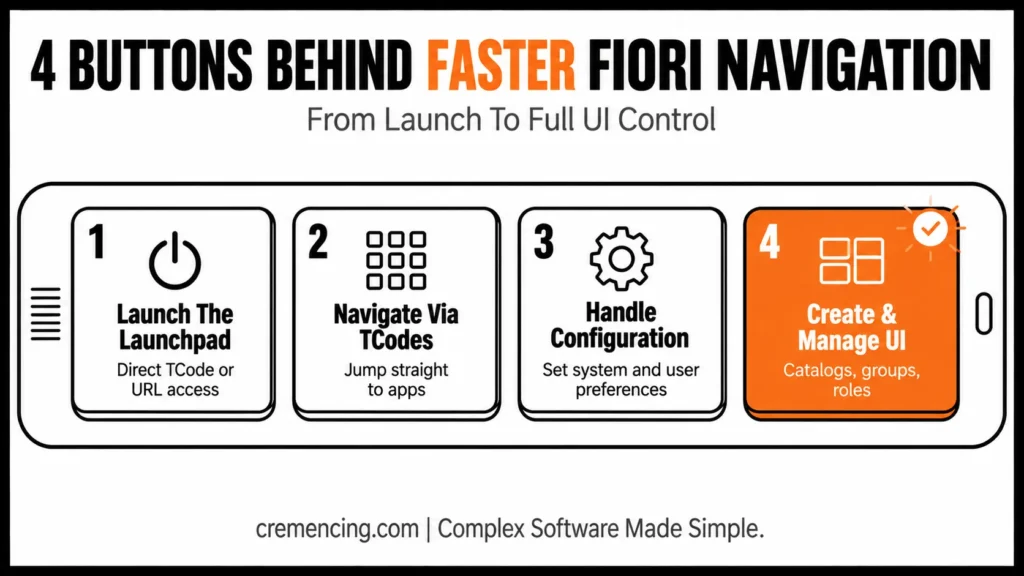
Step 1 – Launch the Fiori Launchpad
Users access the Fiori Launchpad using a specific transaction code or URL.
So, using the following SAP GUI Fiori launchpad tcode.
This allows for rapid introduction into the Fiori landscape. This phase minimizes reliance on manual navigation.
Step 2: You use the TCodes to navigate through apps
After Launchpad is opened, users can run their applications in:
- SAP Fiori app tcode
- Predefined tiles and catalogs
This allows users to jump directly to the needed functions without scrolling in menus.
App-level navigation runs through /UI2/FLP, with individual apps resolved via intent-based navigation (semantic object + action) rather than a dedicated per-app transaction code. When a tile fails to launch, /IWFND/GW_CLIENT (Gateway Client) lets you test the app’s OData service directly and inspect the raw response — this isolates whether the failure is frontend routing or a backend service issue before you escalate.
Step 3: Handling Launchpad Configuration
Those are the administrator TCodes to configure system settings.
Examples include:
- Transaction code for SAP Fiori launchpad configuration
- SAP Fiori Launchpad specific configuration for user preferences
This helps the system to project business requirements.
On S/4HANA on-prem 2020 and later, configuration runs through /UI2/FLPCM_CUST (spaces and pages). On ECC or earlier S/4HANA releases still using catalogs and groups, use /UI2/FLPD_CUST instead — these are not interchangeable, so confirm your release before applying either. [NEEDS SME VERIFICATION: exact release cutoff between catalog-based and spaces-based FLP, per your client’s SAP_RELEASE_SCOPE]
Step 4: Managing UI Components with Fiori Launchpad Transaction Codes
Using tools like:
- SAP Fiori launchpad designer tcode
- SAP Fiori launchpad manager tcode
Administrators can:
- Create catalogs and groups
- Assign roles
- Customize user interfaces
This makes it more user-friendly and provides users with relevant access.
After the user invokes the open with functionality using custom commands, Clarity for ABAP intercepts this information.
Developers and technical users rely on:
- SAP ABAP Fiori launchpad tcode
This allows them to:
- Be a bridge between the frontend applications and backend systems.
- Manage data processing
- Ensure system consistency
This phase is essential for performance and reliability.
Catalog/group or spaces/pages creation happens in /UI2/FLPD_CUST or /UI2/FLPCM_CUST respectively; the tiles built there are only visible to users whose roles reference them via PFCG. Skipping role assignment in PFCG is the most common reason a correctly built tile stays invisible to end users.
| Transaction Code | Purpose | Release |
|---|---|---|
/UI2/FLP | Launch the Fiori Launchpad shell | All Fiori-enabled releases |
/UI2/FLPD_CUST | Design catalogs, groups, target mappings | ECC + S/4HANA on-prem |
/UI2/FLPCM_CUST | Manage spaces and pages | S/4HANA on-prem 2020+ only |
PFCG | Assign roles containing catalogs/groups | All releases |
SICF | Activate ICF service node | All Gateway-based releases |
/IWFND/MAINT_SERVICE | Register/activate OData service | All Gateway-based releases |
SEGW | Build/extend OData service | All Gateway-based releases |
/IWFND/GW_CLIENT | Test OData responses directly | All Gateway-based releases |
/IWFND/ERROR_LOG | View Gateway-side error logs | All Gateway-based releases |
Fiori Launchpad T-Code Cheat Sheet
- Launch:
/UI2/FLP - Design (ECC/on-prem):
/UI2/FLPD_CUST - Manage (S/4HANA 2020+):
/UI2/FLPCM_CUST - Assign roles:
PFCG - Activate backend:
SICF→/IWFND/MAINT_SERVICE - Build/test OData:
SEGW→/IWFND/GW_CLIENT - Debug:
/IWFND/ERROR_LOG
Pros And ROI For Fiori Launchpad Transaction Codes
With transaction codes in the case of SAP Fiori Launchpad, there is a marked difference in productivity and overall system performance.
Operational Benefits
- 30–50% faster navigation across applications
- Less time spent searching for functions
- Improved workflow efficiency
- Better user experience
Financial Impact
- Less training time required for newbies
- Reduction in operational costs as a result of efficiency improvements
- Increased productivity due to faster task completion
Strategic Value
- Improved system control for administrators
- Improved alignment between frontend and backend systems
- Scalable access management
Organizations that smartly leverage these transaction codes are witnessing a drastic change in user productivity overnight.
Mistakes to Avoid When Using Fiori Launchpad Transaction Codes
Common Mistakes
- Massive use of SAP GUI rather than Fiori
- Missing an option to navigate using the available transaction codes?
- Poor configuration of Launchpad settings
- Lack of user training
- Ignoring role-based access control
These errors impact the quality and usability of the Fiori environment.
Best Practices
SAP Fiori Launchpad Transaction Codes for Quick Navigation
I hope this prepares you with a new to-do list for any such HANA Migration scenario you come across.
- Regularly review Launchpad configurations
- Implement role-based access for more security
- Synchronize frontend apps with backend processes
By practicing them, you are guaranteed to get the maximum efficiency and usability.
Why Fiori Launchpad Transaction Codes Remain a Hidden Layer
A lot of content available regarding SAP Fiori is primarily from a UI and App design perspective. But it frequently overlooks how transaction codes help enhance performance and control over systems.
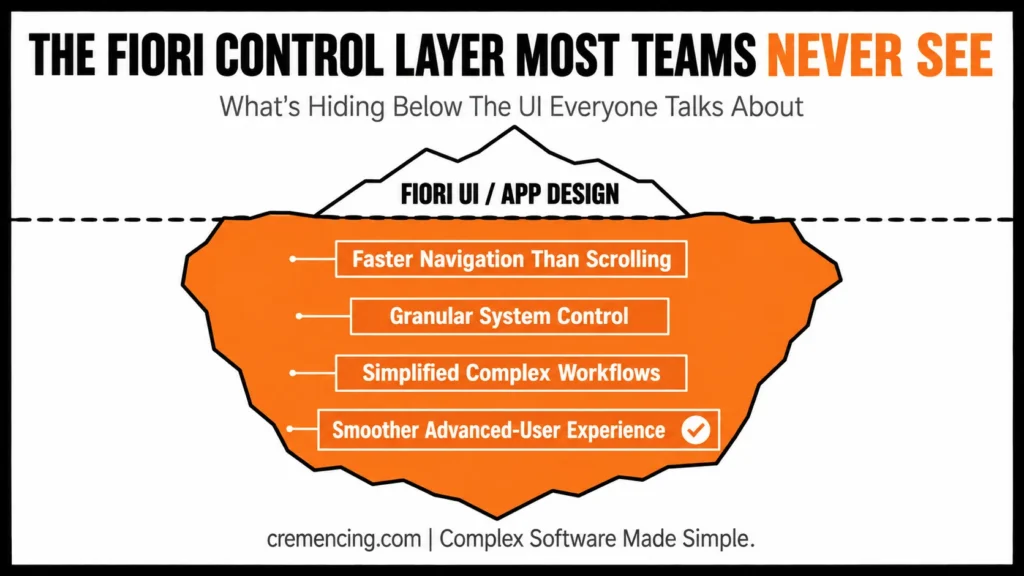
However, the SAP Fiori Launchpad transaction codes have more value as a control layer, which is very much hidden.
What Is Often Missed
- Transaction codes are a faster way to navigate than scrolling.
- They allow for granular control of system functions
- They simplify complex workflows
- They make system usage nicer for advanced users
Why It Matters
Organizations that do not leverage this layer depend mostly on UI navigation, which spikes the speed of operations. Those who make use of transaction codes improve their system environment efficiency and control.
Conclusion:
Fiori Launchpad Transaction Codes aren’t a workaround for the UI — they’re the control layer that determines whether your rollout saves time or just relocates the same navigation problem behind a nicer interface. The nine codes covered here (/UI2/FLP through /IWFND/ERROR_LOG) map the full launch-to-backend lifecycle, and version mismatches — like assuming /UI2/FLPCM_CUST works on ECC — are a more common failure point than the codes themselves.
Before your next role rollout or S/4HANA upgrade, confirm which of these codes your release actually supports, and formalize a t-code-first workflow instead of defaulting to tile-hunting.
FAQ Section
What are SAP Fiori Launchpad transaction codes?
Essentially, tiles are the access shortcuts to applications, settings, and configurations in the Fiori Launchpad. In other words, they serve as the entry point for users to reach specific functions quickly.
What is the SAP Fiori app t-code?
Simply put, the Fiori transaction code is used to open very specific Fiori applications. As such, it allows users to bypass unnecessary navigation and go straight to the required app.
SAP GUI Fiori launchpad tcode falls under which category?
To clarify, SAP GUI for HTML is an SAP tool that enables users to access the Fiori Launchpad from their respective SAP GUI environment. Thus, it acts as a bridge between the two interfaces.
How is the configuration t-code of the SAP Fiori launchpad system used?
Generally, this type of code is used to specify system settings and modify Launchpad behavior. Consequently, administrators rely on it to adjust the environment according to business requirements.
Can SAP Fiori Launchpad transaction codes be used alongside SAP GUI transactions?
Yes, absolutely. In fact, most organizations run both in parallel, since Fiori Launchpad transaction codes are designed to complement, not replace, traditional SAP GUI transactions. Consequently, users can switch between the two environments without losing productivity.
Do transaction codes work the same way across different SAP Fiori versions?
Not entirely. While the core logic remains similar, transaction codes may behave differently depending on the Fiori version and the underlying SAP S/4HANA release. Therefore, it’s important to check version-specific documentation before applying them in a new environment.
Is any special authorization required to use these transaction codes?
Generally speaking, yes. Since transaction codes often provide access to configuration and administrative functions, appropriate authorization roles must be assigned beforehand. Otherwise, users may encounter access errors or restricted functionality.
Can transaction codes be customized for specific business needs?
Indeed, they can. Administrators can create custom tiles, groups, and catalogs tied to specific transaction codes, thereby tailoring the Launchpad experience to match unique business workflows. As a result, teams get faster access to the functions they use most.
What happens if a transaction code is entered incorrectly?
In such cases, the system typically returns an error message or fails to launch the intended application. Hence, it’s advisable to double-check code accuracy, especially during configuration or scripting tasks, to avoid unnecessary downtime.
Are transaction codes relevant for mobile access to SAP Fiori?
Yes, to a certain extent. Although mobile interfaces are primarily tile-based, transaction codes still play a role in the background, particularly when it comes to configuring app behavior and access control. Thus, understanding them remains useful even for mobile-first users.




