
Introduction
Most organizations invest in ERP systems to streamline operations, improve visibility, and connect business processes. Yet when implementation is poorly planned, they can end up with fragmented workflows, inconsistent data, and manual processes that hold growth back.
An ERP implementation can look successful on paper while the processes underneath remain broken. Finance may have a new system, inventory may be centralized, and employees may have completed training, yet approvals still move through spreadsheets, duplicate data is entered across systems, and teams continue relying on manual workarounds.
The problem is not always the ERP system. It is often how the system is implemented.
ERP implementation services can address these gaps by mapping actual business processes, identifying bottlenecks and duplicate effort, aligning the ERP with approved workflows, and validating the results before go-live. However, success depends on more than deployment alone.
This article breaks down 7 key steps for ERP implementation, from process analysis and system design to data migration, testing, go-live, and continuous improvement, so businesses can measure whether their implementation is actually improving operational efficiency.
What are ERP implementation services?
ERP implementation services help business operations effectively through the deployment and configuration of the enterprise resource planning system.
These facilities involve a suitable arrangement of ERP systems with the current mechanisms/systems to boost efficiency for organizations.
Key Components
- Business process analysis – Discover where your inefficiencies and gaps lie
- Configuration of system– Integrate ERP modules with workflows
- Legacy migration – Migration from Legacy data
- Integration – System integration between ERP and other applications
- Testing and deployment —Verify works as expected
- The goal is simple: to align your systems with how your business runs.
How Do ERP Implementation Services Reduce Process Gaps?
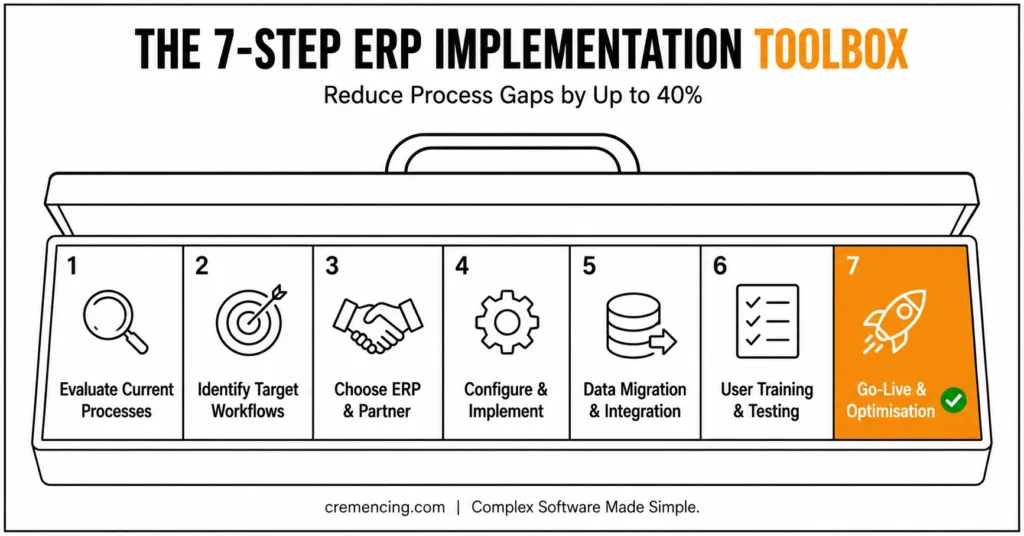
Step 1 – Evaluate Current Business Processes
First, learn about how work is moving from department to department now.
Identify:
Manual processes
Bottlenecks
Redundant tasks
It points out what needs to be resolved by ERP.
Step 2 – Identify Your Target Workflows
Design effective workflows based on business objectives
Focus on:
Automation opportunities
Standardization across teams
Eliminating inefficiencies
This ensures that, instead of outdated processes, ERP modernization services back modern concepts to run the operations better.
Step 3 — Choose the Right ERP Solution and Partner
Based on your business model and scale, select an ERP platform Also, choose from the ERP modernization services providers with proven experience that:
- Understand your industry
- Use proven methodologies
- Offer post-implementation support
| Implementation decision | Use when | Main question | Main risk |
|---|---|---|---|
| Standard functionality | ERP already supports the requirement | Can the business adopt the standard process? | Unnecessary process resistance |
| Configuration | Requirement is supported through settings | Can configuration meet the requirement without custom code? | Incorrect configuration |
| Integration | Another system must exchange data | What system owns the data and when is it exchanged? | Interface failures or inconsistent data |
| Extension/custom development | Validated requirement cannot be met adequately through standard capabilities | Is the business value worth the lifecycle cost? | Technical debt and maintenance |
| Process redesign | Legacy workflow creates unnecessary complexity | Should the old process exist at all? | Automating an inefficient process |
Step 4 — Configure and implement the ERP
Align the ERP modules with business requirements
Examples:
Finance module for real-time reporting
Inventory tracking from the supply chain module
Avoid over-customization—it increases complexity.
Step 5-Data Migration and Integration
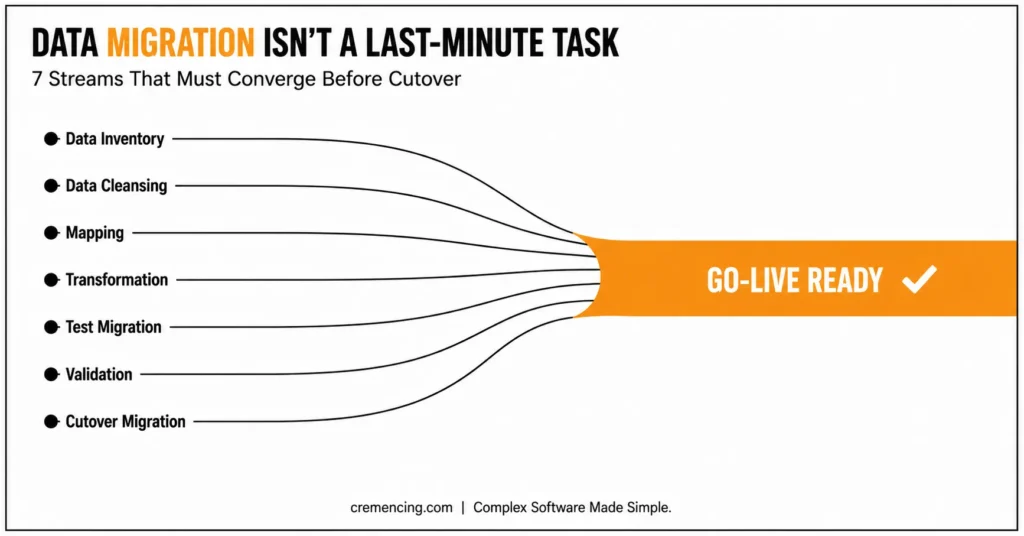
Data migration should not be treated as a final technical activity immediately before go-live. Poor legacy data can undermine otherwise successful process design.
A controlled migration cycle should include:
- Data inventory — identify the legacy objects and fields that actually need to move.
- Data cleansing — remove duplicates, obsolete records, invalid values, and inconsistent master data.
- Mapping — define how legacy fields map to the target ERP structure.
- Transformation — convert formats, units, identifiers, or other values required by the target system.
- Test migration — load representative data into a non-production environment.
- Validation — reconcile record counts, key values, balances, and business outcomes.
- Cutover migration — execute the final controlled load using an approved migration plan.
Integration testing should run alongside migration work rather than after it. If CRM, HR, warehouse, payment, reporting, or other applications exchange data with the ERP, test both successful and exception scenarios. A technically successful interface is not enough if the receiving process rejects incomplete or incorrectly transformed business data.
Step 6 – User Training & Testing
Testing should prove more than whether individual screens or functions work. The implementation team should test complete business scenarios across system boundaries.
For example, an order-to-cash test should validate the transaction from order creation through fulfilment, billing, integration, and the resulting financial posting where applicable.
A practical testing structure includes:
- Unit or component testing for individual configured or developed functions
- Integration testing across connected applications and business processes
- User acceptance testing (UAT) against approved business scenarios
- Regression testing after significant configuration or development changes
- Cutover rehearsal to validate migration, sequencing, responsibilities, and timing
Training should then be based on the future-state processes users are expected to execute, rather than simply teaching users where individual ERP functions are located.
Step 7—Go-Live & Optimisation
After deployment:
Monitor performance
Collect user feedback
Optimize workflows
SAP implementation guidance explicitly continues into configuration, testing, deployment, and operational activities. For S/4HANA Cloud Public Edition, SAP also identifies SAP Cloud ALM as an implementation and operations tool.
Benefits & ROI of ERP Implementation Services
A powerful, agile ERP implementation provides quantifiable business value.
Operational Benefits
Process Gaps Reduction of Up To 40%
Improved workflow efficiency
Real-time visibility across operations
Financial Benefits
Better process standardization, automation, data quality, and workflow visibility can reduce avoidable operational effort, although the financial impact varies by implementation scope and baseline processes. For organizations that already have an SAP environment, implementation support can also provide additional technical resources during the transition, testing, and stabilization stages.
Strategic Benefits
Better decision-making with accurate data
Scalability: Systems that can grow with the business
Improved customer experience
Proper ERP implementation service can earn rapid ROI for you as well as provide long-term benefits.
Mistakes & Best Practices
Common Mistakes
Implementing ERP without process analysis
Over-customizing the system
Ignoring user training
Choosing inexperienced providers
Lack of change management
Best Practices
Align ERP with business strategy
Focus on process standardization
Use phased implementation
Train users thoroughly
Monitor and optimize continuously
These don’ts are utilized in the ERP development process, whichever technology is used. Which means you receive all of the advantages without needing to compensate for what occurs after.
Why Good Technology Fails In Most ERP Implementations
There are features out there with a million blogs written about them, but that really is not the issue.
Key Insight
When dysfunctional business processes are automated, ERP systems fail.
What Successful Companies Do Differently
Redesign processes before implementation
Focus on simplicity and usability
Tie ERP into actual business flows
Measure success with clear KPIs
Real Example
Confirm the original retail case, the 35% metric, whether the result was a 35% reduction in processing time or a 35% improvement in processing speed, and provide the source before publishing.:
- Eliminating redundant approval steps
- Automating inventory updates
- Standardizing workflows across locations
It shows that outcomes are driven by process alignment not technology alone. When an implementation requires SAP-specific development or extensions, the technical design should distinguish genuine business requirements from customizations that could create unnecessary lifecycle complexity.
Conclusion
ERP implementation succeeds when the technology, data, and business processes are treated as one connected system. Simply configuring modules and reaching go-live does not prove that the implementation improved the way the business operates.
The stronger approach is to establish the current state, design the future-state process, determine where standard functionality is sufficient, validate data and integrations, test complete business scenarios, and measure the results after deployment.
For SAP S/4HANA projects, this process should also align with the applicable SAP implementation methodology and deployment model. SAP provides Activate-based roadmaps for implementation, while S/4HANA Cloud Public Edition provides dedicated implementation guidance and SAP Cloud ALM capabilities.
FAQ
What are ERP implementation services?
They are services that assist in deploying and configuring an ERP system to optimize business processes.
What Makes ERP Implementation Services Reduce Process Gaps?
By dissecting workflows, reducing waste, and designing systems that are in alignment with business processes.
What is the time frame for ERP implementation?
It varies according to complexity but is usually anywhere from a few months to over a year.
What are some of the Challenges areas in ERP Implementation?
Issues with data migration, user resistance, and ineffective strategy are often pitfalls of the process.
What should happen before an ERP implementation begins?
Before implementation begins, the organization should document critical processes, identify business objectives, establish requirements, assess data quality, identify integrations, define stakeholders, and agree on measurable success criteria.
What is the difference between ERP configuration and customization?
Configuration uses supported ERP settings to adapt standard functionality, while customization or extension changes or adds functionality beyond the standard capabilities. The appropriate choice depends on the business requirement, supported capabilities, lifecycle impact, and deployment model.
How does data migration affect ERP implementation?
Data migration affects implementation quality because inaccurate, duplicated, incomplete, or incorrectly mapped data can cause downstream process and reporting problems. Migration should therefore include cleansing, mapping, test loads, validation, and reconciliation before production cutover.
Resources
ERP Implementation Guide (Oracle)




