
The material number is wrong in the report. The amount is rounded incorrectly. Customer ID lost its leading zeros after export. “That’s the ticket. The code activates fine in ECC 6.0 and SAP S/4HANA 1909+; there are no errors or dumps, but the output is wrong anyway. Nine times out of ten, it’s not ALV, not SQL, not the user. It’s a bad choice of ABAP elementary data types.
The material number is wrong in the report. The amount is rounded incorrectly. Customer ID lost its leading zeros after export. The code activates fine in ECC 6.0 and SAP S/4HANA 1909+; there are no errors or dumps, but the output is wrong anyway. Nine times out of ten, it’s not ALV, not SQL, not the user. It’s a bad choice of ABAP elementary data types.
This guide breaks down the five mistakes that actually cause this: NUMC misuse, decimal mistakes, fixed-length truncation, manual typing instead of dictionary typing, and unsafe SAP-to-SQL Server mapping. It applies across ECC, SAP NetWeaver 7.40+, and S/4HANA. ABAP Cloud changes how you access tables, but the type-selection rules underneath don’t change at all.
Avoiding ABAP Typing Errors
Incorrect elementary data type declarations in ABAP frequently introduce subtle runtime bugs, data truncation, and silent calculation errors without triggering syntax warnings. Developers often misuse NUMC for mathematical operations or float types (F) for financial amounts, leading to loss of leading zeros or binary rounding inaccuracies.
To maintain data integrity across database operations and interfaces, developers should reference ABAP Dictionary fields directly using TYPE database-field syntax. Utilizing packed decimals (P) for currency calculations and dynamic strings for variable-length text ensures precise data representation across SAP ECC, S/4HANA, and external integration layers.
Why ABAP Data Type Mistakes Break Programs
ABAP data types define value storage, length, decimals, initial value, display behaviour, comparison behaviour, and conversion behaviour. A wrong type can pass the syntax check and still damage the output. That is why beginners get confused: the program runs, but the data is no longer correct.
The root cause is that ABAP has program-level data objects and ABAP Dictionary field definitions. Program variables use declarations such as DATA, TYPE, LIKE, and local TYPES. Dictionary fields use domains, data elements, table fields, lengths, decimals, and conversion exits. If you guess a type manually instead of checking the Dictionary, you may remove SAP semantics from the value.
SE11 is the SAP GUI transaction for viewing ABAP Dictionary objects such as tables, data elements, domains, structures, and views. Use it before declaring variables that represent database values. This matters for ABAP elementary data types, material numbers, document numbers, amounts, quantities, dates, and identifiers.
Many tutorials show an ABAP data types list, but a list does not teach judgment. The question is not only “What types exist?” The real question is, “Which type keeps this SAP value correct during calculation, display, database read, export, and integration?”
5 ABAP Data Type Mistakes and Correct Patterns
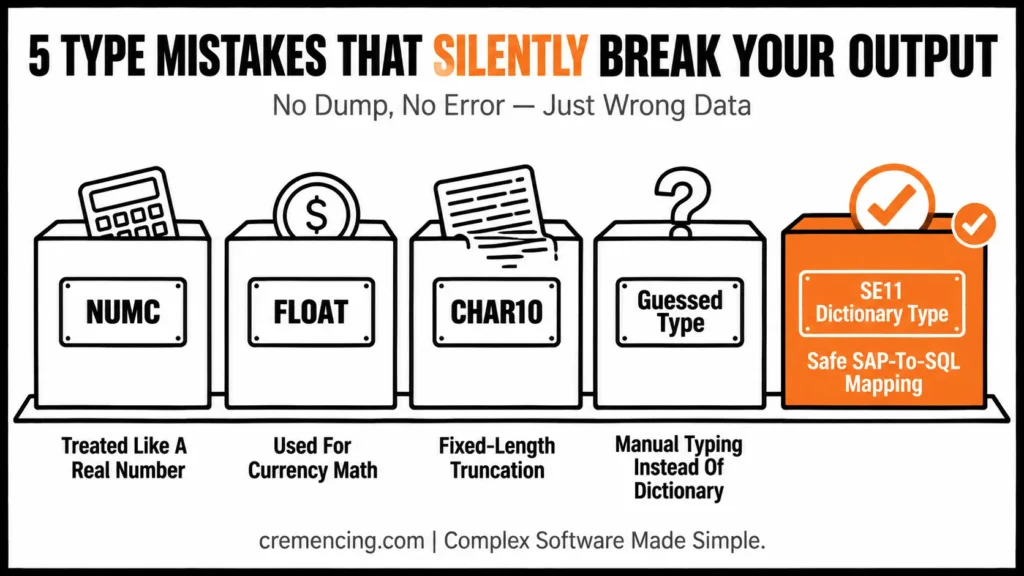
| Data Need | Wrong Type Choice | Correct Type Choice |
|---|---|---|
| ID with leading zeros | Integer (TYPE i) | NUMC or Dictionary field (mara-matnr) |
| Currency/money | Floating-point (TYPE f) | Packed decimal (TYPE p LENGTH n DECIMALS d) |
| Variable-length text | Fixed TYPE c LENGTH n (too short) | TYPE string |
| SAP table field value | Manually guessed TYPE c LENGTH n | Dictionary reference (e.g., TYPE vbak-vbeln) |
| Exporting to SQL Server | Direct 1:1 type mapping | Explicit conversion per field before export |
1. Stop treating NUMC like a real number
NUMC stores numeric text. It can contain only digits, but it behaves like a character-like type for storage and leading zeros. That is why the SAP data type NUMC cause bugs when developers convert it into integer types too early.
Use NUMC for identifiers where leading zeros matter. Do not use it for arithmetic. If you need a calculation, convert a validated numeric value into a numeric type separately.
Wrong pattern:
REPORT z_type_mistake_numc_wrong.
DATA lv_customer_numc TYPE numc10. ” Customer-like ID with leading zeros
DATA lv_customer_int TYPE i. ” Integer removes leading zeros
lv_customer_numc = ‘0000000123’. ” ID value from external input
lv_customer_int = lv_customer_numc. ” Converts numeric text to integer
WRITE: / ‘Original NUMC:’, lv_customer_numc. ” Shows 0000000123
WRITE: / ‘Integer value:’, lv_customer_int. ” Shows 123
Correct pattern:
REPORT z_type_fix_numc_correct.
DATA lv_customer_id TYPE numc10. ” Keeps leading zeros for ID
DATA lv_output TYPE string. ” Text output value
lv_customer_id = ‘0000000123’. ” Assign customer-like ID
lv_output = |Customer ID: { lv_customer_id }|. ” Keeps stored text value
WRITE: / lv_output. ” Displays ID with leading zeros
The fix is simple: do not model identifiers as integers just because they contain digits. Customer numbers, document numbers, material numbers, and external keys often need character-like handling. When the value means “identity,” not “quantity,” use CHAR, NUMC, or a Dictionary field type.
2. Use packed decimals correctly for money and quantities
The most common ABAP data type decimal mistake is using FLOAT or a poorly declared packed number for business amounts. Floating-point types can introduce binary rounding behaviour that does not belong in currency calculations. Business amounts usually need the packed decimal type P with explicit decimals or a dictionary-based amount type.
Wrong pattern:
REPORT z_type_mistake_float_money.
DATA lv_price_float TYPE f. ” Floating-point type is not ideal for money
DATA lv_quantity TYPE i. ” Quantity as integer
DATA lv_total TYPE f. ” Floating-point total
lv_price_float = ‘19.99’. ” Demo price
lv_quantity = 3. ” Demo quantity
lv_total = lv_price_float * lv_quantity. ” May show floating representation issues
WRITE: / ‘Total:’, lv_total. ” Output may not match business expectation
Correct pattern:
REPORT z_type_fix_packed_decimal.
DATA lv_price TYPE p LENGTH 8 DECIMALS 2. ” Packed amount with 2 decimals
DATA lv_quantity TYPE i. ” Countable quantity
DATA lv_total TYPE p LENGTH 10 DECIMALS 2. ” Total with enough length
lv_price = ‘19.99’. ” Assign price
lv_quantity = 3. ” Assign quantity
lv_total = lv_price * lv_quantity. ” Calculate with decimal precision
WRITE: / ‘Total:’, lv_total. ” Expected business-style amount
Packed numbers need enough length and decimal places. If the length is too small, large values may overflow. If decimals are wrong, cents, tax values, discounts, and quantities can display incorrectly.
For database-backed money values, prefer Dictionary references where possible. Currency and quantity fields often need reference currency or unit fields in SAP tables. That context matters when values move into ALV, forms, interfaces, or external databases.
3. Don’t lose data with short, fixed-length character fields
TYPE c, LENGTH n, creates a fixed-length character field. If the value is longer than the length, ABAP can truncate it during assignment. This is one of the easiest ABAP data type length bugs to miss because the code may still activate and run.
Wrong pattern:
REPORT z_type_mistake_length_wrong.
DATA lv_name_short TYPE c LENGTH 10. ” Too short for a full name
DATA lv_name_full TYPE string. ” Dynamic string
lv_name_full = ‘International Customer Name’. ” Long text value
lv_name_short = lv_name_full. ” Text gets truncated
WRITE: / ‘Short field:’, lv_name_short. ” Shows only the first 10 characters
Correct pattern:
REPORT z_type_fix_length_correct.
DATA lv_name TYPE string. ” Dynamic text handles variable length
lv_name = ‘International Customer Name’. ” Assign full text
WRITE: / ‘Name:’, lv_name. ” Displays full text
Use STRING for variable-length text in program logic when the database field length does not define the value. Use TYPE c LENGTH n when you need a fixed technical length, such as a defined code, flag, or interface field. Do not guess the length for SAP database values.
If the value comes from a table, use the Dictionary field type. For example, material number and sales document fields carry SAP-specific length and conversion behaviour. This is where ABAP variable types and ABAP field types must work together.
4. Stop guessing SAP field types manually
Manual typing is convenient, but it causes bugs when the SAP field carries length, domain, conversion, or semantic meaning. A developer may declare a material as char10 because test data looks short. Then production data contains longer values, leading zeros, or a different format.
SE11 helps here because it shows the exact table field definition. For a database field, type your variable from the table field or data element instead of copying what you think the length should be. Explore OOPS ABAP Tutorial
Wrong pattern:
REPORT z_type_mistake_manual_typing.
DATA lv_material TYPE c LENGTH 10. ” Manual guess, may be too short
lv_material = ‘000000000000123456’. ” Material-like value longer than 10
WRITE: / ‘Material:’, lv_material. ” Truncated output risk
Correct pattern:
REPORT z_type_fix_dictionary_typing.
DATA lv_material TYPE mara-matnr. ” Uses SAP Dictionary field type
DATA lv_salesdoc TYPE vbak-vbeln. ” Uses sales document field type
lv_material = ‘000000000000123456’. ” Material-like value
lv_salesdoc = ‘0000123456’. ” Sales document-like value
WRITE: / ‘Material:’, lv_material. ” Preserves field semantics
WRITE: / ‘Sales Doc:’, lv_salesdoc. ” Preserves document number semantics
This pattern is safer because it uses SAP data type table definitions from the ABAP Dictionary. It also makes your code easier to review because another developer can see exactly which SAP field your variable represents.
5. Don’t map SAP data types to SQL Server blindly
The keyword “SAP data types to SQL Server” usually appears when teams export SAP data, replicate tables, or build reporting integrations. The dangerous assumption is that ABAP program types, Dictionary types, SAP HANA database types, and SQL Server types map one-to-one. They do not always map cleanly.
NUMC should often stay character-like outside SAP if leading zeros matter. Packed decimals need precision and scale. Dates may leave SAP as YYYYMMDD depending on the layer. Currency and quantity values may need reference fields for currency code or unit.
A safer export preparation pattern is to make the conversion explicit before handing data to an interface layer.
REPORT z_type_fix_external_mapping.
DATA lv_customer_id TYPE numc10. ” Keeps leading zeros
DATA lv_amount TYPE p LENGTH 10 DECIMALS 2. ” Packed decimal amount
DATA lv_date TYPE sy-datum. ” ABAP date in YYYYMMDD format
DATA lv_payload TYPE string. ” Text payload for demo
lv_customer_id = ‘0000000123’. ” Customer-like ID
lv_amount = ‘1250.75’. ” Amount with 2 decimals
lv_date = sy-datum. ” Current SAP date
lv_payload = |ID={ lv_customer_id };AMOUNT={ lv_amount };DATE={ lv_date }|. ” Explicit output
WRITE: / lv_payload. ” Review exact outbound representation
This example does not replace a real integration mapping specification. It shows the key rule: define how each SAP value leaves SAP. Do not let an external database decide whether an identifier becomes an integer, a packed number loses scale, or a date becomes text.
For S/4HANA and ABAP Cloud, also check the released APIs and allowed data sources. Direct table access may not be allowed in ABAP Cloud, so your mapping should follow released data models and service contracts.
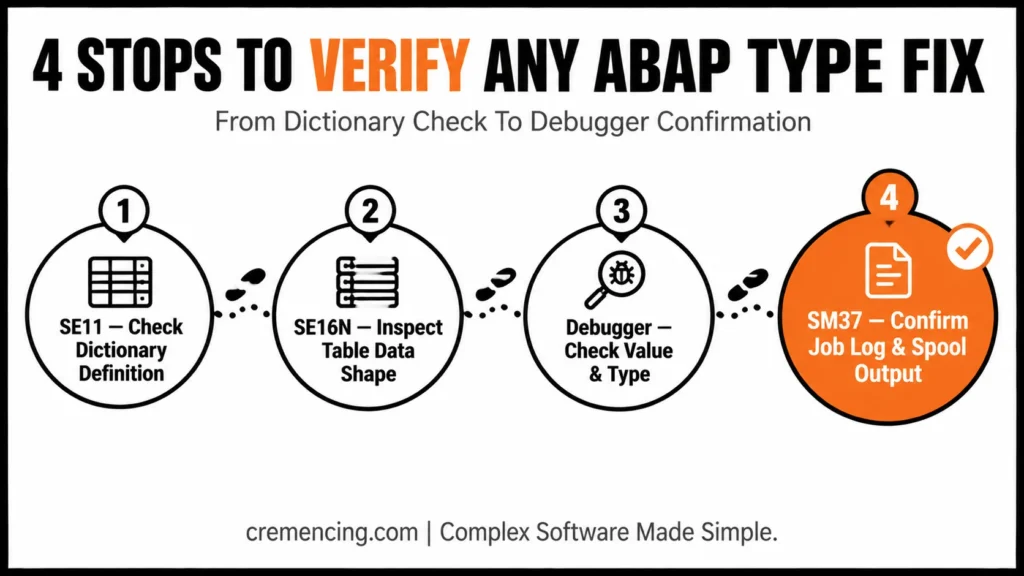
How to Verify the Fix in SE11, SE16N, SM37, and the Debugger
Use SE11 first. SE11 displays dictionary definitions, including field type, length, decimals, data element, domain, and value restrictions. If your variable represents a table field, compare your declaration with SE11 before running the report.
Use SE16N to display table data in SAP GUI for quick inspection. SE16N is useful for checking whether a value contains leading zeros, expected length, or actual decimal output in the table. Do not use it as proof of business correctness, but use it as a data shape check.
Use the debugger to inspect variable values after assignment, calculation, and conversion. Set a breakpoint before the suspicious assignment and check the value, type, length, decimals, and SY-SUBRC where relevant. If a report runs in the background, use SM37, the SAP GUI transaction for viewing background jobs, to check the job log and spool output for truncated or converted values.
ABAP Data Type Debugging Checklist
- SE11 — check field type, length, decimals, domain, data element
- SE16N — inspect actual table data for leading zeros/truncation
- Debugger — verify value, type, length, decimals after assignment
- SM37 — check job log/spool for background job output issues
- Cross-check — does the variable’s type match the Dictionary field it represents?
Mistakes That Bring Data Type Bugs Back
The first mistake is replacing dictionary typing with guessed CHAR lengths during quick fixes. That may pass one test case and fail on production master data. Use table-field references when the value represents a real SAP field.
The second mistake is using NUMC for calculations. NUMC stores numeric text, not business quantities. Convert only after validation, and keep identifiers as identifiers.
The third mistake is using FLOAT for currency or tax calculations. Use packed decimals or dictionary amount fields with correct decimals and currency context. Floating-point output can create values that do not match business rounding rules.
The fourth mistake is ignoring integration mapping. SAP-to-SQL Server transfers need explicit rules for identifiers, dates, packed decimals, currencies, quantities, text, and RAW fields. If you skip the mapping design, the bug may appear outside SAP and come back as a reporting defect.
Conclusion
ABAP data types are not just syntax. They decide whether identifiers keep leading zeros, amounts keep decimals, text keeps full length, and integrations preserve meaning. Use dictionary field types when the value comes from SAP tables, use packed decimals for business amounts, and keep NUMC away from arithmetic.
The most secure rule is straightforward: check length, decimals, and dictionary metadata first, then the type from the business meaning. A customer number, material number, sales document, price, quantity, date, and free-text field do not behave the same way just because they look simple on screen. In SAP, the value’s meaning must match the type, not what one test case shows.
When you work with ABAP variable types, don’t guess technical length from sample data. Open SE11, check the related table field, data element, domain, decimals, and conversion behavior. That one habit prevents truncated material numbers, wrong document IDs, broken amount calculations, and confusing ALV output.
For integrations, be even stricter. SAP data types to SQL Server mapping needs explicit rules for NUMC, packed decimals, dates, currencies, quantities, text, and RAW fields. If leading zeros, decimal scale, or unit context matter in SAP, preserve them before the value leaves the system.
So, don’t memorize an ABAP data types list and stop there. Learn the failure patterns: NUMC treated like a number, FLOAT used for money, short CHAR fields, manual typing instead of dictionary typing, and blind external mapping. Fixing those five habits makes your ABAP programs safer, easier to debug, and more reliable across ECC, S/4HANA, and integration projects.
Frequently Asked Questions
1. What are the basic ABAP data types?
The basic ABAP data types include character-like, numeric, byte-like, date, time, string, and hexadecimal types. Common examples are C, N, I, P, F, D, T, STRING, and XSTRING. For SAP table values, also check the ABAP Dictionary field definition.
2. What is the difference between TYPE C and TYPE N in ABAP?
TYPE C stores general character text, while TYPE N stores numeric text. TYPE N is useful for identifiers where digits and leading zeros matter. Do not use SAP data types numc or TYPE N for arithmetic calculations.
3. Why is there a NUMC data type in ABAP?
NUMC exists because SAP often stores digit-only identifiers as text. Document numbers, customer-like IDs, and similar values may need leading zeros. Treat NUMC as numeric text, not an integer. That prevents leading-zero loss in reports and interfaces.
4. How should I declare amount fields in ABAP?
Declare amount fields with packed decimals or dictionary amount types. For ABAP data type decimal, use TYPE p LENGTH n DECIMALS d with enough length and the correct decimal places. For real SAP fields, prefer Dictionary references that preserve currency and field semantics.
5. What is the ABAP data types list?
An ABAP data types list usually includes C, N, I, P, F, D, T, X, STRING, and XSTRING. The list is only the starting point. The safer decision depends on business meaning, length, decimals, dictionary typing, and integration rules.
6. What is the length of ABAP data types?
ABAP data types’ length defines how much storage a field has and how much data it can hold. Short fixed-length character fields can truncate text. Packed numbers with poor length can overflow or lose expected decimal behaviour. Always check SE11 for table-backed fields.
7. Can a wrong ABAP data type cause a runtime dump?
Not always — many type mistakes pass activation and run without a dump, which is what makes them dangerous. Truncation, rounding, and leading-zero loss usually happen silently. Dumps are more likely with genuine type mismatches during MOVE or arithmetic between incompatible types.
8. Should I always use Dictionary types instead of local TYPES?
For any variable representing a real SAP table field, yes — use the Dictionary field type (e.g., TYPE mara-matnr) so length, domain, and conversion behavior stay in sync with the table. Local TYPES are fine for values with no direct table representation.
9. Does ABAP Cloud change how data types work?
No — the underlying type-selection rules (NUMC for identifiers, packed decimals for money, Dictionary references for table fields) stay the same. What changes is data access: ABAP Cloud restricts direct table access to released CDS views and APIs.
10. How do I check if a field will overflow with TYPE P?
Check the field’s LENGTH and DECIMALS against the maximum value you expect. A TYPE p LENGTH 8 DECIMALS 2 can safely hold values well into the billions before overflow — but if you’re aggregating many large amounts, increase length rather than assuming the default is enough.




