
An ABAP developer gets a requirement to add an approval status to a custom application. One developer creates a CHAR1 field, another creates a new domain, and a third hard-codes the allowed values in an ABAP program. All three solutions may work in testing. Six months later, they can represent the same business concept in three different ways.
That is where SAP Data Dictionary knowledge becomes more than SE11 navigation.
For ABAP developers, DDIC determines far more than a table’s field type. Domains define technical constraints, data elements carry reusable semantic information, Dictionary fields provide consistent typing, search helps support input selection, and lock objects coordinate concurrent updates. In modern S/4HANA development, the decision goes further: developers must also know when a requirement belongs in classic DDIC, CDS, an extension model, a released API, or a RAP business object.
This article focuses on that design skill. Instead of treating SE11 as a place to look up field names, it shows how experienced ABAP developers use Dictionary knowledge to make better dthe field, andns about data meaning, reuse, typing, validation, concurrency, and modern S/4HANA development.
What ABAP Developers Miss in SE11
The SAP Data Dictionary is not only where you inspect tables. It is the contract between business meaning and technical storage: field labels, validation, search help, locks, and ABAP typing. Use SE11 to design reusable definitions, not just to copy field names into reports.
Side-by-Side Comparison
| Feature | Old Way | New Way |
| SE11 usage | Open table, copy field, leave | Inspect domain, data element, labels, key, search help, lock, where-used |
| Domain | Treated as a random type holder | Owns technical type, length, decimals, and allowed values |
| Data element | Often ignored | Owns business meaning, labels, documentation, and type connection |
| Table design | Create custom table quickly | Check standard tables, extension fields, CDS, and reuse options first |
| ABAP typing | Guess CHAR length or use local types | Type variables from DDIC fields and data elements |
| Field labels | Fixed later in ALV or UI | Designed in data element from the start |
| Input help | Coded manually in selection screen | Modeled through search help when reusable |
| Locking | Added after users report overwrite issues | Designed through lock objects before update logic |
| S/4HANA fit | SE11-only thinking | SE11 + CDS + released APIs + extension model |
| Developer ownership | “I only needed a field type” | “I own how this value behaves across code and UI” |
This is why the se11 data dictionary skill separates a copy-paste ABAP developer from someone who can design stable SAP objects. A table field is not just storage. It can drive labels, validation, typing, value help, locking, and reuse. Every table, domain, and data element becomes even more valuable when combined with the SAP Enhancement Framework, allowing developers to extend standard SAP objects without modifying core code.
Using SE11 Only to Look Up Fields
The old approach starts with a bug report or new requirement. A developer opens ABAP dictionary SE11, enters a table name, checks a field, and copies the field type manually. The code activates, but the design stays weak.
Example: a developer sees a material number and declares it as a short character field because the test value looks short.
REPORT z_old_ddic_typing.
DATA lv_material TYPE c LENGTH 10. ” Manual guess, too short for material numbers
DATA lv_salesdoc TYPE c LENGTH 10. ” Manual guess, ignores SAP document semantics
lv_material = ‘000000000000123456’. ” Material-like value from test data
lv_salesdoc = ‘0000123456’. ” Sales document-like value
WRITE: / ‘Material:’, lv_material. ” Output may be truncated
WRITE: / ‘Sales Doc:’, lv_salesdoc. ” Output may look correct by accident
The immediate problem is length. The deeper problem is meaning. The developer declared a field based on visible sample data, not on the Dictionary definition.
This mistake spreads into ALV reports, forms, interfaces, and custom tables. Developers create repeated domains, unclear data elements, weak key fields, and manual validations because they do not use the SAP ABAP data dictionary se11 design layer correctly.
The same issue appears with field labels. A developer may fix labels in ALV field catalog code instead of giving the data element proper short, medium, and long field labels. That creates repeated UI fixes across reports.
REPORT z_old_manual_label.
DATA lv_status TYPE c LENGTH 1. ” Local status with no data element meaning
lv_status = ‘A’. ” Demo approval status
WRITE: / ‘S:’, lv_status. ” Poor label because meaning is not modeled
This code works, but another developer cannot know whether A means active, approved, archived, or assigned. A domain with fixed values and a data element with clear field labels would carry that meaning across the system.
Owning DDIC as a Data Contract
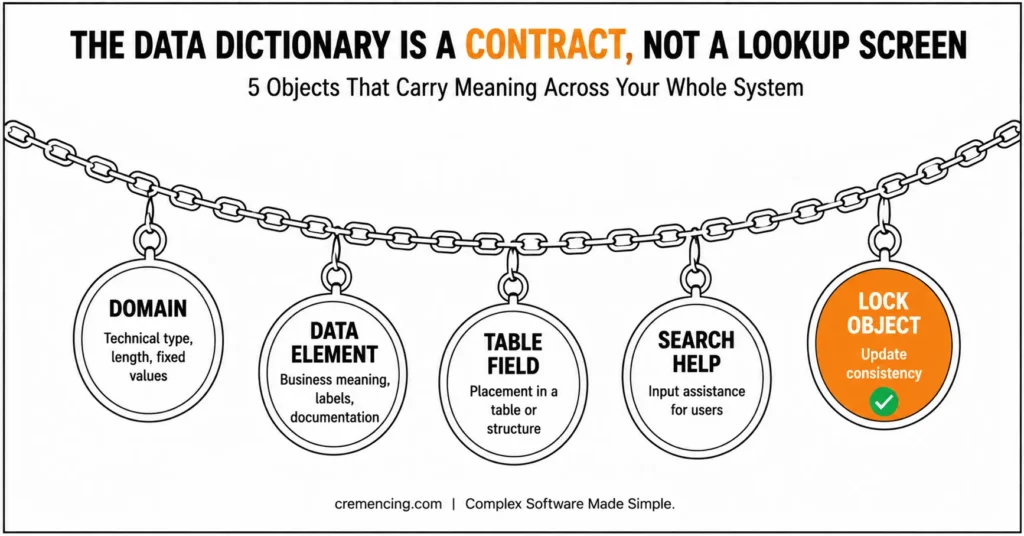
The SAP Data Dictionary is viewed as a data contract in the new approach. Before code starts, a data contract answers five questions: what this value mean? How is it stored? How is it displayed, how is it found by the user, and how do updates stay consistent? Start with the object model:
Object model:
| Object | Owns | Example |
| Domain | Technical type, length, decimals, fixed values | CHAR10, NUMC10, approval status values |
| Data Element | Business meaning, field labels, documentation | Customer ID, Material Group, Approval Status |
| Table Field | Placement in a table or structure | ZCUSTOMER_ID inside a custom table |
| Search Help | Input assistance for users | F4 help for plant, customer, or material |
| Lock Object | Update consistency | Prevent two users changing the same custom record |
The most useful project rule is simple: domain equals technical rule, data element equals business meaning. A domain may say the field is CHAR1 and allows values A, R, and P. The data element should explain whether those values mean approval status, release status, or processing state. For developers moving beyond classic Dictionary objects, understanding how CDS becomes part of the modern SAP data-modeling layer is the next logical step.
Now compare the safer DDIC-based typing pattern.
REPORT z_new_ddic_typing.
DATA lv_material TYPE mara-matnr. ” Uses SAP Dictionary material field semantics
DATA lv_salesdoc TYPE vbak-vbeln. ” Uses SAP Dictionary sales document semantics
lv_material = ‘000000000000123456’. ” Material-like value
lv_salesdoc = ‘0000123456’. ” Sales document-like value
WRITE: / ‘Material:’, lv_material. ” Keeps Dictionary-compatible type
WRITE: / ‘Sales Doc:’, lv_salesdoc. ” Keeps document number type
Data Dictionary Best Practices
This code is easier to review because another developer can see the intended SAP business field. It also avoids guessed lengths. The type follows the dictionary object, not sample test data.
For custom definitions, create a domain only when the technical rule is reusable. Create a data element when the business meaning needs labels, documentation, and reuse. Do not create one generic domain for unrelated business meanings just because the fields share the same technical type.
Search helps when a value needs reusable input assistance. Lock objects become important when two users or background jobs may update the same logical record. Shared table types and structures provide consistency when multiple programs need the same typed interface.
The SAP SE11 transaction becomes more than a lookup screen in this workflow. It becomes the place where you check whether a new field should reuse an existing domain, get a new data element, inherit standard SAP typing, or be replaced by a standard extension option. If the requirement ultimately needs custom SAP functionality, evaluate the persistence and extension decision alongside your broader SAP Custom Development approach.
In S/4HANA, the new approach also includes “should this be a custom table at all?” Sometimes the better option is a standard extension field, a CDS view, a configuration, a released API, or a RAP business object. SE11 ownership does not mean creating more DDIC objects. It means choosing the right data layer.
Migration Checklist
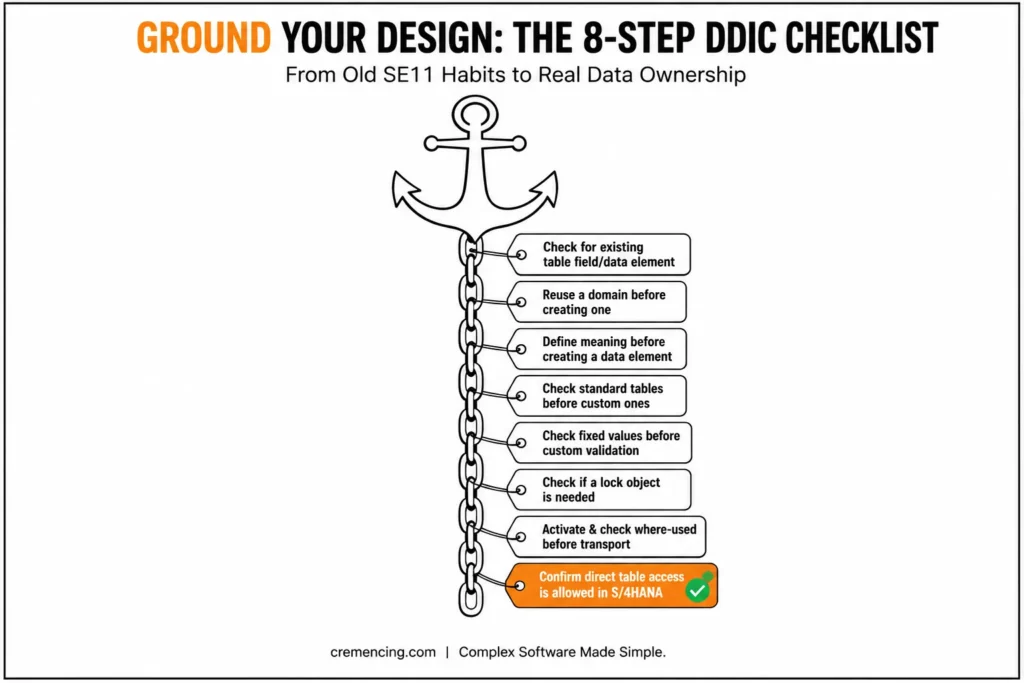
Use this checklist when moving from old SE11 habits to real DDIC ownership.
- Before declaring a variable, check whether a standard table field or data element already carries the meaning. Use TYPE mara-matnr, TYPE vbak-vbeln, or a project data element instead of guessing CHAR length.
- Before creating a domain, ask whether the technical type and allowed values will be reused. Do not create a new domain for every field if the rule already exists.
- Before creating a data element, define the business meaning, labels, and documentation. A field label is not decoration; it affects ALV output, UI display, and developer understanding.
- Before creating a custom table, check standard tables, customizations, extension fields, CDS views, and released APIs. In S/4HANA, avoid custom persistence when the standard model already supports the requirement.
- Before writing custom validation, check whether a domain fixed value, check table, search help, or foreign key relationship can express the rule.
- Before writing update logic, check whether a lock object is needed. A missing lock object can create inconsistent updates even when the ABAP code looks correct.
- Before transporting DDIC changes, activate all dependent objects and check where-used. Table changes can affect reports, forms, interfaces, CDS views, and background jobs.
- For S/4HANA and ABAP Cloud-style work, confirm whether direct table access is allowed. New development may require released APIs, CDS view entities, or extension frameworks instead of classic custom table access.
This checklist prevents the most common DDIC mistakes: duplicated definitions, weak field labels, guessed types, poor validations, missing locks, and custom tables that should never have existed.
Conclusion
The SAP Data Dictionary is the skill that controls how ABAP data behaves before a single report, class, or interface runs. If you treat SE11 as only a lookup screen, you miss the design layer behind domains, data elements, labels, search helps, locks, and safe ABAP typing.
Own the Dictionary as a data contract. Use standard field types when they match the business value, design domains and data elements deliberately, and question every custom table before creating it. In S/4HANA, combine SE11 knowledge with CDS, released APIs, extension fields, and clean-core rules. Most reusable business logic relies on well-designed function modules in SAP ABAP, which often use Data Dictionary objects to define parameters.
A strong ABAP developer does not only ask, “Which table has this field?” They ask, “What does this value mean, where should it be stored? How should users search it? What label should appear on screen? What prevents two users from changing it at the same time?” Those questions turn basic SE11 usage into real design ownership.
Start small. When you open the SAP ABAP data dictionary SE11, don’t stop at the field name. Check the domain, data element, field labels, fixed values, check table, search help, key fields, technical settings, and where-used list. That habit improves your reports, ALV output, validations, interfaces, and custom table design.
For ECC systems, this skill helps you maintain classic custom tables, reports, and enhancements safely. For S/4HANA systems, it helps you decide when SE11 is still the right layer and when CDS views, released APIs, extension fields, or RAP-style modelling are the better option. The tool is old, but the design thinking behind it is still current.
Frequently Asked Questions
1. What is the SAP Data Dictionary?
SAP Data Dictionary is the central metadata layer for ABAP data definitions. It contains objects such as domains, data elements, structures, table types, database tables, views, search helps, and lock objects. Developers use it to define how data is stored, typed, displayed, and reused.
2. What is SE11 in SAP ABAP?
SE11 is the ABAP Dictionary transaction used to display, create, and maintain Dictionary objects. The SAP ABAP data dictionary se11 workflow includes tables, data elements, domains, structures, views, search helps, and lock objects. Use it for design checks, not only field lookup.
3. What is the difference between a domain and data element?
A domain owns technical rules such as type, length, decimals, and fixed values. A data element owns business meaning, field labels, and documentation. In se11 data dictionary design, connect both correctly so fields carry technical rules and business meaning.
4. What is the use of lock object in ABAP Dictionary?
A lock object protects data from conflicting updates by creating enqueue logic for a table key or logical object. Use lock objects when custom update programs can change the same record from multiple users, jobs, or sessions. This prevents overwrite defects.
5. What is ABAP Dictionary SE11 used for?
ABAP Dictionary SE11 is used to define and inspect tables, domains, data elements, structures, views, search helps, and lock objects.





One Response