
Introduction
There’s a common assumption that you build SAP Fiori apps mostly through frontend work — pick a template, drag in some fields, and you’re done. In practice, that assumption is what causes most beginner Fiori projects to stall.
The frontend is the last piece, not the first: a Fiori app is only as good as the CDS view and OData service underneath it, and skipping straight to UI work before that foundation is solid is the single most common reason apps end up rebuilt from scratch.
This guide walks through the seven steps in the order that actually works — starting from the business requirement, through data modeling and service exposure, and only then into the UI — so the app you build the first time is the one you keep.
Data-Driven Approach to Build SAP Fiori Apps
Building sustainable SAP Fiori applications requires establishing a robust data modelling foundation before initiating frontend user interface development. Rather than building custom user interfaces from scratch, modern development utilises ABAP Core Data Services (CDS) views to structure enterprise data and apply UI annotations that define layout behaviour directly within the data layer.
Exposing these CDS views as OData services allows tools like SAP Business Application Studio to automatically generate standardised SAP Fiori Elements applications, such as List Reports and Object Pages.
This metadata-driven architecture decouples the backend logic from the frontend implementation, reducing custom UI maintenance and ensuring seamless compatibility across future SAP S/4HANA release updates.
What Exactly Does It Mean to Build SAP Fiori Apps?
SAP Fiori App Development stands for the development of modern, role-based applications that are based on SAP UI5 and adhere to the design principles enclosed by the SAP Fiori. These are different from SAP GUI screens; they bring a more simplistic user experience.
Fiori apps are typically built on:
- SAPUI5 (frontend framework)
- OData services (data layer)
- CDS views (data modeling)
- SAP Gateway (communication layer)
There are several kinds of Fiori apps:
- Transactional apps (Data entry and processing)
- Analytical apps (reports and dashboards)
- Fact sheet apps (information display)
You must know about this architecture before beginning development.
7 Steps to Build SAP Fiori Apps: Uncover the Journey to Successful Development
Here’s how to build SAP Fiori apps from scratch using this step-by-step methodology.
Step 1 — Write down the Business need
- Start with a clear requirement.
- Identify the business process
- Define user roles
- Determine required data and actions
Prevent unnecessary rework later with a clear scope.
Step 2 — Model Your Data Before You Build SAP Fiori Apps
This is the basic if you want to generate a Fiori app from a CDS view.
- Define the CDS view in ABAP
- Expose required fields
- Add annotations for UI behavior
CDS views standardize and makes data models reusable.
Step 3 — Expose the CDS View as an OData Service
Let’s call the service from our project using the built-in OData Generation functionality. Then, make your data available as an OData service.
- Use SEGW or CDS annotations
- Activate service in /IWFND/MAINT_SERVICE
- Test using the Gateway client
OData is the connection point between your backend and frontend.
Step 4 — Build SAP Fiori Apps’ UI Using SAPUI5 or Fiori Elements
Now build the frontend.
- Use SAP Business Application Studio
- Select template (List Report, Object Page)
- Bind UI to OData service
Step 5 — Customize the Fiori App You Built
Enhance functionality:
- Add custom fields
- Modify UI behavior
- Implement validation logic
This is where you start customizing your app to meet the needs of the business.
Step 6: Deploy the SAP Fiori App You Built
The following are the steps that can be referred to for how to deploy the SAP Fiori app:
- Deploy to the SAP system via BAS
- Register the app in Fiori Launchpad
- Assign roles and catalogs
Deployment allows users to enjoy the app.
Tom Reddick is a consultant with more than 20 years of SAP experience and an expert in the development of Fiori applications through extending for custom TCode integration.
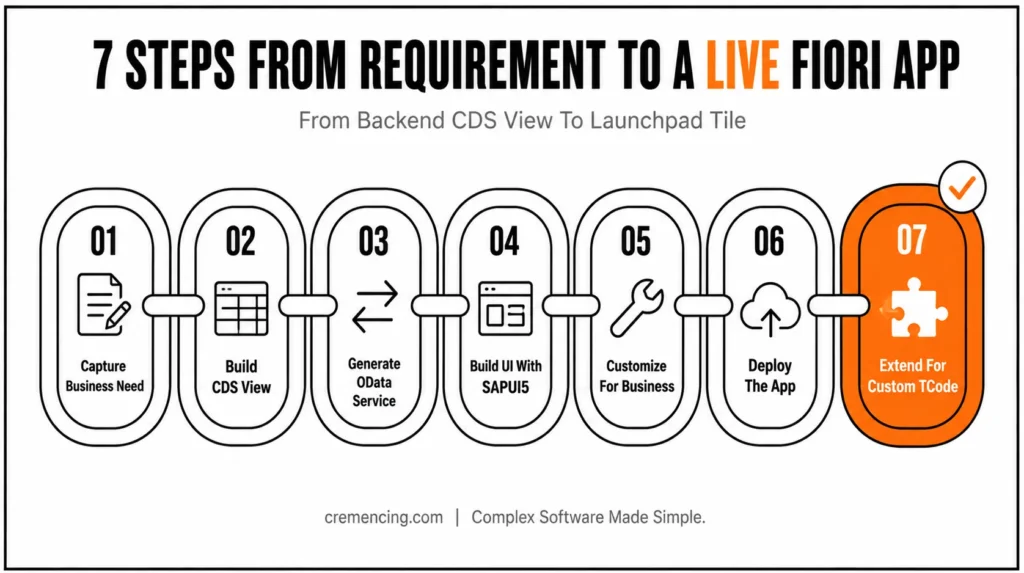
Step 7 – Extend Your Fiori App for Custom TCode Integration
If that Fiori app is for custom Tcode, how to create:
- SAP GUI for HTML: Wrap TCode
- Create a tile in Launchpad
- Assign proper authorization
This approach makes it possible to access legacy processes through Fiori.
Advantages & ROI of Building SAP Fiori Apps
Here are some of the measurable benefits that adopting SAP Fiori App Development brings:
- Interactions by the user are 30–50% faster than with SAP GUI
- Improved user experience and adoption
- Less time needed for end-user training
- Faster development using templates
- Better scalability and maintainability
Fiori enhances productivity and lowers operational complexity for organizations that invest in it.
Common Mistakes to Avoid When You Build SAP Fiori Apps
Common Mistakes
- Skipping CDS view design
- Poor OData service structure
- Ignoring Fiori design guidelines
- Not testing before deployment
- Hardcoding logic in UI
Best Practices
- Default UI Logic via CDS Annotations
- Follow Fiori design principles
- Maintaining loose coupling between the backend and frontend
- Test across devices
- Document app architecture
These practices help to keep our applications clean and scalable.
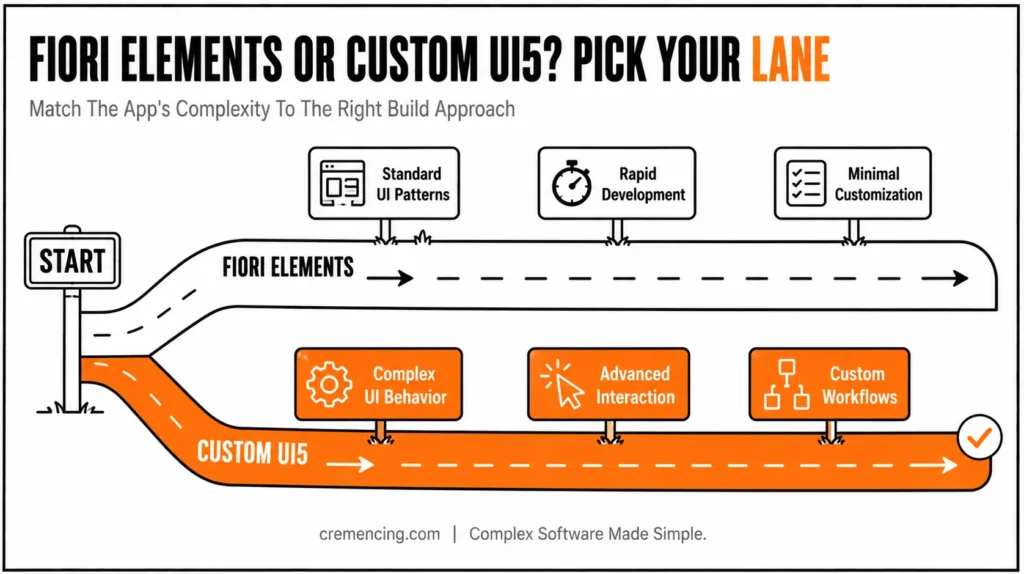
Fiori Elements vs Custom UI5: Which to Use When You Build SAP Fiori Apps
| Factor | Fiori Elements | Custom UI5 |
|---|---|---|
| Development speed | Fast — standard templates | Slower — built from scratch |
| UI complexity supported | Standard patterns (List Report, Object Page) | Fully custom behavior |
| Customization ceiling | Moderate (via extensions) | High |
| Best fit | Rapid, standard transactional/analytical apps | Complex workflows, unique interactions |
Conclusion
The seven steps in this guide follow one underlying principle: get the foundation right before touching the UI. A Fiori app built on a well-modeled CDS view and a cleanly exposed OData service is straightforward to extend later — add a custom field, wrap a legacy TCode, adjust the UI behavior — without reworking what’s underneath.
An app built the other way around, UI-first with the data layer patched in afterward, is the one that ends up rebuilt within a year. If you’re starting your first Fiori project, resist the urge to open SAP Business Application Studio first. Start with the business requirement, get the CDS view right, and the rest of these steps get noticeably easier
FAQs
What Does It Mean to Build SAP Fiori Apps?
Building SAP applications via SAPUI5 OData and Fiori design principles
What Is the End-to-End Process to Build SAP Fiori Apps from a CDS View?
The formal process consists of CDS View, OData Exposure, and Fiori Elements App Binding
How do you create a Fiori app for a custom TCode?
Yes, you can wrap the TCode and use SAP GUI for HTML on the launchpad.
How Do You Deploy an App After You Build SAP Fiori Apps?
The implementation consists of BAS Deploy, Launchpad Registration, and Role/Catalog Assignment.
What are the tools used in Fiori development?
Your toolkit consists of the SAP Cloud Application Programming model, SAP Business Application Studio, CDS views, SAPUI5, and finally SAP Gateway.
Do I need CDS view experience before starting Fiori development?
Yes, a working understanding of CDS views is important, since the data model defined there directly determines what fields and behavior are available in the Fiori app later. Skipping this step usually means reworking the app once missing fields or annotations surface.
Can Fiori apps work offline?
Yes, SAP offers offline capabilities for certain Fiori app types, typically through SAP Mobile Services, though this requires additional configuration beyond the standard online app build process covered here.
What’s the difference between transactional, analytical, and fact sheet Fiori apps?
Transactional apps handle data entry and processing, analytical apps present reports and dashboards, and fact sheet apps display read-only contextual information about a business object — the right type depends on what the end user needs to do with the data.
How do I test a Fiori app before deploying it?
Testing typically happens through the Gateway client for the OData service layer and through the Fiori Launchpad preview or SAP Business Application Studio’s built-in preview for the UI layer, ideally across multiple device sizes before go-live.
Can an existing Fiori app be extended later without rebuilding it?
Generally yes, provided the original app followed clean separation between the CDS view, OData service, and UI layers — extensions like custom fields or additional validation logic can usually be layered on without touching the core structure.
