
Introduction
Every time you need to work with SAP Fiori apps, it can become quite chaotic when you simply cannot find the correct app or understand the Fiori Library app download process. — which is exactly the problem the SAP Fiori Library is built to solve. Could save many consultants hours of searching through documents, trial and error guesswork at app ID rules, and identifying key technical dependencies.
This is why the SAP Fiori Library will become your best friend. It is the single source of truth for all of the SAP Fiori apps, but more often than not, people are only using a small portion of its features. Consequently, they fail to quicken the pace to filter apps, find requirements, and carry forward a SAP Fiori app download process in less time.
A library, when used correctly, will help you mitigate research time and implementation errors, thus speeding up your entire flow.
This guide is about six golden secrets of utilising SAP Fiori Library more proficiently to ease your App search and introduction process.
Navigating SAP Fiori Apps Library
The SAP Fiori apps reference library functions as the central repository for evaluating, configuring, and planning user experience deployments across SAP S/4HANA and SAP Business Suite environments. Rather than hosting downloadable executable files, the platform provides technical implementation details required for system activation, including OData service technical names, SAP UI5 component IDs, and backend authorization catalogs.
Enterprise architecture teams utilize the library to verify system compatibility across specific SAP release levels and analyze cross-app dependencies. Validating these technical prerequisites before deployment prevents runtime activation errors and ensures seamless integration with the SAP Fiori Launchpad architecture.
What You Should Know About Fiori Library App Download and How It Can Help
SAP Fiori Library: The official SAP site that gives you full details about all the available Fiori apps.
It includes:
- App IDs and descriptions
- Technical components
- Required OData services
- Business roles and catalogs
- System version compatibility
It’s not merely a library of apps—you need it for implementation, configuration, and troubleshooting.
Any developers handling the Fiori Library app download and deployment process should be familiar with this tool.
6 Fiori Library App Download Tricks to Be More Productive
These are very practical methods to use the library effectively.
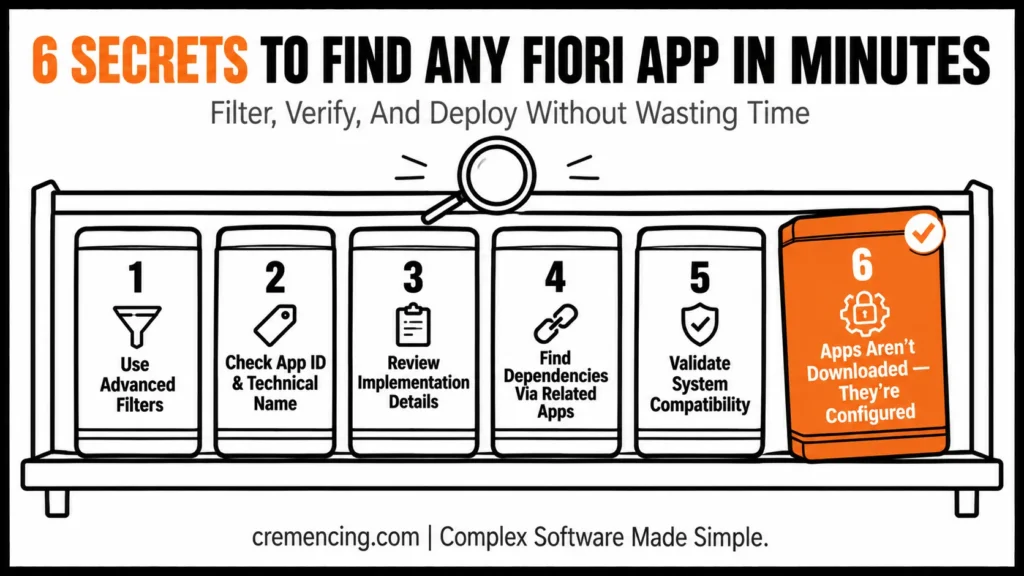
Secret 1 – Filter Before Your Fiori Library App Download
Instead of searching broadly:
- Filter by Line of Business
- Choose Application Type (Transactional, Analytical, Fact Sheet)
- Choose System Version (S/4HANA release)
This minimizes unnecessary results while assisting you in discovering the right app as quickly as possible.
Secret 2 — Always check App ID and Technical Name
Every app has:
- A unique App ID
- A technical component
Use this information to:
- Find the right app on your Device
- Avoid confusion between similar apps
- Map app to backend configuration
This is important before downloading or activating any SAP Fiori app.
You’ll be working with tools last updated in October 2023
Secret 3 – Review Details Before Fiori Library App Download
Before using any app:
- Check required OData services
- Review business catalog assignments
- Identify required system components
Most activation failures are due to not doing this step.
Secret 4 – Check Dependencies Before Fiori Library App Download
All applications may require other applications.
- Check the “Related Apps” section
- Identify navigation links
- Understand process flow
This allows you to implement affordable business processes.
Secret 5: System Compatibility Validation
Not all apps are available on every system.
- Check the supported S/4HANA version
- Verify required software components
- Confirm feature availability
This saves you time by helping you avoid unsupported apps.
Secret 6 – Know That the Fiori Library App Download Is Not Direct
Therefore, a commonly misunderstood fact that you can just download a SAP Fiori app.
In reality:
- OData services must be enabled
- Apps are turned on via system configuration
- UI components are deployed via the SAP system
Now, the library suggests all necessary steps without being able to download a single file.
Benefits & ROI of the Fiori Library App Download Process
Measurable benefits from properly employing the SAP Fiori Library:
- 50% – 40% of the time in searching apps is reduced
- Faster implementation cycles
- Fewer configuration errors
- Improved system consistency
- Improved alignment with SAP best practices
For SAP consultants, this literally leads to better efficiency and quicker project timelines.
| Secret | What to Check | Common Failure If Skipped |
|---|---|---|
| Filters | Line of Business, App Type, System Version | Wasted time scrolling irrelevant results |
| App ID | Unique ID, technical component | Confusing similar apps, wrong backend config |
| Implementation Details | OData services, business catalogs | Activation failure |
| Related Apps | Dependencies, navigation links | Broken or incomplete process flow |
| Compatibility | Supported S/4HANA version, components | Attempting to activate unsupported apps |
| Download Behavior | Configuration vs. file download | Assuming apps install like a downloaded file |
Best Practices and Overall Mistakes
Common Mistakes
- Searching without filters
- Ignoring technical requirements
- Analysed apps can be downloaded directly
- Not checking system compatibility
- Skipping dependency analysis
Best Practices
- Always use advanced filters
- Review implementation details first
- Document app IDs and services
- Validate compatibility before activation
- Use the library as a tool for planning and not just searching
These practices guarantee seamless and error-free delivery.
Before You Activate Any Fiori App
- App ID and technical component documented
- Required OData services confirmed and enabled
- Business catalog assignment reviewed
- Related/dependent apps identified
- S/4HANA version compatibility confirmed
Planning Your Architecture Around Fiori Library App Download
While most guides show how to search for apps, in reality, they are for planning.

Advanced use cases include:
- Designing end-to-end business processes
- Mapping apps to business roles
- Identifying required system components early
- Planning Fiori launchpad structure
- Organizational Alignment apps with the user experience strategy
At the planning stage, it saves rework to use SAP Fiori Library.
Conclusion
The SAP Fiori library, based on usage, provides not only a catalog but also utilities that help users find, filter, and implement apps in an optimized manner. Knowing how to use it correctly may save a fair amount of time and effort.
Implementing the above 6 secrets will help you eliminate workflow mistakes & activate SAP Fiori apps seamlessly without much worry.
If you are working on SAP Fiori applications, this tool is a must-learn.
FAQ Section
Q1: What exactly is SAP Fiori Library used for?
Essentially, it serves as an environment to explore, analyze, and deploy SAP Fiori apps. Therefore, it becomes the single source of truth for anyone working with Fiori implementations.
Q2: Can I download SAP Fiori apps directly?
No — in fact, the Fiori Library app download doesn’t work like a simple file download. Instead, system configuration is what actually turns apps on.
Q3: How do I find the perfect Fiori app for my needs?
Simply put, the SAP Fiori Library helps you do this using filters, app IDs, and implementation details. As a result, you can narrow down results quickly instead of searching blindly.
Q4: What can go wrong after activating a Fiori app?
Occasionally, you could get a message indicating no OData services were found. Alternatively, this can happen in the case of misconfiguration during setup.
Q5: Are all apps deployable to any version of S/4HANA?
No, every app is different — therefore, it has a specific version requirement that must be checked beforehand. Otherwise, you risk attempting to activate an app that isn’t supported on your system.
Q6: Why is the Fiori Library app download process often misunderstood?
Largely, because users assume it functions like a typical app store download. However, in reality, apps are enabled through backend configuration rather than a direct file transfer.
Q7: What happens if I skip checking OData services before activation?
Consequently, this is one of the most common causes of activation failures. Thus, reviewing required OData services beforehand can save significant troubleshooting time later.
Q8: Why should I check the “Related Apps” section before implementation?
Since many applications depend on others to function properly, checking this section first helps you understand the full process flow. Ultimately, this prevents incomplete or broken business processes down the line.
Q9: How much time can proper use of the SAP Fiori Library actually save?
Generally speaking, properly using the library can significantly reduce time spent searching for apps. Moreover, it also leads to fewer configuration errors and faster implementation cycles overall.
Q10: Should the SAP Fiori Library only be used during the search phase?
Not at all — in fact, it’s just as valuable during the planning stage. For instance, it helps map apps to business roles and identify required system components early, well before implementation begins.