
Accounts payable teams use SAP VIM to automate supplier invoice processing, reduce manual data entry, and improve approval workflows. Without automation, employees often spend hours entering invoice details, correcting mistakes, and following up on approvals.
SAP VIM helps organizations reduce this workload by automating invoice capture, validation, approval routing, and exception management within supported SAP ERP environments.
However, invoice automation involves more than converting paper documents into digital files. Finance teams must still verify supplier information, identify duplicate invoices, resolve purchasing discrepancies, and maintain accurate financial controls.
For example, an invoice may contain the correct supplier details but reference a purchase order that has not been fully received. Another invoice may require departmental approval before accounting can process it.
Without a structured workflow, employees must coordinate these activities manually.
OpenText Vendor Invoice Management for SAP Solutions brings these steps into a more controlled process. Consequently, accounts payable employees can spend less time on repetitive activities and more time resolving invoices that genuinely require attention.
This article explains how SAP VIM reduces manual invoice processing, improves accounts payable efficiency, and helps organizations maintain control over supplier invoice workflows.
Quick Answer: How Does SAP VIM Improve Accounts Payable Efficiency?
SAP VIM improves accounts payable efficiency by automating invoice registration, document capture, data validation, duplicate checks, approval routing, and exception handling.
It integrates with supported SAP ERP environments, including SAP ECC and SAP S/4HANA, while working with existing purchasing and financial processes.
Additionally, VIM provides workflow visibility and reporting capabilities that help finance teams identify processing delays and recurring exceptions.
The level of automation depends on invoice quality, configured business rules, supporting capture technologies, and the organization’s approval requirements.
What Is SAP VIM and How Does It Work?
SAP VIM commonly refers to OpenText Vendor Invoice Management for SAP Solutions, an invoice-processing application developed by OpenText for integration with SAP ERP.
It supports the management of incoming supplier invoices from receipt through validation, approval, exception resolution, and preparation for financial posting.
Rather than requiring accounts payable teams to coordinate every processing step manually, VIM uses configured rules and workflows to move invoices through the appropriate activities.
Furthermore, it supports purchase-order-based and non-purchase-order invoice scenarios, which often require different verification and approval processes.
SAP VIM vs. Standard SAP Invoice Processing
Standard SAP financial and purchasing processes remain responsible for the relevant accounting transactions.
For example, SAP Materials Management supports purchasing-related invoice verification, while SAP Financial Accounting handles applicable accounting activities.
OpenText VIM complements these functions by managing the work required to prepare, validate, route, and resolve supplier invoices.
However, VIM does not replace SAP’s underlying financial posting or payment controls.
Key Components of SAP VIM Invoice Processing
| Component | Primary Function | Contribution to AP Efficiency |
| Document capture | Extracts invoice information | Reduces repetitive manual entry |
| OpenText VIM | Manages invoices, workflows, and exceptions | Coordinates processing activities |
| SAP ECC or SAP S/4HANA | Provides purchasing and accounting processes | Maintains financial transaction controls |
| Approval workflows | Routes invoices to responsible users | Reduces manual follow-ups |
| Document archive | Stores related invoice documents | Supports retrieval and review |
| VIM reporting and analytics | Tracks processing status and exceptions | Improves workload visibility |
These components work together to support an organized invoice-processing environment.
Nevertheless, the results depend on how accurately the organization configures its workflows, validations, and supporting systems.
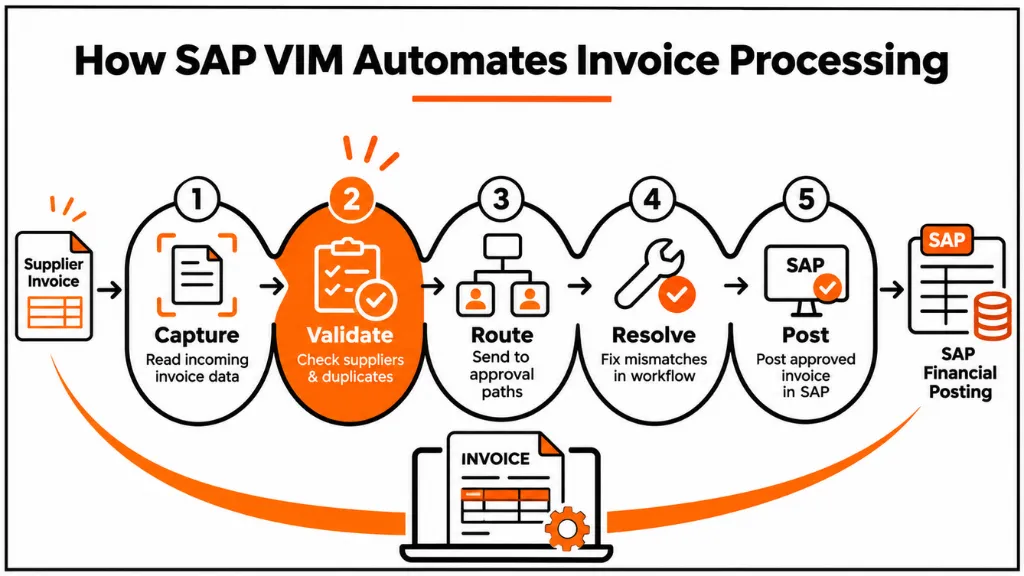
How SAP VIM Automates the Invoice-to-Pay Workflow
The invoice-to-pay process begins when a supplier submits an invoice and continues through verification, accounting, and payment-related activities.
SAP VIM primarily helps manage the invoice-processing stages that precede or support financial posting.
Step 1: Receive Supplier Invoices
Suppliers may send invoices as PDFs, XML documents, electronic messages, or paper records.
The organization receives these documents through its configured channels and prepares them for processing.
Additionally, suitable capture technologies can convert incoming document information into structured invoice data.
Step 2: Extract and Register Invoice Information
The capture component identifies relevant fields, such as supplier names, invoice numbers, dates, amounts, and purchase-order references.
OpenText VIM then supports registration and subsequent processing of the invoice information.
However, extracted data may require validation when document quality or field recognition is uncertain.
Step 3: Validate Invoice Details
Configured rules help check invoice information against relevant SAP records and business requirements.
For example, a purchase-order invoice may need verification against purchasing information.
Meanwhile, a non-purchase-order invoice may require expense coding and additional approval.
Step 4: Route Approvals and Exceptions
Invoices that satisfy the required conditions can progress through the configured workflow.
Documents with discrepancies move to the appropriate users for investigation.
Consequently, employees can focus their attention on invoices that need clarification or correction.
Step 5: Complete Financial Processing
Once the required processing conditions have been satisfied, the invoice can proceed through the applicable SAP financial transaction.
The responsible SAP application performs its accounting and posting controls.
However, invoice approval, successful posting, and supplier payment remain separate business events.
1. SAP VIM Reduces Manual Invoice Entry Through Automated Data Capture
Manual invoice entry is one of the most repetitive activities in accounts payable.
Employees may need to read supplier documents and enter invoice numbers, dates, amounts, and other information into the ERP system.
When invoice volumes increase, this work becomes difficult to manage consistently.
How OCR and Intelligent Capture Reduce Data Entry
OpenText VIM can work with document capture technologies that use optical character recognition and intelligent extraction.
For example, OpenText capture solutions can identify information within incoming supplier documents and prepare it for SAP processing.
The capture process may recognize supplier information, invoice references, amounts, and purchasing details.
Additionally, intelligent recognition capabilities can help reduce the amount of information employees must enter manually.
However, the capture results depend on the document format, quality, and configured extraction capabilities.
Why Capture Accuracy Matters
Automated extraction can still produce incorrect information.
For example, an invoice number may contain characters that look similar when scanned.
An incorrect invoice reference can interfere with duplicate checks or invoice matching.
Similarly, a misread amount may create a validation exception.
Therefore, uncertain or inconsistent information should follow an appropriate review process.
Improve Capture Performance Over Time
Auritas identifies poorly tuned OCR profiles as a common reason why existing VIM environments require unnecessary manual correction.
Supplier layouts and invoice formats can change over time.
Consequently, finance and technical teams should regularly review documents that repeatedly fail capture validation.
The supplied Auritas research recommends refining extraction templates, reviewing high-volume supplier formats, and improving validation rules.
AP efficiency benefit: Standard invoice information can move into processing with less manual typing, while employees focus on correcting genuine capture exceptions.
2. SAP VIM Improves Invoice Validation and Reduces Duplicate Processing
Invoice information must be accurate before it enters financial processing.
Accounts payable employees often verify supplier details, purchase-order references, amounts, and relevant accounting information.
SAP VIM supports configured validations that reduce the need to repeat every check manually.
Matching Invoices With SAP Purchasing Records
Purchase-order-based invoices may need comparison with purchasing and goods-receipt information.
Depending on the configured process, invoice verification can involve two-way or three-way matching.
For example, the organization may compare the supplier invoice with the purchase order and relevant receipt information.
However, matching rules must reflect the actual purchasing requirements.
Overly restrictive tolerances or inconsistent configuration can create unnecessary exceptions.
Handling Price and Quantity Differences
A supplier invoice may contain an amount that differs from the corresponding purchase order.
Similarly, the recorded goods receipt may not match the invoice quantity.
These discrepancies require appropriate validation.
In some scenarios, a configured tolerance may permit processing to continue.
However, material differences or missing purchasing records can require review by the responsible department.
Detecting Duplicate Invoices
Duplicate invoices create a risk of unnecessary processing and potential duplicate payments.
For example, a supplier may resend an invoice because its payment status remains unclear.
The second copy may arrive through a different communication channel.
OpenText VIM provides duplicate-detection capabilities that help identify suspected repeated invoices.
Additionally, SAP ERP can apply relevant duplicate-invoice verification controls.
These mechanisms should be aligned with the organization’s business rules.
Preserve Financial Accuracy
Automated verification should support existing accounting requirements rather than bypass them.
Supplier information, company-code requirements, tax details, and payment-related settings still need appropriate validation.
Therefore, finance teams should review the rules that determine when an invoice can continue automatically.
AP efficiency benefit: Employees can avoid repeated checks on standard invoices and concentrate on discrepancies that require business decisions.
3. SAP VIM Automates Invoice Approval Workflows
Invoice approval often becomes a bottleneck when employees depend on emails, manual reminders, or informal communication.
A document may move between several departments before the responsible approver takes action.
SAP VIM helps organize these activities through configured workflow rules.
Route Invoices to the Right People
Approval routing can depend on organizational responsibilities and invoice characteristics.
For example, a non-purchase-order invoice may require approval from the department responsible for the expense.
Meanwhile, an invoice associated with an approved purchase order may follow a different process.
VIM can assign work to the appropriate users or roles according to the configured workflow.
Consequently, accounts payable employees do not need to decide manually where every document should go next.
Reduce Approval Delays
Automated routing does not guarantee that every invoice will receive immediate approval.
An assigned user may be unavailable, or the workflow may contain unnecessary approval steps.
However, supported workflow configurations can provide reassignment, notification, reminder, or escalation options.
Auritas recommends reviewing approval bottlenecks and eliminating redundant workflow activities.
Additionally, its guidance discusses parallel approvals where appropriate.
Maintain an Approval History
Deloitte describes VIM approval workflows that record relevant actions, users, and comments.
This information improves traceability during invoice processing.
For example, an accounts payable manager can investigate why an invoice remained with a particular department.
Furthermore, recorded approval activities support internal review and audit requirements.
Keep Authorization Controls Intact
Automating approvals should not remove necessary financial controls.
The workflow must reflect the organization’s actual responsibilities and approval policy.
Additionally, appropriate separation of duties remains important.
AP efficiency benefit: Invoices reach responsible approvers through defined workflows, reducing informal follow-ups and improving accountability.
4. SAP VIM Helps Resolve Invoice Exceptions More Efficiently
Not every supplier invoice can move directly from capture to posting.
Some invoices contain missing information, purchasing discrepancies, or incomplete accounting assignments.
Without structured exception handling, these issues can generate lengthy email exchanges and repeated manual work.
Purchase-Order Invoice Exceptions
Consider an invoice for materials that references an existing purchase order.
The supplier submits the invoice before the warehouse records the corresponding goods receipt.
The accounts payable team may be unable to complete the required processing.
In a manual environment, employees might exchange several messages with procurement and warehouse personnel.
However, a configured VIM workflow can direct the exception to the responsible team.
The appropriate employee can then investigate and correct the underlying SAP business information.
Non-Purchase-Order Invoice Exceptions
Non-purchase-order invoices may require additional financial assignments.
For example, a consulting invoice may need an expense account, cost center, and departmental approval.
If these details are missing, the document can enter a controlled clarification process.
Furthermore, VIM can help route the work to the responsible users.
This reduces dependence on informal communication between departments.
Prevent Repeated Exception Loops
A workflow can become inefficient when the same invoice repeatedly moves between users without resolving its underlying issue.
Auritas identifies over-customized workflows and inefficient routing as common causes of processing delays.
Therefore, organizations should review repeated exceptions and unnecessary handoffs.
For example, frequent missing purchase-order references may indicate a supplier communication problem.
Meanwhile, repeated expense-coding errors may suggest that employees need clearer accounting instructions.
Improve Exception Rules
Organizations can use recurring exception information to refine their processing rules.
However, eliminating an exception should not mean removing a legitimate business control.
Instead, the goal is to distinguish unnecessary manual work from checks that protect financial accuracy.
AP efficiency benefit: Employees receive assigned exceptions with clearer responsibilities, reducing repeated emails and avoidable processing delays.
5. SAP VIM Improves AP Visibility and Invoice Processing Transparency
Accounts payable teams need to understand where invoices are within the processing cycle.
In manual environments, this information may be scattered across email inboxes, spreadsheets, and individual employee records.
SAP VIM provides processing visibility and reporting capabilities that support better workload management.
Track Invoice Status
VIM can help employees identify whether an invoice is waiting for validation, exception resolution, approval, or another processing activity.
For example, an AP manager may discover that several documents remain with one approval group.
The team can then investigate the cause of the delay.
However, a completed workflow task should not automatically be interpreted as successful financial posting.
Status definitions must remain consistent.
Use VIM Analytics
Deloitte describes VIM Analytics as a way to examine invoice processing information.
Relevant reporting can include work items, workflow status, responsible agents, and exception reasons.
Additionally, reporting helps identify documents that require attention.
The supplied SAP Help material also describes invoice-processing performance indicators and analytical content associated with OpenText VIM scenarios.
However, the available reporting depends on the deployed products and configuration.
Measure Accounts Payable Performance
Useful performance indicators include invoice processing time, exception frequency, approval delays, and manual intervention.
Organizations may also examine invoices awaiting posting and recurring problem categories.
Furthermore, comparing performance over time can reveal whether automation improvements are effective.
A reduction in one workflow duration does not necessarily mean the entire invoice-to-pay process has improved.
Therefore, finance teams should evaluate the complete process rather than rely on one metric.
Identify the Causes of Recurring Delays
Suppose invoices from a particular supplier repeatedly require correction.
The reporting data may indicate that required purchasing information is missing.
Alternatively, a department may consistently take longer to approve assigned documents.
These findings help organizations decide whether the problem involves supplier instructions, workflow configuration, or internal responsibilities.
AP efficiency benefit: Finance managers can identify invoice backlogs and recurring exceptions without relying entirely on manual status updates.
6. SAP VIM Connects Invoice Automation With SAP Financial Processing
Automated invoice management must eventually connect with the organization’s financial accounting processes.
This stage is important because completing invoice review does not automatically mean that the accounting transaction has succeeded.
SAP VIM manages invoice preparation and processing activities, while SAP ERP handles the relevant financial functions.
Purchase-Order Invoice Processing
Purchase-order-based invoices may involve purchasing records, goods receipts, and invoice verification.
The SAP application performs the relevant business and accounting checks.
VIM supports the activities needed to prepare and route invoice information through the configured process.
However, an earlier workflow approval does not override applicable SAP posting validation.
Non-Purchase-Order Invoice Processing
Invoices without purchase orders may require direct financial account assignments.
For example, an organization may need to identify the appropriate expense account and responsible cost center.
The invoice can then follow the relevant approval and financial processing route.
Additionally, VIM helps maintain visibility while employees complete these activities.
What Happens When Posting Fails?
An invoice may finish its approval workflow but still encounter a posting error.
For example, the assigned accounting information may be invalid.
In that situation, the responsible team needs to identify and correct the problem.
The application should distinguish this condition from a completed financial posting.
Consequently, accounts payable employees can investigate the actual issue instead of assuming the invoice has finished processing.
Invoice Posting Is Different From Supplier Payment
An approved and posted invoice may be eligible for payment, but that does not mean the supplier has been paid.
Payment selection, execution, bank communication, and clearing follow the organization’s applicable SAP financial processes.
VIM helps prepare valid invoices for these activities.
However, it does not replace the controls governing payment execution.
AP efficiency benefit: Invoice-processing activities can connect more smoothly with SAP accounting while preserving the financial checks required before payment.
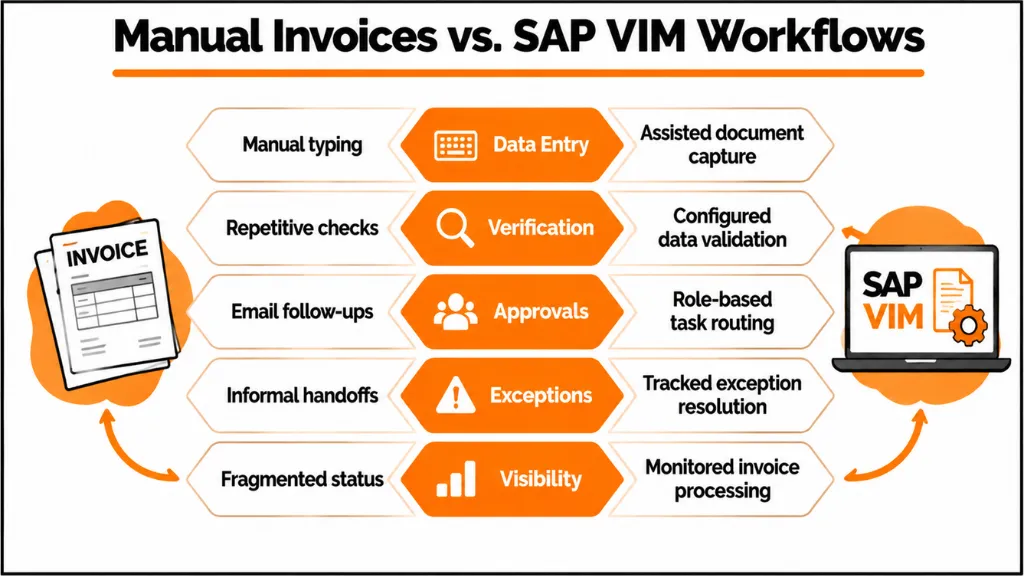
Manual Invoice Processing vs. SAP VIM Automation
The value of automation becomes clearer when manual activities are compared with structured invoice processing.
However, the goal is not to remove every human decision.
Instead, organizations should automate predictable work while directing exceptions to the right employees.
| Processing Activity | Traditional Manual Process | SAP VIM Approach |
| Invoice receipt | Emails, paper files, separate inboxes | Centralized document registration |
| Data entry | Employees type invoice information | Configured capture and extraction |
| Invoice verification | Repeated checks across SAP screens | Automated validation and matching rules |
| Duplicate identification | Manual invoice comparisons | Configured duplicate detection |
| Approval routing | Emails and individual follow-ups | Role-based approval workflows |
| Exception resolution | Informal communication between teams | Assigned exception-processing activities |
| Reporting | Spreadsheets and manual status tracking | Workflow visibility and analytics |
These differences represent potential improvements rather than guaranteed results.
Actual efficiency depends on the organization’s invoice characteristics, configuration, and operational practices.
SAP VIM for SAP S/4HANA: On-Premise vs. Private Cloud
Organizations using SAP S/4HANA may operate their ERP environment on-premises or within a supported private cloud arrangement.
Fink IT-Solutions explains that SAP VIM can support both operating models.
However, the implementation approach and operational responsibilities may differ.
SAP S/4HANA On-Premise
An on-premise deployment can provide organizations with extensive control over their system environment.
This may support specific enhancements and integration arrangements.
However, the organization remains responsible for the relevant technical maintenance and operational activities.
SAP S/4HANA Private Cloud
A private cloud environment operates under a different infrastructure and governance model.
Fink IT-Solutions describes standardized processes, reduced maintenance effort, and update-related benefits as relevant considerations.
Nevertheless, supported functionality and customization options must be assessed against the actual deployment.
Confirm Product Compatibility
SAP VIM is an OpenText product integrated with supported SAP applications.
Therefore, organizations need the appropriate product entitlement, release compatibility, and implementation configuration.
Additionally, SAP Ariba Central Invoice Management should not be confused with OpenText VIM.
Deloitte discusses SAP Ariba Central Invoice Management separately in the context of SAP S/4HANA Cloud Public Edition.
How AI and Intelligent Capture Support SAP VIM
Artificial intelligence and intelligent document processing can extend invoice automation beyond basic document scanning.
Fink IT-Solutions describes AI-assisted capabilities involving invoice data recognition, account assignment, line-item matching, and payment-term identification.
However, organizations should confirm which functions are available in their specific licensed and configured products.
Intelligent Invoice Extraction
Document capture solutions can identify relevant information from supplier invoices.
As these solutions are configured and refined, they may reduce the number of fields requiring manual correction.
Furthermore, improved recognition can help standard invoices progress through validation more efficiently.
Smart Coding and Matching
AI-supported processing may assist with accounting assignments and matching activities where supported.
For example, the supplied Fink research discusses smart coding and semantic line-item matching.
However, any suggested financial assignment still needs to satisfy the organization’s accounting and authorization rules.
Touchless Invoice Processing
Touchless processing refers to invoices progressing through relevant processing activities without routine manual intervention.
Deloitte discusses this objective in its OpenText VIM overview.
However, complete automation is not appropriate for every invoice.
Exceptions involving disputed charges, missing purchasing information, or unusual accounting requirements may still need human decisions.
The practical objective is to increase automation for invoices that satisfy the configured rules.
Common SAP VIM Implementation Challenges
Implementing invoice automation does not guarantee that accounts payable performance will improve.
Organizations may still encounter inefficient workflows, poor document capture, or underused automation features.
The supplied Auritas research emphasizes that VIM requires continued optimization after initial implementation.
Poor OCR Accuracy
Low-quality extraction creates additional correction work.
Therefore, finance teams should monitor recognition problems and refine relevant supplier profiles.
Overly Strict Matching Rules
Matching tolerances that do not reflect actual business requirements may create unnecessary invoice blocks.
However, tolerances should be reviewed carefully rather than relaxed without financial approval.
Complex Approval Workflows
Too many approval stages can slow invoice processing.
Additionally, poorly defined routing can create repeated handoffs.
Workflow reviews should identify redundant steps while preserving legitimate controls.
Underused Automation
Some organizations use VIM mainly for document registration and approvals while continuing manual activities that supported automation could handle.
Auritas identifies auto-posting, background processing, and automated exception handling as areas worth evaluating.
However, these capabilities should be enabled only where the business rules and controls permit them.
Lack of Continuous Optimization
Supplier formats, invoice volumes, and organizational responsibilities change over time.
Therefore, the initial workflow design may eventually require review.
A periodic assessment helps identify whether the configured process still meets business needs.
How to Measure SAP VIM Accounts Payable Efficiency
A successful implementation should improve measurable processing activities.
Finance teams should establish their current performance before changing capture rules or workflows.
Additionally, they should compare results after implementation or optimization.
Invoice Processing Time
Measure the time between invoice receipt and the relevant processing milestone.
For example, the organization may measure receipt-to-posting duration.
However, it should use consistent definitions across reporting periods.
Manual Intervention Rate
Identify the share of invoices that require employee correction or intervention.
A decline may indicate improved capture accuracy or more effective processing rules.
Nevertheless, the team should confirm that important controls have not been removed.
Exception Frequency
Track how often invoices enter exception workflows.
Furthermore, group exceptions by their underlying causes.
This makes it easier to identify whether recurring problems involve suppliers, purchasing records, or accounting information.
Approval Delays
Measure how long invoices remain with assigned approvers.
The results can reveal routing bottlenecks or unavailable users.
Additionally, the organization can use this information to review escalation and reassignment procedures.
Touchless Processing
Determine which invoices complete the relevant processing stages without routine manual involvement.
However, the metric should exclude invoices that bypass required checks or remain unresolved.
The objective is controlled automation, not simply the highest possible automation percentage.
What Do the Supplied SAP VIM Case Studies Show?
Auritas discusses organizations that improved invoice processing through VIM optimization and related capture technologies.
However, the reported outcomes should be understood as individual case-study results rather than guaranteed performance benchmarks.
Air Products: Improving Data Capture and Automation
The supplied Auritas article describes Air Products modernizing its VIM environment.
The project included an upgrade to VIM version 7.6 and implementation of SAP Information Capture Core.
It also involved more than 20 OCR profiles across an environment spanning 44 countries.
The case study describes reduced manual data entry and a controlled introduction of auto-posting.
Furthermore, it illustrates how capture improvements and workflow optimization can support a wider finance transformation.
Broader VIM Optimization Results
Auritas also discusses work involving NVIDIA and The Toro Company.
The article reports examples of manual-processing reductions of up to 85% and cycle-time improvements exceeding 13 days.
However, these figures belong to the provider’s reported case-study outcomes.
They should not be applied as universal SAP VIM performance expectations.
Actual improvements depend on the organization’s starting processes, data quality, and implementation scope.
Best Practices for Implementing and Optimizing SAP VIM
Successful invoice automation begins with understanding how supplier invoices currently move through the organization.
Fink IT-Solutions recommends analyzing existing processes, standardizing formats, using suitable rules, involving stakeholders, and training employees.
The supplied Auritas guidance adds the importance of regular optimization.
Review the Existing Invoice Process
Identify where manual entry, approval delays, and repeated corrections occur.
Then determine which activities can be automated without weakening financial controls.
Improve Supplier Document Quality
Standardized invoice formats and accurate references can reduce unnecessary processing exceptions.
Additionally, capture rules should reflect the documents suppliers actually provide.
Configure Workflows Around Business Responsibilities
Approval rules should match the organization’s departments and authorization structure.
Furthermore, exception routing should identify who can resolve each type of problem.
Test Both Standard and Exception Scenarios
Testing should cover normal invoices and documents requiring correction.
For example, include missing purchase orders, incorrect assignments, and suspected duplicate invoices.
Review Performance After Go-Live
Monitor processing times, exception rates, and approval delays.
Consequently, organizations can identify where the configuration needs refinement.
Frequently Asked Questions About SAP VIM
1. What is SAP VIM used for?
SAP VIM, or OpenText Vendor Invoice Management for SAP Solutions, helps organizations manage incoming supplier invoices within supported SAP ERP environments. It supports invoice registration, validation, approval routing, exception handling, and processing visibility. Additionally, it can work with document capture solutions to reduce manual data entry. The solution helps accounts payable teams organize repetitive activities while maintaining financial controls. However, SAP VIM does not replace the underlying SAP accounting and payment functions. Its effectiveness depends on the configured workflow and supporting business data.
2. Is SAP VIM part of SAP S/4HANA?
SAP VIM is an OpenText product that integrates with supported SAP applications, including SAP S/4HANA. It is not automatically included as a standard feature in every SAP S/4HANA installation. Organizations need the appropriate OpenText product entitlement, implementation, and configuration. Furthermore, compatibility depends on the relevant SAP and OpenText releases. SAP VIM can support invoice-processing workflows while SAP S/4HANA continues handling the applicable accounting transactions. Businesses should confirm their deployment requirements before selecting or upgrading the solution.
3. How does SAP VIM reduce manual invoice processing?
SAP VIM reduces manual work through automated invoice registration, document capture integration, validation rules, duplicate detection, and approval workflows. For example, extracted invoice information can move through configured checks instead of requiring repeated manual entry. Additionally, invoices with discrepancies can be routed to the appropriate employees for resolution. This helps accounts payable teams concentrate on exceptions rather than routine processing. However, the amount of work eliminated depends on invoice quality, matching rules, workflow configuration, and the organization’s existing financial procedures.
4. Does SAP VIM support OCR and AI invoice processing?
SAP VIM can work with OpenText document capture technologies that use optical character recognition and intelligent extraction. These technologies help identify invoice numbers, supplier information, amounts, and other relevant fields. Additionally, the supplied research describes AI-assisted capabilities involving smart coding, matching, and data recognition. However, the precise features depend on the licensed products and configured environment. Extracted information still requires appropriate validation. AI-supported processing can reduce repetitive correction work, but it does not remove the need for financial controls.
5. Can SAP VIM process invoices without purchase orders?
Yes, SAP VIM supports non-purchase-order invoice scenarios through suitable document types, validation rules, and approval workflows. These invoices may require financial account assignments, cost-center information, and authorization from the responsible department. For example, a consulting invoice may need approval before the accounting transaction can proceed. Additionally, VIM can route missing information to the relevant employees. However, non-purchase-order invoices may require more manual judgment than standard matched purchasing invoices. The available automation depends on the organization’s configuration.
6. How does SAP VIM prevent duplicate invoices?
SAP VIM includes duplicate-detection capabilities that help identify suspected repeated supplier invoices. For example, a supplier may resend a document because its payment status remains unclear. The second copy can be flagged when the configured comparison rules identify relevant matching information. Additionally, SAP ERP may provide separate duplicate-invoice verification controls. Organizations should align these checks to support consistent processing. However, duplicate detection depends on accurate invoice information and suitable configuration. Suspicious documents may still require review before posting.
7. How does SAP VIM improve invoice approval workflows?
SAP VIM supports configured approval workflows that direct invoices to the responsible users or departments. For example, approval routing may depend on invoice characteristics, organizational responsibilities, or the relevant business process. Additionally, the solution can record workflow activities and support appropriate notification or escalation arrangements. This reduces reliance on informal emails and manual follow-ups. However, automation does not guarantee that every approval will happen quickly. Organizations should review unavailable approvers, redundant workflow stages, and incorrect routing rules regularly.
8. What is the difference between SAP VIM and SAP invoice verification?
SAP VIM manages activities surrounding supplier invoice processing, including document registration, validation, approvals, exceptions, and workflow tracking. SAP invoice verification performs relevant purchasing and accounting checks within the ERP application. For example, a purchase-order invoice may need comparison with purchasing records and goods receipts. VIM helps coordinate the document-processing steps, while SAP applies the applicable financial transaction controls. Therefore, the two capabilities complement each other. Completing a VIM approval workflow does not automatically prove that an invoice has posted successfully.
9. Can SAP VIM work with SAP S/4HANA Private Cloud?
The supplied Fink IT-Solutions research describes SAP VIM integration with supported SAP S/4HANA on-premise and private cloud environments. The core invoice-processing activities can remain similar, although operational responsibilities and governance may differ. For example, private cloud deployments may follow more standardized operating procedures. However, organizations must verify the supported product versions, deployment requirements, and available customization options. SAP VIM is also distinct from SAP Ariba Central Invoice Management, which Deloitte discusses separately for SAP S/4HANA Cloud Public Edition.
10. How can companies measure SAP VIM efficiency improvements?
Companies can evaluate SAP VIM efficiency by monitoring invoice processing time, manual intervention, exception frequency, approval delays, and touchless processing. Additionally, reporting can help identify recurring problems involving suppliers, purchasing records, or workflow responsibilities. For example, a reduction in repeated correction activities may indicate better capture accuracy. However, teams should compare results against a consistent baseline and maintain financial controls. Successful automation means fewer unnecessary manual activities and better processing visibility, not simply faster movement through an approval workflow.
Conclusion
SAP VIM helps organizations reduce manual invoice processing through document capture, automated validation, approval routing, exception management, and operational reporting.
Its value extends beyond digitizing invoices. The solution coordinates the activities required to move incoming supplier documents through a controlled accounts payable process.
Furthermore, integration with SAP ECC and SAP S/4HANA allows invoice processing to support existing purchasing and financial workflows.
However, successful automation depends on accurate supplier information, suitable business rules, effective approval responsibilities, and appropriate accounting controls.
Organizations should begin by identifying their largest sources of manual work and recurring invoice exceptions.
By improving these areas and regularly reviewing VIM performance, accounts payable teams can reduce unnecessary processing effort while maintaining better control over invoice operations.
Infographic Brief 1: How SAP VIM Automates Invoice Processing
Title: How SAP VIM Reduces Manual Accounts Payable Work
Type: Six-stage process infographic
Stages:
- Invoice Receipt — Supplier invoices arrive through configured channels.
- Intelligent Capture — Document information is extracted and prepared.
- Invoice Validation — Relevant supplier and purchasing information is checked.
- Approval Workflow — Documents move to authorized users.
- Exception Handling — Discrepancies receive controlled review.
- SAP Financial Processing — Valid invoices proceed through applicable posting controls.
Design: Clean white background, SAP-inspired blue, navy headings, and teal automation indicators.
Main Message: SAP VIM reduces repetitive work by connecting invoice capture, validation, approvals, and exception handling.
Infographic Brief 2: Manual Invoice Processing vs. SAP VIM
Title: From Manual Invoice Handling to Structured AP Automation
Type: Before-and-after comparison infographic
Left Side — Traditional Manual Processing:
- Repeated invoice data entry
- Manual verification
- Email-based approvals
- Informal exception handling
- Spreadsheet status tracking
Right Side — SAP VIM Processing:
- Automated document capture
- Configured validation rules
- Workflow-based approvals
- Assigned exception resolution
- Invoice processing visibility
Design: Two-column comparison using neutral grey for manual activities and SAP blue with teal accents for automated activities.
Main Message: The objective of invoice automation is to reduce unnecessary manual activities while preserving financial controls.
Suggested Internal Links
- SAP S/4HANA Financial Processes: Key Automation Opportunities — [INTERNAL LINK]
- SAP Invoice Management: Workflow and Automation Guide — [INTERNAL LINK]
- SAP Integration Suite: Connecting Business Applications — [INTERNAL LINK]
References
- Fink IT-Solutions. SAP Invoice Management. April 9, 2026. Source covering OpenText VIM, invoice capture, S/4HANA integration, AI capabilities, and implementation recommendations.
- Auritas. A Practical Guide to Optimizing Your OpenText VIM and AP Operations. April 7, 2026. Research on capture accuracy, matching rules, approval workflows, automation utilization, and reported customer cases.
- Deloitte. SAP Inbound Invoice Management Solutions. Supplied research covering OpenText VIM, invoice approval workflows, exception management, reporting, and SAP Ariba Central Invoice Management.
- Wise. SAP Vendor Invoice Management Review: Is It Right for Your Business? May 5, 2025. Research covering invoice automation, ERP integration, implementation considerations, and AP processing.
- OpenText. Vendor Invoice Management for SAP Solutions. Official product resource included in the supplied research.
- OpenText. Invoice Processing for SAP. Official solution resource included in the supplied research.
- SAP Help Portal. Vendor Invoice Management in OpenText. Supplied reference for process analysis.
- SAP Help Portal. Metrics for Vendor Invoice Management. Supplied reference for performance measurement.
- Supplied technical research draft. How SAP VIM Reduces Manual Invoice Processing and Improves AP Efficiency. October 27, 2026.