
SAP interface design plays an important role in reliable business integration. An integration can connect two applications successfully and still fail when real business transactions begin. Orders may appear twice, inventory information may become inconsistent, or important updates may never reach the receiving system.
A poorly designed SAP interface can cause these problems even when technical connectivity works as expected.SAP interface design should match the response requirements of each business transaction.
The difficulty often comes from decisions made before development begins. Teams may focus on APIs, mappings, and middleware while overlooking data ownership, transaction dependencies, and recovery requirements.Good SAP interface design also defines clear responsibilities for maintaining business information.
However, moving information between systems does not automatically mean that the complete business process has succeeded.
For example, an external application may submit a sales order to SAP S/4HANA but lose the response before confirming whether the document was created.
Meanwhile, another integration may successfully deliver a message that the receiving application later rejects because of a business-rule violation.
SAP Integration Suite provides capabilities for connectivity, message processing, transformation, security, and monitoring. Nevertheless, these services must be configured around actual business requirements. Effective SAP interface design helps teams identify integration risks before they affect business operations.
This article examines six SAP interface design mistakes that can lead to integration failures, their consequences, and the controls organizations should review before production deployment.
Quick Answer: What Causes SAP Interface Integration Failures?
The six major SAP interface design mistakes are unclear data ownership, unsuitable communication patterns, unsafe retries, incorrect message sequencing, insufficient security controls, and weak monitoring.
These problems may result in duplicate transactions, delayed processing, missing updates, inconsistent business records, and difficult recovery.
Therefore, reliable integration requires clearly defined interface contracts, appropriate communication methods, controlled retries, transaction ordering, authorization checks, and end-to-end monitoring.
Technical connectivity is only one part of the process. The integration must also confirm that the expected business outcome has occurred.
What Is SAP Interface Design and Why Does It Matter?
An SAP interface is a technical connection that enables SAP applications to exchange information or business operations with other systems.
Depending on the application and integration requirements, these connections may use APIs, IDocs, RFCs, BAPIs, or supported messaging technologies.
For example, an external customer relationship management application may exchange customer information and sales requests with SAP S/4HANA.
However, the interface must define more than how one application sends information to another.
It must establish which system owns the business data, which operations are permitted, and what happens when processing fails.
How SAP Interface Design Connects Business Applications
SAP integrations frequently involve multiple technical layers.
The sending application creates or updates information, while the integration layer manages communication and any required transformation.
The receiving application then processes the information according to its own business rules.
Furthermore, middleware such as SAP Cloud Integration can support message routing, transformation, and monitoring.
However, middleware processing status should not be confused with final business transaction status.
A message may reach SAP successfully while the corresponding business document remains incomplete.
SAP Interface Design and Common Integration Technologies
| Technology | Typical Integration Purpose | Main Design Consideration |
| REST or OData API | Access or update supported business objects | API contracts, authorization, and transaction results |
| IDoc | Exchange structured business documents | Processing status, dependencies, and duplicates |
| RFC or BAPI | Invoke supported SAP application functions | Compatibility, permissions, and transaction behavior |
| SAP Cloud Integration | Route, transform, and process messages | Persistence, retries, and exception handling |
| SAP Event Mesh | Support event-driven communication | Event delivery and consumer processing |
Each approach has different technical and operational characteristics.
Consequently, architects should select the technology according to the required business process rather than using the same communication pattern for every connection.
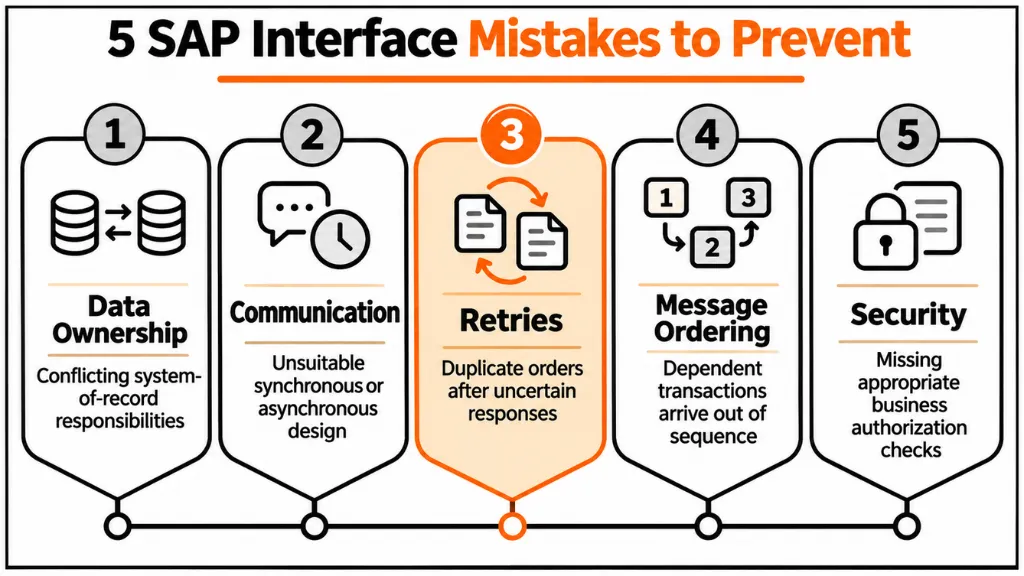
1. Designing an SAP Interface Without Clear Data Ownership
An integration becomes unreliable when two applications independently maintain the same business information without agreed responsibilities. Poor SAP interface design can also create conflicts when multiple applications update the same business information.
This problem often appears in customer master data, product records, inventory information, and financial transactions.
Although both systems may contain related data, they do not necessarily have equal authority to change it.
How SAP Interface Design Prevents Conflicting Data Updates
Consider an organization connecting a CRM application to SAP S/4HANA.
The CRM system manages customer interactions and sales activities.
Meanwhile, SAP S/4HANA processes relevant ERP transactions and maintains associated business information.
A customer address may exist in both applications.
However, if each system independently updates that address, one interface can overwrite information entered through the other.
The integration may report successful processing even though the final record is incorrect.
SAP Interface Design and System of Record
Before developing the interface, architects should identify which application controls each relevant business object or attribute.
For example, a CRM application may manage sales-related customer information.
SAP S/4HANA may control accounting-related customer attributes and the corresponding ERP business processes.
However, the precise ownership arrangement depends on the organization’s master-data requirements.
The integration design should document which system publishes authoritative changes and which systems consume them.
Additionally, it should explain how conflicting updates are identified and resolved. SAP interface design should clearly define which system controls each business update.
Separate Data Ownership From Transaction Ownership
A system responsible for customer information may not be responsible for creating the final sales document.
For example, an external application can initiate a sales request while SAP S/4HANA validates and creates the ERP sales order.
These responsibilities require different controls.
Therefore, the interface contract should identify the originating request, the authoritative transaction, and the permitted update operations.
How to avoid this mistake: Establish clear data and transaction ownership before selecting interfaces, designing mappings, or configuring synchronization.
2. Choosing the Wrong Communication Pattern for SAP Transactions
Integration teams sometimes use synchronous communication. SAP interface design decisions affect how applications communicate and handle transaction failures for processes that could benefit from asynchronous handling.
In other cases, they introduce asynchronous processing where the business requires an immediate response.
Both decisions can create problems when the selected pattern does not match the transaction requirements.
Why Synchronous Interfaces Can Become Unreliable
A synchronous interface sends a request and waits for the receiving application to respond.
This approach works well when the sender needs an immediate result.
For example, an application may need to retrieve current availability information before completing a customer interaction.
However, synchronous processing becomes more difficult when receiving systems experience temporary delays.
Consider an e-commerce application submitting a sales order directly to SAP S/4HANA.
If SAP processing takes longer than the caller expects, the request may time out.
Meanwhile, SAP may still be processing the original transaction.
The customer-facing application cannot safely assume that the order failed simply because it did not receive the response.
When Asynchronous Processing Is More Suitable
Asynchronous integration separates initial message acceptance from subsequent processing.
For appropriate scenarios, SAP Cloud Integration supports persistent messaging through configured mechanisms.
This allows a sender to submit a request while the receiving application processes the message separately.
Furthermore, the architecture can manage relevant retry and recovery activities.
However, accepting a message into middleware does not mean that the business transaction has been completed.
The sending system still needs a way to determine the eventual outcome.
Choose Based on Business Requirements
Communication patterns should reflect response-time expectations, transaction volume, processing dependencies, and failure behavior.
For example, a business process requiring an immediate availability response may justify synchronous communication.
Meanwhile, some high-volume transaction exchanges may benefit from asynchronous processing.
The selected approach should also consider what happens when the receiving application is unavailable.
How to avoid this mistake: Define required response times, transaction outcomes, and failure behavior before choosing synchronous or asynchronous processing.
3. Retrying Failed SAP Interface Messages Without Duplicate Protection
Retries are a common part of integration recovery.
They can help systems recover when temporary communication problems interrupt message delivery.
However, repeating a transaction without checking its original outcome can create duplicate business records.
How Duplicate Transactions Occur
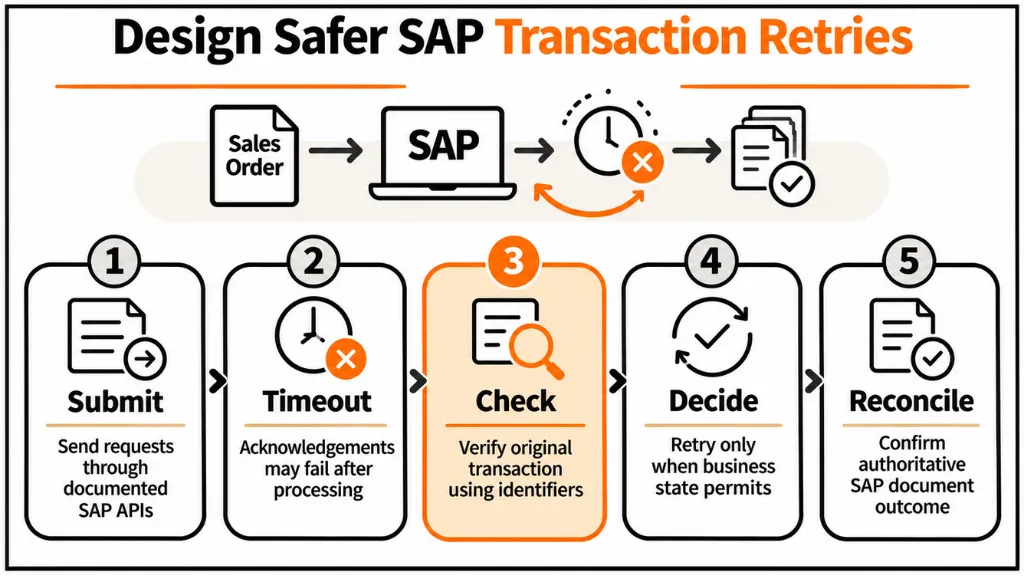
Consider an external sales application submitting an order to SAP S/4HANA.
SAP processes the request and creates the sales document.
However, a network interruption prevents the acknowledgement from reaching the sending application.
The sender receives a timeout and cannot determine whether the original transaction succeeded.
If it immediately submits the same request again, another sales order may be created.
The actual outcome depends on the interface’s transaction handling and business validation.
Nevertheless, uncontrolled retries can turn a temporary communication problem into an operational error.
Understand Idempotency
Idempotency means that repeating an operation does not produce additional unintended business effects.
For example, submitting the same external sales request twice should not result in two separate ERP orders when the business intended only one.
Developers can support this requirement through stable request identifiers and appropriate duplicate-detection mechanisms.
However, the identifier must remain associated with the original business request.
Generating a completely new identifier for every retry makes it harder to recognize repeated processing. Effective SAP interface design helps prevent duplicate business transactions during recovery.
SAP Cloud Integration Idempotent Process Call
SAP Cloud Integration provides an Idempotent Process Call step.
This capability can identify previously processed messages and help prevent duplicate subprocess execution.
However, its protection has important boundaries.
If the receiving application completes a transaction but the acknowledgement disappears, middleware may not know that the business operation succeeded.
Consequently, middleware-level duplicate detection cannot independently guarantee exactly-once business processing in every scenario.
Add Receiver-Side Checks and Reconciliation
Where supported, the receiving application should recognize repeated business requests.
Additionally, the interface should provide a procedure for investigating uncertain outcomes before replaying a message.
For example, the integration team may compare the originating sales request with the corresponding SAP document.
This helps determine whether the transaction needs correction or has already succeeded.
How to avoid this mistake: Combine stable business request identifiers, appropriate duplicate checks, controlled retries, and reconciliation.
4. Ignoring Message Ordering and Business Dependencies
Some SAP transactions depend on information created or updated by earlier transactions.
When interfaces process these messages in the wrong order, technically valid data may still fail.
This risk becomes more important when several integrations operate concurrently.
Why Message Sequence Matters
Consider a manufacturing system sending production information into SAP S/4HANA.
One message contains a relevant production-order update.
Another contains a confirmation that depends on that update.
If the confirmation reaches SAP first, the receiving application may reject the transaction.
Similarly, a sales order may depend on customer or material information that must already exist.
Therefore, message validity alone does not establish that the required business sequence has been preserved.
Parallel Processing Can Change the Order
Asynchronous integration can process multiple messages concurrently.
This may improve throughput when transactions do not depend on one another.
However, concurrent processing does not automatically preserve message order.
For example, updates relating to different sales orders may be processed independently.
Meanwhile, successive status changes for the same order may require controlled sequencing.
Architects should identify where ordering matters and where independent processing is acceptable.
Queue Configuration Requires Validation
SAP Integration Suite includes messaging and event-driven integration capabilities.
The supplied research also identifies ordering considerations for supported queue arrangements, including SAP Integration Suite, advanced event mesh.
Developers should not assume that every messaging service preserves the required business sequence.
However, ordering guarantees depend on the chosen technology and its configuration.
Protect Against Outdated Updates
Message delays can create a separate problem when older information reaches the receiving application after newer updates.
For example, an earlier order status should not automatically overwrite the current authoritative status.
The consuming application needs suitable processing rules for these situations.
Furthermore, integration testing should include delayed messages, repeated deliveries, and out-of-order processing.
How to avoid this mistake: Define ordering requirements for relevant business objects and validate them through realistic concurrency and recovery tests.
5. Treating Authentication as Complete SAP Interface Security
An integration can authenticate successfully while still allowing access to more business information than the application requires.
Authentication confirms the identity of a caller.
Authorization determines which actions that caller may perform.
However, both controls are necessary to protect SAP integration scenarios.
Why Shared Technical Accounts Create Risk
Consider several external applications using one technical account to access SAP.
Each application may have a different business purpose.
For example, one system may need customer information while another processes purchasing transactions.
If the shared account has broad permissions, the connected applications may receive more access than necessary.
Furthermore, support teams may find it harder to identify which application performed a particular operation.
Apply Appropriate Access Restrictions
SAP interfaces should use permissions that match their intended business functions.
For example, an application that retrieves information should not automatically receive permission to modify unrelated business records.
The relevant SAP system must continue enforcing its own authorization requirements.
Additionally, teams should review access whenever application responsibilities change. Secure SAP interface design ensures that each application receives only the access it needs.
Understand SAP API Management Security
API Management within SAP Integration Suite provides capabilities for securing and governing published APIs.
Supported configurations can include authentication, authorization-related policies, traffic controls, and other protective measures.
However, API gateway controls do not replace SAP backend authorization.
A caller may pass gateway authentication but still lack permission to update an ERP business object.
Consequently, security must be applied across the complete integration path.
Protect Credentials and Sensitive Data
Integration interfaces may process customer, employee, financial, or operational information.
Developers should avoid embedding credentials directly in integration code or configuration artifacts.
Instead, they should use appropriate supported credential-management mechanisms.
Furthermore, monitoring logs may contain sensitive information.
The organization must balance troubleshooting requirements with relevant data-protection controls.
How to avoid this mistake: Apply suitable authentication, least-privilege authorization, credential protection, and data security across all connected systems.
6. Deploying SAP Interfaces Without End-to-End Monitoring and Recovery
A technically successful message does not always confirm that the receiving application completed the intended business operation.
Consequently, monitoring only the middleware layer can leave critical failures undetected.
A reliable monitoring approach must connect technical message processing with actual business outcomes.
Message Status Can Be Misleading
SAP Cloud Integration provides message-processing logs and relevant runtime statuses.
These help administrators identify completed, failed, or otherwise affected processing.
However, a message may successfully reach its destination before the receiving application performs additional business validation.
For example, an order interface may deliver information successfully while the ERP application later rejects the transaction.
The middleware delivery result and business-document result are therefore different.
Connect Technical Messages With Business Records
Support teams need enough information to trace a transaction across connected applications.
For example, an order integration may involve an originating request identifier, a middleware message reference, and an SAP sales document number.
These references help engineers determine where the process stopped.
Furthermore, meaningful error categories can make troubleshooting more effective.
Authentication failures, mapping problems, business-rule rejections, and network interruptions require different responses.
Design Error Handling Before Go-Live
SAP Cloud Integration provides exception-handling capabilities for applicable integration flows.
Depending on configuration, teams can return controlled errors or manage failed processing.
However, exception handling must preserve the meaning of the actual failure.
Some configured exception endings may result in a completed technical message status.
Consequently, monitoring teams must understand how exception handling affects operational reporting.
Avoid Blind Message Reprocessing
Not every failed message should be immediately replayed.
For example, an earlier request may have completed successfully even though the response was lost.
Reprocessing it without checking the business result may create another transaction.
Therefore, recovery procedures should distinguish between failed delivery, rejected processing, and uncertain outcomes.
How to avoid this mistake: Monitor the complete transaction lifecycle and establish documented procedures for alerting, investigation, reconciliation, and safe recovery.
How to Evaluate SAP Interface Design Before Production
The six design mistakes share an important characteristic: many remain invisible during basic connectivity testing.
An interface may exchange messages correctly but fail when it encounters production volumes, incomplete data, unavailable applications, or unexpected transaction sequences.
Therefore, pre-production evaluation should examine more than successful message transmission.
SAP Interface Production Readiness Checklist
| Design Area | Required Verification | Responsible Team |
| Data ownership | Approved business-object responsibilities | Business and solution architecture |
| Communication pattern | Response-time, throughput, and failure testing | Integration architecture |
| Duplicate protection | Retry and idempotency validation | Integration development |
| Message ordering | Sequence and concurrency testing | Integration development |
| Security | Authentication and authorization verification | Security and application owners |
| Monitoring and recovery | Transaction tracing and recovery rehearsal | Application support |
The checklist should reflect the actual business process.
For example, an informational interface may have different recovery requirements from one that creates financial or purchasing documents.
Test More Than Successful Transactions
A complete testing strategy should include realistic failure conditions.
For example, the receiving application may become temporarily unavailable during message processing.
The test should determine how the integration reacts and whether any transaction remains unresolved.
Additionally, developers should test repeated requests, incorrect data mappings, insufficient permissions, and unexpected message order.
These conditions may reveal problems that ordinary unit testing does not detect.
Involve Business and Technical Teams
SAP Community research on connector development highlights the importance of involving SAP functional experts during design and testing.
Technical developers may understand how to connect systems but lack complete knowledge of the business rules behind the transactions.
For example, invoice status may have a different meaning in accounting than developers initially assume.
Consequently, business representatives should validate interface requirements and expected outcomes before production approval.
Common SAP Interface Design Warning Signs
Some integration problems become visible only after business users notice incorrect or delayed information.
However, several warning signs can indicate that the underlying design requires attention.
Repeated Data Mismatches
Customer, material, or financial records may differ between connected applications.
This can indicate unclear data ownership or incorrect transformation rules.
Unexplained Message Failures
Messages may fail intermittently without a clear explanation.
Furthermore, insufficient error classification can make it difficult to identify the underlying problem.
Duplicate Business Documents
Repeated transaction requests may produce unintended additional records.
The recovery process should determine whether duplicate prevention and retry controls are sufficient.
Growing Integration Delays
Processing may become slower as transaction volumes increase.
Consequently, communication patterns and performance requirements may need review.
Missing Support Ownership
Integration incidents become harder to resolve when no team clearly owns the interface.
Documentation should identify the responsible application, integration, and business teams.
Relevant SAP Integration Guidance From the Supplied Research
July 13, 2025: SAP Community Discusses Connector Design Mistakes
An SAP Community article examined common problems when building SAP connectors.
The guidance covered underestimated scope, excessive customization, inadequate testing, missing SAP expertise, security, version control, and stakeholder involvement.
Furthermore, it emphasized understanding actual business processes before implementing technical connections.
May 12, 2026: SAP Community Examines Migration Complexity
A SAP Community contributor discussed the challenges of migrating complex integration landscapes.
The article highlighted hidden interface dependencies, legacy mappings, and the importance of understanding existing integration logic.
However, vendor-reported migration performance figures should not be treated as universal results.
August 13, 2026: VeeTee Reviews SAP Integration Failures
VeeTee Technologies discussed failures involving master-data alignment, middleware selection, insufficient error handling, and API version management.
The article also emphasized testing and change control before deployment.
August 27, 2026: Manufapp Highlights SAP-MES Integration Problems
Manufapp examined manufacturing integration risks involving delayed synchronization, inconsistent master data, point-to-point connections, and missing exception handling.
Additionally, it highlighted the need for documented integration ownership.
Frequently Asked Questions About SAP Interface Design
1. What is an SAP interface?
An SAP interface is a technical connection that enables SAP applications to exchange information or business operations with other systems. Depending on the integration scenario, it may use REST APIs, OData services, IDocs, RFCs, BAPIs, or messaging technologies. However, the interface is more than a communication channel. Its design must also define data ownership, supported operations, authorization requirements, processing behavior, and error recovery. These controls help connected applications maintain consistent business information and reliable transaction processing.
2. What are the most common SAP interface errors?
Common SAP interface errors include authentication failures, incorrect mappings, missing reference data, receiver timeouts, and business-rule rejections. Additionally, architectural weaknesses can create duplicate transactions, delayed processing, or incorrect message sequences. These problems may appear even when the technical connection works. Therefore, support teams should distinguish communication errors from application-level failures before selecting a corrective action. Monitoring should also provide enough information to connect a failed technical message with its originating request and the relevant SAP business document.
3. What is the difference between IDoc and API integration in SAP?
IDocs support structured business-document exchange through established SAP integration mechanisms. APIs expose defined application operations through supported technical contracts. For example, an application may use an API to request information or submit a transaction, while an IDoc interface exchanges relevant business-document data. However, neither approach automatically eliminates duplicate processing, authorization problems, or message dependencies. The correct choice depends on the SAP product, business scenario, response requirements, and operational recovery needs. Each interface requires appropriate testing and monitoring.
4. How does SAP Integration Suite handle failed messages?
SAP Integration Suite provides capabilities for integration processing, monitoring, and exception handling. SAP Cloud Integration supports relevant retry and persistence patterns through configured messaging mechanisms. Additionally, exception subprocesses can manage particular processing failures. However, the resulting behavior depends on the integration flow and selected components. Some technical processing statuses may not represent the final business outcome. Therefore, developers must configure error handling carefully and ensure that support teams can distinguish unsuccessful delivery, business validation errors, and uncertain transaction results.
5. How can SAP interfaces prevent duplicate transactions?
SAP interfaces can reduce duplicate transactions by using stable business request identifiers, appropriate duplicate checks, and controlled retry procedures. SAP Cloud Integration also provides an Idempotent Process Call step for applicable scenarios. However, middleware-level protection does not guarantee that the receiving application never processes the same business request twice. For example, an acknowledgement may disappear after SAP has already completed the original transaction. Therefore, receiver-side validation and reconciliation remain important when handling uncertain processing outcomes.
6. What is the best way to monitor SAP interfaces?
Effective SAP interface monitoring should connect technical processing information with the resulting business transaction. For example, support teams may need to relate an original order request to its middleware message and final SAP sales document. Additionally, monitoring should distinguish authentication errors, mapping failures, business rejections, and network timeouts. Clear alerting and ownership help teams respond to relevant problems. However, a completed middleware message does not always prove business completion, so critical integrations also require appropriate transaction verification.
7. Why do SAP interfaces fail even when connectivity works?
Connectivity confirms that systems can communicate, but it does not establish that every business transaction will succeed. For example, SAP may receive a message but reject it because required information is missing or the requested operation violates a business rule. Additionally, an integration may process dependent messages in the wrong order. Duplicate requests, incorrect mappings, and insufficient permissions can cause similar problems. Therefore, interface testing should validate actual business outcomes rather than relying exclusively on successful connection tests.
8. Should SAP interfaces use synchronous or asynchronous processing?
The appropriate communication pattern depends on the business requirement. Synchronous processing suits operations requiring an immediate response, such as certain information lookups. Meanwhile, asynchronous processing can support transactions that do not require immediate completion and benefit from separate message handling. However, both patterns introduce different failure considerations. A synchronous request may time out while the receiver continues processing, while asynchronous messaging requires status tracking and appropriate recovery. Architects should review response-time expectations, transaction volume, dependencies, and failure behavior before selecting an approach.
9. Why is data ownership important in SAP interface design?
Data ownership determines which application controls particular business objects or attributes. Without clear responsibilities, multiple systems may overwrite one another’s updates or create inconsistent records. For example, customer information may exist in both CRM and SAP S/4HANA, but each application may have authority over different attributes. Furthermore, responsibility for master data may differ from responsibility for business transactions. Therefore, integration architects should document the system of record, permitted updates, synchronization direction, and conflict-handling rules before development begins.
10. What should organizations test before an SAP interface goes live?
Organizations should test successful transactions alongside realistic failure scenarios. These include unavailable receiving systems, incorrect data mappings, authorization failures, duplicate requests, and messages arriving out of order. Furthermore, teams should validate actual business-document processing and the ability to investigate uncertain outcomes. Performance and transaction-volume requirements also need attention. Business users should confirm that the integration supports the intended workflow. Finally, support teams should test monitoring, alerting, and recovery procedures before the interface enters production.
Conclusion
A reliable SAP interface requires more than successful connectivity and correct message mapping.
Data ownership, communication patterns, retries, message ordering, security, and monitoring determine whether connected systems behave correctly during real business transactions.
Furthermore, these decisions become particularly important when interfaces process customer orders, financial documents, or inventory movements.
However, a technically completed message does not automatically establish that the intended business operation succeeded.
Organizations should review the six design mistakes against their existing integration landscape and identify where responsibilities or recovery procedures remain unclear.
By validating these controls before deployment, integration teams can reduce avoidable failures and improve the reliability of connected SAP business processes.
References
- SAP Community. Common Mistakes Companies Make When Building SAP Connectors (and How to Avoid Them). July 13, 2025.
- SAP Community. Why Most SAP Integration Migrations Fail — and How IntegrateHub Is Built to Prevent That. May 12, 2026.
- VeeTee Technologies. 7 SAP Integration Mistakes That Stall Projects — And How Experienced Teams Avoid Every One. August 13, 2026.
- Manufapp. 5 Common SAP-MES Integration Failures (and How to Avoid Them). August 27, 2026.
- ISGUS. The 7 Most Common Mistakes in SAP Integration and How Companies Can Avoid Them. Supplied research.
- George Kordosis. The 5 SAP Implementation Mistakes That Cost Companies Millions. LinkedIn, April 10, 2026.
- Cloud Consulting Inc. 7 SAP Implementation Mistakes to Avoid in 2026. Updated August 27, 2026.
- DesIDEA. Common SAP BTP Implementation Mistakes and How to Avoid Them. Supplied research.
- SAP Help Portal. Define Idempotent Process Call.
- SAP Help Portal. Apply the Retry Pattern.
- SAP Help Portal. API Management.
- SAP Help Portal. Handle Exceptions.
- SAP Help Portal. Message Status.
- Supplied technical research draft. 6 SAP Interface Design Mistakes That Cause Integration Failures.