
SAP Business Connector can appear reliable for years until a certificate expires, a server fails, or an important business transaction stops processing. Suddenly, the team discovers that the middleware connecting SAP with external applications has become difficult to maintain or troubleshoot.
SAP Business Connector was developed to connect SAP systems with non-SAP applications through technologies such as RFC, IDoc, HTTP, and web services. Many organizations have continued using it for established integration scenarios.
However, reliable message exchange today does not guarantee that the same interface will remain manageable as infrastructure, security requirements, and application landscapes change.
SAP stopped developing Business Connector further after introducing newer integration technologies. Additionally, SAP’s published guidance identified 2027 as the end of maintenance for its final release, version 4.8.
For companies still operating this middleware, the challenge is deciding which existing connections can remain under control and which require modernization.
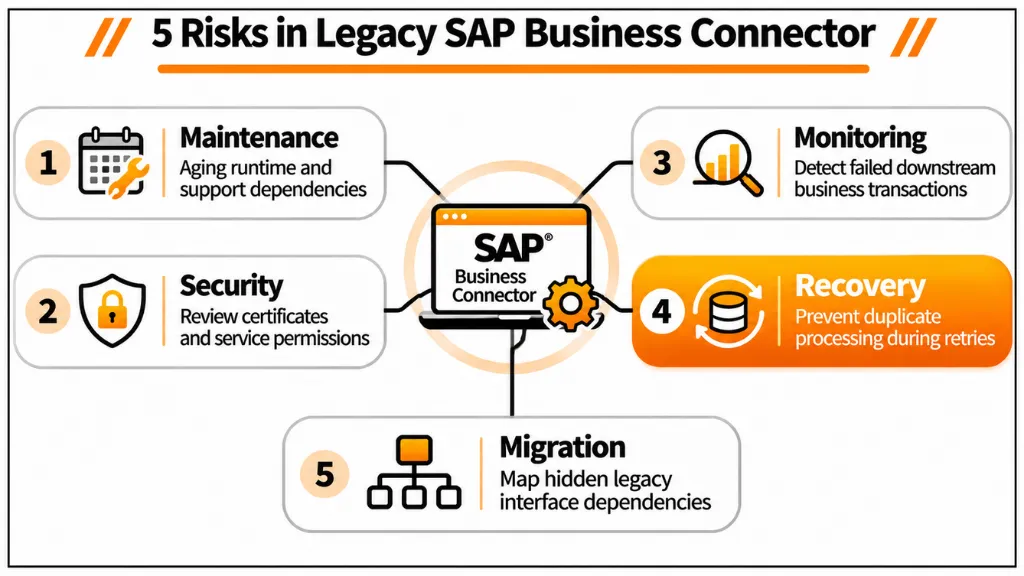
This article examines five integration risks involving maintenance, security, monitoring, message recovery, and migration complexity. It also explains what businesses should review before deciding whether to retain or replace their existing Business Connector interfaces.
Quick Answer: What Are the 5 Main SAP Business Connector Risks?
The five main risks are maintenance dependency, outdated security configuration, limited visibility into failed transactions, unreliable message recovery, and complicated migration caused by undocumented interfaces.
SAP Business Connector can continue processing established connections, but organizations must evaluate whether those connections remain supportable and operationally reliable.
Furthermore, replacing the middleware does not automatically resolve every integration problem.
A proper assessment should examine the existing runtime, communication protocols, custom mappings, authentication, monitoring, and business-process dependencies before selecting a replacement.
What Is SAP Business Connector, and Why Does It Still Matter?
SAP Business Connector is a Java-based middleware product introduced by SAP in 1999.
It was designed to connect SAP ERP environments with external business applications and partner systems.
The product supports communication between different technical environments while providing capabilities for message routing, conversion, and data mapping.
For example, an SAP system may exchange business documents with an external partner using RFC-based communication internally and HTTP-based communication externally.
Business Connector can act as an intermediary between these different communication methods.
How SAP Business Connector Works
SAP Business Connector uses SAP Java Connector (JCo) to communicate with SAP systems.
Its SAP-facing connectivity includes RFC communication and built-in IDoc support.
Meanwhile, its external communication capabilities include HTTP(S), FTP, email protocols, JDBC, and web services.
The platform also supports data transformations using graphical mapping, XSLT, and custom development.
However, these capabilities operate within a proprietary Java-based architecture that differs from newer SAP integration platforms.
SAP Business Connector vs. SAP Integration Suite
The distinction matters because both technologies support integration, but their architecture and capabilities differ.
| Capability | SAP Business Connector | SAP Integration Suite |
| Architecture | Legacy standalone Java middleware | Cloud-based integration platform |
| SAP connectivity | RFC and IDoc-based communication | Supported SAP application interfaces and adapters |
| External connections | HTTP(S), FTP, email, JDBC, web services | Broader supported cloud and hybrid integrations |
| Data transformation | Graphical mapping, XSLT, custom code | Integration flows and message transformation |
| API management | Limited support for modern API approaches | Dedicated API Management capabilities |
| Change governance | No native integration with ChaRM or Focused Build | Separate modern integration development and management capabilities |
| Migration considerations | Proprietary content and dependencies | Replacement scenarios require assessment and appropriate implementation |
SAP Business Connector may remain operational for established scenarios.
Nevertheless, its architecture creates important questions about maintenance, modernization, and long-term integration support.
Why SAP Business Connector Deserves a Review in 2026
An older integration platform is not automatically unreliable.
A stable interface may process business transactions successfully for an extended period.
However, operational stability depends on more than whether the middleware is running.
Organizations must consider how the integration will behave when infrastructure changes, a dependency fails, or additional security controls become necessary.
The Maintenance Timeline Matters
SAP’s November 2022 Community guidance identified Business Connector 4.8 as the final release and stated that its maintenance would end in 2027.
That published timeline makes lifecycle planning particularly important for organizations still using the product in 2026.
However, businesses should confirm their applicable maintenance agreements and current SAP support information before making contractual or technical decisions.
Integration Dependencies Can Remain Hidden
A connection may depend on custom services, transformation logic, technical accounts, and external communication settings.
These dependencies may not be obvious during normal operations.
For example, a business-critical purchasing interface may work until its supporting server requires replacement.
Consequently, administrators should examine operational dependencies before a failure forces them to investigate under pressure.
Risk 1: SAP Business Connector Maintenance and Technology Dependency
The first risk concerns continued dependence on middleware whose technology and maintenance strategy may no longer align with future requirements.
SAP Business Connector operates as a standalone Java application.
Although it supports several established communication technologies, its underlying architecture differs from modern integration environments.
Why Maintenance Becomes Difficult
SAP’s published guidance explains that Business Connector is proprietary technology rather than a component of the SAP NetWeaver application-server stack.
Therefore, administration and development experience from other SAP environments may not directly cover its specific requirements.
Organizations may also depend on specialists who understand its packages, development tools, and runtime behavior.
When that knowledge is concentrated among a small number of people, recovering or changing an interface can become difficult.
Infrastructure Changes Can Expose Dependencies
Consider an organization using Business Connector for communication between SAP ERP and an external supplier.
The integration performs its daily tasks without obvious errors.
However, a planned infrastructure replacement requires the team to review the Java runtime, installed packages, network configuration, and related services.
An overlooked dependency could interrupt the connection after the change.
Furthermore, a working installation does not establish that every supporting component remains compatible with the next environment.
What Organizations Should Review
A maintenance assessment should identify the installed Business Connector version and its operational environment.
It should also document the relevant SAP systems, external endpoints, custom services, and third-party dependencies.
Additionally, support teams should verify whether they can restore the existing configuration after a failure.
An integration that cannot be reliably recovered deserves attention even if it currently operates without errors.
Recommended control: Maintain a complete technical inventory, confirm the applicable support position, and assess whether existing interfaces can be restored and maintained.
Risk 2: Security Controls That No Longer Match Enterprise Requirements
SAP integrations frequently exchange confidential business information.
This may include financial records, customer details, purchasing data, and other sensitive operational information.
Therefore, an integration endpoint must be protected according to the data and business processes it handles.
Older Middleware Does Not Automatically Mean Insecure Communication
SAP Business Connector supports HTTPS and other communication technologies.
Consequently, the product’s age alone does not prove that every deployed interface is insecure.
The relevant concern is whether the installed configuration still meets the organization’s security requirements.
For example, outdated certificates or inappropriate endpoint exposure can create operational or security problems.
Review Authentication and Access
An external application may connect to Business Connector before the middleware calls a relevant SAP function.
Both sides of this communication require appropriate controls.
The external endpoint must authenticate permitted connections.
Meanwhile, the SAP technical user should have only the authorizations needed for its assigned activities.
However, securing the middleware endpoint does not automatically establish appropriate authorization within SAP.
Check Certificates and Communication Protocols
Business integrations may depend on certificates and configured trust relationships.
An expired certificate can prevent communication with an external partner.
Additionally, weak or unsuitable communication settings may create unnecessary exposure.
The team should review active protocols, certificate validity, authentication settings, and renewal procedures.
Reduce Unnecessary Exposure
Organizations should evaluate which services need to be externally accessible.
Access restrictions, network controls, and appropriate endpoint protection can reduce unnecessary exposure.
Furthermore, technical accounts should be reviewed when an integration changes or becomes obsolete.
A security review should consider the complete communication path rather than only the middleware server.
Recommended control: Review certificates, authentication, technical-user permissions, network exposure, and the security requirements of every critical interface.
Risk 3: Limited Visibility Into Failed Business Transactions
An integration can successfully transmit a message without completing the intended business transaction.
This distinction is important when SAP Business Connector exchanges orders, confirmations, or other operational records.
However, organizations sometimes rely heavily on technical message status without verifying the final business result.
Message Delivery Is Not Business Completion
Consider an external application sending a purchasing update to SAP.
Business Connector receives the information and processes the required transformation.
The middleware then submits the message through an appropriate SAP interface.
However, SAP may reject the update because the referenced business document is not in the expected state.
The message may have reached the destination, but the business process remains incomplete.
Why This Creates Operational Problems
A receiving application may report a business error even when the earlier communication steps succeeded.
If monitoring does not distinguish these outcomes, support teams can overlook the unresolved transaction.
Consequently, employees may believe an order or document has been updated when the expected change never occurred.
The problem becomes more serious when several systems depend on the same information.
Technical Logs Need Business Context
The middleware may record its own processing activity.
Meanwhile, the sending application holds its original message details.
SAP maintains the relevant business document and its processing outcome.
Investigating a failure requires enough information to connect these records.
For example, a support team may need to identify the originating request, the middleware processing record, and the resulting SAP document.
Modern Monitoring Alternatives
SAP Integration Suite provides monitoring capabilities for supported integration flows.
Additionally, SAP Cloud ALM supports integration and exception monitoring for relevant scenarios.
These technologies can help organizations modernize integration operations.
However, deploying a different platform does not automatically establish complete transaction visibility.
Monitoring still needs appropriate configuration, useful identifiers, and defined support responsibilities.
Recommended control: Track critical transactions from the original request through middleware processing to the confirmed SAP business outcome.
Risk 4: Duplicate Messages and Unreliable Recovery
Network interruptions and application failures can affect integrations even when the underlying interface is correctly configured.
The important question is how the system responds when the outcome of a transaction becomes uncertain.
Without appropriate recovery controls, retrying a message may introduce another problem.
When a Transaction Succeeds but Confirmation Fails
Consider a supplier application sending a purchase order update through Business Connector.
SAP receives and processes the request.
However, the connection fails before the sender receives confirmation.
The sender now has no reliable indication of whether SAP completed the operation.
If it immediately repeats the request, the result depends on the interface and its transaction-handling rules.
In some scenarios, an unintended duplicate update may occur.
Why Automatic Retries Need Careful Design
Retry mechanisms can help recover from temporary communication failures.
However, not every failure should trigger the same response.
A connection timeout differs from a business validation error.
For example, repeatedly submitting a document with invalid business information does not correct the underlying problem.
Instead, the relevant error requires investigation and correction.
Understand Different Communication Mechanisms
SAP Business Connector supports various RFC communication methods and IDoc processing.
The supplied technical research distinguishes synchronous, asynchronous, and transactional communication.
However, these mechanisms do not all provide identical processing behavior.
Ordinary HTTP communication should not automatically be assumed to provide the same transactional handling as relevant SAP communication mechanisms.
Therefore, recovery design must reflect the actual interface.
Use Business Identifiers During Reprocessing
A critical transaction should have enough identifying information to establish its earlier processing status.
For example, support teams may need to compare the originating purchasing request with the corresponding SAP document.
Before repeating the operation, they should determine whether the business update already succeeded.
Additionally, unresolved messages should remain visible until their outcome is confirmed.
Reconciliation Supports Reliable Recovery
Reconciliation compares information between sending and receiving systems.
It helps identify records that were submitted, accepted, rejected, or left unresolved.
Furthermore, the process can reveal missing updates that technical message monitoring alone did not explain.
The objective is to restore the correct business state rather than simply clear a technical error.
Recommended control: Define retry rules, duplicate detection, transaction reconciliation, and procedures for handling uncertain outcomes.
Risk 5: Migration Complexity and Hidden Interface Dependencies
Replacing SAP Business Connector may appear straightforward when an organization looks only at the visible connection between two applications.
However, the actual implementation may contain years of custom transformations and business-specific processing.
These elements make migration more complicated than changing middleware endpoints.
Proprietary Mapping Creates Additional Work
SAP’s published Business Connector guidance explains that its graphical mappings use technology different from SAP PI and newer SAP integration platforms.
Consequently, these mappings cannot simply be exported and transferred into another integration environment.
Some implementations also contain XSLT transformations or custom Java and C++ development.
However, the ability to reuse parts of this logic depends on the specific implementation.
Why Automatic Migration Cannot Be Assumed
SAP’s 2022 guidance explains that Business Connector components are stored in proprietary formats.
It does not identify a general automatic migration tool for moving this content into SAP Integration Suite or SAP PI.
Therefore, custom scenarios often require analysis and reimplementation.
An organization should not approve a migration plan based only on the number of visible interfaces.
Different Scenarios Require Different Migration Effort
SAP describes several Business Connector migration situations.
ELSTER scenarios: SAP’s published guidance identifies standard replacement options for relevant tax-related integrations.
Simple IDoc routing: Some connections primarily transfer or convert messages without extensive custom mapping.
Custom transformations: Interfaces containing business-specific mapping logic generally require more redevelopment.
Additional adapters: Organizations must verify whether equivalent communication capabilities exist on the selected platform.
Third-party solutions: Vendor-dependent packages may require separate coordination with their providers.
Consequently, migration complexity depends on the actual content and dependencies of each interface.
Review the Complete Interface
Before replacing a connection, teams should identify its sender, receiver, communication protocol, and message format.
They should also document transformation logic, business rules, technical accounts, and failure-handling procedures.
Furthermore, the assessment should cover dependencies that may not appear in existing architecture diagrams.
The replacement must preserve the required business behavior rather than simply transmit messages in a new format.
Consider SAP Integration Suite
SAP Integration Suite is a relevant modernization option for organizations replacing legacy integration technology.
It provides integration-flow processing, supported adapters, message transformation, and API Management.
However, it should not be treated as an automatic one-to-one replacement for every Business Connector implementation.
The selected architecture must match the actual integration requirements.
Recommended control: Inventory every interface and its business logic before deciding on migration scope, replacement technology, or cutover timing.
How to Decide Whether to Retain or Replace SAP Business Connector
Not every existing connection carries the same operational risk.
Some interfaces may have limited complexity and clearly documented business responsibilities.
Others may support critical processes while depending on poorly understood custom services.
Therefore, organizations should prioritize their assessments according to business impact and technical exposure.
SAP Business Connector Risk Assessment Checklist
| Risk Area | Warning Sign | Recommended Review |
| Maintenance | Unclear support or runtime compatibility | Confirm lifecycle and recovery requirements |
| Security | Broad permissions or outdated connection settings | Review authentication, certificates, and access |
| Monitoring | No confirmed business transaction outcome | Establish message correlation and alerts |
| Recovery | Messages retried without outcome checks | Define duplicate controls and reconciliation |
| Migration | Undocumented custom mappings or services | Inventory dependencies and replacement requirements |
The assessment should distinguish immediate operational weaknesses from longer-term modernization requirements.
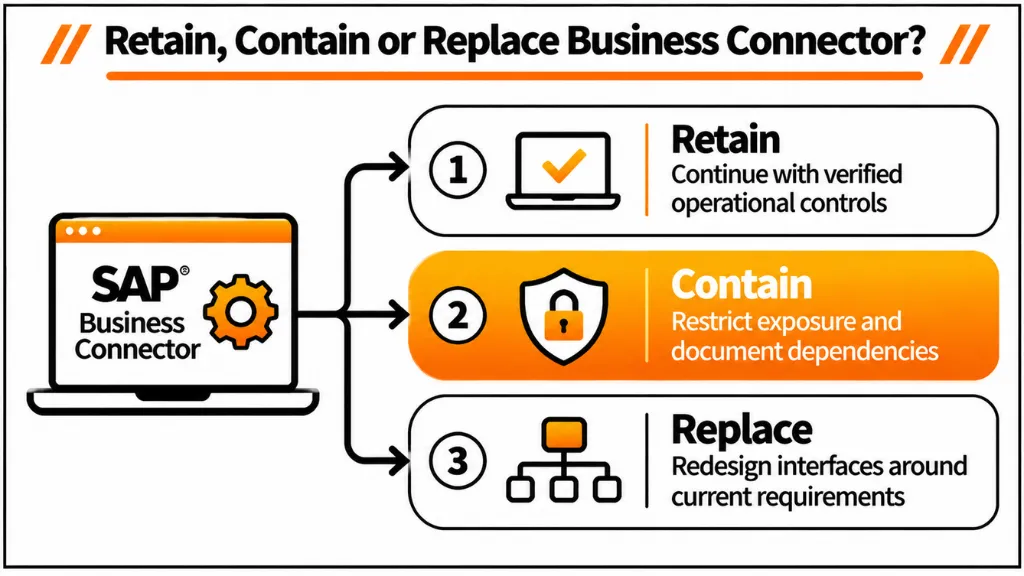
Option 1: Retain Temporarily
An existing interface may remain in operation while the organization completes its review.
However, continued use should be a deliberate decision.
The team should maintain appropriate security controls, monitoring, recovery procedures, and technical ownership.
Additionally, the applicable maintenance and compatibility conditions need to be understood.
Option 2: Contain and Prepare
Some critical interfaces may require significant work before replacement.
In these cases, organizations can prioritize documentation and immediate operational controls while planning migration.
For example, a complex supplier interface may need improved monitoring and a complete mapping inventory before redevelopment.
This allows the team to address known weaknesses without rushing into an inadequately tested replacement.
Option 3: Replace
Replacement becomes more important when an interface depends on technology approaching an unsupported state or when operational risks cannot be managed appropriately.
However, migration should follow a controlled implementation plan.
The team must verify business processing, integration dependencies, security, error recovery, and operational support before cutover.
Planning a Migration From SAP Business Connector to SAP Integration Suite
SAP’s Business Connector guidance emphasizes planning, preparation, and appropriate technical expertise.
A migration should begin with understanding the current integration landscape.
Furthermore, both the legacy platform and the selected replacement technology need to be represented during implementation.
Step 1: Inventory Existing Connections
Identify active interfaces and their business purposes.
Document source systems, receiving systems, protocols, mappings, and dependencies.
Additionally, establish which interfaces support critical business operations.
Step 2: Classify Migration Complexity
Separate simple routing scenarios from connections containing custom business logic.
Determine whether existing adapters, transformations, or vendor components need replacement.
Consequently, the project can estimate the required development and testing effort more accurately.
Step 3: Select the Appropriate Integration Pattern
Review the capabilities of the intended replacement platform.
SAP Integration Suite supports modern integration requirements, but each scenario needs a suitable implementation design.
For example, an older RFC-based connection may require different treatment from an integration that already uses HTTP-based communication.
The choice should reflect business requirements and supported interfaces.
Step 4: Validate Business Outcomes
Testing should confirm that the replacement processes relevant transactions correctly.
Furthermore, teams should examine error conditions, delayed responses, rejected messages, and repeated submissions.
The replacement should preserve required business behavior, not merely produce technically successful message exchanges.
Step 5: Plan Controlled Cutover
Migration planning should identify the transition sequence and relevant support responsibilities.
The team must also consider outstanding messages and unresolved business transactions.
Additionally, running old and new interfaces simultaneously requires controls to prevent duplicate processing.
Finally, post-cutover monitoring should confirm that critical business transactions continue operating correctly.
Common SAP Integration Mistakes That Can Make Legacy Risks Worse
The supplied HashRoot and Solsynch research identifies several wider integration problems that also deserve attention when reviewing Business Connector.
Ignoring Scalability
An integration may support current transaction volumes but struggle when demand increases.
Therefore, teams should assess expected processing requirements and system dependencies.
Poor Data Mapping
SAP and external applications may use different field definitions and data structures.
Incorrect mapping can create inconsistent information across connected systems.
Additionally, custom mappings require documentation and appropriate validation.
Insufficient Testing
Testing only successful messages can leave important failure scenarios unexplored.
Teams should examine invalid records, unavailable applications, connection interruptions, and recovery behavior.
Weak Documentation
Missing interface documentation makes troubleshooting and replacement more difficult.
Furthermore, undocumented custom logic can introduce hidden dependencies during migration.
Treating Monitoring as a One-Time Task
Integration behavior can change as connected applications evolve.
Consequently, organizations need ongoing monitoring and periodic review rather than assuming the connection will remain reliable indefinitely.
Relevant SAP Business Connector Guidance and Integration Developments
November 7, 2022: SAP Discusses the Future of Business Connector
SAP Community published What Happens Next with SAP Business Connector?
The article explained the product’s architecture, technical limitations, maintenance direction, and possible replacement approaches.
Importantly, it identified 2027 as the planned maintenance endpoint for release 4.8.
July 7, 2026: Integration Quality and Business Processing Risks
Solvetect discussed how poorly designed SAP integrations can affect business processes.
The article highlighted incorrect data mapping, synchronization problems, manual rework, and weak governance.
July 17, 2026: HashRoot Reviews SAP Integration Challenges
HashRoot published guidance on integration risks involving legacy systems, data synchronization, custom mapping, security, and error handling.
The article emphasized the importance of middleware architecture, monitoring, and controlled recovery.
November 2026: Integration Platform Assessments
PeerSpot’s supplied November 2026 material describes customer experiences with SAP Business Technology Platform.
Reviewers discuss integration flexibility and scalability while also identifying concerns involving licensing, customization, monitoring costs, and migration complexity.
However, these reviews concern SAP Business Technology Platform generally and should not be interpreted as direct performance findings about SAP Business Connector.
Frequently Asked Questions About SAP Business Connector
1. What is SAP Business Connector?
SAP Business Connector is a legacy middleware product developed to connect SAP systems with external applications and business partners. It uses a standalone Java-based architecture and supports communication technologies such as RFC, IDoc, HTTP(S), FTP, and web services. Additionally, it can perform message transformations and custom mappings. SAP introduced the product in 1999 and later developed newer integration technologies. Organizations still using Business Connector should review their runtime dependencies, technical configuration, maintenance conditions, and long-term support requirements.
2. Is SAP Business Connector still supported in 2026?
SAP’s November 2022 product guidance identified 2027 as the end of maintenance for SAP Business Connector 4.8, the final release. Therefore, organizations operating it during 2026 should review their applicable support arrangements and current SAP lifecycle information. However, the published timeline should not replace verification of individual contractual conditions. Continued operation also does not guarantee compatibility with future infrastructure or security requirements. Businesses should evaluate support, recovery procedures, and migration plans before the maintenance horizon becomes an operational problem.
3. What replaces SAP Business Connector?
SAP Integration Suite is a relevant modernization option for many integration scenarios previously handled through SAP Business Connector. It offers capabilities for connecting applications, processing integration flows, transforming messages, and managing APIs. However, SAP Business Connector does not have a universal automatic migration path for every custom implementation. Existing mappings and proprietary components may require redevelopment. Organizations should first inventory their interfaces and compare their technical and business requirements with the supported capabilities of the selected replacement platform.
4. Can SAP Business Connector connect to SAP S/4HANA?
SAP Business Connector supports established SAP communication technologies, including RFC and IDoc-based integration. However, whether a particular Business Connector interface is suitable for SAP S/4HANA depends on the relevant product releases, supported communication mechanisms, and deployed configuration. Organizations should not assume compatibility without validating their specific landscape. Additionally, new SAP S/4HANA integration requirements may justify reviewing currently supported APIs and integration approaches. The appropriate decision depends on the business process and technical requirements rather than the middleware name alone.
5. What are the main security risks of SAP Business Connector?
The main security concerns involve the actual deployment configuration, including exposed endpoints, authentication, certificates, technical-user permissions, and communication protocols. SAP Business Connector supports secure communication options such as HTTPS, so its age does not automatically make every interface insecure. However, outdated certificates, excessive permissions, or poorly protected connections may create risks. Organizations should review access restrictions and SAP backend authorizations together. Security planning should cover the complete communication path between external applications, middleware, and SAP.
6. Why is monitoring important for SAP Business Connector?
Monitoring helps organizations distinguish technical message processing from actual business transaction completion. A message may pass through middleware successfully while the receiving SAP application rejects its business operation. Consequently, teams need sufficient information to connect the source request, middleware activity, and SAP processing result. Without this visibility, unresolved transactions can remain unnoticed. Organizations should establish appropriate monitoring, alerting, and support responsibilities for critical interfaces. Replacing middleware alone does not automatically provide complete business-level transaction monitoring.
7. Can SAP Business Connector cause duplicate transactions?
Duplicate processing can occur in certain integration scenarios when a sender repeats a request without confirming whether the original transaction succeeded. For example, SAP may process an update while a connection failure prevents the confirmation from reaching the sender. However, the actual outcome depends on the interface and its transaction-handling mechanism. Organizations should use appropriate identifiers, duplicate checks, and reconciliation procedures. Recovery rules must also distinguish temporary communication failures from business validation errors that require correction.
8. Is migrating from SAP Business Connector difficult?
Migration complexity depends on the existing interfaces and the amount of custom processing they contain. Simple routing scenarios may require less redevelopment than integrations containing custom mappings, XSLT transformations, or proprietary services. SAP’s published guidance explains that Business Connector mappings cannot simply be exported into newer platforms. Therefore, teams often need to analyze and reimplement relevant components. A complete migration plan should cover interface inventory, supported adapters, business validation, error handling, testing, and controlled cutover.
9. What is the difference between SAP Business Connector and SAP Integration Suite?
SAP Business Connector is a legacy standalone middleware product designed around established SAP and internet communication technologies. SAP Integration Suite is a cloud-based platform that provides broader integration capabilities, including supported application connectivity, integration flows, and API Management. Furthermore, Integration Suite supports modern cloud and hybrid integration requirements. However, it does not automatically reproduce every custom Business Connector implementation. Migration teams must evaluate communication protocols, business mappings, authentication, and runtime requirements before replacing existing interfaces.
10. Should organizations replace SAP Business Connector immediately?
Not every Business Connector interface necessarily requires the same migration priority. Organizations should first assess maintenance exposure, security, monitoring, recovery capabilities, business criticality, and replacement complexity. For example, a well-documented interface may remain operational during a controlled migration program. Meanwhile, a critical connection with unsupported dependencies or unreliable recovery may deserve earlier attention. The decision should follow a structured risk assessment rather than product age alone. Any replacement must be tested against the required business outcomes.
Conclusion
Continuing to use SAP Business Connector requires more than confirming that messages still move between SAP and external applications.
Its maintenance horizon, standalone architecture, security configuration, transaction visibility, and proprietary integration content can affect long-term reliability.
Furthermore, message recovery and migration planning become more complicated when critical interfaces depend on undocumented custom logic.
However, an older platform does not automatically mean every existing connection must be replaced immediately.
Organizations should begin by assessing their active interfaces and identifying the risks that could disrupt important business operations.
A controlled modernization approach can then prioritize critical dependencies while preserving the transaction behavior required by the business.
The most useful next step is to review the five risks against the current Business Connector landscape and establish a documented plan for retaining, containing, or replacing each important interface.
References
- SAP Community. What Happens Next with SAP Business Connector?. November 7, 2022.
- SAP Help Portal. SAP Business Connector 4.8 Introduction.
- SAP Help Portal. SAP Business Connector — Components of SAP Communication Technology.
- SAP Help Portal. What Is SAP Cloud Integration?.
- SAP Help Portal. What Is Migration Tooling?.
- HashRoot. Top Challenges in SAP Integration and How to Solve Them. July 17, 2026.
- Solsynch. 5 Common Mistakes to Avoid in SAP Integration. LinkedIn, November 22, 2024.
- Solvetect. How Bad Integrations Kill Good SAP Implementations. July 7, 2026.
- Cremencing Solution. What Is SAP Integration and Why Most Businesses Struggle Without It Until It Starts Breaking Their Systems. May 8, 2026.
- LeverX. SAP Integration in 2027: Salesforce, Oracle, and E-Commerce Patterns. November 24, 2026.
- PeerSpot. SAP Business Technology Platform Reviews and Buyer’s Guide. October–November 2026.
- Supplied research draft. Still Using SAP Business Connector? 5 Integration Risks Worth Reviewing.