
Your SAP production ticket is marked “urgent.”
The business team is waiting. Three support groups are asking who owns it.
This often occurs when SAP support relies on email, spreadsheets, and manual follow-up instead of a structured service management process. Therefore, if your business currently runs SAP Solution Manager 7.2, SAP S/4HANA landscapes, or is migrating to SAP Cloud ALM, an SAP ITSM tool can provide the workflows, visibility, and governance needed to support more complex operations.
Average and efficient SAP support teams aren’t just about the technical skills. It’s how well they handle incidents, requests, changes, and recurring issues. We’ll take a look at nine features of SAP ITSM tools that can enable support teams to deliver better response quality and operational control.
Why SAP Support Teams Need More Than Basic Ticket Tracking
Many SAP organizations already use some form of ticket management.
- A user reports an issue.
- A ticket is created.
- A consultant investigates.
- The issue gets resolved.
At first glance, this process seems sufficient. However, enterprise SAP environments create challenges that simple ticket tracking cannot solve.
Modern SAP landscapes often include:
- SAP S/4HANA systems
- SAP Fiori applications
- SAP BTP extensions
- SAP Integration Suite
- Third-party business applications
- Multiple functional and technical support teams
A single business process may involve several systems and teams.
For example, an order processing issue could involve:
- SAP SD configuration
- SAP CPI integration
- User authorization
- External applications
Without structured service management, teams spend valuable time determining ownership instead of solving the actual problem. This is where an SAP ITSM tool becomes valuable.
An SAP ITSM tool helps organizations manage IT services through defined processes such as:
- Incident management
- Service request management
- Problem management
- Change management
- Service-level management
The goal is not simply recording tickets. The goal is creating a predictable support operation where every issue follows a controlled lifecycle.
What Is an SAP ITSM Tool, and Why Does It Matter?
An SAP ITSM tool is a service management platform that helps SAP teams organize, track, and improve support activities across SAP landscapes. The full form is SAP Information Technology Service Management. The approach follows IT service management principles by introducing structured workflows for handling user issues and operational requests.
For organizations using SAP S/4HANA on-premises environments, these capabilities help connect business support needs with technical operations.
A basic ticket system answers:
“Was the issue recorded?”
An SAP ITSM tool answers deeper operational questions:
- Who owns the issue?
- How critical is the business impact?
- What SLA applies?
- Has the same issue occurred before?
- What solution was implemented previously?
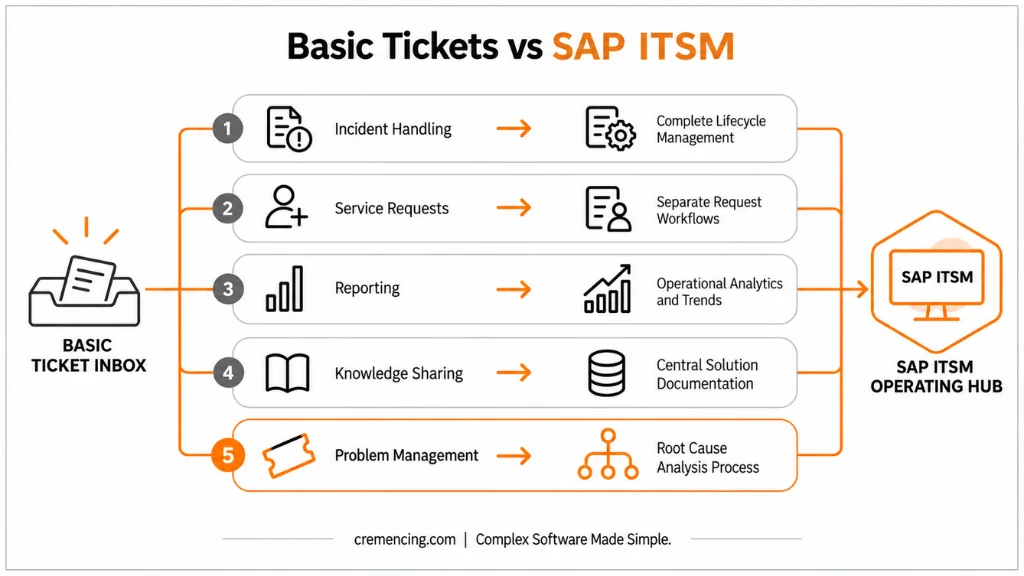
This difference allows SAP support teams to move from reactive issue handling toward continuous service improvement.
Feature 1: Intelligent Incident Management Workflows
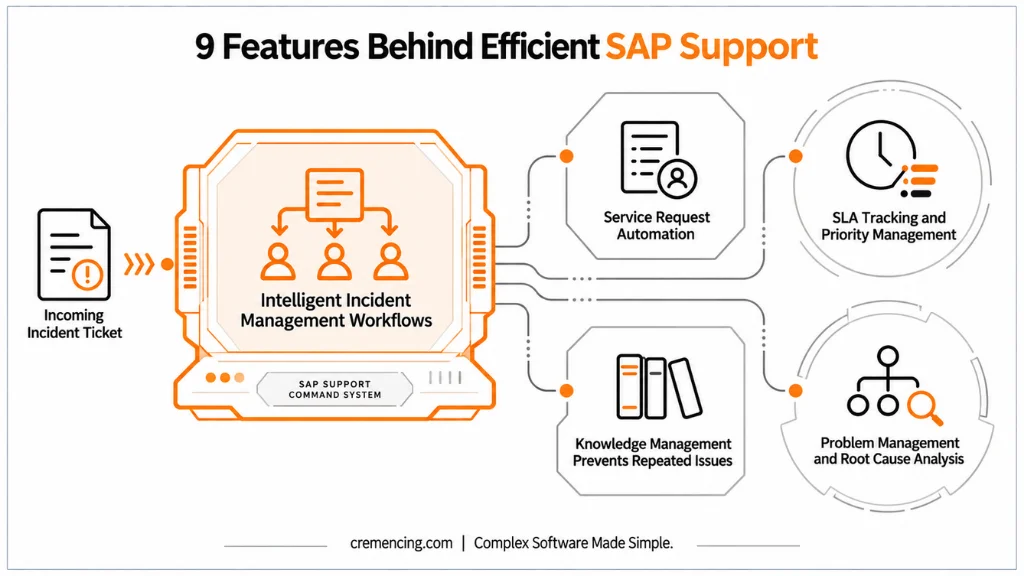
The first capability that separates an effective SAP ITSM tool from basic ticketing is structured incident management. An SAP incident management process ensures that every issue follows a defined path from creation to closure.
Without a structured workflow, incidents often move like this:
User sends email → Support team investigates → Ownership changes → Status updates are requested repeatedly
This creates delays.
With SAP ITSM, incidents are categorized based on:
- SAP module
- Business impact
- Priority
- Responsible support team
For example:
A production issue preventing invoice posting in SAP FI should receive a different priority compared with a request for a report enhancement.
The workflow ensures that critical issues reach the correct team quickly.
A strong SAP incident management process also maintains:
- Complete communication history
- Resolution documentation
- Assignment details
- Escalation records
This information becomes valuable for future analysis. Efficient SAP teams do not only close incidents. They learn from them.
Feature 2: Service Request Automation for SAP Users
Not every SAP request is an incident. This distinction is one of the most important features of an SAP ITSM solution. An incident means something is broken.
A service request is a standard requirement that follows a defined process.
Examples include
- New SAP user creation
- Authorization extension
- Report access request
- Master data update request
- System information request
When organizations mix incidents and service requests together, reporting becomes inaccurate. A high-priority production issue may compete with a routine access request. SAP service request management separates these activities through predefined workflows.
Feature 3: SLA Tracking and Priority Management
A SAP ITSM tool helps organizations manage support expectations through service-level agreements. Without SLA tracking, support teams often work based on who follows up the most.
This creates inconsistent priorities.
An effective ITSM process evaluates:
- Business impact
- Urgency
- System availability
- User impact
A financial posting issue affecting month-end closing should not follow the same process as a minor reporting question.
SLA management helps teams define:
- Response targets
- Resolution expectations
- Escalation rules
Managers can identify:
- Which incidents exceeded targets
- Which teams need support
- Where process improvements are required
This transforms SAP support from a reactive activity into a measurable operation.
Feature 4: Knowledge Management That Prevents Repeated SAP Issues
Efficient SAP support teams do not solve the same problem repeatedly. They capture solutions and make them available for future incidents. This is where knowledge management becomes a valuable feature of an SAP ITSM tool.
Without a knowledge management process, SAP consultants often depend on personal experience. One consultant knows the fix. Another consultant faces the same issue weeks later and starts the investigation again.
This creates unnecessary effort.
A SAP ITSM solution allows teams to document:
- Root causes
- Resolution steps
- Configuration details
- Known errors
- Troubleshooting approaches
For example:
A user repeatedly receives an authorization error in SAP Fiori.
The support team identifies the missing role assignment and documents the solution. The next time the issue appears, consultants can search existing knowledge before starting a complete analysis. This improves resolution consistency and reduces dependency on individual expertise.
Feature 5: Problem Management and Root Cause Analysis
Incident management restores service. Problem management prevents the same failure from returning. This distinction separates mature SAP support teams from teams that only react to issues.
An SAP ITSM tool helps identify patterns across multiple incidents.
Consider this example:
A company receives several incidents every month because purchase orders fail approval. A basic ticket system treats every issue separately. The support team fixes each ticket and moves on. An SAP ITSM solution connects these incidents and helps teams identify a common cause.
The investigation may reveal:
- Incorrect workflow configuration
- Missing authorization assignments
- Master data inconsistencies
- Integration failures
The team can then create a permanent solution instead of repeating temporary fixes. Problem management helps organizations reduce recurring incidents and improve SAP system reliability.
Feature 6: SAP Landscape Integration and Monitoring
Modern SAP environments depend on more than one system.
A business process may involve:
- SAP S/4HANA
- SAP Fiori
- SAP BTP services
- SAP Integration Suite
- External applications
A strong SAP ITSM tool should connect support processes with the wider SAP landscape.
Integration capabilities allow teams to combine service management with operational information.
For example:
A monitoring alert detects a technical issue.
Instead of waiting for a user complaint, the system can create or support incident processing through connected operations processes. Furthermore, SAP Solution Manager 7.2 provides integration capabilities within SAP Application Lifecycle Management scenarios, while SAP Cloud ALM supports cloud-focused monitoring and operations use cases.
Feature 7: Reporting and SAP Support Performance Analytics
An SAP ITSM tool gives managers visibility into support performance. Without reporting, organizations often know that support teams are busy but cannot identify why.
Analytics help answer important questions:
- Which SAP modules generate the most incidents?
- Which issues repeat frequently?
- Which teams have the highest workload?
- Where are SLA targets being missed?
For example:
If SAP MM creates a large number of recurring incidents, managers can investigate whether the problem comes from:
- Training gaps
- Configuration issues
- Process design
- Master data quality
The value of reporting is not only measuring performance. It helps organizations improve SAP operations based on real data. Also read Why Teams Are Switching To ITSM.
Feature 8: Change Management Integration
SAP changes can affect critical business processes. A configuration update, transport request, or enhancement can impact:
- Financial processing
- Procurement
- Sales operations
- Production planning
A SAP ITSM tool helps connect service management with controlled change processes.
Before implementing changes, teams can track:
- Change reason
- Business impact
- Approval status
- Testing results
- Implementation details
This reduces the risk of uncontrolled modifications.
For SAP environments with strict governance requirements, change management integration provides better visibility between support teams, developers, functional consultants, and business stakeholders.
Feature 9: Multi-Team Collaboration and Governance
Large SAP environments rarely have one support team.
They usually include:
- Functional consultants
- ABAP developers
- Basis administrators
- Security teams
- Integration specialists
- External SAP partners
Without a structured process, ownership becomes unclear.
A SAP ITSM tool creates collaboration through:
- Assignment rules
- Support queues
- Escalation paths
- Complete ticket history
Everyone involved can understand:
- What happened
- Who worked on it
- What action was taken
- What remains pending
This improves coordination between technical and functional teams.
SAP ITSM Tool Features Comparison
| Feature | Basic Ticket System | SAP ITSM Tool |
| Incident handling | Records issues | Manages complete incident lifecycle |
| Service requests | Often mixed with incidents | Separate request workflows |
| Reporting | Limited ticket counts | Operational analytics and trends |
| Knowledge sharing | Depends on individuals | Central solution documentation |
| Problem management | Usually missing | Root cause analysis process |
| Governance | Limited visibility | Structured approvals and history |
How to Select the Right SAP ITSM Tool for Your Landscape
Choosing an SAP ITSM tool depends on your current SAP environment and future roadmap.
Organizations should evaluate several factors.
SAP Platform Compatibility
The first question is:
Which SAP landscape does your organization operate?
Examples:
- SAP ECC environments
- SAP S/4HANA on-premise
- SAP S/4HANA Cloud
- Hybrid SAP landscapes
SAP Solution Manager ITSM has traditionally supported many on-premise SAP landscapes. SAP Cloud ALM is designed for cloud-focused SAP operations. The correct choice depends on operational requirements.
Integration Requirements
A SAP ITSM tool should fit into the existing technology ecosystem.
Evaluate:
- SAP monitoring tools
- External ITSM platforms
- Identity management systems
- Communication channels
Poor integration creates additional manual work.
Support Process Maturity
Technology alone does not create efficient support.
Organizations should define:
- Incident categories
- Priority rules
- Escalation paths
- Ownership models
A good tool supports a good process.It does not replace one.
Common Mistakes When Implementing SAP ITSM Tools
Some organizations implement SAP ITSM only to move away from emails.
This limits the value.
The real benefit comes from improving:
- Service processes
- Knowledge sharing
- Root cause analysis
- Reporting
Creating Too Many Workflows
Complex workflows create confusion. SAP teams should design processes that match actual business needs. A simple, clear workflow usually performs better than an overly complicated one.
Ignoring Historical Data
Previous incidents contain valuable information.
Organizations should use historical tickets to identify:
- Repeated problems
- Common errors
- Improvement opportunities
Not Measuring Results
After implementation, teams should track:
- Resolution time
- SLA performance
- Recurring incidents
- User satisfaction
Measurement shows whether the SAP ITSM tool is improving operations.
Conclusion
An SAP ITSM tool is what differentiates efficient SAP support teams from reactive support organizations by introducing processes to incidents, requests, changes, and recurring problems.
The benefits are not just in ticket management. Various features, including workflow automation, SLA tracking, knowledge management, reporting, and problem analysis, enable SAP teams to get better every day and communicate effectively with the business.
A suitable ITSM solution can provide a more controlled, measurable, and scalable support model for organisations that are currently using SAP S/4HANA or have a future SAP roadmap in place.
FAQs
1. What is an SAP ITSM tool?
An SAP ITSM tool is a platform that helps organizations manage SAP support services through structured processes such as incident management, service requests, problem management, and change management.
Instead of managing SAP issues through emails and manual tracking, teams use ITSM workflows to assign ownership, monitor progress, and maintain complete resolution history.
2. What is the SAP ITSM full form?
The full form is SAP Information Technology Service Management.It refers to the processes and tools used to manage SAP-related IT services following service management practices.
SAP ITSM helps organizations control support activities by defining how incidents, requests, changes, and problems are handled across SAP environments.
3. Why do companies use SAP ITSM solutions?
Companies use SAP ITSM solutions because SAP environments have become more complex. Modern landscapes often include SAP S/4HANA, cloud applications, integrations, and multiple support teams.
An SAP ITSM solution provides structured workflows, better reporting, clear ownership, and improved service visibility compared with traditional support methods.
4.What is An SAP ITSM tool ?
SAP ITSM tools include a platform that enables organizations to handle SAP support services, such as incidents, requests for service, problem solving, and dealing with changes, in a structured way.
Teams no longer handle SAP problems with email correspondence and manual tracking – they now cover the ownership, tracking and full history of resolution through ITSM workflows.
5.What does the full form of SAP ITSM stand for?
The full form is SAP Information Technology Service Management. It is about the processes and tools for managing IT services related to SAP, based on service management practices.
By establishing the rules and workflows for handling incidents, requests, changes, and problems in SAP environments, SAP ITSM enables organizations to manage their support activities effectively.
6. Why do companies use SAP ITSM solutions?
SAP environments are getting more complex, and this is why companies use SAP ITSM solutions. Today, SAP S/4HANA, cloud applications, integrations and various support teams are common features of modern landscape.
An SAP ITSM solution offers more structured workflows, as well as improved reporting, clear ownership and increased visibility of the services compared to conventional methods of support.
7. What is the difference between SAP ITSM and a normal ticketing system?
The normal ticketing system primarily documents user problems.
SAP ITSM supports the lifecycle of the service.
It includes:
- Incident management
- Service request management
- Problem management
- Change processes
- Knowledge management
- SLA monitoring
It’s not just about keeping track of tickets, but enhancing the SAP support processes.
8 . Is SAP Solution Manager an SAP ITSM tool?
Yes, SAP Solution Manager 7.2 does have IT Service Management capabilities.
Structured incident handling, application lifecycle management processes, and handling of service requests are addressed by many organizations that operate SAP ECC and SAP S/4HANA on-premise landscapes with SAP Solution Manager ITSM.
The best way to determine if SAP Cloud ALM is a suitable solution is by considering the organization’s future SAP plans and operations.





One Response