
Introduction
SAP Product Lifecycle Management (PLM) connects the technical objects that turn a product design into a controlled, manufacturable product. For an ABAP developer, that means PLM is not simply a functional module to understand; it is an object network involving documents, materials, BOMs, classification, and engineering change management.
That distinction matters when you are asked to build a PLM interface, automate a document process, extend a BOM scenario, or integrate engineering data with another system. A developer who treats a BOM, Document Info Record, and change master as isolated objects can easily create technically valid code that still breaks the business process.
The goal is not to memorize transactions. It is to understand the object relationships well enough to build and troubleshoot PLM integrations without treating legacy interfaces as the entire S/4HANA architecture.
What Is SAP Product Lifecycle Management and Why It Matters
SAP Product Lifecycle Management is not one module; it’s a set of integrated components inside ECC and S/4HANA that manage a product’s data from concept through retirement. It covers defining, developing, delivering, and managing products across the digital supply chain, which in practice means four connected areas: material master data, engineering documents, bills of material, and controlled change processes.
The Document Management System (DMS) inside PLM is the central repository for engineering drawings, specifications, test certificates, and SOPs, and every document gets a unique Document Info Record (DIR) with a document type, version, and status.
The reason PLM matters to an ABAP developer specifically is that it’s rarely a standalone build. You’ll be asked to extend a BOM explosion, automate a document upload from a CAD system, or trigger a workflow when a change master moves from “in work” to “released.” PLM captures data as ideas become actual products, and that data then feeds decisions through manufacturing, sales, and adaptation. Get the object model wrong, link a document to the wrong object type, or skip a change number on a BOM update, and the error doesn’t show up until someone tries to release a change months later.
How SAP Product Lifecycle Management Works
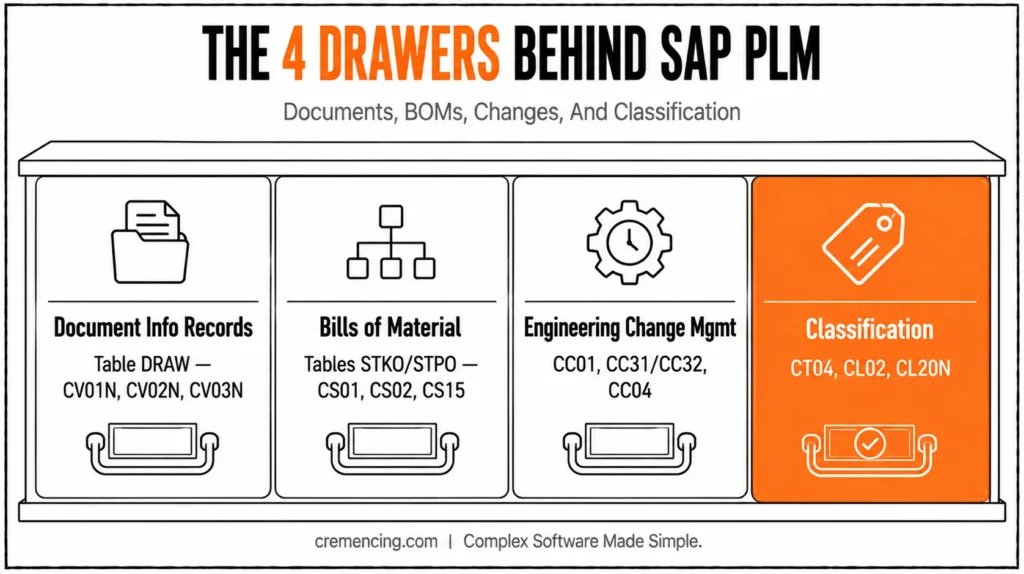
PLM’s internals break into four building blocks, each with its own table and transaction family. Document Info Records (DIR) live in table DRAW, are created via CV01N, changed via CV02N, and displayed via CV03N. Version control is central here: when a drawing is revised, the old version is never deleted; it’s archived, and the new version becomes current, creating a permanent auditable history.
Bills of Material (BOM) use the header table STKO and item table STPO. Developers maintain BOMs through CS01 (create) and CS02 (change), while CS15 provides where-used analysis. Engineering Change Management (ECM) controls product changes and their effective dates. CC01 creates the change master, while CC31/CC32 handle engineering change requests, and CC04 displays change-master information. After you create a change number in CC01, you can assign it to the relevant BOM and use CS02 with that change number to modify BOM items. Creating the change master alone does not modify the BOM.
Classification ties it together: CT04 creates characteristics, CL02 creates a class, and CL20N assigns objects to that class, which is what lets variant configuration and search-by-attribute work across materials and documents. In S/4HANA, most of this logic is unchanged at the table level; Fiori apps like “Manage Bills of Material” sit on top of the same STKO/STPO structures rather than replacing them.
Planning updates around this schedule is easier once you understand how SAP product lifecycle management creates value across the whole landscape.
How SAP PLM Objects Fit Together
For an ABAP developer, the most useful way to understand SAP PLM is as a connected object model rather than as a single application. A typical engineering process can involve a material, one or more BOMs, engineering documents, classification data, and a controlled change process.
A Document Info Record (DIR) identifies and controls an engineering document. Classic DMS uses document type, document number, document part, document version, and status to manage the document. SAP also provides object links so a document can be associated with business objects.
A BOM represents the product structure. In classic SAP implementations, developers commonly encounter header and item structures represented by objects such as STKO and STPO. Transactions such as CS01, CS02, and CS03 are the familiar create, change, and display entry points.
Engineering Change Management (ECM) adds controlled validity to changes. A change master can contain the reason for change, validity information, and object-type controls. The important development principle is that a change number is not simply another field to copy into an update program; it participates in the rules that determine when and how product data becomes effective.
Classification adds attribute-based organization and search. Characteristics and classes can be associated with relevant product objects, allowing users and applications to work with attributes rather than relying only on technical object numbers.
For developers working on S/4HANA extensions, the move from classic transaction-driven development toward supported APIs and clean-core practices is equally important.
SAP PLM Objects and Their Technical Touchpoints
| PLM object | Classic SAP touchpoint | Technical purpose | Development consideration |
|---|---|---|---|
| Document Info Record | CV01N / CV02N / CV03N | Engineering document control | Use DMS APIs/BAPIs where supported |
| BOM | CS01 / CS02 / CS03 | Product structure | Respect validity and change-management rules |
| Change Master | CC01 / CC02 / CC03 | Controlled engineering changes | Do not equate a header AENNR with “active change.” |
| Classification | CT04 / CL02 | Characteristics and classes | Object type and class type matter |
| Change Record | Fiori Manage Change Records | End-to-end change process | The release/deployment model determines availability |
| CAD integration | SAP ECTR or other integration | CAD authoring/data exchange | Evaluate integration requirements separately from DMS |
In newer S/4HANA releases, SAP also provides change records as a structured change-management layer. The Manage Change Records application can connect people, processes, objects, attachments, workflows, and related records, while current S/4HANA documentation also provides APIs for Change Records and associated objects.
The practical takeaway is simple: when developing against PLM, identify the business object first, then its lifecycle, then the supported interface for the target release. Do not start with a table update simply because the table is familiar. If you are mapping PLM changes into a broader SAP application lifecycle process, compare the responsibilities of SAP ALM and Solution Manager before designing the integration.
When to Use It vs. Alternatives
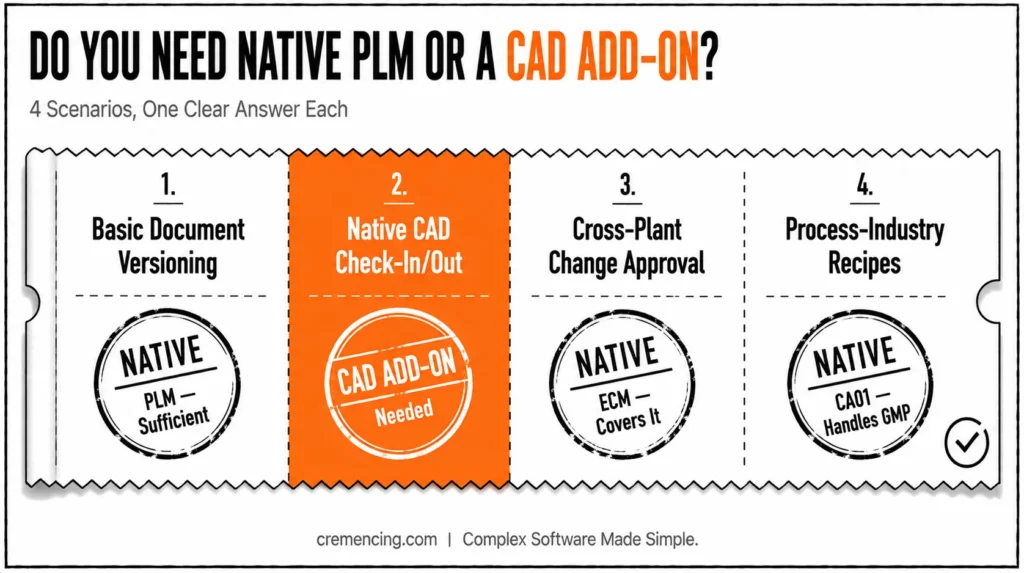
Not every product-data requirement belongs in native SAP PLM. Heavy CAD-integration scenarios, multi-CAD collaboration, or external supplier design exchange often call for a bolt-on tool instead.
| Scenario | Native SAP PLM | Specialized CAD/PLM Add-on |
| Basic document versioning tied to a material | Sufficient—CV01N/DRAW handles it natively | Unnecessary overhead |
| Native CAD file check-in/check-out with structure sync | Limited without add-ons | SAP ECTR is built specifically for this, including CAD tool integration like NX and Creo |
| Cross-plant engineering change with approval workflow | Native ECM (CC01/CC31) covers it | Same engine; add-on just improves the front end |
| Process-industry recipes (ingredients, GMP e-signatures) | CA01 manages recipes with quantities, processing steps, and GMP-compliant electronic signatures | Only needed for niche compliance extensions |
If your requirement is “store a document, version it, link it to a material or BOM item, and control changes with an approval step,” native PLM inside ECC or S/4HANA does that without an add-on. Reach for a CAD-specific layer only when the actual CAD authoring tool integration, not just document storage, is the requirement.
Conclusion
SAP PLM becomes much easier to work with once you stop treating it as a single module and start tracing the relationships between documents, materials, BOMs, classification, and engineering changes. For ABAP developers, that object-level view is more valuable than memorizing a list of transactions.
The classic ECC and S/4HANA on-premises transactions remain useful for understanding the underlying processes, but modern S/4HANA development requires an additional question: What interface does SAP support for the target release? Current S/4HANA provides Fiori-based change records and APIs alongside the established PLM capabilities, so a technical solution should be designed around the release and deployment model rather than assuming that an ECC-era approach is automatically the right S/4HANA approach.
The object model has stayed consistent across releases, so what you learn here carries forward whether the system in front of you is ECC or S/4HANA. Product lifecycle data feeds directly into SAP HANA lifecycle management, since most PLM records live on the HANA database layer.
Frequently Asked Questions
1. What is SAP Product Lifecycle Management in simple terms?
It’s the set of SAP components that manage a product’s data documents, BOMs, and engineering changes from concept and design through engineering, production, servicing, and retirement inside a single ERP environment. It sits inside both ECC and S/4HANA rather than being a separate system.
2. Is SAP PLM a separate module or part of ECC/S/4HANA?
It’s a set of modules within SAP ECC and SAP S/4HANA, not a standalone system you install. Document management, BOM, and change management run on the same ERP tables as the rest of your landscape.
3. What transaction codes are used most often in SAP PLM?
CV01N creates a document, CS02 changes a BOM, CC01 creates a change master, and CT04/CL02 handle classification for variant configuration. [INTERNAL LINK: transaction code reference → Complete SAP PLM Transaction Code Cheat Sheet]
4. How do I create a change number and actually use it on a BOM?
Create the change number in CC01, assigning the BOM materials, plant, and usage as objects, then go to CS02 and enter the same change number; modifying the BOM items alone doesn’t apply any changes.
5. What’s the difference between BAPI_DOCUMENT_CREATE and BAPI_DOCUMENT_CREATE2? BAPI_DOCUMENT_CREATE2 is the current, supported BAPI for creating document info records; the original BAPI_DOCUMENT_CREATE still appears in older code but isn’t the recommended choice for new development.
6. Does SAP PLM still exist in S/4HANA?
Yes, S/4HANA supports running product change management processes so that only approved master data is released for production, and it lets you integrate third-party PLM systems where needed. The core tables and BAPIs are unchanged from ECC.




