
The deadline is no longer distant. SAP Solution Manager mainstream maintenance ends on 31 December 2027, and teams running ECC 6.0, SAP S/4HANA, or hybrid landscapes now need a practical ALM target rather than another temporary extension of the old model. Officially delivered as SAP Cloud ALM, SAP Cloud Application Lifecycle Management has become SAP’s strategic direction for implementation, testing, deployment, operations, and SAP service collaboration. By the end of this article, you’ll know what changes in 2026, what does not move one-for-one, and how to plan the transition without disrupting active projects.
SAP cloud application lifecycle management is the right default for new SAP cloud and S/4HANA programs, and it is the strategic destination for many existing SAP Solution Manager customers. Move by use case, not by product name: begin suitable new work in SAP Cloud ALM, assess capability gaps carefully, retain specialized tools where necessary, and complete the transition before the end of 2027.
SAP Cloud ALM does not reproduce every Solution Manager function. SAP confirms that Cloud ALM, Solution Manager and SAP Focused Run do not have full functional parity because they serve different operating models.
Side-by-Side Comparison Table
| Decision area | Customer-managed Solution Manager model | SAP Cloud ALM model in 2026 |
| Platform ownership | Customer installs, sizes, patches and upgrades the ALM stack | SAP operates the SAP cloud application lifecycle management service |
| Project method | Customer configures methods, templates and custom processes | SAP Activate roadmaps and SAP Best Practice content are delivered centrally |
| Implementation objects | Strong capabilities, often separated by work centre and local process design | Processes, requirements, tasks, tests, features and releases share a connected lifecycle |
| Operations | Deep on-premise history and extensive custom monitoring options | Standard cloud, hybrid and selected on-premise monitoring for supported solutions |
| ITSM | Built-in Solution Manager ITSM and service-desk functions | External ITSM remains the recommended system for full ticket and service management |
| Change control | ChaRM can support highly customised approval processes | Standardised feature, release, deployment and traceability controls |
| Infrastructure effort | Customer Basis team maintains the ALM platform | SAP maintains the SAP cloud application lifecycle management platform |
| Product updates | Customer plans upgrades and maintenance windows | SAP delivers continuous service updates |
| Best fit | Existing processes that still depend on non-replaced functions | New SAP programmes and phased transition of supported use cases |
SAP cloud application lifecycle management does not produce one universal winner. Solution Manager can remain necessary during a controlled transition, especially where custom ChaRM, ITSM, historical reporting, or specialised monitoring still supports daily operations.
The organisational model also changes. With Solution Manager, a small specialist team could own much of the platform and translate its data for the rest of the programme. SAP Cloud ALM exposes more lifecycle work directly to project managers, process owners, testers, developers and operations teams.
That improves shared visibility only when teams define roles, naming conventions, status rules and ownership before configuring the first project. A poorly governed cloud platform can reproduce the same fragmented information that existed in the old model.
SAP Solution Manager and Customer-Managed ALM
SAP Solution Manager has served as the center of project delivery, test management, ChaRM, monitoring, documentation, service processes and operations for years. Customers could configure it deeply and connect it closely to ECC 6.0, SAP Business Suite and on-premise S/4HANA systems.
That flexibility came with platform responsibility. Teams maintained the application stack, planned upgrades, patched components, managed capacity and supported years of custom workflow and reporting decisions.
The model made sense when most SAP systems operated inside customer-controlled data centres. Solution Manager could act as both the lifecycle platform and the repository for technical and operational history.
The challenge in 2026 is not that the old model has suddenly stopped functioning. The challenge is that SAP’s product strategy, maintenance timeline and customer landscapes have changed.
Cloud applications update continuously, and timelines and integration paths cross SAP and non-SAP platforms. Implementation teams expect current SAP Activate content without first completing a separate ALM platform project.
Maintaining an on-premise lifecycle system can also consume basis capacity needed for S/4HANA transformation, BTP integration, security, data migration, and cloud operations. Teams may spend significant effort maintaining the tool that manages the transformation rather than delivering the transformation itself.
The older model can also separate lifecycle information by work center or specialist team. Project planning may sit in one area, testing in another, monitoring elsewhere, and business approval in email or spreadsheets.
The information exists, but assembling a reliable end-to-end view often requires Solution Manager specialists. SAP Cloud Application Lifecycle Management changes that operating model by delivering a customer-light cloud service focused on standardized implementation and operations scenarios.
It does not copy every custom process. That is why a standardized begin with a use-case inventory rather than an instruction to switch off Solution Manager.
SAP Cloud Application Lifecycle Management in 2026
SAP Cloud ALM supports implementation, operations, service delivery, and transformation activities across supported cloud, on-premise, and hybrid SAP landscapes. SAP positions it as the strategic next-generation ALM platform, which is why current product investment and transition guidance center on it.
The practical difference begins with platform ownership. Your team does not install or upgrade the SAP Cloud ALM application server. SAP operates the service, provides standard content,t and releases product updates.
That removes a category of infrastructure work. It does not remove the need to connect managed systems, define roles, configure data collection, design governance, test integrations, and train users.
Cloud-native also changes release management for the ALM platform itself. Customers do not choose when SAP updates Cloud ALM, so teams need a lightweight process for reviewing release information, checking affected integrations, and updating internal guidance.
How the Application Lifecycle Connects
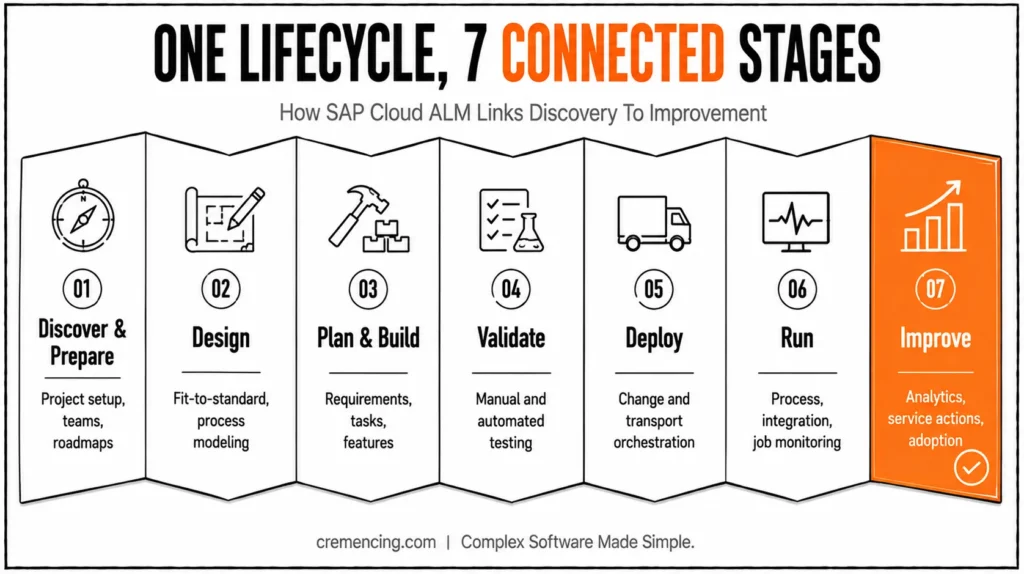
SAP cloud application lifecycle management works best when teams treat it as one lifecycle rather than a catalogue of unrelated applications:
| Lifecycle stage | SAP Cloud ALM capability |
| Discover and prepare | Project setup, teams, roles, scope, roadmaps and milestones |
| Design | Fit-to-standard workshops, process modeling, and documentation |
| Plan and build | Requirements, user stories, tasks, features and releases |
| Validate | Manual tests, automated testing integration, defects and test reporting |
| Deploy | Change and deployment management, transport orchestration and traceability |
| Run | Business-process, integration, job, health and user monitoring |
| Improve | Analytics, service results, issues, actions and adoption guidance |
The main value is the relationship between these stages. Process scope can connect to requirements, tests, releases and production monitoring.
That traceability is not automatic. Teams must maintain relationships, statuses, responsibilities, and evidence accurately. No ALM product can infer a complete lifecycle when project data is missing or users approve work outside the agreed process.
SAP Cloud ALM in 2026 — 60-Second Decision Reference
- Starting a new SAP cloud or S/4HANA program? → Default to Cloud ALM.
- Running highly customized ChaRM approvals? → Keep Solution Manager until redesigned, or move to external ITSM + Cloud ALM governance.
- Need enterprise ITSM (incidents, SLAs, service catalogue)? → External ITSM platform; Cloud ALM is not a replacement.
- Need engineering backlogs/sprints for software teams? → Jira or equivalent; Cloud ALM owns SAP process/test/release governance.
- Need high-volume or specialized on-prem monitoring? → SAP Focused Run alongside Cloud ALM.
- Deadline that matters: Solution Manager mainstream maintenance ends 31 December 2027.
Implementation and SAP Activate
SAP cloud application lifecycle management for implementation provides project setup, SAP Activate roadmaps, phases, sprints, milestones, fit-to-standard support, process scoping, requirements, user stories, documentation, testing, release planning, and analytics.
For a new SAP S/4HANA Cloud program, this reduces the need to construct the complete project method manually. Teams can begin with product-specific roadmap content, roles, tasks, and process structures.
The benefit is not merely that templates exist. The roadmap, process, task, requirement, test, and release can share the same project context. A program manager can see whether a process was scoped, whether its requirement was approved, whether testing finished and whether the related change reached the planned release. This creates a clearer chain between the business decision and the technical deployment.
SAP Cloud ALM also provides APIs for selected implementation objects. These matter when Jira, testing platforms, enterprise reporting products, or other project tools remain part of the delivery architecture. The objective should be clear ownership. Do not copy every status and description into every connected platform. This shift builds on the broader move toward SAP Cloud ALM in 2026, which is reshaping how teams manage releases.
Testing and Deployment
SAP Cloud ALM supports manual test preparation, execution, defect handling, reporting, and integration with selected automated-testing providers. It can also connect features and releases to supported deployment and transport technologies.
This gives release managers a clearer relationship between the requested change, its test evidence, and its production movement. It also helps teams identify whether a feature is genuinely ready for the planned release. Do not overstate the result. SAP Cloud Application Lifecycle Management does not prove that testing was complete simply because a status appears green.
Operations and Monitoring
SAP Cloud Application Lifecycle Management for Operations provides business-process monitoring, integration and exception monitoring, job monitoring, health monitoring, real-user monitoring, event handling, analytics, and automation for supported solutions.
This supports a more connected operations model. A business process may begin in SAP SuccessFactors, pass through SAP Integration Suite, and post into SAP S/4HANA.
A delay can affect the business before any individual system reports a hard failure. Cloud ALM can combine supported process and integration signals more directly than a system-by-system monitoring approach.
SAP Service Collaboration
SAP Cloud Application Lifecycle Management for service provides visibility into SAP service engagements, digitized service results, issues, actions and collaboration between SAP and the customer. It also includes current AI-assisted innovation-adoption guidance.
This does not make SAP Cloud ALM a full enterprise service desk. It can detect operational events, add SAP context, and exchange information with external incident platforms.
Customers using Solution Manager ITSM should plan a transition to an external ITSM product. SAP Cloud ALM can integrate with that platform, but the external system can remain responsible for incidents, problems, requests, SLAs, service catalogues, and enterprise workflows.
Why SAP Teams Are Moving in 2026
The first driver is SAP’s product direction. SAP identifies Cloud ALM as its strategic platform, so teams starting new SAP programs do not want to create long-term governance around a product nearing the end of mainstream maintenance.
The second driver is the 31 December 2027 Solution Manager deadline. Customers need time to assess existing use cases, run SAP Readiness Check, redesign integrations, train teams, and decide which historical data matters.
The third driver is lower ALM platform administration. SAP operates and updates Cloud ALM as a service, reducing customer responsibility for patching, upgrade projects and infrastructure maintenance.
The fourth driver is cloud-centric delivery. SAP S/4HANA Cloud, SuccessFactors, Ariba, Integration Suite and BTP services need a control layer designed for distributed services and frequent updates.
The fifth driver is embedded SAP Activate content. Teams can begin with product-specific roadmaps, tasks, roles and process content rather than building the complete implementation model from an empty system.
The sixth driver is contractual access. Eligible customers with SAP Enterprise Support, Product Support for Large Enterprises, or qualifying cloud subscriptions may already have SAP Cloud ALM usage rights.
The seventh driver is SAP’s investment in AI-assisted and increasingly autonomous operations. SAP describes a direction involving continuous observation, analysis, situation detection and governed remediation.
Treat this as a developing direction rather than proof that every landscape is already self-healing. Available automation depends on the connected solution, available data, configured use case and control rules.
When to Use SAP Cloud ALM and When to Keep Other Tools
Use SAP Cloud Application Lifecycle Management as the default candidate for:
- New SAP cloud implementations
- SAP Activate-based transformation programmes
- Supported hybrid monitoring
- Test and deployment traceability
- SAP service collaboration
- Standardised lifecycle governance
Keep SAP Focused Run when you need high-volume monitoring, advanced service provider operations, or specialised on-premises observability beyond available Cloud ALM coverage.
An external ITSM platform remains appropriate when incident, problem, request, service catalog, SLA, and enterprise workflow management extend beyond Cloud ALM’s scope.
For software teams that need established backlogs, sprint controls, engineering workflows, and cross-product delivery, Jira or another agile platform remains a better fit. Define whether Cloud ALM owns SAP process scope, testing, and release governance while Jira owns engineering execution.
Keep specialized testing products when automation depth, performance testing, test-data management, or enterprise quality orchestration exceeds native capabilities. SAP Cloud ALM can retain lifecycle context while the testing platform performs the specialized work.
Transition Checklist for 2026
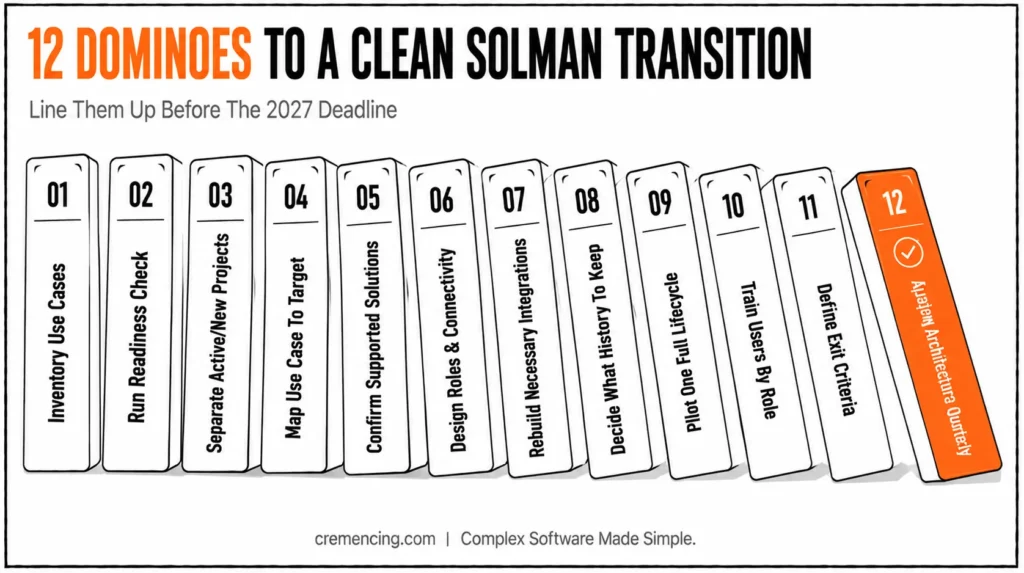
A successful SAP cloud application lifecycle management transition starts with evidence, not a product switch.
1. Inventory Current Solution Manager Use Cases
Record project management, ChaRM, test management, documentation, monitoring, ITSM, custom developments, interfaces, reports, and retained history.
For a technical component inventory, transaction SE38 creates and runs executable ABAP reports. The following read-only report lists installed software components from table CVERS, helping the transition team document the managed ABAP system before checking Cloud ALM support.
IF lt_components IS INITIAL.
MESSAGE ‘No installed components found in CVERS’ TYPE ‘S’.
RETURN.
ENDIF.
The report does not determine Cloud ALM compatibility by itself. Compare the results with SAP’s current supported-solutions documentation.
2. Run SAP Readiness Check
Use SAP Readiness Check for SAP Cloud ALM to identify supported transition paths, preparation work and capability gaps.
3. Separate Active and New Projects
Finish active projects in Solution Manager when moving them would create unnecessary delivery risk. Start suitable new programmes directly in Cloud ALM.
4. Map Every Use Case to a Target
Choose SAP Cloud ALM, SAP Focused Run, external ITSM, Jira, a testing platform or temporary Solution Manager retention. Do not assume one product must own every lifecycle activity.
5. Confirm Supported Solutions
Check capability-level support for ECC 6.0, SAP S/4HANA, cloud applications, integrations and monitoring scenarios. Support can differ by product and use case.
6. Design Identity, Roles and Connectivity
A provisioned tenant is not an operational ALM platform. Configure managed systems, users, roles, data collection, APIs and ownership.
7. Rebuild Only Necessary Integrations
Do not reproduce years of unused Solution Manager customisation simply because it exists. Preserve the processes that still meet a current business or compliance requirement.
8. Decide What History to Retain
Some reporting and operational history will not transfer one-for-one. Archive required evidence or retain controlled read access where necessary.
9. Pilot One Complete Lifecycle
Use a controlled project or operations scope to test process documentation, requirements, testing, deployment, monitoring and support handoffs.
10. Train Users by Role
Project managers, developers, testers, Basis teams, operations staff and service managers need different Cloud ALM workflows.
11. Define Solution Manager Exit Criteria
Set dates for each use case, data-retention decision, interface shutdown and operational handover.
12. Review the Architecture Quarterly
SAP cloud application lifecycle management changes continuously. Revisit earlier gap decisions when SAP delivers new capabilities.
Conclusion
SAP cloud application lifecycle management is becoming the preferred direction for SAP teams because it brings implementation planning, process documentation, requirements, testing, deployment governance, monitoring and SAP service collaboration into one SAP-operated platform. For organisations managing SAP S/4HANA, ECC, cloud applications or hybrid landscapes, this connected lifecycle model can reduce fragmented reporting, duplicate project data and the administrative effort required to maintain a separate on-premises ALM platform.
The move to SAP Cloud ALM is also being driven by SAP’s long-term product strategy and the approaching end of SAP Solution Manager mainstream maintenance on 31 December 2027. However, organisations should not treat the transition as a simple technical replacement. SAP Cloud ALM does not reproduce every Solution Manager capability, particularly highly customized ChaRM processes, full ITSM functions, historical reporting, and certain advanced monitoring scenarios.
Low to no success will, therefore, come from a detailed review of current ALM use cases as a starting point. The teams should determine which function can be transferred directly to SAP Cloud ALM, which needs redesign, and which needs to be temporarily in SAP Solution Manager or transferred to specialized tools like SAP Focused Run, Jira, ServiceNow, or dedicated testing platforms.
The best way is to do phased adoption. Launch appropriate new SAP projects in Cloud ALM, proof test complete SAP lifecycle processes, validate integrations, and train users based on their roles. While SAP Cloud ALM supplies the strategic platform, it is the strategic management, accurate administration information, and obviously targeted duties that will determine the real value it offers.
Frequently Asked Questions
1. What is the difference between SAP Cloud ALM and SAP Solution Manager?
SAP Cloud ALM is an SAP-managed cloud service dedicated to standardizing implementation, operation, and service scenarios. Solution
2. Does SAP Cloud ALM completely replace SAP Solution Manager?
Not all Solution Manager capabilities are supported one-for-one when using No. SAP Cloud Application Lifecycle Management.
3. Is SAP Cloud ALM able to connect with on-premises SAP systems?
Yes. Selected SAP solutions, including relevant scenarios of SAP ECC and SAP S/4HANA, are supported by SAP Cloud ALM solutions.
4. Do current SAP contracts include SAP Cloud ALM?
It is made available to many eligible customers under SAP Enterprise Support, Product Support for Large Enterprises, and for qualified cloud subscriptions.
5. Does SAP Cloud ALM Have an ITSM/Ticketing Functionality?
It is not a full enterprise ITSM replacement but a complementary alternative to it. SAP Cloud ALM is able to identify events, add operational context, and connect with external incident platforms.
6. What will happen to SAP Solution Manager after 2027?
The mainstream maintenance has been scheduled to come to an end on 31 December 2027. Some functions might still be available as limited extended-maintenance options for eligible customers, but it is recommended to finish the transition to SAP Cloud ALM before the extended-maintenance deadline. Customers are advised to check their contracts and existing SAP maintenance advice.
7. Does SAP Cloud ALM integrate with third-party test automation tools?
SAP Cloud ALM supports integration with selected automated-testing providers alongside its native manual test management.




