Application Lifecycle Management (ALM) is the structured process that connects an application’s business case, requirements, code, tests, releases, and eventual retirement into one traceable chain — instead of leaving each stage to live in a different team’s tool and memory.
That answer is simple. What trips teams up is everything the simple version leaves out: an application with requirements two years old, a test suite no one can map back to a feature, and three releases shipped on guesswork and a shared spreadsheet. ALM exists specifically to close that gap. This guide covers what ALM actually is, the 8 stages it runs through, and — critically — how it differs from SDLC, DevOps, and plain project management, so you know exactly which discipline catches what.
Next-Gen AI & Unified Traceability in Modern ALM
Modern Application Lifecycle Management has rapidly shifted from disconnected point tools to unified, AI-driven intelligence platforms. Furthermore, modern ALM governance automatically integrates policy-as-code and software provenance tracking, ensuring seamless compliance across complex cloud-native architectures and API microservices.
What Is Application Lifecycle Management?
Application lifecycle management (ALM) involves the management of a software application from the initial business idea through development, testing, release, operation, and retirement. IBM describes ALM as managing an application throughout its entire lifecycle, from cradle to grave. The framework centers on three core pillars: governance, development, and maintenance. It also covers key disciplines such as requirements management, architecture, testing, and release management.
The key point is that application lifecycle management isn’t a single tool, a single team’s responsibility, or a euphemism for “coding process. It’s a model of operation that maps business-level decisions to code shipped, tests validating code, incidents after code, and decisions to shut down.
The Quickest Answer to the ALM Question Is
ALM connects every stage of an application’s life cycle, so teams can easily understand why they created a requirement, passed a test, or released an update. Teams can also trace each requirement back to the code that delivers it. That code should lead to the tests that validated it. The tests should go back to the shipping release. The release should flow through the support ticket, the monitoring alert, or some decision to retire, which inevitably follows.
The number of stages in ALM varies, though Microsoft says that it has a continuous process of planning, building, testing, deployment, operation, monitoring, and learning; IBM and Salesforce tend to use five stages and other vendors use seven. All of these models are correct. They simply break the same concept into different levels of detail. This guide uses an eight-stage model because it treats retirement as a separate stage instead of grouping it under maintenance, where teams often overlook it.
Principles and Practices of HRM
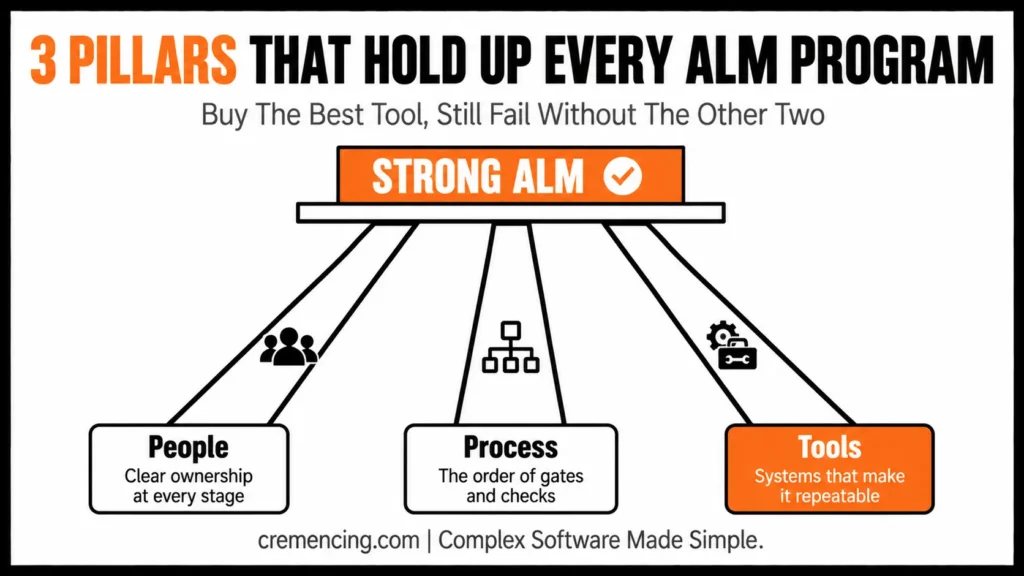
Three ingredients drive every ALM exchange, and it’s worth breaking them up, since one weak ingredient usually causes most failures.
- People refers to having clear ownership, including who approves the business case, who owns requirements, who can merge code, who signs off on a release, and who makes the final decision on the retirement of an application.
- Process defines the actual order of gates and checks, what evidence a release needs, how teams approve security exceptions, and what causes a rollback
- Tools are the systems (source control, test management, CI/CD pipelines, ticketing systems) that make the process repeatable and not depend on institutional memory.
Even if a team purchases the best ALM software available, they won’t have strong ALM if ownership is unclear or if people give approvals informally. They don’t make decisions; they just automate and document them.
The 8 Stages of Application Lifecycle Management
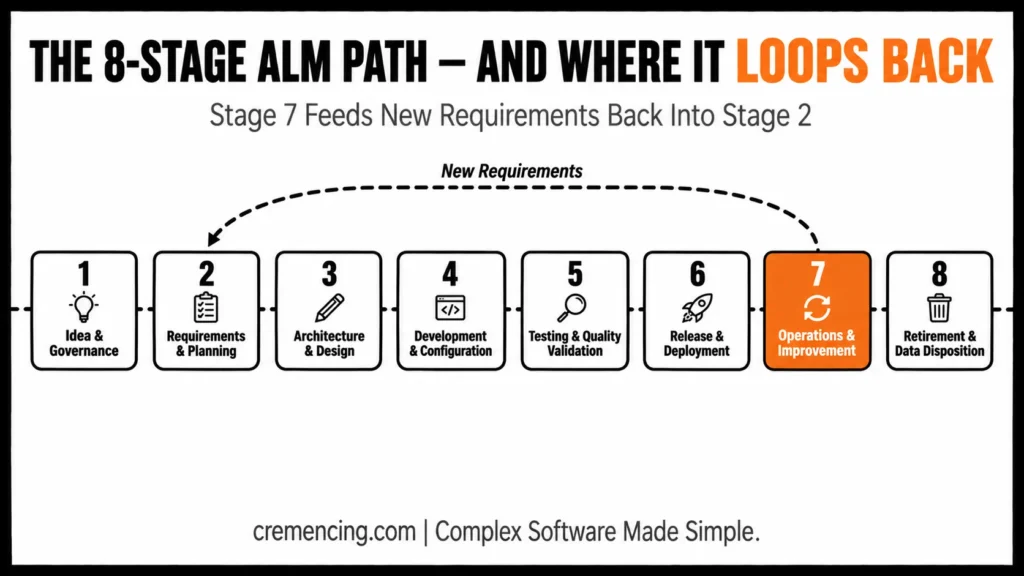
| Stage | What Happens | Key Outputs |
| 1. Idea, Business Case & Governance | The business recognizes a need, risk, or an opportunity and takes responsibility for it. | Business case, application owner, funding decision |
| 2. Requirements & Planning | Functional, security and compliance needs are collected and prioritized | The requirements backlog, acceptance criteria, and release plan. |
| 3. Architecture & Design | Teams determine the application’s run, data storage and integration | The architecture decisions, data model, and security design will be examined. The architecture decisions, data model, and security design will be discussed. |
| 4. Development & Configuration | Programming and setup is coded, reviewed, and backed up in the version control system. | Provide source code, build artifacts, review records |
| 5. Testing & Quality Validation | The application is reviewed for requirements and technical standards. | Test cases, defect records, release recommendation |
| 6. Release & Deployment | The approved change is packaged, deployed and tested in production | Publish package, change record, rollback plan |
| 7. Operations, Support & Improvement | Teams are monitoring and are taking incidents/feedback to be new requirements | Monitoring Data, Incident Record, Improvement Backlog |
| 8. Retirement & Data Disposition | The organisation decommissions the application and manages the data. | The evidence of retirement decision, data archive, decommissioning evidence. |
Once stage 7 completes the cycle (feedback and incidents create new requirements, which loop back to stage 2), the cycle can repeat indefinitely. It is important to note that Stage 8 warrants its own line item instead of being a footnote under maintenance, as it requires individual decisions: moving and storing data, decommissioning integrations, and maintaining records for compliance.
ALM Stage-to-Owner Cheat Sheet
- Idea & Governance → Application/Product Owner
- Requirements & Planning → Business Analyst/Product Manager
- Architecture & Design → Architect
- Development & Configuration → Developers
- Testing & Quality Validation → QA/Testers
- Release & Deployment → Release Manager
- Operations, Support & Improvement → Operations/Support
- Retirement & Data Disposition → Application/Product Owner (with Security/Compliance sign-off)
The process of ALM is one application, start to finish.
Imagine an internal application for approving expenses. It begins with a business case: finance wants to reduce the time taken to approve a business from 5 days to 1 day (stage 1). A product owner and some finance stakeholders write the requirements (approval thresholds, audit trail rules, mobile access—stage 2). The architects determine that it will be a cloud-based service, that is, part of the existing HR system (stage 3). The team develops it in two-week “sprints,” checking code into a shared repository and linking each change to a requirement (stage 4).
The QA team conducts functional and security testing based on the stage 2 acceptance criteria and records defects as they find them (stage 5). After the team completes testing, it packages the release, sends it to a staging environment, and validates it in production. If anything fails, the team follows a documented rollback process (stage 6).
Once the company launches the app, the operations team monitors performance dashboards and responds to support tickets. When users request faster mobile approvals, the team creates a new requirement and returns to stage 2 (stage 7).
Eventually, the company moves to a new HR system and phases out the expense tool (stage 8). The team archives its information for auditing, terminates its integrations, and migrates customers to the new system.
Every step has traceability, as the requirement, the code, the test, and the release are all connected to each other, and if someone audits the process in the future, they will be able to answer the question, “Why does this exist?”
ALM vs SDLC vs DevOps vs Project Management
ALM vs SDLC. SDLC is the technical process of specifying, designing, coding, testing, and deploying software. It is the process through which software is developed, tested, deployed, and maintained. It does not mention tasks involving requirements gathering or sunsetting. ALM is more general: it begins before development in the business case and extends beyond development to operations and eventual retirement. SDLC is really one continuous phase within the larger ALM cycle over an application’s lifecycle; the application can go through many cycles of SDLC as teams continually update and re-release it.
ALM vs DevOps. DevOps is an approach and automation that emphasizes collaboration between development and operations (DevOps) teams, usually covering planning, coding, building, testing, releasing, and monitoring. ALM encompasses all the above but also business case, governance, portfolio decisions, and formal retirement; DevOps practices don’t cover the business case, governance, or portfolio decision layers of ALM.
Now, let’s take a look at ALM vs. project management. A project is specific in its scope and budget and has a beginning and end. There is no fixed end date until the team retires the application; it spans many individual projects (a redesign, a migration, a feature release) over the application’s working life.
The difference between ALM and PLM. Product lifecycle management (PLM) covers physical products, manufacturing, supply chains, and disposal. In contrast, application lifecycle management (ALM) focuses specifically on software applications. The two areas overlap when companies integrate software into physical products.
The benefits of application lifecycle management are numerous.
The advantages of application lifecycle management are many.
- Requirements traceability – the team associates each requirement with the design decision, code, test, and release where the team implemented and validated it, so you never have to guess whether the requested requirement made it into the final release and passed validation.
- More predictable releases, standardized workflows, and environment controls minimize unexpected failure because of manual variation.
- Improved software quality – Structured testing and continuous monitoring help teams detect defects earlier, before or shortly after they release the software.
- Improved cross-team collaboration – business owners, developers, testers, security, and operations teams share the same connected lifecycle data, not disconnected spreadsheets.
- Compliance evidence requirements, approvals, and test evidence will provide an audit trail without additional manual documentation.
- Reduced long-term maintenance risk: the team continuously manages technical debt, dependencies, and documentation instead of forgetting them after a project “ships.”
By formally managing an application’s retirement, teams can prevent forgotten integrations, unmanaged accounts, and unnecessary infrastructure costs. A controlled retirement process helps ensure that teams properly shut down every part of the application.
However, these benefits depend on several factors. Teams need a reliable process, accurate lifecycle information, and strong governance that they follow consistently instead of bypassing it. In an SAP context specifically, this process takes the form of what SAP ALM is and how it keeps the lifecycle on track.
Application Lifecycle Management Roles and Responsibilities
Typical ALM roles and responsibilities.
- Application/product owner – owns the business case and the decision to retire.
- Business analyst/product manager — responsible for requirements and acceptance criteria.
- Architect — takes responsibility for design choices and the integration of the design.
- Developers — own implementation and code review.
- QA/testers – own test coverage and defect tracking.
- Release manager — is responsible for release and rollback.
- Operations/support—is responsible for monitoring, incidents, and feeding back into planning.
- Security/compliance — assumes responsibility for exception approvals & audit evidence at all stages, not just at the beginning.
What are ALM tools supposed to deliver?
A true ALM toolset, whether it be a single tool or a suite of connected tools, should be capable of offering requirements management with traceability links, version-controlled source code, automated build and test pipelines, defect and test-case tracking with links to requirements, controlled deployment with evidence of rollback and roll forward, and evidence of retirement/decommissioning. Typically, these are Azure DevOps or Jira and a test-management add-on, or GitLab, depending on how your teams are operating and what you have in place.
How to implement an ALM in an organisation
- Draw a map of what it looks like now. Identify all tools and manual processes that are currently in contact with requirements, code, testing, and release, and don’t introduce any new ones.
- Ownership by each stage. Each of the eight stages should have an owner not a team name.
- Use connected tools, rather than disconnected ones. Focus on the ability to trace requirements, code, and tests, rather than a feature list.
- Begin with a single application. Test the entire process from a simulated retirement review on one lower-risk application before implementing it enterprise-wide.
- Review and update as necessary quarterly. Teams should adjust governance up or down based on real incident and audit data, rather than allowing it to become static and remain unchanged forever.
Each step above is a starting checklist, not a finish line. Mapping current state should produce an actual inventory document — not a mental model — listing every tool touching requirements, code, testing, and release today, including the shadow processes (a shared spreadsheet, a Slack thread used as an approval record) that formal tooling doesn’t capture. Piloting on one application should specifically be a lower-traffic, non-customer-facing app, since the goal is testing the retirement-review step end-to-end, which most first attempts skip entirely because it feels premature.
Application Lifecycle Management Metrics and Success Measures
| ALM Area | Example Metrics |
| Requirements | The speed required to get the software approved, requirement volatility, and coverage of the requirements under traceability. |
| Development | Lead time for changes, code review time |
| Testing | The number of bugs that pass the tests. Defects that slip through automated testing. |
| Release | How often the changes are deployed, how often the changes fail and/or how often the changes are rolled back. |
| Operations | The “Three As” are the availability, frequency of occurrence, and mean time to restore. |
| Retirement | Retired applications per year and decommissioned infrastructure. |
A high deployment frequency coupled with a growing change-failure rate isn’t a good sign, so a single metric is not the answer.
These metrics matter together, not individually — the guide’s closing point about deployment frequency and change-failure rate applies across every row: requirement volatility without traceability coverage tells you requirements changed, not whether the team controlled that change; release frequency without a rollback rate tells you speed, not stability
Common Application Lifecycle Management Mistakes
- Stopping at maintenance. Treating ALM as a one-off event and not considering eventual retirement.
- Mixing up tools and process. The purchase of ALM software without resolving the ownership issue or lacking acceptance criteria.
- Governance without teeth. Drafting policies that nobody will ever implement during release time.
- Ignoring feedback loops. The accumulation of incidents and the monitoring of incidents without any incident back into the requirements planning.
Conclusion
Application Lifecycle Management works because it refuses to let any stage stand alone. The business case justifies the requirement, the requirement justifies the code, and the code is proven by the test that justifies the release. Break that chain anywhere, and you get exactly the situation this guide opened with: an application nobody can explain, running on institutional memory instead of evidence.
Teams that get ALM wrong aren’t usually missing tools. They’re missing the eighth stage. Retirement gets treated as an afterthought under maintenance, which is why forgotten integrations and orphaned costs pile up years after an application should have shut down. Give retirement the same ownership as the other seven stages, and traceability holds all the way through. ALM isn’t a stage count or a piece of software — it’s clear ownership, consistent process, and tooling connecting the business case to code, tests, and eventual retirement.
Frequently Asked Questions
What is the difference between ALM and SDLC?
SDLC is about the technical development process coding, testing,, and deployment- whereas application lifecycle management is about the entire application life cycle from the initial business case all the way to operation and retirement. SDLC is essentially one iterative cycle in the larger ALM context.
So what’s the difference between ALM and DevOps?
DevOps prioritizes collaboration and automation between development and ops, and often this happens from planning to monitoring. While DevOps practices do not include business case (or business need) and governance, these are included in application lifecycle management.
What is ALM?
ALM refers to application lifecycle management, the process of managing a software app from the beginning of the business case to its development, testing, deployment, operation, and retirement.
List the key phases of application lifecycle management.
There are no defined numbers, only five to seven; these are the steps described by the vendors. This guide assumes the following stages: idea and governance, requirements, architecture, development, testing, release, operations, retirement, because this approach does not limit ALM to development.
What is the difference between ALM and project management?
A project has a definitive beginning, a plan and a definite end date. There is no set end date for application lifecycle management until the application is retired, and application lifecycle management continues for many projects over the working life of the application.
Do small teams need full ALM, or is it only for large enterprises?
Smaller teams still benefit from the traceability ALM provides, but they typically implement it with lighter tooling — a single connected platform (e.g., Jira with a test-management plugin) rather than a full enterprise suite. The principles (clear ownership, connected process, traceable evidence) apply regardless of team size.
What’s the difference between ALM and application portfolio management (APM)?
APM operates at a higher level — deciding which applications an organization should invest in, maintain, or retire across its entire portfolio. ALM operates within a single application’s life, managing it from business case through retirement once that portfolio decision has already been made.
Can an organization run ALM without dedicated ALM software?
Yes, in principle — the People and Process pillars can exist with disconnected tools (a wiki for requirements, a separate test tracker, manual release notes). It’s harder to maintain traceability at scale without connected tooling, which is why most organizations eventually consolidate.
How does ALM apply differently to SaaS applications versus custom-built ones?
For SaaS applications, stages like Architecture & Design and Development & Configuration are constrained by what the vendor allows — governance and requirements management still matter, but “development” often means configuration rather than custom code. Retirement also differs, since it may involve contract termination and data export rather than decommissioning owned infrastructure.
What triggers moving from Stage 7 (Operations) back to Stage 2 (Requirements) instead of into Stage 8 (Retirement)?
The distinction is whether feedback indicates the application still serves its business purpose but needs improvement (loops back to Requirements) versus whether the business need itself has ended or been replaced (moves to Retirement) — this is a business-case decision, not a technical one.