

You are in an SAP project meeting, and the business owner explains exactly what the company needs: a new approval process, a change to sales processing, or a report that exposes a business bottleneck.
The technical consultant immediately starts thinking about APIs, data models, extensions, integrations, security, and system behaviour. The functional consultant starts asking different questions: What should the process look like? Which business rule is changing? Who owns the decision? Can standard SAP already handle it?
Neither approach is better. They solve different parts of the same SAP problem.
That is what makes the choice between an SAP technical and functional career more complicated than simply asking whether you like coding. The better path depends on how you solve problems, how much business interaction you want, the SAP skills you want to build, and where you want your career to go as S/4HANA, SAP BTP, APIs, automation, and AI reshape SAP delivery.
How to Choose Between SAP Functional and Technical Specializations
Choosing an SAP career path depends on whether a professional prefers domain-driven process configuration or software development and platform engineering. SAP functional roles focus on analyzing business requirements, conducting stakeholder workshops, and configuring line-of-business modules such as Financial Accounting (FI) or Supply Chain using standard SAP parameters rather than custom code.
Conversely, technical roles involve underlying architecture, platform management, and custom development using ABAP Cloud, SAP Fiori, or SAP Business Technology Platform (BTP) services. While a functional trajectory suits professionals with finance, operations, or business analysis backgrounds, a technical path best aligns with computer science or software engineering skill sets. Career progression in both domains eventually converges toward enterprise solution architecture
What Is SAP Technical Support and Why Does It Matter?
SAP technical support is the operational work required to monitor SAP systems, investigate incidents, restore failed services, maintain technical stability, and remove the causes of recurring disruption. It covers more than answering tickets or restarting an application server.
The support scope may include SAP Basis administration, ABAP troubleshooting, interfaces, databases, operating systems, background jobs, queues, authorizations, performance, patches, certificates, backups, disaster recovery, and cloud service monitoring. The exact boundary depends on the organization’s landscape and support model.
Who Is Responsible for SAP Technical Support?
SAP Product Support generally focuses on SAP-delivered software. Customer-specific code, interfaces, configurations, and unsupported modifications normally remain the customer’s or implementation partner’s responsibility unless SAP determines that an SAP-delivered component is involved.
Three groups often participate in SAP support. The first is the customer’s internal SAP production support team. This group normally owns daily SAP system monitoring, first-line diagnosis, local configuration, custom code, integrations, user coordination, and recovery actions.
The second is an application management services provider. An AMS partner may provide 24-hour monitoring, SAP Basis support, ticket handling, technical maintenance, patch coordination, performance analysis, and specialized skills that the internal team does not retain full-time.
The third is SAP Product Support. SAP becomes involved when available documentation, SAP Notes, Knowledge Base Articles, internal troubleshooting, and partner analysis do not resolve an issue affecting SAP-delivered software.
SAP Product Support does not replace internal operations. When a customer creates a case through SAP for Me, SAP still needs a clear problem statement, affected component, system details, reproduction steps, business impact, logs, traces, recent changes, and an available contact who can test the proposed correction.
The distinction matters because responsibility affects recovery speed. SAP will not normally correct a customer’s custom Z program, redesign a local interface, or repair an unsupported modification as part of standard product support.
Internal SAP technical support must first determine whether the failure comes from SAP standard software, local development, configuration, infrastructure, integration, security, or an external service. Escalating the wrong layer wastes time during a critical incident. Uptime must also be defined correctly. A running database and active SAP instance do not prove that the business service is available.
Support teams should measure five connected levels:
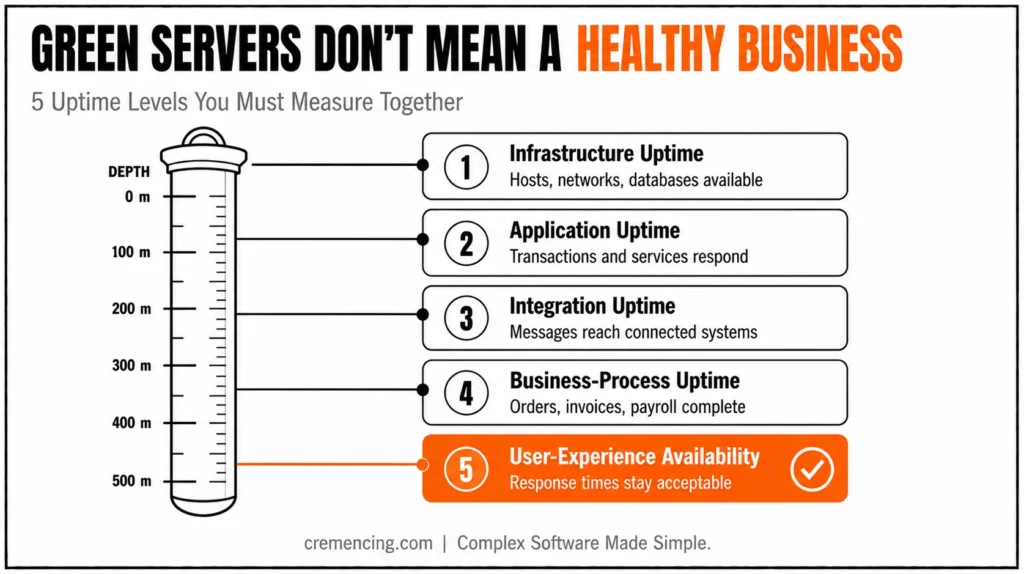
- Infrastructure uptime: Hosts, networks, databases, and instances remain available.
- Application uptime: SAP transactions, services, and applications respond.
- Integration uptime: Messages reach and return from connected systems.
- Business-process uptime: Orders, invoices, payments, payroll, and logistics are complete.
- User-experience availability: Response times remain acceptable for real users.
A business can therefore experience downtime without a server outage. A failed billing job, stuck outbound queue, expired certificate, missing authorization, or overloaded work process may stop an essential process while infrastructure dashboards remain green.
That is why effective SAP application support monitors technical components and business outcomes together.If the technical path appeals to you, it’s worth reading what an SAP technical consultant actually does day to day.
How Does SAP Technical Support Protect Uptime?
1. It Detects Failure Before the Business Escalates
Preventive SAP system monitoring starts with defined technical and business signals. Support teams watch hosts, databases, SAP instances, work processes, memory, CPU, storage, dumps, update failures, queues, jobs, interfaces, certificates, response times, and process backlogs.
Key SAP Transactions Used in Technical Support
ST22 is the SAP transaction used to analyze ABAP runtime errors. It shows the dump type, failing program, source-code location, call stack, user, time, and runtime context.
SM21 displays the SAP system log. Support teams use it to inspect instance-level errors, failed starts, communication problems, update issues, and other system events.
SM50 shows work processes on one application server, while SM66 provides a system-wide work-process overview. These transactions help identify long-running requests, stopped processes, high CPU activity, and sessions that may be blocking capacity.
SM37 monitors background jobs. It shows whether scheduled work is released, ready, active, finished, or cancelled and lets support inspect job logs and execution details.
SM12 displays SAP lock entries. Support teams check it when documents or processes remain locked, but they should never delete a lock without first confirming that no active business transaction still owns it.
SM13 displays failed update requests. A user may receive a success-looking screen while the database update later fails, so update monitoring protects data consistency as well as uptime.
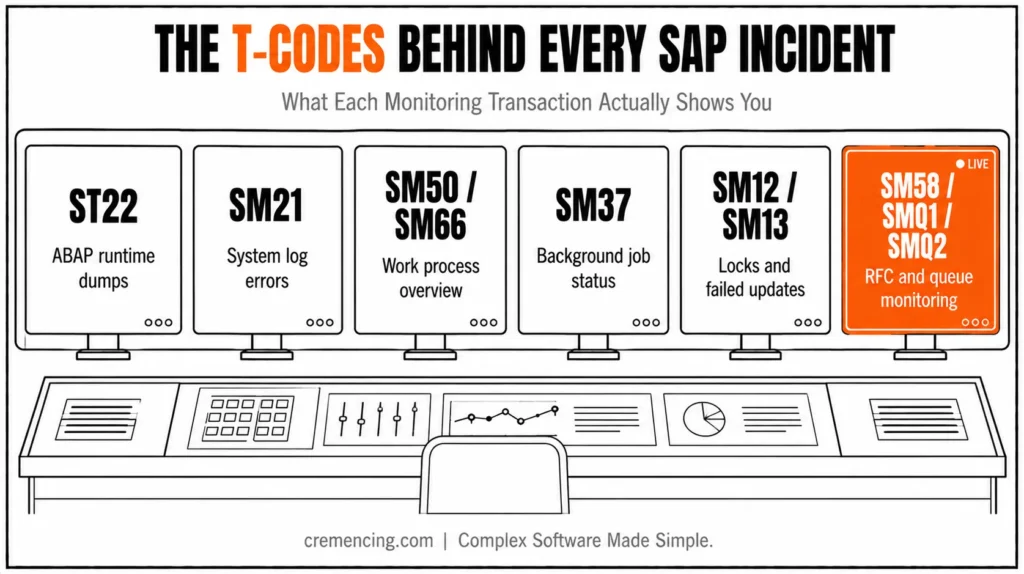
SM58 monitors transactional RFC calls that could not reach their destination. SMQ1 and SMQ2 monitor outbound and inbound queued RFC processing, where a blocked message can stop an entire integration sequence.
These transactions provide local diagnoses. Central platforms provide broader SAP Cloud ALM monitoring or high-volume monitoring across multiple systems.
SAP Cloud ALM and Central Monitoring
SAP Cloud ALM Health Monitoring tracks availability, resource usage, and reported errors. Real User Monitoring measures user requests and response behaviour, while Integration and Exception Monitoring track message failures and exceptions.
Business Process Monitoring adds another layer. It can track operational KPIs such as overdue documents, blocked transactions, failed processing steps, or growing backlogs.
A useful alert must include:
- A clear condition
- A defined owner
- A business impact
- A response threshold
- A runbook
- An escalation path
- A closure test
More alerts do not automatically protect SAP system uptime. Hundreds of unactionable notifications train support teams to ignore the monitoring tool.
2. It Prioritises Incidents by Business Impact
A technical symptom does not determine incident priority by itself. One failed job may affect a test report, while another may prevent payroll, billing, or bank processing.
SAP incident management should assess:
- Which system and client are affected
- Whether production is involved
- Which users or locations cannot work
- Which business process has stopped
- Whether a workaround exists
- Whether data loss or inconsistency is possible
- Whether a go-live or critical deadline is at risk
- How long the interruption has continued
SAP for Me uses Low, Medium, High, and Very High priorities. Teams should reserve very high priority for genuine production emergencies or critical implementation situations that meet SAP’s priority conditions.
A useful SAP support case contains evidence, not only urgency. Include the exact error, timestamp, system ID, client, affected transaction, reproduction steps, recent transports, screenshots, logs, dumps, traces, business impact, workaround status, and contact availability.
Poor case quality extends diagnosis time. SAP Product Support cannot reproduce “the system is slow” without the affected application, timeframe, users, measurements, and technical evidence.
Internal SAP technical support should continue investigating while the SAP case remains open. Waiting for the vendor without checking local code, jobs, queues, authorizations, and infrastructure increases downtime.
3. It Diagnoses the Correct Failure Layer
Good SAP production support avoids random restarts. A restart may hide the symptom, terminate useful evidence, or create additional disruption.
The support team should narrow the failure through layers. Start with infrastructure and network availability. Confirm whether hosts, routes, load balancers, storage, cloud services, and dependent endpoints are reachable.
Then check the database and SAP instance. Review service status, memory pressure, storage growth, work processes, system logs, and connection limits. Next, inspect SAP application processing. Look for ABAP dumps, failed updates, locks, background-job failures, spool problems, number-range exhaustion, and excessive runtime.
Then check integration. Review RFC destinations, queues, IDocs, middleware messages, certificates, API responses, and authentication failures. Finally, separate configuration, authorization, custom code, and SAP-standard defects. The same user-facing error can originate from any of these layers.
For performance incidents, ST05 records SQL traces, RFC traces, enqueue activity, and buffer traces for a controlled test. ST12 combines ABAP and SQL performance tracing and is often more suitable for end-to-end technical analysis.
Support teams should trace a defined case rather than enable broad production tracing for long periods. Uncontrolled traces create overhead and excessive data.
The result of the diagnosis should identify the following:
- The failed component
- The triggering condition
- The business impact
- The immediate recovery action
- The permanent correction
- The responsible team
Without that separation, tickets move repeatedly among Basis, ABAP, functional, security, database, and integration teams.
4. It Restores Service Without Creating a Second Incident
The fastest recovery action must still protect data and dependent processes. SAP technical support may reprocess a queue, correct a destination, restart a failed service, release capacity, reschedule a job, apply a known correction, roll back a transport, or activate a tested workaround.
Each action needs a decision owner. During a critical incident, one coordinator should control communications, technical actions, timestamps, evidence, and business validation. Do not let several administrators restart services or change configuration independently. Uncoordinated actions make the cause harder to identify and can introduce conflicting changes.
After the technical action, validate the complete service. Confirm that users can log in and execute the affected application. Check that jobs run, queues move, interfaces process new and existing messages, backlogs decrease, and document statuses remain consistent.
A restarted application server does not prove recovery. Billing is restored only when billing documents complete, outputs generate, accounting postings succeed, and downstream messages continue. Record the recovery timestamp separately from the ticket-closure timestamp. Mean time to restore should reflect when the service returned, not when documentation finished.
5. It Prevents Recurring Downtime
Closing an incident without root-cause work creates repeat tickets. Preventive SAP technical support asks why the failure occurred, why monitoring did not detect it earlier, and what control would stop it from returning.
Permanent actions may include:
- Applying an SAP Note or support package
- Correcting custom ABAP
- Removing an obsolete background job
- Revising interface retries
- Updating a certificate calendar
- Increasing tested capacity
- Improving transport sequencing
- Correcting an authorisation role
- Changing backup or restore procedures
- Adding a monitoring threshold
- Updating the support runbook
Problem management should group related incidents. Ten separate failed-job tickets may point to one scheduling, capacity, lock, or database issue. Support teams should also review recent changes. A transport, patch, configuration update, infrastructure change, or security adjustment may have introduced the failure.
Change failure rate is therefore an uptime metric. A support team that resolves incidents quickly but repeatedly accepts unstable changes is not protecting the system effectively.
6. It Measures Service Health with Useful KPIs
Availability percentage shows the portion of agreed service time delivered, but it should not stand alone. A system that remains available but consistently slow can still disrupt business operations.
Track the following indicators:
| Metric | What It Measures |
| Availability percentage | Agreed service time successfully delivered |
| Mean time to acknowledge | Speed of the support response |
| Mean time to restore | Time required to return the service |
| Incident recurrence rate | Effectiveness of permanent corrections |
| Failed-job count | Stability of scheduled processing |
| Queue backlog age | Health of asynchronous integrations |
| Critical-dump frequency | Application stability |
| Change failure rate | Quality of releases and transports |
| Alert-to-incident ratio | Monitoring relevance |
| Backup restore success | Proven recovery capability |
Mean time to acknowledge measures responsiveness, not resolution. A quick acknowledgement followed by hours of unclear ownership does not protect SAP system uptime. Mean time to restore should be measured by service, priority, and failure type. Database outages, failed interfaces, authorization errors, and custom-code defects require different response capabilities.
Backup completion is also insufficient. A business only has dependable recovery when teams test the restore procedure, access, integrity, dependencies, and recovery time.
When to Use Internal SAP Technical Support vs. Managed or SAP Product Support
No single support layer handles every incident. Organisations need clear ownership among internal teams, managed providers, and SAP Product Support.
| Support Model | Best Used For | Main Limitation |
| Internal SAP technical support | Daily monitoring, local code, configuration, users, integrations, and first response | Requires enough skills and coverage internally |
| Managed SAP support or AMS | Extended coverage, specialized basis work, monitoring, maintenance, and ticket capacity | Needs clear service scope, access, and accountability |
| SAP Product Support | Suspected defects or issues in SAP-delivered software | Does not own customer code, local design, or unsupported changes |
| SAP Cloud ALM | Central monitoring for cloud-centric and hybrid landscapes | Coverage depends on supported services and configuration |
| SAP Focused Run | High-volume monitoring for large or complex landscapes | Requires implementation, administration, and operating ownership |
| SAP Solution Manager | Existing ALM and monitoring scenarios during transition | SAP Solution Manager 7.2 remains in mainstream maintenance through the end of 2027. |
Choosing the Right SAP Technical Support Model
Use internal support as the operational control point even when an AMS partner handles most tickets. The customer must retain business priorities, security approval, vendor governance, architectural ownership, and major-incident authority.
Use managed support when the organization needs coverage hours, specialized skills, or ticket capacity that it cannot maintain efficiently. Define response targets, escalation, and required evidence before signing the service.
Use SAP Product Support when analysis points to SAP standard software or when an SAP correction, product expert, or development-team investigation is required. Submit a complete case and remain available for testing.
SAP Cloud ALM is SAP’s strategic ALM platform for cloud-centric and hybrid environments. Its operations capabilities include health, user, integration, exception, synthetic, and business-process monitoring.
SAP Focused Run fits organizations that require central, high-volume monitoring across large SAP landscapes. It can monitor systems, hosts, databases, availability, configuration, exceptions, and performance.
SAP Solution Manager remains relevant for existing customers, but teams should plan its transition deliberately rather than wait until the end of mainstream maintenance. The strongest operating model combines monitoring technology, skilled people, clear runbooks, controlled changes, tested recovery, and business validation.
Conclusion
SAP technical support protects uptime by monitoring more than server status. It detects failed jobs, dumps, queues, slow users, broken integrations, and interrupted business processes; then it prioritizes incidents, diagnoses the correct layer, restores service, and removes recurring causes. Combine skilled SAP production support, useful alerts, controlled changes, Cloud ALM or Focused Run, tested recovery, and measurable service outcomes. Technical support teams live in tools like SolMan; see how Solution Manager fits into daily SAP operations for context.
Frequently Asked Questions
1. When Should an SAP Support Case Be Very High Priority?
Use Very High priority for a critical production outage or qualifying go-live situation where essential business operations have stopped or face immediate serious impact. Provide continuous contact availability, exact business impact, technical evidence, and remote-access readiness. Do not use Very High only to accelerate a normal SAP incident management case.
2. How Can the Priority of an Existing SAP Support Case Be Increased?
Update the case in SAP for Me with new business-impact details and request the appropriate priority change. Explain what changed, which production process is affected, whether a workaround exists, and why the existing priority no longer reflects the situation. Strong evidence helps SAP support services assess the escalation correctly.
3. How Is SAP System Uptime Measured?
SAP system uptime should compare agreed service time with confirmed periods when the service was unavailable. Good measurement also considers business-process and user availability, not only server status. Service Availability Management can support formal availability reporting when outage records, planned maintenance, and service-time definitions remain accurate.
4. Where should SAP Production Support Monitor be applied?
The SAP production support needs to monitor instances, work processes, databases, storage, jobs, dumps, updates, locks, queues, interfaces, certificates, response times, backups, and critical business-process backlogs. Monitoring of the SAP system is only effective once each alert has an owner, threshold, runbook and business impact definition. Consider using daily SAP monitoring using Essential Daily SAP System Health Checks
5. What is SAP Technical Support?
SAP technical support is the function that manages SAP services, identifies technical failures, recovers impacted processes, conducts preventive maintenance, and escalates product failures. This may encompass the support or troubleshooting of ABAP, integrations, databases, security, performance, backups, cloud services, or the coordination of incidents and incidents in production, as well as SAP Basis support.




