
Introduction
SAP Cloud Integration Platform is designed to help enterprises manage complex integration across SAP, third-party, cloud, on-premises, API, event-driven, and business-to-business environments. As the number of connected systems grows, the challenge is no longer simply connecting two applications; it is keeping integrations secure, observable, governed, and maintainable as the landscape expands.
That is where SAP Integration Suite has an architectural advantage. Instead, of treating every connection as an isolated point-to-point interface, it brings multiple integration capabilities into a broader platform. For example, it can support application and process integration, API management, event-driven integration, B2B scenarios, and hybrid connectivity. Furthermore, SAP documents Cloud Integration, API Management, Event Mesh, Open Connectors, Integration Advisor, Trading Partner Management, and other capabilities within the suite.
For SAP teams managing S/4HANA, cloud applications, legacy systems, third-party platforms, and partner networks, the important question is not simply whether SAP Integration Suite can connect two systems. More importantly, teams need to consider how those connections will be governed and monitored as the landscape grows. At the same time, the integration architecture must remain secure, observable, and adaptable across different systems and connection types. Therefore, teams should evaluate each requirement before selecting an integration capability.
For instance, one requirement may need an integration flow, while another may require an API or event-driven approach. Consequently, selecting the appropriate capability becomes just as important as establishing the connection itself. Ultimately, this approach helps enterprises build a more structured integration architecture as their landscapes continue to expand.
What is SAP Cloud Integration Platform Suite
SAP Cloud Integration Platform Suite is a unified integration platform for easily connecting apps, systems, and data across cloud & on-premises. It works as an integration layer that connects all systems.
To know its perspective, the answer to this key question must be addressed: What is SAP Cloud Platform integration
It includes features that enable companies to connect and communicate between applications, coordinate data services, and handle business processes.
Integrates with all major cloud platforms:
- SAP and non-SAP system connector tools for integration
- API management capabilities
- Event-driven integration features
- Data transformation and routing services
Furthermore, it includes capabilities such as SAP Cloud Connector, which provides controlled connectivity between on-premises systems and cloud applications. As a result, it can reduce architectural complexity by helping teams manage hybrid connectivity within a broader integration strategy rather than relying on multiple disconnected integration tools.
Monitoring Complex Integration Flows
Monitoring becomes more important as the number of integrations increases because a failed message is rarely just a technical failure. It can represent a delayed order, an incomplete customer update, a failed supplier transaction, or a downstream process waiting for missing data.
Additionally, SAP Cloud Integration provides message monitoring and message processing logs. The monitoring interface can filter processed messages by integration flow, package, artifact, status, and other attributes, while the message processing log records information about individual processing steps.
For troubleshooting, teams should distinguish between normal monitoring and detailed tracing. SAP documents Trace and Debug log levels for investigating integration-flow execution. Trace can capture message content, headers, and properties, while SAP recommends using detailed tracing carefully, particularly outside production environments.
A practical monitoring model is:
- Detect — identify failed or delayed messages.
- Correlate — connect the integration failure to the business transaction.
- Locate — identify the integration-flow step or adapter where processing failed.
- Diagnose — inspect mappings, payloads, headers, properties, and downstream responses where appropriate.
- Recover — retry, correct the underlying issue, and reprocess according to the business process.
- Prevent — add validation, alerting, logging, or architectural controls that reduce recurrence.
For high-volume landscapes, therefore, monitoring should be designed as part of the integration architecture rather than added after interfaces are already in production. In addition, teams should evaluate monitoring requirements before selecting their integration approach. Meanwhile, if you are still deciding whether Cloud Integration is sufficient or whether you need the broader suite, compare the capabilities and architectural scope in our guide to SAP Cloud Integration vs SAP Integration Suite. Ultimately, choosing the right platform scope can make monitoring, governance, and troubleshooting easier as the integration landscape grows.
SAP Cloud Integration Platform Suite Functionality
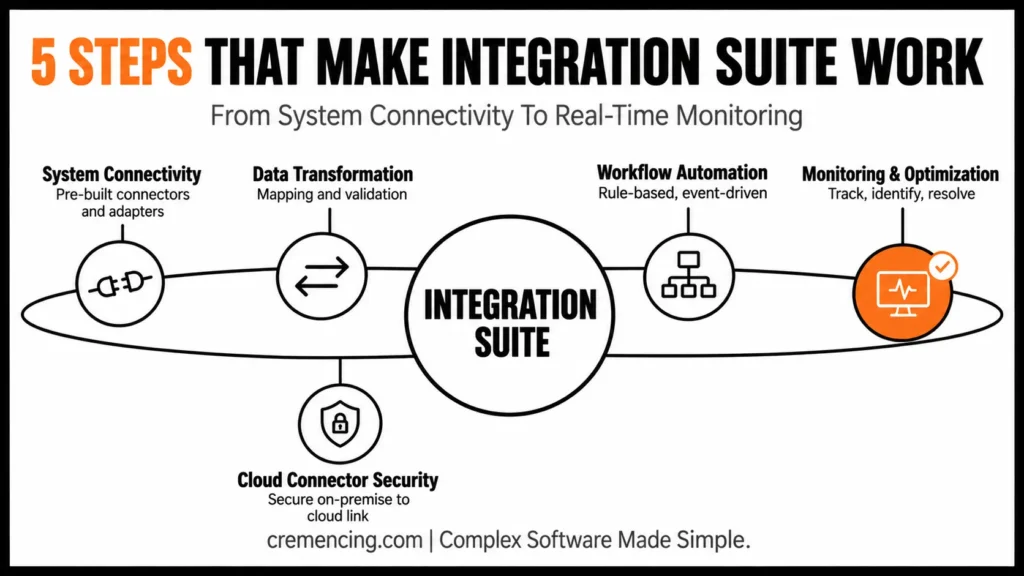
Step 1: System Connectivity
Integrating Your Ecosystem: ERP, CRM, and Other Applications
The SAP Integration Suite is equipped with pre-built connectors, and the adapter has predefined integration flows that make it easier to connect without requiring any complex coding.
That saves a ton of setup time and avoids discrepancies between systems.
Step 2: Transformation and Mapping of Data:
Hence, Data Formats vary from one system to another. It provides a platform to standardize and convert data for use.
This includes:
- Mapping data fields across systems
- Validating incoming data
- Converting formats for seamless processing
This step ensures data accuracy and prevents integration errors by verifying and validating incoming data.
Step 3: Workflow Automation
Integration is more than remote access to data – it is about enabling processes.
The platform enables:
- Rule-based workflows
- Event-driven processing
- Automated decision-making
This reduces manual intervention, which enhances your integration with SAP Cloud Platform Integration Suite.
Step 4: Activate Your Secure Connectivity With Cloud Connector
The SAP integration suite cloud connector provides secure communication from on-premise to cloud systems.
It provides:
- Secure data transfer
- Controlled access to backend systems
- Compliance with security standards
This is crucial for organizations dealing with all business-critical data.
Step 5: Monitoring and Optimisation
This platform provides real-time monitoring tools that allow organizations to:
- Track integration performance
- Identify bottlenecks
- Resolve issues quickly
It enables rapid and efficient integration processes.
Benefits And ROI Of SAP Cloud Integration Platform Suite
The organizations that adopt the SAP Integration Suite create significant efficiencies and performance improvements.
Operational Benefits
- 40–60% faster integration processing
- Reduced system complexity
- Improved workflow automation
- Better data consistency across systems
Financial Impact
- Lower integration maintenance costs
- Less need for various integration tools
- Reduction in implementation time leading to cost savings
Strategic Value
- Scalable integration architecture
- Its gap-free visibility across processes and data in real-time
- Improved agility for business changes
For teams moving toward asynchronous SAP architectures, our SAP Event Mesh tutorial provides a practical look at event-driven integration with S/4HANA and SAP BTP.
Don’t Overlook Mistakes and Best Practices
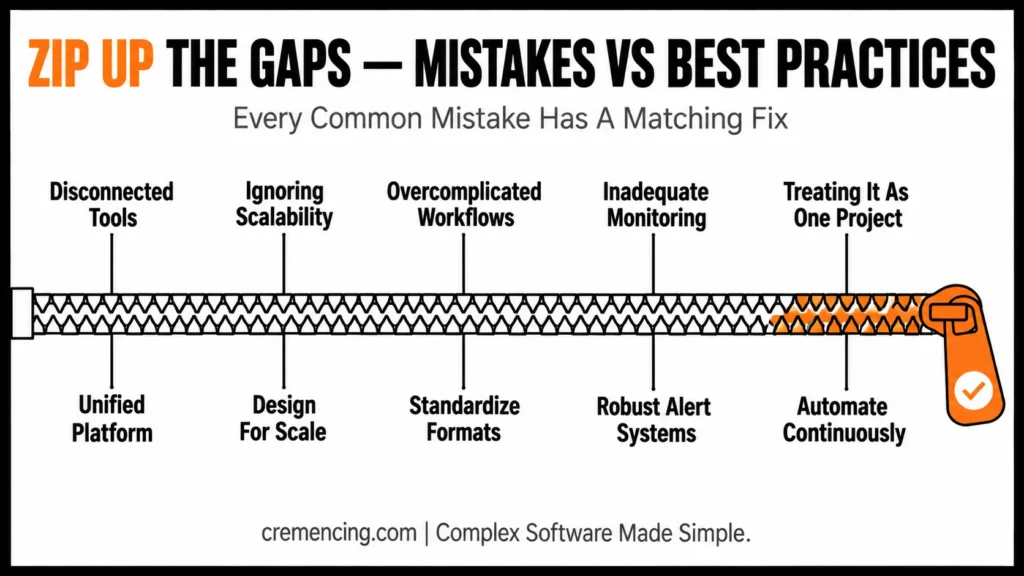
Common Mistakes
- Using multiple disconnected integration tools
- Ignoring scalability during system design
- Overcomplicating integration workflows
- Inadequate monitoring and governance
- Treating integration as a project with a start and an end
Such errors lead to complexity and hummocky system performance.
Best Practices
- Domain unified with cloud platform integration suite
- Design integration architecture for scalability
- Standardize data formats across systems
- Establish robust monitoring and alert systems
- Automate more and manual processes less
This enables you to increase structure for future efficiency and reliability.
Commonly Failing Integration Strategies
However, the majority of this content describes integration but does not answer why integration fails at scale. In reality, connectivity is not the real problem; instead, it is complexity management that becomes the greater challenge.
What Is Often Missed
- That way it is not a waste of time designing integration that you need now
- Performance on high volumes of data is seldom discussed
- Event-driven integration is often ignored
- Security and governance are not built in
| Integration requirement | SAP Integration Suite capability | Primary architectural role |
|---|---|---|
| Application-to-application/process integration | Cloud Integration | Integration flows, routing, transformation and message processing |
| API exposure and governance | API Management | Secure, publish, govern and monitor APIs |
| Event-driven architecture | Event Mesh / Advanced Event Mesh | Asynchronous event distribution and event streaming |
| Third-party application connectivity | Open Connectors | Standardized connectivity to supported third-party applications |
| B2B partner integration | Integration Advisor + Trading Partner Management | Partner mappings, agreements and B2B processes |
| Hybrid access to on-premise systems | Cloud Connector | Controlled connectivity between BTP and selected on-premise resources |
| Runtime troubleshooting | Monitoring + Message Processing Logs | Detect, investigate and analyse integration failures |
The Real Advantage
SAP Cloud Integration Platform Suite is unique — because it brings together:
- Centralized integration management
- Scalable architecture
- Built-in security and monitoring
This enables organizations to manage complexity without sacrificing performance.
Conclusion
Complex integration is not solved by adding more connectors. It is solved by giving different integration requirements the right architectural mechanism.
SAP Integration Suite provides that broader architecture by bringing together Cloud Integration for application and process integration, API Management for governed API exposure, event capabilities for asynchronous architectures, Open Connectors for supported third-party connectivity, B2B capabilities for partner scenarios, and Cloud Connector for controlled access to on-premise resources.
In practice, the practical advantage appears when an enterprise landscape starts expanding. Instead of creating another isolated point-to-point interface for every new requirement, teams can first decide whether the requirement is an integration flow, API, event, partner transaction, or hybrid connectivity problem. Then, they can select the appropriate capability based on that requirement. As a result, the integration architecture can remain more structured as new systems and connections are added.
That does not eliminate integration complexity. It gives architects a way to manage it deliberately. For SAP teams working across S/4HANA, cloud applications, legacy systems, third-party platforms, and partner networks, that distinction matters. The strongest integration architecture is not simply the one that connects the most systems. It is the one that remains observable, governed, secure, and maintainable as those connections continue to grow.
SAP Cloud Integration Platform Suite is a powerful solution for next-generation enterprises, as it provides integration in a simplified manner without compromising performance.
FAQ Section
What is SAP Cloud Platform Integration?
Its middleware solution integrates systems, automates workflows, and controls the exchange of information between applications.
What is the Cloud Platform Integration Suite?
Such a platform covers everything from application integration to data flow management.
What SAP integration suite cloud connector do?
It securely links on-premises systems to cloud-based applications and enables safe data transfer.
What is the difference between SAP Cloud Integration and SAP Integration Suite?
SAP Cloud Integration is a capability focused on application and process integration. In addition, SAP Integration Suite is the broader integration platform that brings together capabilities such as Cloud Integration, API Management, Event Mesh, Open Connectors, Integration Advisor, and Trading Partner Management.
Can SAP Integration Suite connect SAP and non-SAP systems?
Yes. SAP Integration Suite is designed to connect SAP and third-party applications across cloud, on-premises, and hybrid landscapes. SAP also provides prebuilt integration content and Open Connectors for supported third-party scenarios.
What role does Cloud Connector play in SAP Integration Suite?
Cloud Connector provides controlled connectivity between SAP BTP applications and selected resources in on-premises environments. It uses virtual system mappings and access-control configuration to determine which resources can be accessed from the cloud.
Does SAP Integration Suite support event-driven integration?
Yes. SAP Integration Suite supports event-driven integration capabilities. Furthermore, SAP Integration Suite’s Advanced Event Mesh is specifically designed for event streaming, event management, monitoring, and distributed event-driven architectures.
How does SAP Integration Suite help troubleshoot failed integrations?
Cloud Integration provides message monitoring and message processing logs that show message status and processing information. Furthermore, developers can use detailed Debug or trace logging when deeper runtime analysis is required, subject to the applicable environment and operational considerations.
Resources
SAP Cloud Platform Integration Overview
Why Cloud Integration is Essential for Businesses
.




