
Introduction
Every finance team eventually hits the same wall: the invoice process that worked fine at 100 invoices a month starts breaking down at 1,000, and by 10,000 it’s costing real money — in late payments, missed early-payment discounts, and hours spent chasing exceptions manually. This is exactly the problem SAP cloud integration is built to solve.
The company, not the finance team, never built its underlying system to scale. SAP cloud integration solves this by giving businesses a single, automated backbone that connects invoice capture, validation, routing, and ERP posting — so that growth in volume doesn’t mean a proportional growth in headcount, errors, or delay.
This post breaks down exactly how that scaling works, stage by stage, and what separates integrations that hold up under pressure from ones that quietly fail as volume climbs.
Event-Driven Invoice Scaling
Paragraph Scaling high-volume invoice processing within SAP Integration Suite requires transitioning from scheduled batch jobs to event-driven, decoupled integration patterns. Utilizing SAP Event Mesh alongside Cloud Integration allows incoming invoices from emails, vendor portals, or EDI channels to trigger asynchronous processing queues immediately upon arrival.
This event-based architecture prevents system latency and throughput bottlenecks under peak transaction loads by distributing workload execution evenly across runtime worker nodes.
While S/4HANA Cloud environments process these standardized payloads natively via RESTful or OData APIs, legacy ECC target landscapes typically interface through IDoc or BAPI constructs managed by Cloud Connector gateways. Implementing automated exception queues further preserves end-to-end processing velocity without manual intervention.
What Is SAP Cloud Integration
SAP Cloud Integration is a single platform that connects different applications and systems with ease, whether they’re cloud-based or on-premises. It automates one of the most important linking jobs of contemporary business architecture. As a result, keeping data moving between systems without any human interaction.
Key components include:
- SAP Cloud Integration Suite (CPI) to Achieve Application Connectivity
- By using SAP Cloud Integration for Data Services for all transformation and cleansing of data
- Business Process Orchestration- SAP Integration Platform
- SAP Gateway – for secure APIs to publish and consume
Together, these tools eliminate silos, minimize manual processing, and enable real-time data exchange. Fundamentally speaking, SAP cloud integration is designed to facilitate business processes regardless of system complexity or transaction volume (e.g., invoice approval).
SAP Cloud Integration: How does it scale?
Scaling invoice processing isn’t simply about processing more data. Ultimately, it’s about being able to sustain performance, accuracy, and controls even in a changing world as complexity mounts.
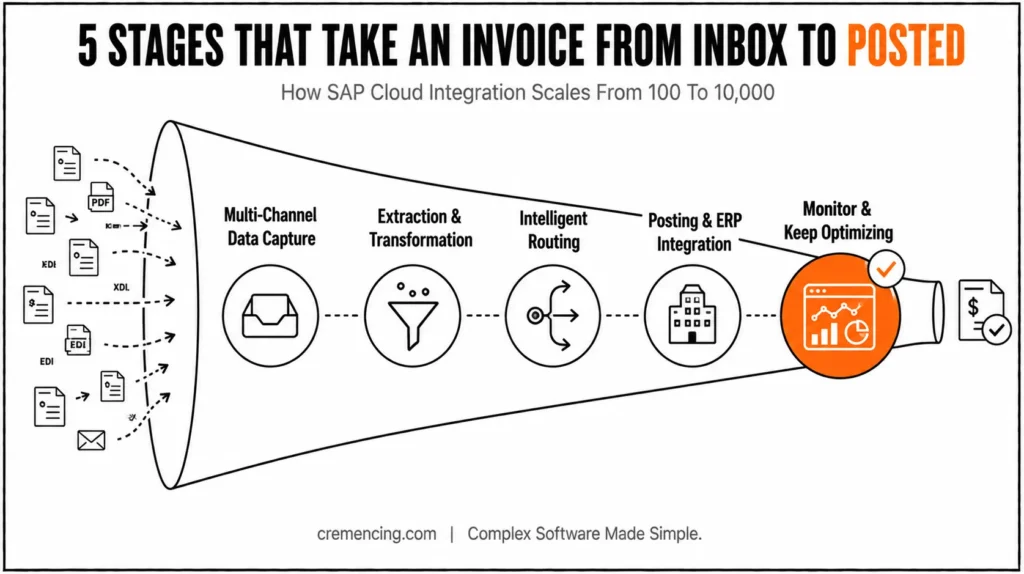
SAP Cloud Integration — 5-Step Invoice Flow at a Glance
- Capture — Email, vendor portal, EDI → auto-standardized
- Extract & Transform — Validated against rules, structured
- Route — By value, vendor, dept, exception type
- Post — Direct to SAP via Gateway/Integration Suite
- Monitor — Dashboards track time, bottlenecks, errors
Step 1: Multi-Channel Data Capture
Where invoices come from. This could be:
- Email attachments
- Vendor portals
- EDI systems
SAP cloud integration captures this data automatically and creates its standardization for processing. This eliminates manual entry and lessens lag time in stage one.
Step 2: Extraction and Transformation of Data
And to wrap it up, we need the formatted data: Raw Invoice Data
- Extracted from documents
- Validated against predefined rules
- Transformed into structured formats
It ensures consistency and accuracy at their proper condition before they start breaking through the workflow.
Stage 3: Intelligent Routing and Automation
Automation services dynamically route invoices based on:
- Invoice value
- Vendor category
- Department or cost center
- Exception types
This allows for parallel processing, thereby helping to reduce approval delays that are not possible in basic workflows.
Step 4 : Posting + ERP Integration
Approved invoices are then posted directly to SAP systems using SAP gateway and integration suite capabilities.
Key advantages:
- No manual data re-entry
- Real-time posting
- Full audit trail
So that no important financial data is skipped with this, and everything is kept.
Depending on the landscape, this posting step typically happens via OData APIs exposed through SAP Gateway, or through IDoc-based interfaces for older ECC-connected systems. [NEEDS SME VERIFICATION: confirm whether the target environment is S/4HANA Cloud (API-first, OData/REST) or on-prem/ECC (IDoc/BAPI-based)] — the integration pattern differs meaningfully between the two, and this should be stated explicitly rather than left generic.
Step 5: Monitor & Keep Optimizing
These insights can be offered by dashboards, analytics tools:
- Processing time
- Bottlenecks
- Error rates
This allows enterprises to continuously improve performance and maintain scalability with volume growth.
SAP Cloud Integration Benefits and ROI
Businesses that adopt SAP cloud integration at scale enjoy instant and quantifiable benefits.
Operational Improvements
- 50–70% reduction in processing time
- 30–60% savings in cost per invoice
- 80–90% touchless processing rates
Financial Impact
Bully time for the company — the faster you approve invoices, the sooner a vendor can get paid, so pay attention. Early payment discounts
- Less manual work translates to reduced operational expenses
- Improved accuracy minimizes costly errors
Strategic Advantages
- Real-time financial visibility
- Stronger compliance and audit readiness
- Scalability without increasing headcount
For finance leaders, utilizing these results translates into a clear and compelling ROI within the first months of implementation.
Common Mistakes and Best Practices for Scaling
Common Mistakes
Many organizations stumble in scaling for avoidable reasons:
- Over-engineering workflows with unnecessary complexity
- Ignoring data standardization across systems
- Delaying integration with ERP systems
- Relying on manual exception handling
These problems are often magnified as invoice volumes rise.
Best Practices
Moreover, to ensure successful scaling, when all else fails, return to the principles of software design.
Use SAP CPI for versatile and dependable integrations. However, utilizing the best solution approach will involve some kind of ETL work, in addition to which could be set out as follows: data quality issue, identify and deduplicate records, standardize column headings, fill in the blanks, standardize formats for all columns
- Implement real-time monitoring and alerts
- Minimize manual intervention through automation
They hold your hand throughout the process and ensure the overall health of integration. Furthermore
is maintained in the long run.
Why, when it comes to integrations, do they fail at scale
SAP Cloud Integration: The Solution You Only Learn About during Implementation (But Not Scalability).
The actual test comes with systems being tested at high transaction volumes.
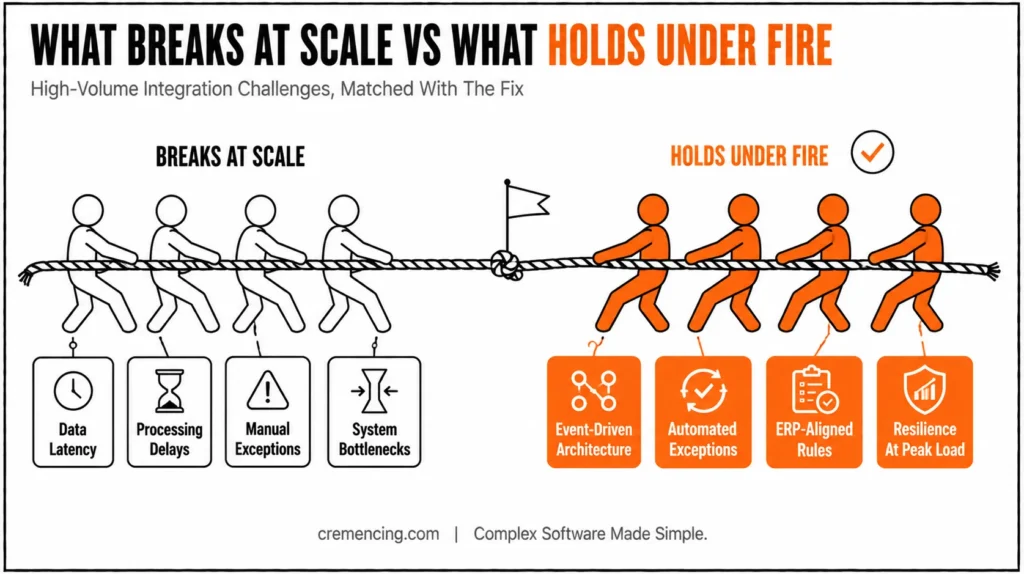
Key Scalability Challenges
- The volume of data creates latency.
- Workflow Impacts due to Processing Delays
- Manual exception handling becomes unmanageable
- System dependencies create bottlenecks
What High-Performing Systems Do Differently
- Event-driven architecture over batch processing
- Automate exception handling wherever possible
- Integrate in accordance with ERP rules
- Make your systems resilient under peak loads
This is where real scalability happens, not just by tying systems together but by building them to function under fire.
| Approach | Batch Processing | Event-Driven Processing |
|---|---|---|
| Processing trigger | Scheduled intervals | Real-time, on invoice arrival |
| Latency at scale | Increases with volume | Stays consistent |
| Exception handling | Delayed until batch runs | Immediate |
| Best fit | Low, predictable volume | High or variable volume (100→10,000) |
Conclusion
SAP cloud integration is more than just a product; it is a strategic capability that allows companies to scale their operations without sacrificing functionality.
Automation is scalable — From 100 invoices to 10000, the right integration framework provides consistency, speed, and accuracy in each stage of the workflow. Using tools like SAP CPI, data services, and automation services, we can remove the bottlenecks to set up a future-ready finance operation.
It’s no longer just a novelty; scalability has become a necessity. And the foundation to achieve it is SAP cloud integration.
Finding it hard to scale your invoice processing? SAP Integration gives you automation at the touch of a finger, avoiding delays and errors while processing high volume.
FAQ Section
1. What is SAP Cloud Integration used for?
Essentially, SAP Cloud Integration is used to connect different systems and automate business workflows. As a result, data flows seamlessly between applications without manual intervention. Consequently, businesses save time and reduce errors.
2. What is SAP CPI in cloud integration?
Basically, SAP CPI is the core tool that enables application connectivity within the integration suite. In addition, it helps automate processes such as data transformation and routing. Therefore, it plays a central role in scalable invoice processing.
3. Can SAP Cloud Integration handle 10,000 invoices?
Yes, indeed, it is specifically built to scale efficiently at high transaction volumes. Furthermore, it maintains performance and accuracy even as invoice numbers grow. So, businesses can rely on it during peak periods as well.
4. How does SAP integration improve invoice processing?
First of all, it eliminates repetitive manual tasks such as data entry. Additionally, it speeds up approvals through intelligent routing. As a result, data remains accurate and consistent across every stage of the workflow.
5. Is SAP Cloud Integration easy to adopt for automation?
Generally speaking, yes, because automation services are designed to replace manual work efficiently. Moreover, the setup process is streamlined to reduce implementation time. Hence, most businesses find adoption fairly straightforward.
6. What are the main benefits of SAP Cloud Integration at scale?
To begin with, it reduces processing time by 50 to 70 percent. Also, it lowers the cost per invoice significantly. Ultimately, it improves accuracy while enabling real-time financial visibility.
7. Why do integrations often fail at scale?
Typically, integrations fail because of poor data standardization across systems. In addition, manual exception handling becomes unmanageable as volume increases. Consequently, latency and bottlenecks start affecting the entire workflow.
8. What best practices help with scaling invoice processing?
First, businesses should use SAP CPI for dependable integrations. Then, they should implement real-time monitoring and alerts. Finally, minimizing manual intervention through automation ensures long-term stability.
9. How does SAP Cloud Integration support ERP systems?
Specifically, it uses SAP Gateway to post approved invoices directly into ERP systems. As a result, there is no need for manual re-entry of data. Meanwhile, a full audit trail is maintained for compliance purposes.
10. What is the ROI of implementing SAP Cloud Integration?
Overall, businesses experience measurable ROI within the first few months of implementation. For instance, faster approvals lead to early payment discounts from vendors. Moreover, reduced manual work results in lower operational expenses as well.




