
You test your RFC in SE37, and it works perfectly. Then the calling system tries it, and suddenly you get a no-authority error, a timeout, or nothing back at all. Across ECC 6.0 and SAP S/4HANA 2026, this remains a common production issue, and the function module is often not the culprit.
The real problem usually sits somewhere in the full RFC chain in SAP ABAP, from the SM59 destination and S_RFC authorization to the remote user, gateway, and error handling. This article shows you how to trace that chain, identify where the failure occurs, and fix the underlying issue instead of repeatedly testing the function module in SE37.
Building robust RFC integrations in SAP ABAP requires stepping away from standard local function module habits to account for network latency, remote transaction boundaries, and system stability. The ultimate takeaway is that efficient ABAP RFC development depends on vectorizing data calls to eliminate chatty network loops, explicitly catching system-level exceptions to prevent unexpected runtime dumps, and enforcing absolute parameter value-passing across memory boundaries. Modernizing these patterns by keeping business logic pure, managing transactional commits outside the remote interface, and shifting heavy extractions toward modern APIs or CDS architectures ensures clean, secure, and high-performing SAP integrations.
Why RFC in SAP ABAP Fails in Real Projects
Essentially, RFC means Remote Function Call. In SAP ABAP, a function module can be executed from another SAP system, an external system, or another technical component via an RFC destination. By comparison, a normal function module runs locally. For remote communication, an RFC function module must be marked as remote-enabled and expose a stable interface that another caller can trust.
Many developers think the job is finished after they tick “Remote-Enabled Module” in SE37. SE37 is the Function Builder transaction. It is used to create, test, and maintain function modules. But SE37 only proves that the function module can run locally or under a controlled test. It does not prove the remote user can call it, the SM59 destination is correct, the authorization is assigned, or that the caller handles failures correctly.
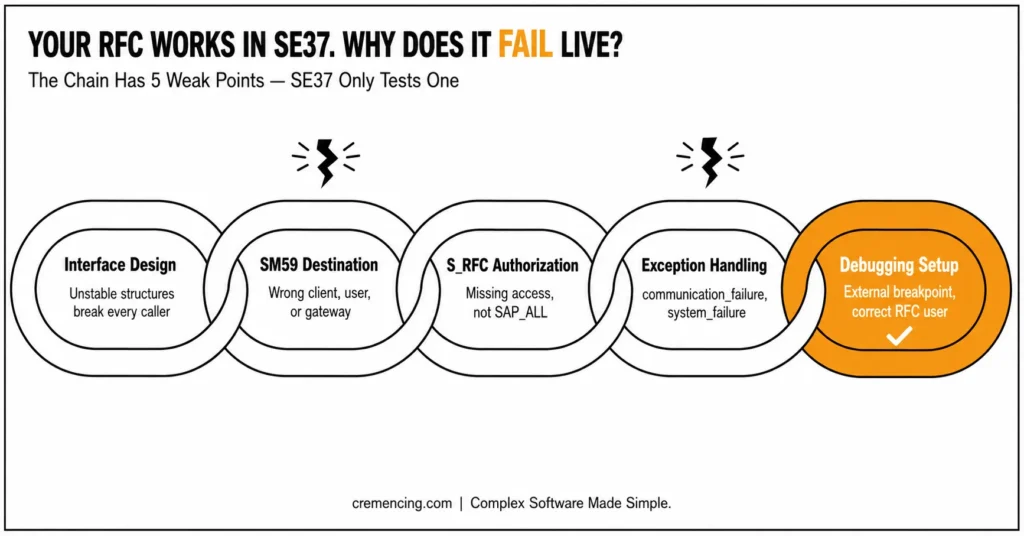
SM59 is the RFC destination transaction. It stores connection details such as target system, logon user, host, system number, gateway, and connection type. A wrong SM59 entry can break a correct RFC FM.
Most RFC issues come from five weak points: unstable interface design, missing S_RFC authorization, wrong RFC destination, missing exception handling, and poor debugging setup. Competitors often explain “how to create RFC in SAP ABAP,” but they skip the production chain that causes real tickets.
A good RFC interface in SAP ABAP should be boring and stable. Use DDIC-based structures, clear names, simple parameters, explicit messages, and no hidden UI logic. Do not surprise the caller with unexpected commits, direct table updates, or different output formats for the same input.
Step-by-Step Fix
Use this RFC in the SAP ABAP step-by-step flow when you create or repair an RFC. Do not start with code only. Start with interface design.
Step 1—Design the RFC interface first
Before you create the function module, define what the caller sends, what the RFC returns, and which errors are business errors versus technical errors. Use DDIC structures when the interface needs stable external use. Avoid local report types because remote callers cannot depend on them.
RFC Interface Example
- IV_KUNNR — Import — Customer number
- ET_ITEMS — Table — Open-item result list
- INVALID_CUSTOMER — Exception — Customer input is missing or invalid
- NO_DATA — Exception — No matching data found
This simple structure makes the RFC interface in SAP ABAP easier to explain, test, and support.
Step 2 — Create the RFC FM in SE37
Create the function module in SE37. SE37 is the function builder used to create and test function modules. Put the function module inside a function group, define import/export/table parameters, and set the processing type to Remote-Enabled Module.
Use a clear name such as Z_RFC_GET_CUSTOMER_ITEMS. Avoid vague names such as Z_GET_DATA because remote interfaces usually live for years.
FUNCTION z_rfc_get_customer_items.
*”*”Remote-enabled function module
*” IMPORTING
*” VALUE(iv_kunnr) TYPE kunnr
*” TABLES
*” et_items STRUCTURE zstr_rfc_customer_item
*” EXCEPTIONS
*” invalid_customer
*” no_data
IF iv_kunnr IS INITIAL.
RAISE invalid_customer. ” Caller sent missing customer number
ENDIF.
SELECT bukrs, kunnr, belnr, gjahr, wrbtr
FROM bsid
INTO CORRESPONDING FIELDS OF TABLE @et_items
WHERE kunnr = @iv_kunnr. ” Read open customer items for RFC response
IF et_items[] IS INITIAL.
RAISE no_data. ” Business exception when no matching items exist
ENDIF.
ENDFUNCTION.
This is a basic RFC in an SAP ABAP example. In a real project, use an approved DDIC structure such as ZSTR_RFC_CUSTOMER_ITEM, validate input more carefully, and avoid exposing unnecessary fields.
Step 3 — Create the RFC destination in SM59
Open SM59. SM59 creates and maintains RFC destinations in SAP. For SAP-to-SAP communication, the common destination type is ABAP Connection. Maintain the target system, client, user, password or trusted setup, language, host, system number, and logon settings according to Basis standards.
Next, test the connection in SM59 before blaming the ABAP code. Use the connection test to check technical reachability. Additionally, use the authorization test where available to verify whether the RFC user has the required access.
As a result, this testing forms the core of reliable RFC destination configuration in SAP ABAP. Moreover, a correct function module cannot run remotely if the destination points to the wrong client, wrong user, locked user, expired password, missing gateway, or unreachable host.
Step 4 — Call the RFC FM from ABAP
Use CALL FUNCTION … DESTINATION from the calling system. Always handle communication and system failures. Do not treat RFC like a local function module.
REPORT z_call_customer_rfc.

PARAMETERS: p_dest  TYPE rfcdest OBLIGATORY,

p_kunnr TYPE kunnr OBLIGATORY.

TYPES: BEGIN OF ty_item,

         bukrs TYPE bukrs,

         kunnr TYPE kunnr,

         belnr TYPE belnr_d,

         gjahr TYPE gjahr,

         wrbtr TYPE wrbtr,

       END OF ty_item.

DATA: lt_items TYPE STANDARD TABLE OF ty_item,

      lv_msg   TYPE string.

CALL FUNCTION 'Z_RFC_GET_CUSTOMER_ITEMS'

  DESTINATION p_dest

  EXPORTING

    iv_kunnr = p_kunnr

  TABLES

    et_items = lt_items

  EXCEPTIONS

    communication_failure = 1 MESSAGE lv_msg

    system_failure        = 2 MESSAGE lv_msg

    invalid_customer      = 3

    no_data               = 4

    OTHERS                = 5.

CASE sy-subrc.

  WHEN 0.

    WRITE: / 'RFC call successful:', lines( lt_items ). " Show number of returned items

  WHEN 1.

    WRITE: / 'Communication failure:', lv_msg. " Network, destination, or gateway issue

  WHEN 2.

    WRITE: / 'System failure:', lv_msg. " Dump or runtime error in target system

  WHEN 3.

    WRITE: / 'Invalid customer sent to RFC'. " Business validation failed

  WHEN 4.

    WRITE: / 'No data returned by RFC'. " Business no-data case

  WHEN OTHERS.

    WRITE: / 'Unknown RFC error'. " Catch unexpected return code

ENDCASE.
This code shows the minimum production habit: handle remote failures separately from business exceptions. If you ignore communication_failure and system_failure, your caller may show a generic dump instead of a useful support message.
Step 5 — Debug with the correct RFC user
RFC debugging in SAP ABAP fails when the developer sets a normal breakpoint for their own dialog user while the RFC runs under a technical user. Use an external breakpoint for the user that executes the RFC in the target system. Confirm the RFC user in SM59 or with the calling application owner.
If external debugging does not start, check user type, debugging authorization, target system client, and whether the breakpoint was set in the correct system. Also check whether the remote call reaches the target system at all. If the call fails before reaching ABAP, SM59 or network setup is the first suspect.
Step 6 — Choose the right RFC type
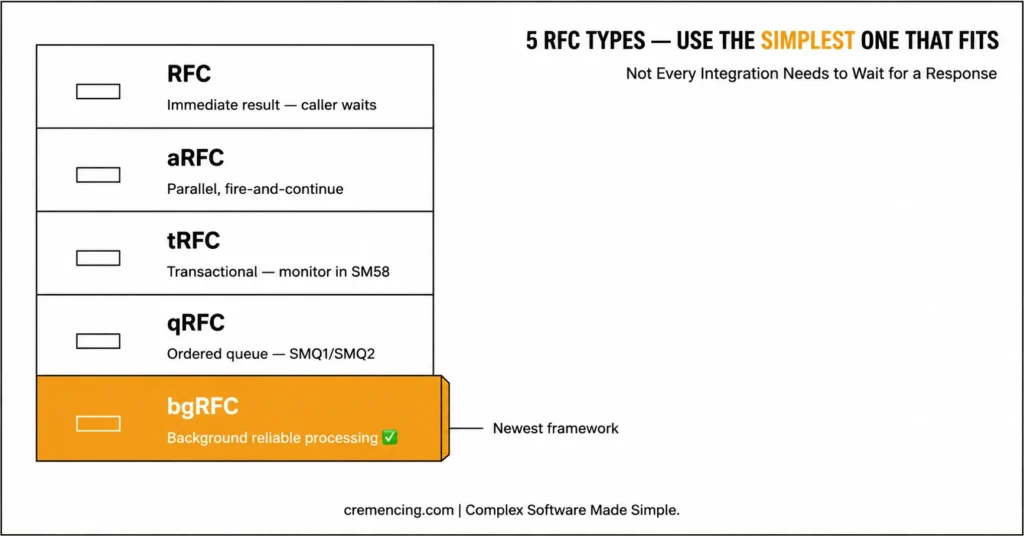
Not every RFC should be synchronous. Synchronous RFC waits for the result immediately. An asynchronous RFC starts remote work without waiting for a direct result. Transactional RFC supports reliable execution with transaction handling. Queued RFC adds sequence control. bgRFC is the newer background RFC framework used in relevant scenarios.
RFC Types at a Glance
- RFC — Immediate result required — Caller waits
- aRFC — Parallel or fire-and-continue processing — Result handling needs design
- tRFC — Transactional remote processing — Monitor in SM58
- qRFC — Ordered queue processing — Monitor in SMQ1/SMQ2
- bgRFC — Background reliable processing — Needs setup and monitoring
Use the simplest type that matches the business need. Do not use synchronous RFC for large background integration loads when the caller does not need an immediate result.
How to Verify the Fix
Verify the RFC fix through the whole chain, not only SE37.
Start with SE37. SE37 tests the function module directly in the target system. Confirm that the RFC FM works with normal input and returns clear output or business exceptions.
Then open SM59. SM59 tests the RFC destination. Run the connection and authorization tests. Confirm the target client, user, language, gateway, and system details.
Check S_RFC authorization for the RFC user. S_RFC controls whether the user can execute the target RFC function module or function group. Do not solve RFC_NO_AUTHORITY by giving broad access such as SAP_ALL. Assign the required authorization through the security team.
ST22 helps identify ABAP dumps in the target system. If the caller receivessystem_failure, check this transaction to determine whether a runtime error occurred during execution.
For system-level issues, SM21 provides relevant logs, particularly when the problem involves the gateway, logon, or another system component. Transactional RFC errors can be reviewed in SM58, while SMQ1 and SMQ2 help investigate outbound and inbound queued RFC issues. Finally, SM50 or SM66 can reveal active work processes when an RFC appears to hang.
For RFC debugging in SAP ABAP, set an external breakpoint in the target system for the RFC user. Then repeat the remote call from the caller. If the breakpoint does not stop, the call is either not reaching the target system or it runs under a different user.
Mistakes That Bring It Back
The first mistake is treating RFC like a local function call. A remote call can fail because of network, logon, authorization, target-system dump, timeout, gateway, or lock issues. Always code for remote exceptions.
The second mistake is building unstable interfaces. If you expose random internal structures, change field meanings without versioning, or return inconsistent messages, every caller becomes fragile.
The third mistake is ignoring authorization. S_RFC exists for a reason. Technical users should receive only the access they need, not broad developer-style roles. If you’re working with invoices, purchase orders, or delivery notes, learn how SmartForms in SAP ABAP transform SAP data into professional business documents.
The fourth mistake is using RFC for every integration. RFC is still useful, but S/4HANA projects may use BAPI, IDoc, OData, SOAP, events, APIs, CDS, or RAP services depending on the architecture. RFC is not automatically the right answer.
The fifth mistake is creating chatty RFC designs. Calling the remote system inside a loop can create hundreds or thousands of network round trips. Bundle data and reduce calls when possible.
Conclusion
RFC in SAP ABAP is not fixed by simply marking a function module as remote-enabled. That setting makes the function module callable from outside the local system, but reliable remote communication also requires a stable interface, correct SM59 configuration, proper S_RFC authorization, clear exception handling, and a practical debugging plan.
Treat RFC as an integration contract rather than a quick function call. The remote caller depends on your parameter design, return messages, exception behaviour, and data consistency. Therefore, define the interface before coding, use DDIC structures where possible, keep parameter names clear, and avoid exposing unnecessary internal fields.
In production, RFC issues can originate anywhere in the communication chain. The SM59 destination may point to the wrong client, the RFC user may be locked, authorization may be missing, the target system may dump, or the caller may ignore communication_failure and system_failure. Testing only in SE37 is therefore not enough.
For ECC systems, RFC remains common in legacy integrations, custom reports, BAPIs, middleware calls, and background processing. S/4HANA projects can also use APIs, OData, SOAP services, IDocs, events, or RAP-based designs where appropriate. The right choice depends on the business process, data volume, timing requirements, security needs, and long-term support model.
A reliable RFC workflow starts with careful interface design, destination testing, proper exception handling, verified authorization, and documented debugging steps. Following this approach makes production incidents easier to track, explain, and resolve.
Frequently Asked Questions
1. What is RFC in SAP ABAP used for?
RFC in SAP ABAP refers to Remote Function Call. It enables you to run a function module remotely in another SAP system or external environment via an RFC interface. Some of the answer points that should be mentioned in a good answer are remote-enabled function modules, SM59 destinations, authorization, and error handling.
2. How to create an RFC in SAP ABAP?
To create an RFC, create a function module in SE37, assign the module to a function group, define the parameters of the function module as stable, and specify “Remote-Enabled Module” as the processing type. Test it locally and call it remotely via an RFC destination.
3. What is an RFC destination in SAP ABAP?
The target system information, such as connection details, is stored in an RFC destination in SAP ABAP. It is kept in SM59. Contains technical connection information, logon information, and information about the target client, target user, and target system for remote calls.
4. Which RFC tcode in SAP ABAP is most important?
The most important RFC tcode in SAP ABAP is SM59 for RFC destinations. SE37 is used for function modules, ST22 for dumps, SM58 for transactional RFC, SMQ1 and SMQ2 for queued RFC, and SM21 for system logs.
5. What is the difference between normal FM and RFC FM in SAP ABAP?
A normal function module runs locally, while an RFC FM in SAP ABAP can be called remotely. The RFC FM must be marked as remote-enabled and should use stable interface parameters suitable for remote communication.





2 Responses