
ABAP ALV Reports Interview questions test more than a candidate’s ability to define ALV. A candidate who can define ALV but can’t explain why a column isn’t displaying, or what happens when i_callback_program is missing, doesn’t just lose points on one question; they signal to the interviewer that they’ve never actually maintained an ALV report in a live system. That’s the gap this list is built to close.
ALV questions are rarely testing whether you know the acronym. They’re testing whether you’ve been in a support ticket where a field catalogue entry was misspelled and a column silently disappeared, or a design review where someone had to justify CL-SALV-TABLE over classic function modules for a new read-only report. Interviewers ask basic-to-practical questions in sequence specifically to find where a candidate’s knowledge stops being real.
ALV still shows up constantly in ECC support work and SAP S/4HANA on-premise projects – for SAP GUI reporting, reconciliation output, audit extracts, and operational analysis, which is exactly why it keeps appearing in interviews at every experience level. What follows are the questions that actually separate textbook answers from project-ready ones, with the code and reasoning behind each.
ABAP ALV Technical Focus Areas
Technical evaluations for SAP ABAP developer roles involving ABAP List Viewer (ALV) prioritize architectural mastery across traditional and modern frameworks over simple syntax memorization. Candidates are routinely tested on handling interactive events such as CALL BACK user commands and optimizing performance for high-volume datasets using memory-efficient structures.
Evaluators heavily emphasize the architectural trade-offs between standard function modules (REUSE_ALV_GRID_DISPLAY), Object-Oriented ALV (CL_GUI_ALV_GRID), and the newer SALV object model (CL_SALV_TABLE). In SAP S/4HANA environments, candidates must also demonstrate how push-down data processing using CDS views and the ALV Object Model on HANA minimizes application-layer overhead. Mastering field catalog configuration, dynamic layout manipulation, and event handling forms the core criteria for technical selection.
What Are ABAP ALV Reports Interview Questions All About?
The key to success in SAP ABAP ALV report interview questions is that they assess reporting output along with a project-ready design. The interviewer is not only looking for the full name of ALV. They are looking to see if you have the ability to build, explain, fix, and improve SAP ALV reports in the workplace.
This is the short form of ABAP List Viewer or SAP List Viewer. It presents the data from an internal table in a conventional SAP style, including sorting and filtering, totals and subtotals, saving the layout, exporting, and printing. Unlike a traditional WRITE report, ALV provides greater control of the report output to the business user.
Most candidates answer only at the definition level. A better answer explains the report flow: selection screen, data selection, internal table, field catalogue or SALV columns, layout, display call, and optional events. That answer sounds like someone who has actually built ALV reports, not someone who copied notes.
The interview usually moves from basic to practical. First, they ask what ALV is. Then they ask why we use ALV. After that, they ask about field catalogue, layout variants, events, user commands, editable ALV, and object-oriented ALV.
For S/4HANA roles, expect modern ALV questions too. Classic function modules still exist in many ECC and migrated systems, but CL_SALV_TABLE is common for clean read-only reports. If you can compare classic ALV and OO ALV clearly, your answer becomes stronger.
How ABAP ALV Reports Work
An ALV report starts like any other ABAP report: the selection screen collects input, the database logic fills an internal table, and the output layer displays the result. The difference is that ALV displays the internal table through a standard reporting framework instead of printing lines manually with WRITE.
Classic ALV function modules use structures such as field catalogue, layout, events, and output table. The field catalogue defines how each column should appear. It can control field name, column text, key fields, output length, editability, icons, hotspots, totals, and hidden columns.
SLIS is a classic type pool used in older ALV function-module reports. You will see types like slis_t_fieldcat_alv, slis_fieldcat_alv, and slis_layout_alv in many ECC reports. These are still common in support projects, so do not ignore them during interview preparation.
OO ALV works differently.
OO ALV in ABAP ALV Reports
CL_SALV_TABLE creates a display object from an internal table. The class can infer columns from the table structure, and you can change functions, columns, layout, and display settings using methods. Explore BDC questions frequently paired with ALV topics.
CL_GUI_ALV_GRID gives more control than CL_SALV_TABLE. It supports editable grids, custom containers, toolbar handling, and more event work. The tradeoff is more setup and more testing.
| Interview Topic | What You Should Say |
| ALV full form | ABAP List Viewer or SAP List Viewer |
| Why ALV | Sorting, filtering, totals, export, layout, business usability |
| Field catalog | Column control for classic ALV |
| Layout | Report display behavior such as zebra pattern and column width |
| Variant | Saved user layout |
| Events | User interaction such as double-click or user command |
| Classic ALV | Function modules such as REUSE_ALV_GRID_DISPLAY |
| OO ALV | Classes such as CL_SALV_TABLE |
| Editable ALV | Use carefully with validation, locks, and authorization checks |
ABAP ALV Development Tools
SE38 is the ABAP Editor transaction used to create and run executable programs. SE80 is the Object Navigator for programs, classes, function groups, and screens. ADT is ABAP Development Tools in Eclipse, common in newer ABAP and S/4HANA projects. If you’re new to ALV reporting, first learn how to create interactive reports with this comprehensive ABAP Report ALV tutorial before attempting advanced interview questions.
Practical ABAP ALV Reports Interview Questions
The best way to answer ALV interview questions is to connect the concept with a small code example. You do not need to write a full production report in an interview, but you should explain the basic flow confidently.
1. What is ALV in SAP ABAP?
ALV is a standard SAP reporting display framework used to show internal table data with user-friendly functions. It helps users sort, filter, total, export, and save layouts. In interviews, add that ALV reduces custom UI coding for report output.
2. Why do we use ALV instead of classical reports?
We use ALV because classical reports show fixed line output, while ALV gives interactive reporting features. Users can change layout, filter records, sort columns, export to Excel, and calculate totals. This makes ABAP ALV reports more useful for business reporting.
3. What is field catalog in ALV?
The field catalog in ALV defines the column behaviour and display properties. It maps output fields to column headings, lengths, key columns, totals, icons, hotspots, and edit settings. In classic ALV, a wrong field catalogue is one of the most common reasons columns do not display correctly.
TYPE-POOLS slis. ” Provides classic ALV field catalogue types
DATA lt_fieldcat TYPE slis_t_fieldcat_alv. ” Table for ALV column definitions
DATA ls_fieldcat TYPE slis_fieldcat_alv. ” Work area for one column definition
CLEAR ls_fieldcat.
ls_fieldcat-fieldname = ‘MATNR’. ” Field must exist in output internal table
ls_fieldcat-seltext_m = ‘Material’. ” Medium column heading shown in ALV
ls_fieldcat-key = abap_true. ” Mark material as key column
APPEND ls_fieldcat TO lt_fieldcat. ” Add column definition to catalogue
4. What is SLIS in ALV?
SLIS is a type pool used in classic ALV reports. It contains types for field catalog, layout, events, and list headers. If your project has older ECC reports, you will often see TYPE-POOLS slis at the top of the program.
5. What are common ALV function modules?
Common classic ALV function modules include
- REUSE_ALV_LIST_DISPLAY
- REUSE_ALV_GRID_DISPLAY
- REUSE_ALV_FIELDCATALOG_MERGE
- REUSE_ALV_COMMENTARY_WRITE.
The most common interview answer should mention that REUSE_ALV_GRID_DISPLAY displays output in grid format.
CALL FUNCTION ‘REUSE_ALV_GRID_DISPLAY’
EXPORTING
it_fieldcat = lt_fieldcat ” Pass field catalogue to ALV
TABLES
t_outtab = lt_output ” Pass output internal table
EXCEPTIONS
program_error = 1
OTHERS = 2.
IF sy-subrc <> 0.
MESSAGE ‘ALV display failed’ TYPE ‘E’. “Handle ALV call failure
ENDIF.
6. What is the difference between REUSE_ALV_LIST_DISPLAY and REUSE_ALV_GRID_DISPLAY?
REUSE_ALV_LIST_DISPLAY displays output in list format. REUSE_ALV_GRID_DISPLAY displays output in grid format with better interactive behaviour. In most practical interviews, a grid display is more common for business-friendly tabular reporting.
7. What is a layout in ALV?
Layout controls general display behaviour of the ALV output. It can handle zebra display, column width optimization, totals behaviour, and other display settings. In classic ALV, layout often uses slis_layout_alv.
DATA ls_layout TYPE slis_layout_alv. ” Classic ALV layout structure
ls_layout-zebra = abap_true. ” Display alternate row shading
ls_layout-colwidth_optimize = abap_true. ” Optimize column width automatically
8. What are ALV variants?
ALV variants are saved layouts. Users can save column order, hidden fields, filters, sorting, and display settings. In interviews, explain that variants reduce repeated manual formatting for business users.
9. What are ALV events?
ALV events are trigger points that react to user actions or display phases. Common examples include top-of-page, user command, double-click, and hotspot click. Events make ALV reports interactive.
10. How do you handle double-clicks in ALV?
You handle double-clicks through ALV event handling. In classic ALV, you can use callback routines. In OO ALV or grid control, you use event handler methods depending on the ALV class.
11. What is USER_COMMAND in ALV?
USER_COMMAND handles actions triggered by the user, such as pressing a custom button, clicking a function, or selecting a row. A strong answer should mention that you read the selected row and then perform navigation or processing.
12. What is REUSE_ALV_COMMENTARY_WRITE?
REUSE_ALV_COMMENTARY_WRITE writes header or commentary information in classic ALV. It is often used to display report title, selection details, company code, date, or summary information above the ALV output.
13. What is OO ALV?
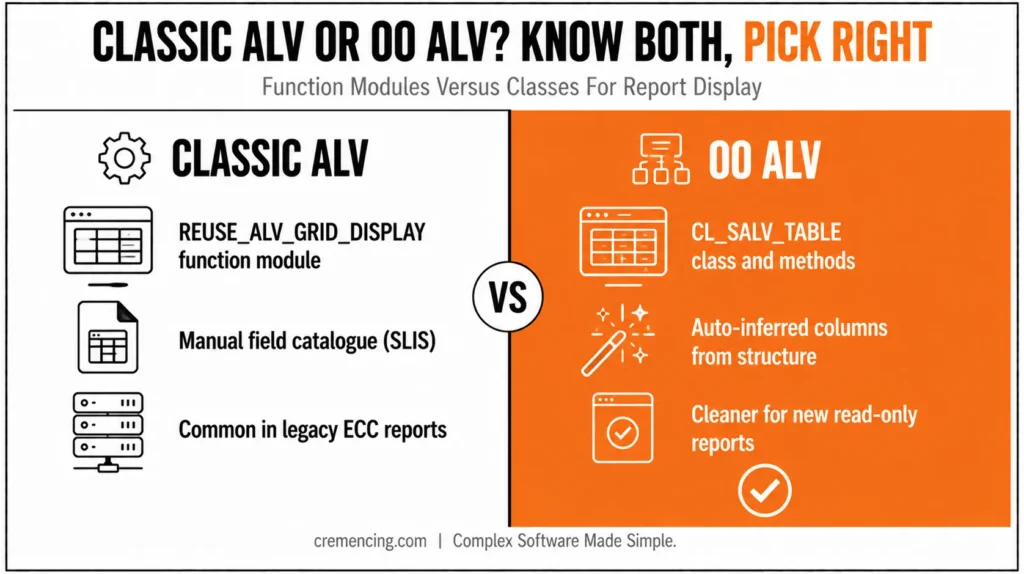
OO ALV means object-oriented ALV reporting using classes instead of classic function modules. The common class for simple read-only table display is CL_SALV_TABLE. It gives a cleaner approach for many new display-focused reports.
DATA lo_alv TYPE REF TO cl_salv_table. ” SALV display object
DATA lt_output TYPE STANDARD TABLE OF mara. ” Demo output table
SELECT *
FROM mara
INTO TABLE @lt_output
UP TO 20 ROWS. ” Demo selection for interview example
cl_salv_table=>factory(
IMPORTING
r_salv_table = lo_alv
CHANGING
t_table = lt_output ). ” Create ALV object for internal table
lo_alv->display( ). ” Display OO ALV output
14. What is CL_SALV_TABLE?
CL_SALV_TABLE is an ALV object model class used to display simple two-dimensional tables. It is useful when the report is read-only and does not need complex editable grid behaviour. For many modern reports, it is easier to explain and maintain than classic ALV function modules.
15. What is the difference between classic ALV and OO ALV?
Classic ALV uses function modules and manual structures like field catalogues and layouts. OO ALV uses classes and methods, such as CL_SALV_TABLE, to create and control the display. In S/4HANA interviews, say OO ALV is cleaner for new read-only reports, while classic ALV is common in legacy ECC support.
16. How do you make ALV editable?
Editable ALV usually uses CL_GUI_ALV_GRID or classic grid settings depending on the design. You must set columns as editable and handle changed data. A senior answer must include validation, locking, authorization checks, and database update control.
17. What precautions are needed for editable ALV?
Editable ALV needs stronger controls than display ALV. Check user authorization, validate changed values, lock records before update, handle errors, and commit only after successful checks. Never update standard SAP data directly from ALV without proper business logic.
18. What is the difference between a classical report and an ALV report?
A classical report displays fixed output using statements like WRITE. An ALV report displays the data using the ALV framework with sorting, filtering, totals, export, and layout options. The interviewer expects you to explain user benefits, not only technical syntax.
19. What are simple, block, and hierarchical ALV reports?
Simple ALV displays one internal table. Block ALV displays multiple lists or blocks. Hierarchical ALV displays parent-child data, such as sales order header and item details. In interviews, give a business example to show understanding.
20. How do you optimize ALV column width?
In classic ALV, use layout settings such as column width optimization. In SALV, call column optimization methods on the column object. This helps users avoid manually resizing columns after every report run.
21. How do you hide a column in ALV?
In classic ALV, mark the field catalogue entry as hidden or technical depending on the requirement. In SALV, get the column object and set visibility. A common use case is hiding technical keys while keeping them available for navigation logic.
22. How do you add a hotspot or icon in ALV?
Hotspots and icons depend on the ALV approach. In classic ALV, field catalogue settings control hotspot or icon behaviour. In OO/grid ALV, you configure column properties and handle the corresponding click event.
23. Your ALV is not showing a column. What will you check?
Check whether the field exists in the output internal table, the field catalogue field name matches exactly, the column is not hidden, and the SELECT fills the field. Also check spelling, uppercase field names, and whether SALV inferred the structure correctly.
24. How will you improve a slow ALV report?
Start with the SELECT, not the ALV display. Avoid SELECT *, add proper WHERE conditions, reduce output volume, avoid SELECT inside LOOP, and trace with ST05. ALV performance issues often come from poor data selection before display.
25. When should you use ALV vs CDS or Fiori?
Use ALV for SAP GUI reports, support tools, audit extracts, and operational lists. Use CDS, analytical apps, or Fiori when the requirement needs a modern UI, reusable data models, analytics, or a role-based app experience. In S/4HANA, explain both options.
When to Use ABAP ALV Reports vs. Alternatives
Interviewers often ask comparison questions because they reveal project judgment. You should not say “ALV is always better.” You should explain when each reporting option fits.
| Requirement | Best Answer |
| Quick technical output | Classical report can be enough |
| Business list with sort/filter/export | ALV report is better |
| Read-only modern SAP GUI report | CL_SALV_TABLE is a clean choice |
| Legacy ECC report support | Classic ALV function modules may remain |
| Editable grid | CL_GUI_ALV_GRID with validation and locks |
| Analytical S/4HANA reporting | CDS views, Fiori, or analytical apps may fit better |
| Interview explanation | Compare user value, technical approach, and risk |
For a fresher answer, define ALV and list features. For a 3-year answer, explain the field catalogue, layout, variants, events, and function modules. Furthermore, for a senior answer, compare classic ALV, OO ALV, editable ALV, performance checks, and S/4HANA reporting alternatives. Preparing for more than just ALV? See 15 proven SAP interview questions every fresher must fearlessly crack.
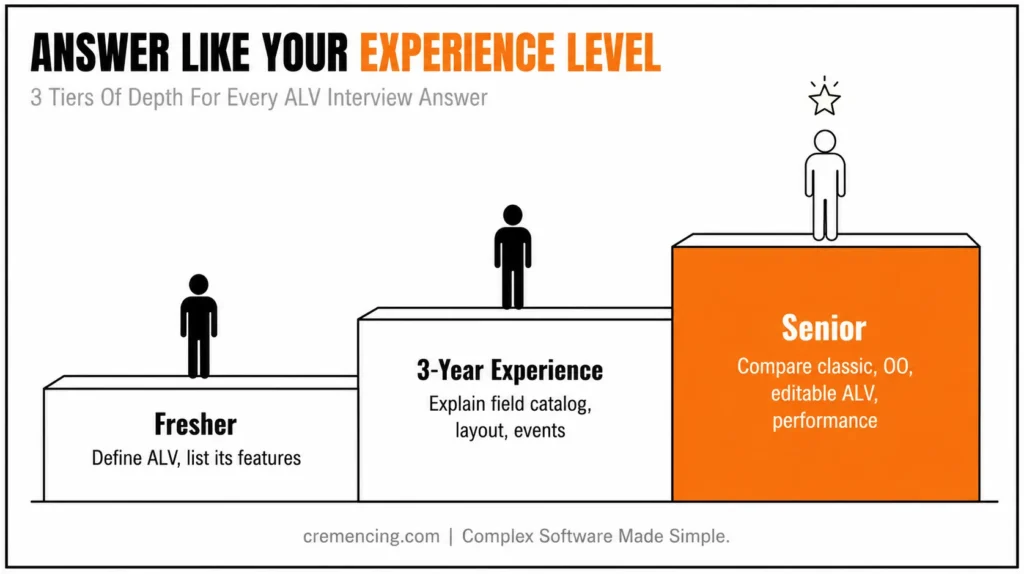
The best way to answer SAP ABAP ALV reports interview questions is to show levels. Start with the direct answer, give one practical project point, then mention a risk or best practice. That makes the answer sound real.
Conclusion
Interview questions with answers on SAP ABAP ALV reports are not limited to definitions. They check the ability to describe the reporting options, the field catalogue, layout, variants, events, classic ALV, OO ALV, editable ALV and reporting alternatives in S/4HANA. A good candidate should demonstrate knowledge of ALV reporting syntax and its practical business use.
Develop answers similar to a project developer: direct answer, then practical use, then risk or best practice. When the interviewer asks about editable ALV, if that is the case, don’t simply reply that it allows users to modify the values in the grid. Additionally, clarify that before editable ALV can be used in production, it must be validated, checked for authorisation, locked, handled for change in the data, and have correct database update logic.
The same approach applies to field catalogues, events, variants, and OO ALV. A beginner may define these terms, but an experienced ABAP developer should explain where they are used in real reports. Field catalogue controls the output columns, variants help users save preferred layouts, events make ALV interactive, and CL_SALV_TABLE gives a cleaner object-oriented option for read-only reports.
The best way to stand out is to connect every answer with a real SAP reporting scenario. Explain how you would build the ALV, what you would check if a column is missing, how you would handle double-click navigation, and what safeguards you would apply before making an ALV editable. That style helps you sound ready for real SAP work, not just memorized interview notes.
ABAP ALV Reports Interview Questions FAQs
1. What is the most asked ALV interview question?
The most asked ALV interview question is usually “What is ALV in SAP ABAP?” Answer directly: ALV means ABAP List Viewer or SAP List Viewer, used to display report output with sorting, filtering, totals, export, and layouts.
2. What are the main SAP ABAP ALV reports interview questions?
The main SAP ABAP ALV reports interview questions cover ALV meaning, field catalog, layout, variants, function modules, events, editable ALV, OO ALV, and classical report vs ALV report. Prepare answers with short project examples.
3. Is the field catalogue mandatory in ALV?
The field catalogue is important in classic ALV when you need to control column behaviour. Some ALV approaches can build it automatically, but interviewers expect you to know how the field catalogue in ALV controls headings, length, editability, keys, icons, and visibility.
4. What is the difference between an ALV list and an ALV grid?
ALV list is closer to list-style output, while the ALV grid gives a more interactive tabular display. In most ABAP ALV reports, grid output is preferred when users need sorting, filtering, column adjustment, and export-friendly display.
5. What is the use of CL_SALV_TABLE?
CL_SALV_TABLE displays internal table data using object-oriented ALV. It is a good choice for read-only reports where you need a clean ALV display without manually building a full classic field catalog.
6. How do you answer editable ALV interview questions?
Answer editable ALV questions by mentioning both technique and control. Say editable ALV can use grid control, but production use needs validation, locking, authorization checks, changed-data handling, update logic, and error messages before saving.
7. Are ALV reports still used in S/4HANA?
Yes, ALV reports are still used in S/4HANA for SAP GUI reports, support lists, internal tools, and operational reporting. However, interview answers should mention that CDS, Fiori, and analytical apps may be better for modern reporting requirements.
8. How do I prepare ALV interview answers for 3 years of experience?
For 3 years of experience, prepare direct answers plus one real project point. Cover field catalogue, layout, variants, events, function modules, CL_SALV_TABLE, editable ALV risks, and performance basics. Do not stop at definitions.
- What’s the difference between the field catalogue and a layout in ALV?
The field catalogue controls column-level behavior (names, headings, key fields, editability); the layout controls overall display behavior (zebra striping, column width optimization, totals). Interviewers often test whether candidates confuse the two.
- Can you convert a classic ALV report to OO ALV without rewriting the whole program?
Often yes for read-only reports if the output is a simple internal table display, CL_SALV_TABLE can frequently replace REUSE_ALV_GRID_DISPLAY with minimal changes to the surrounding selection and data-retrieval logic; editable or event-heavy classic ALV reports require more rework.




