
An unplanned SAP outage can reveal the same problem: the monitoring dashboard stayed green throughout the disruption. SAP Cloud ALM monitoring blind spots rarely announce themselves. They hide inside configuration gaps that look complete on the surface: a health check reports success, an integration scope lacks critical systems, or an alert fires without a recipient assigned to it.
For SAP architects and Basis teams running SAP S/4HANA Cloud, SAP BTP, or hybrid ECC-to-cloud landscapes, these gaps determine whether teams catch a problem within minutes or a business user discovers it hours later. This article examines where these blind spots form, why standard configuration can miss them, and how to close each one.
Why SAP Cloud ALM Monitoring Blind Spots Happen
SAP Cloud ALM was designed to replace fragmented, tool-heavy monitoring approaches with a single application lifecycle management platform. It brings health monitoring, integration and exception monitoring, job automation monitoring, and business process monitoring into one place.
That consolidation helps teams manage their landscapes, but it also creates a specific risk. Teams often treat the initial setup as complete after activating the standard use cases. They may not validate whether the configured scope covers the full technical and business landscape.
Most SAP Cloud ALM monitoring blind spots trace back to one of three root causes.
First, scope drift: Teams configured monitoring correctly at go-live but never updated it as they added new interfaces, jobs, or applications to the landscape.
Second, default thresholds: SAP Cloud ALM ships with generic alerting parameters, and teams often leave those defaults unchanged instead of tuning them to actual transaction volumes and business calendars.
Third, ownership drift: Teams often configure alert routing around project structures that disappear when the system moves into steady-state support. Without updated ownership, alerts can reach the wrong people or nobody at all.
Each of these root causes produces a different type of gap, which is why a single checklist approach to SAP Cloud ALM monitoring rarely closes all of them. The sections below work through nine specific areas where this happens in production landscapes, along with the configuration checks that catch them before they become incidents.
Solution: Closing the Nine SAP Cloud ALM Monitoring Blind Spots
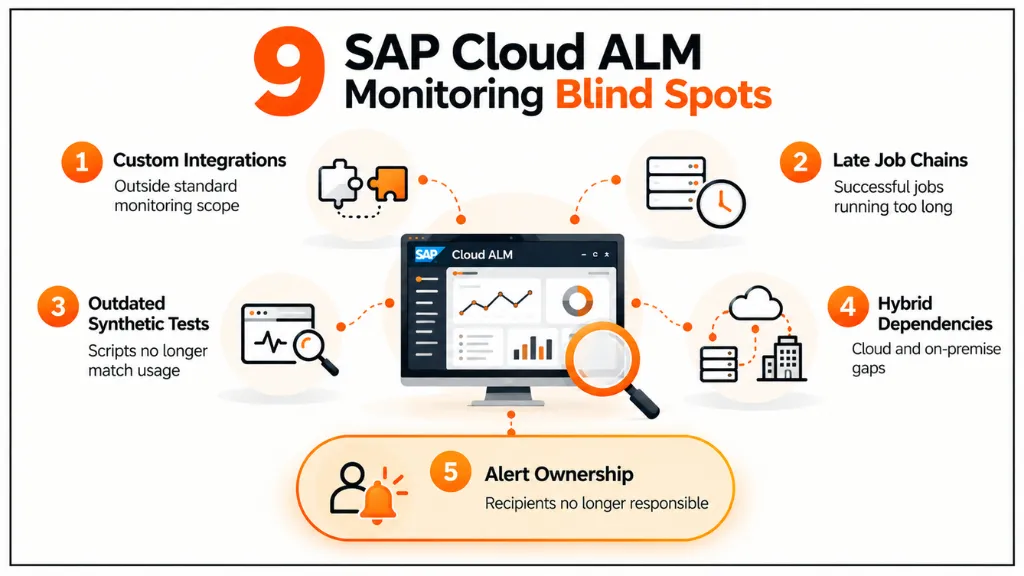
1. Custom Integrations Outside the Standard Monitoring Scope
SAP Cloud ALM’s Integration & Exception Monitoring application covers standard SAP interface technologies. These include IDocs, SAP Integration Suite flows, and Application Interface Framework (AIF) messages used in SAP S/4HANA Cloud. Once teams register the relevant systems as managed components, SAP Cloud ALM can discover these interfaces automatically.
However, SAP Cloud ALM does not automatically detect custom interfaces that use third-party middleware, non-SAP iPaaS platforms, or point-to-point APIs outside SAP Integration Suite. Teams must register these services and configure the relevant monitoring use case.
Teams often skip this step during phased rollouts. Integration teams focus on making each interface work. They postpone monitoring registration as a follow-up task. That task may never reach the priority list.
As a result, the dashboard can look complete while showing only registered interfaces. These interfaces may all show a healthy status. Unregistered interfaces remain outside the monitoring scope. They also do not appear in the list of interfaces marked as “not monitored.”
Implementation check:
Maintain a master integration inventory outside of SAP Cloud ALM in a landscape documentation tool or a simple tracked spreadsheet and reconcile it quarterly against the services actually registered in the Integration & Exception Monitoring configuration panel. Monitoring gaps often overlap with broader SAP Cloud ALM readiness gaps.
2. Job Chains That Finish Late Instead of Failing
Job and Automation Monitoring in SAP Cloud ALM detects failed background jobs across SAP S/4HANA, SAP BTP job scheduling services, and connected systems. It performs this function reliably.
However, SAP Cloud ALM does not catch every timing-related problem by default. A job can complete successfully but run far longer than its normal execution window. This creates a blind spot in job chains.
For example, a delayed predecessor can push every downstream job behind schedule. None of those jobs may report a failure. This pattern often occurs during finance close cycles, intercompany reconciliation, or nightly data replication.
The problem becomes more serious when job chains have hard business deadlines. Period-end closing steps that feed regulatory reporting are one example. A job can finish two hours late and still show a successful status. SAP Cloud ALM may generate no alert, even though the delay causes a downstream reconciliation step to miss its cutoff.
Implementation check: Configure duration-based thresholds for business-critical job chains in Job and Automation Monitoring. Use these thresholds alongside completion-status alerts. This setup can warn teams when a job exceeds its expected runtime, even if the job eventually succeeds.
3. Synthetic Transactions That No Longer Reflect Real User Behaviour
Real User and Synthetic Monitoring in SAP Cloud ALM validates specific transaction paths and Fiori applications to confirm that they remain accessible and perform as expected. Teams typically build synthetic scripts once during implementation or early hypercare, based on the business processes they document at that time.
However, business processes evolve. Teams add new approval steps, replace Fiori apps with updated versions, and adopt different navigation paths. If teams do not update the synthetic scripts, those scripts continue testing transaction paths that no longer reflect how users actually work in the system.
When teams fail to update a synthetic script, it continues testing an outdated transaction path instead of the process users follow today. The script may still report a passing status even when the current process fails. This gives teams false confidence when they rely on synthetic checks to detect problems before users encounter them.
Implementation check:
Review synthetic transaction scripts against current business process documentation on a fixed cadence at minimum after any Fiori app version upgrade or business process change, rather than only when a user complaint prompts a review.
4. Dependency Gaps Between On-Premise and Cloud Components
Hybrid SAP landscapes can create an easy-to-miss monitoring boundary. This setup often connects SAP S/4HANA Cloud or SAP BTP applications to on-premises ECC systems through SAP Cloud Connector or SAP Process Integration/Process Orchestration (PI/PO).
SAP Cloud ALM can monitor cloud-side components comprehensively. However, teams must explicitly onboard and register on-premise systems as managed components. Older ECC systems may remain partly outside the SAP Cloud ALM landscape model, especially when teams have not fully integrated them into the monitoring setup.
This gap creates an operational risk. An interface can fail on the on-premise side without triggering an alert in the monitoring environment that the operations team watches. An RFC destination can become unavailable. A PI/PO adapter can also fail. Each failure can degrade a cloud-facing application while the cloud side continues to appear healthy.
Teams may then investigate the cloud application as the source of the problem. The actual root cause may sit on an on-premises system outside the full monitoring scope. For custom code and system health, an SAP clean core dashboard shows what monitoring alone can miss.
Implementation check:
Build a complete dependency map covering both cloud and on-premises legs of every business-critical interface, and confirm the on-premises components are represented in health and exception monitoring, not only in basic infrastructure availability checks.
5. Authorization and Destination Failures Misclassified as Application Bugs
An SAP BTP or SAP S/4HANA Cloud application can be correctly built and configured at go-live, and still fail weeks later because a destination configuration was modified, a service key was rotated, or an authorization role assignment changed during a routine security review. These failures typically surface in Exception Monitoring as generic HTTP error codes rather than as clearly labeled configuration issues.
Support teams frequently triage generic HTTP errors as application defects, which routes the issue to a development team rather than to whoever owns destination configuration or authorization management. This misclassification delays resolution and, in landscapes with strict change management processes, can trigger an unnecessary code investigation before anyone checks the actual configuration change log.
Implementation check:
Where SAP Cloud ALM’s exception categorization allows it, tag alerts by likely root-cause type configuration versus application logic so authorization and destination-related failures route to the correct owner from the first alert rather than after an extended triage cycle.
6. Alert Fatigue From Untuned Default Thresholds
The default alerting thresholds in SAP Cloud ALM Health Monitoring and Exception Monitoring are calibrated for general use, not for a specific organization’s production transaction volume. Applied directly to a high-volume production landscape, these defaults frequently generate a continuous stream of low-severity notifications for conditions that are within normal operating variance for that specific system.
The predictable response is that support teams mute notification channels or start ignoring entire alert categories, since distinguishing a genuine issue from routine noise takes more effort than the alert volume justifies. This response also suppresses the legitimate business-critical alert that happens to arrive in the same channel, which defeats the purpose of having alerting configured in the first place.
Implementation check:
Monitor production traffic over a representative period, then tune thresholds for each application and interface based on the patterns you observe. Route business-critical alerts through a dedicated notification channel so routine noise does not bury them.
7. No Visibility Into Whether the Business Process Actually Completed
Technical monitoring in SAP Cloud ALM health checks, integration status, job completion confirms that a service responded or a job finished. None of that confirms that a business process reached its intended outcome. A sales order interface can report a fully healthy technical status in Integration & Exception Monitoring while individual orders fail validation rules further downstream and accumulate in a blocked document queue, since a business validation failure does not necessarily generate a technical exception.
This is precisely the gap that SAP Cloud ALM’s Business Process Monitoring capability is designed to close, but it requires deliberate configuration against specific process key performance indicators rather than relying on the technical monitoring use cases alone.
Implementation check: Configure Business Process Monitoring against measurable process KPIs relevant to the business order backlog volume, blocked document counts, failed posting rates rather than treating technical uptime as a proxy for process health.
8. Unmonitored Test and Quality Systems Feeding Go-Live Decisions
Monitoring scope in most SAP Cloud ALM implementations concentrates on production systems, with quality assurance and integration test environments treated as lower priority or left out of the monitoring configuration entirely. This becomes a risk specifically when UAT or integration test results from those systems directly inform a go-live or release decision. A failure in a quality system — an interface breaking during pre-release testing, for example — that goes undetected because the system sits outside monitoring scope can mask a defect that then ships into production.
Implementation check: Extend at least basic health and job monitoring coverage to any non-production system that materially informs a release decision. Thresholds can be looser than production, but the system should not be entirely outside monitored scope. Access risks are a blind spot of their own, so check whether your system is enforcing segregation of duties.
9. Alert Ownership Gaps After Team or Support Model Transitions
An alert can fire exactly as configured and still accomplish nothing operationally if no one owns the response. This gap often appears in the months after go-live. The project implementation team disbands, support responsibility moves to a steady-state operations team, but no one updates the SAP Cloud ALM notification recipient list to match the new structure. The alert fires, SAP Cloud ALM sends the notification successfully, and the message lands in an inbox that the support team no longer monitors.
Implementation check: Audit alert routing and recipient assignments in SAP Cloud ALM’s Notification Management on a recurring schedule, not only during initial setup, and specifically after any support model transition, team reorganization, or managed services handover.
Validation and Best Practices
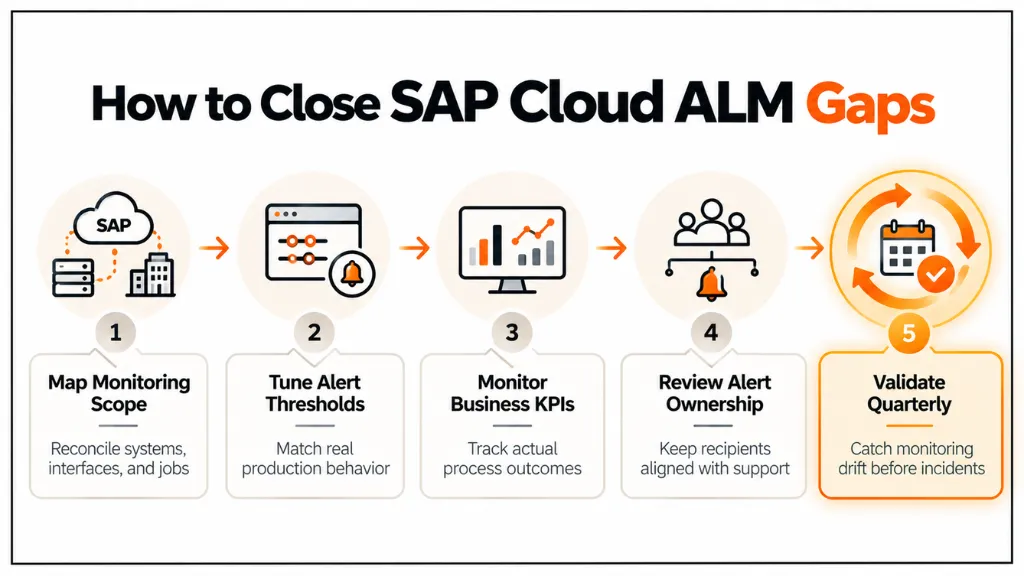
Closing SAP Cloud ALM monitoring blind spots requires ongoing attention, not a one-time project. Each of the nine areas above depends on landscape conditions that change continuously: teams build new interfaces, shift job schedules, redesign business processes, and change support teams. A quarterly validation cycle that reviews monitoring scope, alert thresholds, and ownership assignments helps teams catch drift before it causes an incident, rather than waiting for the next outage to expose missed gaps.
Teams should also validate monitoring coverage against actual incident history. When an existing alert fails to catch a past incident, that failure provides a direct signal of a gap in monitoring scope, threshold configuration, or ownership. Teams can then close that specific gap instead of spending the same effort on a broad audit of the entire monitoring configuration.
Common Mistakes Teams Make When Closing These Gaps
A frequent mistake is treating monitoring expansion as purely a configuration exercise handled by the Basis or platform team, without involving the business process owners who understand which KPIs actually indicate a failed process. Business Process Monitoring configured without that input tends to track metrics that are easy to measure rather than metrics that matter operationally.
Another common mistake is expanding alert scope without addressing threshold tuning at the same time. Adding more monitoring coverage without adjusting thresholds to actual production behavior simply produces more noise, which accelerates the alert fatigue problem rather than solving it. Teams also frequently underestimate how quickly ownership assignments go stale, treating the initial alert routing configuration as permanent rather than reviewing it on the same cadence as other operational documentation.
Conclusion
SAP Cloud ALM monitoring blind spots rarely result from platform limitations. Instead, teams create them when they configure monitoring for a specific point in time—usually go-live—and then stop revisiting it as the landscape, job schedules, and support teams change.
Teams add custom interfaces without registering them, synthetic scripts drift away from actual user behaviour, and support teams fail to update alert ownership after team transitions. Over time, these gaps leave parts of the landscape outside effective monitoring.
Treating SAP Cloud ALM configuration as something to audit on a recurring cycle, rather than a task completed once during implementation, is what keeps monitoring coverage aligned with the actual production landscape. Reviewing the nine areas covered in this article against your current configuration is a practical starting point for closing the gaps before they surface as an unplanned incident.
FAQs
What is the most common SAP Cloud ALM monitoring blind spot in hybrid landscapes?
Dependency gaps between on-premises and cloud components are the most common blind spot in hybrid landscapes. On-premise systems connected through Cloud Connector or PI/PO are often only partially onboarded, so a failure there can degrade a cloud application without triggering an alert.
Does SAP Cloud ALM automatically monitor custom-built integrations?
No. SAP Cloud ALM auto-discovers standard SAP interface technologies like IDocs and AIF messages, but custom integrations built through third-party middleware require manual registration in the Integration & Exception Monitoring configuration scope.
How often should SAP Cloud ALM monitoring configuration be reviewed?
A quarterly review cycle is a reasonable baseline for most production landscapes, with additional reviews triggered by major landscape changes, new interface go-lives, or support model transitions that affect alert ownership.
Can SAP Cloud ALM detect business process failures, not just technical errors?
Yes, through Business Process Monitoring, but only when it is explicitly configured against measurable process KPIs such as blocked documents or failed postings. Technical health monitoring alone does not confirm business process completion.
Why do default SAP Cloud ALM alert thresholds cause alert fatigue?
Default thresholds are calibrated for general use rather than a specific organization’s production transaction volume, which often generates excessive low-severity alerts that lead teams to mute entire notification channels.
Does SAP Cloud ALM cover non-production systems like QA or UAT?
Not by default in most configurations, since monitoring scope typically prioritizes production. Extending basic monitoring to non-production systems that inform go-live decisions helps prevent undetected defects from reaching production.
What causes alert ownership gaps in SAP Cloud ALM?
Alert ownership gaps typically emerge when project teams disband or support models transition to steady-state operations. Teams often fail to update the Notification Management recipient list to match the new support structure.
Is SAP Cloud ALM a replacement for SAP Focused Run in hybrid landscapes?
Not necessarily. SAP positions SAP Cloud ALM for cloud-centric monitoring and SAP Focused Run for high-volume, hybrid landscape monitoring with deeper on-premises coverage, so many hybrid customers run both depending on landscape complexity.
References
Integration & Exception Monitoring




2 Responses