

Introduction
The safest way to enhance a standard SAP Fiori app is to use the supported extensibility mechanism instead of modifying the SAP-delivered application.
For a simple UI change, key-user adaptation may be enough. For a developer-controlled app variant, an SAPUI5 Adaptation Project may be more appropriate. Custom fields and business logic can use SAP’s supported extensibility framework, while larger integrations or independent applications may belong on SAP BTP.
The important point is that there is no single extension method that works for every standard Fiori app. The correct approach depends on the app type, SAP S/4HANA release, deployment model, available extension points, and the kind of change you need to make. This guide shows how to make that decision without modifying the original SAP-delivered code.
What Does Enhancing a Standard SAP Fiori Application Mean?
A secondary benefit is enhancing the standard Fiori application, which basically means adding capabilities without changing any of the SAP-delivered code. This is done via SAP’s extensibility framework that keeps custom logic separate from the standard objects.
Extensibility comes in three types:
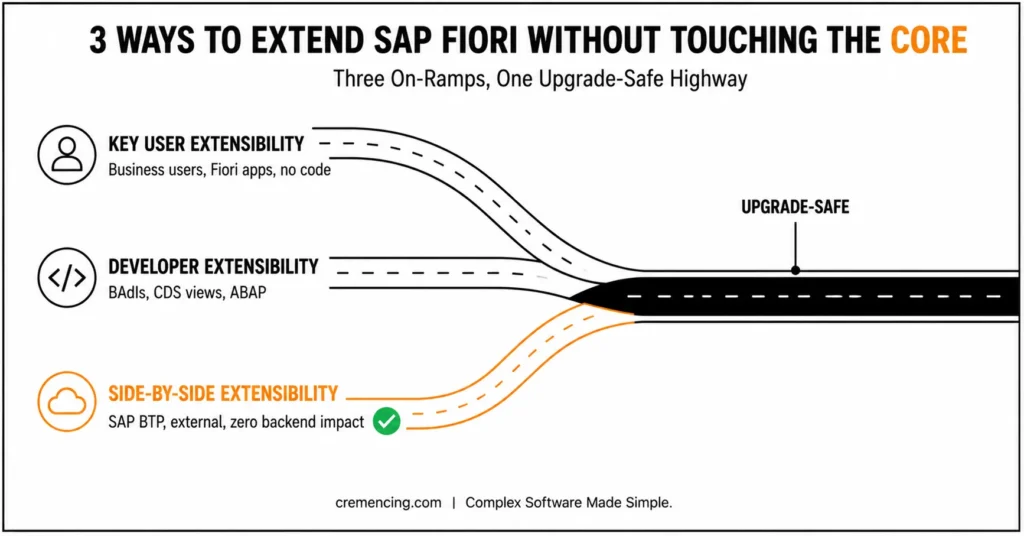
- Key user extensibility
- Allows Business users to create fields and screens with the help of Fiori apps
- Developer extensibility
- Enables developers to customize business logic via BAdIs, CDS views, and ABAP
- Side-by-side extensibility
- Builds external extensions using SAP BTP without affecting the core system
These approaches will keep your enhancements safe for an upgrade and maintain compatibility with the subsequent SAP releases.
Customize Standard SAP Fiori Application
Use this structured approach to safely extend a standard Fiori app.
Step 1 – Identify the Enhancement Requirement
Begin with a clear definition of what you need to improve.
- Do you need a new field?
- Do you require extra business logic?
- Do you need UI changes?
Knowing the prerequisite helps you to select the right extensibility model.
| Requirement | First option to evaluate |
|---|---|
| Hide, move, or change supported UI properties | Key-user UI adaptation |
| Add an available custom field | Custom Fields / key-user extensibility |
| Add business behavior at a supported extension point | Custom Logic / released BAdI |
| Extend an SAPUI5 app with developer-controlled UI logic | SAPUI5 Adaptation Project |
| Extend a supported CDS data model | CDS/entity extension |
| Integrate external applications or systems | Side-by-side extension on SAP BTP |
| Requirement not supported by the standard app | Evaluate a custom application |
Step 2 – Select Appropriate Extensibility Option
For an SAP S/4HANA implementation, check the SAP Fiori Apps Reference Library for the correct product/version and review the application’s implementation and extensibility information. SAP Community guidance also recommends checking the application’s extensibility documentation and technical details before selecting an extension approach.
For an adaptation project, SAP also requires the application to support the relevant adaptation scenario. Current SAP documentation supports SAPUI5 adaptation projects for supported SAP Fiori elements and freestyle applications in S/4HANA and SAP BTP environments.
Choose the method depending on your use case:
- For lightweight extensions, use Custom Fields and logic apps.
- Data model changes can be done utilizing CDS view extensions
- Use BAdIs for business logic
- For front-end changes, use UI adaptation tools
Picking an unsuitable method can create needless complications.
Step 3 – Use Fiori App to Define Custom Fields
In case your need is multiple fields:
- Open derived fields and logic app
- Select the correct business context
- Create and publish the field
- Enable it for UI and reports
The easiest way to improve standard apps.
Step 4 – Augment Data Model with CDS Views
For deeper enhancements:
- Use CDS view extensions
- Custom fields on the data model
- Activate and test the extension
CDS extensions mimic database views—data consistency across applications.
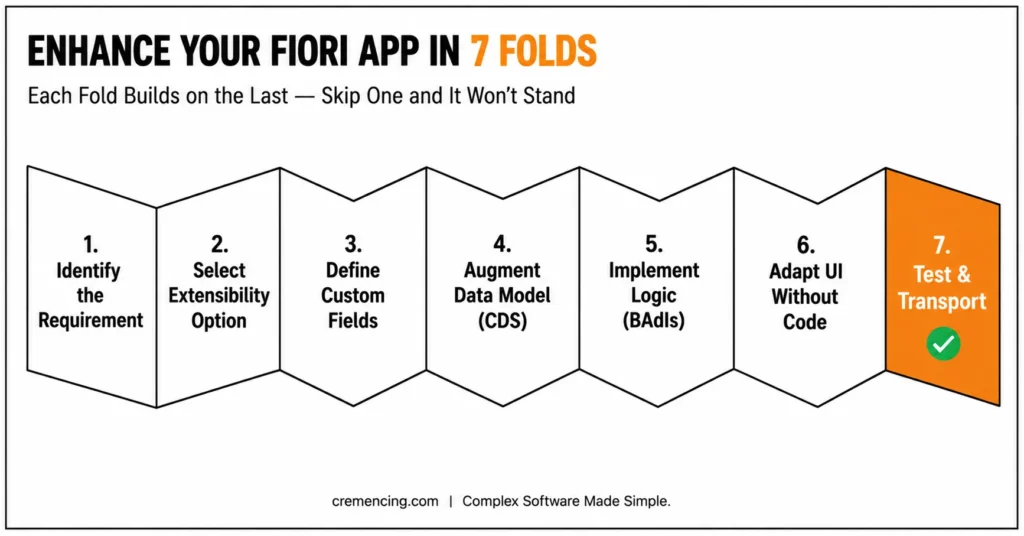
Step 5 – Implement Business Logic Using BAdIs
When logic changes are required:
- Identify relevant BAdI
- Implement custom logic
- Activate and test
That means you can change behavior without changing standard code.
Step 6 – Adapt your UI without Changing any Code
Use UI adaptation tools:
- Adapt UI at runtime
- Hide or rearrange fields
- Add custom fields to screens
It provides frontend flexibility without any backend modifications.
Step 7 – Test and Transfer Changes
After implementation:
- Test in the development system
- Assign transport request
- Break out moves to QA and production
Always validate after transport for continuity. Before extending an application, use the SAP Fiori Apps Library to verify its release, implementation information, technical components, and available extensibility options.
How to Enhance a Standard SAP Fiori App Without Modifying SAP Code
Enhancing standard Fiori applications using upgrade-safe methods brings some measurable benefits:
- 40–60% reduction in upgrade-related issues
- Faster implementation cycles
- Lower maintenance costs
- Improved system stability
- Reduced dependency on custom code
Adhering to SAP’s extensibility model, organizations eliminate expensive rework and guarantee long-term scalability. The SAP Fiori library and SAP Fiori app download process simplify the implementation of SAP solutions. It allows users to find, download, and customize SAP Fiori apps without complex coding, streamlining operations across the enterprise
Common Pitfalls and Recommendations
Common Mistakes
- Modifying standard SAP code directly
- Using an incorrect extensibility method
- Ignoring business context selection
- Skipping testing before transport
- Not documenting custom enhancements
Best Practices
- Always use SAP-recommended extensibility tools
- I said that the custom logic should be separated from the standard code.
- Test enhancements thoroughly in QA
- Document all changes clearly
- Follow naming conventions
These practices help reduce risks and ensure maintainability.
| Extension approach | Best for | Developer effort | Changes SAP-delivered app? | Main consideration |
|---|---|---|---|---|
| Key-user UI adaptation | Supported UI/layout changes | Low | No | Capability depends on app |
| Custom Fields | Customer-specific fields | Low–Medium | No | Correct business context required |
| Custom Logic / released BAdI | Supported business behavior | Medium | No | Required extension point must exist |
| SAPUI5 Adaptation Project | Developer-controlled UI/app variant changes | Medium–High | No | App must support adaptation |
| CDS/entity extension | Supported data-model extensions | High | No | CDS entity must be extensible |
| SAP BTP side-by-side | External integrations/independent apps | High | No | API, integration, identity, and architecture required |
| New custom Fiori app | Requirement exceeds standard extension points | High | No | Higher lifecycle and ownership cost |
Side-by-Side Extensibility
However, most guides only discuss the in-app extensibility part, while this is not always the optimal way.
In some scenarios, side-by-side extensibility via SAP BTP is more powerful:
- Complex or heavy logic
- When external system integrations are needed
- When performance impact needs to be reduced
- When you want to completely avoid backend changes
The extensibility model you choose plays an essential role in long-term architecture. If the standard application cannot satisfy the requirement through supported extension points, a custom Fiori application may be the better architectural choice. When you need to enhance a standard SAP Fiori app, first verify which extension options the specific application supports, then choose the least invasive approach.
Conclusion
Here’s the rewritten conclusion with more content and added transition words:
Ultimately, avoiding direct code changes is one of the most important principles in SAP Fiori development. By following SAP’s extensibility framework, you can easily extend any standard Fiori application without putting your system at risk. As a result, this approach keeps your enhancements steady, your upgrades safe, and your implementation aligned with SAP best practices.
Moreover, choosing the right method whether that’s custom fields, CDS extensions, BAdIs, or UI adaptation — helps you extend functionality while protecting system integrity. Each method serves a different purpose, so understanding when to use which one is just as important as knowing that the options exist.
In short, it’s essential to know how you can improve a standard Fiori application in SAP. After all, what’s the point of enhancing Fiori applications if it means disrupting stock functionality along the way?
That’s where expert guidance makes the difference. With the help of our SAP specialists, you can implement upgrade-safe enhancements suitable for your company’s specific needs. So, get started today — reach out to us and let’s build something that lasts.
FAQ Section
What can I do with standard Fiori app code?
It is not suggested because upgrades can overwrite your modifications.
Which approach is the best and safest way to extend a Fiori app?
SAP Custom Fields, CDS views, and BAdIs ≥ Use extensibility tools from SAP
How can we include a custom field in the Fiori app?
Use the custom fields and logic app, mapped to the appropriate business context.
Key Difference Between CDS and BAdI.
In contrast, BAdIs are used to add business logic, and CDS expands data models.
When to use SAP BTP for extensions?
Use on complex or external integrations if backend modifications are not ideal.
Can I extend a standard SAP Fiori app without changing SAP source code?
Yes. Depending on the application and release, SAP provides mechanisms such as key-user adaptation, custom fields and logic, SAPUI5 Adaptation Projects, and other documented extension points.
What is an SAPUI5 Adaptation Project?
An SAPUI5 Adaptation Project creates an application variant for a supported SAP Fiori elements or freestyle SAPUI5 application while keeping the original application unchanged.
Can I create an adaptation project in SAP Business Application Studio?
Yes. SAP Business Application Studio supports SAPUI5 Adaptation Projects for supported Fiori applications and deployment scenarios. Current SAP documentation also covers S/4HANA on-premise, cloud, and BTP environments.




