Introduction
S/4HANA Migration for CIOs is a critical transformation initiative that requires strong planning, budget control, and strategic decision-making. However, it is far more complex than most organizations realize, often resulting in data inconsistency, system downtime, and delayed outputs — all of which are hugely costly. Ultimately, the real culprit is data migration, and specifically, poorly managed data migration, which is responsible for the majority of failing SAP projects.
The challenge grows multifold when migrating from ECC to S/4HANA. Legacy data structures must be transformed, cleaned, and mapped to a well-built target model. Without an acceptable methodology, companies risk migrating stale or incorrect data into their new environment.
This guide breaks down SAP ECC to S/4HANA data migration in practical terms — a step-by-step approach to selecting the right tools and avoiding common pitfalls. Whether your migration is in the planning stage or already underway, this guide will help set you on the right path from the start.
SAP ECC to S/4HANA data migration is the process of migrating and transforming business data from a legacy SAP ECC system into S/4HANA — not a simple data transfer, but a structured conversion that aligns legacy data with the new system’s data model.
This isn’t a data transfer; it takes some conversion to happen in between:
- Data cleansing
- Data transformation
- Data validation
Structuring S/4HANA Migration Strategy
Migrating from SAP ECC to S/4HANA requires executive leaders to carefully align data governance with clear business outcomes before selecting technical execution models. Organizations must choose between greenfield new implementations, system conversions (brownfield), or selective data transitions based on legacy data quality and required functional changes
. Utilizing automated discovery tooling, such as the SAP Readiness Check, enables IT teams to identify custom code incompatibilities and essential Business Partner transformations early in the planning phase. Establishing comprehensive data profiling and automated cleansing routines before loading data into the SAP S/4HANA Migration Cockpit mitigates project risks, limits system downtime during cutover, and builds a defensible financial business case.
Why S/4HANA Migration for CIOs Matters
Getting S/4HANA Migration for CIOs right starts with understanding why data migration matters — it ensures the data being transferred to a new system is accurate and reliable, reducing the risk of errors and data loss. It also allows real-time analytics as it prepares data in an organized manner so that decisions can be taken without delaying much. Moreover, seamless data migration helps maintain business continuity by ensuring smooth operations and minimizing the disruptions your people face amid system transitions.
- Validates that the data in the new system is correct
- Enables real-time analytics
- Supports business continuity
Types of S/4HANA Migration Approaches for CIOs
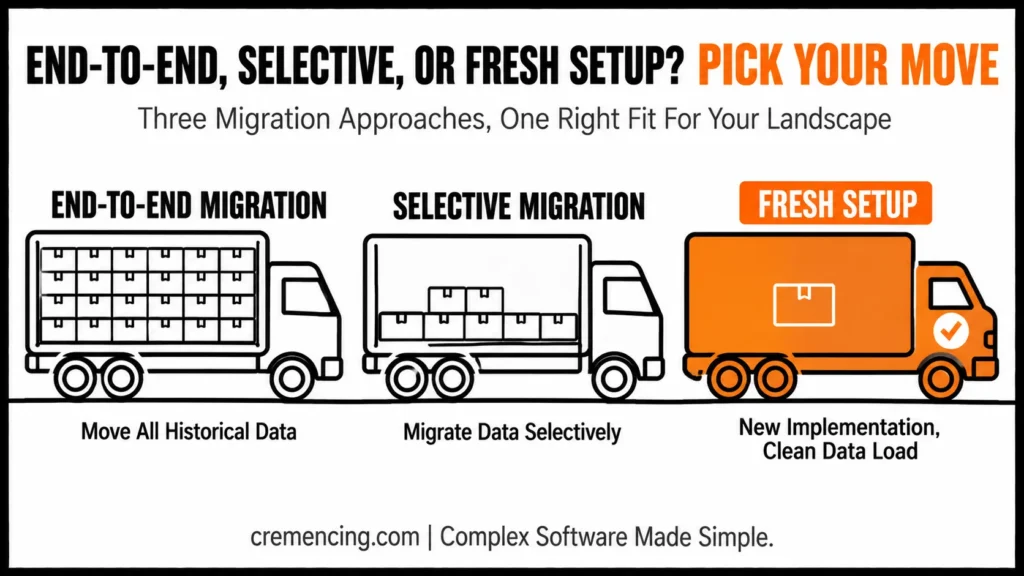
End-to-End Data migration — Move all historical data
Selective Migration: Migrate data selectively
Fresh Setup (New implementation): Data load
This will be based on the needs of the organization and how complicated the systems are.
S/4HANA Migration for CIOs: Process in Steps
Step 1 – Analyze Your Data Landscape
The first thing you have is with your data.
Identify:
- Data sources
- Data volume
- Data quality issues
It helps create what is known as the migration scope.
Step 2— Data Cleaning and Preparation
Data cleansing is essential.
Tasks include:
- Removing duplicates
- Archiving outdated data
- Standardizing formats
Clean data also provides us with improved post-migration performance when migrating a system.
Step 3: Select the Right Tools for S/4HANA Migration for CIOs
Getting the toolkit right is a core part of S/4HANA Migration for CIOs — the wrong choice here creates problems downstream.
Here are some of the SAP ECC to S4HANA migration tools:
SAP Migration Cockpit
SAP Data Services
LVM (Landscape Transformation)
Choose tools based on:
- Data complexity
- Project size
- Integration requirements
STEP 4 — Merging Data Structure for S/4 HANA
S/4HANA simplifies the data model,
You must:
- Map legacy data fields
- Adjust data structures
- Align business objects
This step enables interoperability with the new scheme.
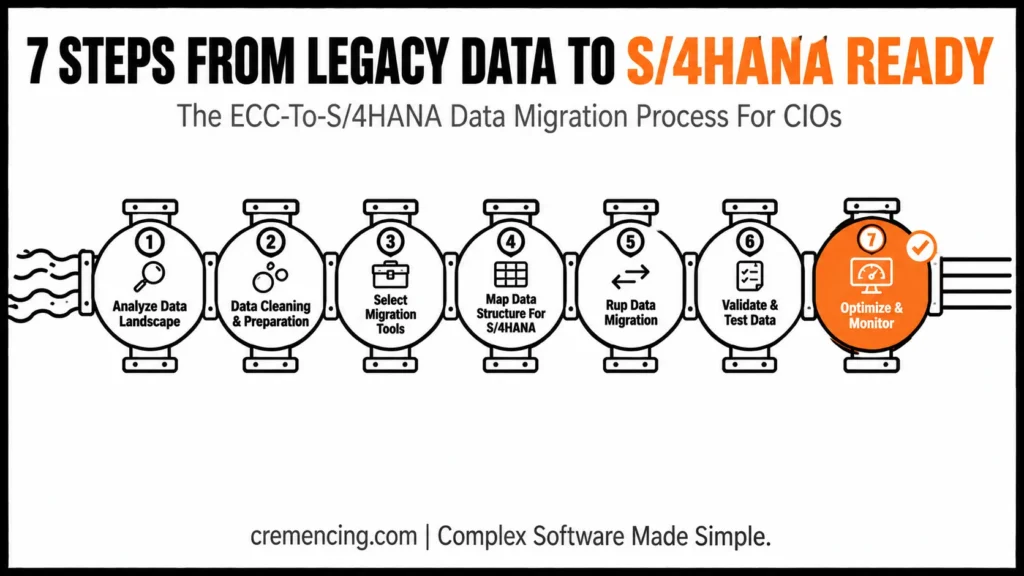
Step 5 — Data Migration
Run the migration process.
Key steps:
- Extract data from ECC
- Transform data
- Load data into S/4HANA
It is necessary to control this step; we will not save any data.
Step 6: Validate & Test Data
Testing ensures accuracy.
Focus on:
- Data completeness
- Data consistency
- Business process validation
Step 7: Optimization and Tracking
After migration:
Monitor system performance
Fix data issues
Optimize workflows
Continuous monitoring ensures long-term success.
It is not a gimmick that will render you money as the worth of their components, but rather for an effective SAP ECC to SAP S/4HANA information migration. For more insights, read our blog on SAP ECC to S/4 Hana Data migration
Benefits of S/4HANA Migration for CIOs
A well-executed S/4HANA Migration for CIOs delivers benefits across three areas:
Improved data accuracy
Faster processing speeds
Simplified data management
Financial ROI
Reduced data storage costs
Lower maintenance expenses
Faster reporting and analytics
Strategic Benefits
Better decision-making
Real-time insights
Future-ready data architecture
Organisations that prioritise data migration are able to enable business outcomes faster.
7-Step Migration Checklist
- Data landscape analyzed and migration scope defined
- Data cleansing completed before touching migration tools
- Tool selected based on complexity, budget, and timeline
- Legacy data mapped to the simplified S/4HANA model
- Migration executed under controlled, monitored conditions
- Multiple testing cycles completed with business validation
- Post-migration monitoring plan in place
Mistakes & Best Practices in S/4HANA Migration for CIOs
Even experienced teams get S/4HANA Migration for CIOs wrong in predictable ways:
Common Mistakes
Skipping data cleansing
Choosing the wrong migration tools
Underestimating data complexity
Lack of testing
Ignoring business validation
Best Practices
Start data preparation early
Make use of the SAP ECC to S4HANA migration tools that have been tested
Perform multiple testing cycles
Involve business users
Monitor data post-migration
| Tool | Best For | Key Consideration |
|---|---|---|
| SAP Migration Cockpit | Standard, SAP-guided migration objects | Easiest for smaller/simpler scopes |
| SAP Data Services | Complex transformations, large data volumes | Requires more setup/expertise |
| SAP Landscape Transformation (SLT) | Near-real-time replication scenarios | Best for phased/selective migrations |
Choosing the Right Tools for S/4HANA Migration for CIOs
Choosing the right tools is where S/4HANA Migration for CIOs often gets stuck — most guides list tools but don’t teach how to choose between them.
Key Factors to Consider
Data Evils: We Need Wicked Tools for Wicked Data
Complexity — Even with automated advanced solutions, they require building more complex tools than simpler transformations.
Integration Needs: Consider system dependencies
Budget and Timeline – Decide the pricing vs economy
Real Insight: S/4HANA Migration for CIOs Cost Impact
Usage of the wrong tool can lead to a 30 – 50% increase in migration time.
Example
Why this company reduced migration time by 40%
Switching to SAP Migration Cockpit
Automating data validation
Reducing manual intervention
Conclusion
S/4HANA Migration for CIOs is one of the biggest efforts in every transformation project. Indeed, it needs careful planning, the right tools, and a clear method to get it done right — there’s little room for shortcuts.
Moreover, understanding the common traps discussed throughout this guide, from skipping data cleansing to underestimating complexity, is what separates a smooth migration from a costly one. In addition, picking up the best-suited SAP ECC to S/4HANA migration tools plays a vital role for organizations in decreasing risks and improving return on investment (ROI).
Ultimately, CIOs who treat data migration as a strategic priority, rather than a technical afterthought, are the ones who secure budget approval, avoid downtime, and lead their organizations through a successful transformation. Therefore, the earlier this planning begins, the smoother the entire journey to S/4HANA becomes.
FAQ
1. What are SAP data migration tools for S/4HANA Migration for CIOs?
Basically, the main tools used are SAP Migration Cockpit, SAP Data Services, and LVM (Landscape Transformation). In addition, the right choice depends on data complexity, project size, and integration needs. Therefore, CIOs should evaluate these factors before committing to a tool.
2. Why is data cleansing important before migration?
Essentially, data cleansing prevents inaccurate or duplicate records from carrying over into the new system. Moreover, it improves post-migration performance and reduces the risk of costly errors. As a result, teams that skip this step often face bigger problems later in the project.
3. How long does SAP ECC to S/4HANA data migration take?
Generally speaking, the timeline depends heavily on data size and complexity. Typically, smaller, well-organized datasets can migrate in a matter of weeks. However, large, complex environments may take several months to complete properly.
4. What is the biggest risk in S/4HANA Migration for CIOs?
Specifically, the biggest risk is migrating stale or incorrect data without a proper cleansing and validation process. Consequently, this leads to inaccurate reporting and poor decision-making after go-live. Hence, CIOs should treat data quality as a top priority from day one.
5. Should CIOs choose end-to-end or selective data migration?
Naturally, this depends on the organization’s needs and system complexity. For simpler environments, a fresh setup with new data load may be more efficient. Meanwhile, larger, more complex systems often benefit from selective migration to reduce risk.
6. How does poor tool selection affect migration time?
Notably, using the wrong migration tool can increase project time by 30 to 50 percent. In contrast, choosing a well-matched tool like SAP Migration Cockpit can significantly reduce delays. Thus, tool selection is one of the most impactful early decisions in the process.
7. What role does testing play in S/4HANA Migration for CIOs?
First and foremost, testing ensures data completeness, consistency, and accurate business process validation. Additionally, multiple testing cycles catch issues before they affect live operations. Ultimately, thorough testing is what separates a smooth go-live from a chaotic one.
8. Can automation reduce S/4HANA migration time?
Yes, indeed — automating data validation and reducing manual intervention can significantly speed up the process. For example, one company reduced migration time by 40 percent simply by switching tools and automating validation. Overall, automation is a practical lever CIOs can pull to control both time and cost.
9. What should CIOs monitor after migration is complete?
Afterward, CIOs should closely monitor system performance, data issues, and workflow efficiency. Furthermore, continuous monitoring helps catch problems early before they escalate into bigger issues. Consequently, this ongoing oversight is key to long-term migration success.
10. Why do some S/4HANA migration projects fail?
Often, projects fail due to skipped data cleansing, wrong tool choices, or underestimated data complexity. Alternatively, some fail simply because business users weren’t involved early enough in the process. Either way, these are avoidable mistakes with the right planning and best practices in place.
Resources
SAP Data Migration Guide
Migration Cockpit Overview
Data Services Overview