

Introduction
SAP custom development becomes important when standard SAP cannot fully support the way an enterprise operates. Although organizations invest in SAP to standardize and improve their business processes, standard functionality does not always cover industry-specific requirements, complex integrations, or highly specialized workflows. As a result, enterprises may need custom solutions to address these gaps while maintaining efficient and scalable operations.
Processes do not always align perfectly. Industry-specific requirements may be missing, integrations can become complex, and teams may end up adjusting business processes around the limitations of the system. This is where SAP custom development comes into play.
SAP extensions allow organizations to tailor business processes without automatically forcing every requirement into the SAP core. The challenge is knowing when custom development is justified, which extension model fits the requirement, and how to avoid unnecessary technical debt.
In this SAP Custom Development Guide, you will learn why standard SAP can fall short in enterprise scenarios, how SAP custom development works, and how to use it without creating avoidable technical debt for the future.
SAP custom development — what is it?
SAP Custom Development Guide involves either building or extending existing SAP functionality to fulfil specific business requirements not supported by standard SAP.
It includes:
- Custom reports and programs
- Enhancements and user exits
- Custom applications and workflows
- Integration components
This may include different methods, like:
- Enterprise Solutions Custom Development Services for SAP
- Custom development expansion options for SAP BTP cloud-native extensions.
- Latest UI by SAP FIORI custom application development
- SAP CPI custom adapter development for integration
This is, simply put, answering the question of what SAP development is beyond standard functionality.
Custom development allows organizations to:
- Customize SAP through unique business processes
- Integrate with external systems
- Improve user experience
- Automate complex workflows
This is where SAP Fiori custom development becomes relevant when the standard user experience does not support a specialized business process.
SAP Custom Development Guide: Step-by-Step Process
A structured SAP custom development process helps ensure a planned and scalable implementation.
Step 1– Business Gaps Identification
Just analyse the gap that standard SAP does not address.
- Identify process inefficiencies
- Document unmet requirements
- Evaluate integration challenges
Step 2 – Identify Solution Approach
Choose the right development model:
- ABAP-based development
- SAP BTP custom development
- Extension using APIs
Public cloud environments need a different approach from on-premises systems, for example, with custom development.
| Approach | Best fit | Coupling | Typical technologies | Main consideration |
|---|---|---|---|---|
| Key-user extensibility | Small UI, field, form, or analytics changes | High/in-app | Extensibility apps, CDS | Limited scope |
| Developer extensibility | Complex ABAP extensions and applications | Tightly coupled | ABAP Cloud, CDS, RAP, BAdIs | Requires released objects and extension points |
| Side-by-side extensibility | Independent applications and cross-system processes | Loose | SAP BTP, APIs, events, ABAP/Java/Node.js | Requires integration and security architecture |
| Classic extensibility | Existing on-premise/private-cloud scenarios requiring classic ABAP | Tightly coupled | Classic ABAP, enhancements | Greater lifecycle and upgrade considerations |
SAP Custom Development Decision Check
- Standard SAP already supports the requirement? → Use standard functionality.
- Only fields, UI, forms, or small adaptations are needed? → Check key-user extensibility.
- Complex ABAP logic must run with S/4HANA? → Evaluate developer extensibility/ABAP Cloud.
- The application needs an independent lifecycle or multiple external systems? → Evaluate side-by-side extensibility on SAP BTP.
- An API or extension point is required? → Verify that SAP has released it for the intended development model.
- Existing classic custom code is involved? → Assess clean-core impact before extending it further.
SAP emphasizes released APIs and stable extension points for lifecycle-stable development. For integrations that connect SAP with external applications, SAP Integration Suite provides a broader integration architecture than treating each connection as an isolated custom component.
Step 3 – Create Architecture
Develop a plan on how the solution will interface with SAP.
- Define data flow
- Ensure scalability
- Avoid over-customization
This step is essential for long-term maintainability.
Step 4 – Develop and Test
Construct the solution using appropriate tools:
- ABAP programs for backend logic
- SAP Fiori for frontend apps
- Integration components for connectivity
Testing should include:
- Functional validation
- Performance testing
- Integration scenarios
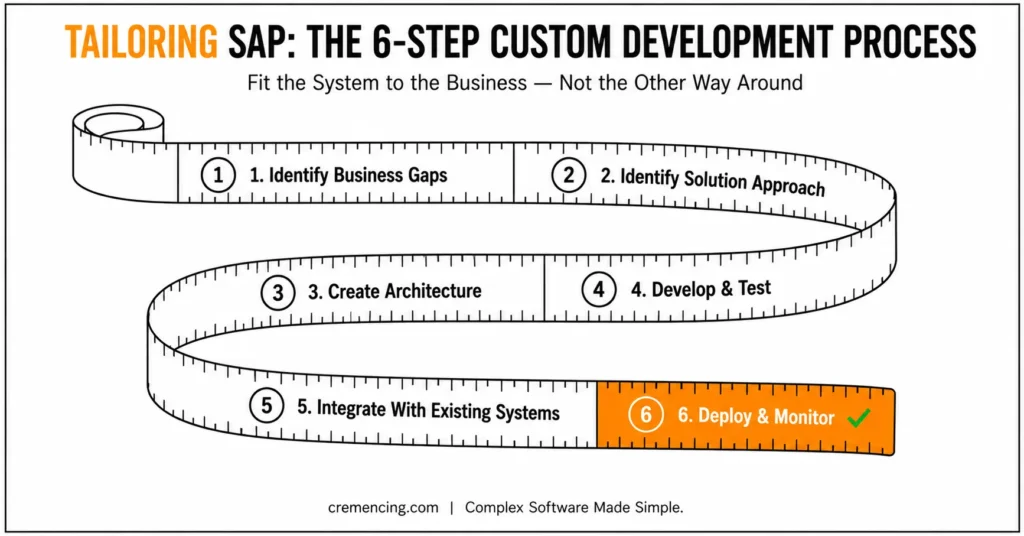
Step 5 – Embrace Existing Systems
Most of the complexity lies in integration.
- Connect SAP with external systems
- Use APIs and middleware
- Ensure data consistency
This is more relevant for SAP CPI custom adapter development.
Step 6 — Deploy & Monitor
After deployment:
- Monitor system performance
- Track errors and logs. Where Custom Development Gets Out of
- Optimize continuously
This ensures stability and scalability.
SAP Custom Development Benefits and ROI
When done right, SAP custom development adds tangible value.
Choosing the Right SAP Custom Development Approach
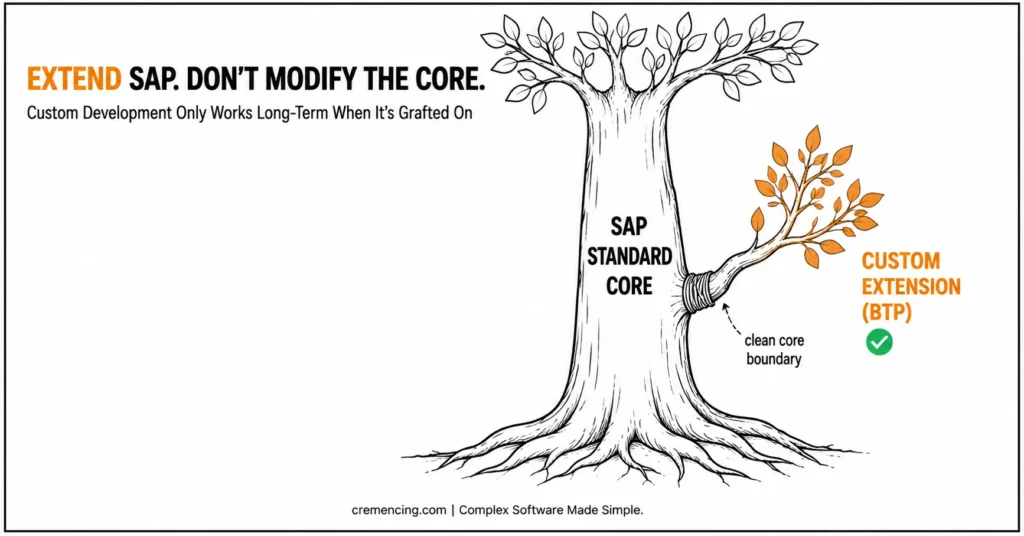
The most important architectural decision is not whether to build custom functionality. It is where that functionality should live.
For a requirement that can be handled by standard SAP configuration or an existing application, custom development should not be the first choice. When a genuine gap exists, classify the requirement before selecting a technology.
Key-user extensibility fits smaller changes such as fields, UI adaptations, forms, and certain analytics scenarios.
Developer extensibility is appropriate when complex ABAP logic or tightly coupled applications need to run with the SAP S/4HANA solution. In ABAP Cloud, developers work with a cloud-optimized ABAP language and released SAP objects rather than unrestricted access to the SAP repository.
Side-by-side extensibility is better suited to applications that should have an independent lifecycle or combine SAP data with other systems. SAP BTP provides the runtime for these extensions, which can use APIs and events exposed by SAP.
This distinction matters because “custom development” is not one architecture. Two applications can solve the same business requirement while having very different upgrade, integration, security, and maintenance implications.
Key Benefits
- Increase process efficiency by 30–50%
- Reduce manual work through automation
- Enable seamless system integration
- Enhance user experience
Operational Benefits
- Better alignment with business processes
- Faster execution of complex workflows
- Reduced dependency on workarounds
Business Impact
- Increased productivity
- Improved decision-making
- Higher system adoption
- Better competitive advantage
When implemented strategically, SAP custom development services can provide better long-term outcomes for organizations investing in structured SAP extensions.
Top Reasons Behind the General SAP Failure in Practical Scenarios
Standard SAP does not cater to complex enterprise scenarios.
Common Limitations
- Limited flexibility for unique processes
- Rigid workflows
- Complex integrations
- In some scenarios, a bad User Experience
Real Challenges
- Industry-specific requirements not covered
- Legacy system integration issues
- High customization needs
As a result, many organizations implement SAP Rise custom development or make use of cloud-based extensions to meet their specific needs.
Common Mistakes and Best Practices
SAP Custom Development Guide can generate value but also risks, if not managed properly.
Common Mistakes
- Over-customization of the SAP core
- Ignoring upgrade compatibility
- Lack of documentation
- Poor integration design
- Not using modern platforms like SAP BTP
These mistakes often lead to:
- System instability
- High maintenance cost
- Upgrade challenges
Best Practices
- Use SAP BTP for extensions
- Keep core clean approach
- Follow modular architecture
- Document all custom developments
- Align development with business goals
Some examples include SAP Fiori custom app development, which enhances usability at no expense to core systems.
When SAP Custom Development Becomes Technical Debt
Custom development becomes technical debt when the organization solves a short-term requirement without deciding how the solution will behave during future SAP releases.
A common warning sign is building directly against internal SAP objects when a released API or supported extension point is available. Another is creating a new application when a small key-user or developer extension would have solved the requirement.
A useful architecture review should ask the following:
- Can standard SAP already perform the process?
- Can configuration or key-user extensibility close the gap?
- Is there a released API or extension point?
- Does the logic need to run inside S/4HANA?
- Would an independent BTP application reduce coupling?
- What happens when SAP changes the underlying release?
- Who owns security, monitoring, testing, and maintenance?
This changes the discussion from “custom development versus standard SAP” to a more useful question: which extension model solves the business requirement with the lowest unnecessary coupling?
SAP’s current guidance explicitly distinguishes coupled developer extensibility tightly from loosely coupled side-by-side extensibility. Before diving into why standard SAP falls short, it helps to understand SAP custom development services and how they drive business value in the first place
Conclusion
SAP custom development guide is valuable when a genuine business requirement sits outside the capabilities of standard SAP. However, the mistake is treating every gap as a reason to modify the core or build another standalone applicat
The better approach is to classify the requirement first, then choose the appropriate extension model. Small adaptations may fit key-user extensibility. Complex ABAP requirements may fit developer extensibility. Applications that need independent lifecycle management or broader integration may be better candidates for SAP BTP side-by-side extensibility.
The technical quality of the solution ultimately depends on its dependencies. Using released APIs, supported extension points, clear integration boundaries, and appropriate security and lifecycle controls makes custom development easier to maintain as SAP evolves.
Therefore, the objective is not to eliminate custom development. Instead, organizations should make every custom component intentional, supportable, and architecturally appropriate so they get the required business functionality without creating unnecessary technical debt.
FAQ
What is SAP custom development?
It’s all about the development or improvement of SAP functionality to fulfil particular business requirements.
How to decide between SAP Custom Development and off-the-shelf products?
When standard SAP does not cover your business processes or integrations.
What is Custom Development in SAP BTP ?
This relates to building extensions in SAP Business Technology Platform without the kind of core changes.
Is SAP public cloud allowed for custom development?
Yes, but it shall follow clean core principles, and it also has to make use of extension frameworks.
What is the impact of SAP custom development on upgrades?
A nasty custom code can increase the difficulty of upgrades, and a structured framework facilitates seamless transitions.
What is the difference between SAP customization and SAP custom development?
SAP customization generally refers to configuring or adapting standard SAP behaviour, while custom development involves creating or extending functionality through development technologies and supported extension mechanisms.
Is SAP custom development allowed in S/4HANA Cloud Public Edition?
Yes, but Public Edition uses controlled extensibility models. Depending on the requirement, organizations can use key-user extensibility, developer extensibility, or side-by-side extensibility with SAP BTP and released interfaces.
Should custom SAP development be built inside S/4HANA or on SAP BTP?
It depends on the requirement. Tightly coupled extensions may fit developer extensibility, while loosely coupled applications and extensions that need an independent lifecycle are candidates for SAP BTP side-by-side development.




