
Most SAP health checks stop at the system layer uptime, response times, batch job failures and miss where the real cost is hiding: in the business processes running on top of that system. That’s exactly the gap an SAP Process Health Check is built to close. A procurement team re-approving the same purchase order three times because no one owns the workflow. A finance close that takes nine days instead of five because master data across two plants doesn’t match. None of that shows up in a Basis or system-performance review, and it compounds quietly until an audit, a migration, or a bad quarter forces the question: is this SAP landscape actually running the business well, or just running?
A SAP Business Process Health Check answers that question directly. Instead of checking whether SAP is technically healthy, it checks whether the processes built on SAP — procure-to-pay, order-to-cash, record-to-report — are efficient, compliant, and improving. For IT managers and SAP decision-makers, that distinction is the difference between a green dashboard and a business that’s actually working the way it should.
This is where a SAP Business Process Health Check becomes critical. It gives you an executive-ready view of how efficient, compliant, and sustainable your business processes are.
Failure to do so may cause organizations to:
- Process inefficiencies are causing unnecessary costs
- Violation of laws and internal rules
- Uncovered hidden operational risks during audits or migrations
- Missed opportunities for continuous improvement
A scheduled health check shows executives where they currently stand and what a path to improvement looks like, so that they can make strategic decisions.
Measuring Process Intelligence and Automation
Recent research from Forrester Consulting indicates that enterprise organizations using automated process intelligence tools achieved a 135% return on investment within three years. Gartner evaluations confirm that process mining platforms reduce end-to-end process analysis timelines from months to mere hours. Furthermore, empirical SAP deployment metrics demonstrate that continuous process monitoring can increase technician productivity by 50% while reducing compliance processing costs by up to 90%. Consequently, process health monitoring has evolved from an ad-hoc audit into a mandatory enterprise capability.
What is a SAP Process Health Check?
A SAP Business Process Health Check is a systematic assessment of the most important SAP-based business processes.
It examines processes for:
- Efficiency: Are operations streamlined, automated, and free of bottlenecks?
- Compliance: Are internal controls for regulations and audit trails executed consistently?
- Operational Risk: Where are the seams, mistakes, and/or inefficiencies that could cause business interruption?
- Potential for Improvement: Can technology or best practices improve processes?
Executives use this analysis to inform decisions regarding SAP investment, process improvement, and transformation projects.
The 5 Pillars of a Successful SAP Process Health Check
An effective health check assesses several aspects for total insight:
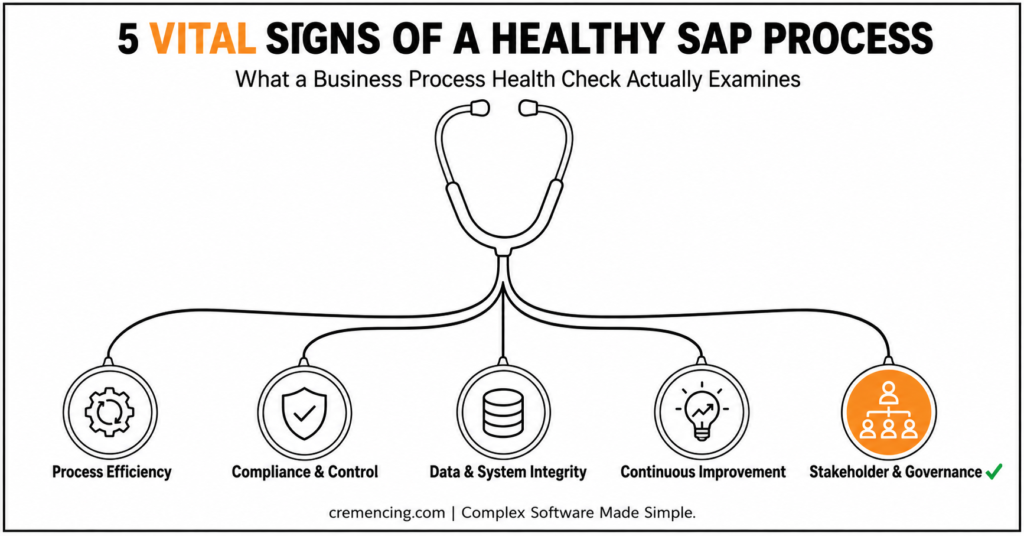
1. Process Efficiency Assessment
Validate whether your processes are offering value efficiently and without waste:
- Find bottlenecks, redundant approvals, and slowdowns
- Look for possible automations through SAP Fiori, workflow tools, and RPA
- Compare the processes to the industry “best practice” or SAP Best Practice
Example: A global manufacturer discovered that its purchase-to-pay operations were duplicating approvals in different parts of the world. Making it more efficient cuts its cycle time by 35%.
2. Compliance and Control Validation
- Double-check segregation of duty (SoD) and authorization controls
- Verify compliance with local laws, SOX, GDPR, etc.
- Detect areas of non-compliance and risks that require attention.
This guarantees the organization is operationally and legally compliant.
3. Data and System Integrity Checks
- Assess the accuracy of master and transactional data
- Detect system configuration or integration points that do not make sense
- Audit how reporting and analytics provide reliable insights
Clean, accurate data helps operations run dynamically and enables evidence-based decisions.
4. Continuous Improvement Opportunities
- Uncover automation and optimization opportunities for processes
- Recommend changes to workflows or the adoption of new technology
- Generate actionable guidance to increase productivity and lower cost
Continuous improvement organizations build a culture of operational excellence.
5. Stakeholder and Governance Assessment
- Evaluate roles and responsibilities for transparency and alignment
- Identify missing links in decision-making and escalation processes
- Align governance with enterprise and SAP goals
Good governance provides sustainable, repeatable, and auditable processes.
Internal vs. External SAP Process Health Check
| Factor | Internal Team | External/Third-Party |
|---|---|---|
| Objectivity | Lower — internal blind spots | Higher — no internal bias |
| SAP-specific tooling access | Varies | Typically broader |
| Speed to start | Faster | Slower (onboarding/scoping) |
| Cost | Lower direct cost | Higher direct cost |
| Best fit | Ongoing monitoring, minor checks | Pre-migration, audit prep, major transformation |
SAP Process Health Check Methodology
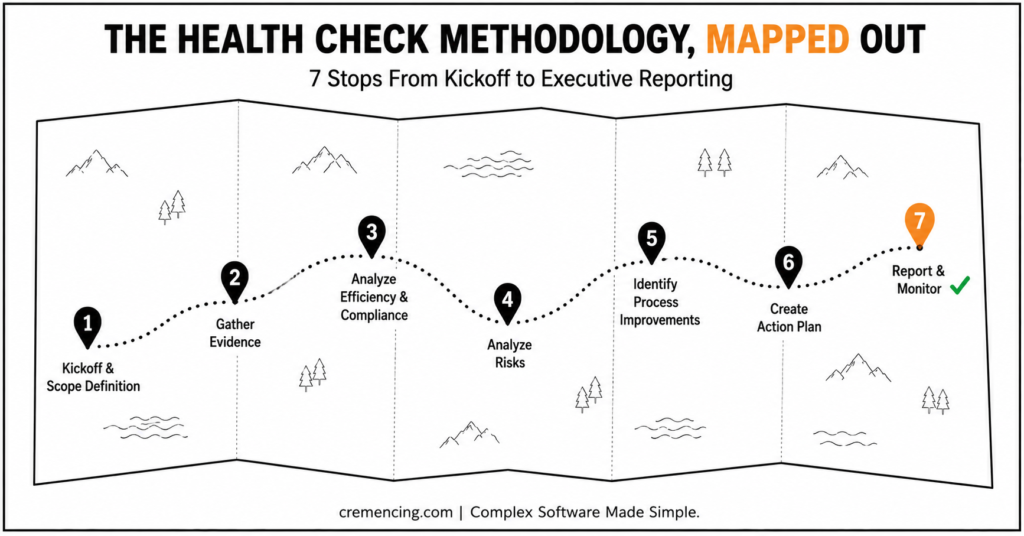
Step 1: Kickoff
Initiate the effort by informing key stakeholders of the methodology and objectives, including identifying process owners to maintain accountability.
Approach strategically:
- Scope Definition: Determine the key processes, systems, and organizational entities
- Gather Evidence:Collect process documents, system logs, performance data, and stakeholder comments
- Analyze Efficiency and Compliance: Chart workflows, discover bottlenecks, and control certain checks
- Analyze Risks: Identify procedural and system shortfalls that may result in operational or regulatory failures
- Identify Process Improvements: Suggest ways to improve quality, automation, and governance
- Create Action Plan: Prioritize work by risk, effort, and business value
- Report and Monitor: Use executive dashboards to monitor remediation and improvement efforts
This ensures teams develop actionable insight grounded in business goals.
Real-Life Example: SAP Process Health Check Drives Efficiency and Compliance
Scenario: A global retail market leader experienced sluggish order-to-cash cycles and financial reporting issues.
Following SAP Business Process Health Check:
- The team recognized and automated opportunities in processing orders.
- Gaps identified: The team resolved discrepancies in the segregation of duties in finance processes.
- The team corrected data inconsistencies across store, stock, and invoice records
- The team implemented continuous improvement initiatives
Outcome: Cycle time decreased 30%, compliance gaps were closed, and operational efficiency increased, illustrating the strategic importance of a business process health check.
Why a SAP Process Health Check Provides Strategic Value: Executive Insights
A SAP Business Process Health Check is a strategic tool for executives:
- Cut Expenses: Automation frees business owners, removes redundancy, and increases production
- Reduce Risk: Discover compliance and operational discrepancies before they become problems
- Drive Digital Transformation: Identify opportunities to automate and innovate
- Enhance Decision Making: Provide insights for investment and transformational decisions based on data
- Drive Ongoing Improvement: Develop a framework for sustainable operational excellence
Regular health checks lead to higher process efficiency, greater compliance, and a more digital organization than peers.
Common Pitfalls to Avoid During a SAP Process Health Check
- Focus solely on system tests, not process waste
- Assess only occasionally rather than continuously
- Do not connect findings to executive priorities
- Overlook actionable items, resulting in no follow-up
Avoiding these pitfalls ensures your SAP Business Process Health Check delivers measurable business results.
SAP Process Health Check — Quick Checklist
- Scope defined: processes, systems, entities
- SoD/authorization controls tested
- Master/transactional data accuracy sampled
- Automation opportunities logged (Fiori, workflow, RPA)
- Findings mapped to executive priorities
- Action plan prioritized by risk × effort × value
- Owner assigned per finding, with follow-up date
Chapter Summary: Achieve Efficiency, Compliance, and Ongoing Improvement
A SAP Business Process Health Check offers executives a holistic perspective of:
- Process performance quality
- Compliance adherence
- Opportunities for improvement
By reviewing efficiency, validating controls, analyzing data integrity, and defining opportunities for continuous improvement, companies can:
- Maximize SAP process value
- Minimize business risks
- Accelerate the realization of benefits
Conduct your health check on key SAP processes, compare against best practices, and develop a roadmap to ensure maximum strategic and operational value for your SAP landscape.
Conclusion
A SAP system can be technically flawless and still be quietly costing the business money — through duplicated approvals, unenforced controls, or stale master data no dashboard flags. That’s the gap a Business Process Health Check closes: it doesn’t ask whether SAP is running, it asks whether the business is running well on top of it.
The organizations that treat this as a recurring discipline, not a one-time pre-audit scramble, are the ones who catch a control gap before an auditor does and an inefficiency before it’s baked into next year’s budget. If it’s been more than a year since your last one, or a migration is on the horizon, that’s your signal to schedule it now, not after something breaks.
FAQs
Q1: What is SAP Business Process Health Check?
It systematically examines SAP-enabled business practices to determine whether the work performed is differentiated, efficient, and effective from an end-to-end perspective.
Q2: Why does this matter for executives?
It brings transparency to process performance, enhances risk management, ensures compliance, and informs strategic decisions about optimization and transformation.
Q3: What will the health checks cover?
Business processes in functions such as finance, procurement, order-to-cash, inventory management, and HR.
Q4: How frequently should organizations conduct a business process health check?
At least annually , or before major SAP initiatives (upgrades, transformations, or ERP migrations).
Q5: What results should business leaders expect?
Efficient and compliant processes, reduced risk, a tangible improvement roadmap, and data-driven decisions.
Q6: Who should be involved in a SAP Business Process Health Check?
Typically, process owners, IT teams, compliance officers, and business stakeholders should all be involved. In addition, executive sponsorship ensures the findings translate into actionable decisions. Therefore, cross-functional participation is essential for a health check to deliver accurate and meaningful results.
Q7: What tools are used during a SAP Business Process Health Check?
Generally, organizations rely on SAP-native tools such as process mining software, workflow analytics, and audit trail reports. Furthermore, third-party diagnostic tools may be used to validate system configurations and data quality. As a result, combining these tools provides a more comprehensive and reliable assessment.
Q8: Can a SAP Business Process Health Check be done internally, or is external expertise required?
In some cases, internal teams can perform a basic health check if they have the right skills and objectivity. However, external consultants often bring specialized expertise and an unbiased perspective, which can uncover risks that internal teams might overlook. Consequently, many organizations choose a hybrid approach that combines internal knowledge with external validation.
Q9: How long does a typical SAP Business Process Health Check take?
Usually, the duration depends on the scope and complexity of the processes being reviewed. On average, a focused health check can take two to four weeks, while a comprehensive, enterprise-wide assessment may take longer. Nevertheless, organizations should prioritize thoroughness over speed to ensure accurate findings.
Q10: What happens after a SAP Business Process Health Check is completed?
Once the assessment is complete, findings are typically compiled into an executive report with prioritized recommendations. Subsequently, organizations develop an action plan to address identified gaps and risks. Ultimately, ongoing monitoring ensures that improvements are sustained and that the organization continues moving toward operational excellence.




