
This ABAP tutorial for beginners
After all, the problem isn’t that ABAP is hard to learn; rather, it’s that most tutorials teach ECC-era syntax patterns without ever flagging where S/4HANA changes the rules. Specifically, table access, CDS-based data modeling, and RAP-based service exposure all behave differently, and if a beginner never sees that distinction, they’ll write code that “works” in isolation but fails the moment it meets a real S/4HANA data model.
This tutorial walks through ABAP fundamentals in the order that actually maps to how S/4HANA projects are structured today, from Open SQL basics through CDS views, RAP, and cloud-aware extension patterns, flagging explicitly, at each step, where ECC and S/4HANA diverge.
Why This Happens in an ABAP Tutorial for Beginners
Tutorials that only provide ECC examples or do not provide a clear release context fail beginners. Runtime errors for novice programmers are caused by differences in table structures, field naming, CDS annotations, and RAP services between ECC and S/4HANA.
Early code in any ABAP tutorial for beginners frequently fails or behaves unexpectedly if LUW handling, authorization checks, and internal table manipulation aren’t covered properly, which is exactly the gap a solid ABAP tutorial for beginners needs to close.
S/4HANA introduces CDS views, RAP services, and cloud extension points that change data access patterns.
To avoid errors in Fiori apps or cloud-based extensions, ABAP learners must comprehend annotations, semantic layers, and API calls. Additionally, failing to perform performance checks or modularization frequently exacerbates these errors.
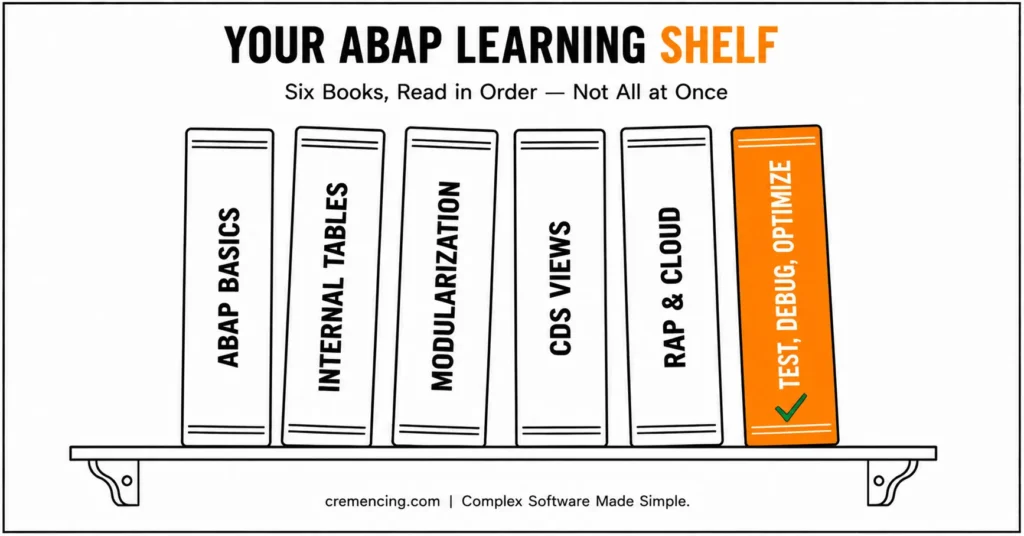
Beginners learn core ABAP, modularization, internal tables, S/4HANA extensions, and cloud integrations in the correct order thanks to a structured tutorial. While avoiding common beginner pitfalls, this order fosters confidence and competence.
| Aspect | ECC | S/4HANA On-Prem |
|---|---|---|
| Material description lookup | Direct join: MARA + MAKT | Same tables, but CDS view recommended for reuse/authorization |
| Data access pattern | Open SQL against transparent tables | Open SQL still works; CDS views preferred for analytics/API exposure |
| Custom business logic exposure | BAPI / function module | RAP behavior definition + service binding |
| UI layer | SAP GUI transactions | Fiori Elements apps generated from RAP/CDS metadata |
| Debugging tools | SE24 (Class Builder), SE30 (deprecated) | ADT breakpoints, SAT (replaces SE30) |
ABAP Tutorial for Beginners Roadmap
Step 1 — Master ABAP Basics
The first step in any solid ABAP tutorial for beginners is mastering Open SQL basics.
makt-maktx.” DATA: lv_matnr TYPE mara-matnr, “Material number
lv_desc TYPE makt-maktx. “Material description
SELECT SINGLE mara~matnr, makt~maktx
INTO (lv_matnr, lv_desc)
FROM mara
INNER JOIN makt ON makt~matnr = mara~matnr
WHERE mara~matnr = ‘10000001’
AND makt~spras = sy-langu.
WRITE: / lv_matnr, lv_desc.
- Learn to SELECT, JOIN, and WRITE using DATA declarations.
- Understand ECC transactional tables and field types.
- Try running code in Eclipse ADT or SE38.
- To properly handle exceptions, always check sy-subrc after SELECT statements.
Step 2 — Work with Internal Tables
DATA: it_mara A TYPE TABLE OF the mara,
TYPE wa_mara mara.
INTO TABLE it_mara SELECT * FROM mara UP TO 5 ROWS.
Make a loop from it_mara to wa_mara.
WRITE: / wa_mara-matnr, wa_mara-maktx.
ENDLOOP.
- Internal tables allow bulk processing and data manipulation.
- Practice data aggregation, loops, filtering, and sorting.
- S/4HANA 2022+ supports CDS-enhanced queries for optimized internal tables.
- In production, use fields rather than SELECT * for efficiency.
Step 3 Modularization and Reuse
TYPE mara-matnr IN THE FORM display_material USING p_matnr
DATA lv_desc TYPE makt-maktx.
SELECT A SINGLE maktx FROM makt INTO lv_desc WHERE matnr IS p_matnr.
Write: / “Material:,” “Description:,” and “Lv_desc.”
ENDFORM.
CALL FUNCTION ‘Z_DISPLAY_MATERIAL’.
- Utilize the INCLUDE, FORM, and FUNCTION MODULES programs for reusability.
- Modularization makes debugging easier and prevents code duplication.
- Report and program structure is taught to beginners.
Step 4: S/4HANA Specific: CDS Views
The name of the @AbapCatalog.sqlView is “ZCDS_MATERIAL”
@AccessControl.authorizationCheck: #CHECK
define view Z_CDS_MATERIAL as select from mara
{
key matnr,
maktx
}
- CDS views provide semantic layers, access control, and analytics readiness.
- Learn about annotations, SQL view names, and authorization checks.
- Required for S/4HANA projects beyond 2022.
- CDS views can take the place of some traditional SELECT statements for analytical purposes.
Step 5: Cloud Awareness and RAP
- Learn about RAP behavior definitions and service bindings.
- Explore Fiori apps side-by-side with BTP.
- For cloud orchestration, integrate ABAP with Python/Java microservices.
- Beginner exposure to RAP prepares for transactional apps and modern SAP projects.
Step 6: Test, Debug, and Optimize
- SE16/SE16N: Validate SELECT results.
- SM37: Keep an eye on batch jobs that run in the background.
- ST05 / ST22: Trace SQL statements and analyze dumps.
- Step through the code with the Debugger (SE24/SE30/ABAP Trace) to ensure that the logic is correct.
- Optimize loops and SELECT queries for performance and maintainability.
- Test across ECC and S/4HANA for portability.
How to Double-Check Your ABAP Code
- Compare execution on ECC vs S/4HANA to catch version differences.
- Utilizing SE80 or Eclipse ADT, examine syntax and modularization.
- Verify performance, LUW handling, and authorization.
- Learn about coding standards and best practices by conducting peer reviews.
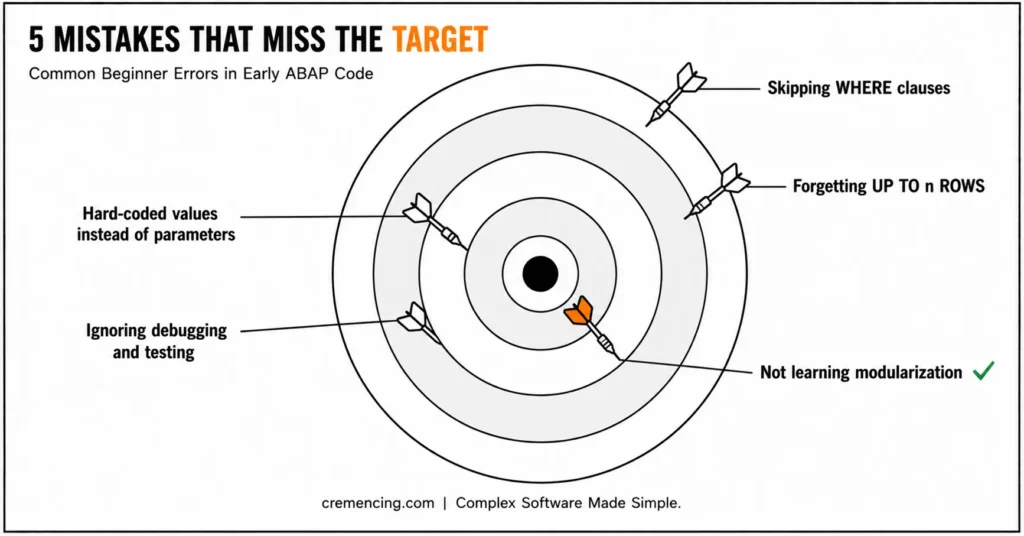
Mistakes Made by Beginners
- Skipping WHERE clauses, causing unintended data retrieval.
- Performing poorly by forgetting up to n rows in SELECT statements.
- Utilizing parameters as opposed to hard-coded values.
- Ignoring debugging and testing, leading to incorrect or failing reports.
- Not learning modularization, which makes it harder to maintain.
Before investing in SAP certification, learn what certifications, preparation paths, and practical ABAP skills can make a real difference in your career. ABAP Certification Course Guide 2026
Conclusion
In this ABAP tutorial for beginners, the learner will understand the differences between S/4HANA and ECC and will also learn to write tested and production-ready SAP code.
With DATA declarations, SELECTs, loops, internal tables, modularization, CDS views, and RAP, beginners are ready for modern ABAP. Starting with PDF guides, YouTube tutorials, and community practice, beginners are able to learn more quickly, avoid pitfalls, and successfully advance to ABAP Cloud, BTP, and hybrid integration projects.
By following a step-by-step path and applying these skills on a consistent basis, beginners acquire the necessary skills for their career and build up the core compliance of their SAP systems in a process of SAP modernization. Explore this free SAP ABAP course to learn practical development skills, build real experience, and understand concepts employers value. Free SAP ABAP Course Online With Certificate: Build Real Skills That Employers
Ultimately, by mastering these ABAP fundamentals early, learners set themselves up for long-term growth, leadership opportunities, and high-value SAP projects thus making ABAP not just a starting point, but a strategic career choice for 2026.
FAQs
1. Is ABAP still worth learning in 2026?
Yes. ABAP remains the primary development language for SAP systems. With the rise of SAP S/4HANA, ABAP Cloud, RAP, and SAP BTP extensions, ABAP developers continue to be in demand across enterprise projects.
2. How long does it take to learn ABAP for beginners?
Most beginners can learn basic ABAP programming concepts within a few weeks. Developing practical skills in reports, enhancements, CDS views, debugging, and modern ABAP development typically requires several months of hands-on practice.
3. What are the most important ABAP concepts beginners should learn first?
Beginners should start with data types, internal tables, Open SQL, reports, modularization techniques, debugging, and function modules. These fundamentals provide the foundation for understanding more advanced topics such as CDS views, RAP, and ABAP Cloud.
4. Can I learn ABAP without prior programming experience?
Yes. Many SAP developers begin with little or no programming background. ABAP is considered relatively beginner-friendly because of its structured syntax and strong integration with SAP business processes. Consistent practice with real-world examples is often more important than previous coding experience.
5. What’s the difference between SE38 and Eclipse ADT for ABAP development?
SE38 is the classic SAP GUI report editor, still usable on ECC and S/4HANA on-premises. Eclipse ADT (ABAP Development Tools) is SAP’s current standard IDE and is required for ABAP Cloud/S/4HANA Cloud development, where GUI-based transactions aren’t available.
6. Do I need to learn ECC syntax if I’m only working on S/4HANA Cloud projects?
Core Open SQL and ABAP language fundamentals carry over, but S/4HANA Cloud restricts you to released APIs and CDS/RAP-based patterns classic BAPIs and direct table access common in ECC are largely off-limits.
7. What’s the difference between a FORM/PERFORM and a function module?
A FORM is a local subroutine within the same program, called with PERFORM. A function module is a standalone, reusable unit callable across programs via CALL FUNCTION, and can be exposed remotely (RFC). Beginners often conflate the two syntax patterns, as flagged in this post’s Step 3 example.
8. Why do CDS views often replace plain SELECT statements in modern ABAP?
CDS views push data-selection logic to the database layer, add semantic annotations (like authorization checks), and can be reused across reports, Fiori apps, and RAP services reducing duplicated SELECT logic across a landscape.
9. Is RAP required for all new S/4HANA custom development?
Not universally, but SAP steers new development toward RAP for anything requiring a business-object-style API, Fiori Elements UI, or exposure to external consumers. Purely internal reports can still use classic ABAP.
10. What tools should I use to debug and trace ABAP code performance issues?
The ABAP Debugger (via SE80 or ADT) for stepping through logic, SAT for runtime/performance analysis, ST05 for SQL trace, and ST22 for reviewing runtime dumps.




