
Introduction
A developer builds two reports that should share the same selection screen data, sets a global variable to pass it, and then watches the value disappear the moment the second report runs in its own internal session. The two ABAP statements for storing temporary values, SET PARAMETER ID and EXPORT TO MEMORY ID, look interchangeable in a syntax reference but operate at completely different scopes, and picking the wrong one produces exactly this kind of silent data loss.
SAP Memory and ABAP Memory both avoid unnecessary database writes for short-lived values, but one belongs to the user session and the other to the ABAP runtime. This article explains how each mechanism works internally, when to use SET/GET PARAMETER ID against EXPORT/IMPORT MEMORY ID, and where these techniques still fit inside SAP S/4HANA development.
What Is SAP Memory and ABAP Memory?
SAP Memory is a user-session memory area that stores individual field values for reuse across different transactions run by the same user. Users access SAP Memory through parameter IDs. It handles small, single-value data such as material numbers, customer numbers, and plants rather than structured data.
ABAP Memory is a runtime memory area that remains within a single internal session. An ABAP program can store complete data objects in ABAP Memory, including variables, structures, and internal tables. Another program can then access that data during the same execution chain.
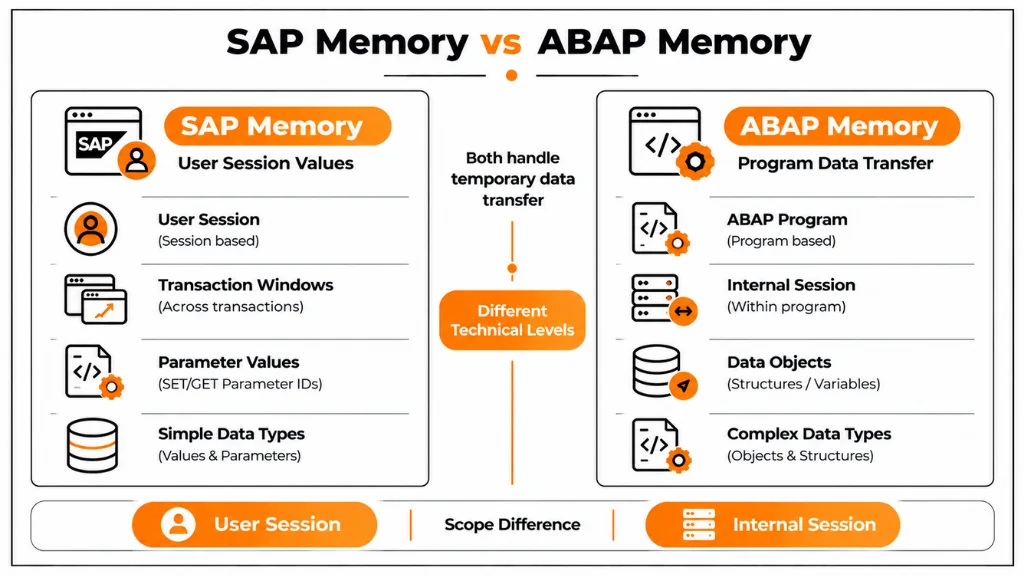
The distinction matters because the two mechanisms fail differently when misapplied. Storing a company code with SET PARAMETER ID so a second transaction can default that field works exactly as intended, because both transactions belong to the same user session. Attempting the same approach to hand an internal table from one report to another does not work, because SAP Memory holds single field values, and the correct tool is EXPORT TO MEMORY ID, which operates inside the internal session created when the calling program starts.
Why These Memory Concepts Matter in Development
Enterprise SAP systems carry thousands of custom programs. The same data often appears in more than one place during a business task. A program can pass a customer number automatically to the next transaction. It can also avoid a second database read after retrieving the data once. Another report can reuse a fully processed result from a report it submits. Memory-based transfer handles these short-lived requirements without adding a Z-table or persistent buffer.
The practical value appears in transaction navigation and duplicate processing. A sales employee selects a customer in one transaction. The next related transaction can then display that customer automatically. SAP uses parameter IDs to support this behaviour. Users do not need to enter the same value again. The practical value shows up in navigation and in avoiding duplicate processing. A sales employee who selects a customer in one transaction expects that customer to appear by default in the next related transaction, and SAP achieves this through parameter IDs rather than forcing re-entry.
A reporting program that has already built an expensive internal table can export it once and let a called program import it, instead of running the same selection logic twice. Choosing the correct memory type for each of these cases is what separates a maintainable custom development from one that silently loses data across session boundaries.
Choosing Between SAP Memory and ABAP Memory
| Development Scenario | Recommended Mechanism | Why It Fits |
|---|---|---|
| Default a material number in another transaction | SAP Memory | SET/GET PARAMETER ID carries a single field value across transactions for the same user. |
| Pass a customer number to a related transaction | SAP Memory | Parameter IDs provide a simple way to retain user context without rebuilding the value. |
| Pass an internal table between connected programs | ABAP Memory | EXPORT/IMPORT MEMORY ID Can transfer complete internal tables within the same internal session. |
| Pass a structure containing multiple selection criteria | ABAP Memory | ABAP Memory can store structured data as a single exported object. |
| Reuse an expensive calculation result in a called program | ABAP Memory | The called program can import the existing result instead of repeating the calculation. |
| Store data for later executions or users | Neither | Both mechanisms are temporary. Persistent requirements need an appropriate database or application-level storage solution. |
| Pass data between unrelated program executions. | Neither | ABAP Memory does not cross internal session boundaries, while SAP Memory is intended for parameter-style user context rather than structured program data. |
SAP Memory: SET and GET PARAMETER ID
SAP Memory uses two statements to store and retrieve values. SET PARAMETER ID 'MAT' FIELD lv_material stores the current value under the parameter ID MAT. Another transaction in the same user session can then read this value with the same ID.
GET PARAMETER ID 'MAT' FIELD lv_material retrieves the stored value into the target variable. If no value exists, SAP leaves the field unchanged. Developers should therefore handle cases where the expected parameter value is not available.
DATA lv_material TYPE matnr.
lv_material = ‘100000’.
SET PARAMETER ID ‘MAT’ FIELD lv_material.
DATA lv_material TYPE matnr.
GET PARAMETER ID ‘MAT’ FIELD lv_material.
Parameter IDs are how standard SAP screens default fields such as material, customer, vendor, company code, and plant work, and custom screens can use the same mechanism by declaring a screen field with the matching parameter ID in the data element, so the value populates automatically without any explicit GET statement. This is the reason SAP Memory is described as a navigation aid rather than a data transfer tool: it carries context between transactions the user opens, not structured business data between programs.
ABAP Memory: EXPORT, IMPORT, and FREE MEMORY ID
ABAP Memory works through three statements EXPORT TO MEMORY ID, IMPORT FROM MEMORY ID, and FREE MEMORY ID, and unlike SAP Memory, it can carry variables, structures, and internal tables as a single unit under one memory ID.
DATA: lv_customer TYPE kunnr.
lv_customer = ‘100000’.
EXPORT lv_customer TO MEMORY ID ‘CUSTOMER_DATA’.
DATA: lv_customer TYPE kunnr.
IF sy-subrc = 0.
IMPORT lv_customer FROM MEMORY ID ‘CUSTOMER_DATA’.
WRITE lv_customer.
ENDIF.
Checking sy-subrc after IMPORT is essential in production code. A memory ID may not exist, may have already been freed, or may belong to a different internal session. In these cases, IMPORT returns a non-zero return code without raising a runtime error. Code that ignores this result may process stale or initial data.
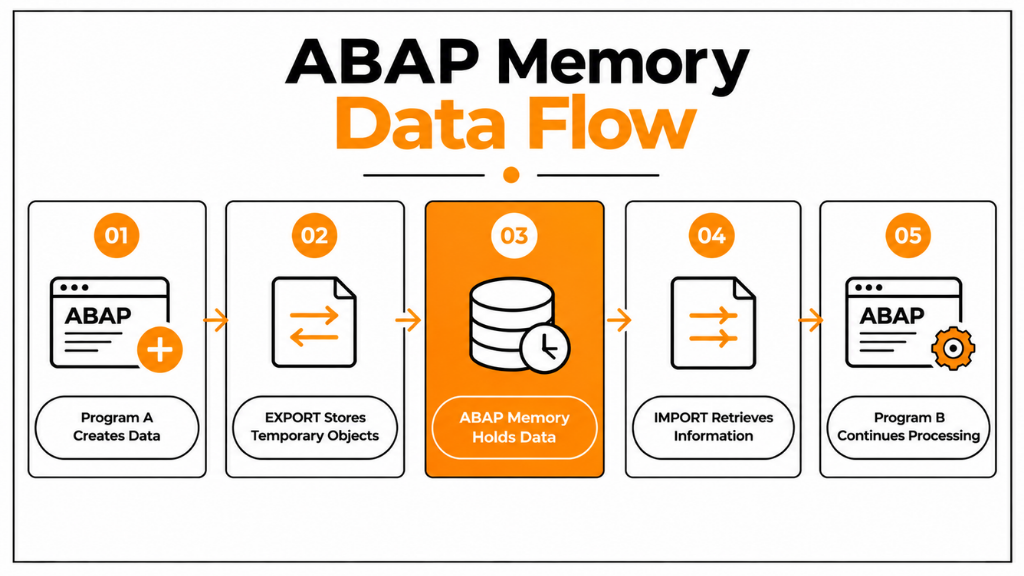
Internal tables follow the same export pattern. For example, it EXPORT lt_customer_data TO MEMORY ID 'CUSTOMER_LIST' stores the complete dataset in ABAP Memory. A calling program can use this approach when it passes control to a called program and needs to provide an already-built dataset. This avoids running the same selection logic again. FREE MEMORY ID ‘CUSTOMER_DATA’ releases the object explicitly, and while ABAP Memory disappears when the internal session ends regardless, calling FREE after long-running processes finish handling large exports keeps application server memory from being held longer than necessary.
Internal Session vs External Session
The scope difference between the two memory types only makes sense in light of SAP’s session model. An external session represents a SAP GUI window. Opening three windows to run VA03, ME23N, and a custom report creates three external sessions for the same user. SAP Memory operates at this level. This is why a parameter value set in one window can often appear in a transaction opened in another window by the same user.
An internal session starts each time an ABAP program begins execution. It holds the program’s variables, memory areas, and runtime context. When Program A calls Program B through SUBMIT or a similar mechanism within the same execution chain, both programs share the internal session. Program B can therefore import data that Program A exported to ABAP Memory.
If the user opens a second, unrelated program in a separate GUI window, that program runs in its own internal session. It cannot access ABAP memory from the first program. This boundary explains the failure mode described in the introduction. Recognizing it before choosing EXPORT helps prevent the common custom ABAP bug where expected data is missing.
If the user instead opens a second, unrelated program in a separate GUI window, that program runs in its own internal session and cannot see ABAP Memory written by the first, which is the exact failure mode described in the introduction. Recognizing this boundary before choosing EXPORT/IMPORT avoids the most common cause of “the data just isn’t there” bugs in custom ABAP.
SAP Memory vs ABAP Memory: Key Differences
| Feature | SAP Memory | ABAP Memory |
| Scope | User session (external session) | Internal session |
| Statements | SET PARAMETER ID, GET PARAMETER ID | EXPORT/IMPORT/FREE MEMORY ID |
| Data carried | Single field values | Variables, structures, internal tables |
| Availability | Across transactions of the same user | Only within the same internal session |
| Typical use | Default values, transaction navigation | Program-to-program data exchange |
The scope column is the one to remember under pressure: SAP Memory follows the user across transactions, while ABAP Memory follows the call stack within one program’s execution and disappears the moment that chain ends or a different session starts.
Real Development Scenarios
A finance team running two custom reports illustrates ABAP Memory’s intended use well. The first report lets users select company code, fiscal year, and document ranges; processes the data; and calls a second report that needs that same selection; exporting the selection structure once and importing it in the second program avoids asking the user to re-enter the same criteria and avoids re-running the same selection logic.
SAP Memory’s typical use is transaction navigation: a user selects a customer number on one screen, the program stores it with SET PARAMETER ID, and a related transaction opened afterwards retrieves it automatically through the parameter ID bound to that field, which is exactly how standard SAP screens default fields for users moving between related business objects.
A third pattern is passing an intermediate calculation result: a report that has already computed aggregated figures exports them to ABAP Memory, and a second report in the same submission chain imports the result instead of recalculating it, which matters when the calculation is expensive.
Both mechanisms have limits worth naming plainly. Heavy reliance on ABAP Memory to move data between unrelated programs hides the data dependency from anyone reading the calling program’s interface, so in object-oriented ABAP, method parameters, classes, and interfaces are usually the clearer design once the relationship between programs is more than a single SUBMIT call.
Performance and Common Mistakes
Exporting a few hundred records to ABAP Memory has negligible impact, but exporting millions of records consumes application server memory that Basis teams monitor for exactly this reason, so the size and duration of an export deserve the same scrutiny as a database-intensive statement. The most common design mistake is confusing the two mechanisms, attempting SET PARAMETER ID for an internal table or expecting ABAP Memory to survive into a separate GUI session, which produces missing data rather than an error message, making it harder to diagnose than a syntax failure.
The second mistake is treating ABAP Memory as permanent storage; data exported under a memory ID exists only for the lifetime of the internal session and must never carry business configuration, cross-user data, or anything that needs to persist beyond one execution chain.
The third is using generic memory ID names such as ‘DATA’ across a large development landscape, which risks collisions between unrelated programs; a name like ‘ZSD_CUSTOMER_REPORT’ tied to the specific application avoids that.
Finally, long-running processes that export large objects and never call FREE MEMORY ID hold memory longer than needed, so releasing objects once processing completes is a habit worth enforcing in code review.
SAP Memory and ABAP Memory in S/4HANA
Both mechanisms remain fully supported in SAP S/4HANA because they are part of the ABAP runtime rather than the data model, and existing ECC programs using SET/GET PARAMETER ID or EXPORT/IMPORT MEMORY ID continue to work unchanged after conversion. They still appear in migration programs, custom reports, enhancements and background processing built on classic ABAP.
New development, however, increasingly favours ABAP Objects, CDS views, and the RESTful ABAP Programming Model, where data is passed through method parameters and defined interfaces rather than through memory IDs, because that approach makes data dependencies visible in the program signature instead of hidden inside a string identifier. The practical guidance for an S/4HANA project is to keep memory concepts available for the narrow cases they suit: simple field defaulting and short-lived transfers within one execution chain while designing new application logic around explicit interfaces.
Conclusion
SAP Memory and ABAP Memory solve the same broad problem, avoiding an unnecessary database write for data that only needs to survive a short time, but they answer to different scopes, and treating them as interchangeable is what causes intermittent, hard-to-diagnose data loss in custom ABAP. SAP Memory follows the user across transactions through parameter IDs and is built for single-field navigation aids, while ABAP Memory follows the internal session and call chain, carrying full data objects between programs that are directly connected through a SUBMIT or similar call.
Both remain fully valid in SAP S/4HANA development, but the direction of new application design favours explicit interfaces over memory IDs precisely because a method signature documents a data dependency that a memory ID string does not. Developers who know when a scenario calls for parameter-based defaulting, when it calls for an EXPORT/IMPORT transfer within one call chain, and when it calls for a proper interface instead, write code that is both easier to maintain and less likely to fail silently across a session boundary.
FAQs
What is the difference between SAP Memory and ABAP Memory?
SAP Memory stores single field values at the user session level using parameter IDs, so the value is available across different transactions the same user opens. ABAP Memory stores complete data objects at the internal session level using EXPORT/IMPORT statements, and it is only visible to programs sharing that same execution chain.
When should I use EXPORT TO MEMORY ID instead of SET PARAMETER ID?
Use EXPORT TO MEMORY ID when a calling program needs to hand a structure, internal table or several related variables to a program it submits within the same internal session. SET PARAMETER ID is for a single field value that should default automatically in another transaction the same user opens later.
Why did my IMPORT FROM MEMORY ID return no data?
The most likely cause is that the importing program is running in a different internal session than the one that executed the EXPORT, since ABAP Memory does not cross internal session boundaries. Other causes include a memory ID that was never populated, was already cleared with a FREE MEMORY ID, or was misspelt.
Is SAP Memory available across separate SAP GUI windows?
Yes, because SAP Memory is scoped to the user session rather than to a single window, so a parameter value set in one external session is usually retrievable in a transaction opened in another window by the same user, as long as both use the same parameter ID.
Can ABAP Memory store internal tables and structures?
Yes. Unlike SAP Memory, which is limited to single field values, ABAP Memory can hold internal tables, structures and multiple variables under one memory ID, which is why it is used for program-to-program data exchange rather than screen field defaulting.
Does SAP S/4HANA still support SAP Memory and ABAP Memory?
Yes, both remain part of the ABAP runtime and continue working unchanged in S/4HANA. New development more often uses ABAP Objects, CDS views and the RESTful ABAP Programming Model, which pass data through explicit interfaces instead of memory IDs.
Should FREE MEMORY ID always be called after EXPORT?
It is good practice for large objects or long-running processes, even though ABAP Memory is cleared automatically when the internal session ends. Calling FREE MEMORY ID explicitly once processing finishes prevents memory from being held longer than the program actually needs it.