

Introduction
Most developers treat Cloud vs Classic ABAP as a naming update, like SAP just renamed something. That assumption breaks code the moment they move from ECC or on-premise S/4HANA into SAP BTP or S/4HANA Cloud.
In S/4HANA 2023+ and the BTP ABAP Environment, ABAP Cloud is not a “new version” of ABAP. It’s a restricted programming model built on Clean Core principles. Classic ABAP still allows full system access. ABAP Cloud blocks unsafe patterns by design, direct table access, unreleased function modules, and unapproved system calls.
ABAP Cloud is for API-driven, cloud-safe development. Classic ABAP is for full-control backend development in ECC and on-premise S/4HANA. You don’t pick one based on preference; you pick based on system constraints and how strictly your landscape needs to follow Clean Core rules.
Accelerating Clean Core Adoption in S/4HANA Transformations
Recent enterprise research indicates that 44% of organizations cite excessive legacy customizations as their primary barrier to S/4HANA migration. The average SAP ECC environment contains over 22,000 custom objects, though 40% to 60% of this custom code is entirely unused in daily operations.
Adopting SAP’s Clean Core standards drastically reduces technical debt, allowing organizations to complete quarterly upgrades in under three weeks compared to eleven weeks for heavily customized environments.
Consequently, automated code remediation and API-first ABAP Cloud adoption have become vital strategies for modernizing legacy enterprise systems efficiently.
Side-by-Side Comparison Cloud vs Classic ABAP
| Feature | Classic ABAP | ABAP Cloud |
| DB access | Direct Open SQL on any table | Only released CDS views / APIs |
| System calls | RFC/BAPI freely allowed | Restricted to released APIs |
| Development style | Full ABAP freedom | RAP-based, API-first |
| Transport model | CTS (SE09/SE10) | Git-based delivery via BTP pipeline |
| Upgrade safety | Manual regression effort | Built-in compliance by design |
| Flexibility | High | Restricted by design |
| Target system | ECC / S/4HANA on-premise | S/4HANA Cloud / BTP ABAP Environment |
Classic ABAP
Classic ABAP allows direct table access and system-level operations without restriction.
DATA lt_vbak TYPE TABLE OF vbak.
SELECT * FROM vbak INTO TABLE lt_vbak
WHERE erdat = sy-datum. ” Direct DB access allowed
LOOP AT lt_vbak INTO DATA(ls_vbak).
WRITE: / ls_vbak-vbeln.
ENDLOOP.
What this shows: Classic ABAP gives unrestricted access. Developers can query tables like VBAK, KONV, or MARA directly, with no API layer in between. This flexibility is powerful, but it’s also exactly what creates upgrade risk every direct table reference is a potential breakage point the moment SAP changes the underlying schema.
Modern ABAP Cloud development is moving toward cloud-based tools, and many developers are now exploring ABAP development in VS Code instead of depending only on traditional Eclipse workflows.
ABAP Cloud: The Modern Side of Cloud vs Classic ABAP
ABAP Cloud forces API-first development. The framework itself blocks direct table access to SAP standard objects, not just convention.
DATA lt_so TYPE TABLE OF zi_salesorder.
SELECT * FROM zi_salesorder INTO TABLE @lt_so.
” Only released CDS views / APIs allowed in ABAP Cloud
LOOP AT lt_so INTO DATA(ls_so).
WRITE: / ls_so-salesorder.
ENDLOOP.
What changed: You no longer touch database tables directly. You work only with:
- CDS views — the mandatory semantic data modelling layer, replacing direct SQL on standard tables
- Released APIs — the only sanctioned integration points into SAP standard logic
- RAP business objects — where data model, behaviour definition, and service exposure are explicitly separated
This isn’t just a style preference SAP is nudging developers toward — the runtime enforces it. Certain RAP rule violations, like explicit COMMIT WORK or ROLLBACK WORK statements, trigger runtime errors regardless of whether you’re in ABAP Cloud or classic ABAP, because RAP exclusively owns transaction handling. Other violations, like invoking authorization checks in the wrong save phase, only error out when strict ABAP Cloud mode is active.
It’s Not Actually Binary: The Clean Core Level Model
Most competitor content (and the simplified table above) frames this as ABAP Cloud vs. Classic ABAP — a clean either/or. In practice, SAP’s own extensibility guidance describes something more graduated: a four-level model, Level A through D, mainly relevant for private edition and on-premise landscapes.
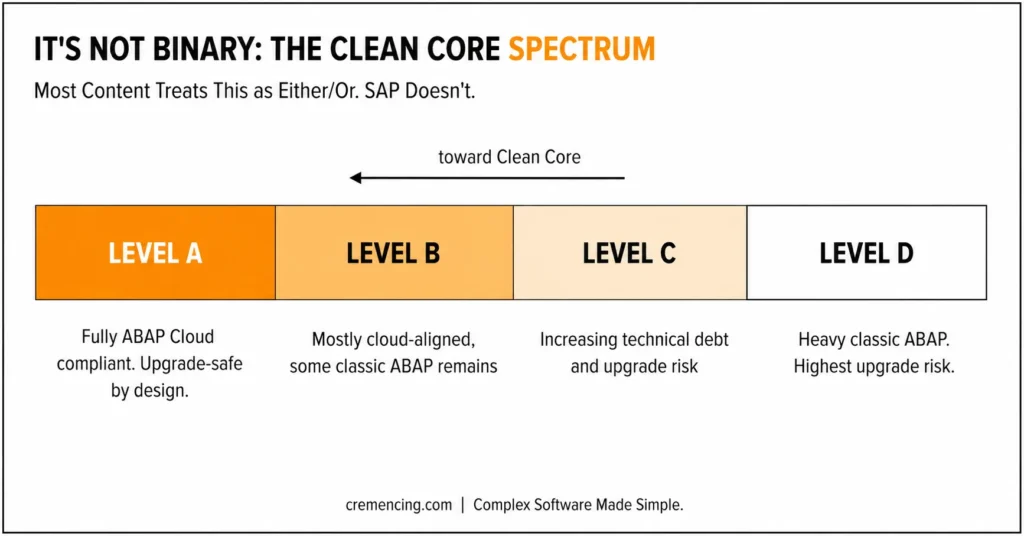
- Level A—Fully ABAP Cloud compliant. Only released APIs. Cloud-ready, upgrade-safe by design.
- Levels B and C — Varying degrees of classic ABAP are still in play, with increasing technical debt and upgrade risk as you move down the scale.
- Level D — The legacy end: heavy classic ABAP, highest upgrade risk.
The practical implication: if a requirement can’t fit ABAP Cloud constraints some low-level, system-dependent, or legacy integration patterns genuinely can’t, you can still use classic ABAP in a controlled, documented scope., That’s not a failure of Clean Core. It’s a recognition that modernisation happens in stages, not in one cutover.
There’s also a middle path worth knowing about: when SAP hasn’t yet released a needed API for ABAP Cloud but lists it as a “nominated” candidate, you can build a Tier 2 wrapper around it. Take your SAP BW development skills further by learning how ABAP is applied in reporting, transformations, and real-world BW scenarios. ABAP for BW Practical Tutorial
ABAP Cloud has now become the standard development model for all new S/4HANA extensions, with SAP pushing enterprises to adopt it ahead of the ECC end-of-mainstream-support deadline in December 2027. A notable 2026 development is the release of an ABAP Cloud extension for Visual Studio Code, bringing full AI-assisted, Clean Core-compliant development into the world’s most widely used coding environment.
SAP has also strengthened enforcement at the tooling level — the ABAP Test Cockpit’s Clean Core check variant now runs natively in S/4HANA 2025 systems, flagging non-released API usage before it becomes an upgrade blocker.
Migration Checklist Cloud vs Classic ABAP
Before moving a project toward ABAP Cloud, verify:
| Migration Task | Purpose |
| Replace direct SELECT on tables with CDS views | Align data access with modern ABAP Cloud development practices. |
| Remove CALL FUNCTION for non-released modules | Ensure compatibility with released APIs and Cloud standards. |
| Identify system-dependent logic that may not have a Cloud equivalent yet | Detect potential migration blockers early. |
| Convert enhancements into RAP behavior definitions | Modernize extension logic using RAP architecture. |
| Check API availability in SAP’s released-API catalog (or identify nominated-API wrapper candidates) | Verify that required functionality is supported in the Cloud environment. |
| Switch CTS transports to Git-based delivery | Adopt modern source control and deployment workflows. |
| Plan authorization redesign — Cloud’s model differs from classic role-based checks | Ensure security and access controls align with Cloud requirements. |
| Decide where Level B/C classic ABAP is acceptable in the short term, and document why | Establish clear exceptions and migration priorities. |
A practical migration mistake worth flagging: teams often start by porting individual reports or function modules one at a time, then discover mid-project that the underlying business object has no released RAP facade yet.
Before committing a sprint to migration work, check API availability first it determines whether you’re doing a straightforward CDS rewrite or a longer wait (or wrapper-based workaround) for SAP to release the interface you need.
Authorization redesign also tends to be underestimated. Classic ABAP authorization checks are typically scattered through procedural logic. RAP centralizes authorization into the behaviour definition layer, which means existing PFCG role logic often needs to be remapped rather than simply ported.
When to Use Cloud vs Classic ABAP
| Scenario | Classic ABAP | ABAP Cloud |
| ECC support | ✔ | ✘ |
| S/4HANA on-prem fixes | ✔ | Limited |
| Greenfield cloud project | ✘ | ✔ |
| RAP development | ✘ | ✔ |
| Legacy enhancements | ✔ | ✘ |
| API-first architecture | ✘ | ✔ |
A simple way to think about it: if you’re starting something new and a released API or CDS view already covers your data model, default to ABAP Cloud even on a private edition or on-premise system where classic ABAP is technically still available. The upgrade-safety payoff compounds over time. If you’re working with performance-critical logic, see our ABAP AMDP tutorial for writing high-performance HANA code.
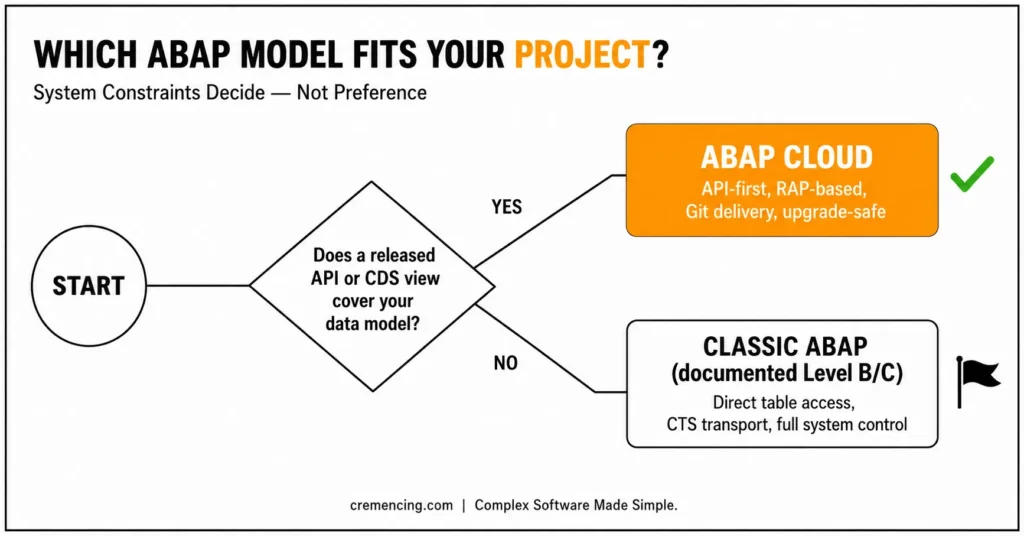
If you’re patching or extending an existing system-dependent process with no released API in sight, classic ABAP at a documented Level B or C is often the pragmatic choice, not a failure of discipline. This decision doesn’t happen in isolation — it’s directly tied to how your organization approaches Clean Core. If you’re still weighing side-by-side vs in-app extensions, it’s worth understanding how Clean Core shapes this decision before you commit to either path.
Conclusion
The real meaning of Cloud vs Classic ABAP isn’t a version comparison it’s system control versus system restriction.
Classic ABAP gives full backend freedom. Developers can access database tables directly, call system functions, and build logic tightly coupled to the SAP backend. That’s powerful, but it’s also what creates upgrade risk and long-term maintenance burden across S/4HANA landscapes.
ABAP Cloud takes the opposite stance. It removes direct system access and enforces API-first, Clean Core–aligned development: every extension goes through released APIs, CDS views, or RAP-based service definitions, keeping code upgrade-safe and portable across BTP and S/4HANA Cloud.
As SAP moves toward modern ABAP development approaches, Debugging remains an essential skill for both classic ABAP and cloud-based applications.
This shift also changes how developers think. In classic ABAP, you design around what the system can do. In ABAP Cloud, you design around what the system’s released contracts allow you to do.
Both models persist because real SAP landscapes are hybrid — and not just as a temporary transition state. SAP’s own four-level extensibility model assumes private-edition and on-premise systems will run classic ABAP at varying levels of “cleanliness” for years, while greenfield cloud work targets Level A from day one. ABAP Cloud doesn’t replace classic ABAP — it defines where classic ABAP should no longer be the default choice.
The real decision isn’t technical preference. It’s architectural alignment: what your system allows, what your landscape supports, and what your upgrade strategy demands.
In practice, most enterprise landscapes will keep running both models in parallel for years — classic ABAP for deep backend logic that can’t yet move, and ABAP Cloud for extension, integration, and new cloud-native development.
FAQs
1. What is ABAP Cloud vs ABAP Classic?
ABAP Cloud is a restricted ABAP development model for S/4HANA Cloud and the BTP ABAP Environment, built on Clean Core principles. Classic ABAP is the traditional, largely unrestricted development model used in ECC and on-premise S/4HANA.
2. Is ABAP Cloud replacing ABAP?
No. It’s a restricted subset designed for Clean Core compliance, not a wholesale replacement and SAP’s own four-level extensibility model assumes classic ABAP will keep running alongside it for years, especially in private-edition and on-premise landscapes.
3. Can I use SELECT * on a standard table in ABAP Cloud?
No. ABAP Cloud blocks direct database access to SAP standard objects. You must go through the released CDS views or APIs.
4. What is the ABAP Cloud environment?
It’s the SAP BTP-based ABAP runtime, centred on RAP and API-only development against released interfaces.
5. Why does SAP restrict ABAP Cloud this way?
To guarantee upgrade safety, Clean Core compliance, and portability across cloud landscapes — restrictions that are enforced at runtime, not just recommended in documentation.
6. Is ABAP Cloud used in S/4HANA today?
Yes, primarily in cloud and greenfield implementations. Private-edition and on-premise systems typically run a mix, governed by the Clean Core level model.
7. What if an API I need isn’t released yet for ABAP Cloud?
Check whether it exists as a nominated API candidate — you can often build a Tier 2 wrapper around it rather than falling back to unrestricted classic ABAP.
8. What typically breaks when moving code from classic ABAP to Cloud?
Direct table access, system calls, non-released function modules, and explicit transaction control statements like COMMIT WORK — the last of which fails in any RAP context, Cloud or classic.
9. Does the ECC end-of-support deadline affect how urgently I should adopt ABAP Cloud?
Yes. With SAP’s ECC mainstream support ending in December 2027, 2026 is the practical window to plan your Clean Core transition. Systems already on S/4HANA should prioritize new development in ABAP Cloud now, rather than adding more classic ABAP that will need remediation later.
10. Can I write ABAP Cloud code outside of Eclipse?
Yes. SAP released an ABAP Cloud extension for Visual Studio Code, bringing Clean Core-compliant development — with AI assistance — into a more widely used editor. This makes it easier for developers newer to SAP to start with ABAP Cloud patterns from day one, rather than learning classic ABAP first.





One Response