
A support ticket marked “production issue” does not tell an SAP team what to do next. Without defined categories, priorities, ownership rules, and workflows, even a simple incident can move between teams while the business waits for an update. That is where SAP ITSM configuration needs to start with the support process, not just the technical setup.
In SAP Solution Manager environments, teams must define how incidents, service requests, problems, and changes move through the organization before they can expect consistent service delivery. The configuration must reflect actual support responsibilities and escalation requirements, not just record incoming tickets. This SAP ITSM configuration guide breaks down the key areas to configure first, including workflows, categorization, priorities, ownership, and SLAs, so teams can build a controlled support process from the ground up.
Why SAP ITSM Configuration Fails Before Teams Start Using It
Many organizations assume implementing SAP ITSM begins with system configuration.
They start by creating:
- Ticket types
- Status values
- Categories
- Assignment rules
However, the biggest ITSM failures usually happen before these settings are created.
The problem is unclear service processes.
A SAP support team must first understand:
- What type of requests users submit
- Which teams handle each issue
- How priorities are determined
- Which incidents require escalation
- How solutions are documented
Without these decisions, SAP ITSM configuration creates technical workflows that do not match business operations. For example, a company may create ten incident categories but fail to define ownership.
The result:
- A user creates a ticket.
- The ticket enters the system.
- Nobody knows who should process it.
The configuration exists, but the support process still fails.A successful SAP ITSM setup connects technical configuration with real support responsibilities.
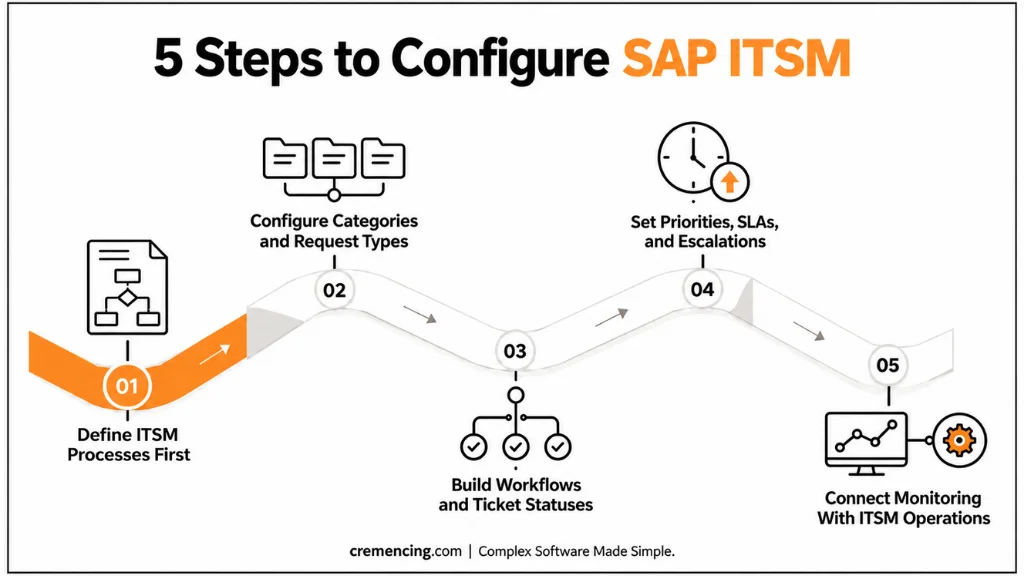
Step 1—Define ITSM Processes Before System Configuration
The first step in any SAP ITSM configuration guide is defining the processes the system will support.SAP teams should avoid copying generic ITSM templates without adjusting them to their environment.
A manufacturing company and a financial services company may have completely different support requirements.Before configuration, define the lifecycle for each process.
Incident Management Process
Incident management focuses on restoring normal service operation.
A typical lifecycle includes:
New incident → Categorization → Assignment → Analysis → Solution → Confirmation → Closure
During configuration planning, teams should define:
- Incident categories
- Priority rules
- Support queues
- Escalation conditions
- Closure requirements
For example:
A production SAP FI posting failure during month-end closing may receive higher priority than a reporting question. The system should reflect this business impact.
Service Request Management Process
Service requests should not be mixed with incidents.
Examples:
- Creating SAP user access
- Requesting authorization changes
- Adding report access
- Updating master data
A service request usually follows:
Request → Approval → Processing → Completion
Separating these processes improves reporting and helps support teams understand actual workload.
Step 2 — Configure SAP ITSM Categories and Request Types
After processes are defined, SAP teams can configure classification structures.
Categories help route tickets to the correct support teams.
Poor categorization creates delays.
For example:
A user reports:
“Cannot complete sales order.”
This could involve:
- SAP SD configuration
- Authorization issue
- Integration failure
- Master data problem
A good category structure helps identify the correct path.
Recommended SAP ITSM Category Structure
A practical structure usually follows SAP business areas:
Functional Categories
- SAP FI
- SAP MM
- SAP SD
- SAP PP
- SAP HCM
Technical Categories
- SAP Basis
- Security
- Development
- Integration
Request Categories
- Access request
- Master data request
- Report request
- Configuration request
The objective is not creating hundreds of categories. The objective is to create categories users and support teams can actually use.
Step 3 — Build SAP ITSM Workflow Configuration
After defining categories and request types, the next step is configuring workflows that control how tickets move through the support lifecycle.
A SAP ITSM workflow determines:
- Who receives the ticket
- What actions happen at each stage
- When escalation occurs
- How approvals are handled
- When an issue can be closed
Without workflow configuration, SAP ITSM becomes only a storage location for tickets. The workflow creates the operational process.
Configure Ticket Status Management
Status values define the current state of an incident or request.
A typical SAP ITSM incident workflow may include:
| Status | Purpose |
| New | User created the incident and support has not started processing |
| Assigned | Ticket has reached the responsible support team. |
| In Process | Consultant is analyzing or working on the issue. |
| Waiting for User | Additional information is required. |
| Solution Provided | Fix or answer has been delivered. |
| Closed | User confirmation and final checks are completed. |
The exact status flow depends on the organization’s support model.The important point is consistency. Every consultant should understand when a ticket moves from one stage to another.
Configure Assignment Rules for Support Teams
Assignment rules decide where incoming tickets go.
An SAP ITSM configuration should avoid manual ticket distribution wherever possible.
For example:
A ticket category:
SAP FI → Invoice Posting Issue
should automatically route to:
Finance Functional Support Team
A ticket category:
Authorization Request
should route to:
SAP Security Team
This reduces delays caused by incorrect ownership.
Good assignment rules normally use:
- Application component
- Category
- Priority
- Business process
- Support organization
The goal is to send every issue to the right team at the first attempt.
Step 4 — Configure Priorities, SLAs, and Escalations
A reliable SAP ITSM process requires clear priority management. Without defined priorities, every user request can appear urgent.
This creates confusion.
SAP teams should define priorities based on business impact and urgency.
A simple model:
| Priority | Example Scenario | Expected Action |
| Very High | Production business process stopped | Immediate investigation |
| High | Important function affected for multiple users | Fast response |
| Medium | Limited business impact | Normal processing |
| Low | Information request or minor issue | Planned handling |
The exact priority definitions should match business requirements.
Configure Escalation Management
Escalations prevent important issues from being forgotten.
A good SAP ITSM process defines automatic actions when:
- SLA deadlines approach
- Tickets remain unassigned
- Critical incidents remain unresolved
For example:
A production outage ticket remains open beyond the defined response time.
The system can notify:
- Support manager
- Application owner
- Service delivery team
This reduces dependency on manual follow-ups.
Step 5 — Connect SAP ITSM With Monitoring and Operations
Modern SAP environments require proactive support.Teams should not depend only on users reporting problems. A complete SAP ITSM setup connects service management with operational monitoring.
Depending on the SAP landscape, organizations may integrate ITSM processes with:
- SAP Solution Manager monitoring
- SAP Cloud ALM operations
- System monitoring tools
- Integration monitoring
For example:
A system monitoring alert detects a technical issue. Instead of waiting for business users to report failures, support teams can investigate earlier. This changes SAP support from reactive problem handling into proactive operations.
SAP Solution Manager ITSM and SAP Cloud ALM Configuration Considerations
The configuration approach depends on the SAP platform.
SAP Solution Manager 7.2 ITSM
SAP Solution Manager 7.2 provides IT Service Management capabilities for many SAP on-premise customers.
Configuration areas commonly include:
- Incident processes
- Service requests
- Business partner assignments
- Organizational structures
- Integration scenarios
Organizations using SAP Solution Manager should align configuration with their existing Application Lifecycle Management processes.
SAP Cloud ALM Considerations
SAP Cloud ALM follows a cloud-based operational model.
Organizations moving toward SAP Cloud ALM should review:
- Existing ITSM workflows
- Current ticket processes
- Integration requirements
- Reporting expectations
Testing and Validation After SAP ITSM Configuration
Configuration should not move directly into production. SAP teams should test every major workflow scenario.
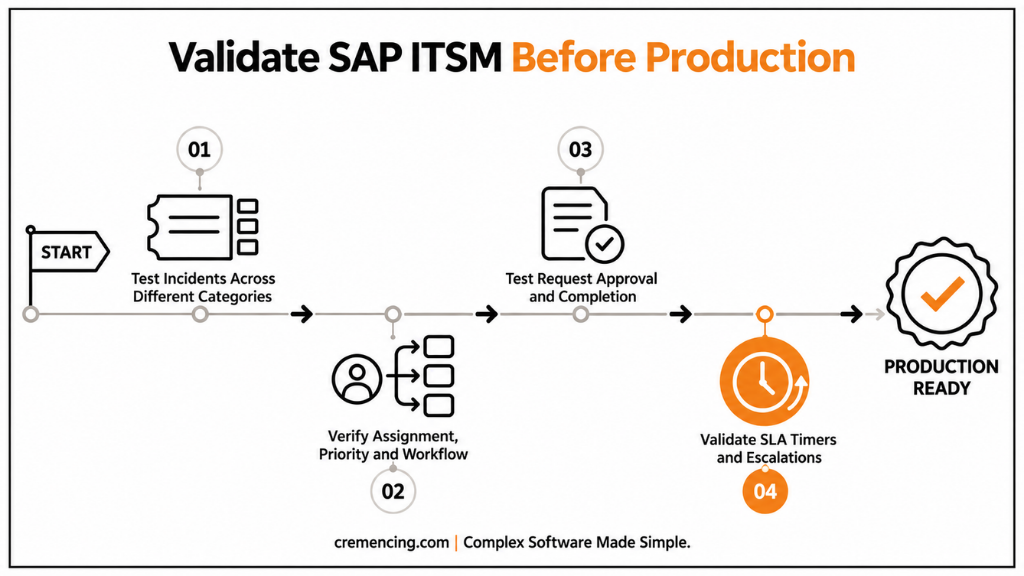
Test Incident Creation
Create sample incidents for different categories.
Verify:
- Correct category selection
- Correct assignment
- Correct priority
- Correct workflow movement
Example:
Create an SAP FI posting issue.
Confirm that:
- The finance support team receives it.
- The priority is calculated correctly.
- Escalation rules work as expected.
Test Service Requests
Create examples such as:
- User access request
- Report request
- Master data request
Check:
- Approval workflow
- Responsible team assignment
- Completion process
Validate SLA Monitoring
Test whether:
- Response timers start correctly
- Escalations trigger correctly
- Notifications reach responsible users
Conclusion
A reliable SAP ITSM process starts with the right foundation: clear ownership, well-defined workflows, accurate priorities, and proper validation. SAP teams that configure these elements first can avoid support delays, reduce confusion between teams, and create a structured approach for managing incidents, service requests, and recurring problems.
A successful SAP ITSM configuration is not only about setting up technical workflows. It is about creating a support model where business users receive faster responses, consultants have clear responsibilities, and managers gain visibility into service performance. Whether using SAP Solution Manager ITSM or evaluating SAP Cloud ALM, organizations should focus on building processes that improve control, collaboration, and long-term SAP operational efficiency.
Frequently Asked Questions
1. What is included in an SAP ITSM configuration guide?
An SAP ITSM configuration guide explains the steps required to prepare and configure IT service management processes in an SAP environment.
2. What should SAP teams configure first in ITSM?
SAP teams should configure business processes and ownership rules before technical settings.
The first step is defining:
- Support teams
- Incident categories
- Request types
- Priority rules
- Escalation responsibilities
A clear process foundation prevents workflow problems later.
Starting directly with system configuration often creates a ticketing system that does not match actual SAP support operations.
3. Is SAP Solution Manager required for SAP ITSM configuration?
SAP Solution Manager 7.2 is one platform that provides SAP ITSM capabilities, especially for SAP ECC and SAP S/4HANA on-premise customers.
However, organizations should evaluate their SAP roadmap before selecting an ITSM approach. SAP Cloud ALM may be considered for cloud-focused SAP environments depending on operational requirements.
4. How do you configure incident management in SAP ITSM?
SAP incident management configuration starts by defining incident categories, priorities, workflows, and responsible support teams.
Teams should configure how incidents move from creation to closure.
Important areas include:
- Ticket classification
- Assignment rules
- SLA handling
- Escalation process
- Resolution documentation
A good incident process ensures critical SAP issues reach the right experts quickly.
5. What is the difference between SAP ITSM incident and service request configuration?
Incident configuration focuses on unexpected problems that interrupt normal business operations.
Examples:
- SAP posting errors
- System failures
- Application issues
Service request configuration handles standard user requirements.
6. How long does SAP ITSM configuration take?
SAP ITSM configuration timelines depend on landscape complexity, process maturity, and integration requirements.
A simple setup may focus on basic incident workflows.
A larger enterprise implementation may require:
- Multiple support organizations
- SLA configuration
- Monitoring integration
- External ITSM connections
- Extensive testing
The planning phase often determines the overall success of the implementation.
7. Which SAP transactions are used for SAP ITSM configuration?
SAP ITSM configuration activities depend on the SAP platform and implementation approach.
In SAP Solution Manager environments, configuration is typically performed through Solution Manager setup activities and related configuration areas rather than relying on a single transaction.
Organizations should verify the exact configuration path for their SAP Solution Manager release before implementation.
8. How can SAP teams test ITSM configuration?
SAP teams should test ITSM configuration using realistic business scenarios.
Testing should include:
- Incident creation
- Category assignment
- Workflow movement
- SLA calculation
- Escalation handling
- Ticket closure
A successful technical configuration should also match how support teams actually work.
References
SAP Solution Manager Application Lifecycle Management





One Response