
In a manual vs automated SAP change management setup, this is exactly the kind of gap that slips through: the transport passed QAS. Testing was done. Approvals were logged. Everything looked fine.
Then someone checked production and found an older version of the object than the one that was supposedly just deployed. Somehow, a newer change had gone in, and then an older one had overwritten it. Nobody caught it before it happened. Nobody caught it while it was happening. It only showed up after the fact, when someone went looking for a different problem entirely.
This is what’s called a sequencing error: changes going into production in the wrong order. It sounds small. It isn’t. In a live SAP system, an out-of-order transport can quietly undo a bug fix, reintroduce a security gap, or break a process that finance, logistics, or manufacturing depends on every day.
And the scary part is that it can happen even when every individual step, test, approval, and piece of documentation was technically followed.
Mitigating SAP Transport Risks
Automating SAP change management significantly mitigates deployment risks by systematically enforcing transport sequencing and preventing version downgrades across complex enterprise landscapes. Unlike manual transport tracking using transaction codes SE09 or STMS, governed workflows in tools like SAP ChaRM or SAP Cloud ALM automatically bind transport requests to controlled features or change documents.
Built-in checks automatically evaluate target queues for downgrade protection and cross-reference dependencies before deployment, reducing out-of-order overwrites and missing object dependencies in production environments.
Effective risk reduction requires aligning CTS authorization profiles, such as removing direct creation (activity 01) and release privileges (activities 43/75) in object S_TRANSPRT via transaction PFCG, thereby ensuring changes strictly adhere to automated approval workflows.
Manual vs Automated SAP: Why the Approach Matters
This is where the manual vs. automated SAP approach becomes important. Manual SAP processes rely heavily on people to track transport sequences, verify dependencies, follow approval steps, and make sure the right changes move through the landscape in the right order. Automated SAP processes, by contrast, can enforce workflows, validate conditions, and reduce the risk of human error before a change reaches production.
For a long time, SAP Solution Manager’s Quality Gate Management has quietly helped organizations control exactly this kind of risk. It enforces order and blocks a transport from moving forward until the required approvals and checks are in place. Most teams don’t think about these controls until they are gone—and for many organizations, that transition is becoming a reality as SAP Solution Manager approaches its end of mainstream maintenance.
Automated SAP change management reduces more operational risk when transport volume, parallel development, compliance pressure, or landscape complexity is high. Manual control can remain workable in a small and stable system, but only with disciplined approvals, restricted authorizations, documented test evidence, and an experienced Basis team. The safest model automates repeatable controls while keeping business approval, exception handling, and production validation with named people.
Compare Manual vs Automated SAP Change Management Processes
“Manual” does not mean abandoning SAP CTS. It means people create, approve, sequence, import, and document changes through separate transactions, spreadsheets, email, ticketing tools, and hand-offs. “Automated” means an integrated workflow such as SAP ChaRM, SAP Cloud ALM Change and Deployment Management, or another governed release platform links the change record, transports, checks, approvals, deployment, and evidence.
Manual vs Automated SAP Change Management: Feature-by-Feature Comparison
To compare manual vs automated SAP change management processes fairly, start with transport volume, team size, and compliance pressure
| Feature | Manual SAP Change Management | Automated SAP Change Management |
| Change record | Ticket, spreadsheet, email, or meeting record | Requirement or change object linked to delivery workflow |
| Transport creation | Developer creates a request directly in SE09 or SE10 | Workflow creates or assigns the transport where supported |
| Approval control | Reviewer checks messages or documents | Status and role rules control progression |
| Import execution | Basis administrator imports through STMS | An approved feature or change triggers an orchestrated deployment |
| Sequence control | Team reads the import queue and dependency notes | Tool follows configured routes and can run conflict checks |
| Conflict detection | Manual object review, version comparison, or late error | Downgrade, cross-reference, lock, critical-object, or code checks where supported |
| Audit evidence | Collected from tickets, emails, screenshots, and logs | Status history, transport links, deployment records, and traceability reports |
| Emergency change | Fast but prone to bypassing normal evidence | Separate urgent workflow with controlled roles and retrospective review |
| Scalability | Degrades as releases, teams, and systems increase | Better for parallel projects and repeatable release trains |
| Initial effort | Low tool setup, high recurring coordination | Higher design and setup effort, lower repeated handling |
| Main failure mode | Human omission, wrong request, wrong order, missing proof | Bad configuration, excessive privileges, failed integration, or false confidence |
| Best fit | Small, low-change, low-compliance landscape | Medium-to-large, regulated, hybrid, or high-change landscape |
The comparison reflects SAP’s documented change-control, deployment-tool, role, and transport-check capabilities, combined with the manual-control risks raised in SAP Community discussions.
Manual vs Automated SAP Change Management: Transport Identity
In a manual vs automated SAP change management comparison, this is a key failure point: a manual process often copies transport IDs between a ticket, spreadsheet, chat message, and STMS import list. One mistyped request number can move the wrong package or leave the approved request behind. SAP’s Change Control Management documentation specifically identifies manual copying between external lists and transport requests as an error source, while an integrated change process creates the relationship automatically. duces that identity gap by attaching transports to a change document or feature.
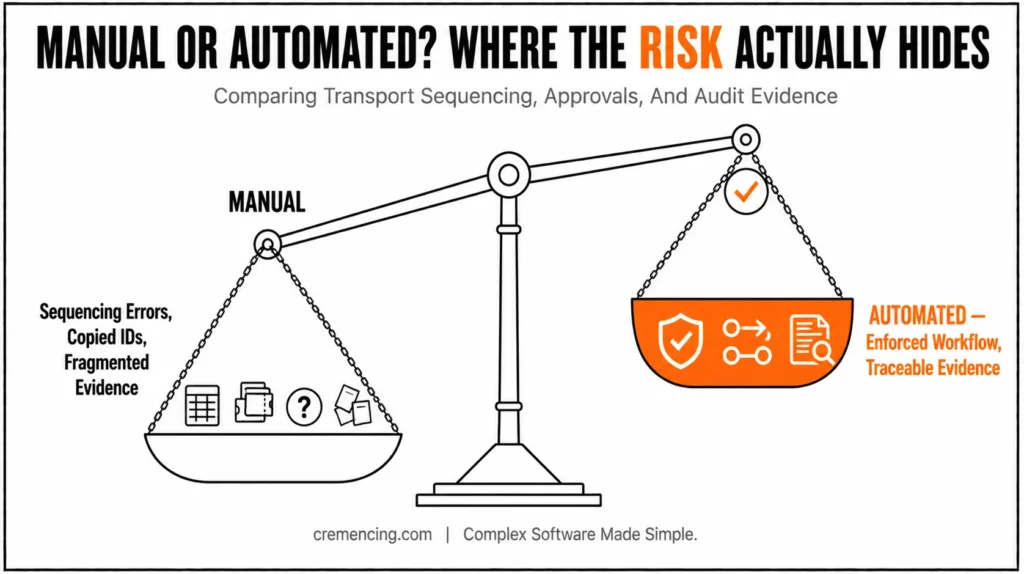
This matters when one business requirement produces several Workbench requests, customizing requests, transports of copies, and follow-up fixes. The record becomes easier to trace from requirement to production without asking three teams to reconcile separate files.
Manual vs Automated SAP: Transport Sequencing and Downgrade Risk
When you weigh manual vs automated SAP change management for sequencing risk, this matters most: manual SAP transport sequencing depends on queue awareness and release discipline. A request containing an older version can overwrite a newer object if teams release or import related requests in the wrong order.
The risk increases when multiple projects modify the same repository object or customizing entry.
SAP Cloud ALM deploys CTS transports according to the TMS import queue; users cannot manually rearrange that sequence in the Features app. Its downgrade-reducer section check can identify potential, imminent, and intrinsic downgrade situations, while the cross-reference check can identify referenced objects that are missing or inconsistent in the target.
These checks require supported CTS-managed ABAP systems and the documented technical prerequisites, so teams must not assume every landscape receives the same coverage
This is where manual vs automated SAP change management diverges sharply on accountability: a spreadsheet can show an ‘Approved’ column, but it cannot stop a developer with release and import rights from bypassing the row.
Manual processes therefore depend heavily on role design, peer behaviour, and detective review after the event. That can work, but it is fragile when deadlines tighten.
Roles, Evidence, and Effort
Automated SAP change management can separate developer, tester, change manager, and deployment manager responsibilities. In SAP Cloud ALM, different roles control implementation, successful-test confirmation, production approval, deployment, and final confirmation.
Automation improves enforcement only when the connected SAP authorizations also prevent direct transport creation or release outside the workflow.
Manual evidence normally sits across the service ticket, test document, email approval, STMS logs, and a release spreadsheet. Preparing an audit sample then becomes a reconstruction exercise. Missing screenshots or unclear timestamps do not prove that a change was unsafe, but they make the control harder to demonstrate.
An integrated workflow records status changes, assigned transports, responsible roles, deployment activity, and final confirmation. SAP Cloud ALM’s Features app is designed to document changes, orchestrate deployments, and support audit-oriented traceability.
Final deployment confirmation still requires the team to verify that transports reached production and that the change behaved correctly.SAP Transport Sequencing and Downgrade Risk
On raw speed, manual vs automated SAP change management isn’t a fair fight for a single low-risk transport: manual processing can be faster because no workflow setup is required.
The recurring cost appears later: chasing approvals, checking queues, rebuilding evidence, resolving ownership, and coordinating release windows. That cost rises with every additional system, project, and emergency change.
Automation shifts effort to process design, integration, role mapping, route configuration, monitoring, and tool support. It pays back when the same controls repeat across many releases. It does not pay back when a company buys a platform but leaves approval rules vague, lets users bypass it, or fails to maintain the CTS and Cloud ALM integration.
Manual SAP Change Management: Code and Limitations
The process can be controlled, but the control usually lives outside the transport itself. A release spreadsheet may contain the request ID, owner, sequence, test result, approval, import time, and rollback note. The Basis team must confirm that the spreadsheet matches the actual queue, that all dependent requests exist, and that nobody changed the content after approval.
Sample Transport Register Report
The following read-only ABAP report creates a basic transport register from standard CTS header and text tables. It can support manual reconciliation on ECC 6.0 or S/4HANA, but it does not prove business approval, successful testing, dependency completeness, or correct production sequencing.
REPORT ztr_manual_register.
PARAMETERS p_from TYPE sy-datum DEFAULT sy-datum OBLIGATORY.
TYPES: BEGIN OF ty_transport,
trkorr TYPE e070-trkorr, ” Transport request number
trfunction TYPE e070-trfunction, ” Request function/type
trstatus TYPE e070-trstatus, ” Current CTS status
as4user TYPE e070-as4user, ” Request owner
as4date TYPE e070-as4date, ” Last changed date
tarsystem TYPE e070-tarsystem, ” Configured target system
as4text TYPE e07t-as4text, ” Language-dependent description
END OF ty_transport.
DATA gt_transport TYPE STANDARD TABLE OF ty_transport.
DATA go_alv TYPE REF TO cl_salv_table.
SELECT a~trkorr
a~trfunction
a~trstatus
a~as4user
a~as4date
a~tarsystem
b~as4text
INTO TABLE gt_transport
FROM e070 AS a
LEFT OUTER JOIN e07t AS b
ON b~trkorr = a~trkorr
AND b~langu = sy-langu ” Read the logon-language description
WHERE a~as4date >= p_from. ” Limit the register to the chosen date
IF gt_transport IS INITIAL.
MESSAGE ‘No transport requests found for the selected date’ TYPE ‘S’.
RETURN.
ENDIF.
cl_salv_table=>factory(
IMPORTING
r_salv_table = go_alv
CHANGING
t_table = gt_transport ). ” Build a read-only ALV list
go_alv->display( ). ” Display the transport register
This report shows why custom lists never become a complete SAP change control system. Tables E070 and E07T contain useful CTS metadata, but they do not contain the full business decision, test evidence, risk acceptance, deployment window, or external-ticket history. A custom report also needs maintenance whenever the organization changes its process.
The manual approach remains reasonable when the landscape has few transports, one experienced release team, clear release windows, and low regulatory pressure. It becomes unsafe when several projects share objects, emergency work is common, evidence must be produced repeatedly, or release decisions depend on messages that are easy to miss.
Automated SAP Change Management: Code and Advantages
The automated approach links each change to a controlled lifecycle. In SAP Solution Manager ChaRM, the change document and maintenance cycle govern the transport path and can invoke transport-related checks. In SAP Cloud ALM, requirements, features, deployment plans, roles, and integrated deployment tools provide the change and deployment flow.
SAP Cloud ALM communicates through CTS, SAP Cloud Transport Management service, or ATO rather than importing directly into an SAP solution. S/4HANA Private Edition, S/4HANA on-premise, and NetWeaver ABAP systems: Cloud ALM can create, assign, release, check, and deploy transports when the required integration is configured.
CTMS supports assignment and deployment of released transports but not creation, release, or transport checks from Cloud ALM. ATO allows assignment of released transports but not deployment from the Features app, and CTS+ is not supported. ion matters.
“Automated” is not one uniform capability across ECC, S/4HANA, BTP, and S/4HANA Cloud Public Edition. You must map each system and content type to its actual deployment technology before promising one workflow.
Manual vs Automated SAP: Control the Bypass Path First
Regardless of where you land in the manual vs automated SAP change management decision, this rule holds: a workflow cannot enforce governance while developers retain unrestricted direct creation and release access. SAP documents that activity 01 in authorization object S_TRANSPRT controls transport creation, while activities 43 and 75 control release actions.
PFCG is the role-maintenance transaction used to adjust authorisations, test changes in a non-production client, and preserve emergency access through a separately approved role.
ABAP check helps a security or Basis team verify whether the current user can create or release a transportable Workbench request. It does not replace PFCG role analysis, SU53 review, or Cloud ALM role testing.
REPORT ztr_check_cts_authority.
PARAMETERS p_ttype TYPE c LENGTH 4 DEFAULT ‘DTRA’ OBLIGATORY.
” DTRA = transportable Workbench change request in S_TRANSPRT
DATA lv_create_text TYPE string.
DATA lv_release_text TYPE string.
AUTHORITY-CHECK OBJECT ‘S_TRANSPRT’
ID ‘ACTVT’ FIELD ’01’ ” Activity 01: create/add request
ID ‘TTYPE’ FIELD p_ttype. ” Request type being checked
IF sy-subrc = 0.
lv_create_text = ‘User can create this transport request type’.
ELSE.
lv_create_text = ‘User cannot create this transport request type’.
ENDIF.
AUTHORITY-CHECK OBJECT ‘S_TRANSPRT’
ID ‘ACTVT’ FIELD ’43’ ” Activity 43: release own request
ID ‘TTYPE’ FIELD p_ttype. ” Use the same request type
IF sy-subrc = 0.
lv_release_text = ‘User can release this transport request type’.
ELSE.
lv_release_text = ‘User cannot release this transport request type’.
ENDIF.
WRITE: / lv_create_text,
/ lv_release_text.
Automate Checks, Not Judgement
On the automated side of manual vs automated SAP change management, ChaRM can run checks for cross-system object locks, downgrade protection, critical objects, cross-references, ATC, Code Inspector, and customer-specific logic where configured.
SAP Cloud ALM transport checks currently focus on supported CTS-managed ABAP scenarios and include downgrade protection and cross-reference analysis. These controls detect technical conflicts; they cannot decide whether a pricing change is commercially correct or whether a finance team accepts the business impact.
Automated workflows only close half the gap — see how ServiceNow integration removes duplicate approval steps for the other half.
Fore remains a human accountability point. A tester confirms that the requirement works, a change manager approves production readiness, a deployment manager controls movement, and the responsible team confirms production deployment.
Automation should make skipped steps visible and difficult, not pretend those steps no longer exist.
Manual vs Automated SAP: Keep the 2027 Decision Accurate
Any manual vs automated SAP change management decision now has to account for a hard deadline: SAP Solution Manager 7.2 mainstream maintenance ends on December 31, 2027. Customers choosing optional Business Suite 7 extended maintenance can rimpact.
Selected Solution Manager functions, including change control management, through the end of 2030.
SAP still recommends completing the transition to SAP Cloud ALM before the end of 2027. mean ChaRM suddenly stops on January 1, 2028, and it does not mean Cloud ALM reproduces every ChaRM function.
SAP states that Quality Gate Management is currently outside Cloud ALM’s scope, Change Control Management data transfer is not planned, and customers should close open change cycles before activating Cloud ALM Deployment Management.
“In practice, this means organizations have a real choice: migrate to Cloud ALM on SAP’s recommended timeline, or use Business Suite 7 extended maintenance to retain select ChaRM functions through 2030 while planning a longer transition — but either path requires knowing which specific ChaRM capabilities Cloud ALM does not yet replace.
Quick Decision Guide
- Small, stable landscape, low transport volume → Manual with strong discipline can work
- Growing transport volume, multiple projects, compliance pressure → Move toward automation
- Currently on ChaRM → Start mapping Cloud ALM feature gaps now, before 2027
- Regulated industry, frequent audits → Automated evidence trail is close to mandatory
Manual Vs Automated SAP Migration Checklist
Use this checklist once you’ve decided, based on how you compare manual vs. automated SAP change management processes, that a hybrid or automated model fits your landscape.
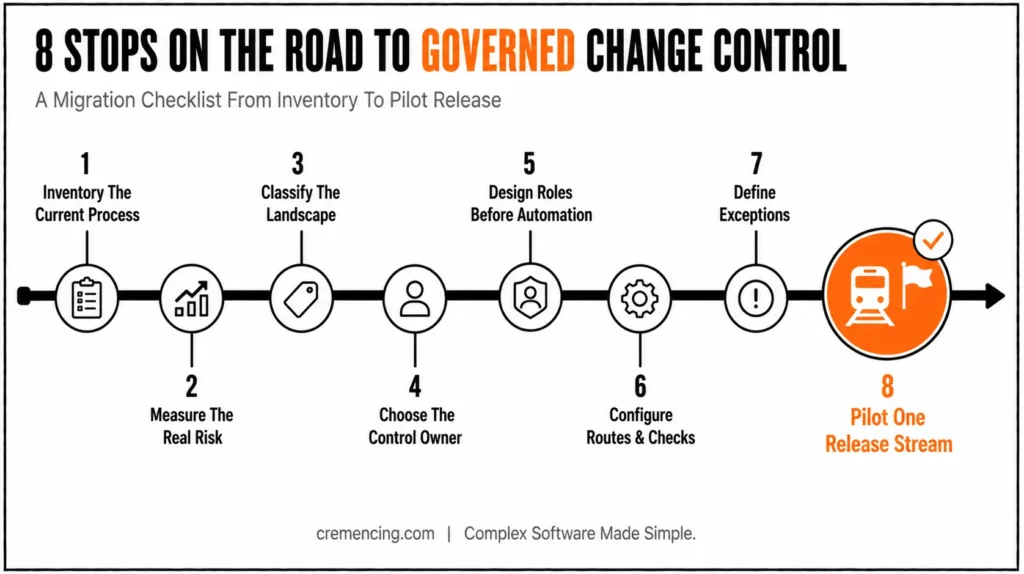
- Inventory the current process. Record every transaction, ticket state, spreadsheet, approval, import job, emergency path, and audit report. Include SE09 or SE10 creation, STMS imports, background schedules, and direct production access.
- Measure the real risk. Count sequence errors, failed imports, orphan requests, unauthorized releases, emergency changes, missing evidence, and hours spent reconciling transport lists.
- Classify the landscape. Separate ECC 6.0, S/4HANA on-premise, private edition, and public edition; BTP; integration suite; and non-ABAP content. Map each to CTS, CTMS, ATO, or another supported deployment tool.
- Choose the control owner. Decide whether ChaRM, Cloud ALM, or another release platform owns the change record, approval state, transport assignment, and deployment evidence.
- Design roles before automation. Separate developer, tester, change approver, deployment manager, and emergency operator duties. Remove direct creation or release rights where the workflow must be mandatory.
- Configure transport routes and checks. Validate TMS routes, clients, RFC connections, ST-PI levels, required SAP Notes, import queues, downgrade protection, cross-reference checks, and critical-object controls.
- Define exceptions. Create an urgent-change path with expiry, named approval, production validation, and retrospective review. Do not solve emergencies by granting permanent broad access.
- Pilot one release stream. Start with a bounded application area, compare tool status with STMS results, test failure handling, and verify that evidence meets internal audit needs.
Conclusion
The sequencing error at the start of this post didn’t happen because anyone skipped a step — it happened because no system enforced the order those steps had to occur in. That’s the real distinction between manual and automated SAP change management: automation doesn’t remove human judgment from testing, approval, or business risk decisions, but it does make it much harder for a step to be silently skipped or reversed.
For a small, stable landscape, disciplined manual control can still hold. For anything larger, or anything approaching the 2027 Solution Manager deadline, the safer default is governed automation with human accountability preserved at the points that actually require judgment.
Frequently Asked Questions
1. How do you compare manual vs. automated SAP change management processes effectively?
Automated SAP change management is better for medium-to-large or regulated landscapes because it enforces sequencing, approval, and audit evidence automatically. Manual control can still work for small, stable systems with strict discipline, but it degrades quickly as transport volume and team size increase.
2. What Is the Difference Between Manual and Automatic SAP Transports?
Manual transport means a person selects, releases, schedules, or imports a request using SE09, SE10, or STMS. Automatic transport uses a governed workflow to trigger these actions with built-in checks. The real difference is control integration, not whether SAP CTS performs the technical import.
3. Can SAP ChaRM Be Used While Transports Are Released Manually in SE09 and Imported Through STMS?
It’s technically possible, but mixing ChaRM records with manual transport actions creates status inconsistencies and bypasses workflow checks. ChaRM reduces the most risk when transport creation, release, approval, and import all stay aligned with the change document and maintenance cycle.
4. Can We Stop Developers From Creating Transports Outside the Controlled Workflow?
Yes, restrict the relevant CTS authorizations. SAP recommends removing activity 01 from S_TRANSPRT to block independent creation and activities 43/75 to block independent release. Test the role design carefully and retain a separately approved emergency access path.
5. Do Small SAP Teams Need Automated Change Management?
Not necessarily. A small, stable landscape with low transport volume, an experienced Basis team, and strict manual discipline can operate safely without a dedicated tool. Automation becomes necessary once transport volume, parallel projects, or compliance pressure increases.
Does moving to SAP Cloud ALM mean losing SAP ChaRM entirely?
No. Cloud ALM does not reproduce every ChaRM function, and SAP has stated that Quality Gate Management is currently outside Cloud ALM’s scope. Organizations should map specific feature gaps before fully retiring ChaRM.
What is the biggest risk of running a hybrid manual-and-automated transport process?
Mixing ChaRM records with manual transport actions in SE09/STMS creates status inconsistencies and bypasses workflow checks, since the automated system loses visibility into changes made outside it.
Can Cloud ALM manage transports for SAP Cloud Public Edition systems?
Coverage varies by deployment technology — CTMS and ATO have different supported capabilities than CTS-managed ABAP systems, so teams must confirm which deployment method applies to each system before assuming uniform Cloud ALM support.
What happens to audit evidence if a company switches from manual tracking to an automated workflow mid-year?
Historical evidence collected manually (tickets, emails, spreadsheets) remains valid for changes made before the switch, but teams should document the transition date clearly so auditors can distinguish which evidence trail applies to which period.
Is SAP Solution Manager’s Quality Gate Management still supported after 2027?
Selected Solution Manager functions, including change control management, may remain available through Business Suite 7 extended maintenance until the end of 2030 for customers who choose that path, but SAP recommends completing the transition to Cloud ALM before the end of 2027 regardless.





2 Responses