

Introduction
In creating, testing, and troubleshooting ABAP programs, SAP developers waste time looking for the correct transaction codes. Within large SAP landscapes, it is essential to know which ABAP program T-code to use for a particular development activity, as this inevitably impacts development speed and the quality of system maintenance.
In ABAP development, developers use various transaction codes throughout the application development process. They use T-codes to write ABAP programs, manage repository objects, debug errors, and transport changes. Novice developers often learn individual T-codes without understanding how those transactions fit into the broader SAP development process.
This guide explains which ABAP program T-codes developers actually need. It also covers their relevance and role in professional ABAP development workflows.
What Are ABAP Program TCodes in SAP?
ABAP program TCodes are SAP transaction codes to direct access to ABAP development, testing, monitoring, and administration functions in an SAP system. These transaction codes provide shortcuts for certain SAP applications or tools to give developers a quick way to accomplish a task without going through several SAP menus.
Repository objects hold ABAP programs in an SAP environment. Developers develop reports, classes, function modules, interfaces, and other objects, which are part of the SAP application landscape. These objects have access points for creation and management through their life cycle via transaction codes.
For instance, an ABAP developer developing a custom report can use SE38 to write and execute the report, SE11 to validate the database structures related to the report, and use debugging transactions to analyze the runtime behavior. Each TCode only provides a specific stage of development and not the entire process.
It cannot be understated that making use of ABAP T-codes is crucial, as ABAP development is not limited to coding. An understanding of transport processes, authorization requirements, testing procedures, and data structures.
Why ABAP Developers Depend on Transaction Codes
SAP systems are built around a structured repository model where technical objects are managed centrally. Unlike traditional programming environments where developers may work with independent files, ABAP development takes place inside the SAP application platform. Transaction codes provide controlled access to these development functions.
For example, a developer creating an ABAP report needs a program editor, a developer analyzing database structures needs dictionary tools, a developer testing reusable logic may need function module or class testing tools, and a developer moving changes between systems needs transport management functions. Each activity requires different SAP tools, and transaction codes provide a consistent way to access them.
In enterprise SAP environments, this becomes especially important because developers work across multiple systems following a Development System → Quality Assurance System → Production System flow. A developer may create a program in the development system, test it in quality assurance, and finally release it to production after approval. SAP Basis teams and development teams rely on correct transaction usage to maintain system stability during this process.
Understanding the SAP ABAP Development Workflow
Before looking at individual ABAP program TCodes, it is important to understand where these transactions fit into the overall development lifecycle. A typical SAP ABAP development process includes several stages.
Requirement Analysis. The process begins when a business requirement is identified. Functional consultants and business teams define what the SAP system needs to achieve. For example, a company may require a custom report showing additional sales analysis data that is not available through standard SAP functionality. At this stage, developers analyze required business logic, data sources, existing SAP objects, and technical feasibility.
Program Development. Once requirements are approved, ABAP developers create or modify SAP repository objects. Common development activities include creating ABAP reports, developing classes, creating function modules, defining database structures, and building interfaces. Transaction codes such as SE38, SE80, and SE11 support these activities.
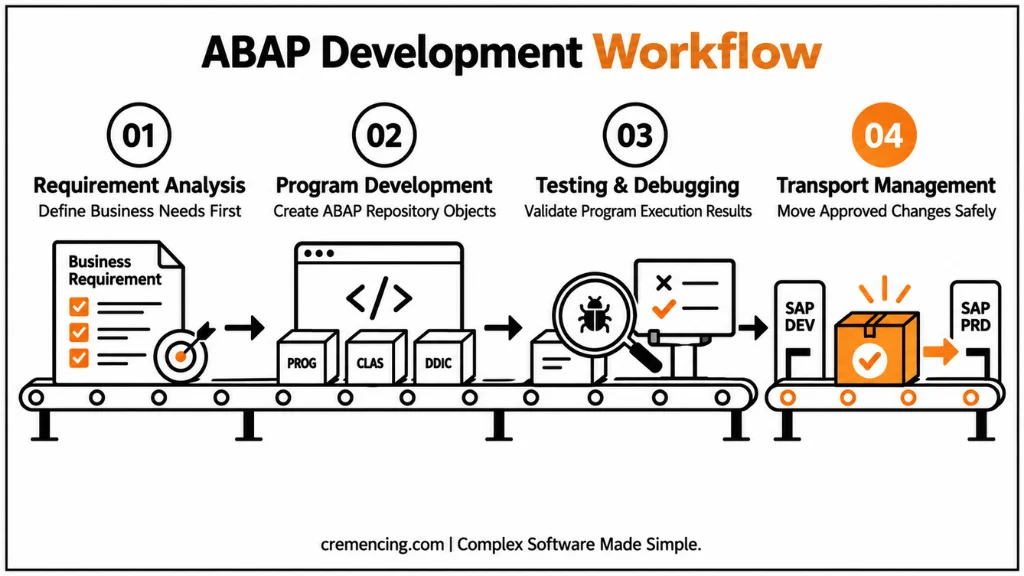
Testing and Debugging. After development, the program must be tested to ensure it produces correct results and handles different business scenarios. Developers use debugging tools to analyze variable values, program execution flow, database operations, and runtime errors. A program that works with sample data may still fail in production due to performance issues, authorization restrictions, or unexpected business conditions.
Transport Management. ABAP objects created in the development system are not directly available in production. Teams must transport these changes through the SAP landscape using controlled processes. Transport management ensures that teams move approved changes to the correct systems, keep development objects consistent, and maintain production stability. SAP Basis teams usually manage transport imports, while developers create and release transport requests for their development changes.
Essential ABAP Program TCodes for Development Activities
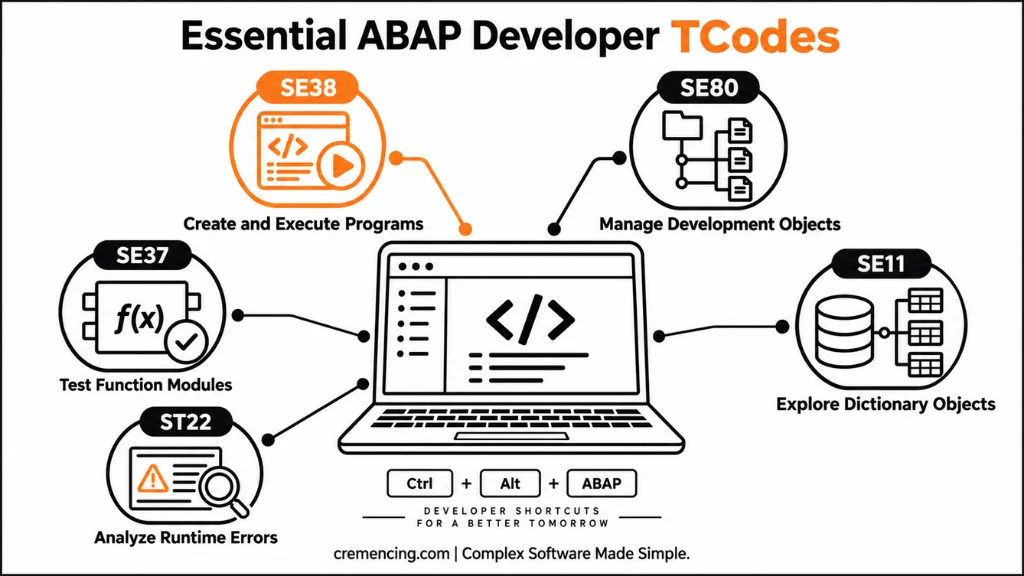
There are many SAP transaction codes available for technical work, but developers regularly depend on a smaller group of important transactions. The most commonly used ABAP development TCodes include:
| TCode | Primary Purpose |
| SE38 | Create, modify, and execute ABAP programs |
| SE80 | Manage ABAP repository objects through Object Navigator |
| SE11 | Create and analyze ABAP dictionary objects |
| SE37 | Test and manage function modules |
| SE24 | Create and maintain ABAP classes |
| SE93 | Create and maintain transaction codes |
| ST22 | Analyze ABAP runtime errors |
| SE16N | View table data for analysis |
These transaction codes support different parts of the development lifecycle. A professional ABAP developer does not use them independently but combines them depending on the technical requirement.
ABAP Program Creation and Execution Using SE38 and SA38
SE38 is one of the most important ABAP program TCodes because it provides direct access to the ABAP Editor and program execution functions. Developers commonly use SE38 for creating executable reports, editing ABAP source code, running programs, checking syntax errors, and activating programs.
A typical ABAP report development process starts in SE38. The developer creates a program name, defines the program attributes, writes the ABAP logic, and executes the program for testing. For example, a developer creating a custom financial report may use SE38 to develop the report logic that retrieves accounting data from SAP tables and displays the required output. However, SE38 alone does not cover every development requirement, and ABAP developers often combine it with other transactions such as SE11 for database structures and SE37 for function module testing.
While SE38 is mainly used for program creation and modification, SA38 is used primarily for executing existing ABAP programs. This distinction is useful in environments where users or support teams need to run reports without modifying the underlying code.
For example, a support analyst may need to execute a custom ABAP report to verify system data without requiring access to development tools. The separation between development and execution helps maintain security controls because not every user who runs reports should have authorization to modify ABAP programs.
Managing Development Objects Through SE80
SE80, known as the Object Navigator, gives developers a single working environment for managing repository objects instead of switching between separate transactions for each object type. From SE80, a developer can view and edit programs, function groups, classes, screens, and module pools within the context of the package or development object they belong to, which makes it easier to understand how related objects connect to one another.
This becomes particularly useful when a program depends on multiple technical components. For example, a custom report built in SE38 may rely on include programs, screen elements, and function modules that are easier to locate and maintain through the SE80 object tree than by opening each transaction individually.
Understanding SAP repository objects and packages → target article] Because SE80 also provides direct access to activation, syntax checking, and navigation to related objects, many developers use it as their primary workbench once a project moves beyond a single, isolated report.
SE80 does not replace SE38 or SE11; it consolidates access to them within one interface. A developer troubleshooting an issue across several objects can open the relevant program, jump to a called function module, and review a referenced table structure without leaving the Object Navigator, which reduces the time spent switching between transactions during complex development or debugging work.
Exploring SAP Dictionary Objects With SE11
SE11 provides access to the ABAP Dictionary, where developers create and maintain the data definitions that ABAP programs depend on, including tables, structures, data elements, domains, views, search helps, and lock objects. Before writing a SELECT statement or building a report layout, developers commonly use SE11 to confirm field names, data types, and key structures rather than relying on assumptions about how a table is defined.
For example, a developer building a sales reporting program may use SE11 to review the structure of a standard table such as VBAK to confirm which fields store order type, sales organization, and document date before referencing them in ABAP code. This step reduces the risk of runtime errors caused by incorrect field names or data type mismatches, which are common issues when developers write logic against table structures they have not verified directly.
SE11 is also where developers create custom data elements and domains when a business requirement calls for a new field that does not exist in standard SAP tables. Because dictionary objects are shared across multiple programs, changes made through SE11 need careful review, since a modification to a widely used structure can affect other development objects that depend on the same definition.
Testing and Debugging ABAP Programs
Testing and debugging are treated as a distinct stage in ABAP development because a program that runs correctly with sample data can still behave differently under real business volumes or specific authorization settings. Developers use the ABAP Debugger, commonly accessed by entering /h before executing a transaction, to step through program logic, inspect variable values, and identify where execution deviates from the expected result.
Function modules created or maintained through SE37 include their own test environment. Developers can use it to execute a function module directly with sample input values before calling it from a larger program. This approach helps developers isolate logic errors early instead of discovering them after integrating the function module into a full report or transaction. When a program fails unexpectedly, developers can use ST22 to access ABAP runtime error dumps. The dumps show the exact statement and data conditions that caused the short dump, which typically gives developers a starting point for root-cause analysis.
Beyond functional correctness, developers also need to confirm that a program performs well under realistic data volumes. A report may return results quickly against a small test dataset but slow down significantly when it processes production-scale tables. For this reason, developers typically perform performance checks before releasing a transport request for testing in the quality system.
Transporting ABAP Development Objects Across SAP Landscapes
Once a program has been developed and tested, it must move through the SAP landscape using a controlled transport process rather than being created independently in each system. Developers use SE09 or SE10, the Transport Organizer, to create and manage transport requests, which act as containers that record which development objects have changed and need to move to the next system.
A typical transport request includes a header describing the change and one or more tasks where the developer’s modified objects are recorded. When development work is complete, the developer releases the transport request, which packages the changes for import into the quality assurance system. SAP Basis teams then manage the technical import process, typically using the Transport Management System, to move approved changes from quality assurance into production according to the organization’s release schedule.
This separation of responsibilities exists because uncontrolled changes in production can affect live business transactions. A transport process that is properly documented, reviewed, and sequenced helps ensure that development objects remain consistent across development, quality, and production systems, and that any issues identified during testing can be traced back to a specific, well-defined set of changes.
Common Mistakes Developers Make With ABAP TCodes
A frequent mistake among newer ABAP developers is treating SE38 as a general-purpose tool for every development task instead of using SE11 to verify table structures or SE37 to isolate function module logic before integrating it into a larger program. This often leads to errors that could have been caught earlier if the correct transaction had been used for that specific stage of development.
Another common issue is skipping performance testing because a program appears to work correctly against a small dataset. Reports that run acceptably during initial testing can create significant system load once they process full production data volumes, particularly when a program lacks proper filtering or uses inefficient database access patterns. Developers should validate performance using representative data volumes rather than assuming that functional correctness alone confirms a program is ready for transport.
Transport-related mistakes are also common, particularly when developers group unrelated changes into a single transport request or release requests without adequate documentation. This makes it difficult for SAP Basis teams and other developers to understand what a specific transport actually changes, which increases the risk of import errors or unintended side effects in downstream systems. Clear, task-specific transport requests with accurate descriptions reduce this risk considerably.
Conclusion
ABAP program TCodes are not isolated shortcuts but connected tools that support each stage of SAP development, from writing and testing code to moving it safely across the SAP landscape. SE38 and SA38 handle program creation and execution, SE80 consolidates access to related repository objects, SE11 confirms the data structures a program depends on, and transport transactions such as SE09 and SE10 ensure that approved changes reach production in a controlled way.
Developers who understand how these transactions fit into the broader ABAP development workflow, rather than memorizing them individually, are better positioned to write reliable programs and avoid the transport and performance issues that commonly affect SAP landscapes. As SAP environments continue to include more S/4HANA-specific tools and cloud-based development options, this foundational TCode knowledge remains a starting point for building sound development practices.
Frequently Asked Questions
1. What is the main ABAP program TCode used for development?
SE38 is the primary ABAP program TCode used for creating, editing, and executing ABAP programs. It gives developers direct access to the ABAP Editor along with syntax checking and program activation functions.
2. What is the difference between SE38 and SA38?
SE38 supports both program creation and execution, while SA38 is used primarily to execute existing programs. This separation allows support teams to run reports without holding authorization to modify the underlying ABAP code.
3. When should a developer use SE80 instead of SE38?
SE80 is useful once a program depends on multiple related objects, such as include programs, function groups, or screens. It consolidates access to these components in one Object Navigator view instead of separate transactions.
4. Why is SE11 important for ABAP developers?
SE11 lets developers verify table structures, data elements, and key fields before writing ABAP logic against them. Checking dictionary objects through SE11 reduces runtime errors caused by incorrect field names or data type mismatches.
5. Which TCode is used to analyze ABAP runtime errors?
ST22 displays ABAP runtime error dumps, showing the exact program statement and data conditions that caused the failure. It is typically the first transaction developers check after a program terminates unexpectedly.
6. How do developers move ABAP objects between SAP systems?
Developers use SE09 or SE10 to create and release transport requests, which package changed development objects for import into quality assurance and production systems through the Transport Management System.
7. Can ABAP programs be tested before they are transported?
Yes, developers test programs directly in the development system using the ABAP Debugger, function module test environments in SE37, and manual execution through SE38 or SA38 before releasing a transport request.
8. What is a common cause of ABAP transport errors?
Transport errors often result from grouping unrelated changes into a single request or releasing requests with incomplete documentation, which makes it harder for Basis teams to trace what a specific transport actually modifies.




