

Choosing between user exits vs BAdIs in SAP is an important decision when extending standard SAP processes. While user exits and customer exits remain common in ECC systems, BAdIs and newer enhancement framework options are increasingly important in S/4HANA. The right choice depends on the available enhancement point, system release, implementation type, upgrade strategy, and long-term support requirements.
Short answer: use the BAdI when SAP has released one for your process, keep the user exit when it’s already stable in a live ECC transaction, and never modify standard code when neither exists without architecture sign-off. The harder part isn’t the rule — it’s that most tickets don’t come labeled with which enhancement point applies, and picking wrong costs you at the next upgrade, not today. Here’s how to make that call correctly, every time, without guessing.
SAP User Exits vs. BAdIs
According to SAP documentation, the transition from legacy User Exits and CMOD/SMOD Customer Exits to modern Business Add-Ins (BAdIs) represents a shift from procedural, include-based modifications to object-oriented, interface-driven extensions.
While traditional exits rely on customer function modules or includes (such as MV45AFZZ), BAdIs utilise explicit interface method definitions that enforce parameter encapsulation, support filter-dependent processing, and allow multiple active implementations. In S/4HANA releases, released BAdIs are the preferred extension mechanism to align with Clean Core principles, preventing explicit modifications that complicate system upgrades. However, developers must avoid executing explicit database commits or unindexed queries within BAdI implementations to prevent transaction instability and performance degradation.
User Exits vs BAdIs in SAP — Key Differences
The fastest way to understand user exits vs. BAdIs in SAP is to compare the decision points that affect real projects. Definitions help, but interviews and production support usually test judgment.
User Exit / Customer Exit vs. BAdI / Enhancement Framework
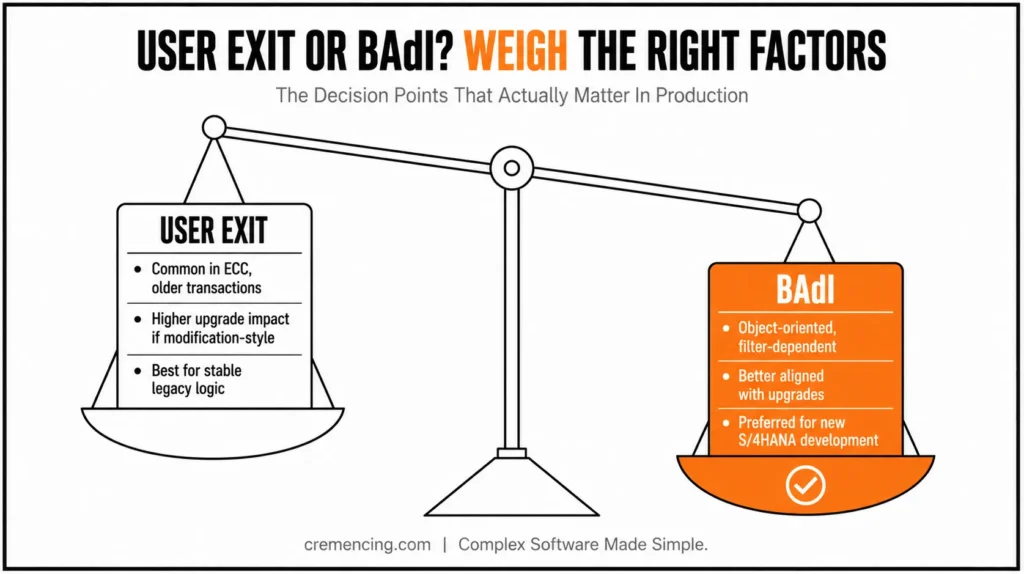
Main purpose: User exits add customer logic in predefined SAP spots, while BAdIs provide enhancement logic through an object-oriented framework.
Common release context: In ECC and older transactions, user exits are common. BAdIs, meanwhile, are widely used in newer ECC designs and S/4HANA.
Main transactions: Developers typically use SMOD, CMOD, SE80, and sometimes SE38 to find or implement user exits. For BAdIs, common tools include SE18, SE19, SE80, and ADT.
Implementation style: With user exits, implementation can involve includes, function exits, menu exits, or screen exits. BAdIs instead use interface method implementations.
Multiple implementations: A user exit is generally limited to single-project behaviour, whereas a BAdI can support multiple implementations when designed for that purpose.
Filter support: Filter-dependent BAdIs can control execution based on specific values. User exits generally do not use filtering as their primary enhancement model.
Upgrade impact: Modification-style user exits can create greater upgrade concerns. BAdIs are generally better aligned with SAP’s enhancement framework.
Debugging method: To debug a user exit, place a breakpoint in the relevant customer function or include. For a BAdI, set the breakpoint in the implemented BAdI method.
Best for: Legacy ECC enhancements and existing exit logic often use user exits. For newer process enhancements, BAdIs generally provide a cleaner extension design.
Main risk: Older user-exit includes can contain hidden side effects, while multiple active BAdI implementations can produce unexpected behavior.
S/4HANA fit: Migrated logic may still contain user exits, but a BAdI is usually preferred when an appropriate released option is available.
User Exits vs BAdI: Understanding Customer Exits
User exits are older enhancement points that let customers add logic to standard SAP processing. In many classic cases, user exits appear as includes or subroutines inside standard programs. Some older user exits can behave close to modifications, so you must understand the exact enhancement type before changing code.
Customer exits are a more controlled enhancement approach, commonly managed through SMOD and CMOD. SMOD is the transaction used to display SAP enhancement projects and components delivered by SAP. CMOD is the transaction used to create and activate customer enhancement projects that implement those components.
The common types of user exits in SAP include function exits, menu exits, and screen exits. A function exit lets you add logic through a customer function module. Meanwhile, a menu exit adds customer menu items, and a screen exit adds custom fields or subscreens to standard screens. Read more on modern integration approaches in S/4HANA.
A typical ECC support example is a sales-order validation in transaction VA01 or VA02. The developer may find an include such as MV45AFZZ and place logic in a user exit routine. That may solve the immediate ticket, but it can become difficult to control if the logic grows across many fields, sales areas, and document types.
Example of old-style user exit logic:
FORM userexit_save_document_prepare.
IF vbak-auart = ‘ZOR’. ” Check custom sales document type
IF vbak-kunnr IS INITIAL.
MESSAGE ‘Sold-to party is required for ZOR orders’ TYPE ‘E’. ” Stop save if customer is missing
ENDIF.
ENDIF.
ENDFORM.
This kind of code is easy to write, but it can become risky when many developers add unrelated validations in the same include. The user exit becomes a dumping ground for business rules. Debugging also becomes harder because one include may control many scenarios.
Customer exits are usually cleaner than direct modification-style exits because SAP provides an enhancement component. Still, they often depend on older tooling. A basic customer-exit flow is to find the enhancement in SMOD, create a project in CMOD, assign the enhancement, implement the function exit, and activate the project, then test the business transaction.
Example of customer function exit style:
FUNCTION exit_sapmv45a_002.
*” IMPORTING
* VALUE(i_vbak) TYPE vbak
*” CHANGING
*” VALUE(c_vbak) TYPE vbak
IF i_vbak-auart = ‘ZOR’. ” Apply logic only for custom order type
c_vbak-bstnk = |CHECKED-{ i_vbak-bstnk }|. ” Adjust reference field for demo logic
ENDIF.
ENDFUNCTION.
Use customer exits when the process already provides them, and the project standard expects them. Do not force a redesign during a small ECC support ticket unless the existing exit is unstable, overused, or blocked by upgrade strategy.
User Exits vs BAdIs in S/4HANA
BAdI means Business Add-In and provides an object-oriented enhancement approach through interfaces and implementations. When comparing user exits vs. BAdIs in SAP, BAdIs generally provide a more structured option for newer development when SAP provides a suitable and released enhancement point for the process.
BAdIs fit modern ABAP design better because the method signature makes the enhancement point clearer. A developer can open the interface, check import and changing parameters, read documentation, inspect filters, and debug the exact implementation. In S/4HANA projects, BAdIs and enhancement framework options are usually preferred when SAP provides them for the process.
A BAdI can be single-use or multiple-use depending on its definition. Some BAdIs are filter-dependent. A filter-dependent BAdI can run different implementations based on values such as company code, country, document type, or application area. This decision also comes up directly in interviews; see how senior SAP employers test this exact judgment call in real interview scenarios.
Example of BAdI method implementation:
METHOD if_ex_sales_validation~check_document.
IF is_header-auart = ‘ZOR.’ “Restrict logic to custom sales order type
IF is_header-kunnr IS INITIAL.
MESSAGE ‘Customer is required for ZOR orders’ TYPE ‘E’. “Stop processing with clear validation
ENDIF.
ENDIF.
ENDMETHOD.
This structure is easier to read than a large shared include. The method name tells you the enhancement purpose, the interface shows the available data, and the implementation can be activated, deactivated, filtered, and transported as a clear enhancement object.
Choosing the Right Extension Point: BAdI vs User Exit
The new approach is not only about BAdI syntax. It is about choosing a controlled extension point. In S/4HANA, this becomes more important because clean-core and upgrade-safe development pushes teams toward released extension points, BAdIs, APIs, CDS extensions, RAP exits, and in-app or side-by-side extensions where applicable.
BAdIs also need discipline. Multiple active implementations can cause unexpected behavior when the design allows more than one implementation. Filter values can be wrong or missing. Heavy SELECT logic inside a BADI can slow down core transactions. A COMMIT WORK inside an enhancement method can break transaction control.
The right answer to “BAdI or user exit” depends on location and requirements. If SAP provides a process-specific BAdI in a modern transaction, use it before an old generic user exit. However, if the logic already exists in a stable ECC customer exit and the change is small, maintain it carefully. When no official hook exists, do not modify standard SAP code without architecture review.
Example of safer BAdI-style guard logic:
METHOD if_ex_document_check~validate.
CHECK is_header-bukrs = ‘1000’. ” Run only for company code 1000
CHECK is_header-blart = ‘DZ’. ” Run only for payment document type
IF is_header-reference IS INITIAL.
MESSAGE ‘Reference is required for this document type’ TYPE ‘E’. “Business validation message: User Exits and Customer Exit
ENDIF.
ENDMETHOD.
The CHECK statements keep the implementation focused. This is important because enhancements often run inside critical standard transaction flow.
User Exits vs BAdIs Selection Checklist
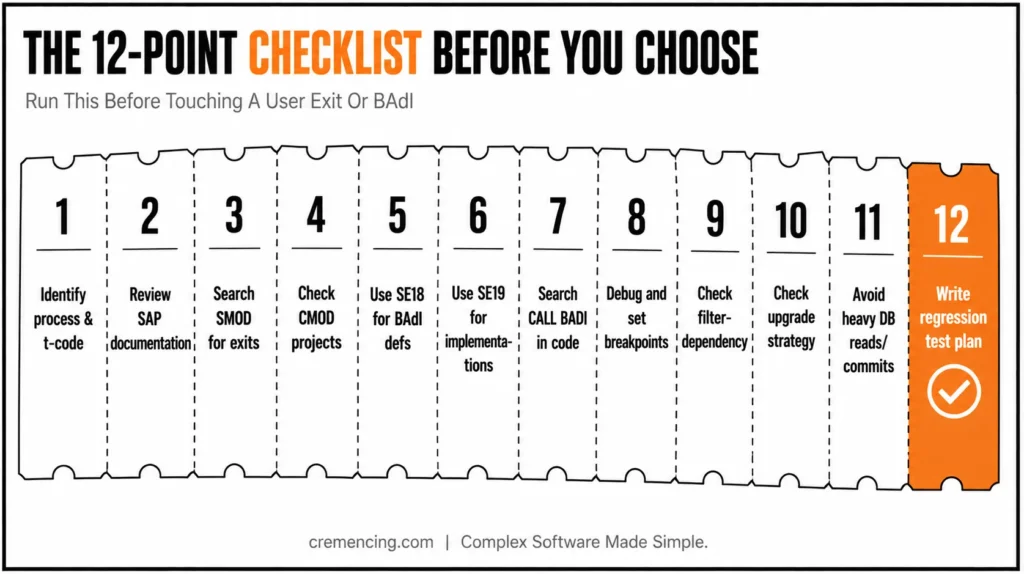
Use this checklist before choosing or replacing user exits and BAdIs in SAP.
- Identify the exact business process and transaction code.
- Review SAP documentation, configuration, and process-specific enhancement points.
- Search SMOD for customer exits related to the package or application area.
- Check CMOD for existing active enhancement projects.
- Use SE18 to search BADI definitions by name, package, or application component.
- Use SE19 to check existing BAdI implementations and activation status.
- Search the standard program for CALL CUSTOMER-FUNCTION, CUSTOMER-FUNCTION, GET BADI, and CALL BADI.
- Debug the transaction flow and set breakpoints in suspected exits or BAdI methods.
- Check if the BAdI is single-use, multiple-use, or filter-dependent.
- Check upgrade and S/4HANA strategy before adding new logic to an old include.
- Avoid heavy database reads, commits, unrelated validation, and cross-module side effects.
- Write a regression test plan for all affected document types, company codes, and user roles.
For how to find user exits and BAdIs in SAP, do not depend on one trick only. Combine package analysis, transaction debugging, repository search, SMOD/CMOD, SE18/SE19, and functional process knowledge. That gives better results than randomly searching the internet for one exit name.
Conclusion:
Choosing between a user exit and a BAdI in SAP depends on the business process, system release, available enhancement options, and long-term support strategy. A user exit is not automatically the wrong choice, especially when existing ECC logic is stable, supported, and already integrated into the process.
For new development in S/4HANA, prefer the released BAdI or enhancement option SAP provides for the specific process. Before implementing it, review existing implementations, filters, execution flow, and potential side effects. The goal is not simply to choose the newer technology but to place custom logic in the right enhancement point with minimal impact on upgrades, testing, and future maintenance.
Frequently Asked Questions
1. What are user exits and BADIs in SAP?
User exits and BAdIs in SAP are enhancement techniques used to add custom logic to standard SAP processing. User exits are older enhancement points, while BAdIs are object-oriented enhancement options connected to interfaces and implementations.
2. What is the difference between a user exit and a BAdI?
The main difference is implementation style and flexibility. A user exit often uses includes or function exits, while a BAdI uses interface methods. In user exit vs. BAdI decisions in SAP, BAdI usually fits newer enhancement designs better.
3. What are the types of user exits in SAP?
The common types of user exits in SAP include function exits, menu exits, and screen exits. Function exits add ABAP logic, menu exits add custom menu entries, and screen exits add fields or subscreens to standard transaction screens.
4. Which T-code is used for user exits?
SMOD displays SAP enhancements, and CMOD creates customer enhancement projects. Developers also use SE80 or program search to inspect includes and enhancement logic. For customer exits, SMOD and CMOD are the main classic transactions.
5. Which tcode is used for BAdI?
SE18 displays or defines BAdIs, and SE19 creates or maintains BAdI implementations. In newer development, ADT may also help inspect enhancement objects. Always check whether the implementation is active and whether filters are maintained.
6. How to find user exits and BAdIs in SAP?
To find user exits and BAdIs in SAP, check SMOD, CMOD, SE18, SE19, package enhancement objects, and standard program calls such as CALL CUSTOMER-FUNCTION, GET BADI, and CALL BADI.
7. Should I use a BADI or user exit in S/4HANA?
Use BAdI or released enhancement framework options in S/4HANA when SAP provides them for the process. Keep existing user exits only when they are still supported, stable, and approved by project standards.
8. Can a user exit and a BAdI exist for the same process at the same time?
Yes, this can happen — especially in systems that migrated from ECC to S/4HANA. When both exist, review which one SAP actually calls first, since running duplicate logic through both can cause conflicting or redundant validations.
9. Is it possible to convert an existing user exit into a BAdI?
There’s no automatic conversion tool, but developers can manually re-implement the same logic using a released BAdI when one becomes available for that process. This requires re-testing the business scenario, since the calling context and parameters often differ between the two.
10. Do BAdIs affect system performance more than user exits?
Not inherently a well-written BAdI performs similarly to a well-written user exit. However, poorly designed BAdIs with heavy SELECTs, unnecessary COMMITs, or multiple active implementations can slow down core transactions more than a simple user exit would.




