
SAP commissions processing becomes complicated when organizations manage multiple sales territories, compensation plans, performance targets, and business applications.
Although calculating a commission may appear straightforward, the actual process often involves several interconnected business rules.
For example, multiple salespeople may contribute to the same transaction. Meanwhile, different products may qualify for different compensation rates.
Returns, transaction corrections, and changes to sales territories can introduce further complications.
Consequently, sales operations and finance teams may spend considerable time investigating payment discrepancies instead of improving compensation strategies.
SAP SuccessFactors Incentive Management, formerly SAP Commissions, helps organizations manage these requirements through automated calculations, configurable crediting rules, compensation plans, and performance reporting.
However, automation alone cannot resolve inaccurate source information or poorly defined compensation policies.
Understanding the underlying challenges helps organizations improve payment accuracy, reduce compensation disputes, and maintain greater transparency throughout the incentive compensation process.
Quick Answer: How Does SAP Commissions Improve Compensation Accuracy?
SAP Commissions helps organizations manage sales incentives by connecting sales transactions with credit allocation, performance measurements, compensation rules, and payment calculations.
Additionally, the application supports complex compensation structures, shared sales responsibilities, transaction corrections, and compensation inquiries.
Administrators can examine calculation results and investigate how particular transactions contribute to commission payments.
Furthermore, sales representatives can access compensation statements and relevant performance information.
These capabilities support more transparent compensation processes. However, reliable results still depend on accurate transactions, appropriate organizational assignments, controlled business rules, and effective payment reconciliation.
What Is SAP Commissions and How Does It Work?
SAP Commissions is the former product name of SAP SuccessFactors Incentive Management, a cloud-based incentive compensation application.
The solution helps organizations design, calculate, manage, and distribute sales incentives.
Traditional compensation processes often rely on spreadsheets and manual calculations. However, these methods become difficult to maintain when organizations introduce complex compensation structures.
For example, a salesperson may receive commissions, bonuses, guarantees, or draws according to different performance requirements.
SAP SuccessFactors Incentive Management provides configurable rules and calculation functions to support these variable compensation elements.
Furthermore, organizations can build, model, and test compensation plans according to approved business requirements.
The official SAP SuccessFactors Incentive Management learning guide introduces the solution and its incentive management capabilities.
Main Calculation Stages in SAP Commissions
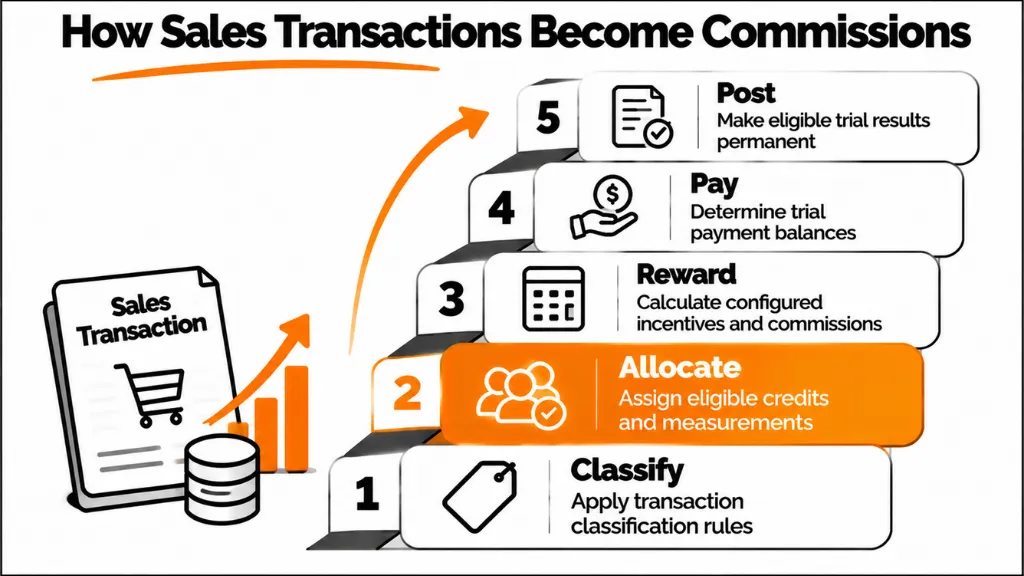
SAP SuccessFactors Incentive Management processes compensation through six standard calculation stages.
Each stage performs a different responsibility within the compensation lifecycle.
| Calculation stage | Primary responsibility | Accuracy consideration |
| Classify | Evaluates valid sales transactions against configured classifications | Correct transaction eligibility |
| Allocate | Calculates credits and primary measurements | Accurate credit ownership |
| Reward | Calculates measurements, incentives, and deposits | Correct compensation rules |
| Pay | Calculates trial payments or balances | Accurate payment treatment |
| Post | Makes applicable trial payment results permanent | Validated compensation results |
| Finalize | Closes the compensation period for ordinary payment processing | Controlled period completion |
These calculation stages connect sales information with compensation results.
However, completing the Post stage does not automatically confirm that an external payroll application has completed payment.
Administrators should therefore distinguish internal compensation processing from external payment execution.
The official SAP Stages and Sequences documentation provides additional information about these processing stages.
Important SAP Commissions Objects
Understanding the main compensation objects helps administrators investigate calculation discrepancies.
A sales transaction provides the underlying business information. Meanwhile, participants and positions establish compensation-related organizational responsibilities.
Credits allocate relevant sales values, while measurements evaluate performance against defined criteria.
Incentives calculate compensation according to applicable rules. Subsequently, deposits and payments support the remaining compensation processing activities.
Consequently, an error within an early calculation stage can influence several downstream results.
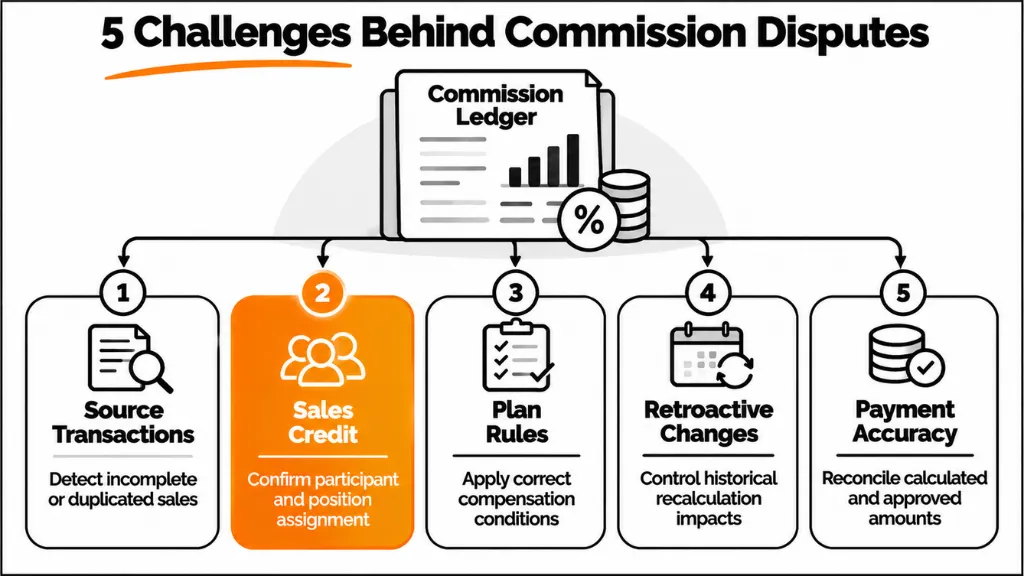
1. Incomplete or Duplicate Sales Transactions Distort SAP Commissions Calculations
Accurate sales compensation begins with reliable transaction information.
Organizations frequently maintain sales information across ERP, CRM, and other enterprise applications. However, integration problems can introduce inconsistencies between these systems.
Missing transactions may cause underpayments, while duplicate records can inflate commission amounts.
Furthermore, incorrect product information or transaction values may prevent the application from calculating the intended compensation.
How Sales Data Enters Incentive Management
Consider an organization that manages customer sales orders through SAP S/4HANA.
The ERP application maintains the underlying sales documents. Meanwhile, SAP SuccessFactors Incentive Management calculates compensation using eligible transaction information.
A configured integration transfers the relevant information between these applications.
However, not every sales document necessarily qualifies for commission processing.
Organizations must define transaction eligibility according to their compensation policies.
Additionally, technical teams should establish appropriate data transfer and reconciliation procedures.
Why Duplicate Transactions Affect Commission Accuracy
Consider a $20,000 sales transaction that enters the incentive compensation application twice.
Both transaction records may satisfy the same compensation conditions.
Consequently, the calculation could produce an inflated commission unless duplicate handling prevents repeated credit.
Similar problems occur when the application does not correctly reflect cancelled orders or adjusted sales amounts.
Administrators should therefore maintain stable transaction identifiers and investigate unexpected record differences.
How SAP Commissions Helps Manage Transaction Accuracy
The solution supports integration with relevant SAP and third-party enterprise applications.
For example, organizations can connect compensation processing with sales information originating from ERP and CRM systems.
Furthermore, structured calculation stages help administrators examine how individual transactions contribute to compensation results.
Nevertheless, successful integration does not automatically confirm that the transferred information is correct.
Technical teams should compare imported transaction counts and monetary values against authoritative source information.
Rejected or excluded records also require investigation before compensation approval.
Technical control: Validate transaction completeness, uniqueness, and eligibility before running compensation calculations.
Business benefit: Accurate source information helps reduce incorrect payments, manual corrections, and avoidable compensation disputes.
2. Sales Credit Goes to the Wrong Person or Team
Commission ownership becomes more complicated when several employees contribute to the same transaction.
For example, an enterprise sale may involve an account manager and a technical sales specialist.
Additionally, organizations may compensate direct sales representatives, indirect sales teams, or channel partners.
Without clearly defined crediting policies, these relationships can create disagreements about who deserves compensation.
Participants and Positions in SAP Commissions
SAP SuccessFactors Incentive Management distinguishes participants from positions.
A participant represents an individual receiving compensation. In contrast, a position represents a compensation-related organizational assignment.
Credit rules determine how relevant transaction values reach the appropriate positions.
For example, a compensation policy may assign sales credit to the account executive responsible for a particular customer.
However, a different account executive may assume responsibility during the compensation period.
Administrators must therefore ensure that the calculation uses the applicable assignments and effective dates.
Managing Split Credit Across Sales Teams
Some organizations divide sales credit among multiple employees.
Consider a customer transaction involving an account manager and a technical specialist.
The approved compensation policy might allocate 70% of eligible credit to the account manager and 30% to the specialist.
Alternatively, separate compensation plans may apply different credit treatments.
SAP Commissions supports configurable credit rules and complex organizational relationships.
Furthermore, its crediting capabilities help organizations manage direct and indirect compensation recipients.
However, the application cannot independently determine whether the approved commercial allocation is fair or appropriate.
Business stakeholders must establish those rules before technical configuration.
How Territory Changes Affect Historical Compensation
Sales territories and customer responsibilities can change throughout a compensation period.
For instance, a salesperson may move to another territory halfway through a quarter.
A transaction completed before the reassignment should follow the applicable historical crediting policy.
Incorrect effective dates can therefore assign compensation to the wrong participant.
Additionally, changes to organizational assignments may influence existing calculation results.
Administrators should examine transaction dates, position assignments, and relevant compensation rules before approving payments.
Technical control: Review participant assignments, effective dates, and split credit results against approved sales ownership policies.
Business benefit: Consistent credit allocation helps organizations reduce ownership conflicts and improve compensation transparency.
3. Complex Compensation Plans Produce Unexpected SAP Commissions Results
Sales compensation frequently involves more than a fixed percentage of revenue.
Organizations may combine commission rates, bonuses, quotas, performance thresholds, accelerators, and other variable compensation elements.
Furthermore, different sales teams may operate under different compensation plans.
Managing these requirements manually increases the risk of inconsistent calculations.
How SAP Commissions Calculates Incentive Results
SAP SuccessFactors Incentive Management connects compensation rules through defined calculation stages.
Credit rules identify relevant sales values. Next, measurement rules evaluate performance against configured criteria.
Incentive rules then calculate compensation using applicable measurements, rates, and formulas.
Finally, deposit rules support subsequent payment-related processing.
Consider a salesperson with a monthly sales target of $100,000.
The compensation plan may apply one commission rate below the target and another rate after the salesperson exceeds it.
However, the actual calculation depends on the configured attainment and rate evaluation rules.
A flat commission percentage may therefore produce an incorrect result when the approved plan requires tiered compensation.
Managing Rate Tables and Effective Dates
Organizations frequently revise compensation plans to reflect changing business objectives.
For example, a company may introduce new performance targets or commission rates at the beginning of a quarter.
SAP Commissions supports applicable effective-dated compensation elements, including rate tables and formulas.
These capabilities help administrators maintain compensation changes across different periods.
Nevertheless, incorrectly maintained effective dates may cause the application to use unsuitable rates.
Administrators should test transactions immediately before and after relevant compensation changes.
Modeling and Testing Compensation Plans
SAP SuccessFactors Incentive Management allows business users to build, model, and test incentive compensation plans.
Additionally, configurable templates and rule-building capabilities support the administration of complex compensation structures.
Organizations can evaluate potential outcomes before introducing relevant plan changes.
For example, administrators may compare the expected effects of different quotas, rates, or performance thresholds.
However, technically valid calculations do not necessarily reflect the intended commercial policy.
Sales operations teams should therefore compare selected results with independently approved compensation examples.
Aligning Compensation Plans With Business Objectives
Compensation plans should encourage sales activities that support organizational objectives.
However, outdated incentive rules may continue rewarding activities that no longer reflect current business priorities.
Performance reporting helps managers assess how compensation plans relate to sales results.
Furthermore, relevant plan optimization capabilities can provide additional insight into potential improvement opportunities.
Organizations should use these insights when reviewing compensation structures and incentive spending.
Technical control: Test compensation formulas, quotas, thresholds, rate tables, and effective dates before releasing plan changes.
Business benefit: Controlled compensation configuration helps organizations manage complex incentive requirements more consistently.
4. Corrections and Recalculations Create Commission Discrepancies
Sales transactions can change after the original commission calculation.
Returns, order adjustments, corrected transaction amounts, and organizational changes may require further processing.
However, updating the original information represents only part of the correction process.
Administrators must also determine how the change affects previously calculated compensation.
Full vs. Incremental Calculation in SAP Commissions
SAP SuccessFactors Incentive Management supports full and incremental calculation modes.
Incremental calculation processes relevant new or modified transactions and associated results.
Consequently, this approach can reduce unnecessary processing during a compensation period.
However, certain partial processing modes require an established full-calculation baseline.
Changes to reference information may also require another full calculation.
Administrators should therefore select the processing mode according to the scope of affected data.
The official SAP Incremental Mode documentation explains relevant calculation requirements and restrictions.
Why Reference Data Changes Matter
Consider a sales transaction that originally received incorrect credit.
Correcting its assignment may require recalculation of the associated compensation.
However, a change to a rate table or another reference object can affect a much larger group of transactions.
Incremental processing may not produce every required update in such situations.
Consequently, administrators must determine which compensation results depend on the changed information.
Relevant calculation requirements should guide the selection of a full or incremental processing approach.
Handling Corrections in Finalized Periods
Compensation corrections may occur after administrators finalize the original payment period.
For example, a corrected sales amount may influence compensation that the application previously posted.
The calculation can generate balances representing adjustments to finalized periods.
These adjustments may affect subsequent payment periods rather than reopen ordinary payment processing for the original period.
Furthermore, administrators should review how the correction influences calculated incentives and payable balances.
Finance teams must understand the resulting adjustment before approving subsequent compensation payments.
Monitoring Recalculation Results
A completed calculation run does not necessarily establish that every affected transaction received the intended treatment.
Administrators should examine calculation outputs, relevant processing logs, and stage statistics.
Additionally, teams should investigate unexpected differences between earlier and revised compensation results.
This helps determine whether the correction addresses the original problem or introduces further discrepancies.
Technical control: Match the calculation mode to the changed information, affected compensation results, and relevant period status.
Business benefit: Controlled recalculation helps organizations manage transaction corrections while maintaining traceable compensation adjustments.
5. Calculated Commissions Do Not Match Expected Payments
Sales representatives often estimate their expected commissions using completed sales and compensation rates.
However, the actual payment may differ because of adjustments, compensation conditions, or previously calculated balances.
These differences can create uncertainty, particularly when employees cannot identify how the application calculated their earnings.
Consequently, sales teams may maintain separate spreadsheets to verify their compensation.
Understanding Incentives, Deposits and Payments
SAP Commissions distinguishes calculated incentives from subsequent payment results.
The Reward stage calculates relevant incentives and deposits. Meanwhile, the Pay stage determines trial payments or balances.
Subsequently, the Post stage makes applicable payment results permanent within the application.
For example, an adjustment from a previous compensation period may influence the current payable amount.
The final payment can therefore differ from the current incentive calculation.
Administrators should examine these processing stages before assuming that the compensation rules contain an error.
Improving Compensation Transparency With SAP Commissions
Sales representatives need clear information about how their performance contributes to compensation.
The solution provides compensation statements, performance metrics, dashboards, and relevant calculation estimates.
Furthermore, users can examine details that help explain their earnings.
This visibility can reduce the need for employees to maintain separate compensation calculations.
However, accurate reporting depends on reliable underlying transactions and compensation rules.
Organizations should therefore maintain consistent information throughout the compensation lifecycle.
Managing Compensation Disputes
Commission disputes frequently arise when employees identify missing transactions, incorrect credit ownership, or unexpected payment differences.
SAP SuccessFactors Incentive Management supports compensation inquiry and dispute functionality.
For example, a salesperson may submit an inquiry about a transaction that did not contribute to their commission.
The responsible administrator can then trace the transaction through classification, credit allocation, incentive calculation, and payment processing.
Additionally, relevant audit information can help identify changes to compensation data and configuration.
Depending on the investigation, the resolution may require a transaction correction, configuration adjustment, or recalculation.
Verifying External Payroll Integration
A posted payment result within Incentive Management does not independently confirm external payroll completion.
Organizations must establish how approved compensation information reaches the receiving payroll or financial application.
Furthermore, finance teams should reconcile transferred payment totals against approved compensation results.
Rejected records and unexpected payment differences require investigation.
Consequently, compensation reconciliation should continue beyond internal calculation completion.
Technical control: Reconcile calculated incentives, deposits, balances, posted payments, and relevant external payment records.
Business benefit: Greater transparency and traceability help organizations investigate compensation disputes more accurately.
How SAP Commissions Supports Growing Sales Organizations
As organizations expand, their compensation requirements frequently become more complicated.
New sales territories, additional products, different pricing arrangements, and increasing transaction volumes can create additional processing requirements.
Furthermore, larger sales teams require consistent compensation policies across different organizational structures.
SAP SuccessFactors Incentive Management provides configurable compensation capabilities to support these requirements.
Managing Growing Transaction Volumes
Rapid business growth can increase the number of transactions that contribute to sales compensation.
Traditional manual processes may struggle to handle larger datasets efficiently.
Automation helps organizations process compensation information without relying exclusively on manual calculations.
However, actual processing performance depends on the configured rules, data volumes, and implementation design.
Technical teams should therefore monitor calculation processing and investigate recurring performance problems.
Adapting to Changing Sales Compensation Plans
Business priorities can change as organizations introduce new products or expand into additional markets.
Consequently, compensation plans may require revised targets, commission rates, or incentive conditions.
SAP Commissions allows administrators to modify relevant compensation structures and business rules.
Additionally, modeling and testing capabilities help teams assess planned changes.
Organizations should maintain appropriate controls to prevent revised compensation rules from unintentionally affecting historical results.
Supporting Sales Performance Analytics
Performance reporting helps organizations evaluate sales activities and compensation effectiveness.
For example, managers can examine sales performance, individual attainment, and incentive spending.
Furthermore, compensation insights can support discussions about the relationship between incentive plans and business objectives.
These capabilities provide additional context when organizations review their sales compensation strategies.
SAP Commissions Accuracy Control Checklist
Reliable compensation processing requires cooperation between sales operations, finance, compensation administrators, and technical support teams.
Organizations should establish verification procedures before approving commission payments.
| Control area | Required verification | Responsible team |
| Transaction information | Compare source and imported transaction records | Integration support |
| Organizational assignments | Validate participants, positions, and effective dates | Sales operations |
| Sales credit | Review individual and shared credit allocations | Compensation administration |
| Compensation rules | Verify rates, quotas, thresholds, and eligibility | Incentive administration |
| Recalculation | Confirm processing mode and compensation period status | Technical support |
| Payment reconciliation | Compare incentives, balances, and payment results | Finance |
| Compensation disputes | Review inquiry details and supporting calculation information | Compensation operations |
These controls help organizations identify the processing stage responsible for a discrepancy.
Furthermore, documented verification provides supporting evidence for compensation approvals and financial reviews.
Best Practices for Improving SAP Commissions Accuracy
Organizations should consider transaction quality, compensation configuration, and financial reconciliation throughout the implementation process.
However, successful implementation requires more than activating automated calculations.
Define Compensation Policies Before Configuration
Business stakeholders should establish approved commission rates, eligibility conditions, crediting rules, and performance targets.
Technical consultants can then configure the relevant compensation requirements.
Consequently, the implemented rules should reflect actual business policies rather than unsupported assumptions.
Maintain Reliable Integration Between Applications
Sales compensation may depend on information from ERP, CRM, HR, and financial applications.
Organizations should therefore establish consistent data exchange and validation procedures.
Furthermore, technical teams should investigate missing transactions, duplicate records, and rejected information before calculation.
Test Complex Compensation Scenarios
Testing should include more than standard sales transactions.
For example, administrators should examine shared credit, territory changes, revised compensation rates, transaction corrections, and payment adjustments.
Additionally, representative test cases should cover relevant effective-date boundaries.
These checks help identify calculation discrepancies before compensation approval.
Maintain Audit Trails and Calculation Traceability
Compensation administrators should understand how sales transactions contribute to final payment results.
SAP Commissions provides relevant audit and traceability capabilities that support this requirement.
Furthermore, organizations can review changes and supporting calculation information during compensation investigations.
These records can also support compliance monitoring and internal financial reviews.
Provide Clear Compensation Information to Sales Teams
Sales representatives should understand their compensation plans, performance targets, and relevant payment results.
Transparent statements and performance dashboards help communicate this information.
Additionally, structured dispute handling provides a process for investigating compensation questions.
This approach can reduce uncertainty and unnecessary administrative work.
Frequently Asked Questions About SAP Commissions
1. What is SAP Commissions used for?
SAP Commissions, now known as SAP SuccessFactors Incentive Management, supports sales incentive calculations and compensation management. Organizations use it to manage sales transactions, credit allocations, compensation plans, performance measurements, and payment adjustments. Furthermore, the application provides reporting and compensation visibility for sales representatives and administrators. These capabilities help organizations manage complex variable compensation requirements. However, accurate results still depend on reliable source information and appropriate business rules.
2. How does SAP calculate sales commissions?
SAP SuccessFactors Incentive Management processes compensation through Classify, Allocate, Reward, Pay, Post, and Finalize stages. Each stage performs a different responsibility within the compensation lifecycle. For example, credit rules identify relevant sales values, while incentive rules calculate compensation using applicable formulas and rates. Additionally, payment processing considers relevant balances and adjustments. Administrators can examine calculation outputs to understand how individual transactions contribute to final compensation results.
3. Can SAP Commissions handle split commissions?
Yes, SAP Commissions supports configurable crediting rules for transactions involving multiple compensation recipients. For instance, an account manager and a technical specialist may share responsibility for a customer sale. Organizations can define how eligible credit reaches the appropriate positions. However, the exact allocation depends on approved compensation policies, organizational relationships, and effective dates. Administrators should therefore validate credit distributions before approving the resulting incentive payments.
4. What causes incorrect sales commission calculations?
Incorrect commissions can originate from missing transactions, duplicate records, unsuitable participant assignments, outdated compensation rates, or inaccurate effective dates. Furthermore, inappropriate recalculation methods may produce unexpected results after transaction corrections. Administrators should investigate the complete calculation lifecycle rather than focus exclusively on the final payment. Reviewing source information, credit allocations, compensation rules, and payment adjustments helps teams identify where the original discrepancy occurred.
5. What is the difference between full and incremental calculation in SAP Commissions?
Full and incremental calculation modes support different compensation processing requirements. Incremental calculation processes relevant new or modified transactions and associated results. However, certain reference-data changes may require another full calculation. SAP also identifies baseline requirements for particular partial processing modes. Consequently, administrators should determine the scope of changed information before selecting a calculation method. Reviewing applicable processing requirements helps prevent incomplete or unexpected compensation updates.
6. Does SAP Commissions integrate with SAP S/4HANA?
SAP SuccessFactors Incentive Management supports relevant integration architectures involving SAP S/4HANA sales information. Additionally, organizations can connect compensation processing with other ERP, CRM, and HR applications. The exact integration method depends on the implementation design. Technical teams must define transaction eligibility, validate transferred information, and establish suitable monitoring procedures. Successful integration provides the necessary data for compensation processing, although organizations must still verify its accuracy.
7. How does SAP Commissions manage compensation disputes?
The application provides compensation inquiry functionality that allows relevant users to raise questions about calculated earnings. Administrators can examine transaction information, credit allocations, incentive results, and payment adjustments during investigations. Furthermore, calculation traceability helps identify where compensation discrepancies originate. Depending on the outcome, resolving a dispute may require source-data corrections or recalculation. Organizations should also maintain clear responsibilities for investigating and closing compensation inquiries.
8. Can SAP Commissions support complex incentive compensation plans?
Yes, the solution supports configurable compensation structures involving commissions, bonuses, quotas, thresholds, accelerators, and other variable pay elements. Organizations can build, model, and test relevant compensation plans according to approved requirements. Additionally, applicable rate tables and formulas support changes across compensation periods. However, businesses must define the intended calculation methodology before implementation. Controlled testing helps ensure that complex compensation rules produce the expected commercial results.
9. How does SAP Commissions improve sales compensation transparency?
SAP Commissions provides compensation statements, dashboards, relevant performance information, and calculation traceability. These capabilities help sales representatives understand how their activities contribute to earnings. Furthermore, administrators can investigate payment discrepancies using underlying transactions and calculation details. Transparent information can reduce the need for separate manual compensation records. Nevertheless, organizations must maintain reliable source information and accurate configuration to ensure that compensation reports reflect the intended results.
10. Does posting a commission mean payroll has completed payment?
No, posting a commission within SAP SuccessFactors Incentive Management does not automatically confirm external payroll completion. The Post stage makes applicable payment results permanent within the incentive compensation application. However, subsequent payment execution depends on the configured payroll or financial integration. Finance teams should therefore reconcile approved compensation results with transferred payment information. Additionally, they should investigate rejected records and unresolved differences before confirming successful external payment.
Conclusion
Sales commission challenges become more complicated when organizations manage multiple compensation plans, shared sales responsibilities, changing business rules, and increasing transaction volumes.
SAP Commissions helps organizations address these requirements through configurable credit allocation, automated incentive calculations, controlled recalculation, and transparent payment processing.
Furthermore, reporting and compensation inquiry capabilities help administrators and sales representatives investigate unexpected payment differences.
However, automated processing cannot independently correct inaccurate source transactions or unsuitable compensation policies.
Organizations should therefore maintain reliable integration, accurate organizational assignments, approved compensation rules, and effective reconciliation procedures.
A practical starting point involves tracing representative sales transactions through classification, credit allocation, incentive calculation, and payment processing.
By validating each stage, organizations can identify discrepancies before external payment execution and manage sales compensation more accurately.
References
- SAP Learning. Getting Started with SAP SuccessFactors Incentive Management.
- SAP Help Portal. Stages and Sequences.
- SAP Help Portal. Incremental Mode.
- SAP Learning. Reviewing Calculation Results.
- SAP Help Portal. Viewing and Managing Compensation Disputes.
- Acuiti Labs. Looking for a Comprehensive Sales Performance Management System? How Can SAP Commissions Help? February 26, 2020.
- Canidium. SAP SuccessFactors Incentive Management for Complex Sales Organizations. September 19, 2023.
- Surety Systems. SAP Commissions: Improving Incentive Compensation Accuracy. September 21, 2023; updated June 13, 2025.
- CLARITY. SAP Incentive Management.
- Original technical research draft. 5 Sales Commission Challenges That SAP Can Help Teams Manage More Accurately. October 27, 2026.