
Managing SAP e-invoicing processes involves more than generating invoices electronically. Organizations must maintain accurate tax information, comply with local regulations, and monitor electronic document submissions.
For example, an invoice may post successfully in SAP S/4HANA but fail validation on an external government platform. Meanwhile, the customer may wait for a valid invoice before processing payment.
Consequently, a technical invoicing problem can quickly become a financial and regulatory concern.
SAP Document and Reporting Compliance (SAP DRC) helps organizations manage electronic document processing, statutory reporting, and external compliance requirements.
However, reliable e-invoicing requires accurate master data, appropriate configuration, effective integration, and consistent monitoring.
Understanding the following seven issues can help finance and technical teams reduce compliance risks, prevent unnecessary payment delays, and improve invoice processing accuracy.
Quick Answer: What Are the Major E-Invoicing SAP Challenges?
The seven major SAP e-invoicing issues include incorrect tax information, invalid electronic formats, missing eDocuments, integration failures, unresolved invoice statuses, duplicate submissions, and weak reconciliation.
Additionally, changing country-specific regulations and complex ERP environments can make these problems harder to manage.
SAP DRC provides capabilities for electronic document generation, submission, status monitoring, and statutory reporting. Nevertheless, organizations must establish suitable validation procedures, exception handling, and financial controls to achieve reliable results.
What Is E-Invoicing in SAP and How Does It Work?
Electronic invoicing involves creating, exchanging, and processing invoices in a structured electronic format.
Unlike traditional paper invoices or ordinary PDF documents, structured electronic invoices support automated data exchange and validation.
SAP Document and Reporting Compliance connects relevant SAP business transactions with electronic invoicing and statutory reporting requirements.
Furthermore, supported integration scenarios allow organizations to exchange electronic documents with tax authorities, government platforms, and business networks.
The exact processing requirements depend on the applicable jurisdiction, SAP release, and deployment architecture.
For additional information, refer to the official SAP Document and Reporting Compliance documentation.
Main Stages of SAP Electronic Invoice Processing
| Processing stage | Primary responsibility | Potential issue |
|---|---|---|
| Source invoice creation | Generate the original business invoice | Incorrect transaction information |
| eDocument generation | Create the relevant electronic document | Missing electronic records |
| Data mapping | Transform invoice data into the required format | Invalid XML or missing fields |
| Validation | Check applicable electronic invoice requirements | Incorrect tax identifiers |
| Transmission | Exchange documents with external platforms | Communication failures |
| Response processing | Receive and evaluate external statuses | Unresolved acknowledgments |
| Reconciliation | Compare SAP records with external outcomes | Unidentified compliance differences |
Each stage contributes to the complete electronic invoicing process.
However, successful accounting posting does not automatically confirm successful electronic invoice acceptance.
Finance teams must therefore monitor both the original business transaction and its corresponding electronic processing outcome.
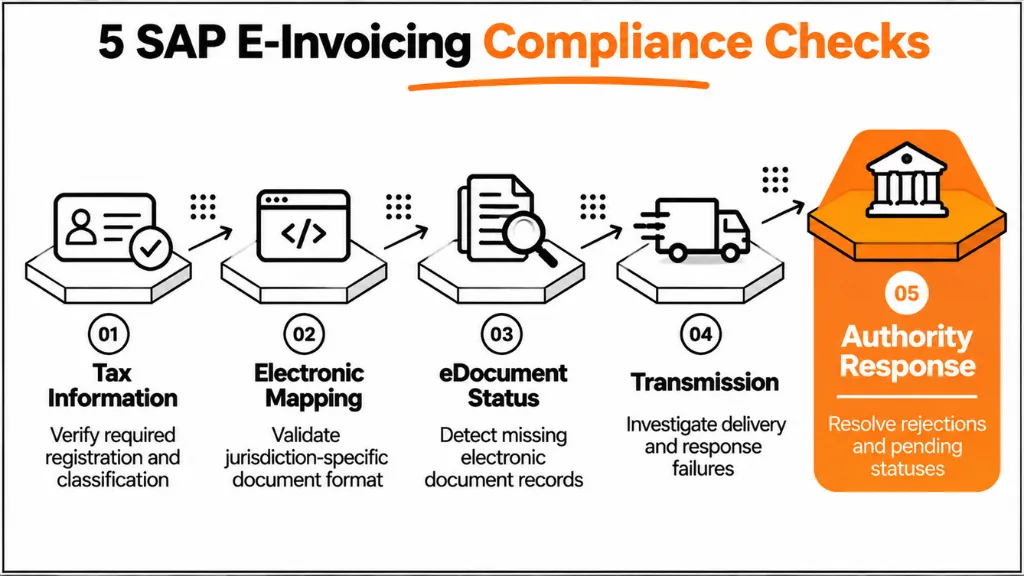
1. Incorrect Tax Information Causes Invoice Rejection
Tax information plays an essential role in electronic invoice validation.
A customer invoice may contain the correct commercial amount but an incorrect tax identification number or missing registration details.
Consequently, an external platform may reject the invoice even when SAP successfully completes the original accounting transaction.
Master Data Problems in E-Invoicing SAP Processes
Electronic invoices depend on accurate information from several business and financial records.
Common data quality problems include:
- Incorrect customer tax identification numbers.
- Missing VAT registration information.
- Incomplete billing addresses.
- Incorrect product classification codes.
- Inconsistent tax information.
- Missing mandatory business partner details.
These errors can originate from business partner records, tax determination, source invoices, or electronic document mappings.
Furthermore, manual data entry can introduce additional inconsistencies when organizations process large invoice volumes.
How Incorrect Tax Information Delays Payments
Consider a supplier submitting an electronic invoice to a regulated invoicing platform.
The invoice contains the correct customer name and transaction amount. However, the customer’s tax registration identifier does not satisfy the platform’s validation requirements.
The external platform may consequently reject the invoice.
Repeated transmission will not resolve the problem unless the organization corrects the underlying information.
Meanwhile, customer payment processing may remain pending until the supplier provides a valid electronic invoice.
How SAP Teams Can Reduce Tax Data Errors
Finance and technical teams should validate business partner information before electronic invoice submission.
Additionally, consultants should examine relevant tax configuration and electronic document mapping rules.
Organizations should establish clear procedures for correcting rejected documents.
Recommended control: Maintain accurate master data and validate mandatory tax information before submission.
2. Invalid Electronic Invoice Formats Prevent Successful Processing
A valid invoice in SAP does not automatically produce a compliant electronic document.
Electronic invoicing platforms often require structured formats with specific fields, identifiers, and validation rules.
Furthermore, different countries and business networks may impose different technical specifications.
Understanding Electronic Invoice Mapping in SAP
SAP DRC supports transforming relevant business transaction information into applicable electronic formats.
These formats can include structured XML documents according to country-specific requirements.
However, generic electronic invoice standards may not cover every local requirement.
For example, some implementations follow standards such as EN 16931 using UBL or UN/CEFACT CII formats. National implementation profiles may introduce additional mandatory fields.
Organizations should therefore validate both the general electronic format and the applicable local requirements.
Common Mapping Errors in E-Invoicing SAP Implementations
An electronic invoice may fail processing because of incomplete buyer information, unsupported classification codes, incorrect document references, or inconsistent monetary values.
Additionally, some jurisdictions require hybrid invoice formats containing structured XML information within a human-readable document.
Producing only one format may not satisfy the applicable requirements.
Technical teams must therefore understand which document structure each supported business scenario requires.
Transformation Failure vs. External Rejection
A transformation failure occurs when the electronic document cannot achieve the required structure before transmission.
In contrast, an external rejection occurs when a receiving platform identifies a problem during its validation process.
These situations require different corrective actions.
Consequently, support teams should examine the electronic payload, mapping configuration, and relevant processing messages before repeating submission.
Recommended control: Test electronic document formats against applicable country-specific specifications.
3. Missing Electronic Documents After Invoice Posting
One particularly difficult SAP e-invoicing problem occurs when finance creates an invoice but cannot find its corresponding electronic document.
The original business transaction exists, yet the expected compliance process has not started.
Possible causes include incomplete configuration, unsupported document conditions, or electronic document creation failures.
Understanding eDocument Creation
The SAP eDocument framework creates electronic document instances from supported source transactions.
These electronic records support subsequent document processing, submission, and monitoring.
However, the source transaction must satisfy the applicable business and configuration requirements.
For example, an invoice may not belong to an activated electronic invoicing scenario.
Consequently, the original transaction can exist without generating the expected electronic document.
Monitoring E Invoicing SAP With the eDocument Cockpit
The eDocument Cockpit provides visibility into relevant electronic documents and their processing statuses.
In applicable SAP ERP and SAP S/4HANA environments, transaction EDOC_COCKPIT supports electronic document monitoring.
Nevertheless, available applications and processing actions depend on the SAP release and country-specific scenario.
Organizations should examine document eligibility, organizational assignments, and relevant configuration when expected electronic documents do not appear.
The official SAP eDocument Cockpit documentation provides additional information about this monitoring capability.
Detecting Missing Electronic Documents
Finance teams should compare eligible source invoices against the corresponding electronic document population.
This comparison helps identify invoices that never entered the expected compliance process.
Furthermore, regular monitoring can prevent missing electronic records from remaining unnoticed until statutory reporting or customer payment deadlines.
Recommended control: Reconcile eligible source invoices against their expected eDocuments.
4. Integration Failures Interrupt Electronic Invoice Transmission
Electronic invoicing frequently involves communication between multiple applications and external platforms.
For instance, an invoice may originate in SAP S/4HANA, pass through a compliance service, and reach a government platform or business network.
Each technical connection introduces potential processing risks.
Integration Architecture in E Invoicing SAP
SAP supports different electronic document exchange arrangements through relevant SAP DRC capabilities and scenario-specific integration services.
Depending on the implementation, organizations may use SAP Document and Reporting Compliance, cloud edition, or applicable SAP Integration Suite content.
Furthermore, businesses may need to connect older SAP ERP environments and non-SAP applications.
Integration design should therefore reflect the relevant country requirements and existing application architecture.
The SAP End-to-End Document and Reporting Compliance documentation explains relevant electronic document processing arrangements.
Common Electronic Invoice Communication Problems
Transmission failures may arise from:
- Invalid authentication credentials.
- Expired certificates.
- Temporary network interruptions.
- Incorrect integration configuration.
- External platform availability problems.
- Message processing errors.
However, these problems do not always indicate that the recipient failed to receive the electronic invoice.
For example, an external platform may process a document successfully while its response fails to reach SAP.
Consequently, an immediate retry can create uncertainty about the actual processing outcome.
Maintaining Invoice Processing During SAP Migration
Organizations transitioning from SAP ECC to SAP S/4HANA may operate multiple ERP environments simultaneously.
Meanwhile, electronic invoicing requirements continue to evolve across different jurisdictions.
Finance, tax, and IT teams may also compete for the same implementation resources.
Therefore, organizations should coordinate compliance requirements with their ERP migration plans rather than treat them as unrelated projects.
Recommended control: Test integration connections, monitor message processing, and verify external delivery status before retrying unsuccessful transmissions.
5. Unresolved Invoice Statuses Create Compliance and Payment Risks
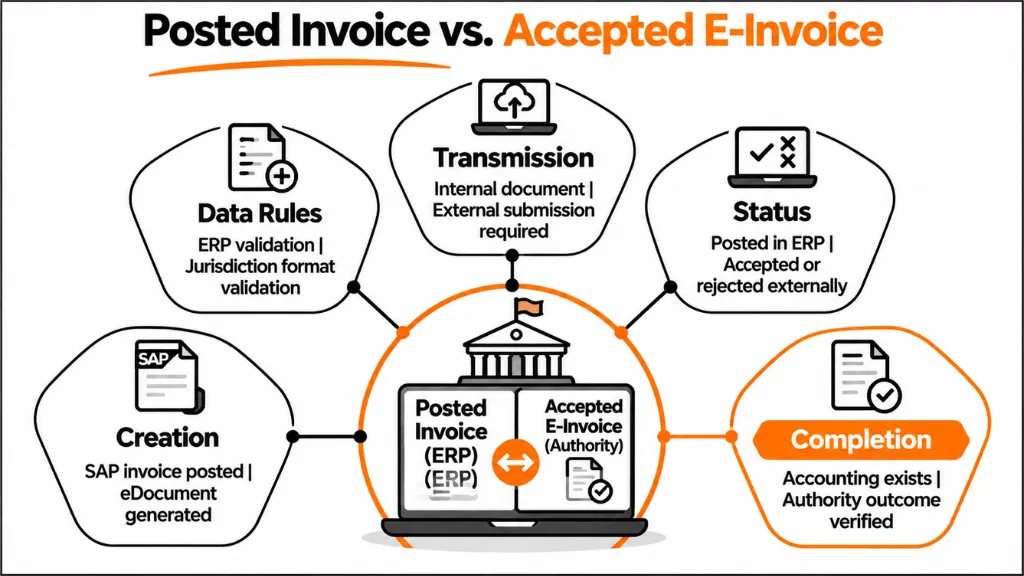
A successful technical transmission does not necessarily establish that the electronic invoice satisfies all regulatory requirements.
Different external platforms may apply several stages of document validation, clearance, exchange, or acceptance.
Consequently, finance teams must understand which processing status represents the required business outcome.
Technical Delivery vs. Regulatory Acceptance
Consider an invoice that reaches an external invoicing platform successfully.
The platform acknowledges receiving the document. However, subsequent validation identifies an incorrect mandatory field.
The original transmission succeeded technically, but the external platform rejects the invoice.
If finance monitors only integration success, the unresolved electronic invoice may remain unnoticed.
Furthermore, the customer may delay payment until the organization completes the required correction.
Monitoring E Invoicing SAP Document Statuses
SAP DRC supports the exchange and monitoring of relevant electronic document statuses.
Organizations should define which statuses require investigation, correction, or escalation.
For example, an invoice may remain pending because an external platform has not returned its final response.
Another invoice may require source-data correction following external rejection.
However, available statuses and follow-up actions differ across supported countries and SAP scenarios.
Establishing Clear Exception Ownership
Finance, tax, and IT teams should understand their respective responsibilities.
Technical support may investigate unsuccessful message transmission. Meanwhile, tax specialists may need to evaluate incorrect regulatory information.
Finance teams should also monitor outstanding invoices that could affect payment processing.
Clear ownership helps organizations prevent unresolved exceptions from accumulating.
Recommended control: Monitor technical delivery separately from the applicable external acceptance outcome.
6. Duplicate Submissions Create Conflicting Invoice Records
Duplicate submission risks can arise when an organization repeats electronic invoice processing without verifying the previous outcome.
For example, a communication timeout may leave users uncertain about whether an external platform received the document.
Meanwhile, an automated processing activity may attempt another transmission.
Without appropriate controls, repeated submissions can create discrepancies between SAP records and external systems.
Understanding Retry Requirements in E-Invoicing SAP
SAP supports relevant retry and follow-up functions for particular country-specific electronic invoicing scenarios.
However, the available actions depend on the electronic document process and its current status.
A rejected invoice may require correction before another submission.
In contrast, an invoice with an uncertain response may require further status investigation before reprocessing.
Organizations should therefore distinguish confirmed failures from uncertain delivery outcomes.
Maintaining Consistent Electronic Document Identity
Reliable recovery procedures should preserve relevant document identifiers and external references where supported.
Furthermore, teams should review previous transmission attempts and external acknowledgments.
This information helps identify whether the organization needs to correct an existing document or perform another permitted processing action.
Administrators should avoid unrestricted retry mechanisms that could create conflicting outcomes.
Managing Invoice Corrections and Cancellations
Invoice corrections may require additional electronic processing according to local regulations.
For instance, relevant credit memos, cancellations, or amendments may need their own compliance treatment.
Organizations must therefore maintain traceability between the original transaction and subsequent corrective documents.
The correct procedure depends on the applicable jurisdiction and supported document scenario.
Recommended control: Verify document identity, submission history, and external processing status before initiating retries or corrections.
7. Weak Reconciliation Hides Tax Compliance and Payment Problems
Monitoring individual electronic invoices does not necessarily provide a complete view of compliance performance.
Some invoices may never enter electronic document processing. Others may remain rejected or await external responses.
Consequently, finance teams may report completed accounting transactions while unresolved electronic invoices remain outside their routine monitoring activities.
Why E Invoicing SAP Reconciliation Matters
Electronic invoicing creates relationships between original business transactions, electronic documents, external responses, and statutory reporting.
Inconsistent information across these records can create audit and tax reporting concerns.
Furthermore, organizations operating multiple ERP applications may find it difficult to maintain consistent financial information.
SAP DRC supports relevant electronic document monitoring and reconciliation-related compliance activities.
These capabilities help organizations identify differences between internal financial records and external processing outcomes.
Connecting E-Invoices With VAT Reporting
Tax authorities increasingly use electronically collected transaction information to support tax reporting and compliance activities.
For example, some authorities prepare draft VAT returns using available transactional data.
Organizations must then compare those records with their own financial information and investigate relevant discrepancies.
Consequently, electronic invoice reconciliation should extend beyond checking whether an individual message reached its destination.
Maintaining Audit Trails and Electronic Archives
Organizations should preserve relevant electronic invoices, supporting documents, processing histories, and correction records.
However, archiving periods, digital signature requirements, and retention obligations differ across jurisdictions.
Finance and tax teams should therefore define document retention requirements during implementation.
Consistent records help organizations investigate discrepancies and provide supporting information during audits.
Monitoring Outstanding Electronic Invoice Exceptions
A reconciliation process should identify missing electronic documents, unsuccessful submissions, unresolved responses, rejected invoices, and inconsistent external statuses.
Additionally, organizations should investigate outstanding cancellation and amendment processes.
Not every pending document necessarily represents a compliance violation. Nevertheless, unresolved exceptions require appropriate monitoring and ownership.
Recommended control: Regularly reconcile source invoices, eDocuments, external outcomes, and applicable tax reporting records.
Country-Specific Compliance Challenges in E Invoicing SAP
One of the biggest challenges in multinational electronic invoicing involves differences between regulatory models.
Although organizations may operate a common SAP ERP environment, individual countries can impose different submission, validation, and reporting requirements.
For example, clearance models require relevant authority validation before invoices achieve legal validity.
In contrast, e-reporting arrangements can require submission of invoice information following the transaction.
Other approaches include interoperability networks, centralized exchange platforms, and regulated five-corner models.
Consequently, organizations should avoid assuming that an electronic invoicing configuration from one country will automatically satisfy another country’s requirements.
Furthermore, regulatory changes can occur after implementation. Finance and tax teams must therefore maintain ongoing compliance monitoring rather than treat go-live as the end of the project.
E Invoicing SAP Troubleshooting and Control Matrix
A structured investigation helps organizations identify the actual source of electronic invoicing problems.
Instead of treating every failed invoice as an integration issue, teams should examine each relevant processing stage.
| Issue | Investigation area | Recommended action | Responsible team |
|---|---|---|---|
| Incorrect tax information | Business partner and tax data | Correct underlying information | Master data and tax teams |
| Invalid electronic format | Mapping and validation rules | Review applicable document specifications | SAP technical team |
| Missing eDocument | Eligibility and configuration | Verify electronic document creation | SAP functional team |
| Transmission failure | Integration and message records | Establish delivery status | Integration support |
| Unresolved invoice status | External acknowledgments | Investigate pending or rejected documents | Finance and compliance |
| Duplicate submission | Document identity and processing history | Verify previous submissions | SAP support |
| Reconciliation difference | Accounting and external records | Investigate mismatched document populations | Finance and tax teams |
These responsibilities provide a practical starting point for exception management.
However, organizations should adapt ownership to their actual operational structure and supported compliance scenarios.
Best Practices for Successful SAP E-Invoicing Implementation
Organizations should address compliance requirements throughout the complete electronic invoice lifecycle.
Furthermore, effective implementation requires cooperation between finance, tax, procurement, and technical teams.
Assess Country Requirements Before Configuration
Identify relevant legal entities, invoice types, electronic formats, submission channels, and regulatory deadlines.
Additionally, assess whether the existing SAP environment supports each required business scenario.
This preparation helps organizations identify configuration and integration requirements before implementation.
Test Successful and Failed Invoice Scenarios
Testing should include correctly formatted invoices alongside realistic processing failures.
For example, teams should examine invalid tax identifiers, missing mandatory fields, unsuccessful authentication, delayed responses, and repeated submissions.
Furthermore, production-like testing can help validate connections with relevant government platforms and business networks.
Maintain Security and Reliable Access Controls
Electronic invoices contain sensitive business and financial information.
Organizations should therefore establish appropriate access controls, secure communication, and relevant data protection measures.
Additionally, regular system reviews can help identify security and processing concerns.
Prepare Finance Teams and Trading Partners
Accounts payable and accounts receivable employees should understand relevant electronic invoice formats, processing deadlines, and exception procedures.
Meanwhile, supplier and customer readiness can influence successful invoice exchange.
Organizations should coordinate implementation activities with affected trading partners and provide appropriate user training.
Monitor Compliance After Go-Live
Electronic invoicing regulations and technical specifications can change over time.
Consequently, organizations should regularly review applicable compliance requirements, processing exceptions, and statutory reporting obligations.
Continuous monitoring helps businesses identify problems before they develop into larger operational or financial risks.
Recent Developments in SAP E-Invoicing and Tax Compliance
SAP’s June 2, 2026, article, E-Invoices are Changing Everything in Tax Compliance – Here’s How to Stay Ahead, highlights developments in electronic invoicing and integrated tax compliance.
Centralized Supplier Invoice Distribution
The article describes SAP DRC capabilities for retrieving regulated supplier invoices and routing them to relevant business applications.
For example, organizations can configure routing rules according to invoice information.
This approach supports businesses that process invoices through different SAP applications while maintaining centralized electronic document exchange.
AI-Assisted Electronic Invoice Error Resolution
SAP also describes AI-assisted capabilities that explain technical error messages in simpler language and suggest relevant corrective actions.
Furthermore, these capabilities can help users understand electronic invoicing errors more efficiently.
Availability depends on the applicable SAP solution and supported scenario.
Continuous Financial and Tax Data Reconciliation
Another area of development involves comparing internal business records with information that tax authorities maintain.
Continuous consistency checks and electronic submissions can help organizations identify missing documents and data discrepancies before period-end reporting.
Consequently, finance teams can investigate relevant compliance exceptions throughout the reporting period.
Frequently Asked Questions About E Invoicing SAP
1. What is SAP e-invoicing?
SAP e-invoicing refers to creating, processing, transmitting, and monitoring structured electronic invoices through supported SAP capabilities. SAP Document and Reporting Compliance helps organizations manage relevant electronic document and statutory reporting requirements. Furthermore, supported integrations connect SAP business transactions with tax authorities, government platforms, and electronic invoicing networks. The exact document formats, validation requirements, and external communication processes depend on the applicable country and SAP deployment.
2. What is SAP Document and Reporting Compliance?
SAP Document and Reporting Compliance, commonly known as SAP DRC, supports electronic document processing and statutory reporting. Organizations can use it to generate electronic documents from relevant business transactions, exchange information with external platforms, and monitor processing outcomes. Additionally, applicable capabilities support compliance monitoring, tax reporting, and reconciliation activities. However, available functionality depends on the relevant country-specific requirements, SAP release, and configured business processes.
3. Why do SAP electronic invoices get rejected?
Electronic invoice rejections can result from incorrect tax identifiers, missing mandatory information, invalid document formats, or unsuccessful external business validation. Furthermore, inconsistent master data can affect the electronic information that reaches receiving platforms. Technical teams should review the electronic document, relevant processing messages, and external responses before selecting corrective actions. Organizations should correct the underlying problem instead of repeatedly submitting an invoice without changing the incorrect information.
4. Can SAP e-invoicing problems delay customer payments?
Yes. Electronic invoicing problems can delay payments when customers require valid electronic invoices before completing their accounts payable activities. For example, a customer may wait for a corrected invoice after an external platform rejects the original document. Additionally, missing electronic records and unresolved transmission responses can complicate invoice processing. The actual financial impact depends on contractual arrangements, regulatory requirements, and the customer’s payment procedures.
5. Does SAP DRC support multiple countries?
SAP DRC supports electronic document processing and statutory reporting across applicable countries and regions. However, individual jurisdictions may require different electronic formats, validation rules, clearance procedures, and reporting deadlines. Organizations should therefore verify relevant supported scenarios before international deployment. Furthermore, a common SAP architecture must accommodate local regulatory differences without assuming that one country’s configuration will satisfy every other country’s requirements.
6. How can organizations monitor failed SAP e-invoices?
Organizations can use relevant SAP monitoring applications, including the eDocument Cockpit, to review electronic document processing statuses. Additionally, technical teams should examine integration messages, external acknowledgments, and available rejection details. Finance departments should reconcile original invoices against corresponding electronic documents. This approach helps identify missing records and unresolved processing outcomes. However, available monitoring applications and corrective actions depend on the SAP release and country-specific implementation.
7. How can businesses prevent duplicate electronic invoice submissions?
Businesses should verify the current electronic document status and previous transmission history before repeating submission. For example, a communication timeout may occur even when an external platform successfully processes the invoice. Consequently, administrators should establish the actual external processing outcome before initiating another attempt. Maintaining relevant document identifiers and external references can also support controlled recovery. Available retry functions depend on the specific electronic invoicing scenario.
8. What is the difference between clearance and e-reporting models?
Clearance models require relevant authority validation before an electronic invoice achieves legal validity. In contrast, e-reporting models require businesses to submit relevant invoice information according to applicable reporting requirements. These approaches differ in processing sequence, submission timing, and compliance obligations. Furthermore, organizations may encounter other electronic invoice exchange models across different jurisdictions. SAP teams should configure the appropriate process according to the applicable local regulations.
9. Why is reconciliation important in e invoicing SAP processes?
Reconciliation helps organizations compare original financial transactions with corresponding electronic documents, submission histories, and external processing outcomes. Without this comparison, missing invoices or unresolved rejections may remain unnoticed. Furthermore, discrepancies between internal financial records and external authority information can complicate statutory reporting and audits. Regular reconciliation helps finance and tax teams identify exceptions, investigate inconsistencies, and maintain more reliable compliance records.
10. Can older SAP ERP environments support electronic invoicing?
Older SAP ERP environments may support relevant electronic invoicing scenarios through appropriate compliance capabilities, add-ons, or integration services. However, organizations should not assume that every existing SAP release supports every required electronic format. Technical teams must assess system compatibility, applicable country requirements, and integration needs before implementation. Additionally, businesses migrating to SAP S/4HANA should maintain electronic invoice processing continuity throughout the transition.
Conclusion
Electronic invoicing problems can create financial and regulatory consequences even when original SAP accounting transactions appear complete.
Incorrect tax information, invalid formats, missing eDocuments, integration failures, unresolved statuses, duplicate submissions, and weak reconciliation can interrupt the electronic invoice lifecycle.
SAP Document and Reporting Compliance provides relevant capabilities for addressing these challenges through electronic document processing, external communication, monitoring, and statutory reporting.
However, organizations must maintain accurate information, suitable configuration, clear exception ownership, and controlled recovery procedures.
Effective e invoicing SAP implementation therefore requires cooperation between finance, tax, and technical teams.
By tracing invoices from their original business transactions to their final external outcomes, organizations can identify processing gaps, strengthen compliance controls, and reduce avoidable payment delays.
References
- SAP Help Portal. What Is SAP Document and Reporting Compliance?
- SAP Help Portal. End-to-End Processing with SAP Document and Reporting Compliance.
- SAP Help Portal. eDocument Cockpit.
- SAP Help Portal. Electronic Document Processing.
- SAP Community. E-Invoices are Changing Everything in Tax Compliance – Here’s How to Stay Ahead. June 2, 2026.
- SAP Community. Colombia: 7 Considerations When Evaluating E-Invoicing Compliance Solutions. July 25, 2016.
- SNI. Top 12 Challenges of e-Invoicing: How to Overcome Them? April 7, 2026.
- TJC Group. Challenges of E-Invoicing in 2025: A Roadmap to Overcoming Them with SAP DRC. June 23, 2025.
- Susie West. The 7 Biggest SAP S/4HANA + E-Invoicing Mandate Challenges Right Now.
- Common Mistakes Companies Make When Implementing E-Invoicing.
- Original technical research draft. 7 SAP E-Invoicing Issues That Can Put Tax Compliance and Payments at Risk.