
It’s day 4 of month-end close. Finance is chasing three approvers who haven’t touched their SAP workflow tasks, procurement can’t explain why a batch of invoices is stuck mid-cycle, and the CIO is asking for a status update nobody can actually give with numbers. This is what “flying blind” in SAP looks like in practice — and it’s exactly the gap Process Visibility (Visibility Scenarios) in SAP Build Process Automation is built to close, by turning invisible process delays into a real-time, drillable dashboard.
Cross-System Monitoring with SAP Build Process Visibility
According to SAP documentation, Process Visibility in SAP Build Process Automation aggregates data across disparate cloud and on-premise solutions—including SAP S/4HANA, SAP Ariba, and third-party systems—by correlating business events into unified Visibility Scenarios. Rather than acting as static reporting tools, these scenarios track running instances in real time within the Process Workspace, calculating process performance indicators (PPIs), target cycle times, and phase statuses dynamically. This orchestration layer allows process owners to identify bottlenecks, receive automated alerts on out-of-tolerance SLA metrics, and trigger corrective workflows before operational delays impact business outcomes. For enterprise architecture teams, configuring targeted Visibility Scenarios bridges the gap between disparate business systems and actionable operational management.
What is SAP Build Process Visibility?
Overview: Essentially, with SAP Build Process Visibility, you can track, analyse, and visualise end-to-end business processes for your entire SAP landscape with a set of integrated tools and dashboards.
Not Just a “Nice-to-Have”
Specifically, process visibility provides:
- Time-consuming process bottlenecks
- Out-of-limit modes that may pose a risk to compliance and/or operations.
- Approval delays impacting efficiency
- Tolerances that could lead to regulatory issues
On-the-fly operational effectiveness, with intelligent decision support
Ultimately, empowers C-level to be proactive, improve processes, and reduce tech debt & business-outcomes misalignment with IT.
Why Process Visibility is Important to Enterprises
Indeed, digital transformation initiatives fail not because of technology, but due to unresolved process inefficiencies.
Without SAP Build process visibility:
- Problems go undiscovered until impacting customers or the business
- Teams fight fires rather than focus on improvement
- Upgrades and automations underperform
- SAP investment takes too long to deliver ROI
Ultimately, deep visibility allows organizations to understand what’s happening in their systems, why it happens, and how to improve, turning SAP from a cost center into a strategic engine.
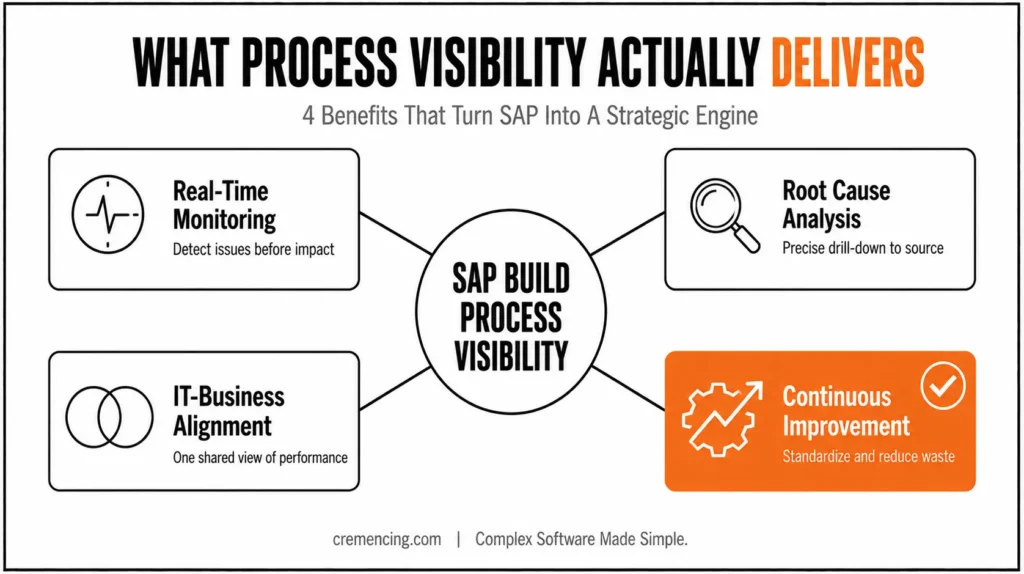
Main Benefits of SAP Build Process Visibility
Real-Time Monitoring
For instance, SAP Build dashboards deliver insights in real time, enabling teams to:
- Detect issues early
- Reduce downtime
- Monitor compliance and SLA adherence
As a result, this speeds up command decisions and reduces operational risk.
Root Cause Analysis
For instance, when exceptions happen, process visibility tools provide precise drill-downs:
- Identify misconfigurations or bottlenecks
- Map them to business impact
- Implement corrective actions quickly
Consequently, helps avoid expensive and damaging operational disruptions.
Increased Alignment of IT with Business
Similarly, with shared process data:
- IT aligns with business priorities
- Automated dashboards replace manual reporting
- Ensures all parties share the same view of process performance
Continuous Improvement
Additionally, process visibility helps organisations:
- Standardize best practices across departments
- Reduce non-value-added activities
- Gauge the effect of process changes
Long-term result: increased operational efficiency and improved resource utilization.
How SAP Builds Process Visibility is Key for Digital Transformation Success
Transformations succeed only when executives have visibility to track and manage processes throughout SAP landscapes.
SAP Build process visibility enables:
- End-to-end process maps from Order-to-Cash, Procure-to-Pay, and Record-to-Report
- Live notifications of exceptions and variances
- Predictive indications for resource and operation planning
Projects are delivered faster, with fewer surprises and more business value.
Example: Companies using visibility in finance and procurement report accelerated month-end closes, shorter invoice cycles, and robust compliance statistics.
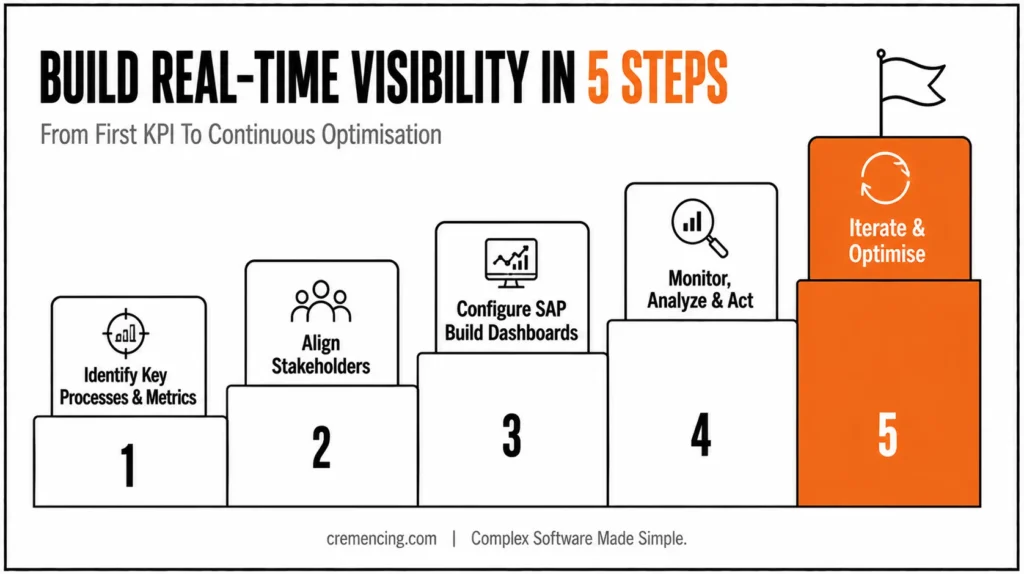
Best Practices for Real-Time Process Visibility using SAP Build
Step 1: Identify Processes and Metrics of Importance
Key processes and measures that matter to leadership:
- Cycle times
- Error rates
- Compliance adherence
- SLA performance
Specific KPIs are the foundation of stamina, health, and visibility initiatives and connect monitoring with business results.
Step 2: Align Stakeholders
Link between IT, business process automation, owners , and executive sponsors:
- Ensure shared understanding of objectives
- Location ownership for monitoring and response
- Promote cross-functional collaboration
Alignment turns process insights into action, not charts full of information.
Step 3: Configure SAP Build Dashboards
Leverage SAP Build tools to:
- Map end-to-end processes
- Integrate relevant SAP modules
- Present actionable data
Dashboards should serve leadership and teams with KPIs that are the most important to them.
Mission Step 4: Watch, Analyze, and Take Action
Use dashboards to:
- Track process health on the fly
- Detect bottlenecks and exceptions
- Prioritize improvement initiatives
Teams can take action before problems impact productivity or compliance.
Step 5: Iterate and Optimise
From there, process visibility is continuous:
- Regularly review KPIs
- Update dashboards as processes evolve
- Utilize intelligence to automate, standardize, and make processes more efficient
Guarantees visibility into increasingly complex organizations.
Impact of SAP Build Process Visibility in Reality
- Global Retailer: Decreased order-to-cash cycle by 25% by identifying bottlenecks in real time
- Financial Services Firm: Improved compliance reporting through exception detection and approval workflow automation
In practice, SAP Build process visibility is a strategic lever for operational excellence, not a luxury.
Checklist for the Executive: Successful Visibility into Business Processes
- Determine and prioritize Critical Business Processes
- Specify KPIs that represent business value
- Bring IT and business together early
- Use SAP Build dashboards for real-time tracking
- Define governance for insights-based action
- Continuously improve based on process performance
Advanced Tips for Maximising Visibility
Once the fundamentals are in place, a few advanced tips can help you get more out of your visibility setup.
- Combine Process Visibility with Automation: Start workflows automatically using SAP Build to reduce errors
- Incorporate AI Analytics: Proactively know where bottlenecks or compliance issues might come up
- Use information from other systems: Across SAP S/4HANA, SAP Ariba, and SAP SuccessFactors as well as other environments
- Invest in Education: Empower your teams to read dashboards & execute on them
Conclusion
To sum up, leveraging SAP Build provides visibility into your enterprise SAP environment:
- Minimizes risk
- Speeds digitalization efforts
- Delivers measurable business performance
Process Visibility isn’t a reporting add-on bolted onto SAP — it’s the layer that tells you, while a process is still running, whether Order-to-Cash, Procure-to-Pay, or Record-to-Report is on track or quietly breaking. The organizations getting real ROI from SAP Build aren’t the ones with the most dashboards; they’re the ones who picked 3-5 KPIs that leadership actually acts on, wired them into a Visibility Scenario, and built a review cadence around exceptions instead of month-end surprises. Start there, not with the full landscape.
FAQs
1. What is SAP Build Process Visibility?
Simply put, it’s the ability to monitor and analyze SAP business processes through dashboards and instrumentation tools in real time. As a result, teams no longer rely on delayed reports or guesswork to understand what’s happening across their SAP landscape.
2. Why is process transparency important in SAP transformations?
First and foremost, it helps identify bottlenecks, exceptions, and inefficiencies upfront. Consequently, this leads to faster adoption, easier upgrades, and a higher return on investment.
3. Can I gain visibility across all SAP modules using SAP Build?
Yes — in fact, SAP Build integrates with finance, procurement, supply chain, and other modules. Therefore, organizations get a complete, 360-degree view of their data rather than isolated snapshots.
4. How does SAP Build process visibility support compliance?
Essentially, it automatically identifies discrepancies and outliers as they occur. This way, companies stay aligned with internal policies and external regulations without waiting for periodic audits.
5. Who should manage SAP Build process visibility?
Ideally, CIOs, Enterprise Architects, SAP transformation owners, and business process leads should all be involved. After all, alignment across these roles ensures visibility translates into actionable outcomes rather than isolated dashboards.
6. How long does it take to implement SAP Build Process Visibility?
Generally, implementation timelines vary based on landscape complexity, but most organizations see initial dashboards live within a few weeks. Afterward, refinement and KPI tuning continue as an ongoing process rather than a one-time setup.
7. Does SAP Build Process Visibility require custom development?
Not necessarily — since SAP Build offers pre-configured dashboards and templates, most use cases can be addressed without heavy custom coding. However, more complex or industry-specific processes may still need some tailored configuration.
8. Can SAP Build Process Visibility work with non-SAP systems?
To some extent, yes. Since many organizations run hybrid landscapes, SAP Build can often pull relevant data from connected non-SAP systems as well. That said, the deepest visibility still comes from SAP-native processes.
9. What’s the difference between process visibility and traditional reporting?
Unlike traditional reporting, which typically shows historical, static snapshots, process visibility delivers real-time, continuous insight into how processes are actually running. As a result, teams can act on issues as they emerge instead of discovering them after the fact.
10. What business outcomes can organizations expect from SAP Build Process Visibility?
Ultimately, organizations can expect faster cycle times, improved compliance, and reduced operational risk. Over time, these improvements compound, turning SAP from a cost center into a genuine strategic advantage.




