
Any ABAP developer can write a report with WRITE. But the moment a customer asks for an Excel export, double-click drill-downs, sortable columns, filters, totals, or a saved layout, that same developer gets stuck. This is exactly where ABAP report ALV stops being a “nice reporting feature” and becomes a must-have skill. In SAP S/4HANA 2026 and ECC 6.0, ALV still runs the reports that matter most day to day: operational reporting, audit extracts, reconciliation, and support dashboards.
Modernizing ABAP ALV Development
SAP List Viewer (ALV) provides standard grid features such as sorting, filtering, and data export in SAP GUI applications, replacing legacy WRITE statement outputs. Modern ABAP developers utilize the object-oriented CL_SALV_TABLE class for read-only reports, as it automatically infers internal table structures and significantly reduces manual field catalog setup.
When requirements demand interactive capabilities—such as editable cells, event handling, or screen container integration—the CL_GUI_ALV_GRID class provides the necessary control. Structuring programs by separating database selections from ALV display logic ensures code maintainability and smooth migration across SAP ECC and S/4HANA environments.
What is ABAP Report ALV, and why does it matter
ABAP report ALV – Presenting report output via SAP List Viewer rather than using plain WRITE statements. ALV offers users sort, filter, total, subtotal, column resize, export data, print output, and save layouts in a structured grid or list. A normal WRITE report displays lines on the screen.
This may be good for a developer test, but hundreds or thousands of records will not do. Standard reporting behaviour without requiring all the developers’ CL_GUI_ALV_GRID gives more control than CL_SALV_TABLEto write sorting, filtering, or layout logic is addressed with SAP ALV reports.
ALV matters because many SAP business reports still run in SAP GUI. Finance teams need open-item lists, MM teams need stock reports, SD teams need sales order reports, and support teams need quick extraction programs. A clean SAP ABAP report ALV can save time for users and reduce repeated change requests.
Beginners usually start with classic ALV function modules such as REUSE_ALV_GRID_DISPLAY. However, modern ABAP developers often prefer object-oriented ALV through CL_SALV_TABLE for display-focused reports.
The key is not only showing data. The key is choosing the right ALV method for the report requirement, SAP release, support team, and maintenance risk.
How It Works
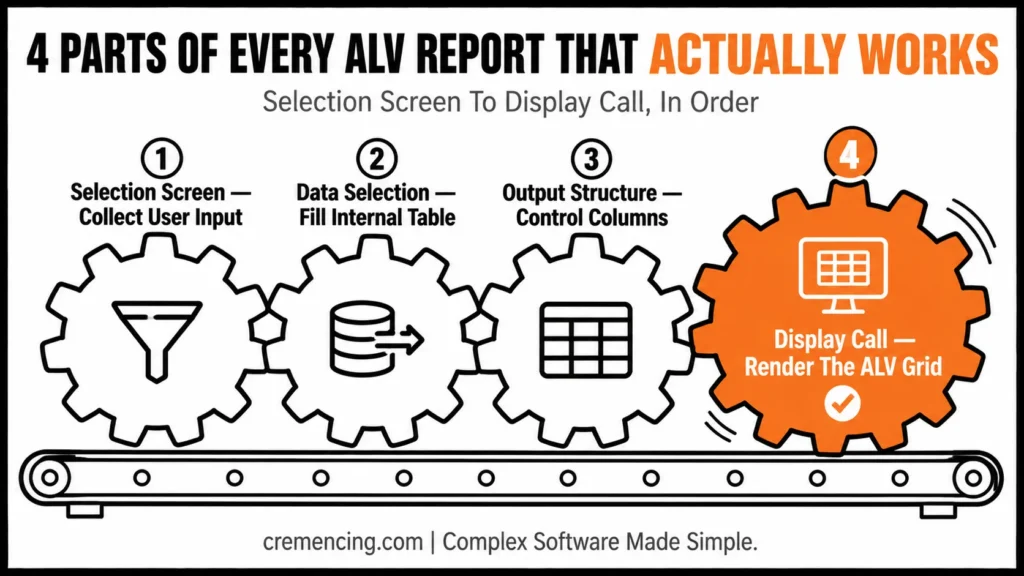
Every ABAP report ALV normally has four moving parts: selection screen, data selection, output structure, and display call. The selection screen collects user input. The SELECT logic fills an internal table. The output structure controls the columns. The ALV display method renders that internal table as a user-friendly report.
SE38 is the ABAP editor transaction used to create and run executable reports in SAP GUI. SA38 runs existing reports directly. SE80 is the object navigator, used to maintain repository objects such as programs, function groups, classes, and screens. ADT is ABAP Development Tools in Eclipse, common in modern S/4HANA projects.
Classic ALV uses function modules. The developer usually prepares a field catalogue, sets layout options, and passes an internal table to the display function. The field catalogue tells ALV which columns to show, what text to display, and how each field should behave.
OO ALV hides much of that manual setup. CL_SALV_TABLE can read the internal table structure and display a table with fewer lines of code. You can then enable standard functions, optimize column width, set headings, and control layout behaviour through object methods.
CL_GUI_ALV_GRID gives more control than CL_SALV_TABLE. For example, it supports custom containers, editable grids, events, and advanced screen behavior. However, that control comes with more coding and more responsibility.
Choosing an ALV Approach
| Approach | Best For | Strength | Risk |
|---|---|---|---|
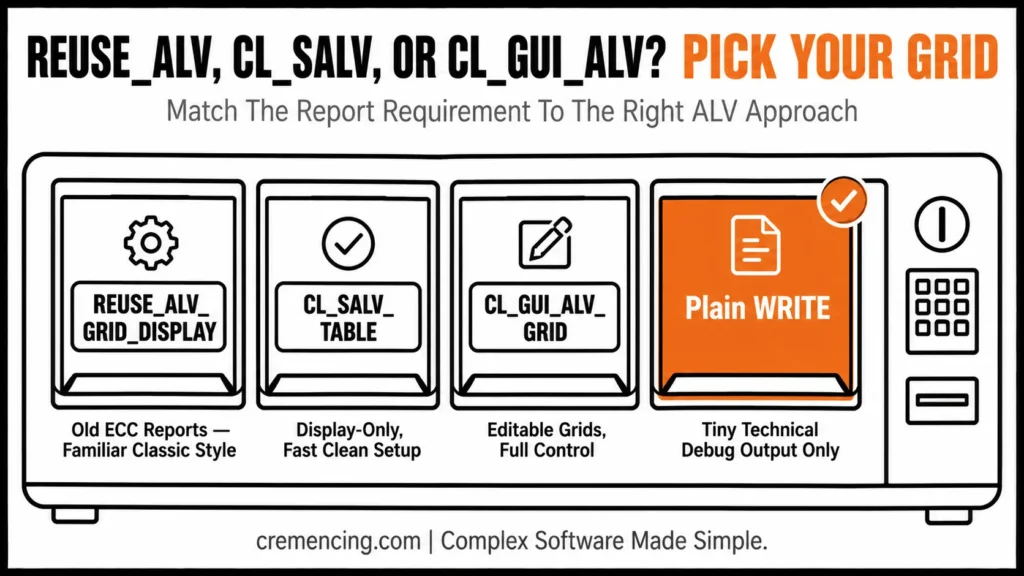
| REUSE_ALV_GRID_DISPLAY | Older ECC reports | Familiar classic style | Procedural design grows quickly |
| CL_SALV_TABLE | Display-only reports | Clean OO syntax, fast setup | Limited edit support |
| CL_GUI_ALV_GRID | Editable or event-heavy reports | Full grid control | More setup and testing |
| Plain WRITE | Tiny technical output | Very quick test output | Poor business usability |
This is why SAP ABAP ALV reports for beginners should not stop at “call one function module.” A developer should understand the display model before choosing the code pattern.
Practical Code Walkthrough
This section shows two practical patterns: classic ALV and object-oriented ALV. Both examples read material master text data and display it in an ALV grid. The goal is to show an ABAP ALV report example that beginners can understand, and developers can extend.
Example 1: Classic ABAP Report ALV Display
Classic ALV still appears in many ECC systems and old custom reports. Use it when you maintain existing procedural reports or when your team standard still uses function modules.
REPORT z_demo_classic_alv.
TYPE-POOLS slis. “Required for classic ALV field catalogue types
TYPES: BEGIN OF ty_material,
matnr TYPE mara-matnr,
mtart TYPE mara-mtart,
maktx TYPE makt-maktx,
END OF ty_material.
DATA: lt_material TYPE STANDARD TABLE OF ty_material,
lt_fieldcat TYPE slis_t_fieldcat_alv,
ls_fieldcat TYPE slis_fieldcat_alv,
ls_layout TYPE slis_layout_alv.
PARAMETERS p_mtart TYPE mara-mtart. “Material type filter entered by user
START-OF-SELECTION.
SELECT a~matnr, a~mtart, b~maktx
FROM mara AS a
INNER JOIN makt AS b
ON b~matnr = a~matnr
INTO TABLE @lt_material
WHERE a~mtart = @p_mtart
AND b~spras = @sy-langu. ” Read material description in logon language
IF lt_material IS INITIAL.
MESSAGE ‘No materials found for selection’ TYPE ‘I’. ” Inform user when result is empty
RETURN. ” Stop report before ALV call
ENDIF.
Building the Field Catalogue and Displaying the ALV Grid
CLEAR ls_fieldcat.
ls_fieldcat-fieldname = ‘MATNR’. ” Technical field name from output table
ls_fieldcat-seltext_m = ‘Material’. ” Medium column heading
ls_fieldcat-key = abap_true. ” Mark material as key column
APPEND ls_fieldcat TO lt_fieldcat.
CLEAR ls_fieldcat.
ls_fieldcat-fieldname = ‘MTART’. ” Technical field name from output table
ls_fieldcat-seltext_m = ‘Type’. ” Column heading for material type
APPEND ls_fieldcat TO lt_fieldcat.
CLEAR ls_fieldcat.
ls_fieldcat-fieldname = ‘MAKTX’. ” Technical field name from output table
ls_fieldcat-seltext_m = ‘Description’. ” Column heading for material text
APPEND ls_fieldcat TO lt_fieldcat.
ls_layout-zebra = abap_true. ” Show alternating row color for readability
ls_layout-colwidth_optimize = abap_true. ” Optimize column width in classic ALV
CALL FUNCTION ‘REUSE_ALV_GRID_DISPLAY’
EXPORTING
is_layout = ls_layout
it_fieldcat = lt_fieldcat
TABLES
t_outtab = lt_material
EXCEPTIONS
program_error = 1
OTHERS = 2.
IF sy-subrc <> 0.
MESSAGE ‘ALV display failed’ TYPE ‘E’. “Stop when classic ALV fails
ENDIF.
This code shows the classic ABAP report ALV display flow: get data, build a field catalogue, set layout, and call the display function. The field catalogue gives you control, but it also creates extra code to maintain.
Example 2: ABAP ALV Report Object-Oriented With CL_SALV_TABLE
Use CL_SALV_TABLE when the report is display-focused and does not need editable cells. It reduces manual field catalogue work and keeps the report cleaner.
REPORT z_demo_oo_alv.
TYPES: BEGIN OF ty_material,
matnr TYPE mara-matnr,
mtart TYPE mara-mtart,
maktx TYPE makt-maktx,
END OF ty_material.
DATA: lt_material TYPE STANDARD TABLE OF ty_material,
lo_alv TYPE REF TO cl_salv_table,
lo_columns TYPE REF TO cl_salv_columns_table,
lo_functions TYPE REF TO cl_salv_functions_list.
PARAMETERS p_mtart TYPE mara-mtart. ” Material type filter entered by user
START-OF-SELECTION.
SELECT a~matnr, a~mtart, b~maktx
FROM mara AS a
INNER JOIN makt AS b
ON b~matnr = a~matnr
INTO TABLE @lt_material
WHERE a~mtart = @p_mtart
AND b~spras = @sy-langu. ” Select only required fields for report output
IF lt_material IS INITIAL.
MESSAGE ‘No materials found for selection’ TYPE ‘I’. ” Prevent empty ALV display
RETURN. ” Exit report after message
ENDIF.
Creating the ALV Object with CL_SALV_TABLE
TRY.
cl_salv_table=>factory(
IMPORTING
r_salv_table = lo_alv
CHANGING
t_table = lt_material ). ” Create SALV object for internal table
lo_functions = lo_alv->get_functions( ). ” Read ALV toolbar function handler
lo_functions->set_all( abap_true ). ” Enable standard functions such as export and filter
lo_columns = lo_alv->get_columns( ). ” Read column settings object
lo_columns->set_optimize( abap_true ). ” Optimize all column widths
lo_alv->display( ). ” Render ALV grid on screen
CATCH cx_salv_msg INTO DATA(lx_salv).
MESSAGE lx_salv->get_text( ) TYPE ‘E’. ” Show SALV framework error
ENDTRY.
This is the cleaner pattern for an SAP ABAP ALV reports tutorial when the output is read-only. You do not manually build the full field.
When to Use Which ALV Approach
Picking the right pattern for your ABAP report ALV comes down to the report’s purpose and audience:
Large production report → OO ALV with separated methods.separate Cleaner support and testing; the class reads the internal table structure and gives you standard ALV behaviour.
Beginner read-only report → CL_SALV_TABLE — Less setup and cleaner code
Old ECC procedural report → REUSE_ALV_GRID_DISPLAY — Easier to maintain old style
Editable grid → CL_GUI_ALV_GRID — Supports edit behaviour and events
Full-screen quick list → CL_SALV_TABLE — Fast display with standard functions
Heavy custom screen logic → CL_GUI_ALV_GRID — Better control through a container
Simple technical debug output → WRITE — Enough for short temporary checks
ABAP Report ALV — Quick Decision Guide
- Large production report → OO ALV, separated methods
- Beginner read-only report → CL_SALV_TABLE
- Old ECC procedural report → REUSE_ALV_GRID_DISPLAY
- Editable grid → CL_GUI_ALV_GRID
- Quick debug output → WRITE
You can still adjust individual columns. For example, you can change column headings when the technical names do not help users.
DATA lo_column TYPE REF TO cl_salv_column_table. ” Reference for one SALV column
TRY.
lo_column ?= lo_columns->get_column(‘MAKTX”). ” Read description column
lo_column->set_short_text(‘Text’). ” Short heading for narrow display
lo_column->set_medium_text(‘Description’). ” Medium heading for normal display
lo_column->set_long_text(‘Material Description’). ” Long heading for detailed display
CATCH cx_salv_not_found.
MESSAGE ‘Column MAKTX not found in ALV output’ TYPE ‘E’. “Handle wrong field name safely
ENDTRY.
For production reports, separate the report into methods: validate input, get data, prepare output, and display ALV. That structure makes future changes easier. If users later ask for totals, double-click navigation, or layout variants, you can change the display method without touching the data selection method. Once you understand how to build and customize ALV reports, the next step is preparing for technical interviews where ALV is a frequently tested topic. Explore these SAP ABAP ALV Reports interview questions to strengthen your interview preparation.
When to Use It vs. Alternatives
Choosing the right ALV approach matters more than memorizing one example. The wrong choice creates extra maintenance work.
Use classic ALV when you maintain old SAP ABAP report ALV code, and rewriting adds no business value. Moreover, use OO ALV when you build a new read-only report. Use CL_GUI_ALV_GRID when users need editable cells, checkbox handling, hotspot clicks, custom toolbar buttons, or screen containers.
Do not use an editable ALV just because users ask to change data ‘directly in the report.’ This is because editing SAP data needs validation, locking, authorization checks, update logic, error handling, and rollback planning.
Watch these common mistakes in SAP ABAP ALV report examples:
- Selecting too many fields with SELECT *
- Loading huge datasets without selection restrictions
- Building a wrong field catalogue field name
- Displaying technical column names that users cannot understand
- Skipping empty-result handling
- Ignoring exception classes in SALV
- Using editable ALV without locks and authorisation checks
- Mixing data selection, calculation, and display logic in one block
ST05 is the SQL Trace transaction. Use it when the ALV report is slow, and you need to check SELECT duration, number of records, and execution count. SAT is ABAP Runtime Analysis. Use it when the report spends time in ABAP processing, loops, formatting, or event logic.
Conclusion
ABAP report ALV is the point where a basic report becomes useful for real SAP users. A simple WRITE report may be enough for a developer test, but business users usually need sorting, filtering, totals, layout saving, export options, and a clear grid display. ALV gives them that standard reporting experience without forcing every developer to build those features manually.
Use clean data selection, select an appropriate ALV approach, and separate display logic from business logic. You should validate the selection screen first, then only retrieve the data that you need, then form the output structure, and then display the ALV. The separation helps to make the report easier to debug, extend and support when users want new columns, totals, layouts, or navigation moves.
For older ECC reports, where function modules like REUSE_ALV_GRID_DISPLAY are already used, use classic ALV. For simple, stable, and display-oriented requirements, use CL_SALV_TABLE for clean output. Consider using CL_GUI_ALV_GRID only if the requirement calls for more in-depth control of the grid, editable fields, custom toolbar buttons, double-click handling, or screen-container integration.
For S/4HANA projects, ALV can still be useful for SAP GUI reporting, support tools, audit extracts, and internal operational reports. Always be sure, though, whether the need is better met with ALV, CDS views, analytical applications, Fiori reports, or RAP-based services. The selection of the right one depends on the individual user, volume, interaction level, and support model.
Frequently Asked Questions
1. What is ALV in SAP ABAP?
ALV means ABAP List Viewer or SAP List Viewer. It displays internal table data in a standard SAP report format with sorting, filtering, totals, export, print, and layout functions. In SAP ALV reports, ALV replaces plain WRITE output for business-friendly reporting.
2. How do I create an ABAP report ALV display?
Create an internal table, fill it with SELECT logic, prepare column information if needed, and call an ALV display method. For classic ALV, use REUSE_ALV_GRID_DISPLAY. For an ABAP report ALV display in modern style, use CL_SALV_TABLE for read-only output.
3. What is the best ABAP ALV report example for beginners?
The best ABAP ALV report example for beginners reads a small table, checks empty output, and displays the result with CL_SALV_TABLE. It should avoid editable logic at first.
4. What is the difference between REUSE_ALV_GRID_DISPLAY and CL_SALV_TABLE?
REUSE_ALV_GRID_DISPLAY is a classic function module approach, common in older ECC reports. CL_SALV_TABLE is object-oriented and cleaner for read-only reports. For ABAP ALV report object-oriented development, CL_SALV_TABLE is usually the easier starting point.
5. Can ALV reports be editable in SAP ABAP?
Yes, ALV reports can be editable when you use the right grid approach, commonly CL_GUI_ALV_GRID. Editable SAP ABAP ALV reports examples need validation, authorization checks, locking, update logic, and error handling. Do not update standard SAP data directly without these controls.
6. What is a field catalogue in ALV?
A field catalogue defines how ALV columns behave and appear. It can control field name, column text, key fields, edit settings, output length, totals, and technical visibility. Classic SAP ABAP report ALV programs often need a field catalogue, while SALV can infer many columns automatically.
7. Which ALV approach should I learn first?
Beginners usually start with classic ALV function modules such as Learn CL_SALV_TABLE first if you want a clean SAP ABAP ALV reports tutorial for read-only output. Then learn classic ALV because you will see it in ECC support. After that, learn CL_GUI_ALV_GRID for editable grids and event-heavy screens.
8. Is CL_SALV_TABLE suitable for large datasets in ABAP report ALV?
Generally, CL_SALV_TABLE works well for moderate to large read-only datasets in an ABAP report ALV. However, for very high-volume data, performance still depends on selection restrictions at the database level, not just the display method. Therefore, always filter data early rather than relying on ALV to handle unrestricted result sets.
9. Can I add totals and subtotals to an ABAP report ALV?
Yes, indeed — both classic ALV and CL_SALV_TABLE support totals and subtotals through their respective configuration methods. In classic ALV, this is done via the field catalogue and sort table; meanwhile, in CL_SALV_TABLE, it’s handled through the aggregations object. Consequently, users get subtotal rows without any manual calculation logic in the report.
10. How do I handle errors gracefully in an ABAP report ALV?
First and foremost, always check for empty result sets before calling the ALV display method, as shown in both code examples. Additionally, wrap CL_SALV_TABLE calls in a TRY-CATCH block to handle exceptions like cx_salv_msg. As a result, users see a clear message instead of a runtime dump when something goes wrong.





2 Responses