

If you learn SAP ABAP in the wrong order, the problem does not appear when you memorize your first few statements. It appears later when a simple SELECT depends on an internal table you do not fully understand, when a class introduces concepts you skipped, or when RAP suddenly requires CDS, ABAP objects, and data-model knowledge you never built.
Most beginners try to learn ABAP step by step by collecting random topics: reports, internal tables, SELECT statements, BAPIs, ALV, and perhaps CDS views. That list may look useful, but it misses the real skill gap. ABAP has dependencies, so learning one concept often requires a solid understanding of another.
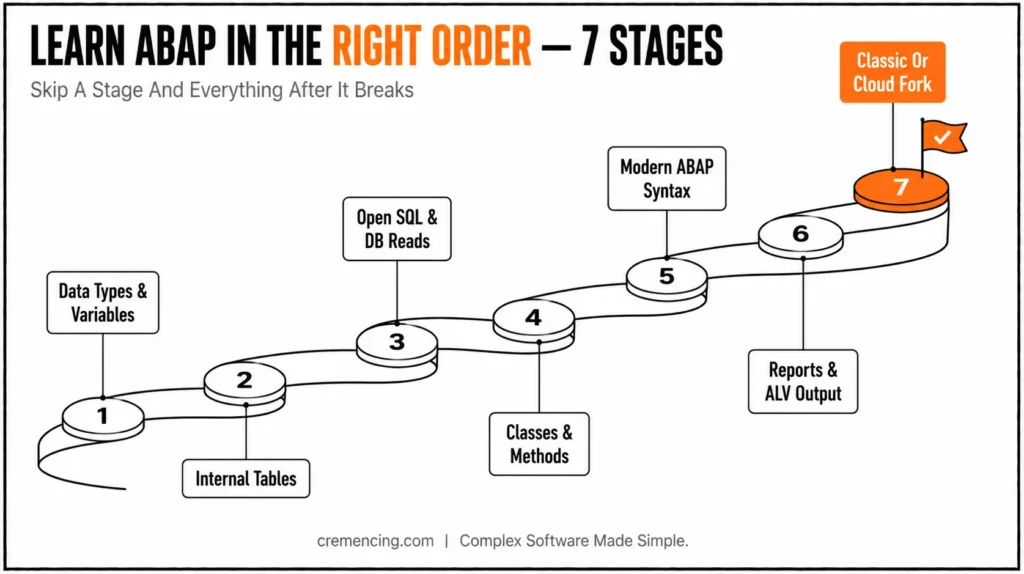
The right SAP ABAP learning path is therefore not a collection of topics. It is a dependency order. You start with data types and structures, move to internal tables and control statements, and then learn Open SQL and modularization before progressing into debugging, ABAP Objects, CDS, and modern development patterns such as RAP.
Your target SAP environment also matters. Classical ABAP development in ECC can look very different from modern development in S/4HANA, SAP BTP ABAP Environment, and S/4HANA Cloud, where newer syntax, CDS, released APIs, and RAP play a much larger role.
How It Works
ABAP development sits on three layers: the Data Dictionary, the ABAP runtime, and the SAP application model. The Data Dictionary defines tables, views, data elements, domains, search helps, and table types. When you declare a variable using a dictionary type, your ABAP code inherits technical length, decimals, conversion exits, and sometimes semantic meaning from SAP metadata.
The runtime then executes your program on the ABAP application server. A report reads from the database, fills internal tables, loops over them, applies business rules, and displays output. In classic SAP GUI development, that output may be a WRITE list or ALV grid. In S/4HANA and ABAP Cloud, the output often moves toward CDS, OData, RAP, and Fiori Elements.
This internal flow explains the learning order. Data types come first because every field depends on them. Internal tables come second because they hold nearly every multi-row result. Open SQL comes third because it fills those internal tables. Classes come next because reusable code belongs in methods, not copied report blocks. Before moving into internal tables, make sure you understand how ABAP data types and SAP Dictionary definitions affect your variables.
Modern ABAP syntax sits across all these layers. ABAP 7.40 introduced inline declarations, constructor expressions, table expressions, string templates, and escaped host variables in Open SQL. In classic ABAP, older syntax still runs for compatibility. In ABAP Cloud, modern style is the normal expectation. So, when you learn ABAP Step by step, don’t treat syntax as decoration. Syntax tells you which SAP release you’re targeting and which development model your code belongs to.
Practical Code Walkthrough
This walkthrough gives you a working order to learn SAP ABAP step by step. The examples focus on syntax and concepts that transfer from ECC to S/4HANA. When behavior changes in ABAP Cloud, the note says so clearly.
Start in an environment where you can execute code. SE38 is the classic SAP GUI transaction for creating and running executable reports. SE80 is the object navigator, which lets you browse and maintain repository objects such as programs, classes, function groups, and dictionary objects. In modern projects, use Eclipse with ABAP Development Tools because it supports ABAP Cloud and RAP development.
Stage 1 — Data Types, Variables, and Output
Start with elementary types. Learn the difference between CHAR, STRING, NUMC, DATS, TIMS, INT4, and packed decimals. ABAP beginners often confuse NUMC with a real number. It stores numeric-looking text, so sorting, conversion, and validation can behave differently from integer or packed decimal fields.
You also need to understand dictionary-based typing. A material number typed as matnr does not behave like a random string. It carries SAP-specific length and conversion behaviour.
REPORT z_stage1_basics.
DATA lv_name TYPE string. ” Variable-length text
DATA lv_matnr TYPE matnr. ” Material number dictionary type
DATA lv_date TYPE dats. ” Internal date format YYYYMMDD
DATA lv_count TYPE int4. ” Integer counter
DATA lv_amount TYPE p DECIMALS 2. ” Packed number for currency-like values
lv_name = ‘ABAP beginner’.
lv_matnr = ‘000000000000000123’.
lv_date = sy-datum. ” Current application server date
lv_count = 3.
lv_amount = ‘1250.50’.
WRITE: / 'Name:', lv_name.

WRITE: / 'Material:', lv_matnr.

WRITE: / 'Date:', lv_date.

WRITE: / 'Count:', lv_count.

WRITE: / 'Amount:', lv_amount.
MESSAGE |Learning date: { lv_date DATE = ISO }| TYPE ‘I’. ” ABAP 7.40+ syntax
This first milestone looks simple, but it teaches the foundation for every later SELECT, LOOP, and method signature. If you cannot explain why matter and string are not the same, pause here before moving forward.
Stage 2 — Internal Tables
Next, learn ABAP internal tables. An internal table is an in-memory table used by ABAP programs. It holds multiple rows after a database read, BAPI call, file import, or calculation.
This topic must come before Open SQL. If you learn SELECT first, you will copy statements without understanding INTO TABLE, work areas, field symbols, table keys, or row access.
ABAP has three major internal table categories. A standard table works like a flexible list. A sorted table keeps rows sorted by key. A hashed table gives key-based access for unique keys.
REPORT z_stage2_internal_tables.
TYPES: BEGIN OF ty_employee,
emp_id TYPE numc8, ” Employee number as numeric text
name TYPE char40, ” Employee name
dept TYPE char10, ” Department code
salary TYPE p DECIMALS 2,
END OF ty_employee.
DATA lt_employees TYPE STANDARD TABLE OF ty_employee WITH EMPTY KEY.
APPEND VALUE #( emp_id = ‘00000001’
name = ‘Ayesha Khan’
dept = ‘FI’
salary = ‘85000.00’ ) TO lt_employees.
APPEND VALUE #( emp_id = ‘00000002’
name = ‘Daniel Meyer’
dept = ‘IT’
salary = ‘92000.00’ ) TO lt_employees.
LOOP AT lt_employees ASSIGNING FIELD-SYMBOL(<employee>).
WRITE: / <employee>-emp_id, <employee>-name, <employee>-dept.
ENDLOOP.
READ TABLE lt_employees ASSIGNING FIELD-SYMBOL(<found_employee>)
WITH KEY emp_id = ‘00000001’.
IF sy-subrc = 0.
WRITE: / ‘Found employee: <found_employee>-name.
ELSE.
WRITE: / ‘Employee not found’.
ENDIF.
Learn sy-subrc here. SAP sets this system field after many operations. A value of 0 usually means success. A non-zero value means no row, no match, or another documented condition.
This is also where performance thinking starts. If you use a standard table and read it by key many times, ABAP scans rows unless you define or use a better key strategy. If you use a sorted or hashed table correctly, the access path changes.
Stage 3 — Open SQL and Database Reads
After internal tables, learn Open SQL. Open SQL is ABAP’s database access language. It lets your program read SAP tables and views without writing database-specific SQL.
In ECC 6.0 and S/4HANA on-premises, many developers still read standard tables directly, depending on project rules. In ABAP Cloud, you must use released APIs and released CDS entities instead of unrestricted direct access to SAP standard tables.
REPORT z_stage3_open_sql.
SELECT carrid, carrname, currcode
FROM scarr
INTO TABLE @DATA(lt_carriers) ” ABAP 7.40+ inline declaration
UP TO 10 ROWS.
IF sy-subrc <> 0.
MESSAGE ‘No carriers found’ TYPE ‘I’.
RETURN.
ENDIF.
LOOP AT lt_carriers ASSIGNING FIELD-SYMBOL(<carrier>).
WRITE: / <carrier>-carrid, <carrier>-carrname, <carrier>-currcode.
ENDLOOP.
Notice the order. The SELECT fills lt_carriers. The LOOP processes lt_carriers. The field symbol points to the current row without copying it into a separate work area.
Now add a filter. This is where ABAP’s new syntax (7.4, matters because host variables need the @ escape character in modern Open SQL.
REPORT z_stage3_open_sql_filter.
PARAMETERS p_curr TYPE scarr-currcode DEFAULT ‘EUR’. ” User input on selection screen
SELECT carrid, carrname, currcode
FROM scarr
WHERE currcode = @p_curr ” Host variable escaped with @
INTO TABLE @DATA(lt_carriers).
IF lt_carriers IS INITIAL.
WRITE: / |No carrier found for currency {p_curr}|.
RETURN.
ENDIF.
LOOP AT lt_carriers ASSIGNING FIELD-SYMBOL(<carrier>).
WRITE: /<carrier>-carrid, <carrier>-carrname.
ENDLOOP.
Avoid learning SELECT * as your default habit. Select the fields you need. Avoid SELECT inside LOOP unless you have a strong reason and have measured it.
Stage 4 — Modularization with Classes
Once you can read and process data, move logic into reusable units. In classic ABAP, you will still meet forms, includes, function modules, and classes. SE37 is the Function Builder transaction used to create, test, and inspect function modules. SE24 is the Class Builder transaction used to create and maintain ABAP classes.
For new development, learn classes early. ABAP Cloud requires class-based development patterns, and RAP depends on classes, behaviour pools, and typed interfaces.
CLASS zcl_abap_learning_helper DEFINITION
PUBLIC
FINAL
CREATE PUBLIC.
PUBLIC SECTION.
CLASS-METHODS format_material
IMPORTING iv_matnr TYPE matnr
RETURNING VALUE(rv_output) TYPE string.
ENDCLASS.
CLASS zcl_abap_learning_helper IMPLEMENTATION.
METHOD format_material.
rv_output = |{ iv_matnr ALPHA = OUT }|. ” Removes leading zeros for display
ENDMETHOD.
ENDCLASS.
This small class teaches method signatures, importing parameters, returning values, and dictionary typing. It also shows why a beginner should not stay in report-only programming for too long.
Stage 5 — Modern Syntax
Now rewrite older patterns into modern ABAP. This stage is not about style only. Modern syntax reduces boilerplate, makes data flow easier to read, and matches code examples in current S/4HANA and ABAP Cloud material.
REPORT z_stage5_modern_syntax.
DATA(lt_numbers) = VALUE STANDARD TABLE OF i(
( 10 )
( 20 )
( 30 )
).
DATA(lv_total) = 0.
LOOP AT lt_numbers INTO DATA(lv_number).
lv_total += lv_number. ” Adds current number to running total
ENDLOOP.
WRITE: / |Total value: { lv_total }|.
You should also learn table expressions. They replace many READ TABLE blocks, but they raise an exception when the row does not exist unless you guard the access.
REPORT z_stage5_table_expression.
TYPES: BEGIN OF ty_city,
id TYPE numc4,
name TYPE string,
END OF ty_city.
DATA(lt_cities) = VALUE STANDARD TABLE OF ty_city(
( id = ‘0001’ name = ‘Karachi’ )
( id = ‘0002’ name = ‘Berlin’ )
).
IF line_exists( lt_cities[ id = ‘0001’ ] ).
DATA(ls_city) = lt_cities[ id = ‘0001’ ]. ” ABAP 7.40+ table expression
WRITE: / ls_city-name.
ENDIF.
Classic ECC systems below the required support package may not support all modern constructs. S/4HANA systems normally support them. ABAP Cloud expects this style. If you are moving from older procedural ABAP, the next step is to understand how modern ABAP syntax changes the way you write and read existing code.
Stage 6 — Output: Reports, ALV, and the Cloud Shift
Classic ABAP developers must learn reports and ALV. ALV means ABAP List Viewer. It displays internal table data in an interactive grid with sorting, filtering, layout options, and export features.
Use CL_SALV_TABLE before older function modules such as REUSE_ALV_GRID_DISPLAY for new classic reports.
REPORT z_stage6_salv_output.
SELECT carrid, carrname, currcode
FROM scarr
INTO TABLE @DATA(lt_carriers)
UP TO 20 ROWS.
TRY.
cl_salv_table=>factory(
IMPORTING
r_salv_table = DATA(lo_alv)
CHANGING
t_table = lt_carriers ).
lo_alv->display( ). ” Shows the ALV grid in SAP GUI
CATCH cx_salv_msg INTO DATA(lx_salv).
MESSAGE lx_salv->get_text( ) TYPE ‘E’.
ENDTRY.
In ABAP Cloud, classic SAP GUI ALV is not the main output model. You move toward CDS views, OData services, RAP behavior definitions, and SAP Fiori apps.
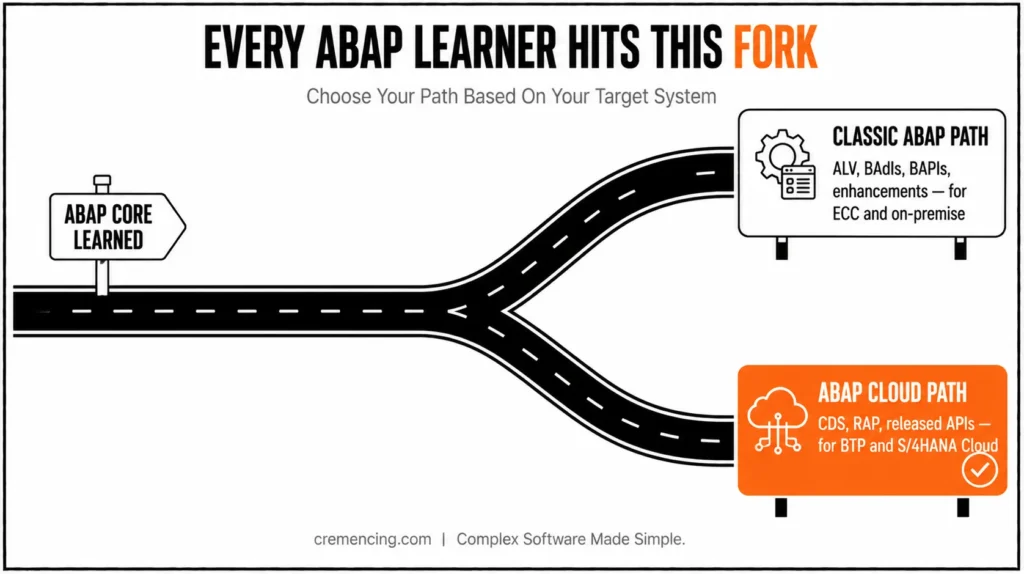
Stage 7 — The Fork: Classic ABAP or ABAP Cloud
At this point, ABAP for beginners becomes environment-specific.
For ECC 6.0 and S/4HANA on-premise maintenance, learn classic enhancement options. SE18 displays BAdI definitions. SE19 creates BAdI implementations. SMOD and CMOD support older user exit projects. You also need BAPIs because many integrations still call released business function modules.
For ABAP Cloud and SAP BTP ABAP Environment, learn CDS, RAP, behavior definitions, service bindings, and released APIs. You do not build the same way you built a classic SAP GUI report.
A practical ABAP learning step by step sequence looks like this:
- Data types and basic syntax
- Internal tables
- Open SQL
- Classes and methods
- Modern ABAP 7.4+ syntax
- Reports and ALV for classic ABAP
- CDS and RAP for ABAP Cloud
- Enhancements and BAPIs for classic project work
Do not skip the fork. It tells you what to practice next, what to ignore for now, and what code examples match your target system.
When to Use It vs. Alternatives
Use this Learn ABAP Step by Step path when you want production-ready ABAP skills, not only interview definitions. It works for beginners, functional consultants who need to read technical logic, and developers moving from another language into SAP.
Do not use this path unchanged if your only goal is to pass a short certification quiz. Certification preparation often follows exam topics, not build order. Do not start with RAP if you cannot read internal tables and Open SQL yet. Do not spend months on classical Dynpro screens if your target role is ABAP Cloud on SAP BTP.
| Target environment | Core ABAP first | Next specialization | Development focus |
|---|---|---|---|
| ECC 6.0 | Types, internal tables, Open SQL, ABAP Objects | Reports, ALV, enhancements, existing integration patterns | Classic ABAP |
| S/4HANA on-premise | Core ABAP + modern syntax | CDS, performance, RAP (where applicable), and enhancements | Modern + existing ABAP |
| S/4HANA Cloud Private Edition | Core ABAP + modern development | CDS, RAP, ADT, released APIs where applicable | Cloud-oriented and upgrade-stable development |
| S/4HANA Cloud Public Edition | Core ABAP + ABAP Objects + CDS | RAP, released APIs, ADT | ABAP Cloud |
| SAP BTP ABAP environment | Core ABAP + CDS foundations | RAP, released APIs, ADT | ABAP Cloud |
If you want a simple rule, follow this: learn the ABAP core first, then specialize by system type. The core gives you transferable value across ECC, S/4HANA, and the SAP BTP ABAP Environment.
Conclusion
The right way to learn ABAP step-by-step is to follow the dependency chain: types, internal tables, Open SQL, classes, modern syntax, output, and then the classic ABAP or ABAP Cloud fork. This order works because it follows how ABAP programs actually run inside SAP systems. You don’t read data before understanding where ABAP stores it, and you don’t move into RAP or enhancements before you can debug a basic report.
Start with executable code, not theory-only reading. Create small programs, run them, inspect internal tables in the debugger, and check sy-subrc after key operations. That habit builds real ABAP skill faster than memorizing syntax lists.
Your SAP target will determine your next course of action. Continue with ALV, BADIs, BAPIs, and performance tuning if you work on ECC or S/4HANA on-premises. Go from modern ABAP to CDS views, RAP, service bindings, and released APIs if you want to use SAP BTP ABAP Environment or S/4HANA Cloud. In order to align your practice with the systems you will actually build for, decide on the release path in advance.
Frequently Asked Questions
1. How should a beginner plan ABAP learning for S/4HANA?
Start with core ABAP before RAP. Learn data types, internal tables, Open SQL, classes, and ABAP new syntax 7.4 first. Then move into CDS views and RAP. S/4HANA still contains classic ABAP code, so skipping the foundation makes real project debugging harder.
2. What should I learn next after basic ABAP reports and ALV?
Learn classes, Open SQL performance, BAPIs, BADIs, and modern syntax next. If your project uses S/4HANA, add CDS views after that. Reports and ALV teach output, but reusable business logic usually belongs in classes or released APIs.
3. What is the difference between old ABAP syntax and new ABAP syntax?
Old ABAP declares most variables before use and relies heavily on work areas. New ABAP syntax adds inline declarations, constructor expressions, table expressions, string templates, and escaped host variables. For S/4HANA work, learn both because legacy code and new code often sit together.
4. What does SY-SUBRC mean in ABAP?
SY-SUBRC stores the return code after many ABAP statements. A value of 0 usually means success. Other values depend on the statement. Check it after READ TABLE, SELECT, CALL FUNCTION, and file operations when the next step depends on success.
5. How long does it take to learn SAP ABAP step by step?
A beginner can learn ABAP basics in 6 to 10 weeks with daily practice. Real project confidence usually takes 6 to 12 months because you must learn debugging, data models, transports, enhancements, and performance checks.
6. Can I learn ABAP without SAP access?
You can read ABAP without SAP access, but you cannot properly learn it. ABAP requires execution, syntax checks, dumps, debugger sessions, and table inspection. Use SAP BTP ABAP Environment trial or an ABAP developer trial system to practice code.
7. Do I still need to learn classical ABAP for S/4HANA?
Yes, if your target role involves maintaining or extending existing S/4HANA systems. Modern S/4HANA landscapes can contain substantial existing ABAP code, so understanding classic syntax and development patterns remains useful. The exact balance depends on the project’s development model.
8. Should I learn RAP before ABAP Objects?
No. RAP is not a replacement for the ABAP foundation. SAP’s current RAP prerequisites include ABAP Objects, ABAP development, CDS, and data-model knowledge. Build those foundations first, then move into RAP.




