Most beginners think that they do not need anything more than what is in the SAP ABAP Course Syllabus PDF. This was more successful on ECC days when the beginners mostly learned to work with SAP GUI, reporting, function modules, ALV, and Smart Forms. In SAP S/4HANA 1909+ and the SAP BTP ABAP Environment, much of the new ABAP is introduced, including expression-based syntax, object-oriented ABAP, CDS, RAP, and released APIs. As a result, the old syllabus is incomplete.
If you need support or legacy maintenance for the ECC system, then you should use the older SAP ABAP course syllabus. If you wish to work with ABAP Cloud, ABAP Environment SAP BTP, or with S/4HANA, use the modern syllabus. Newcomers should start with the core and then select the ECC or S/4HANA track.
Side-by-Side Comparison
| Feature | Old Way: ECC-Style Syllabus | New Way: S/4HANA-Ready Syllabus |
| Primary tool | SAP GUI, SE38, SE11, SE80, SE37, SE24 | Eclipse ADT plus SAP GUI where needed |
| First programming module | Classical reports and WRITE output | Reports plus modern ABAP syntax checkpoints |
| Data modeling | Transparent tables, domains, data elements, views | ABAP Dictionary plus CDS view basics |
| Database access | Open SQL against tables | Open SQL, CDS entities, released APIs |
| Main coding style | Procedural ABAP, includes, function modules | Object-oriented ABAP, classes, methods, RAP |
| Internal table style | Work areas, header lines in old code | Explicit work areas, field symbols, inline declarations |
| Output module | WRITE, ALV, Smart Forms, SAPscripts | ALV for on-premise, Fiori/RAP direction for cloud |
| Extension model | User exits, customer exits, BADIs | BADIs on-premise, released APIs, RAP for cloud |
| Version context | ECC 6.0 and classic NetWeaver | S/4HANA 1909+, SAP BTP ABAP Environment |
| Beginner risk | Learns outdated habits first | May jump into RAP before core ABAP is ready |
| Best use case | ECC support, legacy code reading, on-premise maintenance | S/4HANA projects, ABAP Cloud, modern development roles |
A strong SAP ABAP training syllabus should not reject the old approach completely. Classic ABAP still appears in many real systems. The mistake is treating an old PDF as a complete roadmap for current SAP development.
ECC-Style SAP ABAP Course Syllabus
The old syllabus usually starts with SAP basics, SAP GUI, ABAP Dictionary, reports, internal tables, modularisation, function modules, ALV, Smart Forms, and enhancements. That path matches many ECC 6.0 landscapes because developers often work in SE38, SE11, SE80, SE37, and SE24.
SE38 is the SAP GUI transaction for creating and running executable reports. SE11 displays ABAP Dictionary objects such as tables, domains, data elements, structures, and views. SE80 is the Object Navigator for browsing repository objects. SE37 tests function modules, and SE24 manages ABAP classes.
This syllabus still has value. If your job is ECC support, you must read old syntax, procedural code, function modules, includes, selection screens, ALV reports, and user exits. Many production systems still contain custom code written before ABAP 7.40 syntax became common.
The weakness is learning old patterns as if they are the final destination. A beginner may spend weeks on header lines, obsolete list output habits, and procedural blocks without learning classes, ADT, CDS, or S/4HANA restrictions. That creates a gap when the same learner joins a modern S/4HANA project.
The Old Beginner Checklist
REPORT z_old_syllabus_report.
DATA: lv_name TYPE char30, ” Fixed-length text used in classic examples
lv_msg TYPE char50. ” Message text for list output
lv_name = ‘ABAP Beginner’. ” Assign beginner name
lv_msg = ‘Learning classic ABAP report output’. ” Assign output text
WRITE: / ‘Name:’, lv_name. ” Classical list output
WRITE: / lv_msg. ” Classical list output
This code is valid and useful for first execution. It teaches activation, execution, and simple list output. It does not teach modern syntax, database access, internal table processing, object-oriented design, or S/4HANA direction.
Old syllabi often introduce internal tables like this:
REPORT z_old_internal_table_style.
TYPES: BEGIN OF ty_student,
id TYPE numc5, ” Student ID stored as numeric text
name TYPE char30, ” Student name
END OF ty_student.
DATA: lt_students TYPE STANDARD TABLE OF ty_student, ” Internal table
ls_student TYPE ty_student. “Explicit work area
ls_student-id = ‘00001’. “Assign ID with leading zeros
ls_student-name = ‘Ayesha.’ Assign name
APPEND ls_student TO lt_students. ” Add row to internal table
READ TABLE lt_students INTO ls_student INDEX 1. ” Read first row
IF sy-subrc = 0, check successful read
WRITE: / ls_student-id, ls_student-name.
ENDIF.
This remains a good learning checkpoint because it teaches internal tables and sy-subrc. The issue starts when the syllabus never moves beyond this style. A serious SAP ABAP course syllabus for beginners should teach this pattern, then show how modern ABAP handles the same idea.
Old ECC syllabi also focus on function modules early. That makes sense for legacy systems because BAPIs and custom function modules appear everywhere. But new learners should not treat function modules as the default design unit for new S/4HANA work.
The old approach works when your goal is to maintain ECC custom reports, debug user exits, adjust ALV output, or support older interfaces. It becomes weak when your target is S/4HANA development, ABAP Cloud, or SAP BTP ABAP Environment.
S/4HANA-Ready SAP ABAP Course Syllabus
The modern SAP ABAP course syllabus should still start with fundamentals. Beginners still need SAP basics, ABAP Dictionary, variables, control flow, internal tables, Open SQL, and debugging. The difference is that each module should use release-aware examples and connect to S/4HANA development patterns.
The new syllabus should introduce Eclipse ADT early. ADT is the modern ABAP development environment used for classes, CDS, RAP, and SAP BTP ABAP Environment. SAP GUI still matters for classic transactions, but ADT is no longer optional for a modern ABAP learning path.
The new syllabus should also teach ABAP 7.40+ syntax. Inline declarations, string templates, constructor expressions, table expressions, and escaped host variables appear in current ABAP examples. ECC systems may not support every syntax feature depending on the release and support package, but S/4HANA systems generally expect this style.
Here is the same beginner idea using a more current style:
REPORT z_new_syllabus_report.
DATA(lv_name) = ‘ABAP Beginner’. ” ABAP 7.40+ inline declaration
DATA(lv_msg) = |Learning modern ABAP syntax|. ” String template
WRITE: / |Name: { lv_name }|. ” String template in output
WRITE: / lv_msg. ” Display message
This is still a beginner report, but it teaches syntax that appears in modern SAP examples. It also prepares learners to read S/4HANA project code without feeling that every line looks unfamiliar.
The Modern Internal Table Checklist
A modern internal table checkpoint should look like this:
REPORT z_new_internal_table_style.
TYPES: BEGIN OF ty_student,
id TYPE numc5, ” Student ID stored as numeric text
name TYPE string, ” Dynamic text for name
END OF ty_student.
DATA(lt_students) = VALUE STANDARD TABLE OF ty_student(
( id = ‘00001’ name = ‘Ayesha’ )
( id = ‘00002’ name = ‘Daniel’ )
). ” ABAP 7.40+ constructor expression
IF line_exists( lt_students[ id = ‘00001’ ] ). ” Check row existence
DATA(ls_student) = lt_students[ id = ‘00001’ ]. ” Read row by key
WRITE: / ls_student-id, ls_student-name.
ENDIF.
This version teaches constructor expressions, table expressions, and existence checks. It does not mean beginners should ignore READ TABLE. They need both: old syntax for legacy code and modern syntax for new development.
The modern syllabus should also include Open SQL with escaped host variables:
REPORT z_new_open_sql_checkpoint.
PARAMETERS p_curr TYPE scarr-currcode DEFAULT ‘EUR’. ” User input for currency
SELECT carrid, carrname, currcode
FROM scarr
WHERE currcode = @p_cur”Hostst variable escaped with @
INTO TABLE @DATA(lt_carriers) ” Inline result table
UP TO 10 ROWS. ” Limit records for testing
IF lt_carriers IS INITIAL. Check the result table
WRITE: / ‘No carrier data found.’.
RETURN.
ENDIF.
LOOP AT lt_carriers ASSIGNING FIELD-SYMBOL(<carrier>).
WRITE: / <carrier>-carrid, <carrier>-carrname, <carrier>-currcode.
ENDLOOP.
In ECC and S/4HANA on-premise, this works in many training systems with the demo table SCARR. In ABAP Cloud, direct reads from many SAP standard tables are restricted. For cloud learning, use the released CDS entities or training artifacts provided by the system.
New Syllabus of SAP course
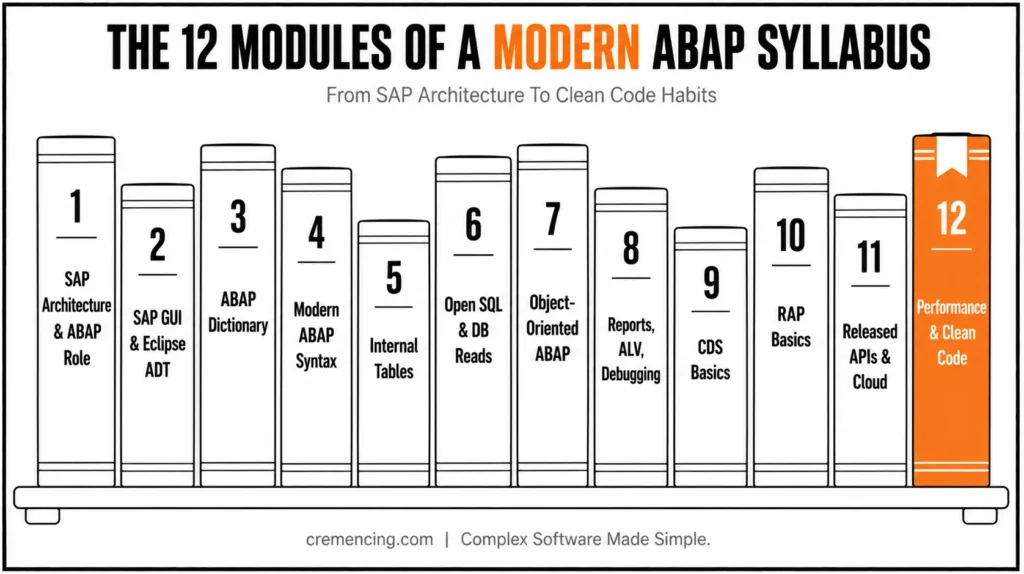
The new syllabus of SAP course for ABAP should include this module order:
- SAP architecture and ABAP role
- Development tools: SAP GUI and Eclipse ADT
- ABAP Dictionary and dictionary typing
- Basic syntax and modern ABAP expressions
- Internal tables and table expressions
- Open SQL and database reads
- Object-oriented ABAP with classes and methods
- Reports, ALV, and debugging for on-premise
- CDS basics for S/4HANA
- RAP basics for SAP BTP ABAP Environment
- Released APIs and ABAP Cloud restrictions
- Performance basics with SQL trace and clean code habits
The new syllabus works because it keeps the beginner foundation but changes the finish line. Instead of stopping at reports and Smart Forms, it prepares the learner for S/4HANA and cloud-based ABAP work. Explore this 7-step learning path to understand the fundamentals and start your SAP development journey with confidence. ABAP Programming Learning Path
Migration Checklist
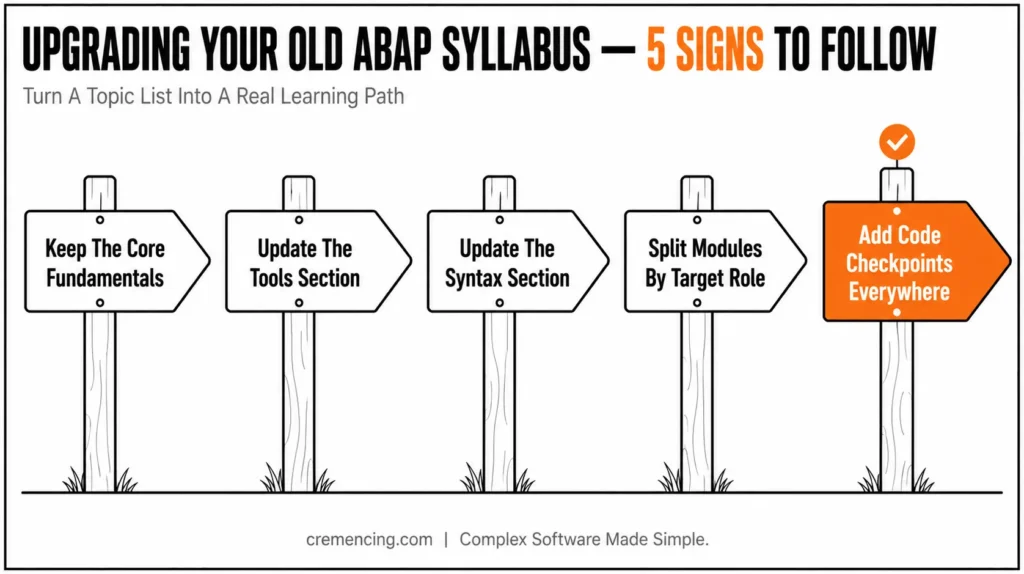
Use this checklist to upgrade an old SAP ABAP course syllabus PDF into a modern learning roadmap.
- First, keep SAP basics, ABAP Dictionary, syntax, internal tables, Open SQL, debugging, and reports. These topics remain useful in ECC, S/4HANA, and ABAP Cloud.
- Second, update the tools section. Add Eclipse ADT next to SAP GUI. Explain SE38, SE11, SE80, SE24, and SE37, but don’t make SAP GUI the only development environment.
- Third, update the syntax section. Add inline declarations, string templates, constructor expressions, table expressions, and modern Open SQL with @.
- Fourth, split the advanced modules by target role. ECC learners need ALV, Smart Forms, BAPIs, BADIs, user exits, and function modules. S/4HANA learners need modern ABAP, CDS, OOP, and performance checks. ABAP Cloud learners need ADT, CDS, RAP, service bindings, released APIs, and cloud restrictions.
- Fifth, add code checkpoints after every module. A syllabus without executable checkpoints becomes a topic list, not a learning path.
Conclusion: Choosing the Right ABAP Syllabus
The right SAP ABAP course syllabus is not the oldest PDF with the longest topic list. It is the syllabus that separates classic ECC skills from modern S/4HANA and ABAP Cloud requirements. Use the old syllabus to understand legacy reports, function modules, ALV, and user exits, but don’t stop there.
A modern beginner roadmap should add ADT, modern ABAP syntax, object-oriented ABAP, CDS basics, RAP awareness, and released APIs. That release-aware path helps you move from training examples to real project work. Learn the foundation first, prove each module with code, then choose the ECC, S/4HANA, or ABAP Cloud track that matches your target role.
Frequently Asked Questions
1.How to Plan an ABAP Course Syllabus for S/4HANA?
Begin with core ABAP first and then topics of S/4HANA. Before CDS or RAP, learn the data types, ABAP Dictionary, internal tables, Open SQL, classes and debugging. This makes the SAP ABAP course syllabus for beginners easier as the base language of S/4HANA development remains the same as before.
2. What is the first step to SAP ABAP?
Begin using live SAP access, and start with small, executable reports. Before enhancements, learn SE38, SE11, data types, internal tables, Open SQL, and the debugger. A good SAP ABAP training course should provide you with something more than just module names, it should provide you with runnable checkpoints.
3. Which course should I do for ABAP basics?
Select a course on modern ABAP and not on old ECC reports. The course should contain ABAP development tools, basic syntax, object-oriented ABAP, ABAP SQL, internal tables, and S/4HANA direction.
4. Should a beginner learn classic ABAP before ABAP Cloud?
Yes, learn core ABAP concepts before ABAP Cloud. You don’t need years of ECC work first, but you need types, classes, internal tables, SQL, and debugging. Then add ADT, CDS, RAP, service bindings, released APIs, and ABAP Cloud restrictions.
5. Where can I download a SAP ABAP course syllabus PDF?
You can find many PDF syllabi from training institutes, but check the release context before using one. If the SAP ABAP course syllabus PDF lacks S/4HANA, ADT, CDS, or RAP, treat it as a classic ABAP outline only.