
Introduction: Custom Fields Logic Deprecated — What You Need to Know
A field that populated correctly for three years suddenly shows blank after a routine S/4HANA upgrade. No error in the logs, no failed transport, no obvious cause — just a custom field that quietly stopped doing its job in production. When the team traces it back, the root cause is the same one showing up across a growing number of SAP landscapes: Custom Fields Logic Deprecated — the Fiori app it was built on is now on a declining support path.
That’s the risk with deprecation — it rarely fails loudly on day one. It fails months later, during an unrelated upgrade, in a way that looks like a random bug instead of what it actually is: a predictable consequence of building on a tool SAP has stopped investing in. This guide covers what the deprecation actually means, what SAP wants you to migrate to instead, and the three actions that matter most before your next system update turns this into an incident.
Accelerated Shift to Modern Clean Core Architecture
Recent industry analyses indicate that up to 70% of legacy SAP S/4HANA customizations face severe maintenance risks during upgrades if they rely on deprecated Fiori apps. According to SAP system benchmarks, transitioning from legacy extension tools to standardized Key User Extensibility and ABAP Cloud framework cuts future rework costs by 40% to 60% while eliminating silent logic failures. Furthermore, Gartner research highlights that enterprise organizations adopting SAP’s “Clean Core” strategy reduce upgrade testing timelines by over 50%. Consequently, migrating to modern extensibility tools before legacy app deprecation has become an operational priority for preserving enterprise continuity.
What is “Custom Fields and Logic Fiori App Deprecated”
The moment SAP marks the custom fields and logic Fiori app as deprecated, it does not mean that the app will stop working. Instead, it signals that:
- The app will not be updated anymore
- Note — SAP may deprecate support in future releases
- After some time, you may face compatibility issues
- No new features will be introduced
SAP is evolving to advance extensibility models, such as:
- Key user extensibility enhancements
- Developer extensibility via ABAP Cloud
- New Fiori-based extensibility tools
This transition is aligned with SAP’s overall approach towards a standardized and more modern orientation of customization programs across S/4HANA environments.
If your system depends on the now-deprecated app, you are on a diminishing support trajectory.
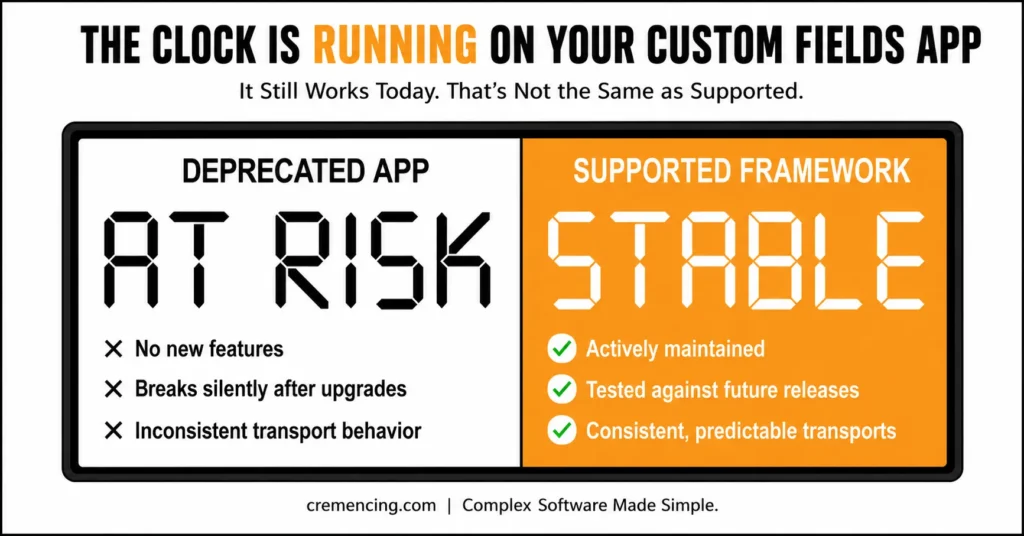
Deprecated App vs Supported Extensibility Framework
| Aspect | Custom Fields and Logic Fiori App (Deprecated) | Supported Extensibility Framework |
|---|---|---|
| Support Status | No longer updated, declining support | Actively maintained and updated by SAP |
| New Features | None introduced | Regularly enhanced with new capabilities |
| Compatibility | Risk of breaking after system upgrades | Built for long-term compatibility |
| Extensibility Model | Legacy custom fields approach | Key user extensibility, ABAP Cloud, modern Fiori tools |
| Stability | Prone to silent logic failures | Stable, tested against future releases |
| Transport Behavior | Inconsistent, unpredictable during upgrades | Consistent, aligned with supported deployment methods |
| Risk Level | High — increases with each update | Low — reduces risk of production failures |
| Recommended Action | Migrate as soon as possible | Adopt for sustainable, future-proof development |
Addressing Custom Fields and Logic Fiori App Deprecation
For business continuity, you require a proactive transition plan.
1. Identify All Existing Custom Fields and Logic
Start by auditing your system.
- Show all custom fields created through the app
- Identify business contexts and dependencies
- (Where are they used (UI, reports, APIs)? Review of use fields
This allows you full visibility into the current setup.
Phase 2 – Custom Fields Logic Deprecated: Understand Dependency and Usage Impact
Well, not every field is that important.
- Add new records based on the Enterprise process areas.
- SAP Help process for CDS views and BAdIs
- Check integration points with external systems
This helps prioritize migration efforts.
Not every custom field carries the same risk. Prioritize by checking three things: which fields feed downstream reports or interfaces, which have associated CDS views or BAdI implementations attached, and which touch integration points with external systems (these tend to fail first and most visibly during upgrades).
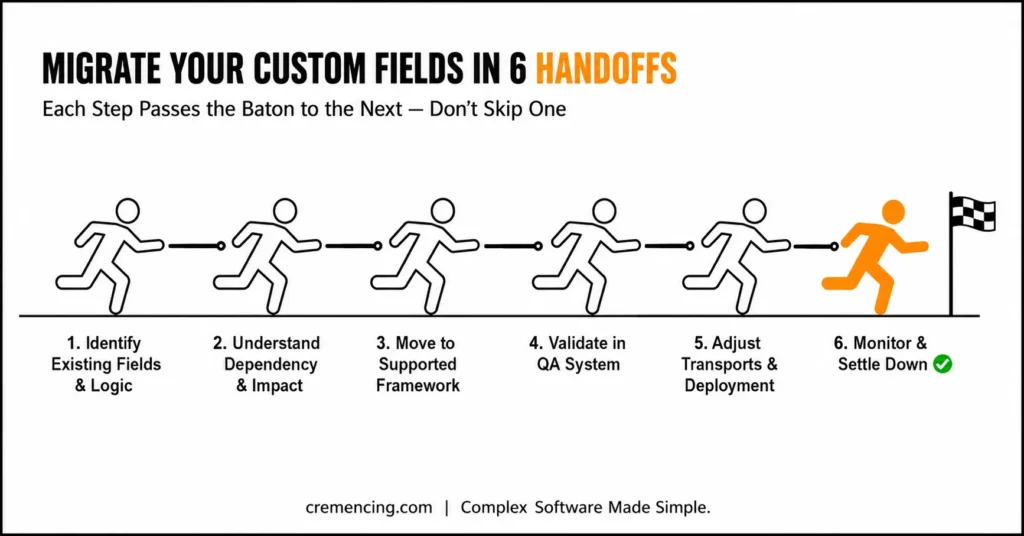
Step 3 – Move to a Supported Extensibility Framework
SAP advises migrating to sustainable extensibility scenarios.
- For enhanced extensibility, make use of updated key user extensibility tools
- Move the logic to the supported BAdI Frameworks.
- Follow ABAP Cloud principles where possible
It allows for long-lasting compatibility and support.
For most on-prem S/4HANA systems, this means rebuilding the logic using key user extensibility tools (accessible via the Custom Fields app’s supported successor) or, for developer-managed extensions, following ABAP Cloud development model principles so the logic stays upgrade-stable going forward.
Step 4 – Custom Fields Logic Deprecated: Validate in QA System
Before production rollout:
- Test migrated fields in QA
- Validate UI visibility and functionality
- Check OData services and APIs
This eliminates unanticipated failures post-deployment.
Step 5 – Custom Fields Logic Deprecated: Change Transports and Deployment Method
Ensure consistency across systems:
- Recreate or adjust transport requests
- Validate transport behavior
- Monitor system logs after import
Transportation inconsistencies during migration are typical.
Step 6 – Settle Down After Migration
After migration:
- Monitor system performance
- Track user issues
- Validate business processes
Continuous monitoring ensures stability.
Custom Fields & Logic Deprecation — Migration Checklist
- Audit: list all custom fields + logic created via the deprecated app
- Prioritize: flag fields tied to CDS views, BAdIs, or external integrations
- Rebuild: migrate logic to supported extensibility framework
- Validate: test in QA (UI, OData services, APIs)
- Transport: verify consistency across systems post-migration
- Monitor: track performance and user-reported issues post go-live
The Payoffs of Tackling Deprecation Head-On
Acting before the deprecation of the custom fields and logic fiori app prevents it from functioning offers tangible advantages:
- 40–60% reduction in future rework
- Lower risk of production failures
- Quicker Implementation of New SAP Functionalities
- Improved system stability and performance
- Reduced dependency on outdated tools
Those who do so act early to avoid emergency fixes and costly downtime.
Common Mistakes and Best Practices
Common Mistakes
- Ignoring SAP deprecation notices
- Under the assumption that the app will work forever
- Delaying migration until failure occurs
- Not documenting existing custom logic
- Skipping dependency analysis
Best Practices
- Perform a system audit regularly
- Plan migration before system upgrades
- Record all custom fields and logic
- Align with SAP’s extensibility roadmap
- Test thoroughly before deployment
Proactive planning reduces long-term risk.
What Other Blogs Fail to Mention in Start Page Deprecation Risk
Many guides touch on migration, but no other risks.
Key insights often missed:
- Upgrades silently break deprecated apps
- Transport behavior can change unexpectedly
- UI inconsistencies may appear gradually
- You will have no idea, and backend logic may fail silently.
- Integration points are often the first thing to break
Identifying these unnoticed dangers will enable you to take action before issues arise.
Conclusion
If you are still using the deprecated custom fields and logic Fiori app, sitting and waiting is not an option. While the app is still functional at this point, risks increase after every system update and modification.
The Custom Fields and Logic app won’t fail the day SAP marks it deprecated — it’ll fail on some ordinary Tuesday, during a routine upgrade, months or years from now, when nobody’s watching for it because the app has “worked fine” the whole time. That gap between deprecation and failure is exactly what makes this risk easy to deprioritize and expensive to ignore.
The three actions that matter most, in order: audit what you actually have running on the deprecated app, prioritize migration by what’s tied to CDS views, BAdIs, or external integrations, and validate everything in QA before it touches production. Systems that follow that order tend to migrate on their own schedule. Systems that don’t end up migrating on SAP’s schedule — during an incident, with no time to plan.
Our SAP experts can evaluate your system, determine vulnerabilities, and assist in a seamless migration journey. We are here to help. Call us today so that you can have your system in place before the problem happens.
FAQ Section
When the Fiori app for Custom Fields and Logic gets deprecated, what happens?
The app stops working but temporarily continues, slowly falling out of support until it breaks in future updates.
Do I have to migrate right away?
A safe move needs more time compared to the past, and therefore, it needs an hour to migrate well in advance, even if it does not seem too much preferable initially.
Will none of my existing custom fields still work?
They might still work for now, but could break after updates or changes to the system.
How to replace a deprecated app?
SAP also advises you to adopt the latest extensibility frameworks and ABAP Cloud-based approaches for your development.
How can I determine whether my system is affected?
Check for SAP note and Version of the System, Custom Fields, and Logic app usage
What triggers SAP to deprecate an app like Custom Fields and Logic?
Generally, SAP deprecates apps when it introduces newer, more sustainable extensibility frameworks that better align with S/4HANA’s evolving architecture. As a result, older tools are phased out to encourage adoption of modern, supported alternatives. Therefore, deprecation is typically part of SAP’s broader strategy to standardize extensibility across systems.
What happens if I ignore the deprecation and continue using the old app?
Initially, the app may continue to function without any visible issues. However, over time, system updates and upgrades can cause fields to stop working, logic to fail silently, or transports to become inconsistent. Consequently, ignoring the deprecation increases the risk of unexpected disruptions to business-critical processes.
How long does SAP typically support a deprecated app before it stops working?
Usually, SAP does not provide a fixed timeline, since deprecated apps may continue running for months or even years. Nevertheless, support and updates are gradually withdrawn, making the app increasingly unstable with each new release. Therefore, it is best to begin migration planning as early as possible rather than waiting for a specific deadline.
Can I migrate custom fields and logic without disrupting live business processes?
Yes, in fact, a structured migration approach — including QA testing and phased rollout — helps minimize disruption to live systems. Additionally, validating changes in a QA environment before production deployment further reduces risk. As a result, businesses that follow a proper migration process typically experience minimal downtime.
Is it necessary to involve SAP experts for this migration, or can internal teams handle it?
In many cases, internal teams with strong SAP extensibility knowledge can handle simpler migrations independently. However, for complex systems with heavy customization, involving SAP experts often ensures a smoother, more reliable transition. Ultimately, the right approach depends on the complexity of your existing custom fields and logic setup.




