
SAP EPM helps organizations address fragmented financial planning by connecting financial data, budgeting, forecasting, and performance management within a governed planning environment.
Many finance teams still manage budgets, forecasts, and actual financial results across separate spreadsheets and business applications. Consequently, departments may calculate identical financial measures using different assumptions.
For example, sales teams may prepare revenue forecasts without considering updated production costs. Meanwhile, finance controllers may spend considerable time reconciling these differences instead of analyzing business performance.
These inconsistencies make financial planning slower, less transparent, and harder to control.
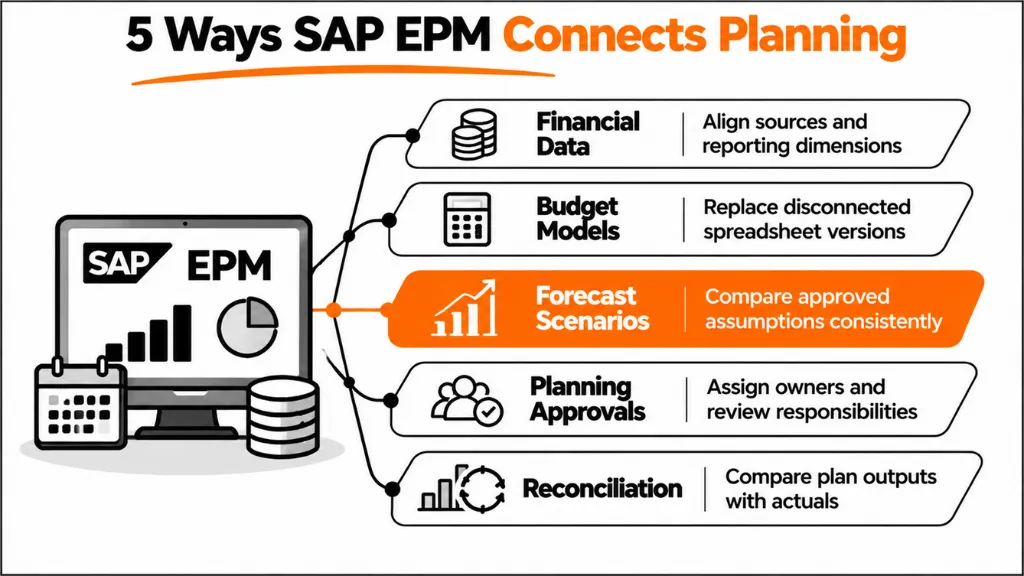
SAP enterprise performance management capabilities offer a more structured approach through integrated data, configurable planning models, scenario analysis, and collaborative workflows.
However, technology alone cannot resolve inconsistent business assumptions or unclear financial responsibilities.
Understanding the following five approaches can help organizations improve financial planning accuracy and establish stronger coordination across departments.
Quick Answer: How Does SAP EPM Improve Financial Planning?
SAP EPM helps organizations improve financial planning by connecting financial and operational information, standardizing budgets, coordinating forecasts, managing approvals, and reconciling planned results with actual financial data.
SAP Analytics Cloud provides planning models, version management, data actions, multi actions, and collaborative calendar capabilities.
Meanwhile, existing SAP Business Planning and Consolidation environments continue supporting established planning and consolidation processes.
The appropriate architecture depends on business requirements, existing applications, supported integration capabilities, and financial governance.
What Is SAP EPM and Why Does It Matter?
SAP EPM refers to enterprise performance management capabilities that support financial planning, budgeting, forecasting, analysis, and performance monitoring.
Rather than representing one universal application, SAP EPM describes a broader collection of solutions addressing different financial management requirements.
Organizations can connect financial assumptions with operational activities and actual business results through these capabilities.
Furthermore, an integrated planning environment helps departments work with consistent financial dimensions and business assumptions.
The official SAP Enterprise Performance Management overview provides additional information about the role of EPM in enterprise planning.
Understanding the Main SAP EPM Components
Different SAP solutions perform different responsibilities within an enterprise performance management architecture.
| SAP component | Primary responsibility | Design consideration |
| SAP S/4HANA | Financial actuals and plan-data integration | Accounting data ownership |
| SAP Analytics Cloud | Planning, forecasting, analytics, and collaboration | Planning models and version control |
| SAP Business Planning and Consolidation | Established budgeting and consolidation processes | Existing models and maintenance requirements |
| SAP Group Reporting | Financial consolidation | Consolidation requirements |
| SAP Integration Suite | Supported application integration scenarios | Data exchange and interface governance |
| SAP Profitability and Performance Management | Specialized calculations and allocation modeling | Calculation accuracy and reconciliation |
Organizations do not necessarily require every component.
For example, a company with straightforward financial planning requirements may need fewer specialized calculation capabilities.
In contrast, organizations with complex operational models may require additional applications to support their financial planning objectives.
Why Fragmented Financial Planning Creates Problems
Fragmentation develops when finance, sales, operations, and other departments maintain separate planning information.
Different teams may use independent reporting structures, calculation methods, and financial assumptions.
As a result, controllers often spend time investigating conflicting numbers rather than evaluating business performance.
Common warning signs include:
- Multiple spreadsheet versions of the same budget.
- Inconsistent financial assumptions across departments.
- Time-consuming manual reconciliation.
- Limited visibility into planning progress.
- Forecasts that do not reflect updated operational information.
- Unclear responsibility for financial data and approvals.
An integrated approach can address these problems by connecting financial planning activities through consistent information and controlled business processes.
1. Connect Financial Data Across Business Functions With SAP EPM
Financial planning becomes difficult when departments work with disconnected information.
Finance may maintain accounting actuals, while sales, production, and human resources manage separate operational assumptions.
Although each dataset may serve its individual purpose, differences between reporting dimensions can create inconsistencies during enterprise planning.
Establish a Consistent Financial Data Foundation
Consider a manufacturing company preparing its annual financial plan.
Finance provides general ledger actuals, while sales contributes expected revenue. Meanwhile, production supplies operating volumes, and human resources provides workforce assumptions.
Each dataset requires compatible organizational structures, reporting periods, and financial dimensions.
SAP Analytics Cloud can bring relevant financial and operational information into supported planning models through appropriate data connections.
However, organizations must first establish which application owns each dataset.
SAP S/4HANA may maintain authoritative financial actuals, while specialized operational applications provide relevant business drivers.
Manage Data Mapping and Refresh Requirements
Financial information must retain its intended business meaning when it moves between applications.
For example, incorrect mappings may assign operating expenses to the wrong cost center.
Similarly, delayed data refreshes can cause finance teams to compare current forecasts against outdated accounting figures.
Organizations should therefore define data extraction frequencies, mapping rules, validation procedures, and ownership responsibilities.
Furthermore, controllers should reconcile imported financial totals against approved source reports.
A successful technical integration does not automatically prove that the imported information reflects the correct financial structure.
Connect Financial, Operational, and Tax Information
Integrated enterprise performance management can extend beyond traditional budgeting and forecasting.
For instance, organizations may connect financial information with operational data, tax requirements, and relevant sustainability measures.
EY’s August 2026 article on integrated EPM explains how disconnected information across these functions can delay management decisions.
A shared data foundation can help departments develop a more consistent understanding of enterprise performance.
Business benefit: Connected financial data reduces conflicting reports and provides a stronger foundation for coordinated planning.
2. Replace Disconnected Budgets With Controlled SAP EPM Planning Models
Spreadsheet-based budgeting often creates multiple versions of the same financial plan.
Department managers may independently change assumptions, formulas, and reporting structures. Consequently, finance teams may struggle to identify which version represents the approved budget.
SAP Analytics Cloud planning models provide structured dimensions and version-management capabilities that help address these challenges.
Design Planning Models Around Business Responsibilities
A financial planning model may include accounts, cost centers, organizational units, reporting periods, and planning versions.
These dimensions determine how users enter, calculate, and analyze financial information.
For example, departmental managers may prepare operating expense budgets for their assigned cost centers.
Finance controllers can then review the combined results using a consistent planning structure.
Furthermore, standardized dimensions help organizations reduce inconsistencies between departmental calculations.
The official SAP Analytics Cloud planning model documentation explains relevant planning model and data capabilities.
Manage Public and Private Planning Versions
SAP Analytics Cloud supports public and private planning versions.
These capabilities allow users to develop alternative budgets and forecasts while preserving relevant shared planning information.
For instance, a finance analyst may prepare an alternative forecast before publishing the revised results.
However, uncontrolled creation of private versions can increase planning complexity and affect performance.
Organizations should therefore establish clear version-management procedures covering naming conventions, publication responsibilities, and retention requirements.
Protect Financial Planning Data
Different employees require different levels of access to planning information.
Department managers may need permission to modify their own budgets, while controllers require broader review capabilities.
Additionally, data locking can help restrict changes to relevant planning information.
These controls support the separation of active planning activities from approved financial plans.
Nevertheless, permissions and locking rules must reflect actual organizational responsibilities.
Business benefit: Structured planning models and controlled versions help organizations maintain consistent budgets without relying on disconnected spreadsheets.
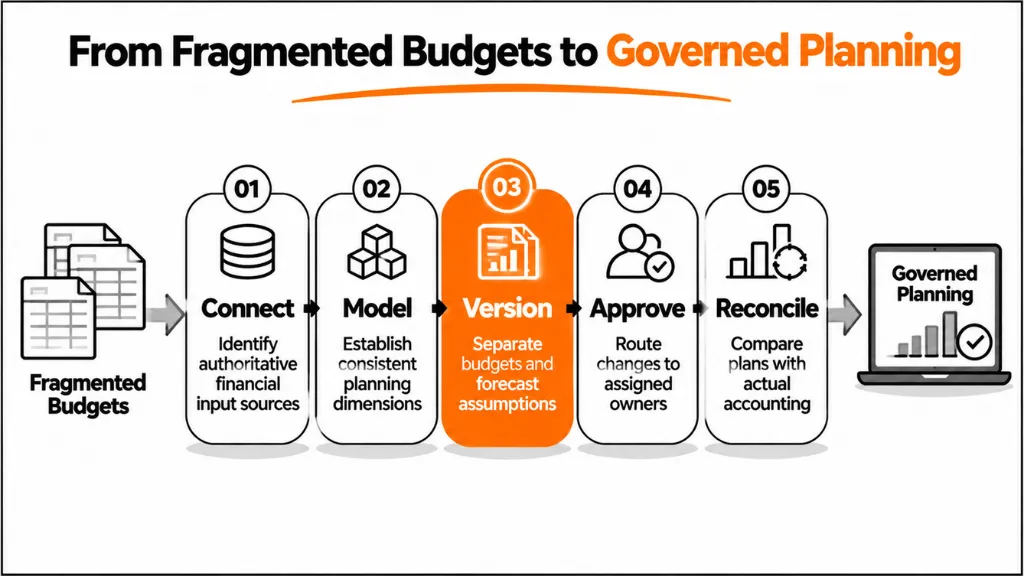
3. Improve Forecasting and Scenario Analysis With SAP EPM
Financial forecasting becomes unreliable when departments use different assumptions without documenting their origins.
Changing sales expectations, production requirements, and operating costs can create further uncertainty.
SAP EPM planning capabilities help finance teams evaluate alternative outcomes through structured models, controlled versions, and configurable calculations.
Connect Forecasts With Operational Business Drivers
Financial forecasts often depend on underlying operational assumptions.
Consider a manufacturer forecasting operating expenses according to expected production volumes.
The calculation may depend on energy consumption, activity rates, and planned operating hours.
SAP Analytics Cloud supports data actions that execute configured planning calculations.
These calculations can include copying values, applying allocations, and executing advanced formulas.
However, successful calculation execution does not guarantee that the underlying assumptions are correct.
Finance teams must therefore validate business drivers before publishing forecast results.
Automate Related Calculations Through Multi Actions
Complex planning activities may require several connected calculation steps.
For example, a planning sequence may prepare financial assumptions, execute data actions, and publish a selected planning version.
SAP Analytics Cloud multi actions can coordinate supported operations across planning models.
Consequently, organizations can reduce manual coordination between individual planning activities.
The official SAP Analytics Cloud Multi Actions documentation provides further information about these capabilities.
However, administrators must maintain appropriate processing sequences and permissions.
A failed operation can affect subsequent planning results. Therefore, technical teams should review execution statuses before assuming that every calculation completed successfully.
Compare Alternative Financial Scenarios
Organizations frequently need to evaluate how changing business conditions could affect financial performance.
Planning teams can create alternative forecasts using different operational assumptions.
For example, a company may evaluate changes in anticipated revenue, production requirements, or operating costs.
Version-management capabilities help maintain these scenarios separately from approved budgets and recorded financial actuals.
Furthermore, documenting the assumptions behind each scenario helps management understand why forecast results differ.
Business benefit: Controlled forecasting and scenario modeling help finance teams evaluate alternative outcomes without compromising approved financial information.
4. Coordinate Financial Planning Approvals and Responsibilities
Fragmented financial planning involves more than disconnected information.
Unclear ownership, inconsistent approval procedures, and manual communication can also delay budgeting and forecasting activities.
For instance, controllers may struggle to determine whether departments have completed their budget submissions.
SAP Analytics Cloud provides calendar capabilities that support collaborative planning processes.
Manage Planning Workflows in SAP EPM
Finance administrators can organize relevant planning activities through calendar processes.
These activities can include input tasks, approval responsibilities, and scheduled planning operations.
Department managers can receive assigned planning responsibilities according to the configured workflow.
Meanwhile, reviewers can examine submitted information and approve or reject applicable activities.
This approach helps finance teams coordinate planning participation across different business functions.
However, workflow automation cannot resolve unclear business ownership.
Organizations must establish who prepares, reviews, and approves financial information before configuring collaborative planning processes.
Protect Approved Budgets and Forecasts
Once finance teams approve planning information, further changes may require additional authorization.
SAP Analytics Cloud supports data locking for applicable planning scenarios.
Consequently, organizations can maintain restrictions around relevant financial data and planning periods.
Administrators should configure these controls according to organizational and financial dimensions.
An unsuitable locking strategy may prevent legitimate corrections or allow unintended modifications.
Finance and technical teams should therefore test relevant permissions before deploying the planning process.
Monitor Planning Completion and Financial Accuracy
Calendar statuses provide visibility into assigned planning activities.
For example, finance managers can identify outstanding departmental tasks or incomplete review activities.
However, completing a workflow task does not automatically establish financial accuracy.
Reviewers must still examine submitted assumptions, significant variances, and missing information.
Furthermore, technical monitoring should identify unsuccessful planning calculations and processing errors.
Business benefit: Collaborative workflows provide clearer planning responsibilities, while controlled approvals help protect important financial information.
5. Improve Financial Reconciliation and Plan Integration
Financial plans lose credibility when organizations cannot connect forecast values with authoritative accounting information.
Different reporting structures, currencies, organizational dimensions, and financial periods can create misleading differences.
SAP EPM solutions support relevant financial planning integration and reconciliation activities.
Compare Actual Results With Approved Financial Plans
Finance controllers frequently compare actual operating expenses against departmental budgets.
These comparisons help organizations identify variances and evaluate business performance.
However, reliable comparisons require consistent accounts, reporting periods, currencies, and organizational structures.
For instance, a difference between actual expenses and planned costs may originate from incorrect data mapping rather than business performance.
Consequently, controllers should confirm that financial information remains comparable before investigating individual variances.
Planning reports should also clearly distinguish actual values, approved budgets, and forecast results.
Connect SAP EPM With SAP S/4HANA Financial Planning
SAP Analytics Cloud and SAP S/4HANA support relevant integrated financial planning scenarios.
Depending on the deployment, organizations can exchange financial actuals and export plan information into applicable SAP S/4HANA planning structures.
One documented interface is the Financial Plan Data OData service.
However, available interfaces and required configuration depend on the SAP release and deployment architecture.
Technical teams should therefore confirm supported integration capabilities before designing financial planning data flows.
Understand Planning Data Export Behavior
Financial plan-data transfers require controlled execution.
SAP documentation explains that certain planning export jobs perform full updates.
Consequently, repeated exports may consume significant processing resources.
Organizations should assess update behavior before scheduling frequent data transfers.
Furthermore, finance teams should reconcile exported values against the corresponding planning versions.
A successful interface execution does not independently guarantee that financial totals match the intended results.
Business benefit: Financial reconciliation connects planning assumptions with actual business performance and helps maintain confidence in financial reporting.
A Practical Example of Integrated SAP EPM
EY’s August 2026 article, Are You Managing Performance or Chasing Fragmented Data?, describes how Novartis addressed disconnected inventory risk management processes.
The organization previously relied on fragmented and manual activities to evaluate slow-moving inventory and potential financial write-offs.
Consequently, identifying inventory risks and maintaining consistent provisioning calculations became difficult.
The integrated solution combined operational inventory information with financial and accounting logic.
SAP Profitability and Performance Management supported complex calculations within the broader solution architecture.
According to EY, the implementation helped Novartis:
- Identify slow-moving inventory and products approaching expiration earlier.
- Apply consistent inventory provisioning logic across entities.
- Improve access to operational and financial information.
- Maintain more transparent and auditable calculation processes.
- Reduce manual work associated with inventory risk assessment.
EY reports that the solution supports the management of approximately US$ 5.2 billion in inventory while addressing more than US$ 300 million in potential annual write-offs.
These figures describe the reported Novartis implementation rather than guaranteed outcomes for other organizations.
The example demonstrates how integrated EPM can connect operational information with financial consequences.
Choosing the Right SAP EPM Architecture
Organizations should select enterprise performance management capabilities according to their existing systems and future financial requirements.
Some businesses continue operating SAP Business Planning and Consolidation, commonly known as SAP BPC.
Meanwhile, other organizations evaluate SAP Analytics Cloud for integrated planning and forecasting.
However, SAP Analytics Cloud and SAP Group Reporting serve different purposes and should not automatically represent a like-for-like replacement for every existing BPC capability.
Assess Existing SAP BPC Dependencies
An established SAP BPC environment may contain extensive business logic, custom calculations, Excel reports, and approval procedures.
Replacing the application without understanding these dependencies can affect financial results and operational continuity.
Organizations should therefore identify:
- Existing planning and consolidation processes.
- Source applications and downstream reporting dependencies.
- Custom calculation logic and reporting structures.
- Application ownership and maintenance requirements.
- Security rules and approval responsibilities.
Furthermore, SAP BPC maintenance timelines vary according to product version and underlying platform.
Finance and IT teams must assess their particular environment before selecting a replacement strategy.
Prioritize Future Financial Planning Requirements
A replacement project provides an opportunity to improve existing financial processes rather than simply reproduce them.
Organizations can classify current processes according to three categories: keep, improve, and rethink.
For example, an effective reporting process may require retention, while manual reconciliation may benefit from automation.
Similarly, outdated forecasting methods may require a different approach.
This assessment helps finance teams select capabilities that address future requirements and existing operational problems.
SAP EPM Financial Planning Implementation Checklist
Organizations should establish appropriate financial and technical controls before expanding integrated planning across departments.
| Control area | Required verification | Suggested responsibility |
| Data foundation | Confirm source ownership, mappings, and financial totals | Finance and data teams |
| Planning models | Validate accounts, cost centers, and reporting dimensions | Planning administrators |
| Version management | Establish naming, publication, and retention rules | Finance controllers |
| Forecast calculations | Validate business drivers and calculation results | FP&A teams |
| Workflow governance | Confirm input and approval responsibilities | Finance management |
| Access and data locking | Test user permissions and approved-data restrictions | SAP support teams |
| Financial integration | Reconcile actuals and exported planning values | Finance and integration teams |
These controls help organizations identify planning discrepancies before they affect management reporting.
Additionally, representative testing should cover realistic data volumes, concurrent user activities, and larger calculation operations.
Recent Developments in SAP Enterprise Performance Management
Recent industry discussions highlight the growing importance of integrated financial planning and the need to evaluate established EPM environments.
Moving Beyond Established SAP BPC Environments
Concentric Solutions’ November 17, 2026, article discusses how organizations using SAP BPC can evaluate their next enterprise performance management approach.
The article recommends assessing existing environments, prioritizing finance requirements, evaluating strategic options, and developing controlled transition plans.
However, maintenance considerations depend on the specific SAP BPC version and underlying platform.
Integrated Planning Across Finance, Tax, and Operations
EY’s August 6, 2026, publication highlights the importance of connecting financial actuals, planning information, tax requirements, and operational data.
Furthermore, the article identifies unified information as an important foundation for future predictive analytics and AI-supported financial decision-making.
These developments demonstrate that enterprise performance management extends beyond isolated budgeting and consolidation activities.
Frequently Asked Questions About SAP EPM
1. What is SAP EPM?
SAP EPM stands for SAP Enterprise Performance Management. It describes capabilities supporting financial planning, budgeting, forecasting, performance analysis, and related management processes. Organizations can use relevant SAP applications to connect financial assumptions with operational information and actual business results. However, SAP EPM does not represent one universal application. Available functionality depends on the selected products, deployment architecture, and financial planning requirements.
2. How does SAP EPM improve financial planning?
SAP EPM supports financial planning through integrated information, structured models, version management, configurable calculations, and collaborative workflows. For example, finance teams can coordinate departmental budgeting activities using consistent organizational dimensions. Furthermore, relevant integration capabilities connect planning processes with authoritative financial actuals. These functions can reduce reliance on disconnected spreadsheets. Nevertheless, reliable financial planning still requires accurate data, appropriate governance, and validated business assumptions.
3. What is the difference between SAP EPM and SAP BPC?
SAP EPM describes the broader enterprise performance management capabilities available within the SAP ecosystem. In contrast, SAP Business Planning and Consolidation represents a specific product supporting established planning and consolidation processes. Organizations evaluating modern planning requirements may consider SAP Analytics Cloud. However, replacing an existing BPC environment requires careful examination of current models, custom calculations, workflows, and integration dependencies.
4. Is SAP Analytics Cloud part of SAP EPM?
Yes, SAP Analytics Cloud provides planning and analytics capabilities relevant to enterprise performance management. Its planning functions include structured models, public and private versions, data actions, multi actions, and collaborative calendar activities. Furthermore, organizations can use these capabilities to coordinate budgeting, forecasting, and scenario analysis. The appropriate implementation scope depends on financial requirements, product entitlements, and supported integration scenarios.
5. Can SAP EPM integrate with SAP S/4HANA?
Relevant SAP enterprise performance management applications support financial planning integration with SAP S/4HANA. For example, supported SAP Analytics Cloud scenarios can use financial actuals and transfer applicable plan information. However, available interfaces and configuration requirements vary according to deployment and release. Organizations should therefore validate data mappings, integration behavior, and financial reconciliation procedures before implementing connected planning processes.
6. Does SAP EPM support scenario planning?
SAP EPM capabilities support scenario planning through structured financial models and controlled planning versions. Organizations can evaluate alternative business assumptions without directly changing recorded accounting actuals. For instance, finance teams may compare forecasts reflecting different expected revenues or production volumes. However, scenario reliability depends on accurate business drivers and suitable calculation rules. Teams should document assumptions and validate results before management reviews.
7. How does SAP EPM reduce spreadsheet dependency?
Structured planning models help organizations maintain consistent financial dimensions and calculation rules across departments. Furthermore, version management provides a controlled alternative to maintaining numerous spreadsheet copies. Collaborative workflows can also support departmental submissions and reviews. However, organizations must address underlying process inefficiencies rather than simply move existing spreadsheet logic into another application. Appropriate model design remains essential for achieving meaningful improvements.
8. How can organizations protect approved financial plans?
SAP Analytics Cloud provides relevant access controls, version-management capabilities, and data locking. Organizations can configure these controls according to financial dimensions and user responsibilities. For example, finance teams may restrict changes to approved planning information. However, unsuitable permissions can prevent legitimate updates or allow unintended modifications. Administrators should therefore test relevant access and locking procedures before production use.
9. Why is financial reconciliation important in SAP EPM?
Financial reconciliation helps organizations confirm that planned results and accounting actuals use comparable financial structures. Without consistent accounts, currencies, reporting periods, and organizational dimensions, reports may contain artificial variances. Furthermore, reconciliation helps identify incorrect mappings and unexpected differences after data transfers. Finance teams should therefore validate imported and exported financial values against their authoritative sources.
10. Should organizations replace SAP BPC with SAP Analytics Cloud?
SAP Analytics Cloud may provide suitable planning capabilities for organizations evaluating their future EPM architecture. However, the decision depends on existing BPC functionality, consolidation requirements, maintenance arrangements, and integration dependencies. SAP Group Reporting may address separate consolidation requirements. Consequently, organizations should evaluate their current processes and future needs before selecting a replacement strategy rather than assume automatic functional equivalence.
Conclusion
Fragmented financial planning makes it difficult for organizations to maintain consistent budgets, reliable forecasts, and transparent financial reporting.
SAP EPM can address these challenges by connecting financial data, standardizing planning models, coordinating forecasting activities, managing approvals, and improving financial reconciliation.
Furthermore, SAP Analytics Cloud provides relevant planning and collaboration capabilities, while existing SAP BPC environments require careful architectural assessment.
However, technology cannot independently correct inaccurate financial data or poorly defined business responsibilities.
Organizations should therefore begin by examining one complete financial planning cycle, including its source information, calculation models, approval activities, and reporting outputs.
By establishing consistent financial information and appropriate planning controls, businesses can develop a more reliable foundation for financial decision-making and enterprise performance management.
References
- SAP. What Is Enterprise Performance Management (EPM)?
- SAP Help Portal. Learn About Planning Model Data — SAP Analytics Cloud.
- SAP Help Portal. Multi Actions — SAP Analytics Cloud.
- SAP Help Portal. Use the Calendar to Organize Your Collaborative Planning Processes.
- SAP Help Portal. Using SAP Analytics Cloud Export Jobs.
- SAP Help Portal. Financial Planning — SAP S/4HANA Cloud Public Edition.
- EY. Are You Managing Performance or Chasing Fragmented Data? August 6, 2026.
- Concentric Solutions. Still Using SAP BPC? 5 Steps to Planning Your Next EPM Move. November 17, 2026.
- Original technical research draft. Is Your Financial Planning Too Fragmented? 5 Ways SAP EPM Can Help. October 27, 2026.