
SAP ChaRM helps organizations manage SAP transport changes, approvals, and production releases through a controlled process. Incorrect import sequences, missing dependencies, and uncontrolled emergency changes can still introduce defects into production, even when the underlying development appears complete.
SAP ChaRM helps organizations coordinate change requests, transport activities, testing, approvals, and production releases through SAP Solution Manager.
However, implementing Change Request Management does not automatically eliminate transport risks. Incorrect configuration, overlapping development activities, and poorly controlled imports can still cause serious problems.
For example, an older transport may overwrite a newer object version, or an urgent correction may reach production without the expected testing.
Meanwhile, administrators may encounter unexpected behavior when transport routes, change cycles, and workflow statuses are not correctly aligned.
These problems often begin long before the production import.
Therefore, SAP Basis administrators, ABAP developers, functional consultants, and release managers need to understand the controls that protect the complete change lifecycle.
This article examines nine SAP ChaRM mistakes that can disrupt transports and production releases, along with practical ways to prevent them.
Quick Answer: What Are the Most Common SAP ChaRM Mistakes?
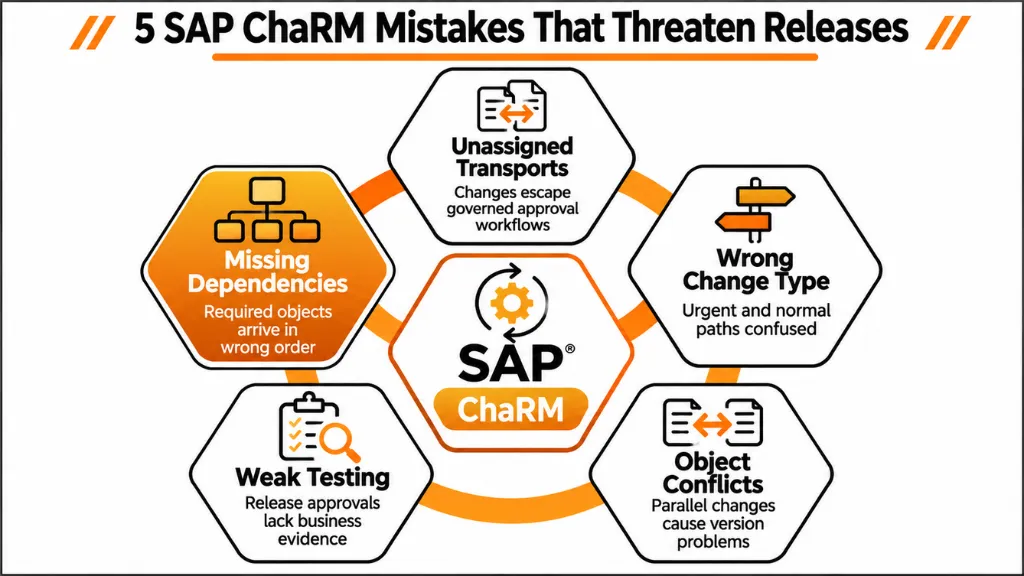
The most significant SAP ChaRM mistakes include creating untracked transports, selecting incorrect change types, releasing incomplete transport requests, overlooking object conflicts, ignoring downgrade warnings, and mishandling emergency changes.
Incorrect import sequencing, insufficient testing evidence, and weak production recovery planning introduce additional risks.
Furthermore, configuration problems involving transport routes, logical components, and maintenance cycles can prevent ChaRM from managing changes correctly.
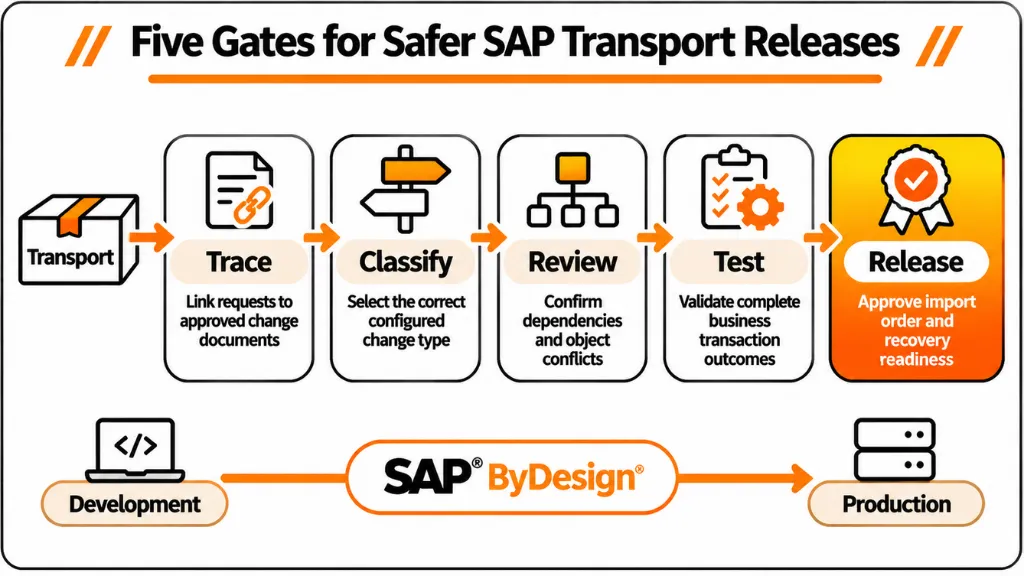
A reliable release process requires coordination between approved change documents, transport requests, technical dependencies, testing results, and production operations.
What Is SAP ChaRM and Why Is Transport Control Important?
SAP ChaRM stands for SAP Change Request Management.
SAP explains the complete Change Request Management process, including change management, project planning, and transport activities.
ChaRM connects approved change activities with technical transport processes.
Additionally, it provides configurable workflows, change documents, task lists, and controls for managing release activities.
How SAP ChaRM Works
A typical SAP transport landscape includes development, quality assurance, and production systems.
Developers create or modify application objects in development before those changes move through the transport landscape.
SAP ChaRM provides change governance around these activities.
However, the underlying transport operations still depend on SAP’s Change and Transport System and Transport Management System.
ChaRM coordinates the authorized process rather than replacing the technical transport infrastructure.
Important Components of SAP ChaRM
| Component | Primary Responsibility | Risk When Poorly Managed |
| Change document | Records change activities and workflow progression | Missing approval or traceability |
| Transport request | Contains exported development or configuration changes | Missing objects and dependencies |
| Transport Management System | Manages transport routes and imports | Incorrect sequence or target |
| ChaRM task list | Coordinates transport activities within a change cycle | Incomplete or inconsistent release activities |
| Cross-System Object Lock | Supports detection of competing object changes | Parallel development conflicts |
| Downgrade Protection | Identifies relevant object-version conflicts | Older versions overwriting newer changes |
| Retrofit | Helps synchronize changes between development tracks | Missing corrections in future releases |
These components work together to support controlled production changes.
Nevertheless, the effectiveness of the process depends on correct configuration and disciplined execution.
1. Creating Transport Requests Outside the SAP ChaRM Workflow
One common mistake is creating transport requests without properly connecting them to the relevant change document.
A transport may be technically valid while remaining outside the expected approval and tracking process.
Consequently, the release manager may not have a complete view of the changes awaiting deployment.
Why Untracked Transports Are Dangerous
SAP ChaRM coordinates changes through configured change documents and task lists.
When developers create requests outside the intended process, those requests may not follow the expected workflow.
For example, a developer might create a customizing transport directly in the development system without associating it with the approved change.
The transport could eventually reach quality assurance while remaining disconnected from the planned release scope.
Furthermore, missing relationships make it harder to establish which request belongs to a particular business change.
Registering Existing Transports
According to the official SAP documentation on Assigning Transport Requests, existing transport requests can be assigned to change documents and managed through SAP ChaRM.
However, registration has specific restrictions.
For the legacy scenario described in the supplied SAP Community guidance, the transport must belong to the relevant CTS project and remain modifiable.
Additionally, a request registered directly through the task list may not have an associated change document or the same workflow capabilities.
Therefore, registering existing requests should not be treated as a universal substitute for proper change-document management.
How to Prevent This Mistake
Development teams should establish a consistent procedure for creating and assigning transport requests.
Each production-bound change should have an appropriate change record and identifiable business purpose.
Furthermore, release managers should review requests that appear outside the expected ChaRM workflow.
Prevention: Keep production-bound transports connected to approved changes and investigate requests that do not follow the configured process.
2. Selecting the Wrong Change Type
SAP ChaRM supports different change-management scenarios, including planned changes and urgent corrections.
These processes have different business purposes and may follow different transport and approval behavior.
However, selecting the wrong change type can introduce unnecessary risk into the release process.
Normal Changes vs. Urgent Changes
A normal change generally follows planned development, testing, and release activities.
An urgent change addresses a time-sensitive problem that may require faster deployment.
For example, a critical production defect may need correction before the next scheduled release.
Meanwhile, a routine report enhancement would usually be more appropriate for a planned change.
The distinction matters because emergency processing can involve different transport strategies and approval activities.
Why Urgent Does Not Mean Uncontrolled
Emergency changes often occur under pressure.
However, faster processing should not eliminate the required technical review.
The team still needs to understand the correction, its dependencies, and its possible impact on production.
Additionally, relevant testing and deployment authorization remain necessary.
Understand Import Strategy Differences
The supplied SAP Community guidance describes different import strategies associated with legacy ChaRM maintenance-cycle variants.
For example, its discussion of SAP0 and SAP1 explains why urgent corrections may behave differently in transport import queues.
Under some configurations, urgent correction requests remain in the import buffer for subsequent processing.
Consequently, administrators must understand the actual strategy configured in their environment.
Prevention: Select change types according to business urgency and understand the corresponding transport and import behavior.
3. Releasing Transports Before Checking Dependencies
A transport request may contain technically valid objects but still depend on changes contained in another request.
Importing those requests in the wrong order can create application failures.
Therefore, transport release should follow a review of object dependencies and intended deployment sequence.
How Missing Dependencies Affect Production
Consider an ABAP enhancement that calls a newly created class.
The enhancement and class may exist in separate transport requests.
If the enhancement reaches production before the required class, the application may encounter activation or execution problems.
Similarly, customizing changes may depend on earlier configuration or repository changes.
These relationships must be identified before release.
Why Transport Contents Matter
SAP’s Change and Transport System records changed objects within transport requests.
The supplied ALM guidance explains that, when a request is released, the exported archive contains the object content at that point in time.
If the same object changes again later, a newly released transport may contain a newer version.
Consequently, the order in which those versions are imported becomes important.
Review the Complete Change
Developers should verify the contents of each transport before release.
Additionally, functional consultants should identify related configuration and business-process dependencies.
The release manager must understand whether dependent requests are included in the planned deployment.
Testing should then validate the combined change rather than considering each transport independently.
Prevention: Check transport contents, technical dependencies, and release order before approving requests for deployment.
4. Ignoring Cross-System Object Lock Conflicts
Parallel development activities can introduce competing changes to the same SAP object.
This becomes especially difficult when several projects or maintenance activities share a transport landscape.
SAP ChaRM includes Cross-System Object Lock functionality to help identify relevant conflicts.
What Is Cross-System Object Lock?
Cross-System Object Lock, commonly called CSOL, supports the detection of competing object changes across managed development activities.
Its behavior depends on the configured processes and relevant conflict conditions.
For example, two development teams may modify the same ABAP class for separate business requirements.
One team may finish its change while the other continues working on the object.
Without coordination, the resulting transport requests can contain competing object versions.
Why Overlapping Changes Create Risk
The same repository object may appear in several requests.
However, those requests may represent different stages of development.
If one version is imported without considering the other, previously completed functionality may be overwritten.
Furthermore, dependencies between the competing changes may not be obvious from transport descriptions alone.
Do Not Treat Every Warning as Harmless
Conflict checks are useful only when teams investigate their findings.
A warning should prompt an examination of the affected object, competing requests, and expected final version.
Additionally, development leads should determine whether the changes require consolidation or coordinated deployment.
Prevention: Investigate object conflicts before allowing transport progression and confirm which version should reach production.
5. Ignoring SAP ChaRM Downgrade Protection Warnings
Downgrade Protection helps identify situations in which transport activity may introduce older versions of SAP objects.
These risks often arise when multiple changes affect the same object over time.
However, treating downgrade warnings as routine messages can undermine the intended protection.
How a Downgrade Happens
An older transport contains an earlier exported version of an object.
A newer request contains a later version.
If the newer version reaches the target system first and the older request is imported afterward, the older content can replace the newer functionality.
This is the downgrade problem described in the supplied ALM guidance.
Why Import Order Matters
The ALM Coffee Party article emphasizes a fundamental CTS principle:
Export order should be preserved in the import order when managing successive versions of the same objects.
The source explains that released transports contain the object versions captured at export.
Therefore, changing the order of relevant imports can produce an inconsistent result.
Project and Maintenance Conflicts
The supplied ALM article also describes a situation involving separate project and maintenance cycles sharing one transport landscape.
The different cycles introduced overlapping changes to the same objects.
A maintenance transport subsequently overwrote a newer project version, creating an inconsistent release situation.
Furthermore, the example involved dependent object changes and an import return code of 8.
The case demonstrates why overlapping cycles and object versions require careful architectural planning.
Respond to Downgrade Warnings Correctly
Administrators should identify the affected objects and competing transport requests.
Next, developers should establish which version contains the intended final changes.
The release team may need to revise the sequence, coordinate related changes, or perform additional testing.
However, bypassing the conflict without understanding its cause can recreate the same problem later.
Prevention: Treat downgrade findings as technical release risks requiring object-level review and appropriate corrective action.
6. Mishandling Emergency Changes and Retrofit
Emergency changes are particularly challenging when an organization maintains several development tracks.
For example, an existing production environment may receive urgent corrections while a separate implementation project continues.
Without proper coordination, those corrections may not reach the future production release.
Why Parallel Development Tracks Become Inconsistent
Consider an organization maintaining SAP ECC while preparing an SAP S/4HANA environment.
The support team corrects a critical defect in the existing production system.
However, the corresponding development change may not be applied to the future environment.
When the new application becomes productive, the earlier defect may reappear.
Consequently, emergency corrections need to be considered across every relevant development track.
What Is Retrofit in SAP ChaRM?
Retrofit supports the synchronization of applicable changes between parallel development landscapes.
It helps teams identify and address differences that arise from maintenance and project work.
However, not every change can be transferred automatically.
Some corrections may require manual review or adaptation.
For example, an application change developed for one SAP release may not be directly suitable for another release.
Avoid Overlapping Transport Cycles
The supplied ALM guidance warns against combining independent project and maintenance cycles within a single transport landscape when overlapping object changes create sequencing conflicts.
The source recommends approaches that separate relevant tracks or use appropriate retrofit functionality.
Furthermore, it explains how separate CTS projects and task lists can complicate import sequencing.
Control Emergency Fixes
Emergency corrections should remain connected to approved change documents.
Their implementation should include relevant testing and deployment verification.
Additionally, outstanding retrofit work should remain visible until the affected development tracks have been reviewed.
Prevention: Coordinate emergency fixes across relevant landscapes and verify that required corrections are present in future releases.
7. Importing Transport Requests in the Wrong Sequence
Transport sequencing is one of the most important controls in SAP release management.
A transport request can import successfully while leaving the overall application landscape inconsistent.
Therefore, a release manager must consider the entire deployment sequence rather than individual import results.
Understand Transport Dependencies
Suppose one request introduces a configuration change.
A second request contains program logic that depends on that configuration.
If the application change arrives first, the program may not work as intended.
Meanwhile, successive changes to the same repository object introduce additional version-order requirements.
ChaRM Task Lists and Import Queues
SAP ChaRM uses task lists to coordinate transport activities within configured change cycles.
However, the technical import process relies on TMS. According to SAP’s transport request release documentation, transport requests can be released through change documents and task lists under the relevant prerequisites.
The supplied SAP Community article explains that importing requests into quality assurance can populate the following system’s transport import buffer.
Consequently, administrators must understand how requests appear and remain in the relevant queues.
Be Careful With Urgent Corrections
The legacy SAP Community guidance describes a scenario in which normal and urgent corrections were managed within the same maintenance cycle.
During a project import, a transport associated with an urgent correction that had not completed testing was also imported.
The article discusses status-dependent and selective import functionality as ways to address particular scenarios.
However, the behavior depends on the applicable ChaRM version and configuration.
Check Actual Import Results
The same guidance distinguishes task-list action indicators from the detailed transport logs on managed systems.
A task-list indicator may reflect successful submission of the transport command rather than completed business processing.
Therefore, administrators should examine the actual import logs and relevant return codes.
Prevention: Review dependencies, transport queues, tested versions, and detailed import results before completing a production release.
8. Approving Production Releases Without Sufficient Testing
A change document may progress through its workflow even when the underlying testing is insufficient.
This creates a gap between administrative approval and actual business readiness.
However, completing the required workflow status does not prove that the changed application behaves correctly.
Technical Testing Is Not Enough
Consider a transport that changes invoice-processing logic.
The ABAP program may activate successfully without errors.
Nevertheless, that result does not confirm that supplier invoices will post correctly under every relevant business condition.
Functional testing should examine the affected process.
Additionally, connected systems and downstream activities may require validation.
Link Testing to the Transported Change
Testing evidence should correspond to the actual change being deployed.
For example, the test record should identify the affected business process and relevant expected result.
The release manager should also verify that the tested change matches the version scheduled for production.
This is particularly important when transports of copies are used during testing.
Use Transports of Copies Appropriately
The supplied transport-management article recommends transports of copies for testing relevant changes.
However, a successful test of a transport of copies does not mean the original transport request has completed the production release process.
The original request still requires proper release and import management.
Furthermore, differences between tested and final object versions must be considered.
Include Functional Consultants
SAP changes can affect finance, procurement, sales, production, and other business areas.
Therefore, testing should involve the appropriate functional experts.
Emergency fixes may use accelerated testing, but their critical business effects still need attention.
Prevention: Require meaningful technical and business testing evidence before authorizing production deployment.
9. Releasing Changes Without Monitoring and Recovery Planning
Even a correctly approved transport can introduce unexpected behavior in production.
Therefore, release management should include monitoring, escalation, and realistic recovery arrangements.
Successful Import Does Not Mean Successful Business Processing
A transport may complete without an obvious technical import error.
However, the resulting application may still behave incorrectly.
For example, a changed validation rule could prevent certain sales orders from being processed.
The problem may become visible only when users execute a particular business transaction.
Review Production Activity
After deployment, support teams should examine relevant application behavior.
This may include monitoring affected business processes, import logs, and integration errors.
Additionally, teams should verify that critical transactions work as expected.
Problems detected immediately after deployment should be assessed against the approved release scope.
Why Rollback Planning Matters
Importing an older transport is not always a safe recovery procedure.
The older request may contain outdated object versions or dependencies that conflict with other production changes.
Furthermore, configuration changes and business data may complicate restoration.
Therefore, recovery planning should identify appropriate corrective or restoration activities rather than assume every transport can simply be reversed.
Assign Clear Responsibilities
A production release should identify the people responsible for monitoring and incident response.
The team should also understand when a detected issue requires escalation.
Moreover, relevant recovery procedures should be considered before the import begins.
Prevention: Approve releases only when monitoring responsibilities and appropriate recovery procedures are clearly defined.
SAP ChaRM Configuration Errors That Can Affect Release Management
Some ChaRM problems arise from landscape configuration rather than individual transport requests.
The supplied SAP Basis World and SAP Community articles describe several errors associated with project activation, transport routes, and system information.
Missing Configuration Item
SAP Basis World documents a situation in which the Configuration Item field was not populated when creating a change request.
The article associated the issue with missing system information.
In its specific environment, correcting the Installation Number in LMDB resolved the reported problem.
However, the underlying cause must be verified in the affected system rather than assuming every missing Configuration Item has the same explanation.
Transport Track Does Not Include Production
The supplied SAP Basis World article describes the error:
“Transport track of source system … does not include a production system.”
The reported issue involved an incomplete transport path.
The article explains how reviewing the relevant STMS configuration and production target assignments resolved that scenario.
No Consolidation System or Export System
These errors may occur when the configured landscape does not match the transport routes expected by ChaRM.
The supplied guidance recommends reviewing STMS, LMDB transport-domain information, and relevant logical component assignments.
Furthermore, the SAP Community article emphasizes the need for consistency between logical components and TMS routes.
These configuration checks should be completed before relying on the relevant project task list.
Practical SAP ChaRM Release-Control Checklist
The nine mistakes highlight the importance of connecting workflow approval with technical transport readiness.
Before a production deployment, the release team should review each major control.
Table 2: SAP ChaRM Production Readiness Checklist
| Control Area | What to Verify | Risk if Overlooked |
| Change registration | Approved change record and relevant transport assignment | Untracked production changes |
| Change classification | Appropriate normal or urgent process | Incorrect approval or import behavior |
| Dependencies | Required objects and configuration included | Activation and runtime failures |
| Object conflicts | Relevant CSOL findings reviewed | Competing object versions |
| Downgrade Protection | Version conflicts investigated | Older objects replacing newer versions |
| Emergency changes | Retrofit and relevant cycles reviewed | Missing corrections in future releases |
| Import sequence | Transport order and dependencies confirmed | Inconsistent application versions |
| Testing | Technical and business validation completed | Untested production defects |
| Recovery | Monitoring and corrective procedures prepared | Extended operational disruption |
The checklist should be used alongside the organization’s actual ChaRM configuration and release procedures.
However, completing a checklist cannot compensate for unresolved technical conflicts or inadequate testing.
SAP ChaRM and SAP Solution Manager Maintenance After 2027
Maintenance planning is another important consideration for organizations using SAP Solution Manager.
The supplied research identifies December 31, 2027, as the end of mainstream maintenance for SAP Solution Manager 7.2.
Optional extended maintenance may be available through 2030 under applicable conditions.
Furthermore, SAP recommends planning the transition toward SAP Cloud ALM.
However, SAP Cloud ALM should not automatically be considered a one-to-one replacement for every SAP ChaRM capability.
Organizations need to assess their existing change workflows, transport governance, integrations, and release requirements before selecting a future approach.
Relevant SAP ChaRM Guidance and Lessons
July 22, 2009: SAP Community Documents Common ChaRM Errors
An SAP Community article examined configuration and operational issues associated with SAP Solution Manager Change Request Management.
The topics included transport routes, logical components, maintenance cycles, import options, task-list logs, and urgent corrections.
Although the article focuses on older Solution Manager functionality, it provides useful background on transport governance and known failure scenarios.
July 13, 2020: SAP Basis World Reviews Project Activation Errors
SAP Basis World discussed three ChaRM activation problems involving missing configuration information, incomplete transport tracks, and missing consolidation or export systems.
The article provides troubleshooting examples involving LMDB, STMS, and logical component assignments.
June 3, 2022: SAP Community Reports a Preliminary Import Issue
A SAP Community contributor described an unexpected preliminary-import behavior in a customized ChaRM normal-change workflow.
The reported issue involved the RESET_STATUS parameter and a preliminary-import flag that was not reset as expected.
The article demonstrates why customized workflow actions require careful testing before production use.
However, the account describes a specific configuration and should not be interpreted as evidence that every ChaRM installation has the same problem.
September 4, 2024: ALM Coffee Party Discusses Transport Sequencing
The ALM Coffee Party article highlighted risks involving transport order, downgrade conflicts, and overlapping project and maintenance cycles.
It emphasized the importance of preserving relevant export and import sequences.
July 14, 2025: Transport Management Risks Highlighted on LinkedIn
Jayanth B discussed common transport mistakes involving incorrect sequencing, overwritten changes, missing dependencies, and uncontrolled urgent fixes.
The article emphasized documentation, transport checks, and functional testing before production deployment.
Frequently Asked Questions About SAP ChaRM
1. What is SAP ChaRM used for?
SAP ChaRM, or Change Request Management, supports the controlled management of changes through SAP Solution Manager. It coordinates change documents, approvals, development activities, testing, and relevant transport processes. Furthermore, it helps organizations manage planned changes and urgent corrections through configured workflows. However, ChaRM does not replace the underlying SAP Transport Management System. Technical transport operations still require correct landscape configuration, appropriate request sequencing, and validation. Organizations use ChaRM to improve governance and traceability throughout the change lifecycle.
2. What is the difference between SAP ChaRM and TMS?
SAP ChaRM manages change-related governance, including approvals, workflows, and transport coordination. SAP Transport Management System handles the underlying transport routes, queues, and technical imports. The two capabilities therefore perform complementary functions. For example, ChaRM may authorize an import through a configured task list, while TMS performs the technical operation. However, a successful import does not automatically confirm that the related business process works correctly. Release teams must review technical results and appropriate testing evidence before considering a deployment complete.
3. What are the most common SAP ChaRM mistakes?
Common SAP ChaRM mistakes include creating untracked transport requests, selecting unsuitable change types, overlooking object dependencies, and ignoring conflicting changes. Additionally, teams may mishandle downgrade warnings, emergency corrections, retrofit activities, or import sequencing. Poor testing and inadequate recovery planning introduce further production risks. These problems may arise even when ChaRM workflows are configured and active. Therefore, organizations need consistent change registration, technical reviews, business validation, and controlled production-release procedures rather than relying exclusively on workflow status.
4. What is Downgrade Protection in SAP ChaRM?
Downgrade Protection helps identify conflicts involving different versions of transported SAP objects. A downgrade can occur when an older transport is imported after a newer transport containing changes to the same object. Consequently, previously implemented functionality may be overwritten. SAP ChaRM provides relevant conflict checks during transport-related activities, depending on configuration and scenario. However, warnings still require technical investigation. Developers should identify the affected requests, determine the intended object version, and establish a suitable deployment sequence before proceeding.
5. What is Cross-System Object Lock in SAP ChaRM?
Cross-System Object Lock supports the identification of competing object changes across relevant development activities. It is particularly useful when multiple teams or release tracks modify the same repository objects. For example, separate development requests may contain different versions of one ABAP class. Depending on the configured rules, ChaRM can identify or prevent certain conflicting activities. However, effective protection requires correct configuration and disciplined handling of warnings. Development leads should investigate competing versions before allowing transport progression or approving an exception.
6. How does SAP ChaRM handle urgent changes?
SAP ChaRM supports urgent-change processes for corrections that require faster deployment than planned changes. These processes use relevant change documents, authorization controls, and transport activities. However, urgent changes can involve import behavior that differs from normal changes, depending on the configured strategy. Therefore, administrators must understand how urgent requests interact with maintenance cycles and transport queues. Emergency handling should also include appropriate testing and production verification. A faster release process should not become an uncontrolled route into the production environment.
7. What is retrofit in SAP ChaRM?
Retrofit supports the synchronization of applicable changes between parallel development tracks. For example, a correction applied to an existing production environment may also be needed in a separate project landscape. Without synchronization, the future release could reintroduce a previously resolved problem. Furthermore, some changes may require manual adjustment because the target release uses different structures or functionality. Retrofit therefore requires technical and functional validation. Teams should track unresolved synchronization work and confirm that required corrections reach the appropriate development environments.
8. Can SAP ChaRM prevent failed production transports?
SAP ChaRM can help reduce transport risks through approved workflows, controlled task lists, conflict checks, and coordinated change activities. However, it cannot guarantee that every production import or application change will succeed. A transport may contain missing dependencies or incorrect business logic despite following the configured workflow. Additionally, technically successful imports may still cause functional problems. Therefore, teams need appropriate testing, detailed import-log review, post-deployment monitoring, and recovery procedures to support reliable production releases.
9. Why do SAP ChaRM transport sequence errors happen?
Transport sequence errors can occur when dependent requests are imported in the wrong order or when overlapping development activities produce competing object versions. Furthermore, separate project and maintenance cycles may complicate release sequencing when they share the same transport landscape. Urgent corrections and different import strategies can introduce additional complications. A successful individual import does not establish that the overall release is consistent. Therefore, release managers should review object dependencies, export order, transport queues, and relevant downgrade findings before production deployment.
10. Is SAP ChaRM being replaced by SAP Cloud ALM?
SAP recommends planning a transition from SAP Solution Manager toward SAP Cloud ALM as Solution Manager approaches the end of mainstream maintenance in 2027. However, SAP Cloud ALM should not be treated as an identical replacement for every ChaRM function. Organizations need to evaluate their existing approval processes, transport controls, landscape requirements, and integrations before selecting a future solution. Furthermore, applicable maintenance arrangements may influence transition timing. A careful assessment is necessary to preserve important release-management controls during the change.
Conclusion
Effective SAP ChaRM management requires more than configuring change documents and enabling transport workflows.
Transport requests must follow approved processes, while object dependencies and competing versions require careful technical review.
Furthermore, urgent corrections, retrofit activities, and production import sequences need coordination across the relevant development landscapes.
The nine mistakes discussed in this article show how release failures can arise from both configuration weaknesses and process decisions.
However, workflow approval alone does not establish that a transport is technically complete or functionally safe.
Release managers should connect change records with actual transport contents, testing evidence, import results, and recovery arrangements.
By identifying these risks before deployment, organizations can strengthen transport governance and reduce avoidable disruption to SAP production systems.