

SAP mobile applications help frontline employees access important ERP workflows directly from smartphones, tablets, and specialized handheld devices. Warehouse operators, maintenance technicians, delivery drivers, and supervisors can use these applications to access business information, complete assigned tasks, and submit updates while working across different locations.
SAP mobile applications help bring relevant ERP workflows directly to smartphones, tablets, and specialized handheld devices. Employees can access assigned work, capture information, and submit updates closer to where business activities happen.
However, effective mobile applications require more than making desktop screens smaller. They need task-focused interfaces, reliable ERP connections, appropriate security, and controlled synchronization.
For example, a warehouse worker may need barcode scanning, while a maintenance technician may require equipment details and offline access.
Meanwhile, managers may only need a simple interface for reviewing and approving pending business requests.
The goal is to make existing SAP processes easier to execute without creating disconnected systems or duplicating important business rules.
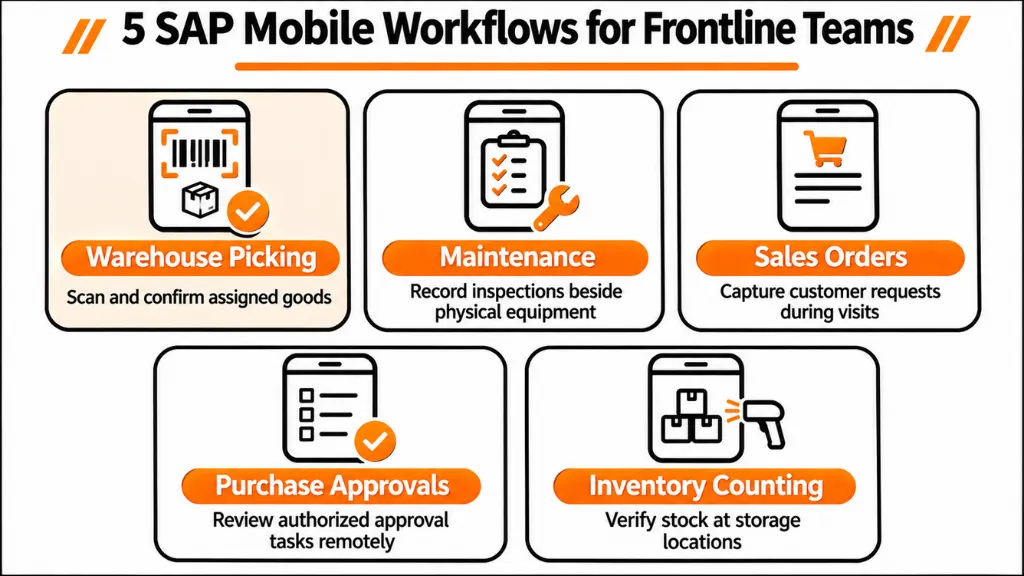
This article explores seven SAP mobile application ideas that can improve frontline workflows, along with the integration and development considerations behind each one.
Quick Answer: What Are the Best SAP Mobile Application Ideas?
Seven practical SAP mobile application ideas are warehouse picking, maintenance inspections, sales order capture, purchase approvals, quality inspections, delivery confirmation, and inventory counting.
These applications help employees complete specific ERP activities from mobile devices rather than relying entirely on fixed workstations.
Moreover, businesses can evaluate existing SAP mobile solutions, responsive SAP Fiori apps, SAP Mobile Development Kit, and supported native development options.
The appropriate approach depends on the workflow, available SAP functionality, target devices, and connectivity requirements.
What Is SAP Mobile and How Does It Connect to ERP?
SAP mobile refers to applications and technologies that make supported SAP business processes accessible through mobile devices.
These experiences can provide access to tasks, business records, notifications, and relevant application functionality.
SAP’s mobile strategy extends enterprise applications beyond traditional desktop environments.
For example, employees can use mobile devices to access service assignments, warehouse activities, expenses, and business approvals.
Additionally, SAP provides mobile development capabilities for organizations that require specialized applications.
How SAP Mobile Applications Work
A mobile application provides an interface designed for the employee’s actual working environment.
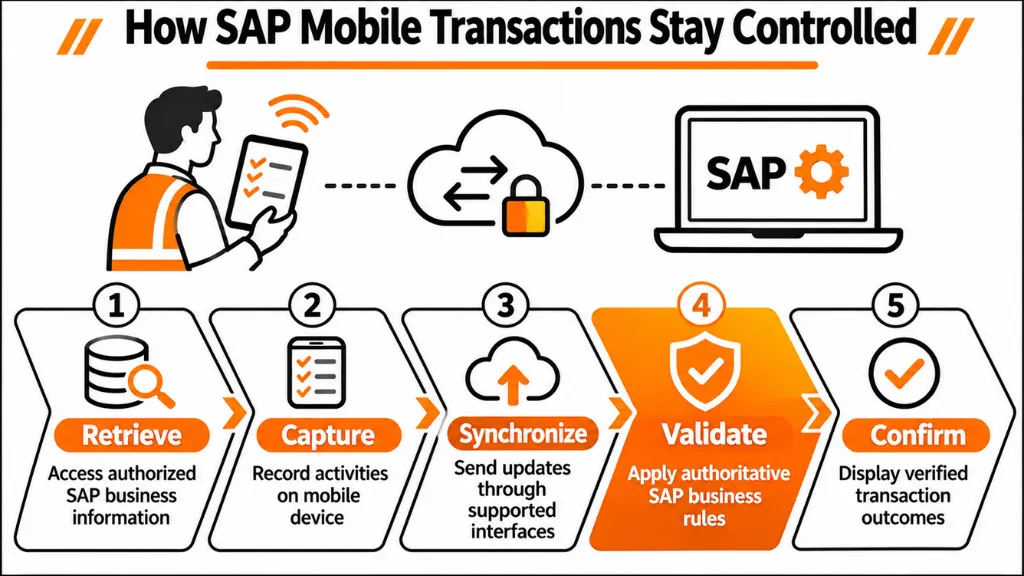
The application connects with the relevant SAP system through supported services and interfaces.
For example, a technician may update a maintenance activity from a tablet, while SAP remains responsible for processing the corresponding business transaction.
However, the available capabilities depend on the installed SAP products, configured services, and user permissions.
SAP Mobile Services and Mobile Development
SAP Mobile Services supports relevant mobile application connectivity, onboarding, security, and application operations.
For cross-platform mobile development, SAP Mobile Development Kit provides metadata-driven development capabilities.
Meanwhile, SAP also offers development SDKs for iOS and Android. Meanwhile, SAP also offers development SDKs for iOS and Android.
Organizations should evaluate existing SAP functionality before deciding whether a custom application is necessary.
7 SAP Mobile Application Ideas for Frontline ERP Workflows
The following ideas focus on activities that employees frequently perform away from fixed workstations.
Each application addresses a specific business problem while relying on the appropriate SAP process for transaction validation.
1. Mobile Warehouse Picking and Goods Movement
Warehouse workers move between storage locations, collect materials, and confirm picking activities throughout the day.
When these tasks depend on fixed terminals or paper instructions, employees may need to return to a workstation before updating SAP.
A mobile application can bring relevant warehouse instructions directly to handheld devices.
How Mobile Warehouse Picking Works
A warehouse operator receives an assigned picking task through a supported SAP-connected application.
The device displays the relevant material, quantity, and storage information.
Next, the employee scans the appropriate barcode and records the completed activity.
The transaction is then submitted to the relevant SAP warehouse or inventory process for validation.
Barcode Scanning and Inventory Accuracy
Mobile devices can support barcode scanning through built-in cameras or compatible external scanners.
This allows workers to capture relevant identifiers without manually typing every material number.
Furthermore, scanning can help reduce transcription errors during warehouse activities.
However, the application must still verify the transaction against the relevant SAP business rules.
Existing SAP Warehouse Applications
SAP Learning identifies SAP Warehouse Logistics as a native mobile application connected to SAP Logistics Management.
The application supports picking activities on Android and iOS devices.
Additionally, it can use built-in camera scanning or external scanners.
Organizations should confirm that the application supports their deployed logistics environment before selecting it.
Practical value: Warehouse employees can perform assigned activities closer to storage locations while reducing delayed data entry.
2. Mobile Maintenance and Equipment Inspection
Maintenance technicians frequently work in factories, remote facilities, and equipment locations with limited connectivity.
They need access to assigned work orders, equipment information, and inspection instructions.
SAP mobile applications can support these activities directly at the point of work.
Access Maintenance Information on Site
A technician receives a work assignment on a mobile device.
The application displays relevant equipment details, inspection instructions, and permitted maintenance activities.
The technician can then enter observations, record measurements, or document completed work.
Furthermore, supported mobile experiences may allow photographs and other relevant evidence to be attached.
SAP Service and Asset Manager
SAP Service and Asset Manager is a native mobile application for relevant enterprise asset management processes.
It helps field technicians access and update operational information through supported SAP environments.
Importantly, the application supports online, offline, and intermittent connectivity scenarios.
However, implementation requirements and available functionality depend on the relevant SAP system and configuration.
Why Offline Functionality Matters
Maintenance work does not always happen in locations with reliable network access.
A technician may need to record an inspection while temporarily disconnected.
Supported offline capabilities allow certain information to be available locally and synchronized later.
Nevertheless, developers must define how updates, conflicts, and failed synchronization attempts are handled.
A locally completed task should not automatically be treated as a confirmed ERP update.
Practical value: Maintenance teams can document work at the equipment location instead of completing paperwork after returning to the office.
3. Mobile Sales Order Capture
Sales representatives often meet customers away from office environments.
During these visits, they may need customer details, product information, and sales-order functionality.
A mobile application can help employees capture requests while keeping the relevant business processing within SAP.
Create Sales Requests From Mobile Devices
A sales representative selects the relevant customer and enters the requested products and quantities.
The application prepares the information for submission through a supported SAP interface.
SAP then applies the relevant sales-processing rules.
However, mobile applications should not independently assume that every request will become an accepted sales order.
The final document status must reflect the result confirmed by the ERP application.
Keep Pricing and Availability Accurate
Product prices, stock availability, and customer conditions may change while employees are working remotely.
Consequently, locally stored information can become outdated.
A mobile application should distinguish information saved as a draft from data validated by SAP.
Furthermore, final order processing may require updated information from the authoritative system.
SAP Sales Cloud Mobile Application
SAP Learning identifies the SAP Sales Cloud mobile application as an option for sales professionals.
It provides access to relevant customer information and supported sales processes.
Additionally, employees can use mobile capabilities to collaborate and work with their business network.
The available experience depends on the deployed SAP Sales Cloud solution.
Practical value: Sales teams can capture customer requirements earlier while maintaining a connection to authorized ERP processes.
4. Mobile Purchase Approval and Exception Handling
Managers frequently receive purchasing requests while traveling, attending meetings, or working away from their desks.
When approvals depend on desktop access, pending documents may remain unresolved.
SAP mobile experiences can bring relevant approval tasks closer to decision-makers.
Review and Approve Requests
A manager receives an assigned purchasing approval task.
The mobile interface displays the relevant document details and available actions.
The manager can then approve or reject the request according to the configured workflow.
Meanwhile, SAP remains responsible for enforcing the relevant authorization and approval rules.
SAP Fiori Approval Applications
SAP Fiori applications provide role-based interfaces for supported business tasks.
Depending on the SAP environment, purchasing approvals may be handled through relevant approval applications or My Inbox.
Furthermore, supported applications can make approval tasks accessible from mobile devices.
However, the available application and workflow capabilities must be checked for the actual SAP release.
Preserve Approval Controls
A mobile approval interface must not bypass established business authorization requirements.
For example, an employee who lacks purchasing approval authority should not gain it simply by accessing the workflow through a smartphone.
The relevant SAP application must continue controlling the approval process.
Additionally, teams should distinguish a completed approval task from the final processing status of its associated business document.
Practical value: Managers can address pending decisions without creating a separate purchasing approval system.
5. Mobile Quality Inspection and Defect Reporting
Quality inspections frequently occur on production lines, in warehouses, and at goods-receipt locations.
Employees may need to record measurements, observations, and defects while examining physical items.
However, paper-based reporting can delay when this information reaches the relevant SAP application.
Capture Inspection Results at the Source
An inspector opens an assigned inspection activity using a supported mobile device.
The application presents the relevant inspection information and permitted recording fields.
Next, the employee records measurements, observations, or defect details.
The results are submitted through the appropriate SAP-connected process.
Use Mobile Device Features
Some quality inspection scenarios may benefit from camera functionality.
For example, an inspector may photograph a visible product defect and associate the evidence with the relevant inspection record.
Additionally, mobile forms can guide employees through required inspection steps.
However, photo storage and document associations must follow the supported application capabilities and security requirements.
Maintain Accurate Quality Decisions
Recording inspection data does not necessarily mean the inspection process is complete.
Quality workflows may involve additional validation, defect processing, or usage decisions.
Therefore, the mobile interface should communicate the actual processing status.
The responsible SAP application should remain the source of authoritative quality information.
Practical value: Quality teams can capture inspection evidence during the activity instead of relying on later manual reporting.
6. Mobile Delivery Confirmation and Logistics Updates
Delivery drivers and logistics teams work across locations where desktop ERP access is often unavailable.
They need delivery information and an appropriate way to report completion or exceptions.
A mobile application can help capture these activities during transportation and delivery.
Record Delivery Information
A driver opens an assigned delivery through a supported application.
The interface displays relevant shipment information based on the user’s permissions.
After reaching the delivery location, the employee records the relevant outcome.
Depending on the business process, this may include quantities, delivery status, timestamps, or supporting evidence.
Capture Proof of Delivery
Some delivery workflows require confirmation that goods reached the customer.
Mobile capabilities may support relevant signatures, photographs, or other approved delivery evidence.
Furthermore, recording this information at the delivery location reduces dependence on later paperwork.
However, the application must distinguish collected field evidence from final ERP document processing.
Handle Delayed Updates
Network connectivity can be unreliable during transportation.
Consequently, delivery information may need to be recorded locally and submitted later when supported by the application.
The integration must account for delayed or repeated submissions.
For example, retransmitting an already confirmed delivery should not create an unintended duplicate business update.
Practical value: Delivery personnel can record outcomes at the destination while supporting more timely logistics information.
7. Mobile Inventory Counting and Stock Verification
Physical inventory counting requires employees to compare actual stock with recorded quantities.
This work often takes place across multiple storage locations.
SAP mobile applications can support counting activities without requiring workers to carry paper lists between warehouse areas.
Perform Inventory Counts on Handheld Devices
A warehouse employee opens an assigned counting activity.
The application displays relevant material and storage information.
The worker then records observed quantities using supported manual entry or scanning functionality.
Finally, the recorded results are submitted through the relevant SAP process.
Reduce Duplicate and Incorrect Counts
Mobile counting applications should distinguish incomplete activities from successfully submitted results.
For example, a worker may accidentally scan the same item more than once.
Additionally, an unfinished task may be reopened after a temporary network interruption.
The application should make the processing status clear so that duplicate submissions can be investigated.
Support Inventory Reconciliation
Physical count results may differ from recorded inventory quantities.
However, the mobile application should not independently decide how every inventory difference is posted.
The relevant SAP process remains responsible for validation and permitted stock adjustments.
Furthermore, teams should test how the application behaves when counting documents change or synchronization fails.
Practical value: Inventory teams can record stock counts near the physical materials while reducing repetitive manual entry.
Comparing the 7 SAP Mobile Application Ideas
The seven applications support different business roles and operational requirements.
Some focus on scanning, while others prioritize approvals, equipment access, or evidence capture.
Table 1: SAP Mobile Application Ideas and Business Value
| SAP Mobile Application | Primary Users | Main Mobile Functions | Business Value to Evaluate |
| Warehouse picking | Warehouse operators | Picking tasks, barcode scanning, confirmations | Faster warehouse task recording |
| Maintenance inspection | Field technicians | Work orders, measurements, equipment details | Reduced paperwork |
| Sales order capture | Sales representatives | Customer information, order requests | Earlier order capture |
| Purchase approvals | Managers | Review, approve, reject | Shorter approval delays |
| Quality inspection | Quality teams | Measurements, defects, photographs | Timelier defect recording |
| Delivery confirmation | Drivers and logistics staff | Delivery updates, supporting evidence | Reduced reporting delays |
| Inventory counting | Warehouse inventory teams | Physical counts, scanning, submission | Reduced manual counting effort |
These are potential business benefits rather than guaranteed performance results.
Actual outcomes depend on implementation, workflow design, user adoption, and the existing SAP environment.
Choosing the Right SAP Mobile Development Approach
Not every SAP mobile requirement needs a newly developed application.
SAP already provides several mobile business applications and responsive experiences.
Therefore, organizations should identify the business problem before selecting the technology.
Start With Existing SAP Applications
Existing functionality should be evaluated before custom development begins.
For example, SAP Service and Asset Manager already provides capabilities for relevant maintenance workflows.
Similarly, supported SAP Fiori applications can address certain approval and business-processing requirements.
Using available functionality may avoid unnecessary development and maintenance work.
Consider SAP Mobile Development Kit
SAP Mobile Development Kit supports metadata-driven application development.
It can be suitable for relevant cross-platform applications requiring supported mobile functionality.
Furthermore, it can work with SAP Mobile Services to support connectivity and applicable offline scenarios.
However, its suitability depends on device requirements, application complexity, and supported interfaces.
Evaluate Native Mobile Development
Some applications require specialized hardware or detailed device integration.
For example, warehouse workflows may depend on particular scanning devices.
SAP provides development SDKs for supported iOS and Android scenarios.
Meanwhile, highly customized requirements may need additional native development.
The choice should be based on technical needs rather than automatically selecting the most complex approach.
Table 2: SAP Mobile Development Options
| Development Approach | Suitable Requirement | Main Consideration |
| Existing SAP mobile app | Standard business workflow already supported | Product availability and licensing |
| Responsive SAP Fiori app | Browser-based access to supported tasks | Release, role, and application prerequisites |
| SAP Mobile Development Kit | Cross-platform task-oriented mobile apps | Supported features and offline requirements |
| MDK with extensions | Additional mobile or business functionality | Customization and maintenance |
| SAP BTP extension | Custom logic or integration services | Interface design and responsibilities |
| Native iOS or Android | Specialized devices and advanced functionality | Platform-specific development and support |
The simplest supported solution that meets the requirement is generally the most practical starting point.
Important SAP Mobile Design Requirements
The success of a mobile application depends on more than its user interface.
Security, connectivity, synchronization, and business-process ownership influence how reliably employees can complete their work.
1. Design for Frontline Users
Mobile interfaces should match the actual tasks employees perform.
For example, a warehouse employee may need a scanning screen rather than a complete ERP menu.
Furthermore, technicians may benefit from guided forms and relevant equipment information.
The objective is to reduce unnecessary navigation while preserving the required business details.
2. Plan Offline Functionality Carefully
Offline support is important for work environments with unreliable connections.
SAP Mobile Services supports relevant offline scenarios, including supported OData synchronization capabilities.
However, an application does not become offline-capable simply because it runs on a mobile device.
Developers must define locally available data, permitted updates, synchronization behavior, and recovery procedures.
3. Maintain ERP Transaction Ownership
The relevant SAP application should remain responsible for its business transactions.
For example, a mobile sales interface may submit an order request, but the ERP application validates and processes the final document.
Similarly, inventory adjustments must follow the appropriate SAP business process.
This distinction helps prevent mobile applications from becoming uncontrolled alternatives to the central ERP system.
4. Protect Enterprise Information
Mobile applications may process sensitive customer, employee, financial, or operational records.
Therefore, access controls must reflect the user’s business role.
Additionally, device security and locally stored data require appropriate protection.
Organizations should also plan how access is managed when a device is lost or replaced.
5. Test Synchronization and Errors
Mobile users may experience interrupted connections while completing work.
For example, an application may submit a transaction but fail to receive confirmation.
The user should not automatically repeat the request without determining its status.
Consequently, developers must test delayed synchronization, duplicate submissions, and rejected business transactions.
How to Evaluate SAP Mobile Application Value
A mobile application should solve a defined business problem.
Before implementation, organizations can identify the existing delays, manual work, and data-entry issues associated with the selected workflow.
For example, a warehouse project may measure the time required to record picking confirmations.
Meanwhile, a purchasing approval application may be evaluated through the time between request submission and approval.
Useful Measures by Workflow
Warehouse operations: Picking completion time, scanning accuracy, and delayed confirmations.
Maintenance: Time spent recording activities, incomplete work orders, and documentation delays.
Sales: Time between customer requests and ERP order submission.
Approvals: Request processing time and pending approval volume.
Inventory: Counting duration and reconciliation effort.
However, these measures should be recorded before implementation.
Comparing results after deployment helps determine whether the mobile experience has improved the intended process.
Recent SAP Mobile Developments and Guidance in 2026
January 6, 2026: SAP Fiori Application Workflows
Cremencing Solution published seven SAP Fiori application scenarios involving purchase approvals, leave requests, stock monitoring, invoices, complaints, production, and travel.
The article emphasized role-based access, backend integration, and measurable workflow performance.
April 21, 2026: Mobile Extensions for Frontline Workforces
Alan Gulino discussed selecting mobile extensions for SAP-based frontline operations.
The article highlighted mobile-first interfaces, offline capabilities, deep SAP integration, and consistent governance across workforce roles.
Furthermore, it emphasized designing mobile experiences around employee tasks rather than desktop software layouts.
October 27, 2026: SAP Mobile Application Development Guidance
LeverX updated its practical guide to SAP mobile application development.
The guidance discusses existing SAP functionality, Fiori applications, SAP Mobile Development Kit, BTP extensions, and native development options.
Additionally, it emphasizes defining business requirements and assessing offline functionality before selecting a development approach.
Frequently Asked Questions About SAP Mobile
1. What is SAP mobile?
SAP mobile refers to applications and technologies that provide access to supported SAP business processes through smartphones, tablets, and other mobile devices. These applications help employees view information, complete assigned activities, and submit business updates away from fixed workstations. Furthermore, SAP provides standard mobile applications and development options for specialized requirements. Available functionality depends on the connected SAP environment, user authorization, and application configuration. Mobile access extends relevant ERP capabilities without automatically replacing the system responsible for business transactions.
2. What are the most useful SAP mobile applications for businesses?
Useful SAP mobile applications include warehouse picking, maintenance inspections, sales order capture, purchase approvals, quality inspections, delivery confirmation, and inventory counting. Each application supports a different operational requirement. For example, warehouse workers may need scanning capabilities, while managers require simplified approval screens. Additionally, field technicians may benefit from equipment information and offline access. The best option depends on the business workflow, available SAP products, target devices, and the improvements an organization wants to achieve.
3. Can SAP mobile applications work offline?
Yes, supported SAP mobile applications can provide offline functionality when the required capabilities are configured. SAP Service and Asset Manager supports offline and intermittent connectivity scenarios. Furthermore, SAP Mobile Services supports relevant offline OData operations for compatible applications. However, offline functionality is not automatically available in every mobile app. Developers must decide which information can be stored locally, how updates are synchronized, and what happens when records change during disconnection. Failed synchronization also requires appropriate recovery procedures.
4. What is SAP Mobile Services used for?
SAP Mobile Services provides capabilities that support enterprise mobile application connectivity, onboarding, security, and operations. Organizations can use it with supported SAP mobile development technologies, including SAP Mobile Development Kit. Additionally, relevant configurations can support offline data processing and synchronization. However, SAP Mobile Services does not independently define every business process used by a mobile application. Developers must still configure appropriate backend connections, authentication, and transaction handling. The available functionality also depends on the selected application and deployment environment.
5. How do SAP mobile applications connect to SAP S/4HANA?
SAP mobile applications can connect to SAP S/4HANA through supported APIs and application services. The integration architecture may include SAP Mobile Services and relevant backend connectivity components. Furthermore, developers must verify that the selected interface supports the intended business process and SAP release. For example, a mobile application may submit a sales request while SAP S/4HANA performs the actual business validation. Mobile interfaces should not independently recreate critical ERP transaction rules or bypass the authorization requirements of the connected SAP application.
6. What is the difference between SAP Fiori and SAP Mobile Development Kit?
SAP Fiori provides design principles and application experiences for supported SAP business processes, including relevant browser-based mobile access. SAP Mobile Development Kit is a development technology for creating supported cross-platform mobile applications. Furthermore, MDK can be used with SAP Mobile Services for relevant connectivity and offline scenarios. The appropriate choice depends on the user’s workflow and device requirements. Existing SAP Fiori functionality may be sufficient for a simple approval, while a specialized field application may require a dedicated mobile experience.
7. Can SAP mobile applications support warehouse barcode scanning?
Yes, supported SAP mobile applications can use barcode-scanning capabilities for relevant warehouse activities. SAP Learning identifies SAP Warehouse Logistics as an application supporting picking activities with built-in camera scanning or external scanners. Additionally, custom applications may use appropriate device capabilities when supported by their development approach. However, scanning a barcode should not independently update authoritative inventory balances without the relevant SAP validation. The selected solution must match the deployed warehouse system, supported interfaces, devices, and business-process requirements.
8. How can SAP mobile applications help maintenance technicians?
SAP mobile applications can help maintenance technicians access assigned work, review equipment information, and document completed activities at the point of work. For example, technicians may record measurements, observations, and relevant supporting evidence without returning to a desktop. SAP Service and Asset Manager supports mobile asset-management activities, including applicable offline scenarios. However, the exact functionality depends on deployment and configuration. Organizations should assess existing SAP maintenance applications before deciding whether custom development is necessary for their workforce.
9. Is a custom SAP mobile application always necessary?
No. A custom SAP mobile application is not always necessary because SAP already provides standard mobile and SAP Fiori experiences for selected business processes. Organizations should first check whether existing functionality addresses the required workflow. Furthermore, they can consider SAP Mobile Development Kit, supported extensions, or native development when additional functionality is required. Custom applications may be appropriate for specialized devices or complex offline processes. However, greater customization also introduces additional development, testing, maintenance, and support responsibilities.
10. What should organizations consider before developing SAP mobile apps?
Organizations should begin by defining the business problem, intended users, and relevant SAP processes. Next, they should identify the devices employees use and whether reliable connectivity is available. Furthermore, the development team must assess existing SAP functionality, supported APIs, authorization requirements, and data synchronization needs. Testing should include interrupted connections and uncertain transaction outcomes. Finally, businesses should evaluate development and support costs alongside measurable operational improvements. The objective is to implement a reliable mobile workflow rather than duplicate existing ERP functionality.
Conclusion
SAP mobile applications can help organizations bring essential ERP workflows closer to the employees performing them.
Warehouse picking, equipment maintenance, sales order capture, purchasing approvals, quality inspections, delivery confirmation, and inventory counting are practical examples.
Furthermore, mobile interfaces can reduce dependence on fixed workstations and support timely recording of business activities.
However, successful implementation requires clear transaction ownership, supported SAP integrations, reliable synchronization, and appropriate security.
Organizations should evaluate existing SAP mobile functionality before investing in custom development.
The most effective mobile experience is one that simplifies frontline work while keeping important business rules and records within the responsible SAP environment.
References
- SAP Community. Mobile Application Workflows and SAP ERP. October 2, 2009.
- Alan Gulino. How to Choose the Best Mobile Extension for SAP: A Smarter Way to Digitize the Frontline Workforce. LinkedIn, April 21, 2026.
- SAP Learning. Introducing the SAP Mobile Experience. Discovering SAP Mobile Experiences.
- SAP Learning. Leveraging Mobile Apps to Enhance SAP Business Suite Processes. Discovering SAP Mobile Experiences.
- Cremencing Solution. 7 Proven SAP Fiori Applications Driving Measurable Workflow Improvements. January 6, 2026.
- LeverX. SAP Mobile App Development: A Practical Business Guide. Updated October 27, 2026.
- AleaIT. ERP Mobile Application Development: A Complete Guide to Features, Cost, Tech Stack & Process (2026). July 10, 2026.
- SAP Help Portal. SAP Mobile Services.
- SAP Help Portal. Mobile Development Kit Documentation.
- Supplied research draft. 7 SAP Mobile Application Ideas That Bring ERP Workflows Closer to the Front Line.