
Introduction
The integration of various development tools is challenging for some SAP developers when they begin ABAP programming. SAP has several transactions for coding, data modelling, testing, and management of development objects, and this can confuse novice SAP developers. The question “What is ABAP Workbench in SAP?” is often asked, as it is the main development environment for creating and maintaining SAP applications.
Materials, such as programs, database objects, interfaces, classes, and others, are managed in the ABAP Workbench in SAP ECC and many SAP S/4HANA environments. This guide will give information about the purpose of ABAP Workbench, the role of SE80 and how developers apply it in enterprise SAP projects.
What Is the ABAP Workbench in SAP?
ABAP Workbench is the integrated development environment of SAP used by SAP developers to create, modify, test, and manage ABAP-based applications. It offers a set of development tools for the programmer, enabling him to access various SAP repository objects from the same environment.
ABAP Workbench is mainly known from the ABAP environment of the SAP NetWeaver Application Server, which is still the backbone of SAP ECC systems and remains a prerequisite for ABAP development in the SAP S/4HANA landscape.
Unlike a simple code editor, the ABAP Workbench combines multiple development functions, including:
- Program development
- Database table creation
- Function module development
- Class and interface creation
- Screen development
- Dictionary object management
- Repository navigation
- Testing and debugging
These tools are used by SAP developers to create their own business applications, to extend the SAP functionality, and to support current ABAP applications.
For instance, if a company needs a custom invoice approval process, extra reporting functionality, or logic between SAP and external systems, ABAP developers are able to use the ABAP Workbench tools to build the technical objects that are needed.
The primary goal of ABAP Workbench is to give developers a controlled development environment in which SAP application components can be built within a consistent environment with the SAP repository and transport system. These tools are used by SAP developers to create customized business applications, extend the capabilities of SAP, and keep existing ABAP solutions in place.
For instance, if a company wants to implement a custom approval workflow for its invoices or add extra reporting capabilities or even integration logic between SAP systems and external systems, the ABAP Workbench tools are used to build the necessary technical objects.
Why ABAP Workbench Is Important for SAP Development
The primary function of ABAP Workbench is to give developers a consistent development environment for creating SAP application components while concurrently in line with the SAP repository and transport system.
Every development object created in SAP is stored within the ABAP Repository. This repository contains technical objects such as
- ABAP programs
- Classes
- Function modules
- Data Dictionary objects
- Web components
- Interfaces
The ABAP Workbench provides access to these objects and allows developers to manage their entire lifecycle.
For enterprise SAP environments, this approach provides several advantages:
- Centralized object management
- Controlled development processes
- Transport integration
- Version management
- Authorization-based access
For example, when a developer creates an ABAP report, the object is not simply saved as a local file. It becomes part of the SAP repository and can be transported from the development system to quality assurance and production environments.
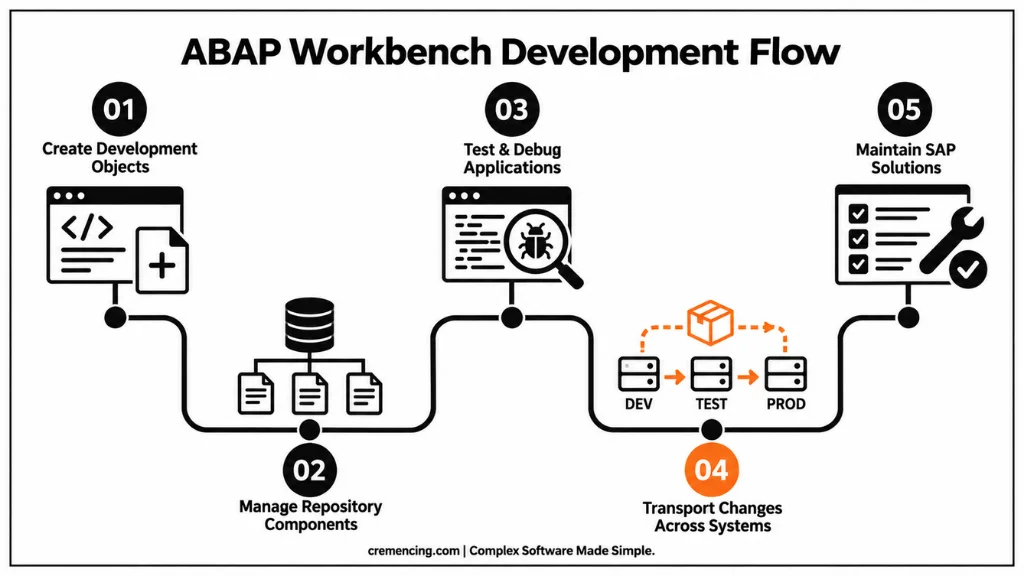
This integration between development and system management is one of the key reasons SAP organizations continue using ABAP Workbench for maintaining enterprise applications.
Understanding the SE80 Transaction in SAP
The SE80 transaction in SAP is commonly known as the Object Navigator and serves as the primary interface for accessing ABAP Workbench functionality. When developers ask what ABAP Workbench in SAP is, SE80 is often the first transaction they encounter because it combines many development tools into one workspace.
Before SE80 became widely used, developers often worked with separate transactions depending on the object type.
Examples include
- SE38 for ABAP Editor
- SE37 for Function Builder
- SE11 for ABAP Dictionary
- SE24 for Class Builder
- SE93 for Transaction Maintenance
SE80 brought many of these capabilities together by providing a centralized navigation environment.
The Object Navigator allows developers to browse development packages and access related objects without switching between multiple transactions.
For example, a developer working on a custom SAP application may need to modify:
- ABAP programs
- Database tables
- Function modules
- Classes
- Screens
Instead of opening separate transactions, the developer can navigate through the related objects directly from SE80. This makes development activities more organized, especially in large SAP projects where applications contain many interconnected objects.
Main Components of ABAP Workbench
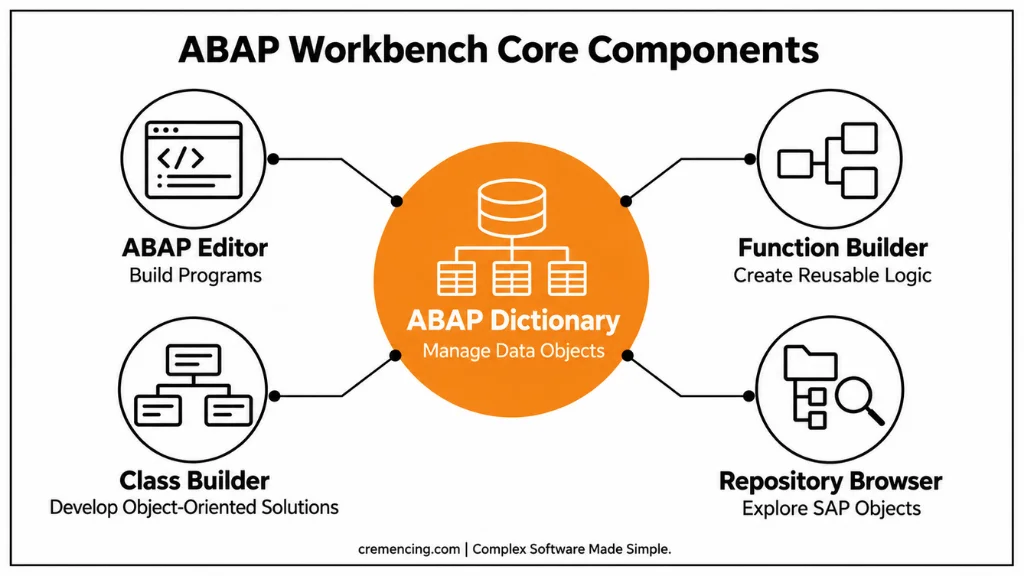
ABAP Workbench consists of several integrated development tools. Each tool manages a specific type of SAP development object.
ABAP Editor
The ABAP Editor is used for writing and maintaining ABAP programs. Developers use it to create:
- Reports
- Interfaces
- Conversion programs
- Enhancements
- Custom business logic
The editor supports syntax checking, debugging integration, and program activation.
For example, a developer creating a financial reporting program may write ABAP logic in the ABAP Editor, test the output, and transport the finished program through SAP landscapes.
ABAP Dictionary
The ABAP Dictionary is one of the most important components of SAP development. It allows developers to define and manage database-related objects.
Common Dictionary objects include:
- Tables
- Views
- Data elements
- Domains
- Structures
- Search helps
The Dictionary provides a central definition of data structures used throughout the SAP system.
For example, instead of manually defining customer data fields in every program, SAP developers define reusable data elements and structures in the ABAP Dictionary. This ensures consistency across SAP applications.
Function Builder
The Function Builder is used to create and maintain function modules.
Function modules are reusable ABAP components that allow developers to organize business logic and enable communication between SAP components.
They are commonly used for:
- Internal SAP processing
- RFC communication
- Integration scenarios
For example, an external application communicating with SAP may call a remote-enabled function module through RFC technology.
Class Builder
Modern ABAP development increasingly uses object-oriented programming. The Class Builder allows developers to create and maintain:
- ABAP classes
- Interfaces
- Methods
- Attributes
Object-oriented ABAP is widely used in SAP S/4HANA development because it supports cleaner application design and reusable components.
ABAP Workbench Architecture and Repository Management
Understanding the architecture behind ABAP Workbench helps developers understand why SAP development follows a different approach compared with traditional programming environments. The ABAP Workbench is not only a collection of coding tools; it is connected with the SAP repository, transport management system, authorization framework, and runtime environment.
SAP uses a repository-based development model where all development objects are centrally stored and managed. These objects are not treated as independent files but as components of the SAP system that have relationships with other technical elements.
For example, an ABAP report may depend on:
- Database tables created in the ABAP Dictionary
- Function modules used for processing
- Classes containing business logic
- Authorization objects controlling access
The ABAP Workbench provides developers with the tools required to create and maintain these connected objects. This architecture allows organizations to control development activities across different SAP landscapes, including development, quality assurance, and production systems.
How ABAP Workbench Works With Transport Management
One of the major advantages of ABAP Workbench is its integration with SAP Transport Management System (TMS).
SAP development normally follows a three-system landscape:
- Development system
- Quality assurance system
- Production system
Developers create and modify objects in the development system. These changes are recorded in transport requests, which are later moved through the landscape after testing.
The ABAP Workbench automatically integrates development objects with transport management.
Examples of transportable objects include:
- ABAP programs
- Classes
- Function modules
- Dictionary changes
- Screens
- Enhancements
This process provides controlled movement of changes between SAP systems.
For example, when an ABAP developer creates a custom sales report, the program is assigned to a transport request. After testing in the quality system, Basis administrators move the approved transport into production. This connection between development and system administration is a key feature of SAP development environments.
ABAP Workbench in SAP ECC Development
SAP ECC environments have traditionally relied heavily on ABAP Workbench for application development and customization.
In SAP ECC, organizations commonly use ABAP Workbench for:
- Custom reports
- Module enhancements
- Interfaces
- Forms development
- Workflow-related developments
- Custom transactions
Many SAP ECC systems contain years of custom ABAP development created through these tools.
For SAP professionals maintaining ECC systems, understanding ABAP Workbench remains essential because businesses continue operating these landscapes while planning future transformations.
A Basis administrator, ABAP developer, or technical consultant working with SAP ECC must understand how repository objects are created, transported, and maintained.
ABAP Workbench in SAP S/4HANA Development
SAP S/4HANA introduced changes in SAP development practices, but ABAP Workbench remains an important environment for many development activities.
S/4HANA development encourages organizations to follow cleaner development approaches and reduce unnecessary modifications to SAP standard functionality.
Modern ABAP development includes concepts such as:
- ABAP Objects
- CDS Views
- Core Data Services
- RAP (RESTful Application Programming Model)
- SAP Fiori development
While traditional transactions such as SE80 are still used in many systems, SAP has increasingly promoted modern development tools through ABAP Development Tools (ADT) in Eclipse.
For example, developers creating CDS views or modern S/4HANA applications often work with Eclipse-based tools rather than only classic SAP GUI transactions.
However, understanding ABAP Workbench remains valuable because many existing SAP applications and custom developments depend on these concepts.
ABAP Workbench vs ABAP Development Tools (ADT)
As SAP development has evolved, developers now have two major development environments:
- Classic ABAP Workbench through SAP GUI
- ABAP Development Tools (ADT) in Eclipse
The difference is mainly related to development approach and supported technologies.
| Feature | ABAP Workbench (SE80) | ABAP Development Tools (ADT) |
| Environment | SAP GUI-based | Eclipse-based |
| Main Usage | Traditional ABAP development | Modern ABAP development |
| Common Objects | Reports, classes, function modules | CDS views, RAP, modern ABAP objects |
| Target Systems | SAP ECC and S/4HANA | Mainly modern S/4HANA environments |
SE80 remains widely used for maintaining existing applications, while ADT is increasingly important for new SAP S/4HANA development.
Professional SAP developers often need knowledge of both environments because enterprise landscapes usually contain a combination of older and newer development approaches.
Creating Duplicate Development Objects
Another common issue is creating unnecessary custom objects without checking existing SAP functionality.
Before developing a new ABAP program, developers should analyze whether:
- Standard SAP functionality already exists
- A reusable function module is available
- An existing class can be extended
- A similar report already exists
The Repository Browser in ABAP Workbench helps developers search existing objects before creating new developments.
For example, two developers working on different projects may create separate reports that retrieve similar customer information. This increases maintenance effort and creates unnecessary complexity in the SAP system. Good ABAP development requires understanding the existing repository structure before adding new objects.
Ignoring Performance Considerations in ABAP Development
ABAP programs directly affect SAP system performance, especially in large enterprise environments where millions of business records are processed daily.
Developers using ABAP Workbench should consider performance during development, not after deployment.
Common performance problems include:
- Poor database queries
- Unnecessary database access
- Large internal tables
- Inefficient loops
- Missing indexes
- Incorrect data selection logic
For example, a custom report that reads millions of database records without proper filtering can significantly slow down SAP operations.
Developers should analyze performance using tools such as:
- ST05 SQL Trace
- SAT ABAP Runtime Analysis
- SQL Monitor
Performance-focused development becomes increasingly important in SAP S/4HANA environments where organizations expect efficient applications that support real-time business processes.
Poor Transport Management Practices
Because ABAP Workbench is connected with SAP Transport Management, developers must understand how changes move between systems.
Common transport-related mistakes include:
- Releasing incomplete objects
- Missing dependent objects
- Incorrect transport sequencing
- Testing insufficiently before moving changes
For example, an ABAP program may depend on a custom table or data element. If the dependent Dictionary objects are not included in the transport request, the program may fail in the quality or production system.
Developers should always verify:
- Object dependencies
- Transport contents
- Target system readiness
Good transport practices reduce production issues and improve collaboration between developers and SAP Basis teams.
Best Practices for SAP ABAP Workbench Development
Professional ABAP development requires following structured practices that support long-term SAP system stability.
Use Object-Oriented ABAP Development
Modern SAP development increasingly uses object-oriented programming principles.
Developers should prefer:
- Classes
- Interfaces
- Methods
- Reusable components
Object-oriented ABAP improves:
- Code organization
- Reusability
- Testing
- Maintenance
This approach is especially important in SAP S/4HANA projects where modern development frameworks are commonly used.
Follow Clean Core Principles
SAP S/4HANA encourages organizations to reduce unnecessary modifications and keep the SAP core clean.
Clean Core development focuses on:
- Using standard SAP capabilities
- Building extensions outside the core when possible
- Avoiding unnecessary custom modifications
ABAP developers working with SAP S/4HANA should understand when to use:
- In-app extensions
- Side-by-side extensions using SAP BTP
- Released SAP APIs
This helps organizations maintain upgrade flexibility.
Conclusion
Understanding what ABAP Workbench in SAP is is essential for anyone working with SAP development environments. SE80 and related ABAP Workbench tools provide developers with a structured way to create, manage, and maintain SAP applications while integrating with the SAP repository and transport processes.
Although SAP development is moving toward modern approaches such as ABAP Development Tools, SAP BTP extensions, and clean core principles, ABAP Workbench knowledge remains valuable because many enterprise SAP systems continue to depend on existing ABAP applications. Developers who understand both classic SAP development tools and modern S/4HANA development practices can build solutions that are easier to maintain and aligned with future SAP architecture.
Frequently Asked Questions
What is ABAP Workbench in SAP used for?
ABAP Workbench in SAP is used for developing, modifying, testing, and managing ABAP-based applications. It provides tools for creating programs, classes, function modules, database objects, screens, and other SAP repository components.
Is SE80 the same as ABAP Workbench?
SE80 is not exactly the entire ABAP Workbench, but it is the main transaction used to access many ABAP Workbench features. SE80, also called Object Navigator, combines several development functions into one interface.
What are the main tools in ABAP Workbench?
The main ABAP Workbench tools include ABAP Editor, ABAP Dictionary, Function Builder, Class Builder, Screen Painter, and Repository Browser. These tools help developers create and maintain different SAP development objects.
Is ABAP Workbench still used in SAP S/4HANA?
Yes, ABAP Workbench is still used in many SAP S/4HANA environments, especially for maintaining existing ABAP applications. However, SAP also promotes ABAP Development Tools (ADT) in Eclipse for modern development approaches.
What is the difference between SE80 and SE38?
SE38 is mainly used for creating and editing ABAP programs, while SE80 provides a broader development environment that includes programs, classes, function modules, packages, and other repository objects.
Do SAP Basis professionals need to know ABAP Workbench?
SAP Basis professionals do not usually develop ABAP applications, but understanding ABAP Workbench helps them support transports, analyze technical issues, and communicate effectively with ABAP development teams.
What is the ABAP Repository in SAP?
The ABAP Repository is the central storage area for SAP development objects. It contains programs, classes, tables, interfaces, and other components created and maintained through ABAP development tools.
Should beginners learn SE80 before ABAP programming?
Beginners should understand SE80 because it provides visibility into SAP development objects. However, learning ABAP programming concepts, data structures, and SAP architecture is equally important for becoming an effective developer.





One Response