
SAP Databricks Integration can give enterprise teams a real-time path from SAP transactional data to modern analytics. It can do this without adding unnecessary complexity to the architecture. Many SAP environments still rely on batch-based data movement. This approach creates delays between business transactions and analytical insights. A well-designed integration can connect SAP systems with Databricks while keeping data flows scalable and governed. It can also align the integration with the existing enterprise architecture.
During a supply chain analytics audit, SAP consultants often find the same problem. The business wants real-time inventory data in its analytics platform. However, the SAP data feeding that platform runs only once each night through a batch job. This creates a gap between transactional and analytical systems. The same challenge can appear in both SAP S/4HANA and ECC environments.
The need for this architecture becomes more apparent as organizations roll out Databricks for machine learning and large-scale reporting. SAP Databricks integration works best when teams define clear data ownership and strong governance. This article explains how the architecture works, which SAP technologies support it, and where implementation teams often go wrong.
SAP Databricks Integration: Understanding and its significance.
An Insight into SAP Databricks Integration and Its Relevance.
SAP Databricks integration combines technologies and design patterns that move operational data from SAP systems to Databricks for analysis. SAP S/4HANA, ECC, and SAP Business Warehouse remain the main sources of transactional accuracy, master data, and business rules. Databricks handles data engineering, machine learning, and large-scale reporting workloads that SAP systems were not designed to handle at scale.
The integration layer connects these two platforms. Its design determines how well the architecture manages performance, governance, and data movement. With the right approach, SAP Databricks integration gives analytics teams access to business data without placing unnecessary load on production SAP systems.
This distinction matters because SAP and Databricks solve different problems. SAP systems support transactional processes across finance, procurement, and operations. Databricks supports distributed processing across large datasets. Teams can use it for predictive models, anomaly detection, and cross-system reporting.
When organizations focus only on moving data, they can overlook these architectural differences. That approach can create duplicated logic and inconsistent reporting. It can also make accountability unclear when numbers do not match across platforms.
How SAP to Databricks Integration takes place internally
The main technical challenge in SAP Databricks integration lies in how SAP exposes its data. SAP typically exposes structured data to external platforms through OData or SAP APIs rather than direct database access. These interfaces provide access to business objects such as business partners, financial documents, and sales orders without requiring teams to load the SAP database directly.
SAP Core Data Services (CDS) add another layer of business context by providing a semantic view of the underlying data. Instead of treating data as individual technical fields, CDS views represent business objects as SAP applications understand them. This approach matters for SAP Databricks integration because teams can use CDS views or APIs to extract business-relevant data and reduce the risk of moving technically correct but business-meaningless data into Databricks.
After SAP exposes the data, an integration layer such as SAP Integration Suite or SAP Cloud Integration (CPI) moves it toward Databricks. This layer manages authentication, message transformation, routing, and error handling, making it a key part of the SAP Databricks integration architecture.
For example, an SAP CPI Databricks integration scenario can receive a business event from S/4HANA, transform the payload into a format that Databricks can ingest, and send the resulting data to a Databricks Lakehouse table. Databricks can then use that data for downstream analytics and other data workloads.
Architecture: Understanding the Three-Layer Model
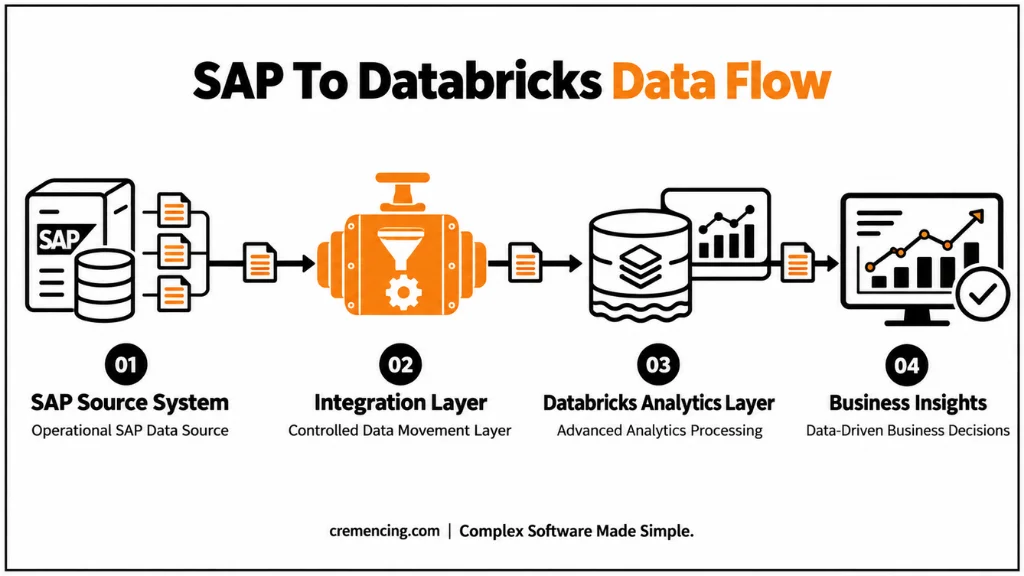
Generally, a SAP Databricks integration architecture is split into three layers, and knowing what each layer is does help to avoid mixing in transactional and analytical issues.
SAP Source Systems Layer
This layer can contain SAP S/4HANA, SAP ECC, SAP Business Warehouse, and applications on SAP BTP. These systems continue to be the system of record for business operations and should not be used as a general-purpose data warehouse. Designs that attempt to use large amounts of raw transaction data without filtering or business context will cause performance stress on production systems.
The Data Movement Layer & Integration Layer
This layer hosts SAP Integration Suite, SAP Cloud Integration, APIs, and replication services. Teams use it to extract, transform, authenticate, handle errors, and route data from SAP to Databricks. It also supports event-driven data movement. When a business event occurs in S/4HANA, the integration layer triggers a message, transforms the data, and sends it asynchronously to Databricks within a short time frame instead of waiting for a scheduled batch window.
Databricks Analytics Layer
The integration layer sends the transformed data to Databricks, where teams can use it for machine learning, predictive analytics, and enterprise reporting. Databricks does not serve as an SAP transactional system; instead, it adds value to SAP data by enabling analysis that SAP’s native reporting tools may not support efficiently at scale.
A typical architectural flow works as follows: SAP S/4HANA creates the business event, the SAP integration layer processes and routes the information, and Databricks stores and processes the information within a Lakehouse structure that supports both structured queries and machine learning workloads.
Practical Business Examples
Supply Chain Analytics
SAP gives the inventory level, material movements, and procurement transaction data, and Databricks can use this data to draw conclusions and offer assistance for demand forecasting. For a manufacturing company to track stock-outs across their many plants, for example, it is more critical to have inventory data available in Databricks as quickly as possible, and not as a nightly extraction job.
Financial Analytics
When it arrives at Databricks, the SAP finance data enables financial reporting, financial forecasting models, and cost analysis. This integration enables the finance team to work with the new business data without having to execute expensive analytical queries against SAP production tables during closing times.
During every audit of a customer’s supply chain analytics request, a SAP consultant will find the same barrier: The business wants inventory information to be available in the analytics platform in real time, but the SAP data that feeds the analytics platform runs only once a night in a batch job. This disconnect between transactional systems (S/4HANA, ECC) and analytical systems is seen in both S/4HANA and ECC environments, and it is becoming more apparent as organizations are rolling out Databricks for ML and large-scale reporting.
SAP Databricks integration can solve this problem, but teams need to design the underlying architecture around clear data ownership and strong governance to make the integration effective. This article explains how the architecture works, which SAP technologies can support it, and where implementation teams often go wrong.
SAP Databricks Integration: Understanding and its significance.
An Insight into SAP Databricks Integration and Its Relevance.
SAP Databricks integration is a collection of technologies and design patterns that enable the transfer of operational data from SAP systems to Databricks to perform analysis. Meanwhile, SAP S/4HANA, ECC, and SAP Business Warehouse continue to be the main source of transactional accuracy, master data management, and business rules; and Databricks is now responsible for data engineering, machine learning, and large-scale reporting workloads which SAP systems were never designed to handle.
It’s the integration layer between the two platforms that decides whether the separation goes smoothly or if it poses performance and governance risk. With proper design, SAP Databricks integration lets analytics teams access existing business data without burdening the production SAP environment.
This is relevant because SAP and Databricks have different problems they’re addressing. The systems in SAP are optimized for regular, transactional data maintenance in finance, procurement, and operations. Optimized for distributed processing over large datasets, Databricks is useful for predictive models, anomaly detection, and cross-system reporting, which SAP alone doesn’t support easily. When organizations tackle the data-movement aspect of integration without paying attention to these architectural differences, they often end up with duplicated logic, inconsistent reporting, and fuzzy accountability when numbers don’t match.
Also read SAP AI Document Information.
How SAP to Databricks Integration takes place internally
The main technical challenge in SAP Databricks integration lies in how SAP exposes its data. SAP typically exposes structured data to external platforms through OData or SAP APIs rather than direct database access. These interfaces provide access to business objects such as business partners, financial documents, and sales orders without requiring teams to load the SAP database directly.
SAP Core Data Services (CDS) provide a semantic layer over the underlying database data. CDS views represent business objects based on how SAP applications understand them rather than as individual technical fields. This approach matters for SAP Databricks integration because teams can extract data through CDS views or APIs and reduce the risk of moving technically correct but business-meaningless data into Databricks.
After SAP exposes the data, an integration layer such as SAP Integration Suite or SAP Cloud Integration (CPI) moves it toward Databricks. This layer manages authentication, message transformation, routing, and error handling, making it a key part of the SAP Databricks integration architecture.
For example, SAP CPI Databricks integration scenarios can receive a business event from S/4HANA, transform the payload into a format that Databricks can ingest, and send the data to a Databricks Lakehouse table. Databricks can then use that data for downstream analytics.
Batch vs. Real-Time SAP Databricks Integration
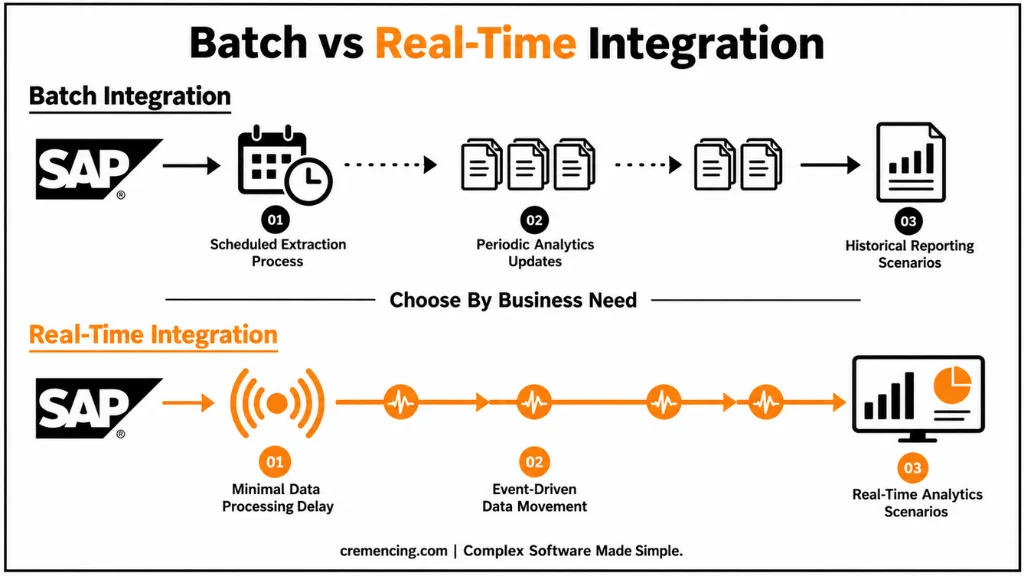
Not every scenario requires real-time data movement, and the correct choice depends on how quickly the business needs to act on the information.
| Area | Batch Integration | Real-Time Integration |
| Data availability | Updated at scheduled intervals | Updated with minimal delay |
| Common use cases | Historical reporting, periodic analytics | Operational monitoring, event-driven analytics |
| SAP system impact | Lower frequency extraction load | Requires careful architecture planning |
| Implementation complexity | Generally simpler | Requires stronger integration design |
Monthly financial analysis, for example, works well with scheduled batch extraction because the reporting cycle itself is not time-sensitive. Production monitoring or supply chain alerts, on the other hand, benefit from faster data availability because delayed information reduces the value of the insight. Choosing real-time SAP data integration when batch processing would be sufficient adds operational overhead without a corresponding business benefit.
Common Integration Mistakes to Avoid
A frequent mistake is extracting large volumes of SAP data into Databricks without first defining the business purpose behind the extraction. SAP systems contain thousands of tables and business objects, and pulling complete transactional datasets increases storage and processing costs while providing limited analytical value. A better approach starts by identifying the specific business scenario, the relevant SAP objects, and how frequently the data actually needs to be refreshed.
Another common issue is relying on direct database access as the primary integration method instead of supported interfaces such as APIs, CDS views, or SAP Integration Suite. Direct access bypasses SAP’s business logic layer, which can create inconsistencies between what Databricks reports and what SAP itself would calculate for the same transaction. It can also introduce performance risk on production systems and complicate future SAP upgrades, since direct table access is more likely to break when SAP changes its underlying data model.
Governance is often treated as an afterthought rather than a design requirement. SAP data frequently includes financial transactions, customer information, and employee records, and once this data moves into Databricks, the same access controls, classification rules, and audit requirements that applied inside SAP need to continue applying outside it. Skipping this step creates compliance exposure that is difficult to correct after the pipeline is already in production.
Conclusion
SAP Databricks integration works best when teams treat it as an architecture decision rather than a simple data-movement task. SAP remains the trusted source for transactional accuracy, while Databricks extends that data into analytics, forecasting, and machine learning use cases that SAP systems cannot handle efficiently at scale. APIs, CDS views, SAP Integration Suite, and SAP BTP all play important roles, but the architecture depends more on decisions around data ownership, latency requirements, and governance.
As organizations continue to adopt SAP S/4HANA and SAP BTP, the demand for reliable, well-governed connections between SAP and analytics platforms such as Databricks will continue to grow. Teams that define a clear business purpose, choose supported integration methods, and maintain governance across both platforms can deliver dependable analytics without disrupting the SAP systems that support critical business operations.
Frequently Asked Questions
1. What is SAP Databricks integration used for?
SAP Databricks integration is used to move operational SAP data into Databricks for advanced analytics, machine learning, and large-scale reporting, while SAP continues managing transactional processing and business rules.
2. Can SAP S/4HANA integrate with Databricks in real time?
Yes, SAP S/4HANA can integrate with Databricks in near real time using APIs, CDS views, and event-driven patterns through SAP Integration Suite, though the approach depends on data volume and latency requirements.
3. What is SAP CPI Databricks integration?
SAP CPI Databricks integration uses SAP Cloud Integration as middleware to handle transformation, routing, and authentication between SAP applications and Databricks, useful when CPI is already part of the integration landscape.
4. Is SAP BTP required for Databricks integration?
SAP BTP is not strictly required, but SAP BTP Databricks integration is commonly used because it provides API management and integration workflows that simplify connecting SAP applications to external analytics platforms.
5. How does SAP Databricks integration affect SAP system performance?
A well-designed integration architecture minimizes performance impact by using filtered extraction, supported APIs, and appropriate scheduling rather than direct, unfiltered access to SAP production tables.
6. Should organizations always choose real-time SAP data integration?
No, real-time integration is not always the better option. Batch processing is often sufficient for historical or periodic reporting, while real-time integration suits operational monitoring and time-sensitive analytics.
7. What role do CDS views play in SAP Databricks integration?
CDS views provide a business-oriented data model that simplifies access to SAP information, reducing the risk of extracting technically valid but business-meaningless data into Databricks.
8. What should teams evaluate before implementing SAP Databricks integration?
Teams should evaluate data ownership, security controls, latency requirements, and governance policies before implementation, since these decisions shape the entire integration architecture.
References
SAP Integration Suite Documentation





One Response