
The SAP CALM API provides secure access to SAP Cloud ALM data, analytics, and events through authenticated API requests. SAP documents a limit of roughly 100 Analytics API requests per minute, but many failed integrations are caused by authentication and authorization issues rather than rate limits.
However, a valid OAuth token proves who’s calling. It does not, however, define what that caller is permitted to read, change, or receive, because those permissions are governed separately by scope, resource visibility, project access, and event subscription. In most cases, SAP CALM API integrations that fail in testing aren’t failing because of rate limits or wrong endpoints. Instead, they’re often failing because a team requested a token, got one successfully, and assumed authentication was the whole problem.
It isn’t. The SAP CALM API splits authentication, data access, and events into genuinely separate layers, each with its own failure modes and 401s, 403s, and quietly incomplete responses; each points to a different one of those layers, not the same generic “something’s wrong with auth.” This guide walks through all three, in the order they need to be built and tested.
A typical integration has three distinct layers:
- Authentication: Obtain an OAuth 2.0 access token.
- Data access: Call an API using the required scope and endpoint contract.
- Events: Subscribe to supported resource changes and deliver them to a webhook.
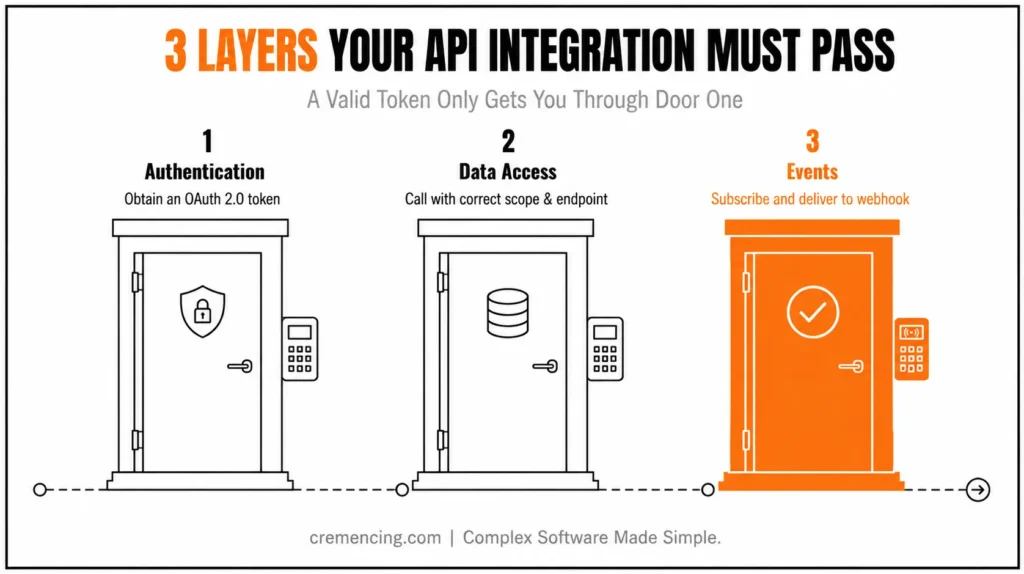
However, a valid token confirms authentication only. The endpoint, API scope, method, resource permissions, filters, pagination, and event configuration determine what the client can actually read, change, or receive.
SAP ABAP ALV Interview Focus Areas
Technical evaluations for SAP ABAP developer roles involving ABAP List Viewer (ALV) prioritize architectural mastery across traditional and modern frameworks over simple syntax memorization. Candidates are routinely tested on handling interactive events such as CALL BACK user commands and optimizing performance for high-volume datasets using memory-efficient structures.
Evaluators heavily emphasize the architectural trade-offs between standard function modules (REUSE_ALV_GRID_DISPLAY), Object-Oriented ALV (CL_GUI_ALV_GRID), and the newer SALV object model (CL_SALV_TABLE). In SAP S/4HANA environments, candidates must also demonstrate how push-down data processing using CDS views and the ALV Object Model on HANA minimizes application-layer overhead. Mastering field catalog configuration, dynamic layout manipulation, and event handling forms the core criteria for technical selection.
What You Need Before Using SAP CALM API
Before configuring the SAP CALM API, confirm that you have:
- Access to the target SAP Cloud ALM tenant
- Permission to manage API service instances or bindings
- The current API specification from SAP Help or SAP Business Accelerator Hub
- A secure client application, integration runtime, or API-testing tool
- An approved list of required read-and-write operations
- A secure location for client secrets or certificates
- A test tenant or non-production integration scenario
- A webhook endpoint when using push events
Decide whether the integration needs transactional data, analytics, raw monitoring data, or events. That choice determines the endpoint family, scopes, request limits, and validation process.
Do not request every available scope “for testing.” Build the permission list from actual methods and resources.
Step 1—Enable SAP CALM API Access
SAP Cloud ALM API access begins with an API service instance or service binding associated with the tenant.
SAP’s c1 enables support for service bindings without requiring a separate Cloud Foundry environment. Older tenants may still use a Cloud Foundry-based setup, particularly where the integration was provisioned before October 2023.
Create the API configuration in the SAP Cloud ALM administration area. Define a clear application identifier that shows which system or integration owns the credentials.
Examples include:
- SAC_REPORTING_PROD
- SERVICENOW_ALERT_SYNC
- TRICENTIS_TEST_RESULTS
- ABAP_TASK_READER
- BTP_WORKFLOW_EVENTS
Avoid generic names such as API_TEST in production. A clear identifier makes credential reviews, scope audits, and incident investigation easier.
During configuration, select the authentication method and authorities required by the client. The service binding or service key will provide the values needed for token generation.
Keep development, test, and production credentials separate. Do not reuse one client across unrelated applications because that prevents accurate access reviews and makes credential rotation more disruptive.
The enabled service should provide information such as:
- OAuth token URL
- Client ID
- Client secret or certificate material
- API host or service information
- Assigned authorities or scopes
Store the credentials in a secure secrets service, destination, or encrypted application configuration. Never commit them to Git or transport text files, source-code comments, or Postman collections shared without protection.
Step 2 — Assign SAP CALM API Scopes
However, a successful OAuth token request does not grant access to every API. The service instance must contain the exact scope required by the endpoint and HTTP method.
SAP Cloud ALM defines separate scopes for resources and actions. Examples include:
calm-api.documents.read
calm-api.documents.write
calm-api.documents.delete
calm-api.tasks.read
calm-api.tasks.write
calm-api.analytics.read
calm-api.bsm.read
calm-api.testcases.read
calm-api.testcases.write
Some API families also provide dedicated personal-data scopes. Assign those only when the business requirement explicitly needs personal information and the data owner has approved the access.
Map scopes to methods before creating the credentials:
| Integration requirement | Minimum permission pattern |
| Read project or task data | Relevant read scope |
| Update tasks | Task read and write scopes |
| Export analytics | Analytics read scope |
| Upload documents | Document write scope |
| Remove documents | Document delete scope |
| Read business-service status events | Business Service Management read scope |
| Synchronise test cases | Test-case read and write scopes |
Do not grant delete or write authority to a reporting application.
The same principle applies to broad analytics and personal-data access. Read-only does not automatically mean low risk when an endpoint exposes employee names, assignments, comments, or operational details.
After adding or removing scopes, create or refresh the credentials as required by the current setup. An older access token will not gain new authority simply because the service configuration changed. If you’re building toward certification, this pairs well with 7 reasons to pursue SAP CALM certification in 2026
Step 3—Create Client-Secret or mTLS Credentials
SAP Cloud ALM supports OAuth 2.0 client credentials for when the SAP Cloud ALM needs to talk to another server without anyone being. The easiest way to set this up is to use a client ID and a client secret. The application that is doing the calling sends the client ID and the client secret to the endpoint, and then it gets a special token that only works for a little while.
Use client secret authentication when:
- The application can protect secrets
- Initial development needs a simple setup
- The integration runtime supports secure credential storage
- Organisational policy permits shared-secret authentication
In addition, SAP Cloud ALM also supports mutual TLS for integrations that require certificate-based client authentication. An mTLS service key can contain a client ID, client certificate, private key, and certificate-authentication URL.
Use mTLS when:
- Security policy requires certificate authentication
- The integration runs on a managed enterprise platform
- Certificate rotation is governed centrally
- A client secret would create unacceptable risk
Protect private keys more strictly than public certificates. Store them in a platform keystore, destination service, or enterprise secrets manager.
Plan credential rotation before the integration goes live. Document:
- Credential owner
- Expiration date
- Rotation frequency
- Renewal procedure
- Test process
- Emergency revocation procedure
- Dependent applications
A technically valid credential with no owner becomes an operational risk when it expires or must be revoked.
Step 4 — Authenticate to the SAP CALM API
Request an OAuth token by sending the client credentials to the token endpoint with grant_type=client_credentials.
Client-secret example with cURL
curl –request POST \
–url ‘https://<TOKEN_HOST>/oauth/token’ \
–user ‘<CLIENT_ID>:<CLIENT_SECRET>’ \
–header ‘Content-Type: application/x-www-form-urlencoded’ \
–data ‘grant_type=client_credentials’
A successful response should contain an access token, token type, and expiry information.
{
“access_token”: “<ACCESS_TOKEN>”,
“token_type”: “bearer”,
“expires_in”: 43199
}
Do not paste the token into tickets, screenshots, documentation, or shared chat messages. Anyone holding a valid token can use the permissions encoded in it until it expires.
Step 5 — Call a REST or OData Endpoint
Copy the current endpoint path and API version from the SAP Cloud ALM API Guide or Business Accelerator Hub specification.
Therefore, do not build from an old community screenshot. SAP can introduce new versions, fields, methods, and resources while older versions remain available for a transition period.
REST request with a Bearer token
curl –request GET \
–url ‘https://<API_HOST>/<CURRENT_API_PATH>’ \
–header ‘Authorization: Bearer <ACCESS_TOKEN>’ \
–header ‘Accept: application/json’
For POST or PATCH operations, include the documented request body and content type.
curl –request POST \
–url ‘https://<API_HOST>/<CURRENT_API_PATH>’ \
–header ‘Authorization: Bearer <ACCESS_TOKEN>’ \
–header ‘Content-Type: application/json’ \
–data ‘{
“<FIELD_FROM_CURRENT_SPECIFICATION>”: “<VALUE>”
}’
The SAP CALM API includes several interface categories:
| API category | Primary use |
| Transactional REST or OData | Read or change lifecycle resources |
| Analytics API | Build reports and dashboards |
| Raw-data inbound API | Send supported monitoring data into Cloud ALM |
| Raw-data outbound API | Export supported operational data |
| Status Events API | Retrieve disruptions, degradations, and maintenance events |
| Resource Changes API | Push notifications when supported resources change |
Transactional APIs can cover projects, tasks, requirements, features, documents, test cases, process scopes, libraries, and service requests. Available methods differ by resource.
Check the response status before parsing data:
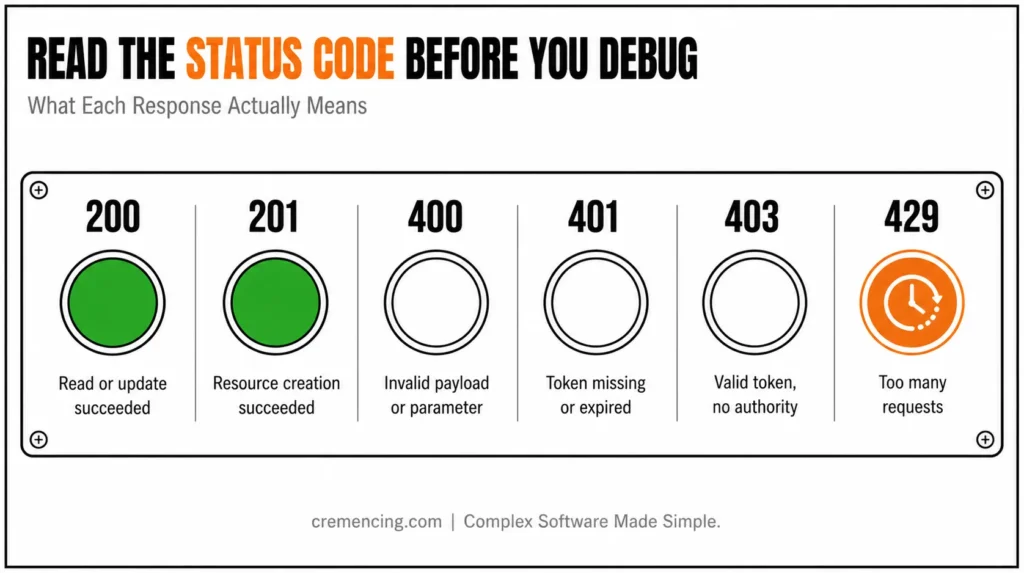
- 200 OK: Read or update succeeded
- 201 Created: Resource creation succeeded
- 204 No Content: Request succeeded without a response body
- 400 Bad Request: Payload, filter, or parameter is invalid
- 401 Unauthorized: Token is missing, invalid, or expired
- 403 Forbidden: Token is valid but lacks authority or resource access
- 404 Not Found: Endpoint, version, tenant, or resource is incorrect
- 429 Too Many Requests: Client exceeded the applicable limit
Step 6 — Configure Events and Webhooks
Instead, use events when an external system must react to a change. Use events when an external system must react to a change without repeatedly polling an endpoint.
SAP Cloud ALM External API Management controls:
- Subscriptions
- Webhooks
- Payload mappings
A subscription watches a supported resource type and event. When the event occurs, SAP Cloud ALM sends a message to the configured webhook.
Supported patterns can include:
TASK.CREATED
TASK.UPDATED
TASK.DELETED
FEATURE.CREATED
FEATURE.UPDATED
EVENT-SITUATION.CREATED
EVENT-SITUATION.CLOSED
WORKFLOW.STARTED
The Resource Changes payload can include the subscription ID, resource type, event type, resource ID, and changed resource.
A simplified event payload may look like:
{
“subscriptionId”: “<SUBSCRIPTION_ID>”,
“resourceType”: “TASK”,
“eventType”: “TASK.UPDATED”,
“resourceId”: “<TASK_ID>”,
“resource”: {
“<FIELD>”: “<VALUE>”
}
}
Configure the target webhook through an SAP BTP destination or supported landscape management system entry. Apply authentication appropriate to the receiving application.
Before activation, test:
- Network reachability
- TLS trust
- Target authentication
- Payload size
- Mapping rules
- Expected response code
- Retry behaviour
- Duplicate-event handling
The receiving system should process events idempotently. If SAP Cloud ALM retries a delivery, the target should not create a duplicate ticket, task, or workflow.
Store the SAP Cloud ALM resource ID and event ID in the target record. That makes later reconciliation possible.
Step 7 — Control Data Access, Pagination, and Versioning
A token with a valid read scope may still return incomplete data.
Check these layers separately:
- API scope
- Resource visibility
- Project access restrictions
- Filters
- Pagination
- Tenant and region
- API version
Moreover, Private or restricted projects may not appear in the same way as generally accessible projects. Treat project visibility as a separate control from OAuth scope.
Analytics APIs also apply their own limits. SAP currently documents a limit of 100 Analytics API requests per minute, while general pull APIs have a broader documented limit of 500 requests per five seconds. API-specific documentation takes priority when a tighter limit exists.
Use pagination instead of requesting a complete large dataset in one response. Record the continuation token, next link, offset, or page information required by the specific API.
For production extraction:
- Request only required fields
- Filter by date or status where supported
- Store the last successful extraction point
- Retry transient failures with backoff
- Stop retrying permanent 400 or 403 errors
- Log response codes without logging tokens
- Reconcile record counts
- Monitor API consumption
SAP states that breaking changes receive a new API version. Deprecated versions remain supported for at least 12 months from deprecation, but clients should move before that window closes.
Review the SAP Cloud ALM “What’s New” page regularly. The 2026 API surface includes new library APIs, expanded testing resources, additional analytics, feature updates, and External API Management changes.
SAP CALM API Testing and Validation
Test the integration as a complete control path rather than as isolated successful requests.
Validate authentication
Confirm that:
- Correct credentials return a token
- Incorrect credentials return an authentication error
- The token expires as documented
- The client refreshes the token before the next protected call
- Secrets never appear in logs
Validate authorisation
Create separate test credentials with different scopes.
A read-only client should retrieve data but fail when attempting a write. A client without the resource scope should receive 403 Forbidden.
This proves that the least-privilege design is working rather than merely documented.
Validate data access
Compare the API response with the SAP Cloud ALM user interface.
Check:
- Record count
- Resource IDs
- Status values
- Date and time zones
- Restricted projects
- Pagination
- Null or optional fields
- Personal-data fields
An empty response is not always an authentication problem. Filters, private resources, wrong tenants, and pagination can also remove expected data.
Validate events
Create or update a safe test resource that matches the subscription.
Confirm that:
- The subscription matches the event.
- SAP Cloud ALM creates the outgoing event.
- The webhook receives it.
- The target validates the payload.
- Duplicate delivery does not create duplicate records.
- Failed delivery produces an operational signal.
- The target stores the source resource identifier.
Monitor both sides. SAP Cloud ALM may show successful delivery while the target application rejects the business meaning of the payload.
Common SAP CALM API Issues During Setup
Common Issues at a Glance
| Symptom | Most likely cause | Check first |
|---|---|---|
| 401 Unauthorized | Authentication problem | Token expiry, token URL, client credentials, tenant match |
| 403 Forbidden (after valid token) | Authorization/scope problem | Required scope, read vs. write, resource permissions |
| 404 Not Found | Wrong endpoint/version | API version, endpoint path, tenant host, region |
| Empty or incomplete results | Filters or visibility, not auth | Filters, pagination, private projects, date range |
| No webhook events received | Subscription/config problem | Subscription active, event type match, webhook reachability |
| Duplicate events | Missing idempotency handling | Event ID + resource ID tracking on the receiving end |
401 Unauthorized
A 401 usually points to authentication rather than API scope.
Check:
- Missing Bearer header
- Expired token
- Incorrect token URL
- Wrong client credentials
- Token issued for another tenant
- Invalid certificate in mTLS
- Incorrect API host or region
Request a new token and inspect its expiry before changing scopes.
403 Forbidden after a valid token
A 403 means authentication probably worked, but the request is not authorised.
Check:
- Required API scope
- Read versus write scope
- Delete-specific authority
- Personal-data scope
- Restricted project visibility
- Supported HTTP method
- Target resource permissions
Do not keep regenerating the same token without changing the service authority. A new token with the same scopes will produce the same result.
404 Not Found
Check the current API version, endpoint path, resource ID, tenant host, and regional URL.
An outdated community example may point to a retired version or old endpoint structure.
Empty or incomplete results
Check filters, pagination, private projects, data availability, date ranges, and tenant selection.
A successful 200 OK response confirms that the request ran. It does not confirm that the response contains every record you expected.
The webhook receives no events
Check:
- Subscription is active
- Resource type is supported
- Event type matches the change
- Webhook is active
- Destination is reachable
- Authentication is valid
- Mapping does not fail
- Target returns a success response
Also confirm that the tested change actually triggers the selected event. Updating an unsupported field may not produce the event you expect.
Repeated or duplicate events
Design the target for idempotency.
Use the source event identifier, resource ID, event type, and version or timestamp to detect repeated delivery. Do not rely only on the arrival time.
Conclusion
A successful SAP CALM API integration needs more than a token and a copied endpoint. Authentication proves the client’s identity, scopes control its authority, resource rules determine visible data, and subscriptions decide which changes reach an external webhook.
Construct the connection in that sequence. Enable the service, set the smallest possible scope to restrict use, acquire the credentials, validate each API method, and test the restricted data, pagination, rate limits, and event retries before going to production.
The aim is not just to get a 200 OK. To develop an integration that accesses only authorized data, updates only authorized resources, responds consistently to known events, and is understandable when things go wrong. Once every layer has an owner and a test to validate the data, the SAP CALM API is no longer a source of unexplained 401, 403, and missing data tickets.
Frequently Asked Questions
How to authenticate to the SAP CALM API?
Access via an SAP Cloud ALM API service binding in terms of OAuth 2.0 Client Credentials. Get a token, provide it to the client with the client ID and secret, and include it in the Authorization: Bearer header of your request.
2. How Does OAuth 2.0 Work with the SAP CALM API?
Yes. The authentication for server-to-server access to SAP Cloud ALM API is OAuth 2.0. It can be configured with a client secret and mutual TLS. The client receives a temporary token from the configured token endpoint, and then calls the permitted SAP Cloud ALM REST API resources with this token.
3. Why does the API return 403 after I receive a valid token?
A valid token proves authentication, not endpoint authority. The service instance may lack the required read, write, delete, analytics, or personal-data scope. A restricted project or unsupported HTTP method can also produce a SAP Cloud ALM 403 error.
4. Which scopes does the SAP Cloud ALM API require?
The required scope depends on the API resource and method. Reading tasks need a task-read scope, while updating tasks need write authority. Document deletion requires a delete-specific scope. Always use the current endpoint documentation and assign only the permissions required by the integration.
5.What Is the Difference Between SAP CALM API Pull and Events?
A pull API returns data when the external client requests it. An SAP Cloud ALM event pushes a supported resource change to a configured webhook. Use pull APIs for current or historical datasets and events when another system must react promptly to a change.
6. Do I need a separate service instance for each integration?
Best practice is yes; the post’s own guidance on avoiding generic client names and keeping dev/test/production credentials separate implies one clearly-named service instance per integration, not a shared one.
7. What’s the difference between a 401 and a 403 in practical terms?
A 401 means the request never proved who’s calling; a 403 means it proved identity, but that identity doesn’t have permission for this specific resource or method. The fix for one (get a valid token) is different from the fix for the other (adjust scopes).
8. How do I know if an event subscription actually fired?
Create or update a test resource matching the subscription and monitor both sides: SAP Cloud ALM’s delivery status and the receiving webhook’s logs — since a successful send on one side doesn’t guarantee successful processing on the other.
9. Can I use the same OAuth token for multiple API categories?
A token’s authority is defined by the scopes assigned to the service instance it came from. If that instance only has task-read scope, the same token won’t work against document or analytics endpoints regardless of which API you call it against.
10. What should I log for troubleshooting without creating a security risk?
Log response codes, resource IDs, and event IDs for reconciliation; never log the token itself, since anyone with a valid token can use its permissions until it expires.




