
SAP S/4HANA Embedded Analytics brings operational reporting and analytical capabilities directly into the ERP environment. Instead of moving transactional data into a separate reporting system for every operational requirement, businesses can analyze relevant information through the SAP HANA database using Core Data Services (CDS) Views and the Virtual Data Model (VDM).
This approach allows finance, procurement, sales, and manufacturing teams to access business insights within their daily workflows. However, getting reliable results requires more than activating standard analytical applications. CDS View design, query optimization, data modelling, and system performance all influence how effectively Embedded Analytics works.
For SAP developers and IT decision-makers, understanding these technical foundations is essential to building analytical solutions that support operational requirements without creating unnecessary database workload.
For further reading, learn more from the SAP S/4HANA Wikipedia
At Cremencing.com, we specialize exclusively in SAP custom development. Moreover, our professionals assist you in maximizing Embedded Analytics to address SAP S/4HANA performance problems, build custom dashboards, and empower predictive insights, without any lag.
What is SAP S/4HANA Embedded Analytics?
To begin with, SAP S/4HANA Embedded Analytics is a group of real-time analytic tools that you can use with the SAP S/4HANA core. It makes real-time transactional data available, thus eliminating the need for a dedicated data warehouse or complicated ETL (Extract, Transform, Load) transactions.
Technical Foundation of SAP S/4HANA Embedded Analytics
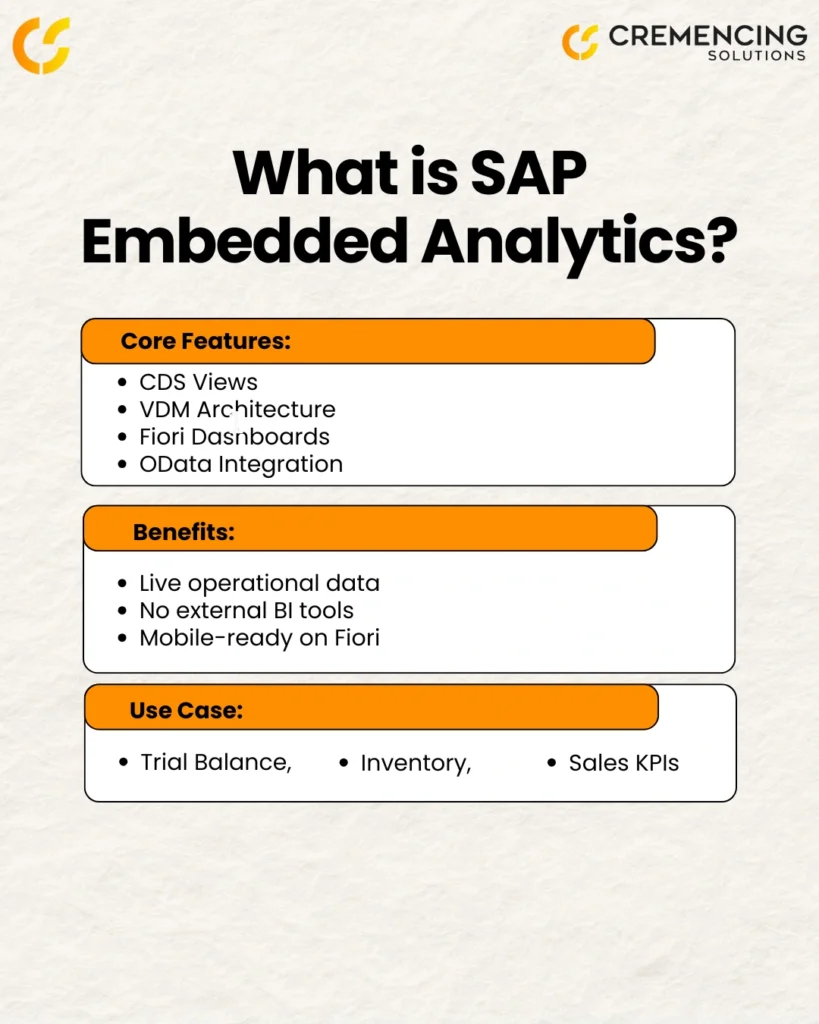
SAP S/4HANA Embedded Analytics relies on a combination of data modelling, database processing, and analytical consumption technologies. These components work together to make transactional information available for reporting without requiring conventional data extraction and replication for every analytical requirement.
Three technical elements form its foundation:
Core Data Services (CDS) Views
CDS Views provide the semantic modeling layer. Developers define business entities, relationships, calculated fields, and analytical annotations that determine how information is presented to analytical applications.
Virtual Data Model (VDM)
The Virtual Data Model organizes CDS Views into reusable layers. It separates basic data access from business logic and analytical consumption, making models easier to maintain and extend.
SAP HANA Database Processing
SAP HANA executes the underlying database queries. By processing data close to its source, the architecture can reduce unnecessary data movement and support responsive operational reporting.
Together, these technologies provide the foundation for building analytical applications that reflect actual business processes.
Key Components:
CDS Views for semantic modelling and construction of analytical objects
The structure of the layered model for VDM
Runtime SQL Views in SAP HANA Database
Fiori Apps for a great user experience
OData services, BICS, and SAP HANA InA interfaces
Key Benefits of SAP Embedded Analytics
| Feature | Benefit |
| Real-Time Reporting | Access and analyze live data directly from S/4HANA |
| Embedded in Processes | Analytics appear in operational workflows |
| CDS-Driven Models | Ensure performance and reduce redundancy |
| Seamless User Experience | Available on mobile and desktop via SAP Fiori |
| AI-Ready | Supports predictive models and machine learning |
How It Works: Embedded Analytics Architecture
SAP S/4HANA Embedded Analytics makes use of ABAP CDS Views, so that data is modeled semantically and independently of the Logical Data Model without involving replication or transformations. Furthermore, if CDS views are activated, SQL times are created, which are then executed directly in the SAP HANA DB to gain fast access and keep the system load to a minimum.
Virtual Data Model Layers:
Private Views: Not shown to the users
Interface Views: Model business logic that is reusable across multiple interfaces.
Consumption view: Made available to end users for analytics and reporting
Consequently, these perspectives enable companies to build reports, dashboards, and KPIs that reflect certain business processes.
When to Use SAP Embedded Analytics
Embedded Analytics is most beneficial in scenarios where:
- You need live access to operational data
- You don’t want to suffer from slowness when pulling out data
- You must have a simplified system; don’t have a separate BI layer.
However, if you need to have a report that considers history coming in from multiple systems, then we suggest you manage with SAP BW/4HANA or SAP Datasphere in combination with Embedded Analytics.
How to Build an Analytical Report in SAP S/4HANA
Building an analytical report in SAP S/4HANA involves several development and configuration steps. The process starts with identifying the business requirement and selecting the appropriate data sources.
A typical development workflow includes:
- Identify reporting requirements: Determine which business metrics, dimensions, and filters users need.
- Select relevant CDS Views: Identify standard SAP CDS Views or determine whether custom views are required.
- Build the data model: Create or extend CDS Views with appropriate associations, calculations, and annotations.
- Define analytical queries: Configure measures, dimensions, aggregations, and selection criteria.
- Expose analytical content: Make the query available through supported analytical applications and consumption interfaces.
- Test and optimize: Validate report results, check authorization behavior, and analyze query performance.
This structured approach helps developers deliver reports that meet business requirements while maintaining the integrity of the underlying SAP data.
Common SAP S/4HANA Embedded Analytics Reports
For example, SAP delivers hundreds of standard built-in reports in various modules. Here are some common categories:
Financial Reports
- Trial Balance
- Profit Center Report
- Accounts Receivable & Payable Aging
Logistics Reports
- Inventory Turnover
- Stock Aging Analysis
- Sales Order Fulfillment
Procurement Reports
- Supplier Evaluation
- Purchase Order Analysis
- Contract Compliance
Manufacturing Reports
- Work
- Production Variance
- Material Availability
These reports are available in SAP Fiori, Query Browser, or Smart Business Cockpits and can be adapted using CDS views.
SAP S/4HANA Embedded Analytics and AI Capabilities
It provides an analytical foundation that organizations can extend with additional intelligent capabilities. By combining operational data with SAP’s broader AI and analytics technologies, businesses can move beyond traditional reporting toward more informed decision-making.
Relevant capabilities include:
SAP Joule: SAP’s AI copilot can support users in accessing information and interacting with SAP applications through natural-language experiences. Available functionality depends on the product, release, and enabled services.
Predictive Analytics: Organizations can use SAP Analytics Cloud and other supported analytical technologies to identify trends, evaluate historical patterns, and develop forecasts.
Anomaly Detection: Analytical solutions can help identify unusual patterns in operational data, such as unexpected inventory movements or variations in financial figures.
Intelligent Business Processes: AI capabilities can support business users by providing contextual information and assisting with decisions within relevant workflows.
These capabilities should be considered part of a broader SAP intelligent enterprise architecture rather than assuming every AI function is built directly into Embedded Analytics. SAP S/4HANA Embedded Analytics provides an analytical foundation that organizations can extend with additional intelligent capabilities. By combining operational data with SAP’s broader AI and analytics technologies, businesses can move beyond traditional reporting toward more informed decision-making.
Relevant capabilities include:
SAP Joule: SAP’s AI copilot can support users in accessing information and interacting with SAP applications through natural-language experiences. Available functionality depends on the product, release, and enabled services.
Predictive Analytics: Organizations can use SAP Analytics Cloud and other supported analytical technologies to identify trends, evaluate historical patterns, and develop forecasts.
Anomaly Detection: Analytical solutions can help identify unusual patterns in operational data, such as unexpected inventory movements or variations in financial figures.
Intelligent Business Processes: AI capabilities can support business users by providing contextual information and assisting with decisions within relevant workflows.
These capabilities should be considered part of a broader SAP intelligent enterprise architecture rather than assuming every AI function is built directly into Embedded Analytics.
Addressing S/4HANA Performance Issues
In practice, many companies struggle with many companies struggle with SAP S/4HANA performance degradation when access and operations start to vie for system resources. Here’s how to avoid them:
Best Practices:
- Activate not all CDS views to avoid unnecessary load!
- Optimise the layering of views so that heavy joins and complex calculations are not stacked on top of each other.
- Monitor and manage HANA workload with performance tuning tools
- Archive and store data according to analytics requirements
At Cremencing, we know how to fix these thanks to a bit of custom development and good ol’ fashioned clever architecture planning.
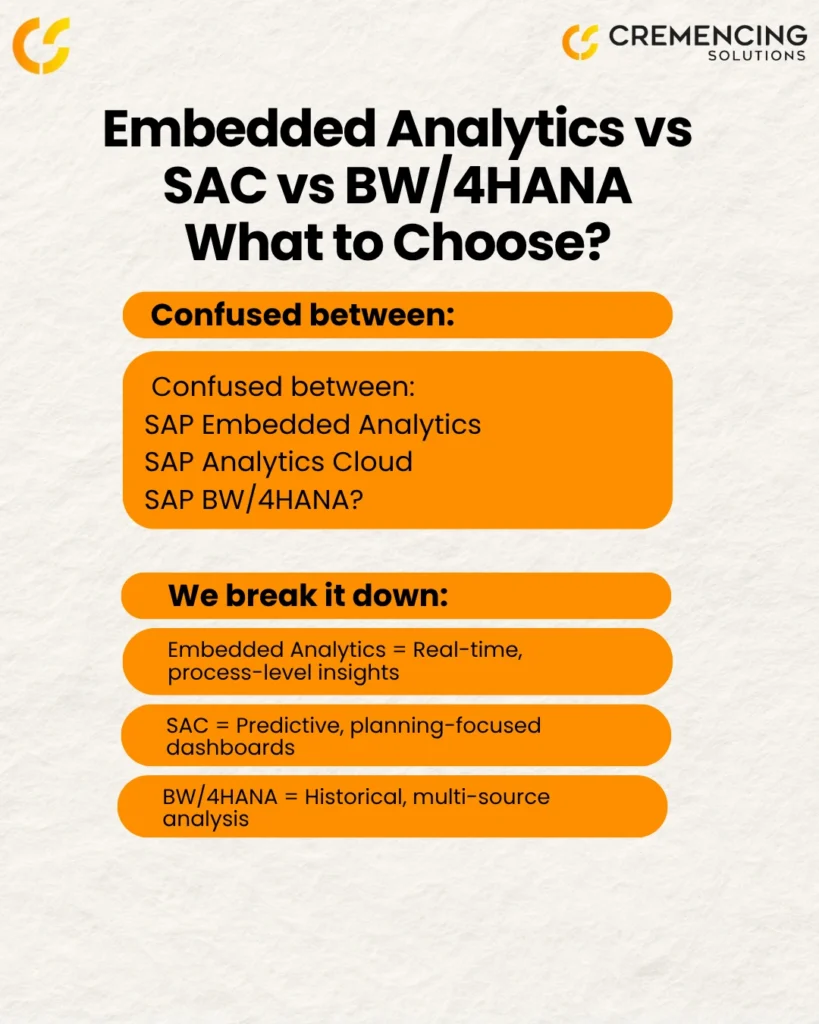
SAP Embedded Analytics vs. SAP Analytics Cloud vs. BW/4HANA
| Feature | SAP Embedded Analytics | SAP Analytics Cloud (SAC) | BW/4HANA |
| Real-Time Access | Yes | Yes (Live/Import) | No |
| Data Scope | Operational | Strategic & Predictive | Historical, multi-source |
| Modeling Complexity | Low | Medium | High |
| Ideal For | Daily users | Analysts & planners | Data consolidation & long-term analysis |
Conclusion
In summary, SAP S/4HANA Embedded Analytics is a Strategic Move from Classic Business Intelligence into a real-time embedded operational reporting. It makes infrastructure leaner, improves decision-making, reduces the cost of data duplication, and eliminates the need for third-party tools.
Together with AI and predictive functions, it sets companies up to shift from reactive to proactive— and even predictive operations.
At Cremencing. com, we enable companies to build and customize embedded analytics for their SAP systems, troubleshoot performance problems they encounter in S/4HANA, and fully capitalize on their intelligent ERP.
Looking for assistance with building or enhancing SAP S/4HANA Embedded Analytics?
At Cremencing Solution, we are Masters of SAP Custom Development. Whether it’s building CDS views and VDMs, speeding up your system or even plugging in AI-driven analytics — we’re here to make a difference.
Visit our Custom Development page or Contact Us to schedule a consultation.
Frequently Asked Questions
1. What is SAP S/4HANA Embedded Analytics?
It’s a native analytics capability within S/4HANA that provides real-time access to business data for operational reporting and decision-making. It uses CDS views and is integrated into business processes.
2. What is SAP S/4HANA Overview?
SAP S/4HANA is SAP’s latest ERP suite, built on the HANA in-memory database, featuring a simplified data model, Fiori UX, and embedded intelligence including analytics, AI, and machine learning.
3. What is the SAP Embedded Analytics job description?
A professional in this role builds and maintains CDS views, develops Fiori dashboards, ensures performance tuning, and integrates S/4HANA with analytics tools like SAC or BW/4HANA.
4. Which Reports Are Included with SAP Embedded Analytics?
Embedded Analytics includes hundreds of standard reports across finance, logistics, procurement, and manufacturing all built on CDS views and accessed through SAP Fiori and related tools.
5. How do CDS Views support SAP S/4HANA Embedded Analytics?
CDS Views provide the semantic data model for Embedded Analytics. They define business entities, associations, calculations, and annotations that support analytical queries. Developers use them to create reusable data models for reporting without physically replicating transactional data.
6. Can SAP S/4HANA Embedded Analytics handle complex reporting requirements?
Yes. Embedded Analytics supports complex operational reporting through layered CDS Views, analytical queries, calculated measures, and aggregations. However, reports involving extensive historical data or multiple external systems may require SAP BW/4HANA or SAP Datasphere.
7. What is the difference between an analytical CDS View and a transactional CDS View?
Transactional CDS Views expose business data for operational applications and processes, while analytical CDS Views are designed for reporting, aggregation, and analytical queries. Their annotations and modelling approaches differ according to how the data will be consumed.
8. How can developers improve SAP Embedded Analytics performance?
Developers can improve performance by optimizing CDS View associations, reducing unnecessary joins, limiting data selection, reviewing complex calculations, and analyzing SQL execution plans. Monitoring workload and testing analytical queries also help identify performance bottlenecks.