
A ServiceNow incident can be closed while SAP Cloud ALM still shows the event as active. That simple mismatch exposes a bigger problem with Cloud ALM integration with ServiceNow: creating a ticket is only the first step. If status, ownership, correlation, and closure do not move correctly between both platforms, support teams can end up working from conflicting views of the same incident.
The challenge becomes more important when Cloud ALM monitors ECC 6.0, Business Suite 7, or SAP S/4HANA environments and feeds operational events into an established ServiceNow workflow. Teams need to understand what the standard integration actually synchronizes, how event-to-ticket mapping works, what information must return to Cloud ALM, and where middleware makes more sense than direct integration. This guide breaks down those integration points so you can design an incident workflow that stays consistent from detection through closure.
What Is Cloud ALM Integration with ServiceNow and Why It Matters?
Cloud alm integration with ServiceNow connects monitoring events detected by SAP Cloud ALM for Operations with incident-processing workflows in ServiceNow. Cloud ALM identifies the SAP condition, while ServiceNow assigns the incident, applies SLA rules, records investigation work, and controls the support process.
The standard scenario does not copy every object between the platforms. SAP provides a ready-to-use ServiceNow Incident Management integration with a predefined mapping for Cloud ALM event situations. Teams configure the ServiceNow endpoint, create a webhook and subscription, select a mapping, and attach the ticket action to relevant monitoring events.
The basic ownership model should remain clear:
- SAP Cloud ALM owns the monitoring event and SAP context.
- ServiceNow owns incident assignment and ITSM processing.
- The integration owns correlation and status exchange.
This distinction prevents both systems from acting as competing incident masters. A monitoring engineer should not close a ServiceNow incident by editing the Cloud ALM event manually unless the agreed workflow supports that action.
What the Standard Integration Shares
A standard SAP Cloud ALM ServiceNow integration can map information such as:
- Event title and description
- Event rating or severity
- Affected SAP system or service
- Cloud ALM event and navigation URLs
- Incident category and subcategory
- Impact and urgency
- Assignment information
- External incident number
- ServiceNow record identifier
- Incident URL and status
ServiceNow normally receives the create request through its Incident Table API endpoint:
/api/now/table/incident
The ServiceNow Table API supports create, retrieve, update, and delete operations on permitted tables. The technical identity making the request must also pass ServiceNow roles and access-control rules for the incident table and mapped fields.
Creating the incident is only the first part of ALM integration with ServiceNow. Cloud ALM must store the returned incident identifier so later updates, status checks, and close actions target the same ServiceNow record.
SAP requires a one-to-one relationship between an event situation and the external ticket number in the standard ticket model. The create response must therefore return the ticket identifier synchronously; otherwise, Cloud ALM cannot associate later actions with the created record. Read more on SAP Cloud ALM Monitoring Use Cases.
Why SAP Teams Connect Both Platforms
SAP operations teams need technical context from Cloud ALM. Service-desk teams need incidents inside the enterprise ITSM queue where assignment groups, SLAs, escalations, communications, and support reporting already exist.
Without cloud alm integration with servicenow, an operator may copy an alert into ServiceNow manually. That process loses identifiers, delays assignment, introduces inconsistent descriptions, and makes it difficult to update or close the correct Cloud ALM event.
With a governed integration, Cloud ALM can create the incident using the event payload and store the ServiceNow number, record ID, and URL. ServiceNow agents can then work inside their normal incident process while retaining a link to the original SAP event.
The value comes from controlled handoff rather than duplicated monitoring. Cloud ALM should explain what failed in the SAP landscape; ServiceNow should manage who investigates it and whether the response meets the agreed support target.
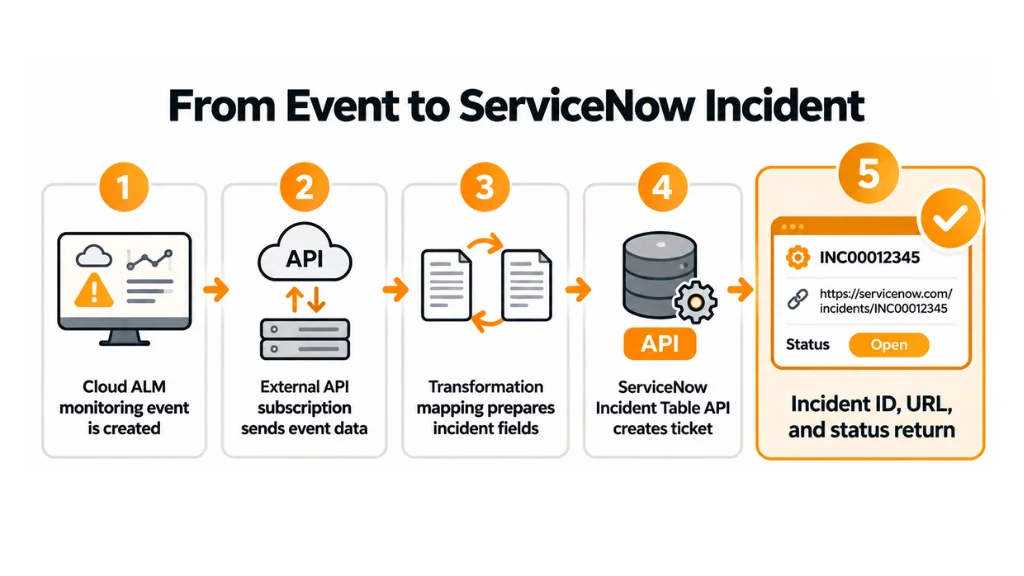
How Cloud ALM Integration with ServiceNow Works — The Internals
The runtime flow begins when a supported SAP monitoring use case creates an event situation. The source can be a monitored ECC 6.0 system, SAP S/4HANA system, SAP BTP service, or another supported cloud product.
SAP system or cloud service
↓
SAP Cloud ALM monitoring event
↓
Event situation and event action
↓
External API subscription
↓
Transformation mapping
↓
ServiceNow Incident Table API
↓
Incident number, sys_id, URL, and status
SAP Cloud ALM uses the External API Management application to manage webhooks, subscriptions, mappings, outbound calls, request data, and response data. A subscription watches one Cloud ALM resource type, applies an optional transformation, and sends the resulting message to the configured external destination.
For the standard Cloud ALM integration with ServiceNow, the resource type is normally EVENT-SITUATION. The webhook points to the ServiceNow incident endpoint, and the subscription links that webhook to the selected transformation mapping.
Connection and Authentication
Teams can create the ServiceNow service and endpoint in Cloud ALM Landscape Management. The service stores the ServiceNow root URL, instance identity, endpoint, and supported authentication configuration.
When Landscape Management does not support the required authentication method, teams can create a destination in the SAP BTP subaccount used by Cloud ALM. The destination then controls the endpoint and authentication settings.
For production alm integration with servicenow, use:
- A dedicated technical identity
- Minimum incident-table permissions
- OAuth client credentials where supported
- Secure secret storage
- Credential rotation
- Separate development, test, and production endpoints
- No ServiceNow administrator role for normal runtime calls
A successful authentication test does not prove that the identity can create or update every mapped field. ServiceNow applies access-control rules to REST calls, so the integration user may authenticate successfully and still receive a 403 Forbidden response for restricted fields or records.
SAP’s example also advises setting the ServiceNow technical user’s time zone to GMT and date format to MM-dd-yyyy. This reduces timestamp inconsistencies between Cloud ALM events and ServiceNow incident records.
Webhooks, Subscriptions, and Mappings
A webhook tells Cloud ALM where to send the request. For a ServiceNow incident, the path normally points to:
/api/now/table/incident
A subscription defines which Cloud ALM resource changes trigger that webhook. The subscription also selects the mapping that converts the Cloud ALM event structure into the ServiceNow incident structure.
SAP Cloud ALM supports rule-based and payload-based mappings. Built-in mappings cannot be edited directly, but administrators can duplicate them and use the copy as a customer template.
That copy becomes necessary when ServiceNow has custom mandatory fields, custom states, domain separation, assignment rules, or additional SAP-specific attributes.
A productive Cloud ALM integration with ServiceNow should map at least:
| Cloud ALM information | ServiceNow field or purpose |
| Event subject | short_description |
| Event details | description |
| Rating | Impact and urgency |
| System or service | CI reference or SAP system field |
| Event identifier | Correlation field |
| Cloud ALM URL | Navigation field or description |
| Responsible service | Assignment group |
| Event state | Incident-state logic |
Priority needs special attention. ServiceNow usually calculates priority from impact and urgency rather than accepting a free priority value in every implementation.
When all Cloud ALM alerts create medium-priority incidents, adjust the duplicated mapping. SAP Community guidance confirms that different incident priorities should be controlled through the ServiceNow mapping structure and its rules.
Created, Updated, Ping, and Closed Actions
The standard mapping defines communication events such as:
- CREATED — create the ServiceNow incident
- UPDATED — update the linked incident
- PING — retrieve or check current incident status
- CLOSED — close the linked incident
These actions require Cloud ALM to retain the returned ServiceNow identifier. An update cannot reliably target an incident using only the visible INC number when the API expects the ServiceNow sys_id.
This is where many cloud alm integration with servicenow projects stop too early. The incident creation test passes, but no one defines how ServiceNow resolution changes the linked Cloud ALM event.
SAP’s general external-ticket model expects bidirectional status exchange. However, its ready-to-use ServiceNow example remains a baseline and does not implement every customer-specific callback or back-communication process.
The production design must therefore answer:
- Does Cloud ALM poll ServiceNow through a PING operation?
- Does ServiceNow call the Cloud ALM Event Situations API?
- Which ServiceNow states close or confirm the event?
- What happens when an incident is reopened?
- Which platform owns final closure?
- Can an operator close one side while the other remains active?
Without these decisions, the result is automated ticket creation rather than bidirectional ticket integration.
Practical Cloud ALM Integration with ServiceNow Code Walkthrough
Start by creating a dedicated ServiceNow technical user with permission to create, read, and update incidents. Test its permissions against the ServiceNow Table API before configuring Cloud ALM.
In SAP Cloud ALM, open Landscape Management, which maintains connected systems, services, and endpoints. Add a cloud service of type ServiceNow, enter the instance root URL, create the endpoint, select the authentication method, and run the connection check.
Next, open External API Management, which manages outbound integrations. Create a webhook using the ServiceNow endpoint and the incident-table path.
Create a built-in subscription for resource type EVENT-SITUATION. Select the new webhook and begin with SAP’s delivered ServiceNow mapping.
Duplicate that mapping before adding customer fields or changing priority logic. Do not edit production mapping rules without source control, peer review, and a rollback copy.
Example ServiceNow Incident Payload
The following is a valid example of the JSON body that the ServiceNow Table API can accept. Cloud ALM mapping rules should generate the required values from the event payload.
{

  "short_description": "SAP Cloud ALM: Sales order interface failed",

  "description": "Cloud ALM detected repeated interface errors in S4P. Review the linked event before resolving this incident.",

  "category": "software",

  "subcategory": "SAP",

  "impact": "2",

  "urgency": "2",

  "correlation_id": "CALM-EVENT-7E39A1",

  "u_sap_system": "S4P",

  "u_cloud_alm_url": "https://example.alm.cloud.sap/event/7E39A1"

}
The custom fields beginning with u_ are examples only. Replace them with fields that exist in your ServiceNow instance.
Use a stable Cloud ALM identifier in the ServiceNow correlation field. Do not use a changing description or timestamp as the only correlation key.
Activate and Test the Event Action
Return to the relevant Cloud ALM monitoring configuration. Select the monitored service, open the event configuration, enable ticket creation, and assign the ServiceNow subscription.
Trigger one controlled event. Confirm that:
- Cloud ALM creates the event situation.
- External API Management sends the request.
- ServiceNow creates one incident.
- ServiceNow returns its number and sys_id.
- Cloud ALM stores the external ticket details.
- An update changes the same incident.
- Resolution follows the agreed return-status process.
Open the Console view in External API Management when no ticket appears. It shows outbound requests, mapped request data, response data, HTTP status, and delivery errors. SAP Community specifically recommends this console when Cloud ALM creates an alert or email but no ServiceNow ticket.
Common errors include:
| Error | What to check |
| 400 BAD_REQUEST | JSON structure, mandatory fields, mapping values |
| 401 Unauthorized | Credentials, token, OAuth configuration |
| 403 Forbidden | ServiceNow roles, ACLs, field permissions |
| 404 NOT_FOUND | Instance URL, table path, or sys_id |
| 422 UNPROCESSABLE_ENTITY | Invalid close/update value or mapping |
| 502 BAD_GATEWAY | Proxy, gateway, or unexpected API response |
SAP documents 400 and 422 errors for external-ticket integrations, including ServiceNow, in its current KBA guidance.
When to Use Cloud ALM Integration with ServiceNow vs. Alternatives
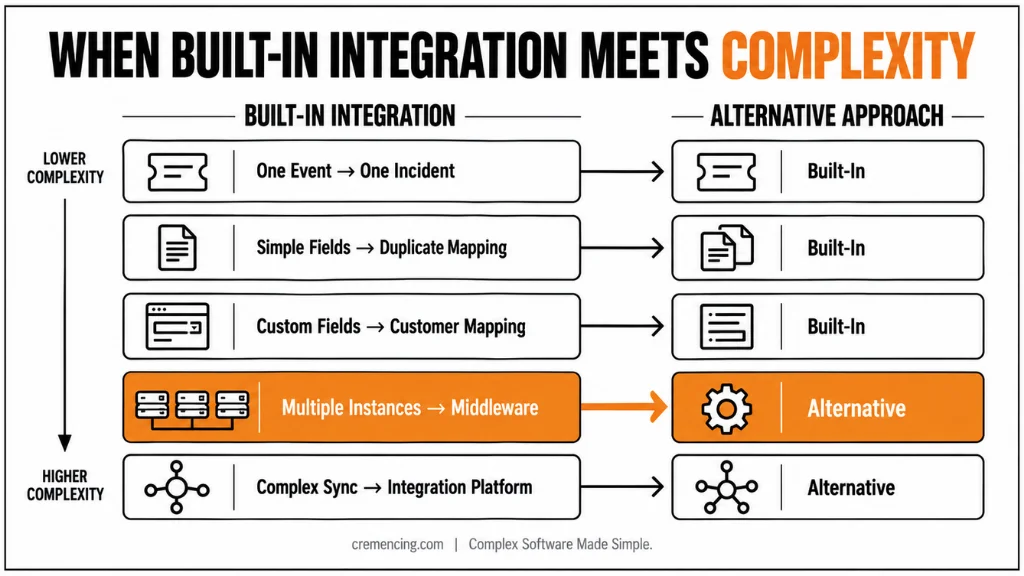
Use the built-in Cloud ALM integration with ServiceNow when one Cloud ALM event should create one ServiceNow incident and the standard incident table remains close to its normal structure.
It also fits when Cloud ALM mapping rules can handle required field transformations, and ServiceNow can return the incident identifier in the create response.
| Requirement | Recommended approach |
| One Cloud ALM event creates one incident | Built-in ServiceNow integration |
| Simple field and priority mapping | Duplicated Cloud ALM mapping |
| Custom mandatory incident fields | Customer mapping based on SAP template |
| Several ServiceNow instances | Middleware or separate governed endpoints |
| One incident represents several events | Middleware with grouping logic |
| CMDB enrichment before ticket creation | SAP Integration Suite or API platform |
| Attachment synchronization | Middleware or custom API service |
| Comments and work-note synchronization | Custom ServiceNow and Cloud ALM APIs |
| ServiceNow incident creates a Cloud ALM defect | Middleware integration |
| Complex retry and dead-letter handling | Integration platform |
Conclusion
A successful cloud ALM integration with ServiceNow does more than turn a monitoring event into an incident. Cloud ALM must send useful SAP context, ServiceNow must return a stable record identifier, and both platforms must follow agreed rules for updates, priority, ownership, resolution, and reopening.
Start with the built-in incident pattern when one event maps cleanly to one ticket. Add custom mappings or middleware only when the workflow requires grouping, CMDB enrichment, attachments, multiple instances, or broader synchronization. This keeps ALM integration with ServiceNow controlled, supportable, and clear to both SAP and ITSM teams.
Teams should also validate the integration after deployment. Test alert creation, ticket updates, ownership changes, priority mapping, and closure behavior from both sides. Review failed or duplicate records during the initial monitoring period and adjust the mapping rules where needed. Clear ownership also matters after go-live. SAP teams should know which issues they own, while ITSM teams should understand which ServiceNow fields and workflows control the incident lifecycle.
The goal is not simply to connect two platforms. The integration should create a reliable operational path from SAP monitoring to ITSM response. When teams define that path clearly and maintain it as the landscape changes, Cloud ALM and ServiceNow can support faster triage without creating unnecessary ticket noise.
Frequently Asked Questions
1. Is there a step-by-step guide for Cloud ALM integration with ServiceNow?
Yes. SAP’s External Ticket Systems page provides the official sequence for creating the ServiceNow service, endpoint, webhook, subscription, mapping, and event action. A production ServiceNow incident integration should add security review, custom-field mapping, correlation, closure handling, and full lifecycle testing.
2. Does the integration support OAuth and an API gateway?
Yes, but the design depends on the endpoint and authentication method. For production SAP Cloud ALM external ticketing, use a BTP destination when Landscape Management does not support the required OAuth, certificate, gateway, or custom-header configuration. Test the complete token and authorization flow before activating event actions.
3. Where can I see failed ServiceNow ticket requests?
Open the Console view in SAP Cloud ALM External API Management. It displays outbound calls, request payloads, responses, and delivery statuses. Use the Cloud ALM event timestamp to locate the corresponding ServiceNow incident integration request and identify mapping, authentication, endpoint, or response errors.
4. How do I change ServiceNow incident priority?
Change the duplicated ServiceNow mapping in Cloud ALM. Map the Cloud ALM event rating to ServiceNow impact and urgency values, which normally calculate incident priority. Test every combination because custom ServiceNow priority matrices can produce different results from the standard Cloud ALM event situation mapping.
5. How do I integrate SAP Cloud ALM with ServiceNow?
Create a ServiceNow endpoint, webhook, EVENT-SITUATION subscription, mapping, and monitoring event action. The SAP Cloud ALM ServiceNow integration then transforms qualifying event situations into incident API requests and stores the returned ServiceNow identifier for later updates and status checks.
6. Is Cloud ALM integration with ServiceNow bidirectional?
The general external-ticket model is bidirectional, but the delivered ServiceNow example does not implement every return process. A complete bidirectional ticket integration must define polling or callback behavior, state mapping, reopen handling, and which platform owns final closure.
7. Can Cloud ALM automatically close ServiceNow incidents?
Yes, the standard mapping includes a CLOSED communication event, but automatic closure depends on the configured mapping and ServiceNow state model. The reverse direction also needs design: resolving ServiceNow should update or confirm the related Cloud ALM event according to the approved workflow.
8. Should I use POST or PUT to create a ServiceNow incident?
Use POST to create a new incident. An update uses the existing record identifier normally the ServiceNow sys_id with the operation supported by that API. Using PUT without an incident identifier will not create the expected record through the ServiceNow Table API.
References and Further Reading
Integration with External Ticket Systems
.





One Response