

Introduction
In today’s fast-paced corporate world, SAP BW 7.4 Open ODS Views are essential tools for businesses needing agile and efficient data modeling. Traditional data warehousing methods, which sometimes have long development cycles and complicated ETL (Extract, Transform, Load) processes, might make it take longer for insights to get to decision-makers.
This is where SAP BW 7.4 Open ODS Views come in and change the game. Learn more about SAP BW on Wikipedia SAP BW 7.4 Open ODS Views change the way we represent data by letting us access external data sources more quickly, flexibly, and easily without having to develop InfoObjects or wait for long data activation processes.
We at Cremencing.com are experts in SAP Custom Development. We help organizations use this cutting-edge technology to speed up SAP BW projects and get closer to their business goals.
This blog will talk about what SAP BW 7.4 Open ODS Views are, what they can do for you, how they are different from old methods, some real-world examples of how they are used, and how Cremencing can help you use this technology.
SAP BW 7.4 Open ODS Views
SAP BW 7.4 Open ODS Views are virtual data models in the SAP Business Warehouse (BW) environment that let you access data from outside sources like database tables, views, or BW DataSources directly. Unlike regular ODS (Operational Data Store) objects, Open ODS Views do not store data persistently, which means they provide a virtual layer for on-the-fly data access.
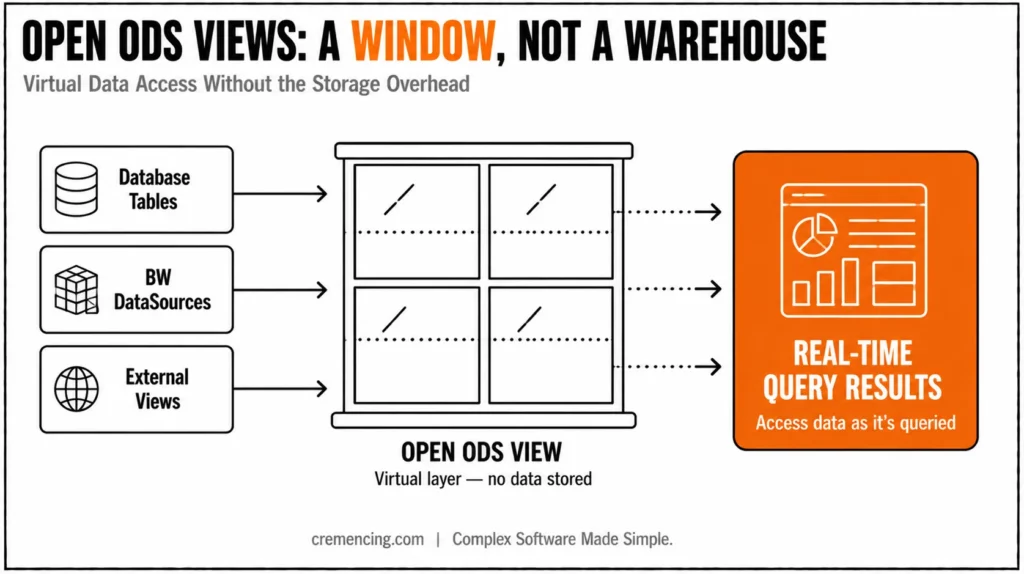
Consequently, this method does away with the long ETL procedure and data activation phases, which speeds up prototyping and cuts down on the time it takes to create and test.
Key characteristics of Open ODS Views include:
No need for InfoObjects: They take fields from the source system directly, and metadata automatically determines the data kinds and lengths.
Virtual or meta-objects: They do not store data, so changes and tests can be done quickly without impacting storage.
Access to data in real time: Data is collected and changed while a query is running.
Integration capabilities: You can use it with SAP BW master and transactional data in queries.
Flexibility: Can be used in side-car deployment situations on BW on HANA; therefore, it can work with current SAP BW landscapes.
Why You Need Agile Data Modelling
Long development cycles are common in traditional SAP BW projects. Specifically, data extraction, loading, transforming, and activation all take a significant amount of time. As a result, business users often face delays before testing changes. Business customers sometimes have to wait until the next day to test changes, which makes things take longer and makes feedback loops slower.
This slowness can be summed up as:
- Creating and keeping up with complex InfoObjects
- Long ETL and data activation processes
- Problems with data availability have caused multiple testing cycles to be postponed.
- People think that BW is slow because of technical overhead.
Fortunately, Agile data modelling helps with these problems by encouraging:
- Rapid prototyping without having to define InfoObjects ahead of time.
- On-the-fly data consumption that reduces wait times.
- Iterative development which allows for frequent validation and business feedback.
- Reduced technical complexity, thereby improving collaboration between technical and business teams.
Less complicated technology makes it easier for technical and business teams to work together. SAP BW 7.4 Open ODS Views are a good example of this agile attitude because they get rid of a lot of old problems.
Benefits of SAP BW Open ODS
Faster Development and Testing Cycles
Open Ms–ODS Views allow developers visibility into models Wi–without waiting for data activation. As a result, this speeds up the whole development process:
- Make a prototype and test it in hours instead of days.
- Let business users test logic on the same day that changes are made.
- More rounds of testing lead to higher quality and fewer problems after going live.
Reduced Data Storage and Maintenance
- There is no need to store duplicate data, because Open ODS Views do not keep data.
- As a result, costs for hardware and storage are lower.
- Furthermore, managing large amounts of data is less work for administration.
Flexibility and Integration
Open ODS Views can use data from many different places, such as: Native database tables and views.
- SAP BW DataSources.
- SAP HANA Smart Data Access connects to external databases.
- This flexibility makes it possible to incorporate external and internal SAP data sources in hybrid settings without any problems.
Enhanced Business Agility
- First, teams can quickly adapt to changing business needs. In addition, changes in scope are easier to handle without a lot of extra work. Moreover, Open ODS Views support sidecar BW on HANA deployments. As a result, enterprises can innovate without interrupting their existing systems.
Real-World Use Case: Enterprise Procurement Management
Open ODS Views make source system tables available to BW directly in a procurement environment, allowing for quick prototyping. Developers may easily make views that show procurement transactions and master data. This lets business users perform tests and access information without having to wait for ETL and activation.
As a result:
- Problems are being found faster.
- Company decisions are made more quickly.
- Better teamwork between IT and business.
How Open ODS Views Differ from Traditional ODS
| Feature | Traditional ODS | Open ODS Views |
| Data Storage | Persistent data storage | Virtual; no data stored |
| InfoObject Requirement | Mandatory | Not required |
| ETL Process | Required | Eliminated |
| Data Activation | Time-consuming | Not needed |
| Testing Cycle Speed | Slow due to data loads | Fast, real-time data access |
| Data Integration | Limited to BW objects | Combines external and BW data |
| Flexibility | Lower | High, supports hybrid scenarios |
Technical Overview:
How to Create an SAP BW Open ODS
Using BW Modeling Tools in Eclipse or HANA Studio:
First, select New Open ODS View. Next, choose your source type, such as a database table, a view, or a DataSource. Then the system automatically imports the fields with their metadata. After that, map the fields if needed, without creating InfoObjects. Finally, activate the view so you can use it immediately in queries and transformations.
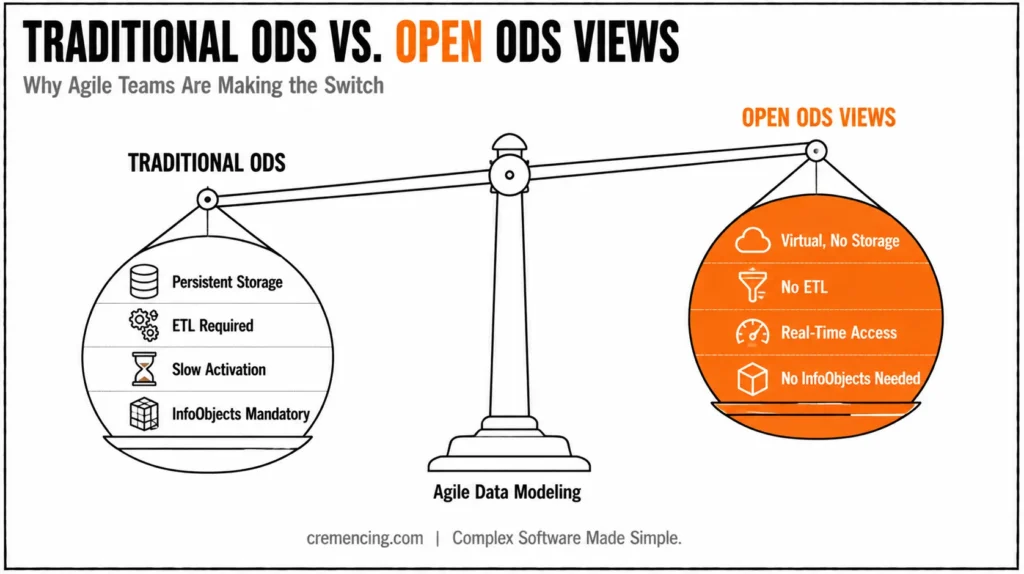
This simplicity supports faster turnaround from development to validation.
Common Questions Around Open ODS Views
To assist you further, we answer some frequently asked questions later in this blog to deepen your understanding.
Cremencing’s SAP Custom Development Services
We offer skilled SAP Custom Development services at Cremencing.com to make SAP BW solutions fit your business demands perfectly.
We assist businesses:
- Use agile modelling strategies to speed up the delivery of your SAP BW project.
- Use Open ODS Views to get to data in real time.
- Improve the performance of SAP BW on HANA landscapes.
- Easily control hybrid SAP environments.
Discover more about our SAP Custom Development Services.
Conclusion:
SAP BW 7.4 Open ODS Views change the way data is modeled by letting you use data from many sources in a virtual, agile, and faster way. In particular, they eliminate several traditional bottlenecks, such as ETL delays, InfoObject maintenance, and extended activation times. As a result, businesses can respond promptly to changing requirements and speed up project delivery.
Moreover, being able to swiftly create prototypes and easily connect to external data makes businesses more flexible. In addition, it helps IT and business teams work together better. Open ODS Views can also work with hybrid deployment models. Consequently, businesses can come up with new ideas while still using their current SAP landscapes.
Therefore, businesses that want to use SAP BW 7.4 Open ODS Views efficiently should engage an experienced SAP custom development partner. At Cremencing.com, we have extensive SAP experience and are dedicated to driving innovation through custom development solutions.
Are you ready to speed up your SAP BW initiatives with flexible, tailored solutions? At Cremencing Solution, we are experts in SAP custom development that uses SAP BW 7.4 Open ODS Views to deliver faster, more flexible, and more powerful outcomes. So get in touch with us today to discuss how we can transform your SAP landscape and help your business grow.
Contact Cremencing for SAP Custom Development
Frequently Asked Questions (FAQs)
Q1: What is an Open ODS View in SAP BW?
An Open ODS View is a virtual data model that provides direct access to external data sources without the need for InfoObjects or traditional ETL processes, enabling agile data modeling.
Q2: What is Agile Data Modeling?
Agile Data Modeling is a flexible, iterative approach to data design that allows rapid prototyping and frequent adjustments to meet changing business needs.
Q3: What is the meaning of ODS in SAP?
ODS stands for Operational Data Store, a storage area used to collect and manage detailed transactional data for reporting.
Q4: Which SAP BW objects can be used in Open ODS View associations?
Open ODS Views can be associated with Composite Providers, Advanced DSOs, and other Open ODS Views to build integrated models.
Q5: What are ODP and ODQ in SAP BW?
ODP (Operational Data Provisioning) is a framework for data extraction and replication; ODQ (Operational Data Queue) manages the data delivery queue within ODP.
Q6: What are the prerequisites for using Open ODS Views in SAP BW 7.4?
You need SAP BW 7.4 SP08 or higher running on SAP HANA, along with the BW Modeling Tools in Eclipse or SAP HANA Studio. You also need access to the source objects, such as database tables, views, or DataSources, that you want to expose.
Q7: Can Open ODS Views be used with SAP HANA Smart Data Access (SDA)?
Yes. Open ODS Views can use SDA to connect to remote databases such as Oracle, SQL Server, and Teradata. This lets you report on external data in real time without physically moving it into SAP BW.
Q8: Do Open ODS Views impact query performance?
Because Open ODS Views are virtual, data is read from the source at query runtime. Performance therefore depends on the source system, the data volume, and the complexity of the query. For high-volume or frequently used data, you can later convert an Open ODS View into an Advanced DSO or a persistent InfoProvider to improve performance.
Q9: What is the difference between an Open ODS View and a CompositeProvider?
An Open ODS View exposes a single source as a virtual BW object, with field metadata derived automatically. A CompositeProvider combines multiple InfoProviders through unions or joins to create a unified reporting layer. In practice, the two are often used together: Open ODS Views feed into CompositeProviders for integrated reporting.
Q10: Can an Open ODS View be converted to a persistent data model later?
Yes. This is one of the biggest advantages of the approach. You can start with a virtual Open ODS View for quick prototyping, then use the built-in conversion function to generate InfoObjects, an Advanced DataStore Object, and the related transformations. This supports a gradual shift from agile prototyping to a fully governed data warehouse model.