

Introduction
ABAP for BW is not simply ABAP placed inside a different SAP application. The important skill is knowing where the code executes, what data package it receives, what it can safely modify, and whether the transformation should run in ABAP or be pushed toward SAP HANA.
That distinction matters when BW loads move from small development datasets to production volumes. A routine that appears reasonable during testing can become expensive when it processes large packages repeatedly. Developers therefore need more than ABAP syntax: they need to understand BW transformation routines, DTP execution, runtime selection, debugging, and the limits of application-server processing.
This ABAP for BW tutorial focuses on those practical decisions. It covers how start and end routines behave, where custom ABAP fits, when HANA runtime and SQLScript become relevant, and how to debug transformation logic before it affects a production load.
What You Should Understand First
Writing an ABAP for BW tutorial isn’t primarily about logic; it’s about understanding how data moves through a pipeline, where performance and transformation accuracy outweigh elegant code structure. Most developers who struggle with BW ABAP do so because they treat routines like ordinary ABAP reports, written once and run against a manageable dataset. BW doesn’t work that way. The same block of code that runs fine against 500 test rows can grind a production load to a halt at 50 million.
BW ABAP Comparison
| Feature | Classic ABAP (Reports) | ABAP for BW Tutorial Context |
| Execution | User-triggered | ETL pipeline-driven |
| Data volume | Medium | Very high (millions of records) |
| Runtime | Dialog/background | BW DTP processing |
| Debugging | SE38/SE80 | RSA1 / DTP monitor |
| Performance focus | Optional | Critical requirement |
| Logic type | Procedural ABAP | Transformation-based ABAP |
Debug the DTP, Not Just the ABAP Code
A syntax check only proves that the code can be processed by the ABAP compiler. It does not prove that the transformation produces the correct BW result.
For BW/4HANA, SAP provides DTP simulation and debugging so developers can test transformation behavior before executing the actual data transfer. Breakpoints can be used at important stages, including before transformation processing, after transformation processing, after a start routine, and before an end routine.
A practical troubleshooting sequence is:
- Reproduce the problem with a controlled DTP selection.
- Use Simulate in Dialogue where supported.
- Set a breakpoint around the transformation or routine.
- Inspect the incoming package.
- Check the package after the routine executes.
- Compare the result with the expected target values.
- Only then test the full production-scale request.
This is especially important when moving logic between ABAP runtime and HANA runtime. SAP documents behavioral differences between the runtimes, including type conversion and rounding, so a technically valid routine can still produce different results after a runtime change. For developers moving beyond application-server processing, our SAP HANA/AMDP content provides additional context on database-side development.
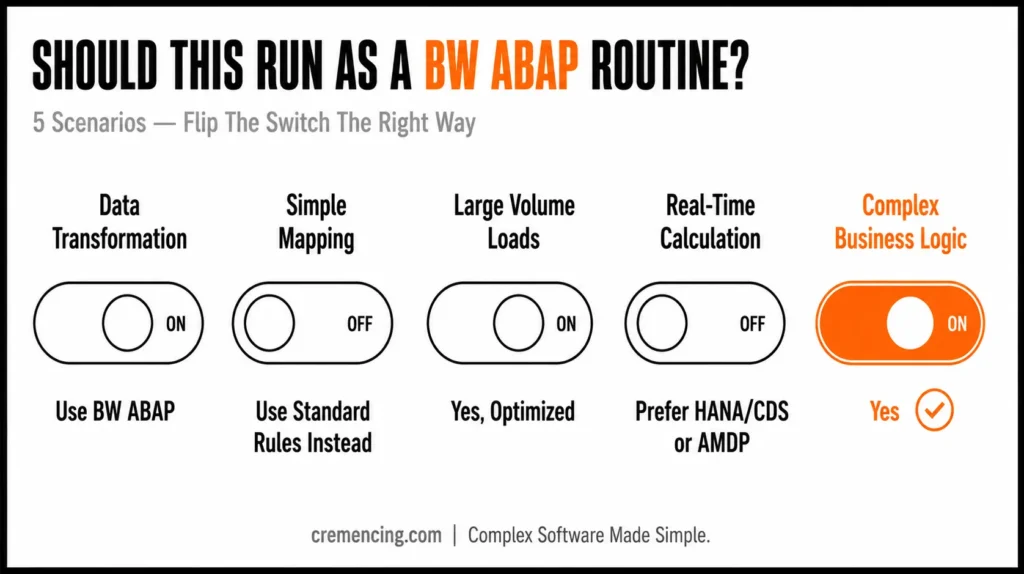
Traditional BW ABAP Routines
A lot of developers write start and end routines the same way they’d write any report without thinking about how the data packet is actually being processed underneath.
Example: Start Routine (Unoptimized)
DATA: lt_data TYPE STANDARD TABLE OF /bic/azsales.
LOOP AT source_package INTO DATA(ls_source).
ls_source-amount = ls_source-amount * 1.1.
APPEND ls_source TO result_package.
ENDLOOP.
The problem: this runs fine against a small test dataset, but it falls over in real BW loads carrying millions of records because:
- There’s no internal table optimization
- No field-symbol usage, so each loop iteration copies data unnecessarily
- No awareness of how the packet itself is structured
- Memory consumption climbs fast as record counts grow
Optimized BW ABAP Usage
ABAP for BW tutorial needs to respect how data packets work and avoid looping in a way that copies the entire structure into memory.
Optimized Start Routine in BW Transformation
FIELD-SYMBOLS: <ls_source> TYPE any.
LOOP AT source_package ASSIGNING <ls_source>.
” Direct modification avoids extra memory copy
<ls_source>-amount = <ls_source>-amount * ‘1.10’.
ENDLOOP.
Why this performs better:
- Field-symbols mean you’re working with a reference to the existing row, not a fresh memory allocation per iteration
- The logic operates per packet, in line with how DTP processing actually moves data
- Runtime overhead drops significantly at scale
- It matches the execution model BW’s ETL engine was actually designed around
If you are also comparing traditional ABAP development with newer SAP development models, see our article on ABAP Cloud vs. Classic ABAP
ABAP vs. AMDP — The BW/4HANA Pushdown Question
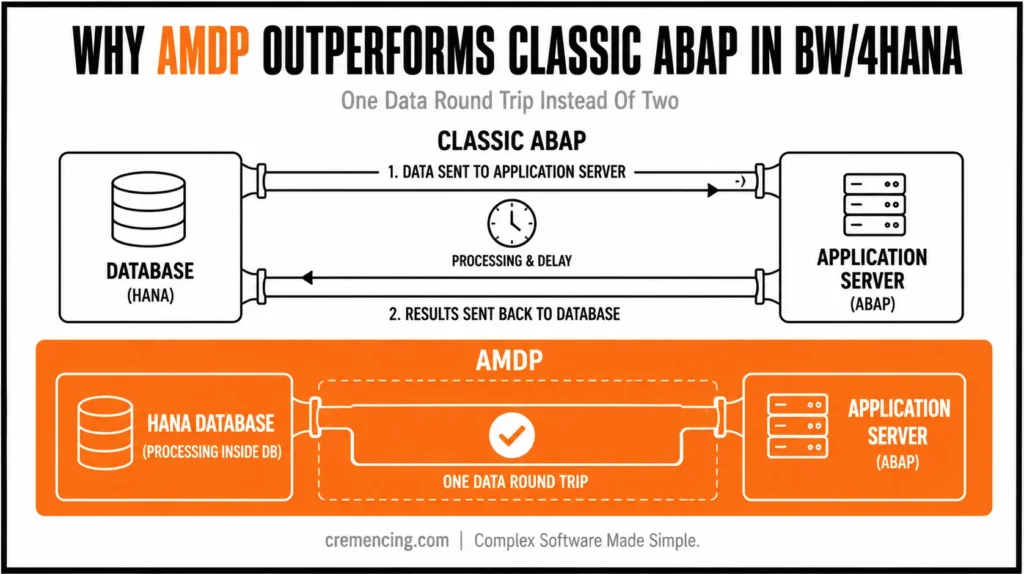
This is where most ABAP for BW tutorials stop short, and it matters more than ever in BW/4HANA landscapes. Since BW 7.4 on HANA, transformations can run in one of two runtimes: classic ABAP, executed on the application server, or AMDP (ABAP Managed Database Procedure), which pushes the logic down into the HANA database layer itself.
The difference isn’t cosmetic. In classic ABAP-based transformation, data is read from the database up to the application server, processed row by row, and shipped back down to write the result, meaning the data crosses the application/database boundary twice. AMDP-based transformation keeps everything inside HANA: source-to-target processing happens in a single step, without that round trip.
Working with BW/4HANA?
- Mixed data flows are allowed, with a catch. You can combine HANA-pushdown transformations and ABAP-routine transformations in the same stacked data flow, but if an upper-level transformation contains an ABAP routine, only the ABAP runtime is supported for that step, even if everything below it is HANA-pushdown capable.
- AMDP has its own debugger. SAP NetWeaver 7.50 with a sufficiently recent HANA revision includes a dedicated AMDP debugger with breakpoints set the same way as in standard ABAP debugging.
- Don’t default to expert routines just because tutorials emphasize them. In traditional BW modelling, expert routines were rarely used. Several BW developers moving to AMDP have noted that most AMDP tutorials lean heavily on expert routine examples, which isn’t necessarily the established best practice, just the easiest case to demonstrate.
- AMDP coding effort isn’t dramatically higher, assuming reasonable SQLScript fluency, but that fluency is the real prerequisite. If your team doesn’t know SQLScript, the learning curve is the actual cost of adopting AMDP, not the framework itself.
For data-intensive transformations, AMDP generally outperforms classic ABAP routines because it eliminates the back-and-forth data transfer and processes everything where the data already lives. That doesn’t mean ABAP routines disappear for lighter logic or when a mixed data flow forces ABAP runtime anyway; classic routines remain the right tool. BW development still leans heavily on classic ABAP patterns; see ABAP Cloud vs Classic ABAP: what most developers get wrong for context on where BW fits today.
ABAP for BW Runtime Comparison Table
| Area | ABAP Runtime | SAP HANA Runtime / SQLScript |
|---|---|---|
| Main execution location | ABAP application layer | SAP HANA database |
| Typical routine language | ABAP | SQLScript |
| Routine implementation | BW-generated local ABAP class | BW-generated AMDP-based implementation |
| Best fit | Logic that requires ABAP processing or is not suitable for HANA runtime | HANA-supported data-intensive processing and pushdown |
| Data movement | May require application-server processing | Can keep supported processing closer to the data |
| Debugging | ABAP/DTP simulation and debugger | Runtime-specific tooling and restrictions apply |
| Main consideration | ABAP compatibility and package processing | Pushdown support and HANA-runtime behavior |
Conclusion
An ABAP for BW tutorial worth following isn’t really about ABAP syntax in isolation; it’s about understanding how that syntax behaves once it’s running inside BW’s ETL pipeline, where data moves in packets rather than single transactions.
In SAP BW systems, identical-looking ABAP code behaves differently depending on where it sits a start routine, an end routine, or an expert routine and in BW/4HANA, whether it’s running as classic ABAP on the application server or pushed down into HANA as AMDP. That’s why performance, memory handling, and the order data flows matter more here than clean syntax ever will.
Once packet processing, transformation logic, and DTP execution behaviour actually click, BW ABAP stops feeling like report programming and starts feeling like what it is: a controlled data-processing layer inside an enterprise data warehouse. The AMDP question adds another dimension to that shift on BW/4HANA; the choice isn’t just “how do I write this logic,” but “should this logic even run on the application server at all, or does it belong pushed down into HANA.”
At that point, the working question changes from how do I write this logic to how do I make sure this logic scales across millions of records without breaking the load or dragging down the ETL process. That’s the real skill gap most tutorials never get around to addressing.
Frequently Asked Questions
1. What is an ABAP for BW tutorial actually teaching?
It’s a way of learning how ABAP is used specifically inside SAP BW transformations, routines, and data extraction processes rather than generic ABAP report writing.
2. Where does ABAP actually get used in SAP BW?
Primarily inside start, end, and expert routines within BW transformations and in extractor enhancements.
3. What is a BW transformation ABAP routine?
Custom ABAP logic that runs during the transfer of data from a source object to a target object in a BW data flow.
4. Why does BW ABAP behave so differently from normal ABAP?
Because it executes inside an ETL pipeline rather than as a user-triggered report, which makes performance and packet handling first-order concerns instead of afterthoughts.
5. What does a Start routine do in BW ABAP?
It processes data before transformation mapping begins in the BW data flow.
6. What is an expert routine, and should I default to it?
An Expert routine replaces the standard transformation logic entirely with fully custom ABAP-controlled processing. It’s powerful but was rarely used in traditional BW modelling; don’t treat it as the default just because online tutorials lean on it for demonstration purposes.
7. How do I debug BW ABAP routines?
Use RSA1, the DTP execution logs, and external breakpoints during data load execution. For AMDP-based transformations on BW/4HANA, there’s a separate AMDP debugger available from NetWeaver 7.50 onward.
8. What usually causes BW ABAP loads to fail or run too slowly?
Most issues trace back to memory overload from unoptimized loops or mishandling of source_package and result_package at scale, exactly the pattern shown in Section 3.




