In older ECC projects, many developers learned a simple rule: use Open SQL for SAP tables and native SQL only when the database has something special to offer. In SAP S/4HANA 2026, that rule still matters, but the discussion around Open SQL vs native SQL has changed because ABAP SQL became stronger, HANA changed database expectations, and ADBC, AMDP, CDS, and SQLScript entered real project work.
Open SQL vs Native SQL
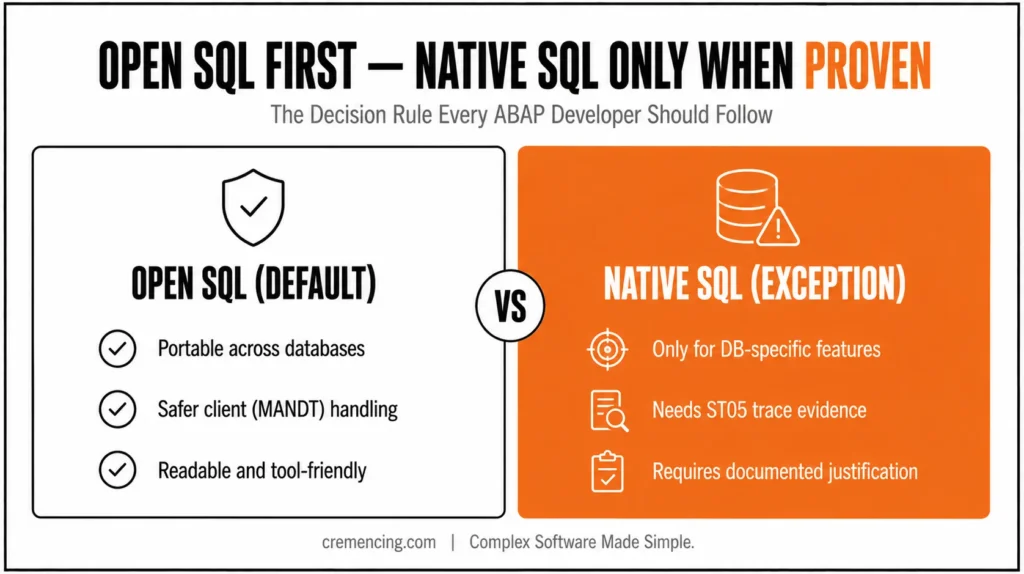
Use Open SQL, now commonly called ABAP SQL in newer SAP documentation, as your default for SAP application data. Use Native SQL only when you need database-specific features, external database access, or a measured case that ABAP SQL cannot solve. Never choose Native SQL because it “feels closer to the database.”
Side-by-Side Comparison Table
| Feature | Old Way | New Way |
| Default choice | Use Open SQL for normal SAP table reads | Use ABAP SQL first for SAP-managed application data |
| Native SQL use | Use when Open SQL lacks a feature | Use only with measured need and release approval |
| Syntax | Classic SELECT … ENDSELECT, older joins, fewer expressions | Modern ABAP SQL with expressions, inline declarations, joins, host variables |
| Performance thinking | Native SQL may be faster because it bypasses abstraction | Trace first; SQL plan, data volume, filters, and indexes decide performance |
| Portability | Often ignored in single-database ECC systems | Critical in S/4HANA, cloud, upgrade, and database migration work |
| Client handling | Developer may forget MANDT in Native SQL | ABAP SQL handles client-dependent access according to Open SQL rules |
| Maintainability | Native SQL hidden inside EXEC SQL blocks | Prefer readable ABAP SQL unless database-specific SQL is justified |
| HANA-specific need | Often solved with direct Native SQL | Consider CDS, AMDP, ADBC, or ABAP SQL depending on the use case |
| Tooling | Basic syntax and runtime checks | ATC, ST05, SQL Monitor, SAT, and code review decide |
| Release support | ECC coding habit | ECC + S/4HANA decision with portability and clean-core review |
This table is the real difference between SAP native SQL vs open SQL in project work. The beginner answer says one is database-independent and the other is database-specific. The senior answer asks whether the code must survive upgrades, database changes, S/4HANA conversion, cloud restrictions, ATC checks, and future support handover.
Treating Native SQL as a Performance Shortcut
The old mistake was simple: a developer saw slow Open SQL, rewrote it as Native SQL, got one faster test run, and treated the case as closed. That looks attractive in ECC systems where the database rarely changes and one Oracle, DB2, SQL Server, or HANA feature solves the immediate issue.
Native SQL in ABAP lets you pass database-specific SQL to the database through the Native SQL interface. Classic code uses EXEC SQL … ENDEXEC. ADBC gives an object-oriented way to work with the same Native SQL interface, often used when developers need dynamic SQL, database-specific statements, or result-set handling outside normal ABAP SQL.
Example: Native SQL That Hides Risk
Here is the kind of Native SQL that looks direct but creates hidden risk:
REPORT zdemo_native_sql_old.
TYPES: BEGIN OF ty_vbak,
vbeln TYPE vbak-vbeln,
erdat TYPE vbak-erdat,
auart TYPE vbak-auart,
END OF ty_vbak.
DATA: ls_vbak TYPE ty_vbak,
lt_vbak TYPE STANDARD TABLE OF ty_vbak.
EXEC SQL.
SELECT VBELN, ERDAT, AUART
INTO :ls_vbak-vbeln, :ls_vbak-erdat, :ls_vbak-auart
FROM VBAK
WHERE MANDT = :SY-MANDT
AND AUART = ‘OR’
ENDEXEC.
APPEND ls_vbak TO lt_vbak. ” Appends one fetched row from Native SQL result
This example has several problems. It depends on database SQL syntax. It also makes the developer handle client logic, type behavior, result handling, and portability risk more carefully than normal ABAP SQL.
Why Native SQL as a Shortcut Is a Cultural Problem
The more dangerous problem is cultural. Once a team accepts Native SQL as a shortcut, developers may start using it for ordinary SAP table reads. That creates scattered database-specific code that future developers must test again during upgrades, Unicode changes, S/4HANA conversion, or database migration.
Native SQL can also hide simple design issues. The original Open SQL may have been slow because it used SELECT *, missed a selective WHERE condition, read too much data, or executed inside a loop. Rewriting bad logic in Native SQL does not make the design good.
The correct question is not “Can Native SQL run faster?” It can in some cases. The correct question is “What did ST05 prove, and can modern ABAP SQL solve the same problem without database-specific risk?” Once you’ve settled on Open SQL, the way you write the SELECT itself still matters our guide on ABAP SELECT performance mistakes covers the specific patterns that quietly slow queries down
The modern answer to ABAP Open SQL vs. native SQL starts with this rule: write normal SAP application reads in ABAP SQL first. Then trace the real workload. Only consider Native SQL, ADBC, AMDP, or database-specific SQL when the trace proves ABAP SQL cannot express or optimise the needed operation.
Modern ABAP SQL can handle many cases that older Open SQL could not handle cleanly. Depending on your release, you can use joins, aggregate functions, expressions, host variables, inline declarations, subqueries, and database-side calculations. In S/4HANA, the database is powerful, but you still need readable, SAP-aware code.
Example: The Same Read Written in ABAP SQL
Here is the same basic read written in ABAP SQL:
REPORT zdemo_abap_sql_new.
TYPES: BEGIN OF ty_vbak,
vbeln TYPE vbak-vbeln,
erdat TYPE vbak-erdat,
auart TYPE vbak-auart,
END OF ty_vbak.
DATA lt_vbak TYPE STANDARD TABLE OF ty_vbak.
SELECT vbeln, erdat, auart
FROM vbak
INTO TABLE @lt_vbak
WHERE auart = @p_auart. ” ABAP SQL handles client-dependent access according to Open SQL rules
This version is easier to read, easier to check, and easier to maintain. It also gives SAP tools more room to analyze the statement. For normal SAP tables, this should be your starting point.
When Native SQL Through ADBC May Be Justified
Now compare a case where Native SQL through ADBC may be justified. Suppose you need a HANA-specific SQL feature that ABAP SQL in your release cannot express. In that case, ADBC can run database-specific SQL, but the code must carry a clear reason and a release warning.
REPORT zdemo_adbc_hana.
connection TYPE REF TO cl_sql_connection.
statement TYPE REF TO cl_sql_statement.
result TYPE REF TO cl_sql_result_set.
DATA lv_sql TYPE string.
lv_sql =
`SELECT COUNT(*) AS CNT FROM VBAK WHERE MANDT = SESSION_CONTEXT(‘CLIENT’)`. ” HANA-specific SQL; S/4HANA 1909+ required
lo_connection = cl_sql_connection=>get_connection( ). ” Get default DB connection
lo_statement = lo_connection->create_statement( ). ” Create ADBC SQL statement object
lo_result = lo_statement->execute_query( lv_sql ). ” Execute database-specific SQL
This kind of code should not appear casually in a normal report. Explain in a comment why ABAP SQL was not enough. Include ATC exemptions only with review, along with ST05 evidence. If your organisation supports multiple databases, also add a fallback or release note
For open SQL vs. native SQL in SAP ABAP, the performance rule is trace-based. Transaction ST05, the SQL Trace tool, shows SQL statements, duration, records, and execution count. When runtime sits in ABAP loops or calculations instead of SQL, SAT, the ABAP Runtime Analysis tool, is the better choice. For workload-level evidence over time, use SQL Monitor instead.
Query performance is a favourite interview topic to check SAP ABAP ALV reports. Interview questions proven to land your dream job.
The biggest improvement often comes from fixing the ABAP SQL, not replacing it. Add correct WHERE conditions. Avoid SELECT inside LOOP. Select only needed fields. Use suitable joins. Use sorted or hashed tables after the read. Then test again.
Open vs Native SQL Migration Checklist
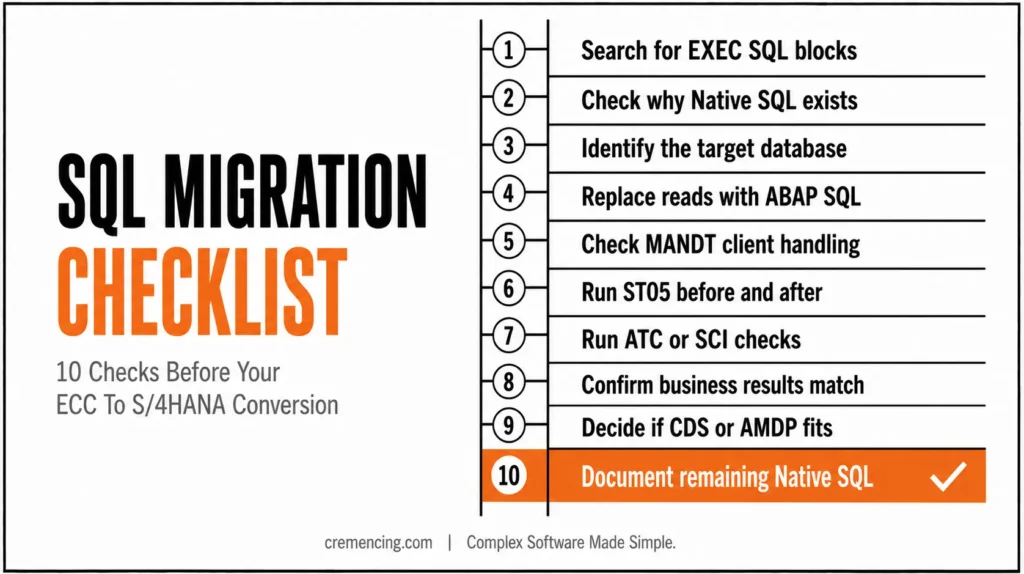
Use this checklist when reviewing open SQL vs native SQL during ECC to S/4HANA conversion, HANA migration, or performance cleanup.
- Search for EXEC SQL, ENDEXEC, cl_sql_statement, cl_sql_result_set, cl_sql_connection, and AMDP classes. These are the first places where database-specific behavior may hide.
- Check why Native SQL exists. If the comment says “performance,” demand ST05 evidence. If there is no comment, treat the code as a review item.
- Identify the target database. ECC code that worked on Oracle may not behave the same way on HANA. S/4HANA code should follow the project’s ABAP SQL, CDS, AMDP, and ADBC rules.
- Replace normal SAP table reads with ABAP SQL where possible. Keep Native SQL only for database-specific features, external database access, administrative tasks, or measured edge cases.
- Check client handling. Native SQL may require explicit handling of MANDT or database session client context. ABAP SQL gives safer default behavior for client-dependent SAP tables.
- Run ST05 before and after the change. Do not accept “it should be faster” as proof. Compare SQL duration, execution count, transferred rows, and result accuracy.
- Run ATC or SCI checks. ATC is the ABAP Test Cockpit and helps enforce code-quality and migration rules. SCI is the older Code Inspector. Use both according to your system standard.
- Confirm business results. A faster SQL statement is wrong if it changes row count, client behavior, language key handling, authorization expectations, or currency/unit-related processing.
- Decide whether CDS or AMDP fits better. In S/4HANA, some data models should move toward CDS views or AMDP only when the project architecture supports that choice.
- Document every remaining Native SQL block. Future developers need to know why Native SQL stayed, which database it targets, which release supports it, and how to test it.
Conclusion
Open SQL vs Native SQL is not a fight between “slow” and “fast.” It is a design decision between SAP-aware, portable ABAP SQL and database-specific Native SQL. The wrong choice can quietly create performance issues, upgrade risk, client-handling mistakes, and maintenance problems that only appear during production volume, S/4HANA conversion, or database migration.
For data in normal SAP applications, use ABAP SQL first. It makes the code easier to read, easier to follow, and safer for future upgrades. In order to replace it with Native SQL, fix the basics first: only select required fields, move filters into the WHERE clause, do not select in loops, check the indexes, and use ST05 or SQL Monitor to measure the real SQL cost.
There is still a time and place for native SQL, but it should be the exception rather than the rule. Use it only when using a database-specific feature, access to an external database, an operation that can only be applied to HANA objects and is not supported by ABAP SQL, or for a proven performance case, based on the tracing results. Even in this case, ensure that you clearly document the reason for using code to avoid normal ABAP SQL, so the next developer can understand the reason.
Most of the time, ECC systems are most susceptible to portability and ongoing maintenance. Because ABAP SQL, CDS, AMDP, ADBC, and HANA-specific logic comply with clean code and migration requirements, the threat is increased for S/4HANA systems. When upgrading or implementing a remediation project whose custom code is required for the upgrade, a technical shortcut that works today may become technical debt.
Frequently Asked Questions
1. What is the difference between Open SQL and Native SQL in SAP ABAP?
Open SQL, now often called ABAP SQL, is database-independent SQL for SAP application data. Native SQL is database-specific SQL sent through the Native SQL interface. In Open SQL vs. Native SQL comparisons, Open SQL is the default for portability, while Native SQL is for justified database-specific needs.
2. Which is faster: Open SQL or Native SQL?
Neither is automatically faster. Native SQL can be faster in a measured database-specific case, but Open SQL may perform equally well when filters, joins, and indexes are correct. For sap native sql vs. Open SQL, use ST05 and compare real execution count, transferred rows, and SQL duration.
3. When should I use Native SQL in ABAP?
Use Native SQL only when ABAP SQL cannot express the required database-specific feature, external database access, or special SQL operation. For normal SAP table reads, ABAP SQL should come first. Native SQL needs comments, trace proof, review, and migration awareness.
4. What is ABAP SQL vs Native SQL?
ABAP SQL is the modern name used for Open SQL in newer SAP documentation. Native SQL is database-specific SQL passed to the database. In ABAP SQL vs native sql decisions, choose ABAP SQL for SAP-managed data and Native SQL only when the database-specific reason is clear.
5. What is ADBC in ABAP?
ADBC is an ABAP API for database connectivity through the Native SQL interface. It provides object-oriented classes such as SQL connection, statement, and result set handling. Use ADBC in ABAP carefully because it can create the same portability risks as Native SQL.
6. Does Open SQL support all the features that Native SQL offers?
Not always — however, modern ABAP SQL covers most SAP application scenarios through joins, expressions, subqueries, and host variables. Consequently, Native SQL is only needed for genuine database-specific gaps, not routine table reads.
7. Is Native SQL safe to use during an S/4HANA conversion?
Generally, no — because Native SQL often carries database-specific syntax that may not behave the same way on HANA. Therefore, every Native SQL block should be reviewed, traced with ST05, and either rewritten in ABAP SQL or clearly justified before conversion.
8. Can CDS views replace the need for Native SQL?
In many cases, yes. Since CDS views push logic to the database layer while staying SAP-aware and portable, they often eliminate the reasons developers once reached for Native SQL. As a result, teams moving to S/4HANA should evaluate CDS before considering database-specific code.
9. How does clean core impact the Open SQL vs Native SQL decision?
Clean core principles push development toward standard, upgrade-safe code. Accordingly, Native SQL — being database-specific and harder to maintain — works against clean core goals, while ABAP SQL and CDS align naturally with them.
10. What is the biggest risk of ignoring this decision during code reviews?
Over time, unreviewed Native SQL tends to accumulate as technical debt, since no one revisits it once it appears to work. Eventually, this hidden risk surfaces during an upgrade, migration, or database change — often at the worst possible time.