

Introduction
A requirement discovered in testing costs far more than one found in a workshop. Likewise, the same rule applies to data errors, custom code, and training that teams postpone. These ERP implementation pitfalls appear in SAP S/4HANA projects of every size, and they usually surface as delays, cost overruns, and low user adoption after go-live. However, most teams react to the symptoms and do not look at the decisions behind them, so the same problems return in the next phase. This article therefore explains five pitfalls, their root causes, and practical fixes that fit the SAP Activate phases, for SAP architects, project managers, and IT leaders.
You can learn more about ERP implementation consultants on Wikipedia.
Why ERP Implementation Pitfalls Happen in SAP Projects
Many organizations still base decisions on reports that are weeks old. Data must often be extracted, reconciled, and formatted manually before anyone sees it. SAP Custom Development Services can shorten this cycle. Teams can build KPI dashboards, scheduled reports, and real-time analytics directly on SAP data. SAP Analytics Cloud can serve as the visualization layer. SAP BTP services can handle integration and data access.
For example, a retail company built a custom app for real-time reporting. The app feeds SAP Analytics Cloud with sales, inventory, and customer data. SAP BTP connects data from each branch. As a result, operational efficiency improved by 15%.
To achieve similar results, define important KPIs before designing any dashboard. Unclear metrics can create cluttered reports that nobody uses. Use the predictive features of SAP Analytics Cloud for forecasting. Also, give users real-time access to data across connected systems.
5 ERP Implementation Pitfalls and How to Avoid Them
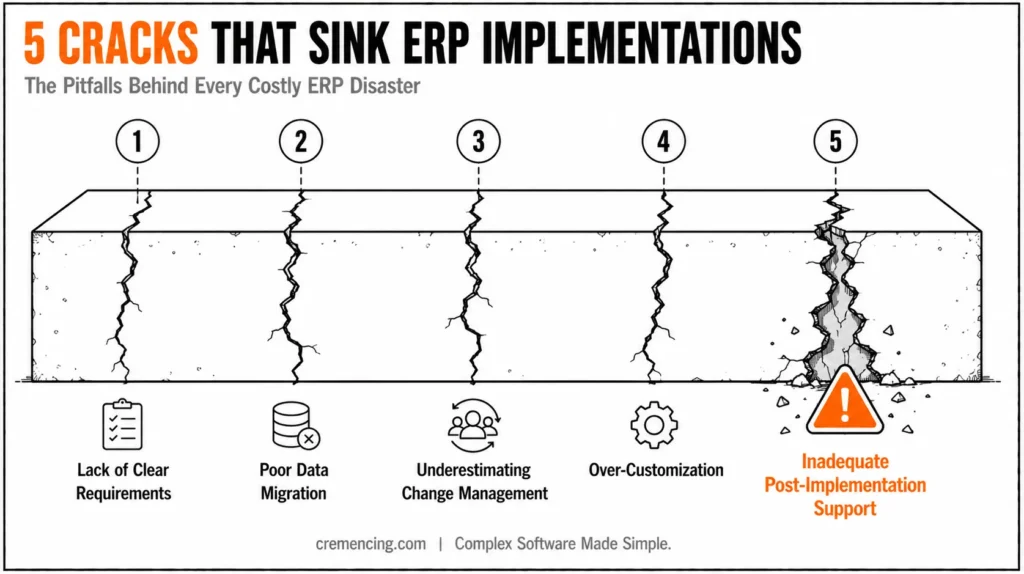
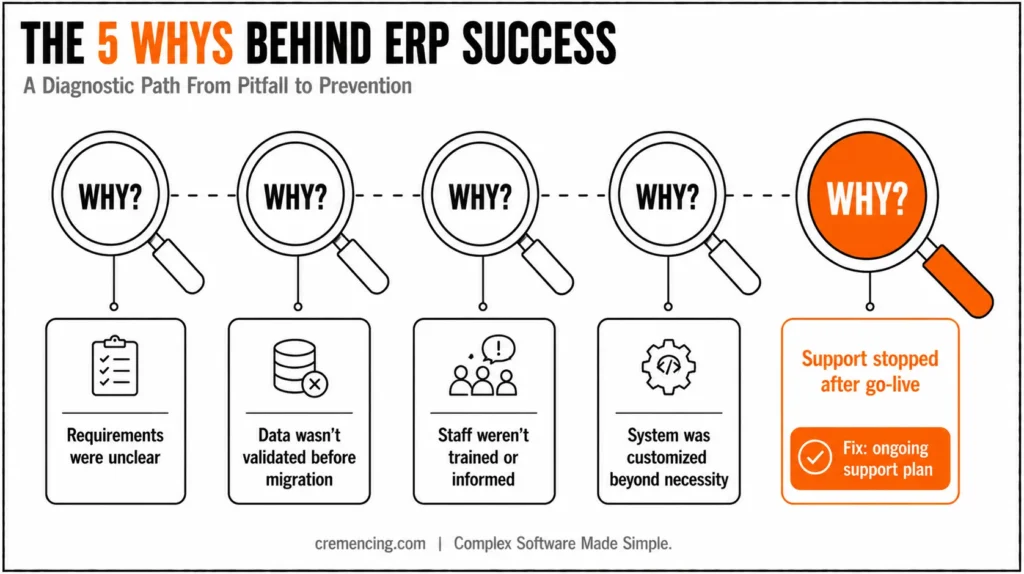
The five pitfalls below follow the project timeline, from requirements to post-go-live support. Each one includes the warning signs, the root cause, and a fix that teams can apply within SAP Activate.
| Pitfall | Warning Sign | Best Phase to Correct | Core Fix |
|---|---|---|---|
| Unclear requirements | Scope grows with every workshop | Prepare and Explore | Business case, fit-to-standard workshops, backlog |
| Poor data migration | Reconciliation differences after each mock load | Explore and Realize | Early cleansing, repeated mock loads, business owners |
| Weak change management | Low training completion, spreadsheet workarounds | Prepare through Deploy | Role-based training, key users, communication plan |
| Over-customization | Growing list of custom objects and unreleased API use | Explore and Realize | Clean core levels, fit-to-standard, extension review |
| Thin post-go-live support | Open tickets pile up after cutover | Deploy and Run | Hypercare team, defect triage, improvement backlog |
1. Unclear Requirements and Weak Planning
Poor planning and unclear requirements are common reasons for ERP overruns. A project without a defined target image can drift into a pure system migration. When nobody states why the organization implements SAP S/4HANA, the project lacks clear direction. Each department may then define success differently. Scope can also grow with every workshop. As a result, teams discover gaps late. Change requests then compete for the same budget.
The fix starts with a measurable business case and a fit-to-standard approach. In SAP Activate, the Explore phase includes fit-to-standard workshops. Business teams review the delivered standard processes during these workshops. The team then records only the gaps in a backlog. Business-driven configuration questionnaires in the SAP Roadmap Viewer can help prepare these workshops. Moreover, a clear project plan with milestones, deliverables, and decision owners keeps requirements stable. Active involvement from department heads and key users also supports this process. SAP Cloud ALM can hold process documentation and requirements. This allows each decision to link to a process step and a test.
For example, a finance team may want to shorten the financial close. It should state the target in days and map it to the record-to-report scope items. The workshops can then test the process against that target. This approach avoids decisions based on general preferences.
2. Poor Data Migration Practices
Data migration is often the most error-prone stage, because a minor failure can ripple through several business divisions. Typical causes include stale source data, duplicate master records, and customer-specific fields without a mapping, and many teams start cleansing too late because they treat it as a technical task. Consequently, migration defects stay hidden until late testing, when fixes are expensive.
The SAP S/4HANA data model adds requirements that ECC data often does not meet. For example, customers and vendors move to the Business Partner model, finance postings land in the Universal Journal, and the material number can extend to 40 characters, so mapping and validation rules must reflect these changes before the first load. As a result, teams that copy ECC mapping rules unchanged generate errors in every mock load.
Instead, teams should start data profiling and cleansing early, with business owners who decide which records are correct. For a new implementation, the SAP S/4HANA Migration Cockpit supports repeated mock loads, and each load should end with a reconciliation report that compares source and target values. Moreover, a verified backup and data security controls must exist before each load, because sensitive business data moves between systems. Validation should also cover completeness, accuracy, and referential consistency, and not only record counts.
3. Underestimating Change Management
An ERP system replaces or changes most existing business processes, and a new SAP Fiori-based interface changes how people work every day. Without training, clear communication, and visible sponsorship, users resist, adoption stays low, and the expected efficiency gains do not appear. Moreover, the cost of low adoption stays hidden, because workarounds in spreadsheets and email keep the business running.
Therefore, change management should start in parallel with planning and not after the build. Role-based training with realistic data, a network of key users in each department, and transparent communication about why the organization introduces the system address the main concerns. In addition, recognition for early adopters and a feedback channel give users a stake in the result. For instance, a useful measure is the share of daily transactions that users run in the new system instead of side spreadsheets, tracked by role during the first month after go-live.
Training also needs a realistic environment. A quality system with migrated data and the final roles lets users practice real processes, and it exposes missing authorizations before go-live, because a user who cannot see a tile cannot work.
4. Over-Customization of the ERP System
Many teams migrate old Z programs and in-house developments one-to-one into the new system because of time pressure or uncertainty. As a result, the SAP S/4HANA core becomes expensive to maintain, upgrades take longer, and integrations get more complex. Moreover, custom code that uses unreleased objects or modifies standard behavior often blocks later release upgrades.
SAP’s clean core guidance gives a practical rule: build extensions at the highest possible clean core level. Level A extensions use released APIs and run either on-stack with ABAP Cloud or side-by-side on SAP BTP, whereas Level D covers non-recommended SAP objects that do not count as clean core. Therefore, teams should start from the standard, customize only processes that create a competitive advantage, and review every request for a custom object against this rule. SAP Note 3578329 is the official source for the level definitions.
Fit-to-standard workshops decide each case. For example, a unique pricing logic may justify a side-by-side extension on SAP BTP, whereas a report that duplicates a standard SAP Fiori app does not justify any development. A short custom code analysis supports this review. ABAP Test Cockpit checks for SAP S/4HANA show which objects need adaptation, and usage data from the ABAP Call Monitor (SCMON) shows which objects nobody calls, so teams can retire unused code before conversion instead of migrating it.
5. Inadequate Post-Implementation Support
Post-go-live support is often ignored in the budget, yet the first weeks after cutover decide whether users trust the system. Without a support structure, issues pile up, productivity dips, and business disruption follows during the first closing cycle. The SAP Activate Run phase therefore covers continuous improvement, and one practitioner source recommends at least six to eight weeks of enhanced support with dedicated resources.
Hypercare should include a staffed help desk, daily defect triage, data reconciliation, and performance tuning, because transactional data grows and query performance and job run times decline when indexes, CDS views, and caching parameters stay untuned. In addition, a periodic system audit and an improvement backlog turn the first months into a structured optimization cycle, and a feedback channel lets users report issues and suggest improvements. After hypercare, the owner of each process should review usage data, support tickets, and regression test results every quarter, so improvements continue after the project team leaves.
Monitoring completes the support model. Moreover, technical monitoring of interfaces, batch jobs, and response times, for example in SAP Cloud ALM, lets the support team find problems before users report them, and a clean transport and release calendar keeps fixes from colliding with business peaks such as period close.
When an SAP Implementation Consultant Adds Value
An implementation consultant adds the most value where internal teams lack experience, namely in fit-to-standard facilitation, data migration tooling, custom code remediation, and cutover planning. A consultant who has run several SAP S/4HANA projects recognizes early which requirements the standard already covers, which data objects need extra cleansing, and which interfaces will break. Therefore, partner selection should examine references in comparable industries, experience with the specific SAP release and edition, and the way the partner transfers knowledge to the internal team.
The contract should define deliverables per SAP Activate phase, roles on both sides, acceptance criteria, and how change requests are estimated and approved, because unclear responsibilities for data cleansing or testing cause disputes in the final months. Cremencing.com supports this work with and SAP custom development that follows the clean core approach.
Validation and Best Practices
Each pitfall needs an early warning indicator. For example, open scope questions and change requests per week show whether requirements are stabilizing. Reconciliation differences per mock load show whether the data is ready, while training completion and role-based test results show whether users are ready. Finally, the number of custom objects and their clean core level show whether customization stays under control.
Testing deserves a separate mention, because many teams test with demo data or happy-path scenarios, which hides issues that appear only under real conditions. Therefore, test cycles should use migrated production-like data, cover regression for existing processes, and include business users who run their real month-end and order-to-cash scenarios. Moreover, a rehearsed cutover with timed steps reveals gaps before the real go-live.
Governance ties these checks together. A steering committee that meets on a fixed schedule, reviews the indicators, and holds named owners accountable prevents small deviations from becoming budget problems. In addition, a decision log keeps scope and design choices traceable when team members change.
Common Mistakes When Rescuing a Troubled Project
The most frequent rescue mistake is to add consultants without reducing scope, because more people increase coordination effort and do not fix the underlying decisions. Another is to extend the timeline without changing the plan, so the same pitfalls reappear later, and the budget grows. Teams also skip a root cause review, which means they treat symptoms such as test defects and ignore causes such as unclear requirements or unclean data.
In contrast, a structured recovery starts with a short assessment of scope, data, customization, and training status. It then sets a revised plan with measurable gates, removes low-value requirements, and agrees decision owners for each open topic. Finally, it communicates the new plan transparently, because stakeholders trust a plan they understand.
Conclusion
ERP implementation pitfalls in SAP projects share a pattern: unclear requirements, late data work, neglected users, unchecked customization, and thin post-go-live support all enter the project early and become expensive later. The five fixes in this article, namely fit-to-standard design, early data cleansing, parallel change management, clean core discipline, and structured hypercare, move each decision to the phase where correction costs least.
Looking ahead, SAP continues to deliver innovation in regular cloud release cycles, including embedded AI such as Joule, so organizations with clean data, a standard core, and trained users adopt new capabilities faster. Cremencing.com supports SAP S/4HANA programs with implementation support and that keeps extensions upgrade-safe.
FAQs
1. What are the most common ERP implementation pitfalls?
ERP stands for Enterprise Resource Planning and is a package that integrates various processes, business processes (e.g., finance, sales, human resources), which were previously separate applications and databases, into a single system/template. Popular ERP systems: Market leaders in ERP are SAP, Oracle ERP, and Microsoft Dynamics.
1. What are the most common ERP implementation pitfalls?
ERP stands for Enterprise Resource Planning and is a package that integrates various processes, business processes (e.g., finance, sales, human resources), which were previously separate applications and databases, into a single system/template. Popular ERP systems: Market leaders in ERP are SAP, Oracle ERP, and Microsoft Dynamics.
2. What is an ERP implementation consultant?
An ERP implementation consultant is a specialist or firm that plans and delivers an ERP system for another organization. In SAP projects, the consultant facilitates fit-to-standard workshops, configures the solution, supports data migration and testing, and helps with cutover and hypercare, so the system fits business processes and strategic goals.
3. What does fit-to-standard mean in an SAP implementation?
Fit-to-standard is the SAP Activate approach in which business teams review the delivered standard processes in the Explore phase and record only the gaps. It validates that the solution covers the requirements and replaces traditional blueprinting, so teams customize less and reduce one of the main ERP implementation pitfalls.
4. How do you avoid data migration problems in SAP S/4HANA?
Start data profiling and cleansing early, and involve business owners who decide which records are correct. Run several mock loads with reconciliation reports, test with production-like data, and verify backups before each load. Data migration problems often stay hidden until late testing, when fixes cost more.
5. How much customization is acceptable in an SAP S/4HANA implementation?
ERP stands for Enterprise Resource Planning and is a package that integrates various processes, business processes (e.g., finance, sales, human resources), which were previously separate applications and databases, into a single system/template. Popular ERP systems: Market leaders in ERP are SAP, Oracle ERP, and Microsoft Dynamics.
6. How long should hypercare last after SAP go-live?
Hypercare commonly lasts several weeks and should cover at least the first month-end close. One practitioner source recommends six to eight weeks of enhanced support with dedicated resources for issue resolution, data reconciliation, and performance tuning. The exact length depends on process complexity, user numbers, and the number of open defects at cutover.
7. Why does change management matter in an ERP implementation?
Change management matters because an ERP system changes daily work, and users who lack training or clear communication resist it or build workarounds. Starting change management alongside planning, with role-based training and key users in each department, raises adoption and protects the efficiency gains that justified the SAP S/4HANA investment.
8. How do you choose an SAP implementation partner?
Check references in comparable industries, experience with your SAP release and deployment model, and proven data migration and testing skills. Review how the partner handles scope, change requests, and knowledge transfer, because a partner who over-customizes or leaves no documentation raises cost. Define deliverables per SAP Activate phase in the contract.
Resources
- Panorama Consulting: Top ERP Trends for 2025
- Cremencing Solutions: SAP Custom Development Services




