
SAP PaPM helps finance teams manage complex profitability calculations involving multiple data sources, shared expenses, allocation rules, and business dimensions.
Although calculating profit may appear straightforward, understanding the actual profitability of individual products, customers, and business segments requires considerably more information.
For example, a product may appear profitable before finance teams consider logistics, marketing, administrative, and customer service expenses.
Additionally, different departments may apply different allocation methods, producing inconsistent profitability results from identical financial transactions.
Traditional spreadsheets can become difficult to maintain when organizations introduce multiple calculation stages and large volumes of financial and operational data.
Consequently, finance teams need a structured calculation environment that connects source information with approved business rules.
SAP Profitability and Performance Management provides configurable functions for cost allocation, financial modeling, data transformation, and scenario analysis.
However, accurate profitability results still depend on reliable source information, appropriate calculation rules, and effective reconciliation procedures.
This article explains why profitability calculations become complicated, how the solution addresses these challenges, and what organizations should consider when designing profitability models.
Quick Answer: How Does SAP PaPM Simplify Profitability Calculations?
SAP PaPM helps organizations simplify profitability calculations through interconnected modeling, allocation, and processing functions.
The solution can combine financial and operational information from SAP and non-SAP systems. Furthermore, it supports detailed profitability analysis across products, customers, regions, channels, and business units.
Finance teams can also model alternative allocation methods and evaluate changing business assumptions.
However, the calculation engine does not independently determine the correct financial methodology. Organizations must define appropriate business drivers, validate source information, and reconcile calculated results.
What Is SAP PaPM and How Does It Work?
SAP Profitability and Performance Management is a calculation and modeling solution that supports complex financial and operational analysis.
The application uses SAP HANA in-memory processing to handle extensive datasets and interconnected business calculations.
Unlike traditional spreadsheet models, the solution organizes processing through individual functions. Each function performs a particular operation and can pass its results to another function.
Consequently, organizations can separate data preparation, cost distribution, profitability calculations, and reporting activities.
Main Functions of SAP PaPM
| Function category | Primary responsibility | Profitability application |
|---|---|---|
| Information functions | Access relevant source information | Collect revenue and cost data |
| Join functions | Combine related datasets | Connect financial and operational records |
| Calculation functions | Apply mathematical expressions | Calculate margins and cost rates |
| Allocation functions | Distribute financial values | Assign shared expenses |
| Write and adapter functions | Transfer calculated results | Return outputs to target systems |
| Analytical functions | Prepare information for analysis | Support profitability reporting |
Together, these functions create a structured calculation environment.
Furthermore, organizations can configure function relationships according to their business requirements.
SAP PaPM Deployment Options
Organizations can use SAP Profitability and Performance Management as a standalone solution or alongside SAP S/4HANA.
The available deployment options include SAP Profitability and Performance Management 3.0 and cloud offerings.
However, the different deployment models may have different technical capabilities, interfaces, and configuration requirements.
The SAP Profitability and Performance Management Cloud documentation provides product-specific information about cloud capabilities.
Therefore, organizations should evaluate the relevant deployment model before designing their profitability calculations.
1. Shared Costs Make Profitability Calculations Difficult
A basic profitability calculation subtracts costs from revenue.
However, determining which expenses belong to individual products, customers, or business activities introduces additional complexity.
Direct expenses may have clear relationships with particular products. Meanwhile, indirect expenses can support multiple departments, activities, and business segments.
Why Shared Expenses Complicate Margin Analysis
Consider a manufacturer that produces several product families.
The organization can associate direct material costs with individual products through established accounting processes.
However, facility expenses, administrative activities, and shared logistics services may support several product groups simultaneously.
An equal distribution of these expenses may not accurately reflect how each product consumes resources.
Consequently, finance teams need appropriate allocation drivers that reflect the underlying business activities.
Relevant drivers may include shipment quantities, working hours, activity volumes, and other approved operational measurements.
How SAP PaPM Supports Shared Cost Allocation
SAP PaPM provides allocation functions that distribute financial values from sender entities to receiving objects.
Finance teams can define the relevant cost pools, receiver populations, and distribution bases.
For example, a manufacturer may distribute shared logistics expenses according to shipment quantities across different product groups.
The resulting allocated expenses then contribute to each product group’s profitability calculation.
Additionally, the modeling environment allows organizations to establish multiple allocation stages where business requirements justify them.
Different Allocation Methods Produce Different Margins
A volume-based allocation method may produce different profitability results from an activity-based approach.
For instance, a low-volume product may require substantial operational support despite generating relatively few transactions.
Consequently, a volume-based distribution may not capture the actual resource consumption of that product.
Finance teams must therefore establish the economic reasoning behind each allocation method.
Although the solution supports sophisticated allocation logic, business stakeholders remain responsible for selecting appropriate cost drivers.
Checking Allocation Completeness
Finance teams should compare the total distributed expenses with the original sender amounts.
Additionally, they should review rounding differences, incomplete receiver information, and intended residual amounts.
A successfully completed calculation does not automatically establish financial accuracy.
How SAP PaPM helps: It provides configurable allocation functions that support controlled distribution of shared expenses across relevant business dimensions.
2. Multiple Data Sources Create Inconsistent Profitability Results
Profitability calculations frequently require information from different financial and operational applications.
For example, accounting systems may contain revenue and expense information, while operational applications maintain shipment quantities or activity measurements.
However, these systems may organize information differently.
Combining their records without validating the underlying relationships can produce incomplete or misleading profitability results.
Financial and Operational Data Requirements
| Calculation component | Typical source | Modeling responsibility |
|---|---|---|
| Revenue | Financial or sales records | Preserve recognized revenue values |
| Direct expenses | Accounting and controlling data | Associate expenses with relevant objects |
| Shared costs | Finance cost pools | Apply approved allocation methods |
| Operational drivers | Production or logistics systems | Establish distribution bases |
| Profitability results | Calculation models | Present margins by reporting dimension |
Each information source contributes a different part of the profitability calculation.
Therefore, organizations should establish which system owns each financial or operational value.
How SAP PaPM Integrates Different Data Sources
The application supports relevant integration scenarios involving SAP and non-SAP systems.
Information functions, including Model Views and Model Tables, provide access to the records required for calculation.
Furthermore, Join functions can combine financial information with relevant operational measurements.
This approach allows organizations to build calculations using data from multiple applications.
However, architects must validate the relationships between datasets before performing financial calculations.
Incorrect Joins Can Distort Profitability
A join combines information from related datasets.
Nevertheless, an incorrect relationship between source records can multiply transactions and inflate financial values.
For example, a model may combine expenses with operational drivers at incompatible levels of detail.
The calculation might finish successfully while producing incorrect allocated expenses.
Therefore, technical teams should review record counts, relevant keys, and financial totals at important processing boundaries.
Maintain Clear Financial Data Ownership
SAP S/4HANA may remain responsible for authoritative accounting transactions while the calculation environment produces additional management information.
Consequently, organizations should distinguish original financial records from newly calculated profitability values.
Calculated results should not overwrite authoritative accounting information without an approved posting process.
How SAP PaPM helps: It connects relevant financial and operational datasets through configurable information and processing functions while supporting traceability to source information.
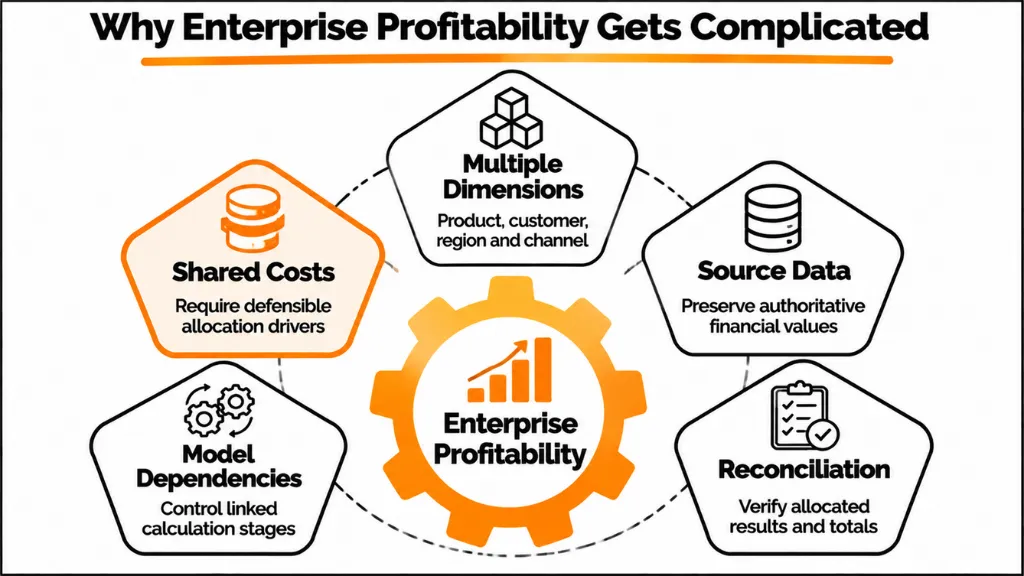
3. Multiple Reporting Dimensions Increase Calculation Complexity
Organizations often require profitability information beyond company-code or business-unit totals.
Management may need to understand which products generate the strongest margins, which customers consume the most resources, and which sales channels perform below expectations.
Additionally, a single product may produce different profitability results across regions or customer groups.
Understanding Granular Profitability Analysis
Granular profitability analysis examines financial performance at detailed business levels.
These dimensions may include:
- Products and product groups.
- Individual customers and customer segments.
- Services.
- Sales channels.
- Geographic regions.
- Business units.
Although additional reporting dimensions provide valuable information, they also increase modeling complexity.
Finance teams must establish the appropriate calculation granularity before combining financial and operational records.
How SAP PaPM Supports Multidimensional Profitability
The solution can process detailed financial and operational information through connected calculation functions.
For example, organizations can combine revenue, direct expenses, marketing costs, and shared service expenses to calculate profitability by product or customer.
Furthermore, the same calculation environment can support different reporting dimensions when the underlying model contains the required information.
This helps finance teams investigate profitability beyond aggregated financial totals.
Product and Customer Profitability
A product may generate substantial revenue while consuming considerable production or distribution resources.
Similarly, a customer with high sales volumes may also require extensive service activities and operational support.
Revenue alone therefore provides an incomplete picture of profitability.
By incorporating the relevant expenses and allocation drivers, finance teams can better understand the financial performance of products and customer segments.
Keep Reporting Dimensions Consistent
Organizations should confirm that financial records and operational drivers represent compatible accounting periods and levels of detail.
Otherwise, inconsistent source information can affect profitability calculations.
Additionally, finance teams should distinguish calculated management margins from posted accounting values.
How SAP PaPM helps: It supports detailed profitability calculations across multiple business dimensions using consistent, configurable calculation logic.
4. Complex Calculation Rules Become Difficult to Maintain
Profitability models frequently involve several connected calculations.
For instance, a model may calculate an intermediate cost rate before distributing expenses across products or customers.
Further processing may then aggregate results and calculate final margins.
However, changes to one calculation stage can affect several downstream results.
How SAP PaPM Builds Connected Calculation Models
The application follows a modular modeling approach.
Individual functions receive input information, perform configured operations, and provide results for subsequent processing.
This structure allows organizations to separate calculation responsibilities into understandable stages.
A profitability model may follow this sequence:
- Access relevant financial and operational information.
- Filter and prepare source records.
- Combine related datasets.
- Calculate intermediate financial values.
- Allocate shared expenses.
- Calculate profitability results.
- Transfer results to reporting applications or supported target systems.
Consequently, finance and technical teams can examine how individual processing stages contribute to the final profitability figures.

Calculation Units and Model Organization
Calculation Units can organize related processing activities within larger environments.
For example, financial processing may involve different business units or operating responsibilities.
Organizing related functions can make calculation dependencies easier to understand.
However, organizations still need clear ownership of model configuration, financial rules, and release procedures.
Managing Changes in Business Rules
Allocation drivers and profitability definitions can change over time.
For instance, finance stakeholders may decide to replace an existing cost distribution method with a different operational driver.
Such changes can produce different profitability results even when the underlying financial transactions remain identical.
Therefore, organizations should document the assumptions behind calculation rules.
Furthermore, regression testing should demonstrate how revised business logic affects representative financial scenarios.
SAP PaPM and Business-Driven Modeling
SAP PaPM Cloud provides a modeling environment that supports configurable business calculation logic without traditional programming for relevant scenarios.
This approach can improve collaboration between finance, controlling, and technical teams.
Nevertheless, complex models still require appropriate technical design, financial validation, and maintenance procedures.
How SAP PaPM helps: It organizes complex business calculations into connected functions, allowing teams to examine, maintain, and validate individual processing stages.
5. Large Data Volumes Affect Calculation Performance
Enterprise profitability models may process thousands or millions of financial and operational records.
Furthermore, repeated joins, intermediate calculations, and allocation stages can increase processing requirements.
Traditional spreadsheets and custom applications may struggle when calculations involve large datasets and complex business relationships.
However, using a high-performance calculation engine does not eliminate the need for efficient model design.
SAP PaPM and SAP HANA In-Memory Processing
SAP PaPM uses SAP HANA processing capabilities to perform complex financial calculations.
This architecture supports large-volume calculations without requiring the same spreadsheet-based processing approach.
Additionally, the application can access relevant source information directly in supported integration scenarios, reducing unnecessary data replication.
Nevertheless, actual calculation performance depends on data volume, model complexity, integration architecture, and configuration.
Organizations should therefore test calculation models using representative business data.
Exclude Unnecessary Fields
Model View and Model Table functions may expose more source fields than subsequent calculations require.
Processing unnecessary columns increases memory consumption.
Consequently, model designers should include only the fields that support the intended calculations.
SAP PaPM provides an Exclude option for relevant fields within these function types.
However, designers must retain the Client field where relevant to avoid unintentionally considering records across clients.
Filter Information Early in SAP PaPM
Processing every available source record can increase calculation time and memory requirements.
Instead, organizations should filter relevant information as early as possible.
For example, a Join function referencing a Model View or Model Table can apply a Selection Condition to restrict processing to the relevant ledger.
Furthermore, early filtering reduces the number of records that subsequent functions need to process.
Use Parameters for Period-Specific Calculations
Monthly profitability calculations frequently require information from a particular fiscal year and accounting period.
Parameters allow users to provide relevant values when deploying processes through the Processes – Manage & Deploy Fiori application.
For example, a model can use parameters such as P_YEAR and P_PERIOD to identify the required fiscal year and period.
The modeling scenario described in the SAP Community performance guidance uses Complex Selection to apply these parameters.
Additionally, certain configurations may require a colon before the parameter name, such as :P_YEAR.
This approach helps restrict calculations to relevant financial records.
However, teams should verify the correct parameter syntax and behavior for their implemented release.
Reduce Unnecessary Calculation Functions
Each executed function can create underlying results that consume memory in the documented PaPM modeling scenario.
Therefore, model designers should avoid unnecessary processing stages where a single function can perform the required operation.
For example, instead of creating separate Join functions for cost elements and cost centers, designers may combine appropriate rules within one Join function.
Additionally, they should restrict executable functions to those that require execution through the relevant process or query design.
SAP PaPM Query Performance
Profitability reports may retrieve extensive datasets from underlying calculation results.
However, users often need information for a particular calculation run rather than every available record.
The documented Environment CDS approach in Query functions supports mandatory user input for relevant filtering fields.
For instance, a report can request a RUN ID before retrieving calculation results.
The technical RUN ID field requires additional handling in the documented modeling scenario because the Query function cannot access it directly.
Model designers can create a corresponding environment field for reporting purposes.
Nevertheless, filtering a report by RUN ID does not replace appropriate authorization controls.
The referenced SAP performance guidance also identifies SAP Note 2967291, FS-PER 3.0: Performance related Modeling Best Practices.
How SAP PaPM helps: It combines high-performance processing with configurable filtering, parameters, and modeling functions that can reduce unnecessary calculation workloads.
6. Changing Business Assumptions Make Profitability Planning Difficult
Profitability analysis becomes more complicated when finance teams need to evaluate future business conditions.
For example, changes in material prices, resource allocation, operational expenses, or selling prices can affect expected margins.
Traditional profitability reports generally explain financial performance using existing information.
However, management may also need to understand how different business decisions could change future profitability.
Scenario Modeling With SAP PaPM
The solution supports scenario modeling and simulation for relevant financial and operational requirements.
Finance teams can evaluate alternative business assumptions without treating every simulated result as an actual accounting transaction.
For example, organizations can compare different cost distribution methods or assess changes in pricing strategies.
Furthermore, simulations help management examine possible financial outcomes before implementing business changes.
Bill of Materials Cost Simulation
Manufacturers may need to understand how component price or quantity changes affect finished-product costs.
A Bill of Materials calculation can involve multiple component relationships and processing stages.
Consequently, changes at one component level may affect the cost of semi-finished and finished products.
SAP PaPM can support complex calculation scenarios involving relevant SAP S/4HANA transactional information.
Organizations can then present calculated outcomes through SAP Analytics Cloud in supported integration scenarios.
Group Costing and Intercompany Profitability
Organizations with multiple legal entities may have complicated intercompany relationships.
Products and services can move through several entities before reaching external customers.
Additionally, transfer prices, intercompany markups, production expenses, service costs, and third-party revenue can affect group profitability.
Detailed calculation models can help organizations examine group margins across relevant transfer-pricing dimensions.
However, finance teams must define appropriate business logic and maintain transparency throughout the calculation process.
Detailed Planning Without Overloading Core Budgeting Models
Management may require planned profitability calculations at an individual stock-keeping unit level.
Nevertheless, such detail may exceed the requirements of the core budgeting process.
A dedicated calculation engine can perform the required detailed calculations before transferring results to the relevant planning or reporting application.
Consequently, organizations can separate complex calculation responsibilities from the primary planning process.
How SAP PaPM helps: It supports financial simulations and detailed scenario calculations that help organizations evaluate alternative business assumptions and profitability outcomes.
How SAP PaPM Connects Financial Data With Reporting
Reliable profitability models require more than a calculation engine.
They also require appropriate relationships between source applications, calculation functions, reporting platforms, and financial posting processes.
Furthermore, organizations should establish which application performs each responsibility.
Integration With SAP S/4HANA
SAP S/4HANA can provide financial and operational information required for profitability calculations.
The calculation model can process relevant records, apply business rules, and generate additional management information.
However, the source accounting system should retain ownership of authoritative financial transactions.
In supported scenarios, organizations can transfer calculated results back to SAP S/4HANA through appropriate integration mechanisms.
Integration With SAP BW/4HANA
SAP BW/4HANA can provide structured information, historical datasets, hierarchies, and relevant reporting measures.
Additionally, calculation models can process this information alongside other financial and operational data.
The integration can support detailed profitability analysis while maintaining a clear relationship between source information and calculated results.
Integration With SAP Analytics Cloud
SAP Analytics Cloud can present calculated profitability information through dashboards, analytical reports, and planning scenarios.
For example, finance teams may examine product margins, customer profitability, or cost distributions through relevant analytical views.
However, the availability of particular dashboards depends on the implemented reporting design.
Organizations should therefore distinguish calculation responsibilities from reporting responsibilities.
SAP PaPM and SAP Business Data Cloud
SAP Business Data Cloud provides another documented architectural approach to corporate profitability analysis.
In this scenario, SAP Datasphere and relevant data products prepare information from SAP S/4HANA and other connected sources.
The calculation engine then performs relevant profitability calculations.
Finally, SAP Analytics Cloud presents the resulting information within the analytical and planning environment.
This architecture helps connect transactional information, detailed calculation logic, and management reporting.
Nevertheless, the applicable data integration and persistence behavior depends on the chosen architecture.
Prevent Duplicate Financial Postings
Repeated calculations may not create financial consequences when results remain within an analytical environment.
However, repeated financial postings can create problems when organizations transfer calculated results into accounting applications.
Therefore, teams should establish approval and duplicate-prevention procedures before implementing relevant posting scenarios.
Technical teams should verify posting outcomes before resubmitting transactions with uncertain results.
Additionally, finance teams should reconcile the resulting accounting values with approved records.
SAP PaPM vs. Traditional Profitability Calculation Methods
Traditional spreadsheet-based calculations may remain useful for relatively simple financial scenarios.
However, organizations can encounter difficulties when spreadsheets require large datasets, interconnected calculations, and multiple allocation stages.
The following comparison summarizes the different modeling approaches.
| Comparison point | Traditional spreadsheet models | SAP PaPM |
|---|---|---|
| Data integration | Often requires manual preparation | Supports connected SAP and non-SAP information sources |
| Data volume | Large datasets can become difficult to manage | Uses SAP HANA processing capabilities |
| Cost allocation | Often depends on spreadsheet formulas | Uses configurable allocation functions |
| Calculation logic | May span multiple files and worksheets | Organizes logic through connected functions |
| Scenario analysis | May require separate models or manual changes | Supports configurable simulations |
| Traceability | Can become difficult across numerous files | Supports tracing calculations to source information |
| Reporting | Frequently requires additional preparation | Supports integration with analytical applications |
| Maintenance | Formula changes can become difficult to manage | Supports structured model maintenance |
The appropriate solution depends on the organization’s actual calculation requirements.
Therefore, businesses should assess their existing tools before introducing another calculation platform.
SAP PaPM vs. SAP CO-PA and SAP Universal Allocation
SAP Profitability and Performance Management does not automatically replace existing SAP profitability or allocation capabilities.
Instead, organizations should evaluate whether their current accounting and controlling functions can satisfy the required business scenarios.
SAP Controlling-Profitability Analysis, commonly known as SAP CO-PA, supports profitability-related analysis within relevant SAP ERP and SAP S/4HANA configurations.
SAP PaPM addresses specialized calculation requirements that may involve additional data sources, complex allocations, and scenario modeling.
Consequently, the two solutions can serve different architectural responsibilities.
Organizations should consider additional modeling capabilities when their existing profitability processes cannot reasonably support the required calculations.
SAP PaPM and Universal Allocation
SAP Universal Allocation supports cost allocation within SAP S/4HANA.
However, some organizations require more extensive calculation models involving multiple allocation stages, iterative processing, dynamic rules, and additional data sources.
SAP PaPM can support these more specialized modeling requirements.
The SAP allocation function documentation describes relevant allocation capabilities within the Cloud Universal Model.
Nevertheless, organizations should assess their existing allocation requirements before introducing additional calculation complexity.
When Does an Additional Calculation Engine Make Sense?
A separate calculation platform may provide value when organizations need to:
- Combine substantial financial and operational data from different applications.
- Perform specialized or multi-stage allocations.
- Calculate profitability across detailed business dimensions.
- Simulate alternative financial assumptions.
- Maintain transparent, reusable business calculation models.
However, an additional calculation layer also introduces governance, maintenance, and reconciliation responsibilities.
Therefore, organizations should define the actual modeling gap before selecting a solution.
Practical SAP PaPM Use Cases Across Industries
Profitability challenges vary according to business models, operational activities, and financial reporting requirements.
Nevertheless, the configurable modeling environment supports different industry-specific calculation scenarios.
Manufacturing Profitability
Manufacturers must understand how material expenses, labor, logistics, and overhead affect product margins.
Additionally, shared facilities and production activities can make cost distribution more complicated.
Calculation models can help manufacturers allocate relevant expenses and examine profitability across product groups.
Furthermore, Bill of Materials simulations can support the evaluation of changing component costs.
Banking and Financial Services
Banks frequently require detailed profitability information across products, customers, branches, and regions.
For example, an automated margin report can combine revenue, expenses, and customer information from multiple applications.
Allocation functions can distribute indirect expenses, while calculation functions determine gross and net margins.
Additionally, financial institutions can use scenario models to evaluate changes in branch networks, personnel expenses, and operating budgets.
Insurance Profitability
Insurance organizations may need to calculate profitability across substantial numbers of individual policies.
Consequently, the calculation process may require extensive datasets and detailed business rules.
SAP PaPM supports large-volume financial modeling that can help organizations analyze relevant insurance profitability scenarios.
Retail and Consumer Goods
Retail businesses often evaluate profitability across products, customer segments, regions, and sales channels.
However, revenue figures alone may not reflect distribution, marketing, discounts, and other operational expenses.
Detailed profitability models can help organizations incorporate the relevant expenses into margin calculations.
Shared Service Cost Allocation
Departments such as human resources, information technology, and legal services may support multiple business units.
Therefore, organizations need suitable distribution bases to assign these shared expenses.
Allocation models can distribute relevant costs according to approved usage measurements and business drivers.
How to Implement SAP PaPM for Profitability Calculations
Implementing a profitability model requires cooperation between finance stakeholders, technical consultants, and business users.
Organizations should begin with clearly defined financial requirements rather than immediately creating calculation functions.
Step 1: Define Profitability Requirements
Finance teams should establish the intended calculation outcomes, reporting dimensions, and relevant performance measures.
Additionally, stakeholders must agree on which expenses contribute to each profitability calculation.
These requirements provide the foundation for subsequent model design.
Step 2: Identify Financial and Operational Data Sources
Technical teams should identify the applications that contain the required source information.
For example, SAP S/4HANA may provide financial records while other applications maintain operational drivers.
Furthermore, teams should confirm the completeness and reliability of these datasets before connecting them to the calculation model.
Step 3: Design the SAP PaPM Calculation Model
Consultants can organize relevant information, processing, calculation, and allocation functions according to approved requirements.
However, each function should have a clearly defined responsibility.
Model designers should also establish dependencies between calculation stages and document the underlying business rules.
Step 4: Test Financial Calculations
Finance teams should compare calculated results with independently validated sample calculations.
Additionally, testing should examine missing operational drivers, incorrect source relationships, and incomplete allocations.
These checks help identify financial inconsistencies before organizations introduce the model into production.
Step 5: Validate Performance and Simulations
Technical teams should execute calculations using representative data volumes.
Furthermore, they should examine expensive processing stages, unnecessary functions, and excessive source information.
Business stakeholders can also evaluate alternative financial assumptions to confirm that simulations produce understandable results.
Step 6: Deploy and Monitor the Model
After finance and technical teams approve the model, organizations can introduce it into the relevant operational environment.
Additionally, they can connect calculated results with reporting applications and supported target systems.
However, deployment does not eliminate the need for continuous monitoring.
Teams should review calculation performance, financial reconciliation, and changes to business requirements.
SAP PaPM Reconciliation and Financial Control Checklist
A profitability calculation can complete successfully while still producing inaccurate financial results.
Consequently, organizations should establish controls at important calculation boundaries.
The following checklist connects financial validation with technical processing responsibilities.
| Control area | Required verification | Expected evidence | Potential problem |
|---|---|---|---|
| Source information | Confirm financial input completeness | Approved source reconciliation | Missing financial records |
| Data preparation | Review relevant filters and fields | Validated input datasets | Incorrect calculation population |
| Data relationships | Check joins and record counts | Key and record-count checks | Duplicated financial values |
| Cost allocation | Compare sender and receiver amounts | Allocation reconciliation | Incomplete cost distribution |
| Calculation logic | Validate formulas and business rules | Approved sample calculations | Incorrect profitability results |
| Financial posting | Verify relevant posting outcomes | Accounting reconciliation | Duplicate or missing postings |
| Reporting | Confirm periods and reporting dimensions | Approved profitability reports | Inconsistent management information |
| Model changes | Review revised calculation behavior | Regression testing results | Unexplained margin differences |
These controls help finance teams distinguish successful technical execution from accurate financial calculations.
Furthermore, documented reconciliation procedures improve transparency across the profitability calculation process.
Best Practices for SAP PaPM Profitability Models
Organizations should consider financial accuracy, calculation efficiency, and model maintenance throughout implementation.
A technically successful model must also produce results that finance stakeholders understand and trust.
Define Allocation Rules Before Configuration
Finance stakeholders should establish the business reasoning behind each allocation method.
For example, a logistics allocation may require shipment quantities, while another cost pool may require activity measurements.
Therefore, model designers should configure calculation rules only after business stakeholders approve the relevant methodology.
Start With a Representative Pilot Model
An organization does not need to introduce every profitability scenario simultaneously.
Instead, finance and technical teams can begin with one product group or business segment.
They should use representative financial records and approved operational drivers.
Additionally, they should compare calculated outputs with independently validated results.
Once business owners accept the calculations, organizations can consider expanding the model.
Maintain Calculation Traceability
Finance teams must understand how individual calculation stages contribute to final profitability figures.
Consequently, technical teams should maintain clear relationships between source information, intermediate results, and final outputs.
This approach helps stakeholders investigate unusual margins and explain allocation results.
Optimize SAP PaPM Performance From the Beginning
Performance optimization should form part of the initial modeling design.
For instance, organizations should filter irrelevant records, exclude unnecessary fields, and avoid repeated calculations.
Furthermore, teams should test actual processing behavior using representative datasets.
Efficient models can reduce unnecessary memory consumption while maintaining calculation transparency.
Document Changes to Profitability Models
Business assumptions, allocation drivers, and reporting requirements can change.
However, modifying calculation logic without documenting the changes can make historical comparisons difficult.
Finance and technical teams should therefore maintain records of approved calculation rules and relevant model changes.
Additionally, regression testing should demonstrate how revised logic affects existing profitability scenarios.
Separate Calculation Results From Accounting Records
Organizations should clearly distinguish management calculations from authoritative financial transactions.
Although supported integration scenarios allow results to return to accounting applications, these activities require suitable financial controls.
Therefore, teams should establish approval, reconciliation, and duplicate-prevention procedures.
Support Collaboration Between Finance and IT
Profitability models involve both business judgment and technical design.
Finance stakeholders define the calculation methodology, while technical teams configure and maintain relevant processing functions.
Furthermore, operational teams can provide information about resource consumption and business activities.
The PwC analysis of enterprise profitability and performance management discusses the role of calculation platforms in supporting detailed financial analysis and management decisions.
Effective collaboration helps organizations maintain calculation models that reflect actual business requirements.
Challenges Organizations Should Consider Before Implementing SAP PaPM
Although the solution supports complex profitability calculations, implementation introduces several considerations.
Organizations should evaluate these requirements before selecting their calculation architecture.
Source Data Quality
Incomplete financial records and inaccurate operational measurements can produce incorrect profitability results.
Therefore, finance teams should establish appropriate source validation procedures before running calculations.
Model Complexity
Additional functions, calculation dependencies, and processing stages can make models difficult to maintain.
Instead, organizations should design calculation structures that reflect actual business requirements without introducing unnecessary functions.
Initial Implementation Effort
Connecting multiple data sources and defining appropriate allocation rules requires business and technical expertise.
Furthermore, stakeholders need time to validate calculation results and approve the underlying methodology.
Change Management and User Training
Introducing a structured calculation platform may change existing spreadsheet-based processes.
Consequently, organizations should help finance users understand the new modeling, execution, and reporting procedures.
Selecting the Appropriate Solution
Not every organization requires a separate profitability calculation platform.
Existing SAP controlling capabilities or other financial applications may already satisfy particular requirements.
Therefore, organizations should assess their current calculation capabilities and identify specific modeling gaps before selecting SAP PaPM.
Frequently Asked Questions About SAP PaPM
1. What is SAP PaPM used for?
SAP PaPM supports complex profitability analysis, financial modeling, cost allocation, and business performance calculations. Organizations can combine relevant information from SAP and non-SAP systems and apply configurable business rules. Additionally, the application supports detailed profitability analysis across products, customers, regions, channels, and business units. Finance teams can use calculated results to investigate cost drivers and evaluate margins. However, reliable results depend on accurate source information, appropriate calculation logic, and effective financial reconciliation.
2. How does SAP PaPM calculate profitability?
SAP PaPM calculates profitability through connected functions that prepare information, apply mathematical expressions, distribute expenses, and generate financial results. For example, a model may combine revenue, direct costs, shared expenses, and operational drivers. The allocation functions distribute relevant costs before subsequent calculations determine profitability. Furthermore, function dependencies allow intermediate results to support additional processing stages. However, finance teams must validate allocation rules, source information, and calculation outputs before accepting the resulting profitability figures.
3. What is the difference between SAP PaPM and SAP CO-PA?
SAP CO-PA supports profitability-related analysis within relevant SAP ERP and SAP S/4HANA accounting and controlling environments. SAP PaPM provides additional capabilities for specialized calculations, complex allocations, cross-system data processing, and scenario modeling. Consequently, organizations may use the solutions for different architectural responsibilities. However, businesses should not automatically introduce a separate calculation engine when existing controlling functionality already satisfies their requirements. Finance and technical teams should first identify the specific calculation or modeling gap.
4. Can SAP PaPM integrate with SAP S/4HANA?
Yes, SAP PaPM supports relevant integration scenarios involving SAP S/4HANA financial and operational information. The calculation environment can process source records, apply business rules, and produce detailed profitability results. Additionally, supported integration mechanisms can transfer relevant outputs back to SAP S/4HANA. However, available interfaces and posting capabilities depend on the deployment model and configuration. Organizations should establish clear financial data ownership, integration controls, and reconciliation procedures before implementing these scenarios.
5. How does SAP PaPM support cost allocation?
SAP PaPM provides configurable allocation functions that distribute financial values from sender entities to receiving objects. Organizations can establish distribution bases using approved business drivers, such as operational quantities or activity measurements. Furthermore, connected functions can support multiple allocation stages within a profitability model. However, the application cannot independently determine which allocation method best reflects the organization’s economic activities. Finance teams must approve relevant cost drivers and verify that distributed expenses reconcile with original sender amounts.
6. Can SAP PaPM perform what-if analysis?
Yes, SAP PaPM supports scenario modeling that helps organizations examine alternative financial and operational assumptions. For example, finance teams can evaluate changes in cost distribution methods, pricing strategies, or operational expenses. Additionally, manufacturers can examine how changing component prices or quantities affect product costs. These calculations can support management planning without automatically creating actual financial postings. However, available simulation capabilities depend on the implemented product and modeling configuration.
7. How can organizations improve SAP PaPM performance?
Organizations can improve SAP PaPM performance by reducing unnecessary source information and simplifying calculation models. For example, model designers can exclude irrelevant fields and apply selection conditions before extensive processing begins. Additionally, parameters can restrict calculations to relevant fiscal years and accounting periods. Combining suitable processing rules may also reduce unnecessary functions. However, actual performance depends on data volumes, calculation complexity, and deployment architecture. Teams should therefore test models using representative business information.
8. Is SAP PaPM available as a cloud solution?
Yes, SAP provides SAP Profitability and Performance Management Cloud alongside other relevant deployment scenarios. SAP documentation describes Standard Model and Universal Model capabilities within the cloud offering. Furthermore, cloud modeling can support configurable business calculations and integration with relevant SAP and non-SAP information sources. However, organizations should not assume that every deployment model provides identical functions, interfaces, or configuration behavior. Technical teams should assess the specific product requirements before designing profitability models.
9. Can SAP PaPM replace traditional spreadsheets?
SAP PaPM can reduce dependence on complex spreadsheet models when profitability calculations involve extensive datasets, multiple allocation stages, and interconnected business rules. Additionally, the application provides structured modeling functions that support calculation traceability and maintenance. However, spreadsheets may remain suitable for smaller calculations or existing business reporting activities. Some integration scenarios also support exporting calculated information to Excel. Therefore, organizations should select calculation tools according to their actual business requirements rather than replacing every spreadsheet automatically.
10. Does SAP PaPM replace SAP Universal Allocation?
SAP PaPM does not automatically replace SAP Universal Allocation. Universal Allocation supports relevant cost distribution requirements within SAP S/4HANA, while SAP PaPM can address more specialized modeling scenarios. For example, organizations may require multiple allocation stages, iterative calculations, dynamic business rules, or additional information sources. Furthermore, the calculation environment supports broader financial modeling and simulation requirements. Nevertheless, businesses should assess their existing allocation capabilities before introducing additional technical complexity.
Conclusion
Profitability calculations become complicated when organizations combine financial records, operational drivers, shared expenses, and multiple reporting dimensions.
Additionally, changing business assumptions and interconnected calculation rules can make traditional profitability models difficult to maintain.
SAP PaPM provides configurable information, calculation, allocation, and analytical functions that help organizations manage these requirements.
Furthermore, its integration capabilities support profitability calculations involving relevant SAP and non-SAP information sources.
Finance teams can examine product margins, customer profitability, shared cost distributions, and alternative business scenarios through structured calculation models.
However, reliable results still depend on accurate source information, appropriate business drivers, efficient model design, and effective financial controls.
Organizations should therefore begin with a clearly defined profitability scenario and validate its calculation results before expanding the model.
By maintaining transparent calculation logic and consistent reconciliation procedures, businesses can develop profitability models that support more informed financial and operational decisions.
References
The article uses the following research sources you supplied:
- SAP Community. SAP Profitability and Performance Management (PaPM) – Handy Tips to Manage Performance. December 9, 2021.
- Finext. Profitability and Performance Management with SAP PaPM.
- PwC. How SAP Profitability and Performance Management Amplifies Enterprise Performance Analytics. June 6, 2022.
- msg global solutions. Understanding the Basics of SAP PaPM. June 7, 2024.
- Multisoft Systems. Boosting Business Agility and Profitability with SAP PAPM.
- Adesso Business Consulting. SAP PaPM in Banking: Profitability and Efficiency Redefined. December 10, 2025.
- SAP Community. SAP PAPM – The Role of Business Calculation Engine in Business Steering. November 20, 2025.
- SAP Help Portal. SAP Profitability and Performance Management Cloud.
- SAP Help Portal. Processing Functions — SAP Profitability and Performance Management.
- SAP Help Portal. Allocation — SAP Profitability and Performance Management Cloud Universal Model.
- SAP Note 2967291. FS-PER 3.0: Performance-Related Modeling Best Practices.
- Original technical research draft. Why Profitability Calculations Get Complicated and How SAP PaPM Can Help. October 27, 2026.